International Research Journal of Engineering and Technology (IRJET) e-ISSN: 2395-0056
Volume: 06 Issue: 03 | Mar 2019 www.irjet.net p-ISSN: 2395-0072
© 2019, IRJET | Impact Factor value: 7.211 | ISO 9001:2008 Certified Journal | Page 2829
Design and Analysis of RCC Framed Structure(G+5) by using
STAAD.Pro and STAAD.etc
M. Siva Naga Kanya1, A. Meghana Reddy2, A. Pujitha3, M. Dheeraj4
1Asst.Professor, Civil Engineering, Dhanekula Institute of Engg & Technology, Andhra Pradesh, India
2,3,4UG Student, Civil Engineering, Dhanekula Institute of Engg & Technology, Andhra Pradesh, India
-------------------------------------------------------------------------***------------------------------------------------------------------------
Abstract - In recent year the increase of population,
commerce and trade and the cost of land in cities have
resulted in a considerable increase in the number of tall
buildings. At present, there are many factors effecting the
selection and design of the high-rise building structural
system. In order to compete in the ever growing
competent market it is very important for a Structural
Engineer to save time. The main objective of this project is
to analyze and design(wind and seismic) a mutli-storied
building by using STAAD Pro. The design involves load
calculations manually and analyzing the whole structure
by STAAD Pro and STAAD.etc. Complicated and high-rise
structures need and very time taking and cumbersome
calculations using conventional manual methods. STAAD
Pro and STAAD.etc provides us a fast, efficient, easy to use
accurate platform for analyzing an multi-storey building.
Finally we will make an attempt to define the economical
section of multistorey residential building using STAAD.Pro.
software tool
KeyWords: Analysis, design, Residential building STAAD.
Pro, STAAD. etc, Seismic loads.
1. INTRODUCTION
The enormous increase in population and scarcity of
land makes the people to move from rural areas to
urban paces and construction of multi-storied buildings
in small areas is being common now-a-days. Functional
designing of the building has become very important and
the requirements vary from one building to another.
Every Civil Engineer should know the usage of the
buildings by contacting the people and basic principles of
designing of the R.C.C structures. This is project is
intended at Analyzing and designing the multi-storey
structure using STAAD. PRO V8i and STAAD. ETC. In this
project, we adopted limit state method of analysis and
design the structural members manually and using
STAAD.PRO.V8i and STAAD.ETC. Manually design is done
for particular beam, column and slab by using IS456:2000
and loads are dead load, imposed load and external load
considered according to IS 875:2000(PART I&II).It is then
checked in STAAD.P RO.V8i and STAAD.ETC.
About STAAD.etc
STAAD.etc delivers dynamic/interactive graphics for
validation and verification for each step during the
design process. STAAD.etc component design includes:
 Isolated rectangular footing
 Retaining wall
 Two way slab design
 Pile cap design
 Laterally loaded pile analysis
 Circular & Rectangular concrete column design
 Loss calculation in post tensioned tendon
 Pile group analysis
 Corbel design
 Combined footing with beam analysis & design
 Strip footing analysis and design
 Block foundation analysis
2. METHODOLOGY
 MODELLING
 (G+5) Residential building
 LOADS
1.Seismic loads
2.Dead load:
Wall load - 10.5 kN/m(for outer walls)
5kN/m (for inner walls)
3.5 kN/m(for parapet walls)
20kN/m(for staircase walls)
15kN/m(for lift beams)
Floor load – 1.5 kN/
Live load - 1 kN/
 DESIGN
Design of beams, columns in STAAD.Pro.
International Research Journal of Engineering and Technology (IRJET) e-ISSN: 2395-0056
Volume: 06 Issue: 03 | Mar 2019 www.irjet.net p-ISSN: 2395-0072
© 2019, IRJET | Impact Factor value: 7.211 | ISO 9001:2008 Certified Journal | Page 2830
Design of slab and pilecap in STAAD.etc
 GEOMETRIC PARAMETERS
Beams - 0.23m*0.23m(for lift beams)
0.3m*0.3m(for ground floor beams)
0.45m*0.45m(for all remaining beams)
Columns - 0.45m*0.3m(for columns c1)
0.3m*0.45m(for columns c2)
Slabs - D=175mm
D=150mm
 ANALYSIS
Analysis of RCC structure. Shear force and
Bending moment calculations.
 Compare result with manual result.
 Adopting safe and economical design.
3. DESIGN AND ANALYSIS
3.1 MODELLING IN STAAD.PRO V8I
3.1.1 MODEL WITH DETAILING
1. Open STAAD.PRO, click on add beam and then click on OK.
2. Then select units by clicking on meters and kilonewtons
and then click OK.
3. Click on geometry and add nodes by using node cursor.
4. Add nodes by giving the assumed distances and the click
on OK.
5. By using beam cursor join the nodes for forming beams.
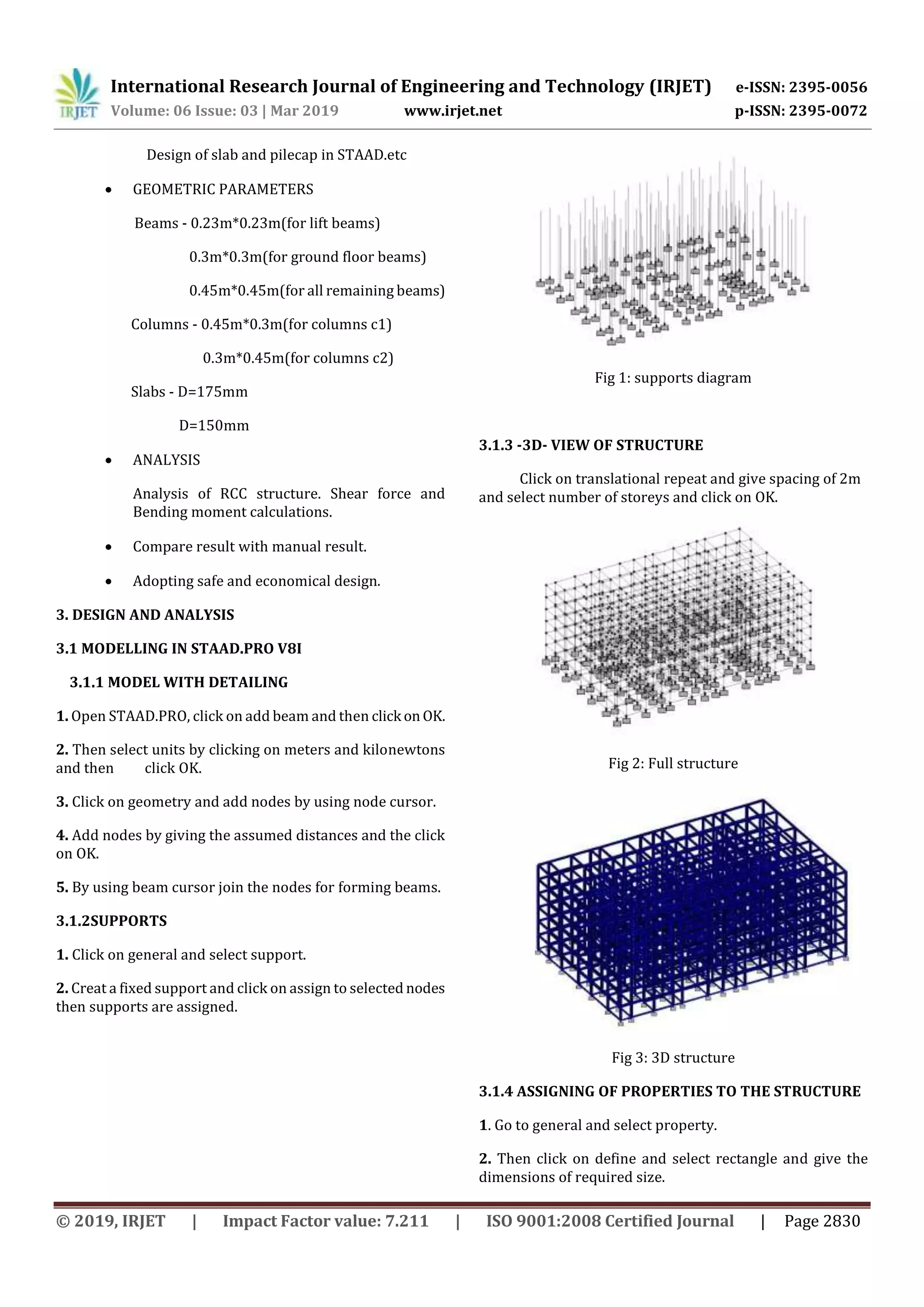
3.1.2SUPPORTS
1. Click on general and select support.
2. Creat a fixed support and click on assign to selected nodes
then supports are assigned.
Fig 1: supports diagram
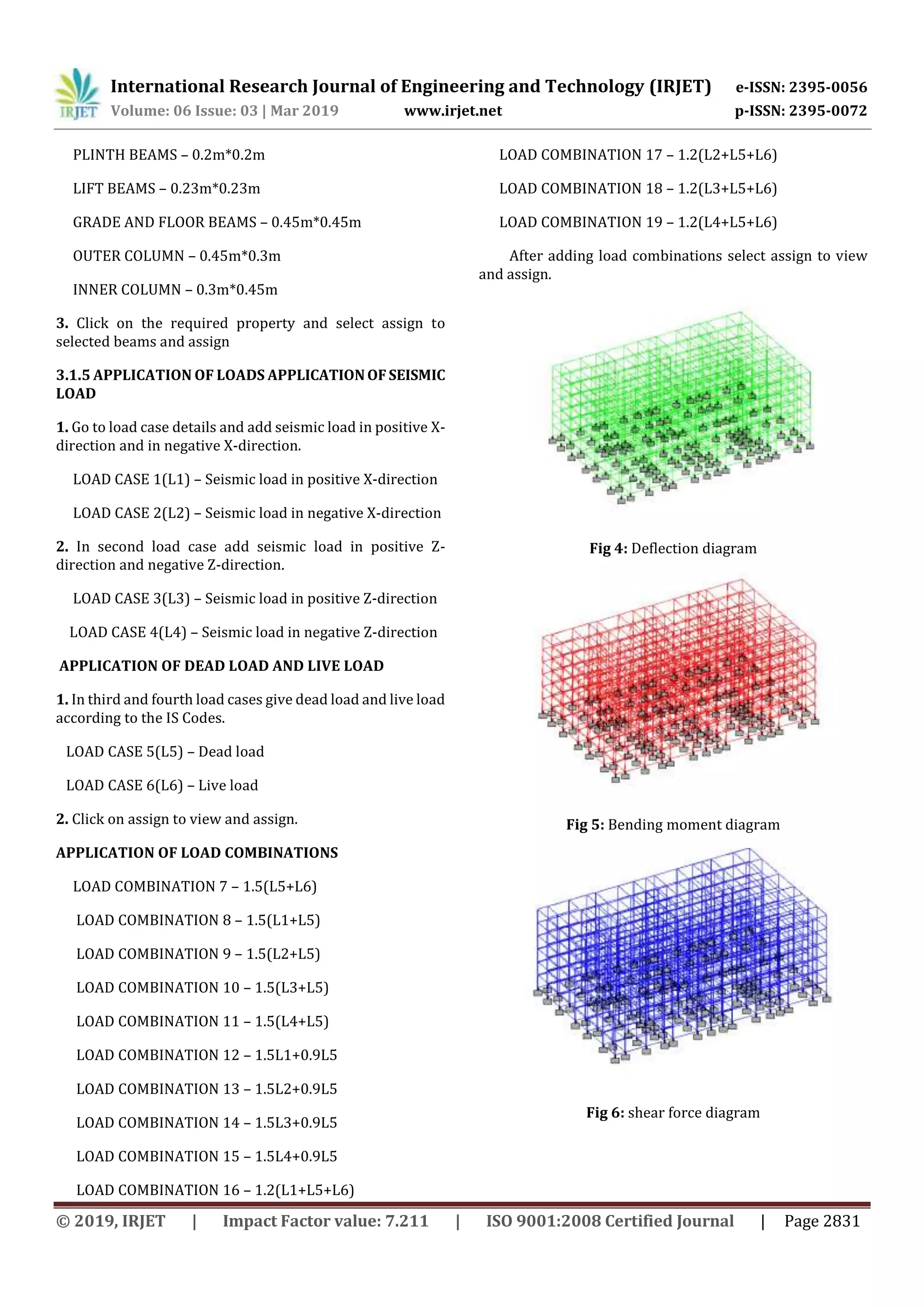
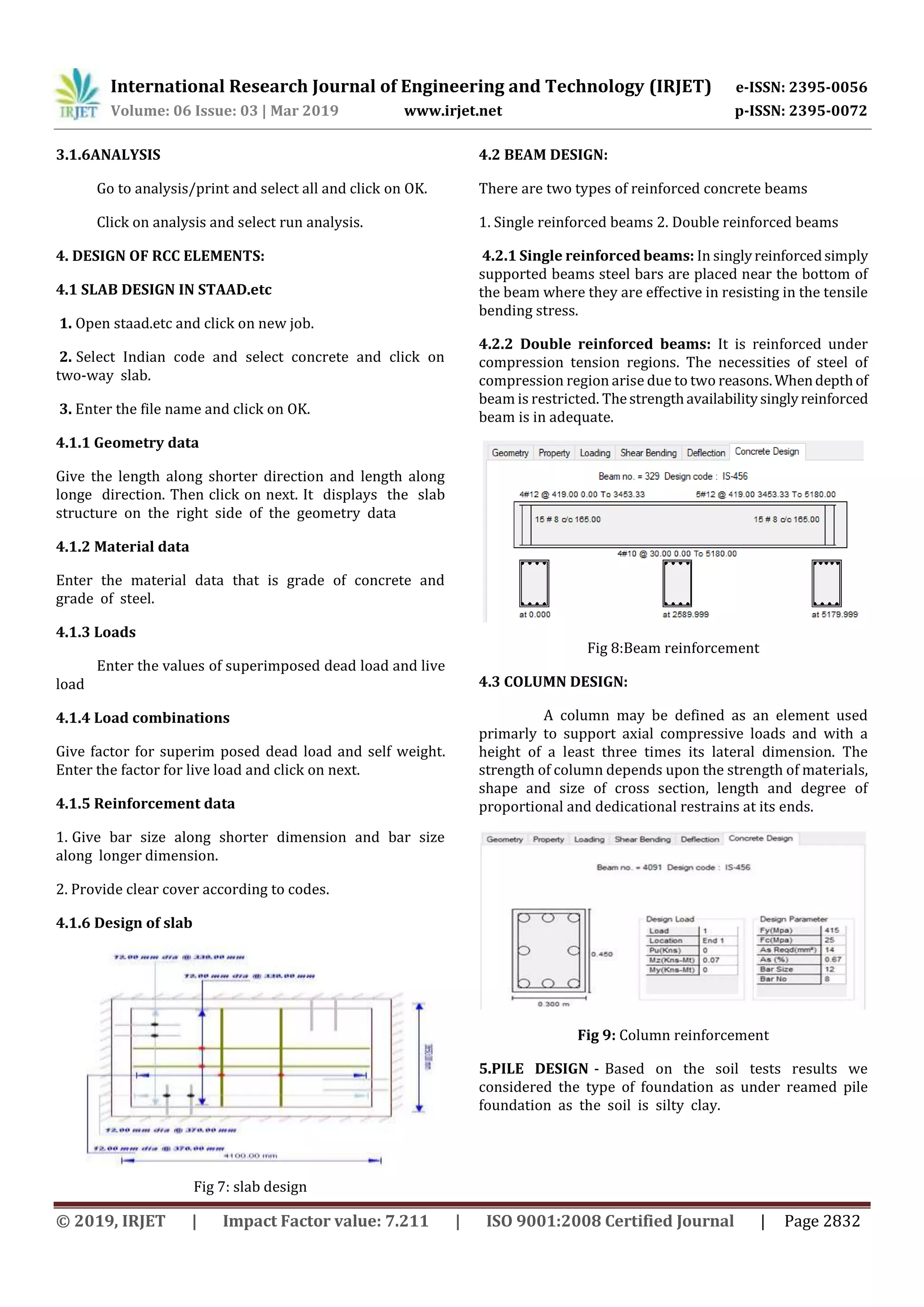
3.1.3 -3D- VIEW OF STRUCTURE
Click on translational repeat and give spacing of 2m
and select number of storeys and click on OK.
Fig 2: Full structure
Fig 3: 3D structure
3.1.4 ASSIGNING OF PROPERTIES TO THE STRUCTURE
1. Go to general and select property.
2. Then click on define and select rectangle and give the
dimensions of required size.
International Research Journal of Engineering and Technology (IRJET) e-ISSN: 2395-0056
Volume: 06 Issue: 03 | Mar 2019 www.irjet.net p-ISSN: 2395-0072
© 2019, IRJET | Impact Factor value: 7.211 | ISO 9001:2008 Certified Journal | Page 2831
PLINTH BEAMS – 0.2m*0.2m
LIFT BEAMS – 0.23m*0.23m
GRADE AND FLOOR BEAMS – 0.45m*0.45m
OUTER COLUMN – 0.45m*0.3m
INNER COLUMN – 0.3m*0.45m
3. Click on the required property and select assign to
selected beams and assign
3.1.5 APPLICATION OF LOADS APPLICATIONOFSEISMIC
LOAD
1. Go to load case details and add seismic load in positive X-
direction and in negative X-direction.
LOAD CASE 1(L1) – Seismic load in positive X-direction
LOAD CASE 2(L2) – Seismic load in negative X-direction
2. In second load case add seismic load in positive Z-
direction and negative Z-direction.
LOAD CASE 3(L3) – Seismic load in positive Z-direction
LOAD CASE 4(L4) – Seismic load in negative Z-direction
APPLICATION OF DEAD LOAD AND LIVE LOAD
1. In third and fourth load cases give dead load and live load
according to the IS Codes.
LOAD CASE 5(L5) – Dead load
LOAD CASE 6(L6) – Live load
2. Click on assign to view and assign.
APPLICATION OF LOAD COMBINATIONS
LOAD COMBINATION 7 – 1.5(L5+L6)
LOAD COMBINATION 8 – 1.5(L1+L5)
LOAD COMBINATION 9 – 1.5(L2+L5)
LOAD COMBINATION 10 – 1.5(L3+L5)
LOAD COMBINATION 11 – 1.5(L4+L5)
LOAD COMBINATION 12 – 1.5L1+0.9L5
LOAD COMBINATION 13 – 1.5L2+0.9L5
LOAD COMBINATION 14 – 1.5L3+0.9L5
LOAD COMBINATION 15 – 1.5L4+0.9L5
LOAD COMBINATION 16 – 1.2(L1+L5+L6)
LOAD COMBINATION 17 – 1.2(L2+L5+L6)
LOAD COMBINATION 18 – 1.2(L3+L5+L6)
LOAD COMBINATION 19 – 1.2(L4+L5+L6)
After adding load combinations select assign to view
and assign.
Fig 4: Deflection diagram
Fig 5: Bending moment diagram
Fig 6: shear force diagram
International Research Journal of Engineering and Technology (IRJET) e-ISSN: 2395-0056
Volume: 06 Issue: 03 | Mar 2019 www.irjet.net p-ISSN: 2395-0072
© 2019, IRJET | Impact Factor value: 7.211 | ISO 9001:2008 Certified Journal | Page 2832
3.1.6ANALYSIS
Go to analysis/print and select all and click on OK.
Click on analysis and select run analysis.
4. DESIGN OF RCC ELEMENTS:
4.1 SLAB DESIGN IN STAAD.etc
1. Open staad.etc and click on new job.
2. Select Indian code and select concrete and click on
two-way slab.
3. Enter the file name and click on OK.
4.1.1 Geometry data
Give the length along shorter direction and length along
longe direction. Then click on next. It displays the slab
structure on the right side of the geometry data
4.1.2 Material data
Enter the material data that is grade of concrete and
grade of steel.
4.1.3 Loads
Enter the values of superimposed dead load and live
load
4.1.4 Load combinations
Give factor for superim posed dead load and self weight.
Enter the factor for live load and click on next.
4.1.5 Reinforcement data
1. Give bar size along shorter dimension and bar size
along longer dimension.
2. Provide clear cover according to codes.
4.1.6 Design of slab
Fig 7: slab design
4.2 BEAM DESIGN:
There are two types of reinforced concrete beams
1. Single reinforced beams 2. Double reinforced beams
4.2.1 Single reinforced beams: In singlyreinforcedsimply
supported beams steel bars are placed near the bottom of
the beam where they are effective in resisting in the tensile
bending stress.
4.2.2 Double reinforced beams: It is reinforced under
compression tension regions. The necessities of steel of
compression region arise due to two reasons.Whendepthof
beam is restricted. Thestrengthavailabilitysinglyreinforced
beam is in adequate.
Fig 8:Beam reinforcement
4.3 COLUMN DESIGN:
A column may be defined as an element used
primarly to support axial compressive loads and with a
height of a least three times its lateral dimension. The
strength of column depends upon the strength of materials,
shape and size of cross section, length and degree of
proportional and dedicational restrains at its ends.
Fig 9: Column reinforcement
5.PILE DESIGN - Based on the soil tests results we
considered the type of foundation as under reamed pile
foundation as the soil is silty clay.
International Research Journal of Engineering and Technology (IRJET) e-ISSN: 2395-0056
Volume: 06 Issue: 03 | Mar 2019 www.irjet.net p-ISSN: 2395-0072
© 2019, IRJET | Impact Factor value: 7.211 | ISO 9001:2008 Certified Journal | Page 2833
5.1 DESIGN OF PILES
5.1.1 Diameter of piles
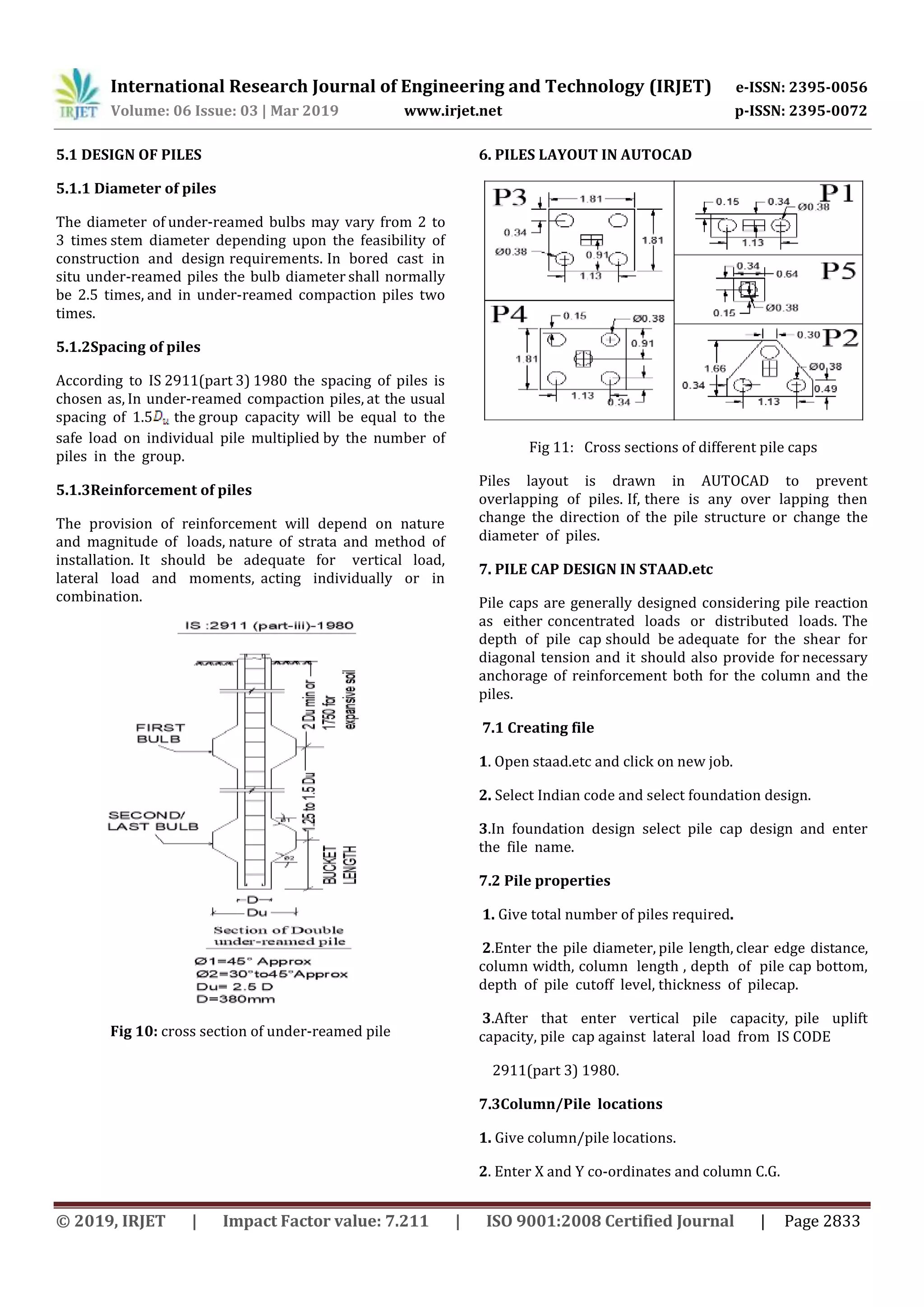
The diameter of under-reamed bulbs may vary from 2 to
3 times stem diameter depending upon the feasibility of
construction and design requirements. In bored cast in
situ under-reamed piles the bulb diameter shall normally
be 2.5 times, and in under-reamed compaction piles two
times.
5.1.2Spacing of piles
According to IS 2911(part 3) 1980 the spacing of piles is
chosen as, In under-reamed compaction piles, at the usual
spacing of 1.5 the group capacity will be equal to the
safe load on individual pile multiplied by the number of
piles in the group.
5.1.3Reinforcement of piles
The provision of reinforcement will depend on nature
and magnitude of loads, nature of strata and method of
installation. It should be adequate for vertical load,
lateral load and moments, acting individually or in
combination.
Fig 10: cross section of under-reamed pile
6. PILES LAYOUT IN AUTOCAD
Fig 11: Cross sections of different pile caps
Piles layout is drawn in AUTOCAD to prevent
overlapping of piles. If, there is any over lapping then
change the direction of the pile structure or change the
diameter of piles.
7. PILE CAP DESIGN IN STAAD.etc
Pile caps are generally designed considering pile reaction
as either concentrated loads or distributed loads. The
depth of pile cap should be adequate for the shear for
diagonal tension and it should also provide for necessary
anchorage of reinforcement both for the column and the
piles.
7.1 Creating file
1. Open staad.etc and click on new job.
2. Select Indian code and select foundation design.
3.In foundation design select pile cap design and enter
the file name.
7.2 Pile properties
1. Give total number of piles required.
2.Enter the pile diameter, pile length, clear edge distance,
column width, column length , depth of pile cap bottom,
depth of pile cutoff level, thickness of pilecap.
3.After that enter vertical pile capacity, pile uplift
capacity, pile cap against lateral load from IS CODE
2911(part 3) 1980.
7.3Column/Pile locations
1. Give column/pile locations.
2. Enter X and Y co-ordinates and column C.G.
International Research Journal of Engineering and Technology (IRJET) e-ISSN: 2395-0056
Volume: 06 Issue: 03 | Mar 2019 www.irjet.net p-ISSN: 2395-0072
© 2019, IRJET | Impact Factor value: 7.211 | ISO 9001:2008 Certified Journal | Page 2834
3.It will display the pile structure on the right side.
7.4 Loads
Enter the vertical dead load which is falling on the
column
7.5 Load combinations
Enter factored dead load and factored live load and click
on next
7.6Constants
Enter the grade of steel and grade of concrete and
provide shear reinforcement. Click on design.
Fig 4: pile cap design in staad.etc
8. CONCLUSIONS
1. Building plan was developed in AUTOCAD with
required dimensions.
2. The structural model was developed in
STAAD.PRO and STAAD.etc for execution of
analysis and design.
3. The analysis and design was carried out manually.
4. The area of steel reinforcement required for
beam design showed 9% less in STAAD.Pro
when compared to manual design.
5. The area of steel reinforcement required for
column design showed 11% less in STAAD. Pro
when compared to manual design.
6. pile cap design and analysis was done in Staad.etc
7. The area of steel reinforcement required for slab
design showed 2% less in STAAD.etc when
compared to manual design.
8. Beam design showed optimum results in
STAAD.Pro. Hence economical beam design and
area of steel required was chosen from
STAAD.pro.
9. Column design showed optimum results in
STAAD.Pro. Hence economical column design and
area of steel required was chosen from
STAAD.pro.
10. Slab design showed optimum results in STAAD.etc.
Hence economical slab design and area of steel
required was chosen from STAAD.etc.
REFERENCES
[1] “Planning Analysing AndDesign of Multi Storeyed
Building By STAAD.PRO.V8i”Anoop.A, Fousiya
Hussain, Neeraja.R, Rahul Chandran, Shabina.S,
Varsha.S, Anjali.A, August(2016).
[2] “Analysis and Designing of G+5 Residential Building
Using STAAD-PRO” S.Sudheer, May(2017).
[3] “Analysis and Design of Multi Storey Building By
Using STAAD.PRO” SK Salem, B. Ravi Kumar,
January(2017).
[4] “Analysis and Design of a (G+5) Multi Storey
Residential Building Using STAAD.PRO” Deevi
Krishna Chaitanya, L. Santosh Kumar,
January(2017).
IS CODES:
 IS 456:2000- (design of RCC elements)
 IS 1893(part 1):2002 -(for earthquake design)
 IS 2911(part 3)- (for pile design.)
 IS 875 part 1- (Dead loads)
 IS 875 part 2-(live loads)
 SP-16& SP-34

IRJET- Design and Analysis of RCC Framed Structure(G+5) by using STAAD.Pro and STAAD.etc

  • 1.
    International Research Journalof Engineering and Technology (IRJET) e-ISSN: 2395-0056 Volume: 06 Issue: 03 | Mar 2019 www.irjet.net p-ISSN: 2395-0072 © 2019, IRJET | Impact Factor value: 7.211 | ISO 9001:2008 Certified Journal | Page 2829 Design and Analysis of RCC Framed Structure(G+5) by using STAAD.Pro and STAAD.etc M. Siva Naga Kanya1, A. Meghana Reddy2, A. Pujitha3, M. Dheeraj4 1Asst.Professor, Civil Engineering, Dhanekula Institute of Engg & Technology, Andhra Pradesh, India 2,3,4UG Student, Civil Engineering, Dhanekula Institute of Engg & Technology, Andhra Pradesh, India -------------------------------------------------------------------------***------------------------------------------------------------------------ Abstract - In recent year the increase of population, commerce and trade and the cost of land in cities have resulted in a considerable increase in the number of tall buildings. At present, there are many factors effecting the selection and design of the high-rise building structural system. In order to compete in the ever growing competent market it is very important for a Structural Engineer to save time. The main objective of this project is to analyze and design(wind and seismic) a mutli-storied building by using STAAD Pro. The design involves load calculations manually and analyzing the whole structure by STAAD Pro and STAAD.etc. Complicated and high-rise structures need and very time taking and cumbersome calculations using conventional manual methods. STAAD Pro and STAAD.etc provides us a fast, efficient, easy to use accurate platform for analyzing an multi-storey building. Finally we will make an attempt to define the economical section of multistorey residential building using STAAD.Pro. software tool KeyWords: Analysis, design, Residential building STAAD. Pro, STAAD. etc, Seismic loads. 1. INTRODUCTION The enormous increase in population and scarcity of land makes the people to move from rural areas to urban paces and construction of multi-storied buildings in small areas is being common now-a-days. Functional designing of the building has become very important and the requirements vary from one building to another. Every Civil Engineer should know the usage of the buildings by contacting the people and basic principles of designing of the R.C.C structures. This is project is intended at Analyzing and designing the multi-storey structure using STAAD. PRO V8i and STAAD. ETC. In this project, we adopted limit state method of analysis and design the structural members manually and using STAAD.PRO.V8i and STAAD.ETC. Manually design is done for particular beam, column and slab by using IS456:2000 and loads are dead load, imposed load and external load considered according to IS 875:2000(PART I&II).It is then checked in STAAD.P RO.V8i and STAAD.ETC. About STAAD.etc STAAD.etc delivers dynamic/interactive graphics for validation and verification for each step during the design process. STAAD.etc component design includes:  Isolated rectangular footing  Retaining wall  Two way slab design  Pile cap design  Laterally loaded pile analysis  Circular & Rectangular concrete column design  Loss calculation in post tensioned tendon  Pile group analysis  Corbel design  Combined footing with beam analysis & design  Strip footing analysis and design  Block foundation analysis 2. METHODOLOGY  MODELLING  (G+5) Residential building  LOADS 1.Seismic loads 2.Dead load: Wall load - 10.5 kN/m(for outer walls) 5kN/m (for inner walls) 3.5 kN/m(for parapet walls) 20kN/m(for staircase walls) 15kN/m(for lift beams) Floor load – 1.5 kN/ Live load - 1 kN/  DESIGN Design of beams, columns in STAAD.Pro.
  • 2.
    International Research Journalof Engineering and Technology (IRJET) e-ISSN: 2395-0056 Volume: 06 Issue: 03 | Mar 2019 www.irjet.net p-ISSN: 2395-0072 © 2019, IRJET | Impact Factor value: 7.211 | ISO 9001:2008 Certified Journal | Page 2830 Design of slab and pilecap in STAAD.etc  GEOMETRIC PARAMETERS Beams - 0.23m*0.23m(for lift beams) 0.3m*0.3m(for ground floor beams) 0.45m*0.45m(for all remaining beams) Columns - 0.45m*0.3m(for columns c1) 0.3m*0.45m(for columns c2) Slabs - D=175mm D=150mm  ANALYSIS Analysis of RCC structure. Shear force and Bending moment calculations.  Compare result with manual result.  Adopting safe and economical design. 3. DESIGN AND ANALYSIS 3.1 MODELLING IN STAAD.PRO V8I 3.1.1 MODEL WITH DETAILING 1. Open STAAD.PRO, click on add beam and then click on OK. 2. Then select units by clicking on meters and kilonewtons and then click OK. 3. Click on geometry and add nodes by using node cursor. 4. Add nodes by giving the assumed distances and the click on OK. 5. By using beam cursor join the nodes for forming beams. 3.1.2SUPPORTS 1. Click on general and select support. 2. Creat a fixed support and click on assign to selected nodes then supports are assigned. Fig 1: supports diagram 3.1.3 -3D- VIEW OF STRUCTURE Click on translational repeat and give spacing of 2m and select number of storeys and click on OK. Fig 2: Full structure Fig 3: 3D structure 3.1.4 ASSIGNING OF PROPERTIES TO THE STRUCTURE 1. Go to general and select property. 2. Then click on define and select rectangle and give the dimensions of required size.
  • 3.
    International Research Journalof Engineering and Technology (IRJET) e-ISSN: 2395-0056 Volume: 06 Issue: 03 | Mar 2019 www.irjet.net p-ISSN: 2395-0072 © 2019, IRJET | Impact Factor value: 7.211 | ISO 9001:2008 Certified Journal | Page 2831 PLINTH BEAMS – 0.2m*0.2m LIFT BEAMS – 0.23m*0.23m GRADE AND FLOOR BEAMS – 0.45m*0.45m OUTER COLUMN – 0.45m*0.3m INNER COLUMN – 0.3m*0.45m 3. Click on the required property and select assign to selected beams and assign 3.1.5 APPLICATION OF LOADS APPLICATIONOFSEISMIC LOAD 1. Go to load case details and add seismic load in positive X- direction and in negative X-direction. LOAD CASE 1(L1) – Seismic load in positive X-direction LOAD CASE 2(L2) – Seismic load in negative X-direction 2. In second load case add seismic load in positive Z- direction and negative Z-direction. LOAD CASE 3(L3) – Seismic load in positive Z-direction LOAD CASE 4(L4) – Seismic load in negative Z-direction APPLICATION OF DEAD LOAD AND LIVE LOAD 1. In third and fourth load cases give dead load and live load according to the IS Codes. LOAD CASE 5(L5) – Dead load LOAD CASE 6(L6) – Live load 2. Click on assign to view and assign. APPLICATION OF LOAD COMBINATIONS LOAD COMBINATION 7 – 1.5(L5+L6) LOAD COMBINATION 8 – 1.5(L1+L5) LOAD COMBINATION 9 – 1.5(L2+L5) LOAD COMBINATION 10 – 1.5(L3+L5) LOAD COMBINATION 11 – 1.5(L4+L5) LOAD COMBINATION 12 – 1.5L1+0.9L5 LOAD COMBINATION 13 – 1.5L2+0.9L5 LOAD COMBINATION 14 – 1.5L3+0.9L5 LOAD COMBINATION 15 – 1.5L4+0.9L5 LOAD COMBINATION 16 – 1.2(L1+L5+L6) LOAD COMBINATION 17 – 1.2(L2+L5+L6) LOAD COMBINATION 18 – 1.2(L3+L5+L6) LOAD COMBINATION 19 – 1.2(L4+L5+L6) After adding load combinations select assign to view and assign. Fig 4: Deflection diagram Fig 5: Bending moment diagram Fig 6: shear force diagram
  • 4.
    International Research Journalof Engineering and Technology (IRJET) e-ISSN: 2395-0056 Volume: 06 Issue: 03 | Mar 2019 www.irjet.net p-ISSN: 2395-0072 © 2019, IRJET | Impact Factor value: 7.211 | ISO 9001:2008 Certified Journal | Page 2832 3.1.6ANALYSIS Go to analysis/print and select all and click on OK. Click on analysis and select run analysis. 4. DESIGN OF RCC ELEMENTS: 4.1 SLAB DESIGN IN STAAD.etc 1. Open staad.etc and click on new job. 2. Select Indian code and select concrete and click on two-way slab. 3. Enter the file name and click on OK. 4.1.1 Geometry data Give the length along shorter direction and length along longe direction. Then click on next. It displays the slab structure on the right side of the geometry data 4.1.2 Material data Enter the material data that is grade of concrete and grade of steel. 4.1.3 Loads Enter the values of superimposed dead load and live load 4.1.4 Load combinations Give factor for superim posed dead load and self weight. Enter the factor for live load and click on next. 4.1.5 Reinforcement data 1. Give bar size along shorter dimension and bar size along longer dimension. 2. Provide clear cover according to codes. 4.1.6 Design of slab Fig 7: slab design 4.2 BEAM DESIGN: There are two types of reinforced concrete beams 1. Single reinforced beams 2. Double reinforced beams 4.2.1 Single reinforced beams: In singlyreinforcedsimply supported beams steel bars are placed near the bottom of the beam where they are effective in resisting in the tensile bending stress. 4.2.2 Double reinforced beams: It is reinforced under compression tension regions. The necessities of steel of compression region arise due to two reasons.Whendepthof beam is restricted. Thestrengthavailabilitysinglyreinforced beam is in adequate. Fig 8:Beam reinforcement 4.3 COLUMN DESIGN: A column may be defined as an element used primarly to support axial compressive loads and with a height of a least three times its lateral dimension. The strength of column depends upon the strength of materials, shape and size of cross section, length and degree of proportional and dedicational restrains at its ends. Fig 9: Column reinforcement 5.PILE DESIGN - Based on the soil tests results we considered the type of foundation as under reamed pile foundation as the soil is silty clay.
  • 5.
    International Research Journalof Engineering and Technology (IRJET) e-ISSN: 2395-0056 Volume: 06 Issue: 03 | Mar 2019 www.irjet.net p-ISSN: 2395-0072 © 2019, IRJET | Impact Factor value: 7.211 | ISO 9001:2008 Certified Journal | Page 2833 5.1 DESIGN OF PILES 5.1.1 Diameter of piles The diameter of under-reamed bulbs may vary from 2 to 3 times stem diameter depending upon the feasibility of construction and design requirements. In bored cast in situ under-reamed piles the bulb diameter shall normally be 2.5 times, and in under-reamed compaction piles two times. 5.1.2Spacing of piles According to IS 2911(part 3) 1980 the spacing of piles is chosen as, In under-reamed compaction piles, at the usual spacing of 1.5 the group capacity will be equal to the safe load on individual pile multiplied by the number of piles in the group. 5.1.3Reinforcement of piles The provision of reinforcement will depend on nature and magnitude of loads, nature of strata and method of installation. It should be adequate for vertical load, lateral load and moments, acting individually or in combination. Fig 10: cross section of under-reamed pile 6. PILES LAYOUT IN AUTOCAD Fig 11: Cross sections of different pile caps Piles layout is drawn in AUTOCAD to prevent overlapping of piles. If, there is any over lapping then change the direction of the pile structure or change the diameter of piles. 7. PILE CAP DESIGN IN STAAD.etc Pile caps are generally designed considering pile reaction as either concentrated loads or distributed loads. The depth of pile cap should be adequate for the shear for diagonal tension and it should also provide for necessary anchorage of reinforcement both for the column and the piles. 7.1 Creating file 1. Open staad.etc and click on new job. 2. Select Indian code and select foundation design. 3.In foundation design select pile cap design and enter the file name. 7.2 Pile properties 1. Give total number of piles required. 2.Enter the pile diameter, pile length, clear edge distance, column width, column length , depth of pile cap bottom, depth of pile cutoff level, thickness of pilecap. 3.After that enter vertical pile capacity, pile uplift capacity, pile cap against lateral load from IS CODE 2911(part 3) 1980. 7.3Column/Pile locations 1. Give column/pile locations. 2. Enter X and Y co-ordinates and column C.G.
  • 6.
    International Research Journalof Engineering and Technology (IRJET) e-ISSN: 2395-0056 Volume: 06 Issue: 03 | Mar 2019 www.irjet.net p-ISSN: 2395-0072 © 2019, IRJET | Impact Factor value: 7.211 | ISO 9001:2008 Certified Journal | Page 2834 3.It will display the pile structure on the right side. 7.4 Loads Enter the vertical dead load which is falling on the column 7.5 Load combinations Enter factored dead load and factored live load and click on next 7.6Constants Enter the grade of steel and grade of concrete and provide shear reinforcement. Click on design. Fig 4: pile cap design in staad.etc 8. CONCLUSIONS 1. Building plan was developed in AUTOCAD with required dimensions. 2. The structural model was developed in STAAD.PRO and STAAD.etc for execution of analysis and design. 3. The analysis and design was carried out manually. 4. The area of steel reinforcement required for beam design showed 9% less in STAAD.Pro when compared to manual design. 5. The area of steel reinforcement required for column design showed 11% less in STAAD. Pro when compared to manual design. 6. pile cap design and analysis was done in Staad.etc 7. The area of steel reinforcement required for slab design showed 2% less in STAAD.etc when compared to manual design. 8. Beam design showed optimum results in STAAD.Pro. Hence economical beam design and area of steel required was chosen from STAAD.pro. 9. Column design showed optimum results in STAAD.Pro. Hence economical column design and area of steel required was chosen from STAAD.pro. 10. Slab design showed optimum results in STAAD.etc. Hence economical slab design and area of steel required was chosen from STAAD.etc. REFERENCES [1] “Planning Analysing AndDesign of Multi Storeyed Building By STAAD.PRO.V8i”Anoop.A, Fousiya Hussain, Neeraja.R, Rahul Chandran, Shabina.S, Varsha.S, Anjali.A, August(2016). [2] “Analysis and Designing of G+5 Residential Building Using STAAD-PRO” S.Sudheer, May(2017). [3] “Analysis and Design of Multi Storey Building By Using STAAD.PRO” SK Salem, B. Ravi Kumar, January(2017). [4] “Analysis and Design of a (G+5) Multi Storey Residential Building Using STAAD.PRO” Deevi Krishna Chaitanya, L. Santosh Kumar, January(2017). IS CODES:  IS 456:2000- (design of RCC elements)  IS 1893(part 1):2002 -(for earthquake design)  IS 2911(part 3)- (for pile design.)  IS 875 part 1- (Dead loads)  IS 875 part 2-(live loads)  SP-16& SP-34