Jonathan Moore
CTO and Vice President RL-UK
Koen Roggernans
IT Manager Sint-Ritacollege
RL Background and Context

●
    Over 3000 hosted Moodle sites
●
    Over 12 million registered Moodle
    accounts
●
    Over 2,000,000 Moodle courses
●
    Hosting Moodle sites since 2004
●
    Virtualized Infrastructure
Sint-Ritacollege Background
and Context
●   1,500 pupils
●   Age 12 – 18
●   Dedicated server
●   Early adopter
Getting to Know You

●   How many host your own Moodle
    site?
●   What OS are you running?
●   What web server are you running?
●   What database are you running?
Format

●   Platform / Architecture Overview
●   Best practices / info sharing
●   Hands-on
Hosting Application Layer

●   Web Server
●   Database Server
●   Moodledata (dataroot)
●   Sessions
Server Options
●   Dedicated / Virtual / Shared
●   OS selection
●   Database selection
Platform Selection

●   Linux most used for scalability
●   Windows significantly lower performance
    for PHP apps
●   Mac OSX forking performance issue
    –   Apache and MySQL concurrency issue
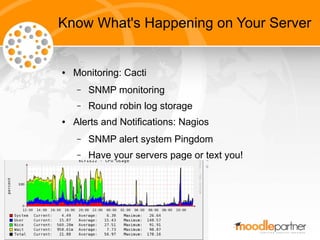
Know What's Happening on Your Server


●   Monitoring: Cacti
    –   SNMP monitoring
    –   Round robin log storage
●   Alerts and Notifications: Nagios
    –   SNMP alert system Pingdom
    –   Have your servers page or text you!
Performance Testing

●   jMeter
●   Apache ab utility
Hands-on

●   Download jMeter
●   Show ab
Performance Tips

●   PHP Accelerator – APC
●   MySQL –
    – Buffers and Query Caching
    – Use InnoDB
    – Use Percona build
●   Sessions
●   Moodle source code location
More Tips

●   Batch cron.php runs for multiple
    Moodles
●   Check state of indexes and bigints
●   Perform database maintenance
Performance Tweaking

●   Memory Budget
●   Concurrency
●   5 Things Making Your Site Slow
●   Testing
Hands-on

Working with jMeter for performance
testing
Questions?

Ireland Moot 2013 Admin Workshop Afternoon Session

  • 1.
    Jonathan Moore CTO andVice President RL-UK
  • 2.
  • 3.
    RL Background andContext ● Over 3000 hosted Moodle sites ● Over 12 million registered Moodle accounts ● Over 2,000,000 Moodle courses ● Hosting Moodle sites since 2004 ● Virtualized Infrastructure
  • 4.
    Sint-Ritacollege Background and Context ● 1,500 pupils ● Age 12 – 18 ● Dedicated server ● Early adopter
  • 5.
    Getting to KnowYou ● How many host your own Moodle site? ● What OS are you running? ● What web server are you running? ● What database are you running?
  • 6.
    Format ● Platform / Architecture Overview ● Best practices / info sharing ● Hands-on
  • 7.
    Hosting Application Layer ● Web Server ● Database Server ● Moodledata (dataroot) ● Sessions
  • 8.
    Server Options ● Dedicated / Virtual / Shared ● OS selection ● Database selection
  • 9.
    Platform Selection ● Linux most used for scalability ● Windows significantly lower performance for PHP apps ● Mac OSX forking performance issue – Apache and MySQL concurrency issue
  • 10.
    Know What's Happeningon Your Server ● Monitoring: Cacti – SNMP monitoring – Round robin log storage ● Alerts and Notifications: Nagios – SNMP alert system Pingdom – Have your servers page or text you!
  • 11.
    Performance Testing ● jMeter ● Apache ab utility
  • 12.
    Hands-on ● Download jMeter ● Show ab
  • 13.
    Performance Tips ● PHP Accelerator – APC ● MySQL – – Buffers and Query Caching – Use InnoDB – Use Percona build ● Sessions ● Moodle source code location
  • 14.
    More Tips ● Batch cron.php runs for multiple Moodles ● Check state of indexes and bigints ● Perform database maintenance
  • 15.
    Performance Tweaking ● Memory Budget ● Concurrency ● 5 Things Making Your Site Slow ● Testing
  • 16.
    Hands-on Working with jMeterfor performance testing
  • 17.