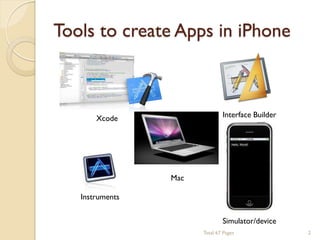
Tools to create Apps in iPhone

Interface Builder

Xcode

Mac
Instruments
Simulator/device
Total 67 Pages

2
Sound and Music Computing


We use iPhone to make music!
 Mobile Music Group
◦ MOGFUN
◦ MOGCLASS
◦ MOGHEALTH

Total 67 Pages

3
MOGCLASS


MOGCLASS DEMO

Total 67 Pages

4
MOGCLASS


Do you want to create your own iPhone
App or develop novel user interface for
MOGCLASS?

Total 67 Pages

5
You need to know…


Language: Objective-C and C/C++
 Objective Oriented Programming
 Programming and testing in Xcode
 Digital Signal Processing basics
 Assembly Code (ARM)
 Computer Network
 Etc…

Total 67 Pages

6
Today we will cover…


Objective-C basics
 Building an Application
 Sensor programming (accelerometer, GPS,
microphone…)
 Audio Libraries


There are a lot of materials about iphone
online. What we will cover today is more
oriented for your final project.
Total 67 Pages

7
How to learn iPhone Programming


Recommended Book: None! We’ll use
Apple documentation
 iOS Developer Center:
◦ Download the sample code and learn.

http://developer.apple.com/devcenter/ios/index.action



Write the code by yourself… Trial and
error.

Total 67 Pages

8
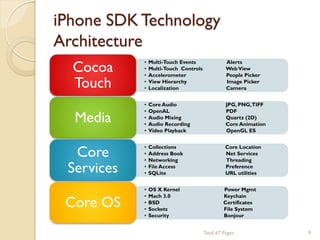
iPhone SDK Technology
Architecture
Cocoa
Touch

•
•
•
•
•

Multi-Touch Events
Multi-Touch Controls
Accelerometer
View Hierarchy
Localization

Alerts
Web View
People Picker
Image Picker
Camera

Media

•
•
•
•
•

Core Audio
OpenAL
Audio Mixing
Audio Recording
Video Playback

JPG, PNG,TIFF
PDF
Quartz (2D)
Core Animation
OpenGL ES

Core
Services

•
•
•
•
•

Collections
Address Book
Networking
File Access
SQLite

Core Location
Net Services
Threading
Preference
URL utilities

Core OS

•
•
•
•
•

OS X Kernel
Mach 3.0
BSD
Sockets
Security

Power Mgmt
Keychain
Certificates
File System
Bonjour
Total 67 Pages

9
Outlines


Objective-C basics
 Building an Application
 Sensor programming (accelerometer, GPS,
microphone…)
 Audio Libraries

Total 67 Pages

10
OOP Vocabulary


Class: defines the grouping of data and
code, the ―type‖ of an object.
 Instance: a specific allocation of a class.
 Method: a ―function‖ that an object knows
how to perform.
 Instance Variable (or ―ivar‖): a specific
piece of data belonging to an object.

Total 67 Pages

11
OOP Vocabulary


Encapsulation



Polymorphism



Inheritance

◦ Keep implementing private and separate from
interface
◦ Different objects, same interface
◦ Hierarchical organization, share code,
customize or extend behaviors

Total 67 Pages

12
Objective-C








Strict superset of C

◦ Mix C with ObjC
◦ Or even C++ with ObjC (usually referred to as
ObjC++)

A very simple language, but some new
syntax
Single inheritance, classes inherit from one
and only one superclass
Protocols define behavior that cross classes
Dynamic runtime
Loosely typed, if you’d like
Total 67 Pages

13
Class and Instance Methods


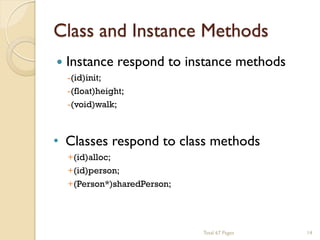
Instance respond to instance methods
-(id)init;
-(float)height;
-(void)walk;

• Classes respond to class methods
+(id)alloc;
+(id)person;
+(Person*)sharedPerson;

Total 67 Pages

14
Message Syntax
[receiver message];
[receiver message:argument];
[receiver message:arg1 andArg: arg2]

Total 67 Pages

15
Terminology






Message expression
[receiver method:argument]

Message
[receiver method:argument]

Selector
[receiver method:argument]

Method
The code selected by a message.

Total 67 Pages

16
Dot Syntax


Objective-C 2.0 introduced dot syntax
 Convenient shorthand for invoking accessor
methods
float height = [person height];
float height = person.height;
[person setHeight: newHeight];
person.height = newHeight;

 Follows

the dots…

[[person child] setHeight:newHeight];
//exact the same as
person.child.height = newHeight;
Total 67 Pages

17
Dynamic and static typing


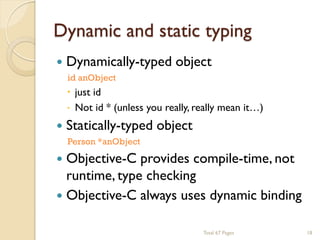
Dynamically-typed object
id anObject




 just id
 Not id * (unless you really, really mean it…)

Statically-typed object
Person *anObject

Objective-C provides compile-time, not
runtime, type checking
 Objective-C always uses dynamic binding
Total 67 Pages

18
Selectors identify methods by name



A selector has type SEL
SEL action = [button action];
[button setAction: @selector(start:)];

Conceptually similar to function pointer
 Selectors include the name and all colons,
for example:
-(void) setName:(NSString*)name age:(int)age;

would have a selector:
SEL sel = @selector(setName:age:);

Total 67 Pages

19
Working with selectors




You can determine if an object responds to a
given selector
id obj;
SEL sel = @selector(start:)
if ([obj respondsToSelector:sel]){
[obj performSelector: sel withObject:self];
}

This sort of introspection and dynamic
messaging underlies many Cocoa design
patterns
-(void)setTarget:(id)target;
-(void)setAction:(SEL)action;
Total 67 Pages

20
Working with Classes


You can ask an object about its class
Class myClass = [myObject class];



NSLog(@"My class is %@", [myObject className]);

Testing for general class membership (subclasses
included):
if ([myObject isKindOfClass:[UIControl class]]) {
// something



}

Testing for specific class membership (subclasses
excluded):
if ([myObject isMemberOfClass:[NSString class]]) {
// something string specific
}
Total 67 Pages

21
Working with Objects


Identity v.s. Equality
 Identity—testing equality of the pointer
values


if (object1 == object2) {
NSLog(@"Same exact object instance");
}

Equality—testing object attributes
if ([object1 isEqual: object2]) {
NSLog(@"Logically equivalent, but may
be different object instances");
}

Total 67 Pages

22
-description



NSObject implements -description
- (NSString *)description;

Objects represented in format strings using %@
 When an object appears in a format string, it is
asked for its description



[NSString stringWithFormat: @”The answer is: %@”,
myObject];

You can log an object’s description with:
NSLog([anObject description]);

Your custom subclasses can override description
to return more specific information
Total 67 Pages

23
Foundation Framework


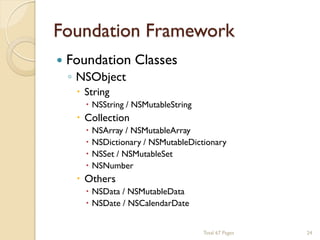
Foundation Classes
◦ NSObject
 String

 NSString / NSMutableString

 Collection





NSArray / NSMutableArray
NSDictionary / NSMutableDictionary
NSSet / NSMutableSet
NSNumber

 Others

 NSData / NSMutableData
 NSDate / NSCalendarDate
Total 67 Pages

24
More OOP Info


Tons of books and articles on OOP
 Objective-C 2.0 Programming Language

Total 67 Pages

25
Outlines


Objective-C basics
 Building an Application
 Sensor programming (accelerometer, GPS,
microphone…)
 Audio Libraries

Total 67 Pages

26
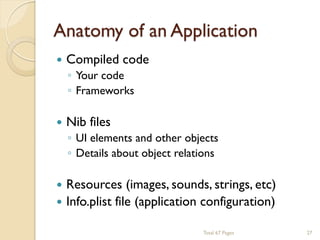
Anatomy of an Application


Compiled code



Nib files




◦ Your code
◦ Frameworks

◦ UI elements and other objects
◦ Details about object relations

Resources (images, sounds, strings, etc)
Info.plist file (application configuration)
Total 67 Pages

27
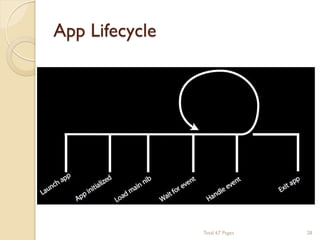
App Lifecycle

Total 67 Pages

28
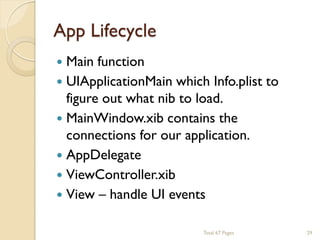
App Lifecycle


Main function
 UIApplicationMain which Info.plist to
figure out what nib to load.
 MainWindow.xib contains the
connections for our application.
 AppDelegate
 ViewController.xib
 View – handle UI events
Total 67 Pages

29
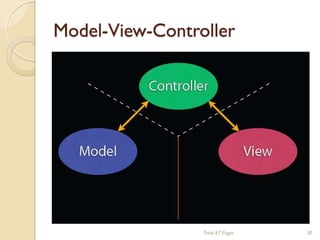
Model-View-Controller

Total 67 Pages

30
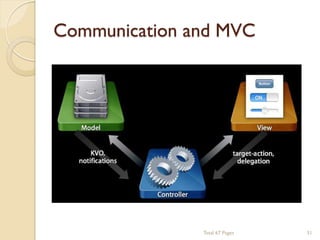
Communication and MVC

Total 67 Pages

31
Model


Manages the app data and state
 Note concerned with UI or presentation
 Often persists somewhere
 Same model should be reusable,
unchanged in different interfaces

Total 67 Pages

32
View


Present the Model to the user in an
appropriate interface
 Allows user to manipulate data
 Does not store any data


◦ (except to cache state)

Easily reusable & configurable to display
different data

Total 67 Pages

33
Controller


Intermediary between Model & View
 Updates the view when the model
changes
 Updates the model when the user
manipulates the view
 Typically where the app logic lives

Total 67 Pages

34
Outlines


Objective-C basics
 Building an Application
 Sensor programming (accelerometer, GPS,
microphone, …)
 Audio Libraries

Total 67 Pages

35
Accelerometer



What are the accelerometers?
◦ Measure changes in force

What are the uses?
 Physical Orientation vs. Interface
Orientation
◦ Ex: Photos & Safari

Total 67 Pages

36
Orientation-Related Changes



Getting the physical orientation
◦ UIDevice class

 UIDeviceOrientationDidChangeNotification

Getting the interface orientation
◦ UIApplication class

 statusBarOrientation property

◦ UIViewController class

 interfaceOrientation property

Total 67 Pages

37
Shake
Undo!


UIEvent type

◦ @property(readonly) UIEventType type;
◦ @property(readonly) UIEventSubtype
subtype;
◦ UIEventTypeMotion
◦ UIEventSubtypeMotionShake

Total 67 Pages

38
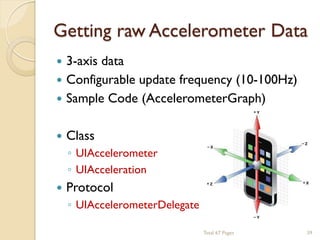
Getting raw Accelerometer Data


3-axis data
 Configurable update frequency (10-100Hz)
 Sample Code (AccelerometerGraph)


Class



Protocol

◦ UIAccelerometer
◦ UIAcceleration
◦ UIAccelerometerDelegate
Total 67 Pages

39
Getting raw Accelerometer Data
-(void)initAccelerometer{
[[UIAccelerometer sharedAccelerometer] setUpdateInterval: (1.0 / 100)];
[[UIAccelerometer sharedAccelerometer] setDelegate: self];
}
-(void)accelerometer: (UIAccelerometer*)accelerometer didAccelerate:
(UIAcceleration*) acceleration {
double x, y, z;
x = acceleration.x;
y = acceleration.y;
z = acceleration.z;
//process the data…
}
-(void)disconnectAccelerometer{
[[UIAccelerometer sharedAccelerometer] setDelegate: nil];
}
Total 67 Pages

40
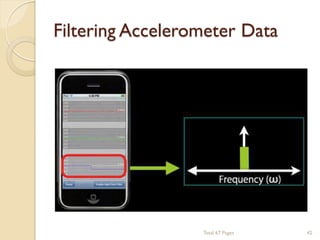
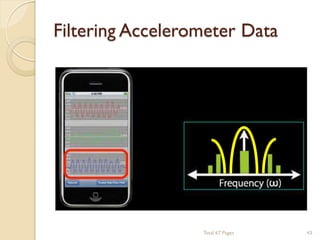
Filtering Accelerometer Data


Low-pass filter



High-pass filter

◦ Isolates constant acceleration
◦ Used to find the device orientation
◦ Shows instantaneous movement only
◦ Used to identify user-initiated movement

Total 67 Pages

41
Filtering Accelerometer Data

Total 67 Pages

42
Filtering Accelerometer Data

Total 67 Pages

43
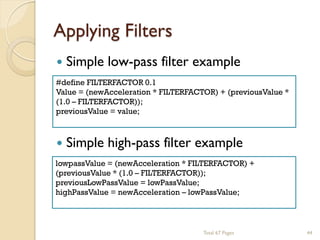
Applying Filters


Simple low-pass filter example

#define FILTERFACTOR 0.1
Value = (newAcceleration * FILTERFACTOR) + (previousValue *
(1.0 – FILTERFACTOR));
previousValue = value;



Simple high-pass filter example

lowpassValue = (newAcceleration * FILTERFACTOR) +
(previousValue * (1.0 – FILTERFACTOR));
previousLowPassValue = lowPassValue;
highPassValue = newAcceleration – lowPassValue;

Total 67 Pages

44
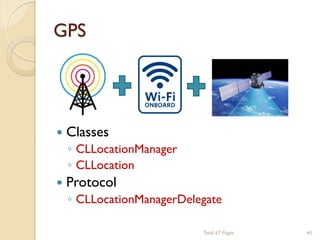
GPS



Classes



Protocol

◦ CLLocationManager
◦ CLLocation
◦ CLLocationManagerDelegate
Total 67 Pages

45
Getting a Location


Starting the location service

-(void)initLocationManager{
CLLocationManager* locManager = [[CLLocationManager alloc] init];
locManager.delegate = self;
[locManager startUpdatingLocation];
}



Using the event data

-(void)locationManager: (CLLocationManager*)manager didUpdateToLocation:
(CLLocation*)newLocation fromLocation: (CLLocation*)oldLocation{
NSTimerInterval howRecent = [newLocation.timestamp timeIntervalSinceNow];
if(howRecent < -10) return;
if(newLocation.horizontalAccuracy > 100) return;
//Use the coordinate data.
double lat = newLocation.coordinate.latitude;
double lon = newLocation.coordinate.longitude;
}
Total 67 Pages

46
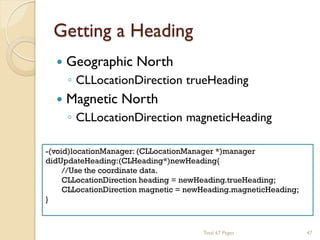
Getting a Heading


Geographic North



Magnetic North

◦ CLLocationDirection trueHeading
◦ CLLocationDirection magneticHeading

-(void)locationManager: (CLLocationManager *)manager
didUpdateHeading:(CLHeading*)newHeading{
//Use the coordinate data.
CLLocationDirection heading = newHeading.trueHeading;
CLLocationDirection magnetic = newHeading.magneticHeading;
}

Total 67 Pages

47
Microphone


We will cover it in the audio library…

Total 67 Pages

48
Outlines


Objective-C basics
 Building an Application
 Sensor programming (accelerometer, GPS,
microphone…)
 Audio Libraries

Total 67 Pages

49
Audio Libraries


System Sound API – short sounds
 AVAudioPlayer – ObjC, simple API
 Audio Session - Audio Toolbox
 Audio Queue - Audio Toolbox
 Audio Units
 OpenAL
 MediaPlayer Framework

Total 67 Pages

50
AVAudioPlayer







Play longer sounds (> 5 seconds)
Locally stored files or in-memory (no network
streaming)
Can loop, seek, play, pause
Provides metering
Play multiple sounds simultaneously
Cocoa-style API



Supports many more formats



Sample Code: avTouch

◦ Initialize with file URL or data
◦ Allows for delegate

◦ Everything the AudioFile API supports

Total 67 Pages

51
AVAudioPlayer


Create from file URL or data

AVAudioPlayer *player;
NSString *path = [[NSBundle mainBundle] pathForResource:… ofType:…];
NSURL *url = [NSURL fileURLWithPath:path];
player = [[AVAudioPlayer allow] initWithContentsOfURL:url];
[player prepareToPlay];



Simple methods for starting/stopping

If(!player.playing){
[player play];
}else{
[player pause];
}

Total 67 Pages

52
Audio Sessions




Handles audio behavior at the application,
inter-application, and device levels
◦
◦
◦
◦

Ring/Silent switch?
iPod audio continue?
Headset plug / unplug?
Phone call coming?

Sample Code: avTouch & aurioTouch

Total 67 Pages

53
Audio Sessions


Six audio session categories
◦
◦
◦
◦
◦
◦

Ambient
Solo Ambient (Default session)
Media playback
Recording
Play and record
Offline audio processing

Total 67 Pages

54
Audio Queue






Audio File Stream Services & Audio Queue
Services
Supports wider variety of formats
Finer grained control over playback
◦ Streaming audio over network
◦ Cf: AVAudioPlayer(local)

Allows queueing of consecutive buffers for
seamless playback
◦ Callback functions for reusing buffers

Sample code: SpeakHere
Total 67 Pages

55
Audio Units


For serious audio processing
 Graph-based audio
◦
◦
◦
◦

Rate or format conversion
Real time input/output for recording & playback
Mixing multiple streams
VoIP (Voice over Internet Protocol).



Very, very powerful.



Sample code: aurioTouch
Total 67 Pages

56
Audio Units




Lowest programming layer in iOS audio
stack
◦ Real-time playback of synthesized sounds
◦ Low-latency I/O
◦ Specific audio unit features

Otherwise, look first at the Media Player,
AV Foundation, OpenAL, or Audio
Toolbox!

Total 67 Pages

57
Audio Units


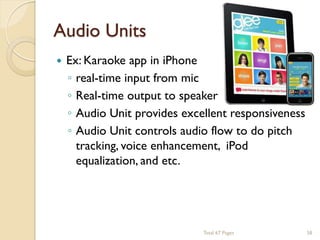
Ex: Karaoke app in iPhone
◦ real-time input from mic
◦ Real-time output to speaker
◦ Audio Unit provides excellent responsiveness
◦ Audio Unit controls audio flow to do pitch
tracking, voice enhancement, iPod
equalization, and etc.

Total 67 Pages

58
OpenAL


High level, cross-platform API for 3D audio mixing



Models audio in 3D space



Sample code: oalTouch



More information: http://www.openal.org/

◦ Great for games
◦ Mimics OpenGL conventions

◦ Buffers: Container for Audio
◦ Sources: 3D point emitting Audio
◦ Listener: Position where Sources are heard

Total 67 Pages

59
MediaPlayer Framework


Tell iPod app to play music
 Access to entire music library
◦ For playback, not processing



Easy access through
MPMediaPickerController
 Deeper access through Query APIs


Sample code: AddMusic
Total 67 Pages

60
Others


Accelerate Framework



Bonjour and NSStream



◦ C APIs for vector and matrix math, digital
signal processing large number handling, and
image processing
◦ vDSP programming guide

The Synthesis ToolKit in C++ (STK) and
OSC
Total 67 Pages

61
More Info for Beginners


iPhone Application Programming
(Standford University - iTunes University)
 Dan Pilone & Tracey Pilone. Head First
iPhone Development.

Total 67 Pages

62


Thank you and good luck to your final
projects!

Total 67 Pages

63

Iphone lecture imp

  • 2.
    Tools to createApps in iPhone Interface Builder Xcode Mac Instruments Simulator/device Total 67 Pages 2
  • 3.
    Sound and MusicComputing  We use iPhone to make music!  Mobile Music Group ◦ MOGFUN ◦ MOGCLASS ◦ MOGHEALTH Total 67 Pages 3
  • 4.
  • 5.
    MOGCLASS  Do you wantto create your own iPhone App or develop novel user interface for MOGCLASS? Total 67 Pages 5
  • 6.
    You need toknow…  Language: Objective-C and C/C++  Objective Oriented Programming  Programming and testing in Xcode  Digital Signal Processing basics  Assembly Code (ARM)  Computer Network  Etc… Total 67 Pages 6
  • 7.
    Today we willcover…  Objective-C basics  Building an Application  Sensor programming (accelerometer, GPS, microphone…)  Audio Libraries  There are a lot of materials about iphone online. What we will cover today is more oriented for your final project. Total 67 Pages 7
  • 8.
    How to learniPhone Programming  Recommended Book: None! We’ll use Apple documentation  iOS Developer Center: ◦ Download the sample code and learn. http://developer.apple.com/devcenter/ios/index.action  Write the code by yourself… Trial and error. Total 67 Pages 8
  • 9.
    iPhone SDK Technology Architecture Cocoa Touch • • • • • Multi-TouchEvents Multi-Touch Controls Accelerometer View Hierarchy Localization Alerts Web View People Picker Image Picker Camera Media • • • • • Core Audio OpenAL Audio Mixing Audio Recording Video Playback JPG, PNG,TIFF PDF Quartz (2D) Core Animation OpenGL ES Core Services • • • • • Collections Address Book Networking File Access SQLite Core Location Net Services Threading Preference URL utilities Core OS • • • • • OS X Kernel Mach 3.0 BSD Sockets Security Power Mgmt Keychain Certificates File System Bonjour Total 67 Pages 9
  • 10.
    Outlines  Objective-C basics  Buildingan Application  Sensor programming (accelerometer, GPS, microphone…)  Audio Libraries Total 67 Pages 10
  • 11.
    OOP Vocabulary  Class: definesthe grouping of data and code, the ―type‖ of an object.  Instance: a specific allocation of a class.  Method: a ―function‖ that an object knows how to perform.  Instance Variable (or ―ivar‖): a specific piece of data belonging to an object. Total 67 Pages 11
  • 12.
    OOP Vocabulary  Encapsulation  Polymorphism  Inheritance ◦ Keepimplementing private and separate from interface ◦ Different objects, same interface ◦ Hierarchical organization, share code, customize or extend behaviors Total 67 Pages 12
  • 13.
    Objective-C       Strict superset ofC ◦ Mix C with ObjC ◦ Or even C++ with ObjC (usually referred to as ObjC++) A very simple language, but some new syntax Single inheritance, classes inherit from one and only one superclass Protocols define behavior that cross classes Dynamic runtime Loosely typed, if you’d like Total 67 Pages 13
  • 14.
    Class and InstanceMethods  Instance respond to instance methods -(id)init; -(float)height; -(void)walk; • Classes respond to class methods +(id)alloc; +(id)person; +(Person*)sharedPerson; Total 67 Pages 14
  • 15.
    Message Syntax [receiver message]; [receivermessage:argument]; [receiver message:arg1 andArg: arg2] Total 67 Pages 15
  • 16.
    Terminology     Message expression [receiver method:argument] Message [receivermethod:argument] Selector [receiver method:argument] Method The code selected by a message. Total 67 Pages 16
  • 17.
    Dot Syntax  Objective-C 2.0introduced dot syntax  Convenient shorthand for invoking accessor methods float height = [person height]; float height = person.height; [person setHeight: newHeight]; person.height = newHeight;  Follows the dots… [[person child] setHeight:newHeight]; //exact the same as person.child.height = newHeight; Total 67 Pages 17
  • 18.
    Dynamic and statictyping  Dynamically-typed object id anObject    just id  Not id * (unless you really, really mean it…) Statically-typed object Person *anObject Objective-C provides compile-time, not runtime, type checking  Objective-C always uses dynamic binding Total 67 Pages 18
  • 19.
    Selectors identify methodsby name   A selector has type SEL SEL action = [button action]; [button setAction: @selector(start:)]; Conceptually similar to function pointer  Selectors include the name and all colons, for example: -(void) setName:(NSString*)name age:(int)age; would have a selector: SEL sel = @selector(setName:age:); Total 67 Pages 19
  • 20.
    Working with selectors   Youcan determine if an object responds to a given selector id obj; SEL sel = @selector(start:) if ([obj respondsToSelector:sel]){ [obj performSelector: sel withObject:self]; } This sort of introspection and dynamic messaging underlies many Cocoa design patterns -(void)setTarget:(id)target; -(void)setAction:(SEL)action; Total 67 Pages 20
  • 21.
    Working with Classes  Youcan ask an object about its class Class myClass = [myObject class];  NSLog(@"My class is %@", [myObject className]); Testing for general class membership (subclasses included): if ([myObject isKindOfClass:[UIControl class]]) { // something  } Testing for specific class membership (subclasses excluded): if ([myObject isMemberOfClass:[NSString class]]) { // something string specific } Total 67 Pages 21
  • 22.
    Working with Objects  Identityv.s. Equality  Identity—testing equality of the pointer values  if (object1 == object2) { NSLog(@"Same exact object instance"); } Equality—testing object attributes if ([object1 isEqual: object2]) { NSLog(@"Logically equivalent, but may be different object instances"); } Total 67 Pages 22
  • 23.
    -description   NSObject implements -description -(NSString *)description; Objects represented in format strings using %@  When an object appears in a format string, it is asked for its description   [NSString stringWithFormat: @”The answer is: %@”, myObject]; You can log an object’s description with: NSLog([anObject description]); Your custom subclasses can override description to return more specific information Total 67 Pages 23
  • 24.
    Foundation Framework  Foundation Classes ◦NSObject  String  NSString / NSMutableString  Collection     NSArray / NSMutableArray NSDictionary / NSMutableDictionary NSSet / NSMutableSet NSNumber  Others  NSData / NSMutableData  NSDate / NSCalendarDate Total 67 Pages 24
  • 25.
    More OOP Info  Tonsof books and articles on OOP  Objective-C 2.0 Programming Language Total 67 Pages 25
  • 26.
    Outlines  Objective-C basics  Buildingan Application  Sensor programming (accelerometer, GPS, microphone…)  Audio Libraries Total 67 Pages 26
  • 27.
    Anatomy of anApplication  Compiled code  Nib files   ◦ Your code ◦ Frameworks ◦ UI elements and other objects ◦ Details about object relations Resources (images, sounds, strings, etc) Info.plist file (application configuration) Total 67 Pages 27
  • 28.
  • 29.
    App Lifecycle  Main function UIApplicationMain which Info.plist to figure out what nib to load.  MainWindow.xib contains the connections for our application.  AppDelegate  ViewController.xib  View – handle UI events Total 67 Pages 29
  • 30.
  • 31.
  • 32.
    Model  Manages the appdata and state  Note concerned with UI or presentation  Often persists somewhere  Same model should be reusable, unchanged in different interfaces Total 67 Pages 32
  • 33.
    View  Present the Modelto the user in an appropriate interface  Allows user to manipulate data  Does not store any data  ◦ (except to cache state) Easily reusable & configurable to display different data Total 67 Pages 33
  • 34.
    Controller  Intermediary between Model& View  Updates the view when the model changes  Updates the model when the user manipulates the view  Typically where the app logic lives Total 67 Pages 34
  • 35.
    Outlines  Objective-C basics  Buildingan Application  Sensor programming (accelerometer, GPS, microphone, …)  Audio Libraries Total 67 Pages 35
  • 36.
    Accelerometer   What are theaccelerometers? ◦ Measure changes in force What are the uses?  Physical Orientation vs. Interface Orientation ◦ Ex: Photos & Safari Total 67 Pages 36
  • 37.
    Orientation-Related Changes   Getting thephysical orientation ◦ UIDevice class  UIDeviceOrientationDidChangeNotification Getting the interface orientation ◦ UIApplication class  statusBarOrientation property ◦ UIViewController class  interfaceOrientation property Total 67 Pages 37
  • 38.
    Shake Undo!  UIEvent type ◦ @property(readonly)UIEventType type; ◦ @property(readonly) UIEventSubtype subtype; ◦ UIEventTypeMotion ◦ UIEventSubtypeMotionShake Total 67 Pages 38
  • 39.
    Getting raw AccelerometerData  3-axis data  Configurable update frequency (10-100Hz)  Sample Code (AccelerometerGraph)  Class  Protocol ◦ UIAccelerometer ◦ UIAcceleration ◦ UIAccelerometerDelegate Total 67 Pages 39
  • 40.
    Getting raw AccelerometerData -(void)initAccelerometer{ [[UIAccelerometer sharedAccelerometer] setUpdateInterval: (1.0 / 100)]; [[UIAccelerometer sharedAccelerometer] setDelegate: self]; } -(void)accelerometer: (UIAccelerometer*)accelerometer didAccelerate: (UIAcceleration*) acceleration { double x, y, z; x = acceleration.x; y = acceleration.y; z = acceleration.z; //process the data… } -(void)disconnectAccelerometer{ [[UIAccelerometer sharedAccelerometer] setDelegate: nil]; } Total 67 Pages 40
  • 41.
    Filtering Accelerometer Data  Low-passfilter  High-pass filter ◦ Isolates constant acceleration ◦ Used to find the device orientation ◦ Shows instantaneous movement only ◦ Used to identify user-initiated movement Total 67 Pages 41
  • 42.
  • 43.
  • 44.
    Applying Filters  Simple low-passfilter example #define FILTERFACTOR 0.1 Value = (newAcceleration * FILTERFACTOR) + (previousValue * (1.0 – FILTERFACTOR)); previousValue = value;  Simple high-pass filter example lowpassValue = (newAcceleration * FILTERFACTOR) + (previousValue * (1.0 – FILTERFACTOR)); previousLowPassValue = lowPassValue; highPassValue = newAcceleration – lowPassValue; Total 67 Pages 44
  • 45.
  • 46.
    Getting a Location  Startingthe location service -(void)initLocationManager{ CLLocationManager* locManager = [[CLLocationManager alloc] init]; locManager.delegate = self; [locManager startUpdatingLocation]; }  Using the event data -(void)locationManager: (CLLocationManager*)manager didUpdateToLocation: (CLLocation*)newLocation fromLocation: (CLLocation*)oldLocation{ NSTimerInterval howRecent = [newLocation.timestamp timeIntervalSinceNow]; if(howRecent < -10) return; if(newLocation.horizontalAccuracy > 100) return; //Use the coordinate data. double lat = newLocation.coordinate.latitude; double lon = newLocation.coordinate.longitude; } Total 67 Pages 46
  • 47.
    Getting a Heading  GeographicNorth  Magnetic North ◦ CLLocationDirection trueHeading ◦ CLLocationDirection magneticHeading -(void)locationManager: (CLLocationManager *)manager didUpdateHeading:(CLHeading*)newHeading{ //Use the coordinate data. CLLocationDirection heading = newHeading.trueHeading; CLLocationDirection magnetic = newHeading.magneticHeading; } Total 67 Pages 47
  • 48.
    Microphone  We will coverit in the audio library… Total 67 Pages 48
  • 49.
    Outlines  Objective-C basics  Buildingan Application  Sensor programming (accelerometer, GPS, microphone…)  Audio Libraries Total 67 Pages 49
  • 50.
    Audio Libraries  System SoundAPI – short sounds  AVAudioPlayer – ObjC, simple API  Audio Session - Audio Toolbox  Audio Queue - Audio Toolbox  Audio Units  OpenAL  MediaPlayer Framework Total 67 Pages 50
  • 51.
    AVAudioPlayer       Play longer sounds(> 5 seconds) Locally stored files or in-memory (no network streaming) Can loop, seek, play, pause Provides metering Play multiple sounds simultaneously Cocoa-style API  Supports many more formats  Sample Code: avTouch ◦ Initialize with file URL or data ◦ Allows for delegate ◦ Everything the AudioFile API supports Total 67 Pages 51
  • 52.
    AVAudioPlayer  Create from fileURL or data AVAudioPlayer *player; NSString *path = [[NSBundle mainBundle] pathForResource:… ofType:…]; NSURL *url = [NSURL fileURLWithPath:path]; player = [[AVAudioPlayer allow] initWithContentsOfURL:url]; [player prepareToPlay];  Simple methods for starting/stopping If(!player.playing){ [player play]; }else{ [player pause]; } Total 67 Pages 52
  • 53.
    Audio Sessions   Handles audiobehavior at the application, inter-application, and device levels ◦ ◦ ◦ ◦ Ring/Silent switch? iPod audio continue? Headset plug / unplug? Phone call coming? Sample Code: avTouch & aurioTouch Total 67 Pages 53
  • 54.
    Audio Sessions  Six audiosession categories ◦ ◦ ◦ ◦ ◦ ◦ Ambient Solo Ambient (Default session) Media playback Recording Play and record Offline audio processing Total 67 Pages 54
  • 55.
    Audio Queue      Audio FileStream Services & Audio Queue Services Supports wider variety of formats Finer grained control over playback ◦ Streaming audio over network ◦ Cf: AVAudioPlayer(local) Allows queueing of consecutive buffers for seamless playback ◦ Callback functions for reusing buffers Sample code: SpeakHere Total 67 Pages 55
  • 56.
    Audio Units  For seriousaudio processing  Graph-based audio ◦ ◦ ◦ ◦ Rate or format conversion Real time input/output for recording & playback Mixing multiple streams VoIP (Voice over Internet Protocol).  Very, very powerful.  Sample code: aurioTouch Total 67 Pages 56
  • 57.
    Audio Units   Lowest programminglayer in iOS audio stack ◦ Real-time playback of synthesized sounds ◦ Low-latency I/O ◦ Specific audio unit features Otherwise, look first at the Media Player, AV Foundation, OpenAL, or Audio Toolbox! Total 67 Pages 57
  • 58.
    Audio Units  Ex: Karaokeapp in iPhone ◦ real-time input from mic ◦ Real-time output to speaker ◦ Audio Unit provides excellent responsiveness ◦ Audio Unit controls audio flow to do pitch tracking, voice enhancement, iPod equalization, and etc. Total 67 Pages 58
  • 59.
    OpenAL  High level, cross-platformAPI for 3D audio mixing  Models audio in 3D space  Sample code: oalTouch  More information: http://www.openal.org/ ◦ Great for games ◦ Mimics OpenGL conventions ◦ Buffers: Container for Audio ◦ Sources: 3D point emitting Audio ◦ Listener: Position where Sources are heard Total 67 Pages 59
  • 60.
    MediaPlayer Framework  Tell iPodapp to play music  Access to entire music library ◦ For playback, not processing  Easy access through MPMediaPickerController  Deeper access through Query APIs  Sample code: AddMusic Total 67 Pages 60
  • 61.
    Others  Accelerate Framework  Bonjour andNSStream  ◦ C APIs for vector and matrix math, digital signal processing large number handling, and image processing ◦ vDSP programming guide The Synthesis ToolKit in C++ (STK) and OSC Total 67 Pages 61
  • 62.
    More Info forBeginners  iPhone Application Programming (Standford University - iTunes University)  Dan Pilone & Tracey Pilone. Head First iPhone Development. Total 67 Pages 62
  • 63.
     Thank you andgood luck to your final projects! Total 67 Pages 63