









iPhone 6s
- Mercy Jane P. Ballesteros -
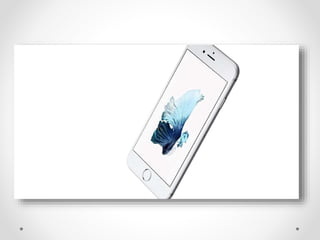
What is iPhone 6s?
New aluminum alloy isn’t to
blame for iPhone 6s weight gain
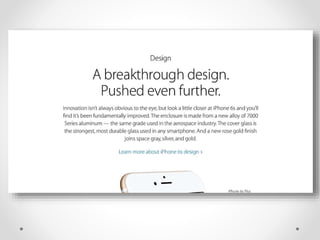
 According to Apple, the aluminum in 6s Plus only
weighs 2 grams more than the aluminum in its
predecessor.
 The aluminum in 6s weighs a gram less than that
in the 6.
 The new aluminum might keep iPhones from
bending in half.
How Apple built 3D Touch
 Apple has made many things over the years but
its process has remained essentially the same:
Find something ugly. Make it prettier and easier.
 John Ive focus is a feature called 3D touch, and
it makes using an iPhone even easier.
 He says “This is what galvanizes our efforts right
across the company”
How Apple built 3D Touch
 John Ive focus is a feature called 3D touch, and
it makes using an iPhone even easier.
 He says “This is what galvanizes our efforts right
across the company”.
 and He added emphasis “ It is something we’ve
been working on for a long time – multi, multi,
multi years”
Most Important Three Minutes
of the Apple Keynote Speech
Hands-On With the Updated
iPhone 6S and 6S Plus
Apple makes iPhone 6s and
iPhone 6s Plus $100 More
Expensive
New iPhones Gobble Storage
(More Than You Realize
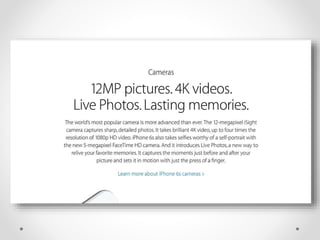
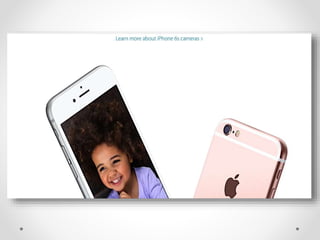
 The headline features for many with the new
iPhones are their upgraded cameras.
 A jump to 12MP for the rear iSight camera and
5MP for the front facing FaceTime camera.
 It has the ability to 4K and 1080p video
respectively.
Doing the Maths
 12MP Live Photos:
8MP iPhone photos are typically about 2.5MB
in size so you’re looking at about 4.5 – 5MB
for a 12MP image which balloons to 9-10MB
with every Live Photo.
 4K videos:
Every minute of 1080p video is roughly
190MB and this doubles to approximately
380MB for 4K videos.
The End Result
 Apple has reduced the install size of iOS so a
16GB iPhone now has about 13GB of free space
out of the box.
 13GB would equate to just 30-35 minutes of 4K
video, or with even split- 17 minutes of 4K video
and 650 Live Photos.
The Faulty Defence
 The obvious counterpoint to all this users
could reduce video recording to 1080p,
photos down to 8MP and switch off Live
Photos.
 Users can upgrade to more iCloud storage
to reduce how much content they need to
hold on the phone;
 Or to invest in larger internal or external
computer store for regular backups.
Apple iOS 9 Has 25 Great
Secret Features
 Camera and Video:
Zoom In Videos – Yes, with iOS 9 pinch to
zoom not only works for photos but videos as
well. Just perform the pinch gestures while a
video is playing.
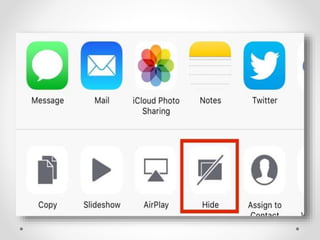
 Hide Photos -. In camera roll tap ‘Select’ and
select all the photos you want to be hidden
away then tap the bottom left corner button to
open a Share Sheet and select ‘Hide’.
Apple iOS 9 Has 25
Great Secret Features
Fast Photo Selection
 With iOS 9 you no longer need to tap
individual photos for multiple selections.
Just keep your finger on the screen after
selecting the first photo and drag it to
select as many as you want in a single
action.
Fast Photo Scanning
 You’re likely to build up a substantial
photo library over time so once you open
a photo in iOS 9 look for the strip of
image thumbnails below. Drag this left or
right to race through your snaps.
Easy Close Photo Shortcut
 As iPhones get bigger it isn’t so easy to
reach the top left ‘Back’ button, but iOS 9
eases this frustration by allowing you to
swipe down on any open photo to return to
the Camera Roll.
Battery Secrets
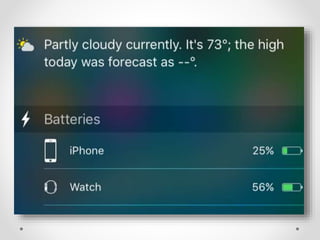
Hidden Battery Widget
 iOS 9 lets you add a new battery widget to
the bottom of the ‘Today’ view in the
Notification Center. Tap ‘edit’ at the bottom
of the Today column to reveal the option to
add it. You will notice it also shows a
connected Apple Watch.
Detailed Battery Usage
 Ever wondered which apps are killing
your battery? Now you can get a detailed
breakdown in iOS 9 by going to Settings
> Battery then ‘Battery Usage’. These
can also be broken down by the time
using the Clock button.
Manually Enable Low Power
Mode
Sometimes you may want to conserve
power long before your iPhone or iPad is
about to die. Turn the new Low Power
Mode on manually by going to
Settings >
General >
Battery >
Low Power Mode and toggle it to On.
Messaging
Convenience
Quick calls and Messages
 Open Spotlight (swipe right on your home
screen, or swipe down over the home
screen icons) and you’ll find iOS 9 gives
you quick access to call or message
contacts.
Quick Reply
 This feature was partially introduced in
iOS 8, but now all messaging apps in iOS
9 allow quick replies to be sent by
dragging down on a new message
notification.
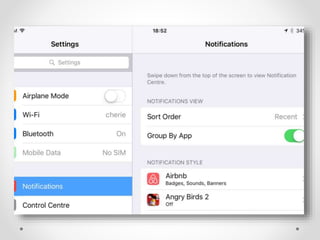
Group Notifications
 Prefer your notifications grouped by app
rather than time? Easy in iOS 9!
 Settings >
Notifications >
Group By App and switch the toggle to
On.
New Voices
 iOS 9 has more voice options if you head
to
Settings >
General >
Accessibility >
Voices.
Messages: Easy Close
Attachments
 As with photos, you can avoid using
the hard-to-reach back button by
swiping down on any open
attachment to return to the message.
Safari Shortcuts
Smart Safari Search
 Paste a URL into the Safari address bar
and it triggers the button ‘Paste and Go’,
saving an extra tap. Similarly, paste any
text into the Safari address bar and it gives
you a single tap ‘Paste and Search’ button.
Desktop Mode Shortcut
 Safari has long had a ‘request desktop
site’ mode but now you can quickly access
it in iOS 9 but tapping and holding your
finger on the address bar to bring up the
‘Request Desktop Site’ option.
Enhanced Reader Mode
 Reader Mode in Safari existed in iOS 8,
but now you can also change the font,
background and other options simply but
tapping the ‘Aa’ button.
Save Website As PDF
 While the likes of Pocket and Instapaper
have become the defacto offline reading
tools for millions, it can also be useful to
save a website as a simple PDF. Open the
Safari Share Sheet menu and you’ll now
find ‘Save PDF to iBooks’.
AdBlock Shortcut
 In iOS 9 if you long press the refresh icon
in Safari it gives you the option to reload
the page with ad blocking enabled.
iPhone 6S Vs iPhone 6S
Plus: What's The
Difference?
Design – Familiar But
Intelligently Improved
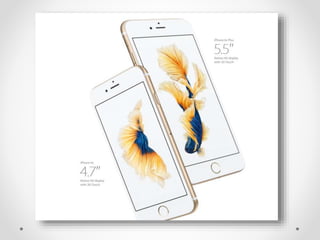
Size and Weight
Increases
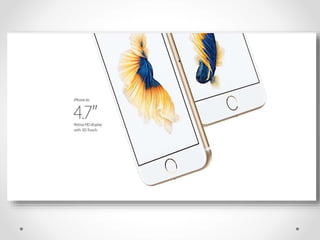
 iPhone 6S: 138.3 x 67.1 x 7.1mm (5.44 x 2.64 x
0.28in) and 143g (5.04oz)
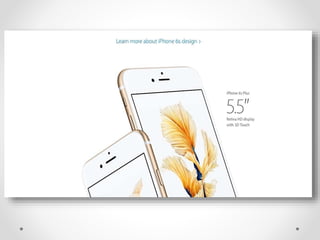
 iPhone 6S Plus: 158.2 x 77.9 x 7.3mm (6.23 x 3.07
x 0.29in) and 192g (6.77oz)
 iPhone 6: 138.1 x 67 x 6.9mm (5.44 x 2.64 x 0.27in)
and 129g (4.55oz)
iPhone 6 Plus: 158.1 x 77.8 x 7.1mm (6.22 x 3.06 x
0.28in) and 172g (6.07oz)
Strength Improvements
 Apple openly mocked the so-called ‘Bend gate’
scandal last year when the iPhone 6 and,
notably, iPhone 6 Plus were found to warp under
relatively meager pressures.
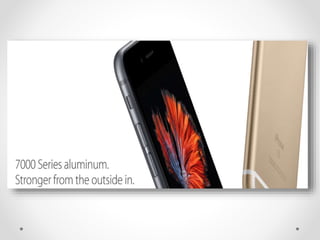
 Consequently the new iPhone 6S and iPhone
6S Plus have switched from Series 6000 to
Series 7000 aluminum.
Apple has improved the durability of the new
iPhones’ glass displays.
Winner: iPhone 6S
 It gets less of a weight bump while the
iPhone 6S Plus is now a genuinely heavy
phone, a problem when both remain so
slippery
Displays – Ingenious Or
Falling Behind?
 iPhone 6S still has a pixel density similar
to a 4K ‘Ultra HD’ resolution on a 13-inch
laptop while the iPhone 6S Plus has a
pixel density higher than a 4K display on
an 11-inch laptop.
Winner: iPhone 6S
Plus
 It continues to have a noticeably higher
pixel density than the smaller iPhone 6S
and with most rivals now sporting 2K
displays, 6S owners in particular may feel
a little shortchanged
3D Touch – Initially
Interesting, Potentially
Amazing
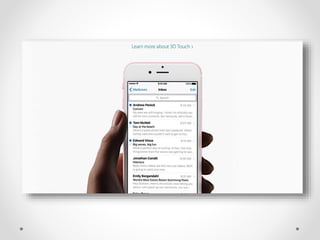
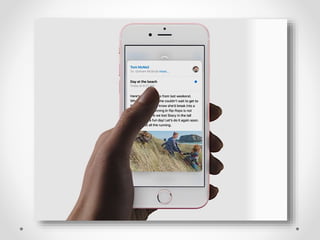
 iPhone 6S and iPhone 6S Plus now sport
a variant of Force Touch called ‘3D Touch’.
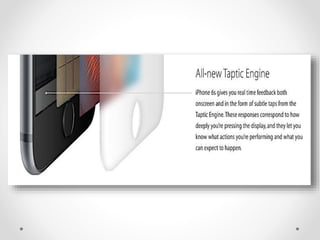
This uses the same pressure sensitive
panel as these devices to distinguish
between different types of touch and gives
vibration feedback to the user to confirm
when force touches are recognized.
Cameras – A New Force To
Be Reckoned With
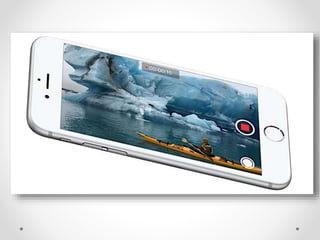
 iPhone 6S and 6S Plus – 12 megapixel sensor,
F2.0 lens, Focus Pixels, dual-LED flash – 4p
video recording. Front: 5 megapixel sensor, F2.0
lens, 1080p video recording
 iPhone 6 and 6 Plus – 8 megapixel sensor, F2.2
lens, Focus Pixels, dual-LED flash – 1080p
video recording. Front: 1.2 megapixel sensor,
F2.2 lens, 720p video recording
Winner: iPhone 6S Plus
 The very disappointing absence of Optical
Image Stabilization (OIS) from the iPhone
6S makes this an easy win
Performance – Big Jump, But
Memory The Key
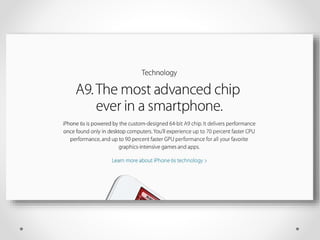
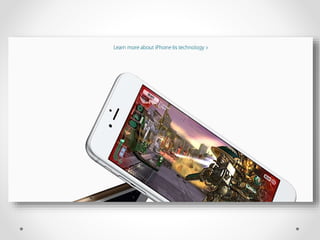
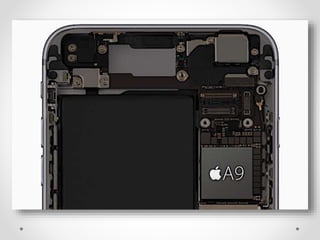
 A9 chipset will offer 70% greater CPU
performance and 90% greater graphics
performance compared to the A8 chipset in the
iPhone 6 and iPhone 6 Plus.
The higher resolution of the iPhone 6 Plus was
found to impact its performance compared to the
iPhone 6 as it has to drive more pixels for its
display.
 Both the iPhone 6S and iPhone 6S Plus also
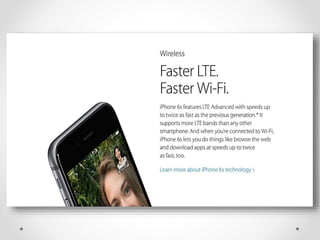
received upgraded LTE performance, now
Winner: iPhone 6S
 Though we can’t see the iPhone 6S Plus
struggling to keep up for quite some time
Touch ID 2.0 – Faster And
More Secure
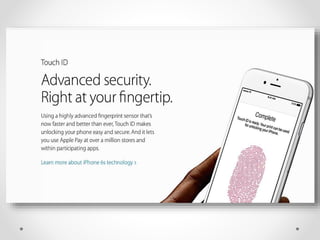
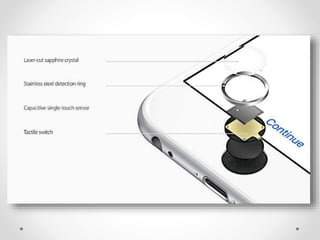
 With Apple Pay slowly gaining
mainstream adoption, Apple has chosen
an optimal time to bring an upgraded
version of Touch ID to the iPhone 6S and
iPhone 6S Plus.
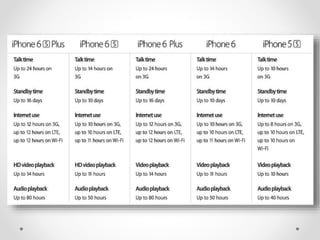
Battery Life and Charging
 Apple boasts that the A9 chipset is more
efficient, but sadly it hasn’t coupled that new
efficiency with the extra win of larger capacity
batteries.
Cost – No Surprises, Storage
– A Letdown
 With the shift to more expensive Series 7000
aluminum (as well as a more premium camera
sensor and Touch ID technology) there had been
fears iPhone 6S and iPhone 6S Plus prices would
increase this year. Identical price points remain:
iPhone 6S: $649 (16GB), $749 (64GB) and $849
(128GB)
iPhone 6S Plus: $749 (16GB), $849 (64GB) and
$949 (128GB)
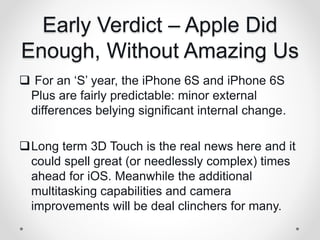
Early Verdict – Apple Did
Enough, Without Amazing Us
 For an ‘S’ year, the iPhone 6S and iPhone 6S
Plus are fairly predictable: minor external
differences belying significant internal change.
Long term 3D Touch is the real news here and it
could spell great (or needlessly complex) times
ahead for iOS. Meanwhile the additional
multitasking capabilities and camera
improvements will be deal clinchers for many.
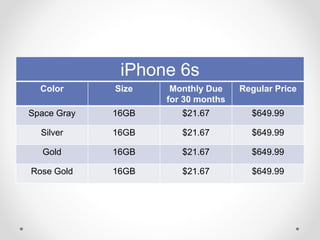
Prices
AT & T
Color Size Monthly Due
for 30 months
Regular Price
Space Gray 16GB $21.67 $649.99
Silver 16GB $21.67 $649.99
Gold 16GB $21.67 $649.99
Rose Gold 16GB $21.67 $649.99
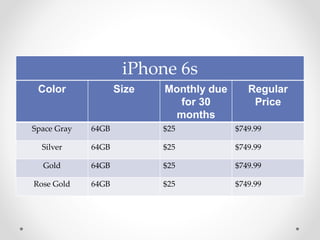
iPhone 6s
iPhone 6s
Color Size Monthly due
for 30
months
Regular
Price
Space Gray 64GB $25 $749.99
Silver 64GB $25 $749.99
Gold 64GB $25 $749.99
Rose Gold 64GB $25 $749.99
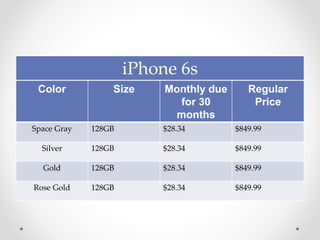
iPhone 6s
Color Size Monthly due
for 30
months
Regular
Price
Space Gray 128GB $28.34 $849.99
Silver 128GB $28.34 $849.99
Gold 128GB $28.34 $849.99
Rose Gold 128GB $28.34 $849.99
References
 http://www.apple.com/iphone-6s/
 http://www.forbes.com/sites/gordonkelly/2015/09/1
9/apple-ios-9-secrets/
 http://www.forbes.com/sites/gordonkelly/2015/09/1
9/apple-ios-9-secrets/
 https://www.youtube.com/watch?v=9X6Lw-wt2yY
References
 http://www.forbes.com/sites/gordonkelly/2015/09/12/ip
hone-6s-iphone-6s-plus-more-expensive/
 https://www.youtube.com/watch?v=6AognKF81aI
 http://www.bloomberg.com/features/2015-how-apple-
built-3d-touch-iphone-6s/
 http://www.att.com/cellphones/iphone/iphone-
6s.html?WT.srch=1&source=ECPS0000000PSM00P#sku=sk
u7730397
THANK YOU! 

iPhone 6s

  • 1.
    iPhone 6s - MercyJane P. Ballesteros -
  • 2.
  • 21.
    New aluminum alloyisn’t to blame for iPhone 6s weight gain  According to Apple, the aluminum in 6s Plus only weighs 2 grams more than the aluminum in its predecessor.  The aluminum in 6s weighs a gram less than that in the 6.  The new aluminum might keep iPhones from bending in half.
  • 22.
    How Apple built3D Touch  Apple has made many things over the years but its process has remained essentially the same: Find something ugly. Make it prettier and easier.  John Ive focus is a feature called 3D touch, and it makes using an iPhone even easier.  He says “This is what galvanizes our efforts right across the company”
  • 23.
    How Apple built3D Touch  John Ive focus is a feature called 3D touch, and it makes using an iPhone even easier.  He says “This is what galvanizes our efforts right across the company”.  and He added emphasis “ It is something we’ve been working on for a long time – multi, multi, multi years”
  • 24.
    Most Important ThreeMinutes of the Apple Keynote Speech
  • 25.
    Hands-On With theUpdated iPhone 6S and 6S Plus
  • 26.
    Apple makes iPhone6s and iPhone 6s Plus $100 More Expensive
  • 27.
    New iPhones GobbleStorage (More Than You Realize  The headline features for many with the new iPhones are their upgraded cameras.  A jump to 12MP for the rear iSight camera and 5MP for the front facing FaceTime camera.  It has the ability to 4K and 1080p video respectively.
  • 28.
    Doing the Maths 12MP Live Photos: 8MP iPhone photos are typically about 2.5MB in size so you’re looking at about 4.5 – 5MB for a 12MP image which balloons to 9-10MB with every Live Photo.  4K videos: Every minute of 1080p video is roughly 190MB and this doubles to approximately 380MB for 4K videos.
  • 29.
    The End Result Apple has reduced the install size of iOS so a 16GB iPhone now has about 13GB of free space out of the box.  13GB would equate to just 30-35 minutes of 4K video, or with even split- 17 minutes of 4K video and 650 Live Photos.
  • 30.
    The Faulty Defence The obvious counterpoint to all this users could reduce video recording to 1080p, photos down to 8MP and switch off Live Photos.  Users can upgrade to more iCloud storage to reduce how much content they need to hold on the phone;  Or to invest in larger internal or external computer store for regular backups.
  • 31.
    Apple iOS 9Has 25 Great Secret Features  Camera and Video: Zoom In Videos – Yes, with iOS 9 pinch to zoom not only works for photos but videos as well. Just perform the pinch gestures while a video is playing.  Hide Photos -. In camera roll tap ‘Select’ and select all the photos you want to be hidden away then tap the bottom left corner button to open a Share Sheet and select ‘Hide’.
  • 33.
    Apple iOS 9Has 25 Great Secret Features
  • 34.
    Fast Photo Selection With iOS 9 you no longer need to tap individual photos for multiple selections. Just keep your finger on the screen after selecting the first photo and drag it to select as many as you want in a single action.
  • 35.
    Fast Photo Scanning You’re likely to build up a substantial photo library over time so once you open a photo in iOS 9 look for the strip of image thumbnails below. Drag this left or right to race through your snaps.
  • 36.
    Easy Close PhotoShortcut  As iPhones get bigger it isn’t so easy to reach the top left ‘Back’ button, but iOS 9 eases this frustration by allowing you to swipe down on any open photo to return to the Camera Roll.
  • 37.
  • 39.
    Hidden Battery Widget iOS 9 lets you add a new battery widget to the bottom of the ‘Today’ view in the Notification Center. Tap ‘edit’ at the bottom of the Today column to reveal the option to add it. You will notice it also shows a connected Apple Watch.
  • 40.
    Detailed Battery Usage Ever wondered which apps are killing your battery? Now you can get a detailed breakdown in iOS 9 by going to Settings > Battery then ‘Battery Usage’. These can also be broken down by the time using the Clock button.
  • 41.
    Manually Enable LowPower Mode Sometimes you may want to conserve power long before your iPhone or iPad is about to die. Turn the new Low Power Mode on manually by going to Settings > General > Battery > Low Power Mode and toggle it to On.
  • 42.
  • 44.
    Quick calls andMessages  Open Spotlight (swipe right on your home screen, or swipe down over the home screen icons) and you’ll find iOS 9 gives you quick access to call or message contacts.
  • 45.
    Quick Reply  Thisfeature was partially introduced in iOS 8, but now all messaging apps in iOS 9 allow quick replies to be sent by dragging down on a new message notification.
  • 46.
    Group Notifications  Preferyour notifications grouped by app rather than time? Easy in iOS 9!  Settings > Notifications > Group By App and switch the toggle to On.
  • 47.
    New Voices  iOS9 has more voice options if you head to Settings > General > Accessibility > Voices.
  • 48.
    Messages: Easy Close Attachments As with photos, you can avoid using the hard-to-reach back button by swiping down on any open attachment to return to the message.
  • 49.
  • 50.
    Smart Safari Search Paste a URL into the Safari address bar and it triggers the button ‘Paste and Go’, saving an extra tap. Similarly, paste any text into the Safari address bar and it gives you a single tap ‘Paste and Search’ button.
  • 51.
    Desktop Mode Shortcut Safari has long had a ‘request desktop site’ mode but now you can quickly access it in iOS 9 but tapping and holding your finger on the address bar to bring up the ‘Request Desktop Site’ option.
  • 53.
    Enhanced Reader Mode Reader Mode in Safari existed in iOS 8, but now you can also change the font, background and other options simply but tapping the ‘Aa’ button.
  • 54.
    Save Website AsPDF  While the likes of Pocket and Instapaper have become the defacto offline reading tools for millions, it can also be useful to save a website as a simple PDF. Open the Safari Share Sheet menu and you’ll now find ‘Save PDF to iBooks’.
  • 55.
    AdBlock Shortcut  IniOS 9 if you long press the refresh icon in Safari it gives you the option to reload the page with ad blocking enabled.
  • 56.
    iPhone 6S VsiPhone 6S Plus: What's The Difference?
  • 57.
    Design – FamiliarBut Intelligently Improved
  • 58.
    Size and Weight Increases iPhone 6S: 138.3 x 67.1 x 7.1mm (5.44 x 2.64 x 0.28in) and 143g (5.04oz)  iPhone 6S Plus: 158.2 x 77.9 x 7.3mm (6.23 x 3.07 x 0.29in) and 192g (6.77oz)  iPhone 6: 138.1 x 67 x 6.9mm (5.44 x 2.64 x 0.27in) and 129g (4.55oz) iPhone 6 Plus: 158.1 x 77.8 x 7.1mm (6.22 x 3.06 x 0.28in) and 172g (6.07oz)
  • 60.
    Strength Improvements  Appleopenly mocked the so-called ‘Bend gate’ scandal last year when the iPhone 6 and, notably, iPhone 6 Plus were found to warp under relatively meager pressures.  Consequently the new iPhone 6S and iPhone 6S Plus have switched from Series 6000 to Series 7000 aluminum. Apple has improved the durability of the new iPhones’ glass displays.
  • 61.
    Winner: iPhone 6S It gets less of a weight bump while the iPhone 6S Plus is now a genuinely heavy phone, a problem when both remain so slippery
  • 63.
    Displays – IngeniousOr Falling Behind?  iPhone 6S still has a pixel density similar to a 4K ‘Ultra HD’ resolution on a 13-inch laptop while the iPhone 6S Plus has a pixel density higher than a 4K display on an 11-inch laptop.
  • 64.
    Winner: iPhone 6S Plus It continues to have a noticeably higher pixel density than the smaller iPhone 6S and with most rivals now sporting 2K displays, 6S owners in particular may feel a little shortchanged
  • 66.
    3D Touch –Initially Interesting, Potentially Amazing  iPhone 6S and iPhone 6S Plus now sport a variant of Force Touch called ‘3D Touch’. This uses the same pressure sensitive panel as these devices to distinguish between different types of touch and gives vibration feedback to the user to confirm when force touches are recognized.
  • 68.
    Cameras – ANew Force To Be Reckoned With  iPhone 6S and 6S Plus – 12 megapixel sensor, F2.0 lens, Focus Pixels, dual-LED flash – 4p video recording. Front: 5 megapixel sensor, F2.0 lens, 1080p video recording  iPhone 6 and 6 Plus – 8 megapixel sensor, F2.2 lens, Focus Pixels, dual-LED flash – 1080p video recording. Front: 1.2 megapixel sensor, F2.2 lens, 720p video recording
  • 70.
    Winner: iPhone 6SPlus  The very disappointing absence of Optical Image Stabilization (OIS) from the iPhone 6S makes this an easy win
  • 71.
    Performance – BigJump, But Memory The Key  A9 chipset will offer 70% greater CPU performance and 90% greater graphics performance compared to the A8 chipset in the iPhone 6 and iPhone 6 Plus. The higher resolution of the iPhone 6 Plus was found to impact its performance compared to the iPhone 6 as it has to drive more pixels for its display.  Both the iPhone 6S and iPhone 6S Plus also received upgraded LTE performance, now
  • 73.
    Winner: iPhone 6S Though we can’t see the iPhone 6S Plus struggling to keep up for quite some time
  • 74.
    Touch ID 2.0– Faster And More Secure  With Apple Pay slowly gaining mainstream adoption, Apple has chosen an optimal time to bring an upgraded version of Touch ID to the iPhone 6S and iPhone 6S Plus.
  • 76.
    Battery Life andCharging  Apple boasts that the A9 chipset is more efficient, but sadly it hasn’t coupled that new efficiency with the extra win of larger capacity batteries.
  • 78.
    Cost – NoSurprises, Storage – A Letdown  With the shift to more expensive Series 7000 aluminum (as well as a more premium camera sensor and Touch ID technology) there had been fears iPhone 6S and iPhone 6S Plus prices would increase this year. Identical price points remain: iPhone 6S: $649 (16GB), $749 (64GB) and $849 (128GB) iPhone 6S Plus: $749 (16GB), $849 (64GB) and $949 (128GB)
  • 80.
    Early Verdict –Apple Did Enough, Without Amazing Us  For an ‘S’ year, the iPhone 6S and iPhone 6S Plus are fairly predictable: minor external differences belying significant internal change. Long term 3D Touch is the real news here and it could spell great (or needlessly complex) times ahead for iOS. Meanwhile the additional multitasking capabilities and camera improvements will be deal clinchers for many.
  • 81.
  • 82.
  • 83.
    Color Size MonthlyDue for 30 months Regular Price Space Gray 16GB $21.67 $649.99 Silver 16GB $21.67 $649.99 Gold 16GB $21.67 $649.99 Rose Gold 16GB $21.67 $649.99 iPhone 6s
  • 84.
    iPhone 6s Color SizeMonthly due for 30 months Regular Price Space Gray 64GB $25 $749.99 Silver 64GB $25 $749.99 Gold 64GB $25 $749.99 Rose Gold 64GB $25 $749.99
  • 85.
    iPhone 6s Color SizeMonthly due for 30 months Regular Price Space Gray 128GB $28.34 $849.99 Silver 128GB $28.34 $849.99 Gold 128GB $28.34 $849.99 Rose Gold 128GB $28.34 $849.99
  • 86.
    References  http://www.apple.com/iphone-6s/  http://www.forbes.com/sites/gordonkelly/2015/09/1 9/apple-ios-9-secrets/ http://www.forbes.com/sites/gordonkelly/2015/09/1 9/apple-ios-9-secrets/  https://www.youtube.com/watch?v=9X6Lw-wt2yY
  • 87.
    References  http://www.forbes.com/sites/gordonkelly/2015/09/12/ip hone-6s-iphone-6s-plus-more-expensive/  https://www.youtube.com/watch?v=6AognKF81aI http://www.bloomberg.com/features/2015-how-apple- built-3d-touch-iphone-6s/  http://www.att.com/cellphones/iphone/iphone- 6s.html?WT.srch=1&source=ECPS0000000PSM00P#sku=sk u7730397
  • 88.