Intro to Natural Language Processing (NLP)
What is Natural Language Processing (NLP)?
By “natural language” we mean a language that is used for everyday communication by humans.
NLP is an Intersection of several fields
▪ Computer Science
▪ Artificial Intelligence
▪ Linguistics
It is basically teaching computers to process human language
Two main components:
▪ Natural Language Understanding (NLU)
▪ Natural Language Generation (NLG)
NLP is AI Complete
▪ Requires all types of knowledge humans possess  It’s hard!
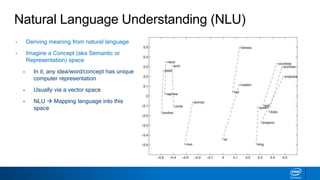
Natural Language Understanding (NLU)
• Deriving meaning from natural language
• Imagine a Concept (aka Semantic or
Representation) space
▪ In it, any idea/word/concept has unique
computer representation
▪ Usually via a vector space
▪ NLU  Mapping language into this
space
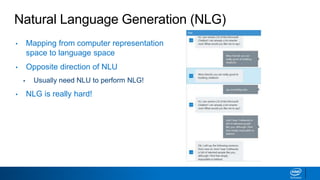
Natural Language Generation (NLG)
• Mapping from computer representation
space to language space
• Opposite direction of NLU
▪ Usually need NLU to perform NLG!
• NLG is really hard!
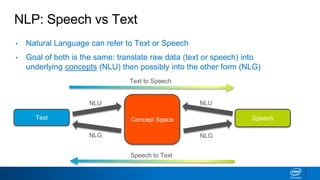
NLP: Speech vs Text
• Natural Language can refer to Text or Speech
• Goal of both is the same: translate raw data (text or speech) into
underlying concepts (NLU) then possibly into the other form (NLG)
Concept Space
Text Speech
Text to Speech
Speech to Text
NLU
NLG
NLU
NLG
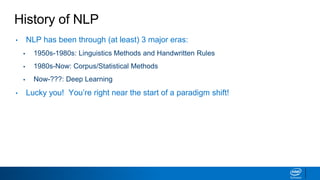
History of NLP
• NLP has been through (at least) 3 major eras:
▪ 1950s-1980s: Linguistics Methods and Handwritten Rules
▪ 1980s-Now: Corpus/Statistical Methods
▪ Now-???: Deep Learning
• Lucky you! You’re right near the start of a paradigm shift!
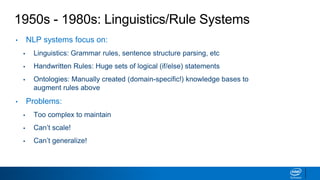
1950s - 1980s: Linguistics/Rule Systems
• NLP systems focus on:
▪ Linguistics: Grammar rules, sentence structure parsing, etc
▪ Handwritten Rules: Huge sets of logical (if/else) statements
▪ Ontologies: Manually created (domain-specific!) knowledge bases to
augment rules above
• Problems:
▪ Too complex to maintain
▪ Can’t scale!
▪ Can’t generalize!
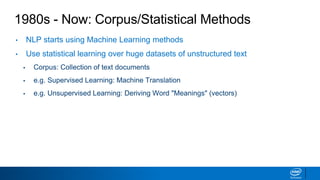
1980s - Now: Corpus/Statistical Methods
• NLP starts using Machine Learning methods
• Use statistical learning over huge datasets of unstructured text
▪ Corpus: Collection of text documents
▪ e.g. Supervised Learning: Machine Translation
▪ e.g. Unsupervised Learning: Deriving Word "Meanings" (vectors)
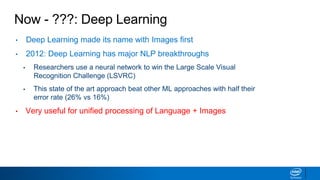
Now - ???: Deep Learning
• Deep Learning made its name with Images first
• 2012: Deep Learning has major NLP breakthroughs
▪ Researchers use a neural network to win the Large Scale Visual
Recognition Challenge (LSVRC)
▪ This state of the art approach beat other ML approaches with half their
error rate (26% vs 16%)
• Very useful for unified processing of Language + Images
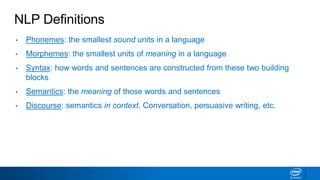
NLP Definitions
• Phonemes: the smallest sound units in a language
• Morphemes: the smallest units of meaning in a language
• Syntax: how words and sentences are constructed from these two building
blocks
• Semantics: the meaning of those words and sentences
• Discourse: semantics in context. Conversation, persuasive writing, etc.
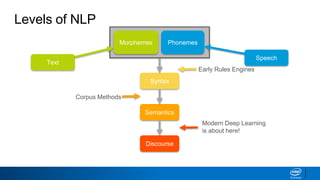
Levels of NLP
Morphemes Phonemes
Syntax
Semantics
Discourse
Text
Speech
Early Rules Engines
Corpus Methods
Modern Deep Learning
is about here!
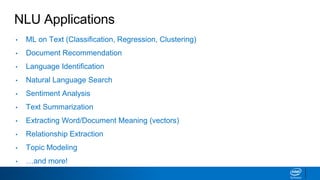
NLU Applications
• ML on Text (Classification, Regression, Clustering)
• Document Recommendation
• Language Identification
• Natural Language Search
• Sentiment Analysis
• Text Summarization
• Extracting Word/Document Meaning (vectors)
• Relationship Extraction
• Topic Modeling
• …and more!
NLU Application: Document Classification
• Classify “documents” - discrete collections of text - into categories
▪ Example: classify emails as spam vs. not spam
▪ Example: classify movie reviews as positive vs. negative
▪ Example: classify legal documents as relevant vs. not relevant to a topic
NLU Application: Document Recommendation
• Choosing the most relevant document based on some information:
▪ Example: show most relevant webpages based on query to search
engine
▪ Example: recommend news articles based on past articles liked
▪ Example: recommend restaurants based on Yelp reviews
NLU Application: Topic Modeling
• Breaking a set of documents into topics at the word level
▪ Example: see how prevalence of certain topics covered in a magazine
changes over time
▪ Example: find documents belonging to a certain topic
explain
NLG Applications
• Image Captioning
• (Better) Text Summarization
• Machine Translation
• Question Answering/Chatbots
• …so much more
• Notice NLU is almost a prerequisite for NLG
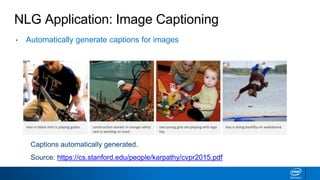
NLG Application: Image Captioning
• Automatically generate captions for images
Captions automatically generated.
Source: https://cs.stanford.edu/people/karpathy/cvpr2015.pdf
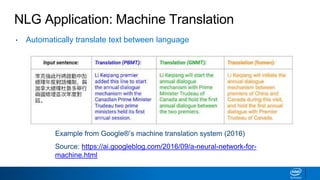
NLG Application: Machine Translation
Example from Google®’s machine translation system (2016)
Source: https://ai.googleblog.com/2016/09/a-neural-network-for-
machine.html
• Automatically translate text between language
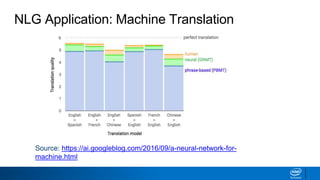
NLG Application: Machine Translation
Source: https://ai.googleblog.com/2016/09/a-neural-network-for-
machine.html
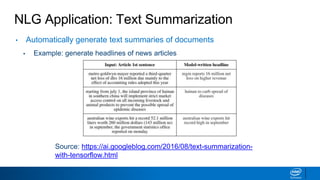
NLG Application: Text Summarization
• Automatically generate text summaries of documents
▪ Example: generate headlines of news articles
Source: https://ai.googleblog.com/2016/08/text-summarization-
with-tensorflow.html
Where We’re Headed
• Today:
▪ Regular Expression (regex) Basics
• Upcoming:
▪ NLP Preprocessing Tasks (Week 2)
▪ Deriving features from text (Week 3)
▪ Machine Learning with Text (Week 4)
▪ Topic Modeling on Text (Weeks 5-7)
▪ Advanced Topics for NLG including Deep Learning (Week 8)
Regular Expressions
What are Regular Expressions (“RegEx”)?
• A regex describes a pattern to look for in text
• Examples:
▪ Does a string contain the word ”cat”?
▪ Does a string contain 3 letters and then 2 numbers followed by a space?
▪ Does a string contain one or more letters (and only letters)?
• Typical Usage:
▪ Find strings that contain the regex pattern
▪ Retrieve the part of a string matching the pattern
Use Cases for Regex
• Parsing documents with expected component structure
▪ Use regex to grab the pieces you want
▪ e.g. HTML, find all headers aka within <h> tags
▪ e.g. remove known boilerplate sections from emails
• Validating User Input
▪ e.g. does email match xxx@xxx.com?
• NLP Preprocessing
▪ What pattern(s) represent individual words in text?
▪ e.g. space + letters + space  grab the letters
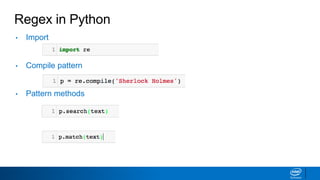
Regex in Python
• Import
• Compile pattern
• Pattern methods
Metacharacters
• . Matches any single character
• ^ Beginning of string
• $ End of string
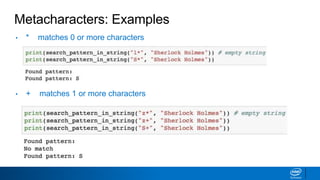
• * matches 0 or more characters
• + matches 1 or more characters
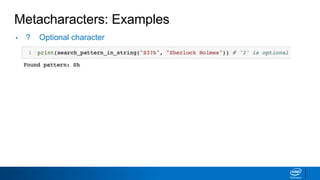
• ? Optional character
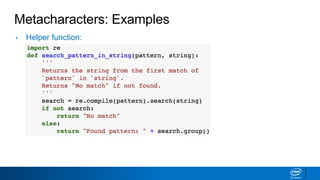
Metacharacters: Examples
• Helper function:
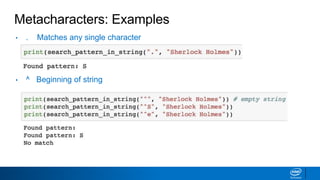
Metacharacters: Examples
• . Matches any single character
• ^ Beginning of string
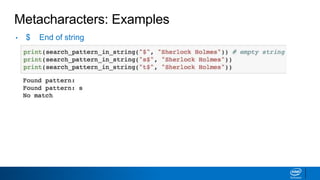
Metacharacters: Examples
• $ End of string
Metacharacters: Examples
• * matches 0 or more characters
• + matches 1 or more characters
Metacharacters: Examples
• ? Optional character
More Metacharacters
• { m,n} specify number of times character is matched between m
and n times
• [ ] list characters to be matched
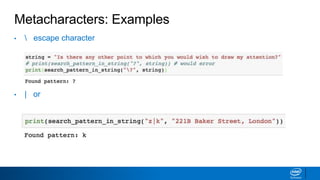
•  escape character
• | or
• ( ) capture group inside parenthesis
Metacharacters: Examples
• { m,n} specify number of times character is matched between m
and n times
• [ ] list characters to be matched
Metacharacters: Examples
•  escape character
• | or
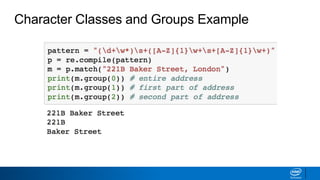
Character Classes
• s - matches any whitespace
• w - matches any alpha character. Equivalent to [A-Za-z]
• d - matches any numeric character. Equivalent to [0-9]
You may negate these by capitalizing. For example, D matches
anything not a digit
Handling Groups
• ()
Parenthesis control which parts of the string are returned after a
match
Character Classes and Groups Example
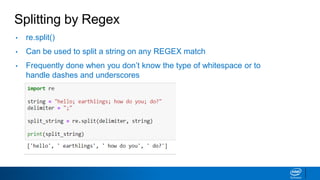
Splitting by Regex
• re.split()
• Can be used to split a string on any REGEX match
• Frequently done when you don’t know the type of whitespace or to
handle dashes and underscores
Lookaheads/Lookbehinds
• Allow you to keep the cursor in place, but still check to see if
certain conditions are met before or after that character
• Look ahead: (?=d) checks to see if the character is followed by a
number
• Look Behind: (?<=[aeiou]) checks to see if the character is
preceded by a vowel
examples
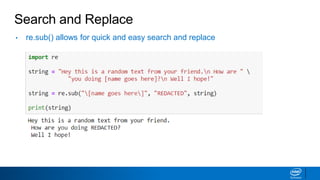
Search and Replace
• re.sub() allows for quick and easy search and replace
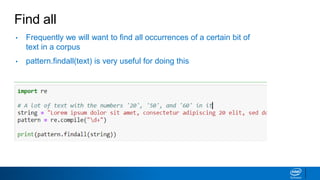
Find all
• Frequently we will want to find all occurrences of a certain bit of
text in a corpus
• pattern.findall(text) is very useful for doing this
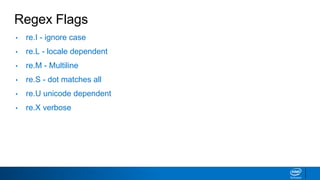
Regex Flags
• re.I - ignore case
• re.L - locale dependent
• re.M - Multiline
• re.S - dot matches all
• re.U unicode dependent
• re.X verbose
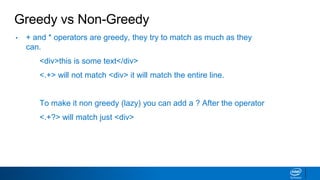
Greedy vs Non-Greedy
• + and * operators are greedy, they try to match as much as they
can.
<div>this is some text</div>
<.+> will not match <div> it will match the entire line.
To make it non greedy (lazy) you can add a ? After the operator
<.+?> will match just <div>
introtonlp-190218095523 (1).pdf

introtonlp-190218095523 (1).pdf

  • 1.
    Intro to NaturalLanguage Processing (NLP)
  • 2.
    What is NaturalLanguage Processing (NLP)? By “natural language” we mean a language that is used for everyday communication by humans. NLP is an Intersection of several fields ▪ Computer Science ▪ Artificial Intelligence ▪ Linguistics It is basically teaching computers to process human language Two main components: ▪ Natural Language Understanding (NLU) ▪ Natural Language Generation (NLG) NLP is AI Complete ▪ Requires all types of knowledge humans possess  It’s hard!
  • 3.
    Natural Language Understanding(NLU) • Deriving meaning from natural language • Imagine a Concept (aka Semantic or Representation) space ▪ In it, any idea/word/concept has unique computer representation ▪ Usually via a vector space ▪ NLU  Mapping language into this space
  • 4.
    Natural Language Generation(NLG) • Mapping from computer representation space to language space • Opposite direction of NLU ▪ Usually need NLU to perform NLG! • NLG is really hard!
  • 5.
    NLP: Speech vsText • Natural Language can refer to Text or Speech • Goal of both is the same: translate raw data (text or speech) into underlying concepts (NLU) then possibly into the other form (NLG) Concept Space Text Speech Text to Speech Speech to Text NLU NLG NLU NLG
  • 6.
    History of NLP •NLP has been through (at least) 3 major eras: ▪ 1950s-1980s: Linguistics Methods and Handwritten Rules ▪ 1980s-Now: Corpus/Statistical Methods ▪ Now-???: Deep Learning • Lucky you! You’re right near the start of a paradigm shift!
  • 7.
    1950s - 1980s:Linguistics/Rule Systems • NLP systems focus on: ▪ Linguistics: Grammar rules, sentence structure parsing, etc ▪ Handwritten Rules: Huge sets of logical (if/else) statements ▪ Ontologies: Manually created (domain-specific!) knowledge bases to augment rules above • Problems: ▪ Too complex to maintain ▪ Can’t scale! ▪ Can’t generalize!
  • 8.
    1980s - Now:Corpus/Statistical Methods • NLP starts using Machine Learning methods • Use statistical learning over huge datasets of unstructured text ▪ Corpus: Collection of text documents ▪ e.g. Supervised Learning: Machine Translation ▪ e.g. Unsupervised Learning: Deriving Word "Meanings" (vectors)
  • 9.
    Now - ???:Deep Learning • Deep Learning made its name with Images first • 2012: Deep Learning has major NLP breakthroughs ▪ Researchers use a neural network to win the Large Scale Visual Recognition Challenge (LSVRC) ▪ This state of the art approach beat other ML approaches with half their error rate (26% vs 16%) • Very useful for unified processing of Language + Images
  • 10.
    NLP Definitions • Phonemes:the smallest sound units in a language • Morphemes: the smallest units of meaning in a language • Syntax: how words and sentences are constructed from these two building blocks • Semantics: the meaning of those words and sentences • Discourse: semantics in context. Conversation, persuasive writing, etc.
  • 11.
    Levels of NLP MorphemesPhonemes Syntax Semantics Discourse Text Speech Early Rules Engines Corpus Methods Modern Deep Learning is about here!
  • 12.
    NLU Applications • MLon Text (Classification, Regression, Clustering) • Document Recommendation • Language Identification • Natural Language Search • Sentiment Analysis • Text Summarization • Extracting Word/Document Meaning (vectors) • Relationship Extraction • Topic Modeling • …and more!
  • 13.
    NLU Application: DocumentClassification • Classify “documents” - discrete collections of text - into categories ▪ Example: classify emails as spam vs. not spam ▪ Example: classify movie reviews as positive vs. negative ▪ Example: classify legal documents as relevant vs. not relevant to a topic
  • 14.
    NLU Application: DocumentRecommendation • Choosing the most relevant document based on some information: ▪ Example: show most relevant webpages based on query to search engine ▪ Example: recommend news articles based on past articles liked ▪ Example: recommend restaurants based on Yelp reviews
  • 15.
    NLU Application: TopicModeling • Breaking a set of documents into topics at the word level ▪ Example: see how prevalence of certain topics covered in a magazine changes over time ▪ Example: find documents belonging to a certain topic explain
  • 16.
    NLG Applications • ImageCaptioning • (Better) Text Summarization • Machine Translation • Question Answering/Chatbots • …so much more • Notice NLU is almost a prerequisite for NLG
  • 17.
    NLG Application: ImageCaptioning • Automatically generate captions for images Captions automatically generated. Source: https://cs.stanford.edu/people/karpathy/cvpr2015.pdf
  • 18.
    NLG Application: MachineTranslation Example from Google®’s machine translation system (2016) Source: https://ai.googleblog.com/2016/09/a-neural-network-for- machine.html • Automatically translate text between language
  • 19.
    NLG Application: MachineTranslation Source: https://ai.googleblog.com/2016/09/a-neural-network-for- machine.html
  • 20.
    NLG Application: TextSummarization • Automatically generate text summaries of documents ▪ Example: generate headlines of news articles Source: https://ai.googleblog.com/2016/08/text-summarization- with-tensorflow.html
  • 21.
    Where We’re Headed •Today: ▪ Regular Expression (regex) Basics • Upcoming: ▪ NLP Preprocessing Tasks (Week 2) ▪ Deriving features from text (Week 3) ▪ Machine Learning with Text (Week 4) ▪ Topic Modeling on Text (Weeks 5-7) ▪ Advanced Topics for NLG including Deep Learning (Week 8)
  • 22.
  • 23.
    What are RegularExpressions (“RegEx”)? • A regex describes a pattern to look for in text • Examples: ▪ Does a string contain the word ”cat”? ▪ Does a string contain 3 letters and then 2 numbers followed by a space? ▪ Does a string contain one or more letters (and only letters)? • Typical Usage: ▪ Find strings that contain the regex pattern ▪ Retrieve the part of a string matching the pattern
  • 24.
    Use Cases forRegex • Parsing documents with expected component structure ▪ Use regex to grab the pieces you want ▪ e.g. HTML, find all headers aka within <h> tags ▪ e.g. remove known boilerplate sections from emails • Validating User Input ▪ e.g. does email match xxx@xxx.com? • NLP Preprocessing ▪ What pattern(s) represent individual words in text? ▪ e.g. space + letters + space  grab the letters
  • 25.
    Regex in Python •Import • Compile pattern • Pattern methods
  • 26.
    Metacharacters • . Matchesany single character • ^ Beginning of string • $ End of string • * matches 0 or more characters • + matches 1 or more characters • ? Optional character
  • 27.
  • 28.
    Metacharacters: Examples • .Matches any single character • ^ Beginning of string
  • 29.
  • 30.
    Metacharacters: Examples • *matches 0 or more characters • + matches 1 or more characters
  • 31.
  • 32.
    More Metacharacters • {m,n} specify number of times character is matched between m and n times • [ ] list characters to be matched • escape character • | or • ( ) capture group inside parenthesis
  • 33.
    Metacharacters: Examples • {m,n} specify number of times character is matched between m and n times • [ ] list characters to be matched
  • 34.
    Metacharacters: Examples • escape character • | or
  • 35.
    Character Classes • s- matches any whitespace • w - matches any alpha character. Equivalent to [A-Za-z] • d - matches any numeric character. Equivalent to [0-9] You may negate these by capitalizing. For example, D matches anything not a digit
  • 36.
    Handling Groups • () Parenthesiscontrol which parts of the string are returned after a match
  • 37.
    Character Classes andGroups Example
  • 38.
    Splitting by Regex •re.split() • Can be used to split a string on any REGEX match • Frequently done when you don’t know the type of whitespace or to handle dashes and underscores
  • 39.
    Lookaheads/Lookbehinds • Allow youto keep the cursor in place, but still check to see if certain conditions are met before or after that character • Look ahead: (?=d) checks to see if the character is followed by a number • Look Behind: (?<=[aeiou]) checks to see if the character is preceded by a vowel examples
  • 40.
    Search and Replace •re.sub() allows for quick and easy search and replace
  • 41.
    Find all • Frequentlywe will want to find all occurrences of a certain bit of text in a corpus • pattern.findall(text) is very useful for doing this
  • 42.
    Regex Flags • re.I- ignore case • re.L - locale dependent • re.M - Multiline • re.S - dot matches all • re.U unicode dependent • re.X verbose
  • 43.
    Greedy vs Non-Greedy •+ and * operators are greedy, they try to match as much as they can. <div>this is some text</div> <.+> will not match <div> it will match the entire line. To make it non greedy (lazy) you can add a ? After the operator <.+?> will match just <div>