[Type text]
BizTalk Server 2013
Guide on new features
Varun Kumar
1
Table of Contents
Introduction to BizTalk....................................................................................... 2
Different Versions.............................................................................................. 2
BixTalk General Features.................................................................................... 3
Limitations......................................................................................................... 4
New Features (With BizTalk 2013)...................................................................... 4
Deprecated List................................................................................................ 12
Hardware Requirements for BizTalk Server 2013 and 2013 R2........................... 13
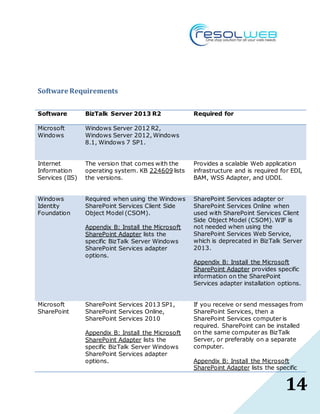
Software Requirements.................................................................................... 14
2
Introduction to BizTalk
BizTalk Server enables companies to automate business processes, through the use
of adapters which help to communicate with different software systems used in an
enterprise. It delivers a suite of powerful technologies that help IT professionals,
developers, and business users manage complex integration easily, while reducing
costs as well.
Microsoft BizTalk Server offers a suite of technologies, such as messaging, Adapter
Pack, Host Integration Server, Orchestration Designer, Business Rules Engine, B2B
integration, business activity monitoring, and more, that enable and enhance the
quality of integration.
Different Versions
 2000 - BizTalk Server 2000
 2002 - BizTalk Server 2002
 2004 - BizTalk Server 2004 (First version to run on Microsoft .NET 1.0)
 2006 - BizTalk Server 2006 (First version to run on Microsoft .NET 2.0)
 2007 - BizTalk Server 2006 R2 (First version to utilize the new Windows
Communication Foundation (WCF) via native adapter)
 2009 - BizTalk Server 2009 (First version to work with Visual Studio 2008)
 2010 - BizTalk Server 2010(First version to work with Visual Studio 2010 and
Microsoft .NET 4.0)
 2013 - BizTalk 2013 (First version to work with Visual Studio 2012 and
Microsoft .NET 4.5)
3
 2014 - BizTalk 2013 R2 (First version to work with Visual Studio 2013 and
Microsoft .NET 4.5.1)
BixTalk GeneralFeatures
 Adapters to simplify integration to line of business (LOB) applications (Siebel,
SAP, IFS Applications, JD Edwards, Oracle,[clarification needed] Microsoft
Dynamics CRM), databases (Microsoft SQL Server, Oracle Database and DB2)
and other Technologies (Tibco and Java EE)
 Support for enterprise standards like RosettaNet, HL7, HIPAA and SWIFT.
 Business activity monitoring (BAM), which allows a dashboard, aggregated
(PivotTable) view on how the Business Processes are doing and how
messages are processed.
 A unified administration console for deployment, monitoring and operations
of solutions on BizTalk servers in environment.
 Built-in electronic data interchange (EDI) functionality supporting X12 and
EDIFACT.
 Ability to do graphical modelling of business processes in Visual Studio,
model documents with XML schemas, graphically mapping between different
schemas, and building pipelines to decrypt, verify, parse messages as they
enter or exit the system via adapters.
 Users can automate business management processes via Orchestrations.
 BizTalk integrates with other Microsoft products like Microsoft Dynamics CRM,
Microsoft SQL Server, and SharePoint to allow interaction with a user
participating in a workflow process.
 Extensive support for web services (consuming and exposing)
 RFID support, as of BizTalk 2006 R2.
4
Limitations
1. Human-centric processes cannot be implemented directly with BizTalk Server
and need additional applications like Microsoft SharePoint server
New Features (With BizTalk 2013)
1. New Model
BizTalk Server 2013 configures on a Windows Azure or virtual machine, and
operates on a per core license model, with a core priced one quarter of the
processor cost. To run BizTalk Server 2013 on four core processors, costs
almost the same as running BizTalk Server 2010, and it is now possible to
scale up easily and seamlessly.
BizTalk Server supports the following platform stack:
 Windows Server 2012 R2, Windows Server 2012, Windows 8.1,
Windows 7 SP1.
 Microsoft Office Excel 2013 or 2010.
 .NET Framework 4.5 and .NET Framework 4.5.1
 Visual Studio 2013
 SQL Server 2014 or SQL Server 2012 SP1
 SharePoint 2013 SP1
5
2. Adapter Enhancements
 WCF-WebHttp Adapter enhancements:
With this new version of BizTalk Server the WCF-WebHttp adapter now
also supports sending and receiving JSON messages. This new version
of BizTalk ships with a wizard to generate XSD schema from a JSON
instance and two new pipelines (and components) for processing JSON
messages in a messaging scenario.
 Updates to the SFTP adapter
SFTP adapter now supports two-factor authentication and provides an
option to specify a temporary folder while uploading/downloading large
files. You can also select the Encryption cipher value specific to your
target server.
 Updates to HL7 Accelerator
HL7 Accelerator now supports the following:
 Provides capability to include free-text data as part of the
message that can be processed by the HL7 pipelines.
 64-bit support for hosting Hl7 adapter.
 SharePoint Adaptor:
The updated SharePoint adapter enables users connecting to a
SharePoint server to opt for either a client-side, or server-side object
model.
6
3. HIPPA
BizTalk Server 2013 R2 includes native functionality providing support for
HIPAA. It is not an add-in to the product, such as an adapter or an
accelerator. It is built into the product. BizTalk Server 2013 R2 includes the
EDI components and capabilities that are required to both comply with the
HIPAA mandates and to also embrace HIPAA as a well-managed and
measured business process.
BizTalk Server 2013 R2 supports HIPAA version 5010 and 4010.
HIPAA 5010 Version Support
The following changes have been introduced as part of BizTalk Server’s
support for HIPAA 5010:
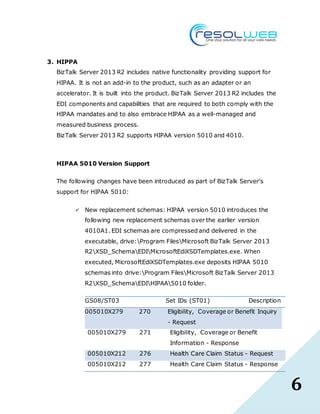
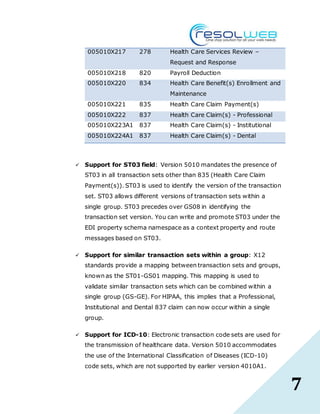
 New replacement schemas: HIPAA version 5010 introduces the
following new replacement schemas over the earlier version
4010A1. EDI schemas are compressed and delivered in the
executable, drive:Program FilesMicrosoft BizTalk Server 2013
R2XSD_SchemaEDIMicrosoftEdiXSDTemplates.exe. When
executed, MicrosoftEdiXSDTemplates.exe deposits HIPAA 5010
schemas into drive:Program FilesMicrosoft BizTalk Server 2013
R2XSD_SchemaEDIHIPAA5010 folder.
GS08/ST03 Set IDs (ST01) Description
005010X279 270 Eligibility, Coverage or Benefit Inquiry
- Request
005010X279 271 Eligibility, Coverage or Benefit
Information - Response
005010X212 276 Health Care Claim Status - Request
005010X212 277 Health Care Claim Status - Response
7
005010X217 278 Health Care Services Review –
Request and Response
005010X218 820 Payroll Deduction
005010X220 834 Health Care Benefit(s) Enrollment and
Maintenance
005010X221 835 Health Care Claim Payment(s)
005010X222 837 Health Care Claim(s) - Professional
005010X223A1 837 Health Care Claim(s) - Institutional
005010X224A1 837 Health Care Claim(s) - Dental
 Support for ST03 field: Version 5010 mandates the presence of
ST03 in all transaction sets other than 835 (Health Care Claim
Payment(s)). ST03 is used to identify the version of the transaction
set. ST03 allows different versions of transaction sets within a
single group. ST03 precedes over GS08 in identifying the
transaction set version. You can write and promote ST03 under the
EDI property schema namespace as a context property and route
messages based on ST03.
 Support for similar transaction sets within a group: X12
standards provide a mapping between transaction sets and groups,
known as the ST01-GS01 mapping. This mapping is used to
validate similar transaction sets which can be combined within a
single group (GS-GE). For HIPAA, this implies that a Professional,
Institutional and Dental 837 claim can now occur within a single
group.
 Support for ICD-10: Electronic transaction code sets are used for
the transmission of healthcare data. Version 5010 accommodates
the use of the International Classification of Diseases (ICD-10)
code sets, which are not supported by earlier version 4010A1.
8
ICD-10 is used for identifying various diagnoses and procedures in
claim billing, related transactions and clinical reporting. The
benefits of using ICD-10 include more accurate data on patient
services, diagnosis, treatment information and more
comprehensive reporting of quality data.
 New fields in 5010 997: The 997 functional acknowledgement
schema provided out-of-the-boxby BizTalk Server 2013 R2
introduces three new optional fields namely AK103, AK203 and
AK41.3. The EDI engine is capable of processing an incoming 5010
997 message which contains these fields but will not generate an
outgoing 997 acknowledgement based on the new schema.
There was a known issue with the HIPAA 4010A1 schemas in which
elements of the X12_R data type were not checked against their minimum
and maximum lengths. In BizTalk Server 2013 R2 this issue has been
fixed and the HIPAA 5010 schemas validate elements of the X12_R data
type for the minimum and maximum lengths.
4. Updates to the supported EDI schemas
BizTalk Server introduces support for the following EDI schemas:
 X12 – 5040, 5050, 6020, 6030
 EDIFACT – D06A, D06B, D07A, D07B, D08A, D08B, D09A, D09B, D10A,
D10B
 HL7 – 2.51 message support added
 SWIFT – 2012 Message Pack

9
5. Integrated ESB Toolkit
ESB Toolkit is now integrated as part of the BizTalk Server setup. Also, the
ESB Toolkit configuration experience is simplified to facilitate quick start time
for users.
6. BizTalk Health Monitor
BizTalk Health Monitor is a new BizTalk snap-in that helps monitor the health
of your BizTalk Server environment. This snap-in can be added to the
existing BizTalk Administration Console or can be run individually. Following
are the features of BizTalk Health Monitor:
 Generate and view report for the Message Box Viewer.
 Dashboard view for overall health of BizTalk environment
 Send e-mail notifications
 Schedule report collection
 Performance monitor integration with pre-loaded scenario-based
performance counters
 Monitor multiple BizTalk environments
 Report management
7. Mapper uses XSLCompiledTransform
The Mapper uses the XSLCompiledTransform class. Previous BizTalk Server
versions used the XslTransform class, which is obsolete. The
XSLCompiledTransform class provides performance enhancements, including:
10
 Once the Load method completes successfully, the Transform
method can be called simultaneously from multiple threads.
 The new XSLT processor compiles the XSLT style sheet to a common
intermediate format. Once the style sheet is compiled, it can be
cached and reused.
8. Configurable Dynamic Send Port Handler
When creating a Dynamic Send Port, an adapter Send Handler is configurable
for every installed adapter. Includes both One-Way and Solicit-Response
Dynamic Ports. In previous BizTalk versions, a dynamic send port uses the
adapter’s default host.
9. Support Tools
Support Tools is automatically installed with BizTalk: C:Program Files
(x86)Microsoft BizTalk Server 20xxSDKUtilitiesSupport Tools.
Tools include:
 BizTalk Assembly Checker
 MsgBox Viewer
 PSSDiagForBizTalk
 Internet shortcut to BizTalk Terminator download
10. PowerShell Provider
The BizTalk Server PowerShell Provider is in C:Program Files (x86)Microsoft
BizTalk Server 2013SDKUtilitiesPowerShell.
11
11. BAM Alerts
BizTalk Server 2013 uses SQL Server 2012, Database Mail is needed to use
BAM Alerts. If BizTalk Server uses SQL Server 2008 R2, SQL Server
Notification Services is needed to use BAM Alerts.
12. Speed
The updated adapters increase speed. In the 2010 version, the maximum
speed was limited to that of the slowest adapter, as it was necessary to
receive an acknowledgement before sending the next message. Biztalk
Server 2013 does away with this hold-up, allowing messages to be sent
without receiving an acknowledgement from the previous message, and
correlating the acknowledgment to the concerned message, when it finally
arrives.
12
Deprecated List
Sno. Program Status Replacement
1 RFID Mobile Removed None
2 RFID Server Deprecated None
3 SharePoint SSOM/Web
Service adapter
Deprecated Use the CSOM (Client Side Object Model)
option.
Windows SharePoint Services Adapter
Appendix B: Install the Microsoft
SharePoint Adapter
4 SOAP adapter Deprecated WCF-BasicHttp Adapter
5 Old SQL adapter Deprecated WCF-based SQL adapter in the BizTalk
Adapter Pack
6 UDDI Deprecated None
13
Hardware Requirements for BizTalkServer 2013 and 2013 R2
Component Minimum Requirement
Computer and
processor
A computer with an Intel Pentium-compatible CPU that is:
 1 GHz or higher for single processors
 900 MHz or higher for double processors
 700 MHz or higher for quad processors
Hyper-threading and dual-core processors are supported.
The 64-bit versions of BizTalk Server require a 64-bit operating
system running on an x64-based system. Computers based on
CPUs that are compatible with the AMD64 (x86-64) and
Extended Memory 64-bit Technology (EM64T) processor
architecture are considered x64-based systems.
BizTalk Server is not supported on Itanium-based systems.
Memory 2 GB of RAM
Hard disk 10 GB of available hard disk space for a complete installation
including the operating system and all prerequisite software.
The hard disk must be NTFS formatted.
Drive CD-ROM or DVD-ROM drive (shared or attached)
14
Software Requirements
Software BizTalk Server 2013 R2 Required for
Microsoft
Windows
Windows Server 2012 R2,
Windows Server 2012, Windows
8.1, Windows 7 SP1.
Internet
Information
Services (IIS)
The version that comes with the
operating system. KB 224609 lists
the versions.
Provides a scalable Web application
infrastructure and is required for EDI,
BAM, WSS Adapter, and UDDI.
Windows
Identity
Foundation
Required when using the Windows
SharePoint Services Client Side
Object Model (CSOM).
Appendix B: Install the Microsoft
SharePoint Adapter lists the
specific BizTalk Server Windows
SharePoint Services adapter
options.
SharePoint Services adapter or
SharePoint Services Online when
used with SharePoint Services Client
Side Object Model (CSOM). WIF is
not needed when using the
SharePoint Services Web Service,
which is deprecated in BizTalk Server
2013.
Appendix B: Install the Microsoft
SharePoint Adapter provides specific
information on the SharePoint
Services adapter installation options.
Microsoft
SharePoint
SharePoint Services 2013 SP1,
SharePoint Services Online,
SharePoint Services 2010
Appendix B: Install the Microsoft
SharePoint Adapter lists the
specific BizTalk Server Windows
SharePoint Services adapter
options.
If you receive or send messages from
SharePoint Services, then a
SharePoint Services computer is
required. SharePoint can be installed
on the same computer as BizTalk
Server, or preferably on a separate
computer.
Appendix B: Install the Microsoft
SharePoint Adapter lists the specific
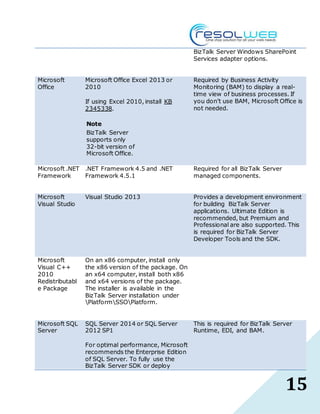
15
BizTalk Server Windows SharePoint
Services adapter options.
Microsoft
Office
Microsoft Office Excel 2013 or
2010
If using Excel 2010, install KB
2345338.
Note
BizTalk Server
supports only
32-bit version of
Microsoft Office.
Required by Business Activity
Monitoring (BAM) to display a real-
time view of business processes. If
you don’t use BAM, Microsoft Office is
not needed.
Microsoft .NET
Framework
.NET Framework 4.5 and .NET
Framework 4.5.1
Required for all BizTalk Server
managed components.
Microsoft
Visual Studio
Visual Studio 2013 Provides a development environment
for building BizTalk Server
applications. Ultimate Edition is
recommended, but Premium and
Professional are also supported. This
is required for BizTalk Server
Developer Tools and the SDK.
Microsoft
Visual C++
2010
Redistributabl
e Package
On an x86 computer, install only
the x86 version of the package. On
an x64 computer, install both x86
and x64 versions of the package.
The installer is available in the
BizTalk Server installation under
PlatformSSOPlatform.
Microsoft SQL
Server
SQL Server 2014 or SQL Server
2012 SP1
For optimal performance, Microsoft
recommends the Enterprise Edition
of SQL Server. To fully use the
BizTalk Server SDK or deploy
This is required for BizTalk Server
Runtime, EDI, and BAM.
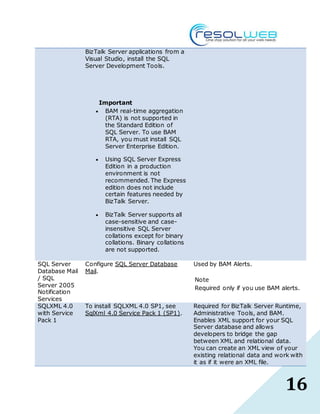
16
BizTalk Server applications from a
Visual Studio, install the SQL
Server Development Tools.
Important
 BAM real-time aggregation
(RTA) is not supported in
the Standard Edition of
SQL Server. To use BAM
RTA, you must install SQL
Server Enterprise Edition.
 Using SQL Server Express
Edition in a production
environment is not
recommended. The Express
edition does not include
certain features needed by
BizTalk Server.
 BizTalk Server supports all
case-sensitive and case-
insensitive SQL Server
collations except for binary
collations. Binary collations
are not supported.
SQL Server
Database Mail
/ SQL
Server 2005
Notification
Services
Configure SQL Server Database
Mail.
Used by BAM Alerts.
Note
Required only if you use BAM alerts.
SQLXML 4.0
with Service
Pack 1
To install SQLXML 4.0 SP1, see
SqlXml 4.0 Service Pack 1 (SP1).
Required for BizTalk Server Runtime,
Administrative Tools, and BAM.
Enables XML support for your SQL
Server database and allows
developers to bridge the gap
between XML and relational data.
You can create an XML view of your
existing relational data and work with
it as if it were an XML file.

Guide on BizTalk Server 2013 Features

  • 1.
    [Type text] BizTalk Server2013 Guide on new features Varun Kumar
  • 2.
    1 Table of Contents Introductionto BizTalk....................................................................................... 2 Different Versions.............................................................................................. 2 BixTalk General Features.................................................................................... 3 Limitations......................................................................................................... 4 New Features (With BizTalk 2013)...................................................................... 4 Deprecated List................................................................................................ 12 Hardware Requirements for BizTalk Server 2013 and 2013 R2........................... 13 Software Requirements.................................................................................... 14
  • 3.
    2 Introduction to BizTalk BizTalkServer enables companies to automate business processes, through the use of adapters which help to communicate with different software systems used in an enterprise. It delivers a suite of powerful technologies that help IT professionals, developers, and business users manage complex integration easily, while reducing costs as well. Microsoft BizTalk Server offers a suite of technologies, such as messaging, Adapter Pack, Host Integration Server, Orchestration Designer, Business Rules Engine, B2B integration, business activity monitoring, and more, that enable and enhance the quality of integration. Different Versions  2000 - BizTalk Server 2000  2002 - BizTalk Server 2002  2004 - BizTalk Server 2004 (First version to run on Microsoft .NET 1.0)  2006 - BizTalk Server 2006 (First version to run on Microsoft .NET 2.0)  2007 - BizTalk Server 2006 R2 (First version to utilize the new Windows Communication Foundation (WCF) via native adapter)  2009 - BizTalk Server 2009 (First version to work with Visual Studio 2008)  2010 - BizTalk Server 2010(First version to work with Visual Studio 2010 and Microsoft .NET 4.0)  2013 - BizTalk 2013 (First version to work with Visual Studio 2012 and Microsoft .NET 4.5)
  • 4.
    3  2014 -BizTalk 2013 R2 (First version to work with Visual Studio 2013 and Microsoft .NET 4.5.1) BixTalk GeneralFeatures  Adapters to simplify integration to line of business (LOB) applications (Siebel, SAP, IFS Applications, JD Edwards, Oracle,[clarification needed] Microsoft Dynamics CRM), databases (Microsoft SQL Server, Oracle Database and DB2) and other Technologies (Tibco and Java EE)  Support for enterprise standards like RosettaNet, HL7, HIPAA and SWIFT.  Business activity monitoring (BAM), which allows a dashboard, aggregated (PivotTable) view on how the Business Processes are doing and how messages are processed.  A unified administration console for deployment, monitoring and operations of solutions on BizTalk servers in environment.  Built-in electronic data interchange (EDI) functionality supporting X12 and EDIFACT.  Ability to do graphical modelling of business processes in Visual Studio, model documents with XML schemas, graphically mapping between different schemas, and building pipelines to decrypt, verify, parse messages as they enter or exit the system via adapters.  Users can automate business management processes via Orchestrations.  BizTalk integrates with other Microsoft products like Microsoft Dynamics CRM, Microsoft SQL Server, and SharePoint to allow interaction with a user participating in a workflow process.  Extensive support for web services (consuming and exposing)  RFID support, as of BizTalk 2006 R2.
  • 5.
    4 Limitations 1. Human-centric processescannot be implemented directly with BizTalk Server and need additional applications like Microsoft SharePoint server New Features (With BizTalk 2013) 1. New Model BizTalk Server 2013 configures on a Windows Azure or virtual machine, and operates on a per core license model, with a core priced one quarter of the processor cost. To run BizTalk Server 2013 on four core processors, costs almost the same as running BizTalk Server 2010, and it is now possible to scale up easily and seamlessly. BizTalk Server supports the following platform stack:  Windows Server 2012 R2, Windows Server 2012, Windows 8.1, Windows 7 SP1.  Microsoft Office Excel 2013 or 2010.  .NET Framework 4.5 and .NET Framework 4.5.1  Visual Studio 2013  SQL Server 2014 or SQL Server 2012 SP1  SharePoint 2013 SP1
  • 6.
    5 2. Adapter Enhancements WCF-WebHttp Adapter enhancements: With this new version of BizTalk Server the WCF-WebHttp adapter now also supports sending and receiving JSON messages. This new version of BizTalk ships with a wizard to generate XSD schema from a JSON instance and two new pipelines (and components) for processing JSON messages in a messaging scenario.  Updates to the SFTP adapter SFTP adapter now supports two-factor authentication and provides an option to specify a temporary folder while uploading/downloading large files. You can also select the Encryption cipher value specific to your target server.  Updates to HL7 Accelerator HL7 Accelerator now supports the following:  Provides capability to include free-text data as part of the message that can be processed by the HL7 pipelines.  64-bit support for hosting Hl7 adapter.  SharePoint Adaptor: The updated SharePoint adapter enables users connecting to a SharePoint server to opt for either a client-side, or server-side object model.
  • 7.
    6 3. HIPPA BizTalk Server2013 R2 includes native functionality providing support for HIPAA. It is not an add-in to the product, such as an adapter or an accelerator. It is built into the product. BizTalk Server 2013 R2 includes the EDI components and capabilities that are required to both comply with the HIPAA mandates and to also embrace HIPAA as a well-managed and measured business process. BizTalk Server 2013 R2 supports HIPAA version 5010 and 4010. HIPAA 5010 Version Support The following changes have been introduced as part of BizTalk Server’s support for HIPAA 5010:  New replacement schemas: HIPAA version 5010 introduces the following new replacement schemas over the earlier version 4010A1. EDI schemas are compressed and delivered in the executable, drive:Program FilesMicrosoft BizTalk Server 2013 R2XSD_SchemaEDIMicrosoftEdiXSDTemplates.exe. When executed, MicrosoftEdiXSDTemplates.exe deposits HIPAA 5010 schemas into drive:Program FilesMicrosoft BizTalk Server 2013 R2XSD_SchemaEDIHIPAA5010 folder. GS08/ST03 Set IDs (ST01) Description 005010X279 270 Eligibility, Coverage or Benefit Inquiry - Request 005010X279 271 Eligibility, Coverage or Benefit Information - Response 005010X212 276 Health Care Claim Status - Request 005010X212 277 Health Care Claim Status - Response
  • 8.
    7 005010X217 278 HealthCare Services Review – Request and Response 005010X218 820 Payroll Deduction 005010X220 834 Health Care Benefit(s) Enrollment and Maintenance 005010X221 835 Health Care Claim Payment(s) 005010X222 837 Health Care Claim(s) - Professional 005010X223A1 837 Health Care Claim(s) - Institutional 005010X224A1 837 Health Care Claim(s) - Dental  Support for ST03 field: Version 5010 mandates the presence of ST03 in all transaction sets other than 835 (Health Care Claim Payment(s)). ST03 is used to identify the version of the transaction set. ST03 allows different versions of transaction sets within a single group. ST03 precedes over GS08 in identifying the transaction set version. You can write and promote ST03 under the EDI property schema namespace as a context property and route messages based on ST03.  Support for similar transaction sets within a group: X12 standards provide a mapping between transaction sets and groups, known as the ST01-GS01 mapping. This mapping is used to validate similar transaction sets which can be combined within a single group (GS-GE). For HIPAA, this implies that a Professional, Institutional and Dental 837 claim can now occur within a single group.  Support for ICD-10: Electronic transaction code sets are used for the transmission of healthcare data. Version 5010 accommodates the use of the International Classification of Diseases (ICD-10) code sets, which are not supported by earlier version 4010A1.
  • 9.
    8 ICD-10 is usedfor identifying various diagnoses and procedures in claim billing, related transactions and clinical reporting. The benefits of using ICD-10 include more accurate data on patient services, diagnosis, treatment information and more comprehensive reporting of quality data.  New fields in 5010 997: The 997 functional acknowledgement schema provided out-of-the-boxby BizTalk Server 2013 R2 introduces three new optional fields namely AK103, AK203 and AK41.3. The EDI engine is capable of processing an incoming 5010 997 message which contains these fields but will not generate an outgoing 997 acknowledgement based on the new schema. There was a known issue with the HIPAA 4010A1 schemas in which elements of the X12_R data type were not checked against their minimum and maximum lengths. In BizTalk Server 2013 R2 this issue has been fixed and the HIPAA 5010 schemas validate elements of the X12_R data type for the minimum and maximum lengths. 4. Updates to the supported EDI schemas BizTalk Server introduces support for the following EDI schemas:  X12 – 5040, 5050, 6020, 6030  EDIFACT – D06A, D06B, D07A, D07B, D08A, D08B, D09A, D09B, D10A, D10B  HL7 – 2.51 message support added  SWIFT – 2012 Message Pack 
  • 10.
    9 5. Integrated ESBToolkit ESB Toolkit is now integrated as part of the BizTalk Server setup. Also, the ESB Toolkit configuration experience is simplified to facilitate quick start time for users. 6. BizTalk Health Monitor BizTalk Health Monitor is a new BizTalk snap-in that helps monitor the health of your BizTalk Server environment. This snap-in can be added to the existing BizTalk Administration Console or can be run individually. Following are the features of BizTalk Health Monitor:  Generate and view report for the Message Box Viewer.  Dashboard view for overall health of BizTalk environment  Send e-mail notifications  Schedule report collection  Performance monitor integration with pre-loaded scenario-based performance counters  Monitor multiple BizTalk environments  Report management 7. Mapper uses XSLCompiledTransform The Mapper uses the XSLCompiledTransform class. Previous BizTalk Server versions used the XslTransform class, which is obsolete. The XSLCompiledTransform class provides performance enhancements, including:
  • 11.
    10  Once theLoad method completes successfully, the Transform method can be called simultaneously from multiple threads.  The new XSLT processor compiles the XSLT style sheet to a common intermediate format. Once the style sheet is compiled, it can be cached and reused. 8. Configurable Dynamic Send Port Handler When creating a Dynamic Send Port, an adapter Send Handler is configurable for every installed adapter. Includes both One-Way and Solicit-Response Dynamic Ports. In previous BizTalk versions, a dynamic send port uses the adapter’s default host. 9. Support Tools Support Tools is automatically installed with BizTalk: C:Program Files (x86)Microsoft BizTalk Server 20xxSDKUtilitiesSupport Tools. Tools include:  BizTalk Assembly Checker  MsgBox Viewer  PSSDiagForBizTalk  Internet shortcut to BizTalk Terminator download 10. PowerShell Provider The BizTalk Server PowerShell Provider is in C:Program Files (x86)Microsoft BizTalk Server 2013SDKUtilitiesPowerShell.
  • 12.
    11 11. BAM Alerts BizTalkServer 2013 uses SQL Server 2012, Database Mail is needed to use BAM Alerts. If BizTalk Server uses SQL Server 2008 R2, SQL Server Notification Services is needed to use BAM Alerts. 12. Speed The updated adapters increase speed. In the 2010 version, the maximum speed was limited to that of the slowest adapter, as it was necessary to receive an acknowledgement before sending the next message. Biztalk Server 2013 does away with this hold-up, allowing messages to be sent without receiving an acknowledgement from the previous message, and correlating the acknowledgment to the concerned message, when it finally arrives.
  • 13.
    12 Deprecated List Sno. ProgramStatus Replacement 1 RFID Mobile Removed None 2 RFID Server Deprecated None 3 SharePoint SSOM/Web Service adapter Deprecated Use the CSOM (Client Side Object Model) option. Windows SharePoint Services Adapter Appendix B: Install the Microsoft SharePoint Adapter 4 SOAP adapter Deprecated WCF-BasicHttp Adapter 5 Old SQL adapter Deprecated WCF-based SQL adapter in the BizTalk Adapter Pack 6 UDDI Deprecated None
  • 14.
    13 Hardware Requirements forBizTalkServer 2013 and 2013 R2 Component Minimum Requirement Computer and processor A computer with an Intel Pentium-compatible CPU that is:  1 GHz or higher for single processors  900 MHz or higher for double processors  700 MHz or higher for quad processors Hyper-threading and dual-core processors are supported. The 64-bit versions of BizTalk Server require a 64-bit operating system running on an x64-based system. Computers based on CPUs that are compatible with the AMD64 (x86-64) and Extended Memory 64-bit Technology (EM64T) processor architecture are considered x64-based systems. BizTalk Server is not supported on Itanium-based systems. Memory 2 GB of RAM Hard disk 10 GB of available hard disk space for a complete installation including the operating system and all prerequisite software. The hard disk must be NTFS formatted. Drive CD-ROM or DVD-ROM drive (shared or attached)
  • 15.
    14 Software Requirements Software BizTalkServer 2013 R2 Required for Microsoft Windows Windows Server 2012 R2, Windows Server 2012, Windows 8.1, Windows 7 SP1. Internet Information Services (IIS) The version that comes with the operating system. KB 224609 lists the versions. Provides a scalable Web application infrastructure and is required for EDI, BAM, WSS Adapter, and UDDI. Windows Identity Foundation Required when using the Windows SharePoint Services Client Side Object Model (CSOM). Appendix B: Install the Microsoft SharePoint Adapter lists the specific BizTalk Server Windows SharePoint Services adapter options. SharePoint Services adapter or SharePoint Services Online when used with SharePoint Services Client Side Object Model (CSOM). WIF is not needed when using the SharePoint Services Web Service, which is deprecated in BizTalk Server 2013. Appendix B: Install the Microsoft SharePoint Adapter provides specific information on the SharePoint Services adapter installation options. Microsoft SharePoint SharePoint Services 2013 SP1, SharePoint Services Online, SharePoint Services 2010 Appendix B: Install the Microsoft SharePoint Adapter lists the specific BizTalk Server Windows SharePoint Services adapter options. If you receive or send messages from SharePoint Services, then a SharePoint Services computer is required. SharePoint can be installed on the same computer as BizTalk Server, or preferably on a separate computer. Appendix B: Install the Microsoft SharePoint Adapter lists the specific
  • 16.
    15 BizTalk Server WindowsSharePoint Services adapter options. Microsoft Office Microsoft Office Excel 2013 or 2010 If using Excel 2010, install KB 2345338. Note BizTalk Server supports only 32-bit version of Microsoft Office. Required by Business Activity Monitoring (BAM) to display a real- time view of business processes. If you don’t use BAM, Microsoft Office is not needed. Microsoft .NET Framework .NET Framework 4.5 and .NET Framework 4.5.1 Required for all BizTalk Server managed components. Microsoft Visual Studio Visual Studio 2013 Provides a development environment for building BizTalk Server applications. Ultimate Edition is recommended, but Premium and Professional are also supported. This is required for BizTalk Server Developer Tools and the SDK. Microsoft Visual C++ 2010 Redistributabl e Package On an x86 computer, install only the x86 version of the package. On an x64 computer, install both x86 and x64 versions of the package. The installer is available in the BizTalk Server installation under PlatformSSOPlatform. Microsoft SQL Server SQL Server 2014 or SQL Server 2012 SP1 For optimal performance, Microsoft recommends the Enterprise Edition of SQL Server. To fully use the BizTalk Server SDK or deploy This is required for BizTalk Server Runtime, EDI, and BAM.
  • 17.
    16 BizTalk Server applicationsfrom a Visual Studio, install the SQL Server Development Tools. Important  BAM real-time aggregation (RTA) is not supported in the Standard Edition of SQL Server. To use BAM RTA, you must install SQL Server Enterprise Edition.  Using SQL Server Express Edition in a production environment is not recommended. The Express edition does not include certain features needed by BizTalk Server.  BizTalk Server supports all case-sensitive and case- insensitive SQL Server collations except for binary collations. Binary collations are not supported. SQL Server Database Mail / SQL Server 2005 Notification Services Configure SQL Server Database Mail. Used by BAM Alerts. Note Required only if you use BAM alerts. SQLXML 4.0 with Service Pack 1 To install SQLXML 4.0 SP1, see SqlXml 4.0 Service Pack 1 (SP1). Required for BizTalk Server Runtime, Administrative Tools, and BAM. Enables XML support for your SQL Server database and allows developers to bridge the gap between XML and relational data. You can create an XML view of your existing relational data and work with it as if it were an XML file.