RUBY ON RAILS
AN INTRODUCTION TO RAILS 3
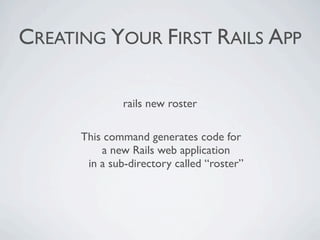
CREATING YOUR FIRST RAILS APP

               rails new roster

      This command generates code for
          a new Rails web application 
       in a sub-directory called “roster”  
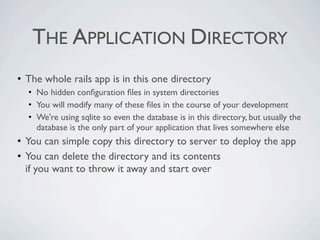
THE APPLICATION DIRECTORY
• The whole rails app is in this one directory
  • No hidden configuration files in system directories
  • You will modify many of these files in the course of your development
  • We're using sqlite so even the database is in this directory, but usually the
    database is the only part of your application that lives somewhere else
• You can simple copy this directory to server to deploy the app
• You can delete the directory and its contents
  if you want to throw it away and start over
RUNNING YOUR APP

      cd roster
       bundle
     rails server 
RAILS ENVIRONMENTS
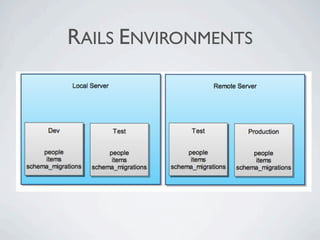
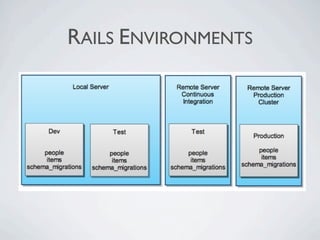
By default, Rails is configured with 3 environments:
   • development
   • test
   • production
RAILS ENVIRONMENTS
RAILS ENVIRONMENTS
RAILS ENVIRONMENTS
The environment can be specified with

 RAILS_ENV as an environment variable
  "development" by default.

In your code, you refer to Rails.env
(or RAILS_ENV in Rails 2)
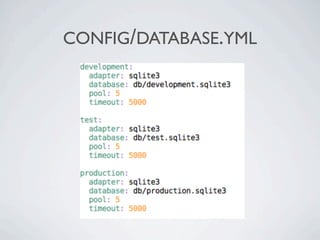
CONFIG/DATABASE.YML
ADDITIONAL CONFIGURATION


config/environments/
   • development.rb
   • production.rb
   • test.rb
MODIFYING THE HOME PAGE

           public/index.html

     All files in the public directory
            are static content.

       Rails checks this directory
   before executing any dynamic code.
MVC
LEARNING WITH SCAFFOLD


rails generate scaffold
   person first_name:string last_name:string
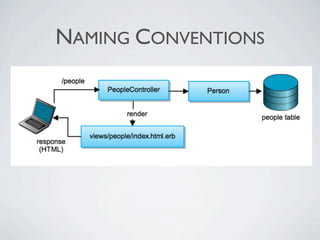
NAMING CONVENTIONS
SCAFFOLD
Model
  app/models/person.rb
  db/migrate/20090611073227_create_people.rb

5 views
    app/views/people/index.html.erb
    app/views/people/show.html.erb
    app/views/people/new.html.erb
    app/views/people/edit.html.erb
    app/views/people/_form.html.erb

Controller
   app/controllers/people_controller.rb
   route.rb: resources :people
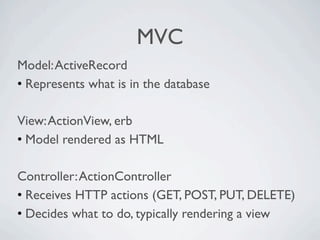
MVC
Model: ActiveRecord
• Represents what is in the database

View: ActionView, erb
• Model rendered as HTML

Controller: ActionController
• Receives HTTP actions (GET, POST, PUT, DELETE)
• Decides what to do, typically rendering a view
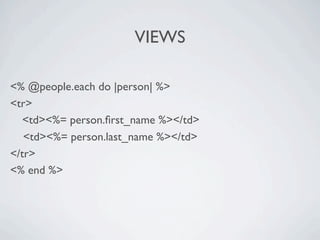
VIEWS

<% @people.each do |person| %>
<tr>

 <td><%= person.first_name %></td>
   <td><%= person.last_name %></td>
</tr>
<% end %>
VIEW EXERCISE

On the main people page 

 a. Change “Listing people” to “My Class List” 

 b. List people with first initial and last name in one visual
  column (e.g. W. Flintstone) 

Introduction to Rails

  • 1.
    RUBY ON RAILS ANINTRODUCTION TO RAILS 3
  • 2.
    CREATING YOUR FIRSTRAILS APP rails new roster This command generates code for a new Rails web application  in a sub-directory called “roster”  
  • 3.
    THE APPLICATION DIRECTORY •The whole rails app is in this one directory • No hidden configuration files in system directories • You will modify many of these files in the course of your development • We're using sqlite so even the database is in this directory, but usually the database is the only part of your application that lives somewhere else • You can simple copy this directory to server to deploy the app • You can delete the directory and its contents if you want to throw it away and start over
  • 4.
    RUNNING YOUR APP cd roster bundle rails server 
  • 5.
    RAILS ENVIRONMENTS By default,Rails is configured with 3 environments: • development • test • production
  • 6.
  • 7.
  • 8.
    RAILS ENVIRONMENTS The environmentcan be specified with RAILS_ENV as an environment variable "development" by default. In your code, you refer to Rails.env (or RAILS_ENV in Rails 2)
  • 9.
  • 10.
    ADDITIONAL CONFIGURATION config/environments/ • development.rb • production.rb • test.rb
  • 11.
    MODIFYING THE HOMEPAGE public/index.html All files in the public directory are static content. Rails checks this directory before executing any dynamic code.
  • 12.
  • 13.
    LEARNING WITH SCAFFOLD railsgenerate scaffold person first_name:string last_name:string
  • 14.
  • 15.
    SCAFFOLD Model app/models/person.rb db/migrate/20090611073227_create_people.rb 5 views app/views/people/index.html.erb app/views/people/show.html.erb app/views/people/new.html.erb app/views/people/edit.html.erb app/views/people/_form.html.erb Controller app/controllers/people_controller.rb route.rb: resources :people
  • 16.
    MVC Model: ActiveRecord • Representswhat is in the database View: ActionView, erb • Model rendered as HTML Controller: ActionController • Receives HTTP actions (GET, POST, PUT, DELETE) • Decides what to do, typically rendering a view
  • 17.
    VIEWS <% @people.each do|person| %> <tr> <td><%= person.first_name %></td> <td><%= person.last_name %></td> </tr> <% end %>
  • 18.
    VIEW EXERCISE On the main people page  a.Change “Listing people” to “My Class List”  b. List people with first initial and last name in one visual column (e.g. W. Flintstone)