Introduction to Microdata
& Google Rich Snippets
Kishan Gor
Plus91 Technologies Pvt. Ltd.
Adding Value to Healthcare
Need for Semantics
• Machines cannot understand the content and the
context.
• Making sense out of the web content is too hard
for machines.
• If they have to understand everything, they have
to be able to understand natural languages, every
language.
• So semantics were helpful to provide meaning to
the web content and help understand the content
by annotating them.
Need for Microdata
• HTML5 is not only about new presentational
elements. It adds several semantic tags.
• Everyone comes up with their need for new
semantic elements. It’s not practical to put an
element in specification to accommodate each
and every semantics to provide relevant meaning.
• New formats like Microdata, Microformats and
RDFa for data markup were created to
accommodate such needs.
What is Microdata?
• Quoting from WHATWG Microdata Specificaiton:
– Sometimes, it is desirable to annotate content with specific machine-readable
labels, e.g. to allow generic scripts to provide services that are customized to
the page, or to enable content from a variety of cooperating authors to be
processed by a single script in a consistent manner.
• For this purpose, authors can use the microdata features described in this
section. Microdata allows nested groups of name-value pairs to be added
to documents, in parallel with the existing content.
• Microdata annotates the DOM with scoped name/value pairs from custom
vocabularies.
• Microdata vocabularies provide the semantics, or meaning of an Item.
Web developers can design a custom vocabulary or use vocabularies
available on the web. A collection of commonly used markup vocabularies
are provided by Schema.org schemas which include: Person, Event,
Organization, Product, Review, Review-aggregate, Breadcrumb, Offer,
Offer-aggregate. Major search engine operators like Google, Microsoft and
Yahoo! rely on this markup to improve search results.
Microdata Syntax
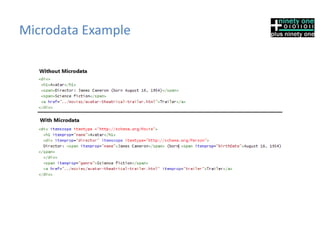
• Microdata is assigned by giving attributes to any HTML
element that contains the content.
• Attributes available:
• Itemscope - Indicates the element is a microdata element
and its child elements are part of its microdata format.
• Itemtype - Defines the vocabulary to be used by the
microdata format.
• Itemid - Allows a vocabulary to define a global identifier for
a microdata item, for example an ISBN number on a book.
• Itemprop - An individual data element.
• Itemref - Allows a microdata element to reference another
element on the page to define it by either HTML id or by
itemid.
Microdata Example
What are Google Rich Snippets?
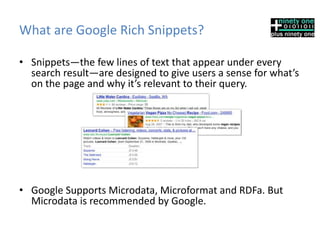
• Snippets—the few lines of text that appear under every
search result—are designed to give users a sense for what’s
on the page and why it’s relevant to their query.
• Google Supports Microdata, Microformat and RDFa. But
Microdata is recommended by Google.
Snippets that Google Understands
• Google supports rich snippets for these
content types:
– Reviews
– People
– Products
– Businesses and organizations
– Recipes
– Events
– Music
Google Rich Snippets Example
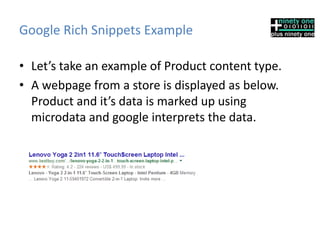
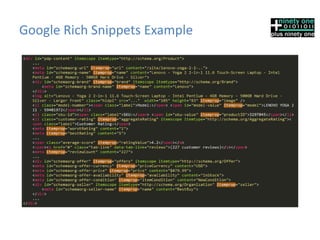
• Let’s take an example of Product content type.
• A webpage from a store is displayed as below.
Product and it’s data is marked up using
microdata and google interprets the data.
Google Rich Snippets Example
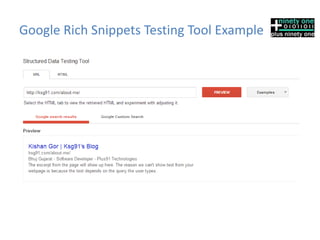
Google Rich Snippets Testing Tool
• Structured Data Testing Tool can be used to test your
Google Rich Snippets.
• You can use tool at
http://www.google.com/webmasters/tools/richsnippets
• You can view preview of the content in Search result by
either giving the URL to the page or using posting HTML
content.
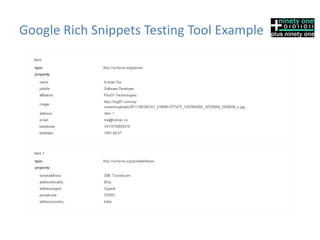
• Along with Google Search preview, it will display all the
structured data is has collected from the page.
• It will also warn you if any property is illegal for used
vocabulary.
Google Rich Snippets Testing Tool Example
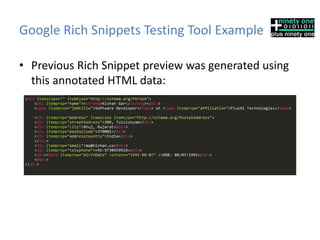
• Previous Rich Snippet preview was generated using
this annotated HTML data:
Conclusion
• Microdata may not be very useful with Browsers
because they rarely do anything with those data
today but there are chances they may start using
them in future.
• But if you are structuring you data with microdata
using popular vocabulary Schema.org, search
engines will be greatly benefited from the content.
And in return, they will be able to show more
relevant results to users, so you will have better
chances at attracting users if you have relevant
content and properly annotated data.
Questions
Web: http://www.plus91.in
Email: kishan.gor@plus91.in
Twitter: @ksg91 @plus91
Facebook: http://www.facebook.com/plus91.in

Introduction to Microdata & Google Rich Snippets

  • 1.
    Introduction to Microdata &Google Rich Snippets Kishan Gor Plus91 Technologies Pvt. Ltd. Adding Value to Healthcare
  • 2.
    Need for Semantics •Machines cannot understand the content and the context. • Making sense out of the web content is too hard for machines. • If they have to understand everything, they have to be able to understand natural languages, every language. • So semantics were helpful to provide meaning to the web content and help understand the content by annotating them.
  • 3.
    Need for Microdata •HTML5 is not only about new presentational elements. It adds several semantic tags. • Everyone comes up with their need for new semantic elements. It’s not practical to put an element in specification to accommodate each and every semantics to provide relevant meaning. • New formats like Microdata, Microformats and RDFa for data markup were created to accommodate such needs.
  • 4.
    What is Microdata? •Quoting from WHATWG Microdata Specificaiton: – Sometimes, it is desirable to annotate content with specific machine-readable labels, e.g. to allow generic scripts to provide services that are customized to the page, or to enable content from a variety of cooperating authors to be processed by a single script in a consistent manner. • For this purpose, authors can use the microdata features described in this section. Microdata allows nested groups of name-value pairs to be added to documents, in parallel with the existing content. • Microdata annotates the DOM with scoped name/value pairs from custom vocabularies. • Microdata vocabularies provide the semantics, or meaning of an Item. Web developers can design a custom vocabulary or use vocabularies available on the web. A collection of commonly used markup vocabularies are provided by Schema.org schemas which include: Person, Event, Organization, Product, Review, Review-aggregate, Breadcrumb, Offer, Offer-aggregate. Major search engine operators like Google, Microsoft and Yahoo! rely on this markup to improve search results.
  • 5.
    Microdata Syntax • Microdatais assigned by giving attributes to any HTML element that contains the content. • Attributes available: • Itemscope - Indicates the element is a microdata element and its child elements are part of its microdata format. • Itemtype - Defines the vocabulary to be used by the microdata format. • Itemid - Allows a vocabulary to define a global identifier for a microdata item, for example an ISBN number on a book. • Itemprop - An individual data element. • Itemref - Allows a microdata element to reference another element on the page to define it by either HTML id or by itemid.
  • 6.
  • 7.
    What are GoogleRich Snippets? • Snippets—the few lines of text that appear under every search result—are designed to give users a sense for what’s on the page and why it’s relevant to their query. • Google Supports Microdata, Microformat and RDFa. But Microdata is recommended by Google.
  • 8.
    Snippets that GoogleUnderstands • Google supports rich snippets for these content types: – Reviews – People – Products – Businesses and organizations – Recipes – Events – Music
  • 9.
    Google Rich SnippetsExample • Let’s take an example of Product content type. • A webpage from a store is displayed as below. Product and it’s data is marked up using microdata and google interprets the data.
  • 10.
  • 11.
    Google Rich SnippetsTesting Tool • Structured Data Testing Tool can be used to test your Google Rich Snippets. • You can use tool at http://www.google.com/webmasters/tools/richsnippets • You can view preview of the content in Search result by either giving the URL to the page or using posting HTML content. • Along with Google Search preview, it will display all the structured data is has collected from the page. • It will also warn you if any property is illegal for used vocabulary.
  • 12.
    Google Rich SnippetsTesting Tool Example
  • 13.
    Google Rich SnippetsTesting Tool Example
  • 14.
    Google Rich SnippetsTesting Tool Example • Previous Rich Snippet preview was generated using this annotated HTML data:
  • 15.
    Conclusion • Microdata maynot be very useful with Browsers because they rarely do anything with those data today but there are chances they may start using them in future. • But if you are structuring you data with microdata using popular vocabulary Schema.org, search engines will be greatly benefited from the content. And in return, they will be able to show more relevant results to users, so you will have better chances at attracting users if you have relevant content and properly annotated data.
  • 16.
    Questions Web: http://www.plus91.in Email: kishan.gor@plus91.in Twitter:@ksg91 @plus91 Facebook: http://www.facebook.com/plus91.in