HTML
INTRODUCTION
INTRODUCTION TO WEB PAGES
• Internet has created a revolution in publishing a global forum
where information reaches millions of people every day.
• It is a powerful medium for bringing information ,images sound
,news and advertisement to a computer on your mobile phones.
• It has already changed the way of working shopping banking
and also living.
WEB SITES AND WEBPAGES
• The information stored on the internet is organized liked pages
that are managed electronically and are often called websites.
• Webpage is a document commonly written in hypertext markup
language that is accessible through the internet using browser
software.
REASONS TO CREATE WEB SITE AND
WEB PAGES
• They can bring together information of all types of databases,
text, pictures ,sound and more.
• A website is a unique way to communicate with the word
whether you choose to create a website to share your business
,sell products or any other reason.
FACILITIES OF WEBSITE
• get in touch with the broad audience at limited cost
• edited in a permanent advertisement
• increase competitiveness
• a place that open 24/7 all year
• share views on any topic
• sell or buy product
WHAT IS HTML
• HTML is also known as hypertext markup language.
• HTML is a computer language that forms the foundation of
world wide web and the basis of most web page.
• It defines the structure of a pages and it determines how data
is displayed online.
• HTML is actually a hidden code that help us to communicate
with others on World Wide Web.
• HTML documents are also referred as web pages.
HYPERTEXT MARKUP LANGUAGE
• Hypertext is a method by which you move around the web by
clicking on the special text hypertext. Hypertext is a text that
contains links to other text this means that when you click on
the hypertext, you are redirected to another web page /site on
the internet.
• Markup is what HTML tags will to the text inside them. They
mark it to appear in a certain way.
• Language means it have codeword and syntax like any other
language.
FEATURES OF HTML
• It is not a computer language or programming language used to
create web pages but was not required programing language.
• It is a markup language and is used to make the text readable
for the browser.
• It is a character based method for expressing the content the
content can be picture text graphics and video.
• All text editors and most word processors support it .
• It delivers a content to multiple platforms.
PROGRAMMING LANGUAGE AND HTML
• A programming language is a computer language with which is
used by the programmers to develop application ,script ,or other
set of instructions for a computer to execute.
• HTML is not a programming language technically it is known as
markup language has the name of hypertext markup language.
• Markup language encapsulates for markup data with HTML tag
which defines the date and describe its purpose on the web
page
TEXT FILE AND HTML FILE
• Text file is a computer file that contains only text and has no
special format in such as bold text Italic text images etc.
• With Microsoft Windows text file are identified with the .txt file
extension.
• HTML file is a text document save with the extension .html or
.htm that contains text and some tags written between
"< >" sign .
Tim Berners - Lee
• Tim Berners-Lee is inventor of HTML the father of wanted to
create a way for researchers to be able to use internet to
collaborate and share information.
• The person who invented HTML was not a computer
programmer but our physicist working at the European
laboratory for Particle physics in Geneva , Switzerland.
CREATION OF HTML DOCUMENTS
The creation of HTML documents can only be done in:
1. Laptops – Notepad
2. Mobile phones – anWRITER
3. Mac mobile phones – EasyHtml
4. Mac laptops – Text Editor
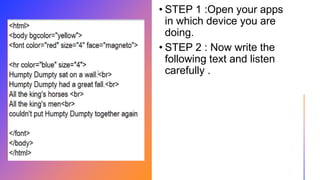
• STEP 1 :Open your apps
in which device you are
doing.
• STEP 2 : Now write the
following text and listen
carefully .
HTML COLOURS
Color Name Color Code Color Name Color Code
Red #FF0000 White #FFFFFF
Cyan #00FFFF Silver #C0C0C0
Blue #0000FF Gray or Grey #808080
DarkBlue #0000A0 Black #000000
LightBlue #ADD8E6 Orange #FFA500
Purple #800080 Brown #A52A2A
Yellow #FFFF00 Maroon #800000
Lime #00FF00 Green #008000
Magenta #FF00FF Olive #808000
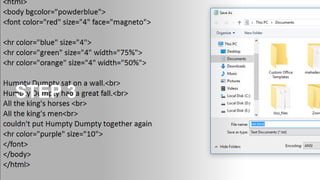
STEP 3
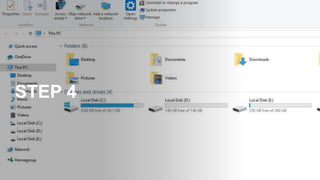
STEP 4
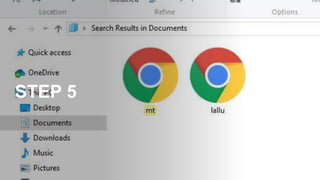
STEP 5
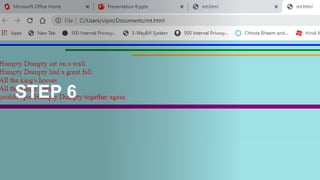
STEP 6
Thank you

INTRODUCTION TO HTML

  • 1.
  • 2.
    INTRODUCTION TO WEBPAGES • Internet has created a revolution in publishing a global forum where information reaches millions of people every day. • It is a powerful medium for bringing information ,images sound ,news and advertisement to a computer on your mobile phones. • It has already changed the way of working shopping banking and also living.
  • 3.
    WEB SITES ANDWEBPAGES • The information stored on the internet is organized liked pages that are managed electronically and are often called websites. • Webpage is a document commonly written in hypertext markup language that is accessible through the internet using browser software.
  • 4.
    REASONS TO CREATEWEB SITE AND WEB PAGES • They can bring together information of all types of databases, text, pictures ,sound and more. • A website is a unique way to communicate with the word whether you choose to create a website to share your business ,sell products or any other reason.
  • 5.
    FACILITIES OF WEBSITE •get in touch with the broad audience at limited cost • edited in a permanent advertisement • increase competitiveness • a place that open 24/7 all year • share views on any topic • sell or buy product
  • 6.
    WHAT IS HTML •HTML is also known as hypertext markup language. • HTML is a computer language that forms the foundation of world wide web and the basis of most web page. • It defines the structure of a pages and it determines how data is displayed online. • HTML is actually a hidden code that help us to communicate with others on World Wide Web. • HTML documents are also referred as web pages.
  • 7.
    HYPERTEXT MARKUP LANGUAGE •Hypertext is a method by which you move around the web by clicking on the special text hypertext. Hypertext is a text that contains links to other text this means that when you click on the hypertext, you are redirected to another web page /site on the internet. • Markup is what HTML tags will to the text inside them. They mark it to appear in a certain way. • Language means it have codeword and syntax like any other language.
  • 8.
    FEATURES OF HTML •It is not a computer language or programming language used to create web pages but was not required programing language. • It is a markup language and is used to make the text readable for the browser. • It is a character based method for expressing the content the content can be picture text graphics and video. • All text editors and most word processors support it . • It delivers a content to multiple platforms.
  • 9.
    PROGRAMMING LANGUAGE ANDHTML • A programming language is a computer language with which is used by the programmers to develop application ,script ,or other set of instructions for a computer to execute. • HTML is not a programming language technically it is known as markup language has the name of hypertext markup language. • Markup language encapsulates for markup data with HTML tag which defines the date and describe its purpose on the web page
  • 10.
    TEXT FILE ANDHTML FILE • Text file is a computer file that contains only text and has no special format in such as bold text Italic text images etc. • With Microsoft Windows text file are identified with the .txt file extension. • HTML file is a text document save with the extension .html or .htm that contains text and some tags written between "< >" sign .
  • 11.
    Tim Berners -Lee • Tim Berners-Lee is inventor of HTML the father of wanted to create a way for researchers to be able to use internet to collaborate and share information. • The person who invented HTML was not a computer programmer but our physicist working at the European laboratory for Particle physics in Geneva , Switzerland.
  • 12.
    CREATION OF HTMLDOCUMENTS The creation of HTML documents can only be done in: 1. Laptops – Notepad 2. Mobile phones – anWRITER 3. Mac mobile phones – EasyHtml 4. Mac laptops – Text Editor
  • 13.
    • STEP 1:Open your apps in which device you are doing. • STEP 2 : Now write the following text and listen carefully .
  • 14.
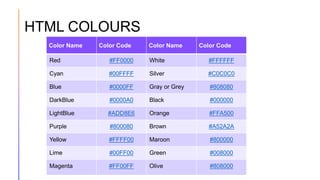
    HTML COLOURS Color NameColor Code Color Name Color Code Red #FF0000 White #FFFFFF Cyan #00FFFF Silver #C0C0C0 Blue #0000FF Gray or Grey #808080 DarkBlue #0000A0 Black #000000 LightBlue #ADD8E6 Orange #FFA500 Purple #800080 Brown #A52A2A Yellow #FFFF00 Maroon #800000 Lime #00FF00 Green #008000 Magenta #FF00FF Olive #808000
  • 15.
  • 16.
  • 17.
  • 18.
  • 19.