Introduction to Drupal 7

                              Session 7.1
                           Themes and design


Drupalist: Kalin Chernev       Course by Init Lab (http://initlab.org)   1
Agenda
•    What is a Drupal theme;
•    Selecting a theme;
•    Downloading and installing a theme;
•    Modifying your theme;


Drupalist: Kalin Chernev   Course by Init Lab (http://initlab.org)   2
Theme
• “Кожа” in Bulgarian;
• Manage the overall look and feel of your site;
       – The colors of the page;
       – Fonts for texts, headings, links, etc;
       – General images and graphics of pages;
       – General layout – header, left column, right
         column, content area, footer, etc


Drupalist: Kalin Chernev   Course by Init Lab (http://initlab.org)   3
A Drupal theme is consisted of
•    HTML markup
•    CSS styling
•    PHP logic
•    Javascript interactivity


Drupalist: Kalin Chernev   Course by Init Lab (http://initlab.org)   4
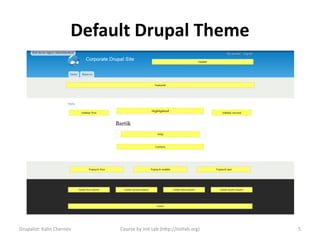
Default Drupal Theme


Drupalist: Kalin Chernev    Course by Init Lab (http://initlab.org)   5
Analyzing the default theme
• Nice blue color 
• Changeable colors
• Modern regions

• Not good for production (common sense)
• Not so extensible


Drupalist: Kalin Chernev   Course by Init Lab (http://initlab.org)   6
Questions to ask yourself
•    Horizontal or vertical navigation /or both
•    Banner areas
•    Number and position of columns
•    Content areas
•    Footer areas
•    General color scheme
•    General fonts scheme

Drupalist: Kalin Chernev   Course by Init Lab (http://initlab.org)   7
Choosing your theme
• Many free themes at
  www.drupal.org/project/themes
• Note that the drupal.org themes are more of a
  basic frameworks
• http://themeforest.net/category/cms-
  themes/drupal
• http://fusiondrupalthemes.com/
• Many other marketplaces
Drupalist: Kalin Chernev        Course by Init Lab (http://initlab.org)   8
Trends
• Majority of drupal.org themes are frameworks
• Zen is the best, yet quite complex theme
• Fusion is trying to meet new trends
• Adaptive themes are great and are getting
  better in the mobile themes sector
• Omega is a new paradigm, heavy on 960gs
• Framework remains a good framework still

Drupalist: Kalin Chernev   Course by Init Lab (http://initlab.org)   9
Installing a new theme
• Download the theme locally;
• Go to Administration > Appearance;
• Click on “Install new theme” OR
• Place uncompressed version of the theme at
  your server site folder ../sites/all/themes
• NEVER place anything at root /themes folder
• Go to Administer > Appearance to enable the
  your theme
Drupalist: Kalin Chernev    Course by Init Lab (http://initlab.org)   10
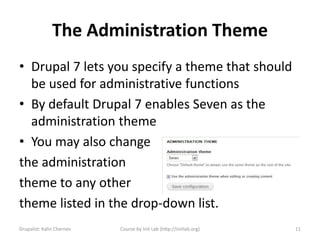
The Administration Theme
• Drupal 7 lets you specify a theme that should
  be used for administrative functions
• By default Drupal 7 enables Seven as the
  administration theme
• You may also change
the administration
theme to any other
theme listed in the drop-down list.
Drupalist: Kalin Chernev   Course by Init Lab (http://initlab.org)   11
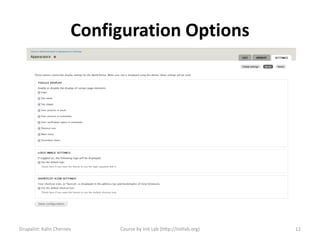
Configuration Options


Drupalist: Kalin Chernev    Course by Init Lab (http://initlab.org)   12
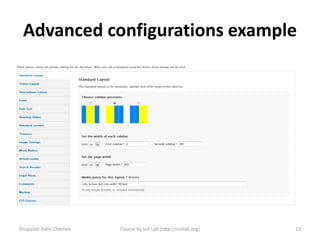
Advanced configurations example


Drupalist: Kalin Chernev   Course by Init Lab (http://initlab.org)   13
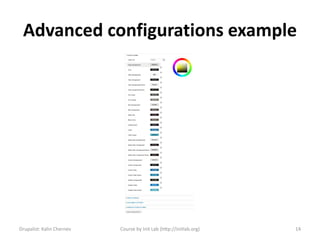
Advanced configurations example


Drupalist: Kalin Chernev   Course by Init Lab (http://initlab.org)   14
Our case study
• Let’s install http://drupal.org/project/danland
• The slideshow is automatic, no configurations
• We have an already made slideshow, why not
  exchange them?
• The problem – current theme does not
  support region in the slideshow
• Not a problem – just add your new region!


Drupalist: Kalin Chernev     Course by Init Lab (http://initlab.org)   15
Creating a region
• Open the .info file and add the following
regions[slideshow] = Slideshow
Just after the Preface top region
• Open page.tpl.php file and locate the following
  opening div <div class="slideshow">
Clear the hard-coded images and change with the
following snipped
<?php print render ($page['slideshow']); ?>
This create a new region Slideshow and will output
the contents which you place there

Drupalist: Kalin Chernev      Course by Init Lab (http://initlab.org)   16
Theming tweaks
• Clear the cache so that the changes take effect
• Go and fix the context for the slideshow (the
  region is different than highlighted region)
• Go and fix the sizes of the image style preset
  to 955 width and 355 height
• The slideshow views block will automatically
  resize from the image style preset


Drupalist: Kalin Chernev     Course by Init Lab (http://initlab.org)   17
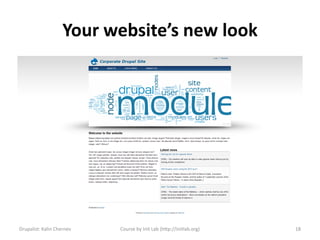
Your website’s new look


Drupalist: Kalin Chernev   Course by Init Lab (http://initlab.org)   18
Summary
• The theme changes the website look and feel
  in an instant
• Think regions
• Think colors, fonts and layout
• Become good at using theme frameworks


Drupalist: Kalin Chernev   Course by Init Lab (http://initlab.org)   19
Time for questions


Drupalist: Kalin Chernev       Course by Init Lab (http://initlab.org)   20
Contacts
Kalin Chernev
       – E: kalata@shtrak.eu
       – T: twitter.com/kalinchernev
       – U: http://shtrak.eu/kalata


Drupalist: Kalin Chernev   Course by Init Lab (http://initlab.org)   21

Introduction to Drupal 7 Themes and design

  • 1.
    Introduction to Drupal7 Session 7.1 Themes and design Drupalist: Kalin Chernev Course by Init Lab (http://initlab.org) 1
  • 2.
    Agenda • What is a Drupal theme; • Selecting a theme; • Downloading and installing a theme; • Modifying your theme; Drupalist: Kalin Chernev Course by Init Lab (http://initlab.org) 2
  • 3.
    Theme • “Кожа” inBulgarian; • Manage the overall look and feel of your site; – The colors of the page; – Fonts for texts, headings, links, etc; – General images and graphics of pages; – General layout – header, left column, right column, content area, footer, etc Drupalist: Kalin Chernev Course by Init Lab (http://initlab.org) 3
  • 4.
    A Drupal themeis consisted of • HTML markup • CSS styling • PHP logic • Javascript interactivity Drupalist: Kalin Chernev Course by Init Lab (http://initlab.org) 4
  • 5.
    Default Drupal Theme Drupalist:Kalin Chernev Course by Init Lab (http://initlab.org) 5
  • 6.
    Analyzing the defaulttheme • Nice blue color  • Changeable colors • Modern regions • Not good for production (common sense) • Not so extensible Drupalist: Kalin Chernev Course by Init Lab (http://initlab.org) 6
  • 7.
    Questions to askyourself • Horizontal or vertical navigation /or both • Banner areas • Number and position of columns • Content areas • Footer areas • General color scheme • General fonts scheme Drupalist: Kalin Chernev Course by Init Lab (http://initlab.org) 7
  • 8.
    Choosing your theme •Many free themes at www.drupal.org/project/themes • Note that the drupal.org themes are more of a basic frameworks • http://themeforest.net/category/cms- themes/drupal • http://fusiondrupalthemes.com/ • Many other marketplaces Drupalist: Kalin Chernev Course by Init Lab (http://initlab.org) 8
  • 9.
    Trends • Majority ofdrupal.org themes are frameworks • Zen is the best, yet quite complex theme • Fusion is trying to meet new trends • Adaptive themes are great and are getting better in the mobile themes sector • Omega is a new paradigm, heavy on 960gs • Framework remains a good framework still Drupalist: Kalin Chernev Course by Init Lab (http://initlab.org) 9
  • 10.
    Installing a newtheme • Download the theme locally; • Go to Administration > Appearance; • Click on “Install new theme” OR • Place uncompressed version of the theme at your server site folder ../sites/all/themes • NEVER place anything at root /themes folder • Go to Administer > Appearance to enable the your theme Drupalist: Kalin Chernev Course by Init Lab (http://initlab.org) 10
  • 11.
    The Administration Theme •Drupal 7 lets you specify a theme that should be used for administrative functions • By default Drupal 7 enables Seven as the administration theme • You may also change the administration theme to any other theme listed in the drop-down list. Drupalist: Kalin Chernev Course by Init Lab (http://initlab.org) 11
  • 12.
    Configuration Options Drupalist: KalinChernev Course by Init Lab (http://initlab.org) 12
  • 13.
    Advanced configurations example Drupalist:Kalin Chernev Course by Init Lab (http://initlab.org) 13
  • 14.
    Advanced configurations example Drupalist:Kalin Chernev Course by Init Lab (http://initlab.org) 14
  • 15.
    Our case study •Let’s install http://drupal.org/project/danland • The slideshow is automatic, no configurations • We have an already made slideshow, why not exchange them? • The problem – current theme does not support region in the slideshow • Not a problem – just add your new region! Drupalist: Kalin Chernev Course by Init Lab (http://initlab.org) 15
  • 16.
    Creating a region •Open the .info file and add the following regions[slideshow] = Slideshow Just after the Preface top region • Open page.tpl.php file and locate the following opening div <div class="slideshow"> Clear the hard-coded images and change with the following snipped <?php print render ($page['slideshow']); ?> This create a new region Slideshow and will output the contents which you place there Drupalist: Kalin Chernev Course by Init Lab (http://initlab.org) 16
  • 17.
    Theming tweaks • Clearthe cache so that the changes take effect • Go and fix the context for the slideshow (the region is different than highlighted region) • Go and fix the sizes of the image style preset to 955 width and 355 height • The slideshow views block will automatically resize from the image style preset Drupalist: Kalin Chernev Course by Init Lab (http://initlab.org) 17
  • 18.
    Your website’s newlook Drupalist: Kalin Chernev Course by Init Lab (http://initlab.org) 18
  • 19.
    Summary • The themechanges the website look and feel in an instant • Think regions • Think colors, fonts and layout • Become good at using theme frameworks Drupalist: Kalin Chernev Course by Init Lab (http://initlab.org) 19
  • 20.
    Time for questions Drupalist:Kalin Chernev Course by Init Lab (http://initlab.org) 20
  • 21.
    Contacts Kalin Chernev – E: kalata@shtrak.eu – T: twitter.com/kalinchernev – U: http://shtrak.eu/kalata Drupalist: Kalin Chernev Course by Init Lab (http://initlab.org) 21