Introduction to Drupal 7

                            Session 7.2
                    Users and roles management


Drupalist: Kalin Chernev    Course by Init Lab (http://initlab.org)   1
Agenda
•    Users
•    Roles
•    Permissions
•    Creating users


Drupalist: Kalin Chernev   Course by Init Lab (http://initlab.org)   2
CRUD
• You can control who has the ability to do what
  You define who has the ability to
       – Read (View)
       – Create
       – Update
       – Delete


Drupalist: Kalin Chernev   Course by Init Lab (http://initlab.org)   3
Roles
•    Categories for authenticated users
•    No limitations on the number of roles you set
•    No limitations on the naming you give
•    Any authenticated user of your website may
     be assigned to none, one, or more than one
     role


Drupalist: Kalin Chernev   Course by Init Lab (http://initlab.org)   4
2 main types of roles
• Anonymous users
       – Do not enter credentials to enter the website


• Authenticated users
       – Enter user ID and password to access more
         functionalities or content


Drupalist: Kalin Chernev        Course by Init Lab (http://initlab.org)   5
Permissions
• Permissions in Drupal are a mechanism for
  controlling what a user assigned to a specific
  role can do.
• There are dozens of permissions – be careful!

• Examples:
       – Create a page
       – Edit/edit own page, etc

Drupalist: Kalin Chernev   Course by Init Lab (http://initlab.org)   6
User accounts
• All Drupal websites have at least one user
  account: the system administrator 
• 3 ways to work out new accounts:
       – Users create their new accounts with no
         administrator moderation
       – Users create their new accounts, but
         administrator approval is needed
       – Only administrator can create new accounts


Drupalist: Kalin Chernev    Course by Init Lab (http://initlab.org)   7
Which is the best option for us?


Drupalist: Kalin Chernev   Course by Init Lab (http://initlab.org)   8
Account settings
• Make sure you review Account settings page
  on every new Drupal website you make
• URL: ../admin/config/people/accounts
• For our case, let’s change the “Who can
  register accounts?” option to “Administrators
  only”


Drupalist: Kalin Chernev      Course by Init Lab (http://initlab.org)   9
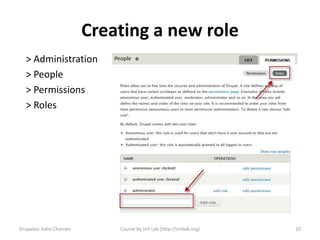
Creating a new role
   > Administration
   > People
   > Permissions
   > Roles


Drupalist: Kalin Chernev       Course by Init Lab (http://initlab.org)   10
Set permissions on the role
• Comment: check all
• Contextual links: Use contextual links
• Filter: User the Filtered HTML text format + Use the
  Full HTML text format
• Menus: Administer menus and menu items
• Node: Administer content + Access the content
  overview page + View published content + View own
  unpublished content + View content revisions + Article:
  Create new content + Article: Edit own content +
  Article Delete own content + same for Basic page
• Search: use search

Drupalist: Kalin Chernev   Course by Init Lab (http://initlab.org)   11
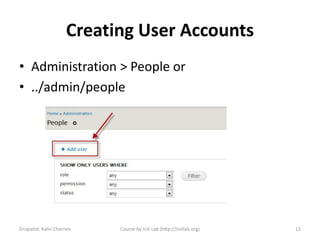
Creating User Accounts
• Administration > People or
• ../admin/people


Drupalist: Kalin Chernev   Course by Init Lab (http://initlab.org)   12
Time for questions


Drupalist: Kalin Chernev       Course by Init Lab (http://initlab.org)   13
Contacts
Kalin Chernev
       – E: kalata@shtrak.eu
       – T: twitter.com/kalinchernev
       – U: http://shtrak.eu/kalata


Drupalist: Kalin Chernev   Course by Init Lab (http://initlab.org)   14

Introduction to Drupal 7 Users and roles management

  • 1.
    Introduction to Drupal7 Session 7.2 Users and roles management Drupalist: Kalin Chernev Course by Init Lab (http://initlab.org) 1
  • 2.
    Agenda • Users • Roles • Permissions • Creating users Drupalist: Kalin Chernev Course by Init Lab (http://initlab.org) 2
  • 3.
    CRUD • You cancontrol who has the ability to do what You define who has the ability to – Read (View) – Create – Update – Delete Drupalist: Kalin Chernev Course by Init Lab (http://initlab.org) 3
  • 4.
    Roles • Categories for authenticated users • No limitations on the number of roles you set • No limitations on the naming you give • Any authenticated user of your website may be assigned to none, one, or more than one role Drupalist: Kalin Chernev Course by Init Lab (http://initlab.org) 4
  • 5.
    2 main typesof roles • Anonymous users – Do not enter credentials to enter the website • Authenticated users – Enter user ID and password to access more functionalities or content Drupalist: Kalin Chernev Course by Init Lab (http://initlab.org) 5
  • 6.
    Permissions • Permissions inDrupal are a mechanism for controlling what a user assigned to a specific role can do. • There are dozens of permissions – be careful! • Examples: – Create a page – Edit/edit own page, etc Drupalist: Kalin Chernev Course by Init Lab (http://initlab.org) 6
  • 7.
    User accounts • AllDrupal websites have at least one user account: the system administrator  • 3 ways to work out new accounts: – Users create their new accounts with no administrator moderation – Users create their new accounts, but administrator approval is needed – Only administrator can create new accounts Drupalist: Kalin Chernev Course by Init Lab (http://initlab.org) 7
  • 8.
    Which is thebest option for us? Drupalist: Kalin Chernev Course by Init Lab (http://initlab.org) 8
  • 9.
    Account settings • Makesure you review Account settings page on every new Drupal website you make • URL: ../admin/config/people/accounts • For our case, let’s change the “Who can register accounts?” option to “Administrators only” Drupalist: Kalin Chernev Course by Init Lab (http://initlab.org) 9
  • 10.
    Creating a newrole > Administration > People > Permissions > Roles Drupalist: Kalin Chernev Course by Init Lab (http://initlab.org) 10
  • 11.
    Set permissions onthe role • Comment: check all • Contextual links: Use contextual links • Filter: User the Filtered HTML text format + Use the Full HTML text format • Menus: Administer menus and menu items • Node: Administer content + Access the content overview page + View published content + View own unpublished content + View content revisions + Article: Create new content + Article: Edit own content + Article Delete own content + same for Basic page • Search: use search Drupalist: Kalin Chernev Course by Init Lab (http://initlab.org) 11
  • 12.
    Creating User Accounts •Administration > People or • ../admin/people Drupalist: Kalin Chernev Course by Init Lab (http://initlab.org) 12
  • 13.
    Time for questions Drupalist:Kalin Chernev Course by Init Lab (http://initlab.org) 13
  • 14.
    Contacts Kalin Chernev – E: kalata@shtrak.eu – T: twitter.com/kalinchernev – U: http://shtrak.eu/kalata Drupalist: Kalin Chernev Course by Init Lab (http://initlab.org) 14