1
01 Introduction to
Database
CII1J3 Database Modelling
2
Learning Outcomes
Students can explain the concepts of data, data model,
advantages of database approach, the process of database
development life cycle, people involved in the development
process, and the evolution of database system
3
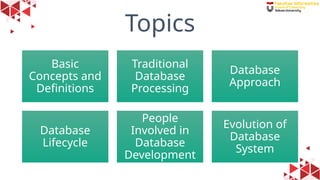
Topics
Basic
Concepts and
Definitions
Traditional
Database
Processing
Database
Approach
Database
Lifecycle
People
Involved in
Database
Development
Evolution of
Database
System
4
1. Basic Concepts and
Definitions
5
Basis Data (Database)
6
Basis Data (Database)
• Data
• Data  bahan mentah
• Fakta mengenai objek atau informasi dasar (angka, huruf, gambar) yang dapat direkam
dan disimpan pada media komputer
• Representasi tersimpan dari objek dan peristiwa yang mempunyai arti dan kepentingan
dalam lingkungan pengguna.
• Basis
• Markas/ Gudang, tempat berkumpul.
• Analogi : sebuah lemari arsip
• Map Kumpulan arsip dengan penomoran/ pola unik tertentu  DATA
• Menentukan kelompok arsip.  INFORMATION
• Menempatkan arsip dengan kelompok tertentu  KNOWLEDGE
7
DEFINITION
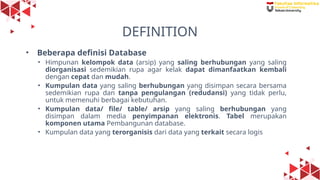
• Beberapa definisi Database
• Himpunan kelompok data (arsip) yang saling berhubungan yang saling
diorganisasi sedemikian rupa agar kelak dapat dimanfaatkan kembali
dengan cepat dan mudah.
• Kumpulan data yang saling berhubungan yang disimpan secara bersama
sedemikian rupa dan tanpa pengulangan (redudansi) yang tidak perlu,
untuk memenuhi berbagai kebutuhan.
• Kumpulan data/ file/ table/ arsip yang saling berhubungan yang
disimpan dalam media penyimpanan elektronis. Tabel merupakan
komponen utama Pembangunan database.
• Kumpulan data yang terorganisis dari data yang terkait secara logis
8
Examples
• List of facts
• Data in context
Useful information to
some users, such as the
course instructor and the
registrar’s office.
Figure 1. Data in context
Data
9
Examples (2)
• Summarized Data
Data presented as graphical
information.
This information could be used
as a basis for deciding whether
to add new courses or to hire
new faculty members.
Figure 2. Summarized Data
10
Real
World
facts about the world in a
database
facts about the world in a
database
facts about the world in a
database
facts about the world in a
database
facts about the world in a
database
facts about the world in a
database
facts about the world in a
database
facts about the world in a
database
facts about the world in a
database
facts about the world in a
database
facts about the world in a
database
facts about the world in a
database
facts about the world in a
database
facts about the world in a
database
more
facts
more
facts
more
facts
more
facts
more
facts
more
facts
more
facts
more
facts
more
facts
more
facts
some more rather long facts about the world in the databse
facts about the world in a
database
facts about the world in a
database
facts about the world in a
database
facts about the world in a
database
facts about the world in a
database
facts about the world in a
database
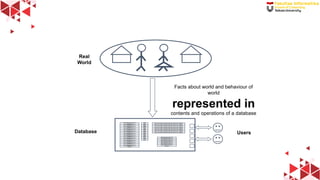
Database
Facts about world and behaviour of
world
represented in
contents and operations of a database
Users
11
Metadata
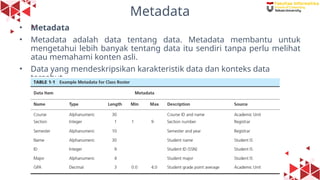
• Metadata
• Metadata adalah data tentang data. Metadata membantu untuk
mengetahui lebih banyak tentang data itu sendiri tanpa perlu melihat
atau memahami konten asli.
• Data yang mendeskripsikan karakteristik data dan konteks data
tersebut.
12
2. Traditional File
Processing Systems
13
Traditional File Processing Systems
“Metode pengelolaan data yang mengandalkan penyimpanan dan
pengolahan data dalam file-file terpisah di media penyimpanan seperti
disk”
 When computer-based data processing was first available, there were
no databases, to be useful for business applications, computers had
to store, manipulate, and retrieve large files of data.
 Computer file processing systems were developed for this purpose.
14
Disadvantages of File Processing Systems
1. Program-data dependence
2. Duplication of data
3. Limited Data Sharing
4. Lengthy development times
5. Excessive program maintenance
Figure 3. Example of File Processing Systems
15
3. The Database
Approach
16
Data Models
• Data models is graphical systems used to capture the nature and
relationships among data.
• Entity is a person, a place, an object, an event, or a concept in the user
environment about which the organization wishes to maintain data.
• The data you are interested in capturing about the entity (e.g.,
Customer Name) is called an attribute.
• Data are recorded for many customers. Each customer’s information is
referred to as an instance of CUSTOMER.
• A well-structured database establishes the relationships between
entities that exist in organizational data so that desired information can
be retrieved.
17
Example of Data Model
Figure 4. Segment of
an enterprise data model
Figure 5. Segment of a project data model
18
Relational Database
• Relational database is a
database that represents data
as a collection of tables in
which all data relationships are
represented by common
values in related tables.
• Relational databases
establish the relationships
between entities by means of
common fields included in a
file, called a relation
19
Database Management System (DBMS)
• A database management system (DBMS) is a software system that
enables the use of a database approach.
• The primary purpose of a DBMS is to provide a systematic method of
creating, updating, storing, and retrieving the data stored in a
database.
• It enables end users and application programmers to share data, and it
enables data to be shared among multiple applications rather than
propagated and stored in new files for every new application (Mullins,
2002).
• A DBMS also provides facilities for controlling data access, enforcing
data integrity, managing concurrency control, and restoring a
database.
20
Advantages of DBMS
1. Program-data independence
2. Planned Data Redundancy
3. Improved Data Consistency
4. Improved Data Sharing
5. Enforcement of Standards
6. Improved Data Quality
7. Increased productivity of application development
8. Improved data accessibility and responsiveness
9. Reduced program maintenance
10. Improved decision support
Figure 3. Example of File Processing Systems
21
Costs and Risks of the Database Approach
(1)
• New, specialized personnel
• Installation and management cost and complexity
• Conversion costs
• Need for explicit backup and recovery
• Organizational conflict
22
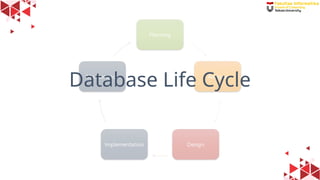
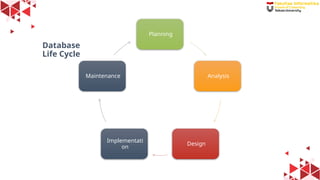
Database Life Cycle
23
Planning
Analysis
Design
Implementati
on
Maintenance
Database
Life Cycle
24
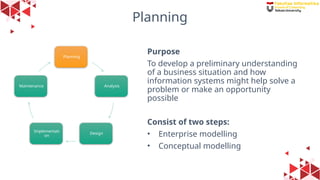
Planning
Purpose
To develop a preliminary understanding
of a business situation and how
information systems might help solve a
problem or make an opportunity
possible
Consist of two steps:
• Enterprise modelling
• Conceptual modelling
Planning
Analysis
Design
Implementati
on
Maintenance
25
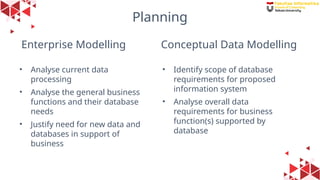
Enterprise Modelling
• Analyse current data
processing
• Analyse the general business
functions and their database
needs
• Justify need for new data and
databases in support of
business
• Identify scope of database
requirements for proposed
information system
• Analyse overall data
requirements for business
function(s) supported by
database
Conceptual Data Modelling
Planning
26
Analysis
Purpose
To analyse the business situation
thoroughly to determine requirements,
to structure those requirements, and to
select among competing system
features
Planning
Analysis
Design
Implementati
on
Maintenance
27
Conceptual Data Modelling (part 2)
• Develop preliminary conceptual data model, including entities and
relationships
• Compare preliminary conceptual data model with enterprise data
model
• Develop detailed conceptual data model, including all entities,
relationships, attributes, and business rules
• Make conceptual data model consistent with other models of
information system
• Populate repository with all conceptual database specifications
28
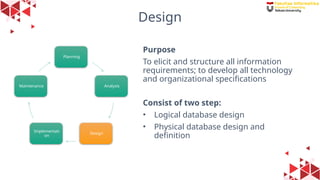
Design
Purpose
To elicit and structure all information
requirements; to develop all technology
and organizational specifications
Consist of two step:
• Logical database design
• Physical database design and
definition
Planning
Analysis
Design
Implementati
on
Maintenance
29
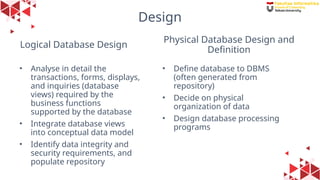
Logical Database Design
• Analyse in detail the
transactions, forms, displays,
and inquiries (database
views) required by the
business functions
supported by the database
• Integrate database views
into conceptual data model
• Identify data integrity and
security requirements, and
populate repository
• Define database to DBMS
(often generated from
repository)
• Decide on physical
organization of data
• Design database processing
programs
Physical Database Design and
Definition
Design
30
Implementation
Purpose
To write programs, build databases, test
and install the new system, train users,
and finalize documentation
The Steps:
• Code and test database processing
programs
• Complete database documentation
and training materials
• Install database and convert data from
prior systems
Planning
Analysis
Design
Implementati
on
Maintenance
31
Maintenance
Purpose
To monitor the operation and usefulness
of the system, and to repair and enhance
the system
The Steps:
• Analyse database and database
applications to ensure that evolving
information requirements are met
• Tune database for improved
performance
• Fix errors in database and database
applications and recover database
when it is contaminated
Planning
Analysis
Design
Implementati
on
Maintenance
32
People Involved in
Database Development
33
Managing People Involved in Database
Development
• Business analysts
• Systems analysts
• Database analysts and data modelers
• Users
• Programmers
• Database architects
• Data administrators
• Project managers
• Other technical experts
34
Evolution of Database
System
35
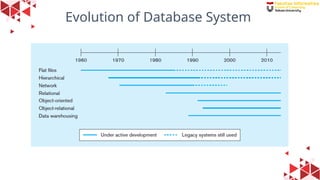
Evolution of Database System
36
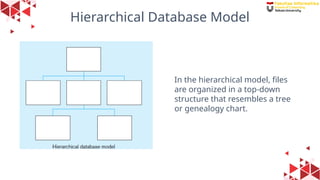
Hierarchical Database Model
In the hierarchical model, files
are organized in a top-down
structure that resembles a tree
or genealogy chart.
37
Network Database Model
In the network model, each file can
be associated with an arbitrary
number of other files.
38
Relational Database Model
The relational model (the primary
focus of this course) organizes data
in the form of tables and
relationships among them.
39
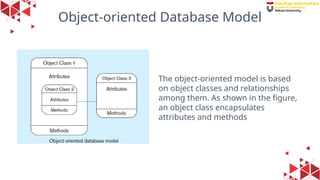
Object-oriented Database Model
The object-oriented model is based
on object classes and relationships
among them. As shown in the figure,
an object class encapsulates
attributes and methods
40
Multidimensional Database Model
Multidimensional databases, which form the basis for data warehouses,
allow us to view data in the form of cubes or a star schema
41
Evolution of Database System - Resume
The development and evolution of database technology generally drove
by:
1. The need to provide greater independence between programs and data,
thereby reducing maintenance costs
2. The desire to manage increasingly complex data types and structures
3. The desire to provide easier and faster access to data for users who
have neither a background in programming languages nor a detailed
understanding of how data are stored in databases
4. The need to provide ever more powerful platforms for decision support
applications
42
Reference
Hoffer, Jeffrey A., et.al., "Modern Database Management", Twelfth Edition,
Pearson, 2016. Chapter 1
43
Questions

Introduction to Database_konsep dasar basis data.pptx

  • 1.
  • 2.
    2 Learning Outcomes Students canexplain the concepts of data, data model, advantages of database approach, the process of database development life cycle, people involved in the development process, and the evolution of database system
  • 3.
  • 4.
    4 1. Basic Conceptsand Definitions
  • 5.
  • 6.
    6 Basis Data (Database) •Data • Data  bahan mentah • Fakta mengenai objek atau informasi dasar (angka, huruf, gambar) yang dapat direkam dan disimpan pada media komputer • Representasi tersimpan dari objek dan peristiwa yang mempunyai arti dan kepentingan dalam lingkungan pengguna. • Basis • Markas/ Gudang, tempat berkumpul. • Analogi : sebuah lemari arsip • Map Kumpulan arsip dengan penomoran/ pola unik tertentu  DATA • Menentukan kelompok arsip.  INFORMATION • Menempatkan arsip dengan kelompok tertentu  KNOWLEDGE
  • 7.
    7 DEFINITION • Beberapa definisiDatabase • Himpunan kelompok data (arsip) yang saling berhubungan yang saling diorganisasi sedemikian rupa agar kelak dapat dimanfaatkan kembali dengan cepat dan mudah. • Kumpulan data yang saling berhubungan yang disimpan secara bersama sedemikian rupa dan tanpa pengulangan (redudansi) yang tidak perlu, untuk memenuhi berbagai kebutuhan. • Kumpulan data/ file/ table/ arsip yang saling berhubungan yang disimpan dalam media penyimpanan elektronis. Tabel merupakan komponen utama Pembangunan database. • Kumpulan data yang terorganisis dari data yang terkait secara logis
  • 8.
    8 Examples • List offacts • Data in context Useful information to some users, such as the course instructor and the registrar’s office. Figure 1. Data in context Data
  • 9.
    9 Examples (2) • SummarizedData Data presented as graphical information. This information could be used as a basis for deciding whether to add new courses or to hire new faculty members. Figure 2. Summarized Data
  • 10.
    10 Real World facts about theworld in a database facts about the world in a database facts about the world in a database facts about the world in a database facts about the world in a database facts about the world in a database facts about the world in a database facts about the world in a database facts about the world in a database facts about the world in a database facts about the world in a database facts about the world in a database facts about the world in a database facts about the world in a database more facts more facts more facts more facts more facts more facts more facts more facts more facts more facts some more rather long facts about the world in the databse some more rather long facts about the world in the databse some more rather long facts about the world in the databse some more rather long facts about the world in the databse some more rather long facts about the world in the databse some more rather long facts about the world in the databse facts about the world in a database facts about the world in a database facts about the world in a database facts about the world in a database facts about the world in a database facts about the world in a database Database Facts about world and behaviour of world represented in contents and operations of a database Users
  • 11.
    11 Metadata • Metadata • Metadataadalah data tentang data. Metadata membantu untuk mengetahui lebih banyak tentang data itu sendiri tanpa perlu melihat atau memahami konten asli. • Data yang mendeskripsikan karakteristik data dan konteks data tersebut.
  • 12.
  • 13.
    13 Traditional File ProcessingSystems “Metode pengelolaan data yang mengandalkan penyimpanan dan pengolahan data dalam file-file terpisah di media penyimpanan seperti disk”  When computer-based data processing was first available, there were no databases, to be useful for business applications, computers had to store, manipulate, and retrieve large files of data.  Computer file processing systems were developed for this purpose.
  • 14.
    14 Disadvantages of FileProcessing Systems 1. Program-data dependence 2. Duplication of data 3. Limited Data Sharing 4. Lengthy development times 5. Excessive program maintenance Figure 3. Example of File Processing Systems
  • 15.
  • 16.
    16 Data Models • Datamodels is graphical systems used to capture the nature and relationships among data. • Entity is a person, a place, an object, an event, or a concept in the user environment about which the organization wishes to maintain data. • The data you are interested in capturing about the entity (e.g., Customer Name) is called an attribute. • Data are recorded for many customers. Each customer’s information is referred to as an instance of CUSTOMER. • A well-structured database establishes the relationships between entities that exist in organizational data so that desired information can be retrieved.
  • 17.
    17 Example of DataModel Figure 4. Segment of an enterprise data model Figure 5. Segment of a project data model
  • 18.
    18 Relational Database • Relationaldatabase is a database that represents data as a collection of tables in which all data relationships are represented by common values in related tables. • Relational databases establish the relationships between entities by means of common fields included in a file, called a relation
  • 19.
    19 Database Management System(DBMS) • A database management system (DBMS) is a software system that enables the use of a database approach. • The primary purpose of a DBMS is to provide a systematic method of creating, updating, storing, and retrieving the data stored in a database. • It enables end users and application programmers to share data, and it enables data to be shared among multiple applications rather than propagated and stored in new files for every new application (Mullins, 2002). • A DBMS also provides facilities for controlling data access, enforcing data integrity, managing concurrency control, and restoring a database.
  • 20.
    20 Advantages of DBMS 1.Program-data independence 2. Planned Data Redundancy 3. Improved Data Consistency 4. Improved Data Sharing 5. Enforcement of Standards 6. Improved Data Quality 7. Increased productivity of application development 8. Improved data accessibility and responsiveness 9. Reduced program maintenance 10. Improved decision support Figure 3. Example of File Processing Systems
  • 21.
    21 Costs and Risksof the Database Approach (1) • New, specialized personnel • Installation and management cost and complexity • Conversion costs • Need for explicit backup and recovery • Organizational conflict
  • 22.
  • 23.
  • 24.
    24 Planning Purpose To develop apreliminary understanding of a business situation and how information systems might help solve a problem or make an opportunity possible Consist of two steps: • Enterprise modelling • Conceptual modelling Planning Analysis Design Implementati on Maintenance
  • 25.
    25 Enterprise Modelling • Analysecurrent data processing • Analyse the general business functions and their database needs • Justify need for new data and databases in support of business • Identify scope of database requirements for proposed information system • Analyse overall data requirements for business function(s) supported by database Conceptual Data Modelling Planning
  • 26.
    26 Analysis Purpose To analyse thebusiness situation thoroughly to determine requirements, to structure those requirements, and to select among competing system features Planning Analysis Design Implementati on Maintenance
  • 27.
    27 Conceptual Data Modelling(part 2) • Develop preliminary conceptual data model, including entities and relationships • Compare preliminary conceptual data model with enterprise data model • Develop detailed conceptual data model, including all entities, relationships, attributes, and business rules • Make conceptual data model consistent with other models of information system • Populate repository with all conceptual database specifications
  • 28.
    28 Design Purpose To elicit andstructure all information requirements; to develop all technology and organizational specifications Consist of two step: • Logical database design • Physical database design and definition Planning Analysis Design Implementati on Maintenance
  • 29.
    29 Logical Database Design •Analyse in detail the transactions, forms, displays, and inquiries (database views) required by the business functions supported by the database • Integrate database views into conceptual data model • Identify data integrity and security requirements, and populate repository • Define database to DBMS (often generated from repository) • Decide on physical organization of data • Design database processing programs Physical Database Design and Definition Design
  • 30.
    30 Implementation Purpose To write programs,build databases, test and install the new system, train users, and finalize documentation The Steps: • Code and test database processing programs • Complete database documentation and training materials • Install database and convert data from prior systems Planning Analysis Design Implementati on Maintenance
  • 31.
    31 Maintenance Purpose To monitor theoperation and usefulness of the system, and to repair and enhance the system The Steps: • Analyse database and database applications to ensure that evolving information requirements are met • Tune database for improved performance • Fix errors in database and database applications and recover database when it is contaminated Planning Analysis Design Implementati on Maintenance
  • 32.
  • 33.
    33 Managing People Involvedin Database Development • Business analysts • Systems analysts • Database analysts and data modelers • Users • Programmers • Database architects • Data administrators • Project managers • Other technical experts
  • 34.
  • 35.
  • 36.
    36 Hierarchical Database Model Inthe hierarchical model, files are organized in a top-down structure that resembles a tree or genealogy chart.
  • 37.
    37 Network Database Model Inthe network model, each file can be associated with an arbitrary number of other files.
  • 38.
    38 Relational Database Model Therelational model (the primary focus of this course) organizes data in the form of tables and relationships among them.
  • 39.
    39 Object-oriented Database Model Theobject-oriented model is based on object classes and relationships among them. As shown in the figure, an object class encapsulates attributes and methods
  • 40.
    40 Multidimensional Database Model Multidimensionaldatabases, which form the basis for data warehouses, allow us to view data in the form of cubes or a star schema
  • 41.
    41 Evolution of DatabaseSystem - Resume The development and evolution of database technology generally drove by: 1. The need to provide greater independence between programs and data, thereby reducing maintenance costs 2. The desire to manage increasingly complex data types and structures 3. The desire to provide easier and faster access to data for users who have neither a background in programming languages nor a detailed understanding of how data are stored in databases 4. The need to provide ever more powerful platforms for decision support applications
  • 42.
    42 Reference Hoffer, Jeffrey A.,et.al., "Modern Database Management", Twelfth Edition, Pearson, 2016. Chapter 1
  • 43.

Editor's Notes

  • #2 Mengatur data
  • #3 Orang yang Terlibat dalam Pengembangan Basis Data
  • #5 Data data tidak memiliki makna yang jelas tanpa pengolahan lebih lanjut Informasi  informasi lebih mudah dimengerti dan menunjukan hubungan antar data Pengetahuan  hasil dari pemahaman informasi, yang memungkinkan kita membuat Keputusan berdasarkan informasi yang sudah dipahami
  • #14 1 program dan data sangat bergantung satu sama lain, sehingga perubahan pada data memaksa perubahan pada program 2 duplikasi data membuat pengelolaan data lebih sulit dan kurang efisien 3 kesulitan dalam berbagi data, dikarenakan seringkali data disimpan dalam file yang terpisah-pisah 4 waktu pengembangan yang lama 5 pemeliharaan program yang berlebihan dikarenakan memerlukan jumlah waktu dan usaha yang sangat besar untuk di perbaharui, diperbaiki, dan dipelihara
  • #20 1. Program-data independence The separation of data descriptions (metadata) from the application programs that use the data is called data independence. With the database approach, data descriptions are stored in a central location called the repository. This property of database systems allows an organization’s data to change and evolve (within limits) without changing the application programs that process the data. 2. Planned Data Redundancy Good database design attempts to integrate previously separate (and redundant) data files into a single, logical structure. Ideally, each primary fact is recorded in only one place in the database. 3. Improved Data Consistency By eliminating or controlling data redundancy, we greatly reduce the opportunities for inconsistency. For example, if a customer’s address is stored only once, when the customer’s address changes, recording the new address is greatly simplified because the address is stored in a single place. Finally, we avoid the wasted storage space that results from redundant data storage. 4. Improved Data Sharing A database is designed as a shared corporate resource. Authorized internal and external users are granted permission to use the database, and each user (or group of users) is provided one or more user views into the database to facilitate this use. A user view is a logical description of some portion of the database that is required by a user to perform some task. For example, an employee working in human resources will need access to confidential employee data; a customer needs access to the product catalog available on Web site. The views for the human resources employee and the customer are drawn from completely different areas of one unified database. 5. Enforcement of Standards When the database approach is implemented with full management support, the database administration function should be granted single-point authority and responsibility for establishing and enforcing data standards. These standards will include naming conventions, data quality standards, and uniform procedures for accessing, updating, and protecting data. 6. Improved Data Quality Database designers can specify integrity constraints that are enforced by the DBMS. A constraint is a rule that cannot be violated by database users. For example, if a customer places an order, the constraint that ensures that the customer and the order remain associated is called a “relational integrity constraint,” and it prevents an order from being entered without specifying who placed the order. Increased productivity of application development. A major advantage of the database approach is that it greatly reduces the cost and time for developing new business applications. Improved data accessibility and responsiveness. With a relational database, end users without programming experience can often retrieve and display data, even when they cross traditional departmental boundaries. Reduced program maintenance. In a database environment, data are more independent of the application programs that use them. Within limits, we can change either the data or the application programs that use the data without necessitating a change in the other factor. Improved decision support. Some databases are designed expressly for decision support applications.
  • #21 New, specialized personnel. Frequently, organizations that adopt the database approach need to hire or train individuals to design and implement databases, provide database administration services, and manage a staff of new people. Installation and management cost and complexity. A multiuser database management system is a large and complex suite of software that has a high initial cost, requires a staff of trained personnel to install and operate, and has substantial annual maintenance and support costs. Conversion costs. The cost of converting older systems to modern database technology—measured in terms of dollars, time, and organizational commitment—may often seem prohibitive to an organization. Need for explicit backup and recovery. A shared corporate database must be accurate and available at all times. This requires that comprehensive procedures be developed and used for providing backup copies of data and for restoring a database when damage occurs. Organizational conflict. A shared database requires a consensus on data definitions and ownership, as well as responsibilities for accurate data maintenance. Experience has shown that conflicts on data definitions, data formats and coding, rights to update shared data, and associated issues are frequent and often difficult to resolve.
  • #33 Business analysts - These individuals work with both management and users to analyse the business situation and develop detailed system and program specifications for projects. Systems analysts - These individuals may perform business analyst activities but also specify computer systems requirements and typically have a stronger systems development background than business analysts. Database analysts and data modelers - These individuals concentrate on determining the requirements and design for the database component of the information system. Users - Users provide assessments of their information needs and monitor that the developed system meets their needs. Programmers - These individuals design and write computer programs that have commands to maintain and access data in the database embedded in them. Database architects - These individuals establish standards for data in business units, trying to achieve optimum data location, currency, and quality. Data administrators These individuals have responsibility for existing and future databases and ensure consistency and integrity across databases, and as experts on database technology, they provide consulting and training to other project team members. Project managers Project managers control assigned projects, including team composition, analysis, design, implementation, and support of projects. Other technical experts Other individuals are needed in areas such as networking, operating systems, testing, data warehousing, and documentation.