UNIT -1
Introduction to Data Structures
Data Structures
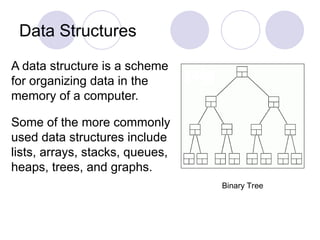
A data structure is a scheme
for organizing data in the
memory of a computer.
Some of the more commonly
used data structures include
lists, arrays, stacks, queues,
heaps, trees, and graphs.
Binary Tree
Data Structures
The way in which the data is
organized affects the
performance of a program
for different tasks.
Computer programmers
decide which data structures
to use based on the nature
of the data and the
processes that need to be
performed on that data.
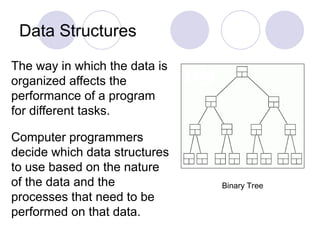
Binary Tree
Example: A Queue
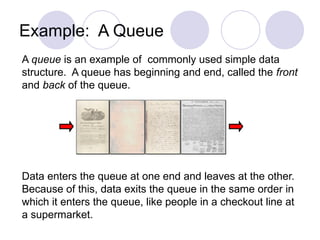
A queue is an example of commonly used simple data
structure. A queue has beginning and end, called the front
and back of the queue.
Data enters the queue at one end and leaves at the other.
Because of this, data exits the queue in the same order in
which it enters the queue, like people in a checkout line at
a supermarket.
Example: A Binary Tree
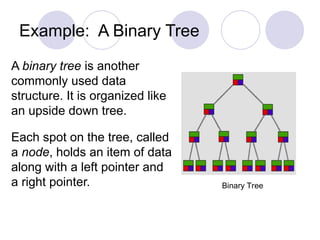
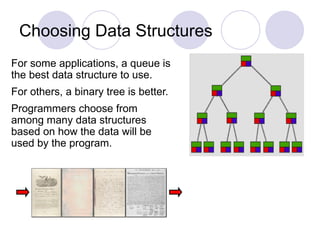
A binary tree is another
commonly used data
structure. It is organized like
an upside down tree.
Each spot on the tree, called
a node, holds an item of data
along with a left pointer and
a right pointer. Binary Tree
Example: A Binary Tree
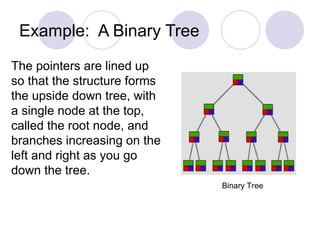
The pointers are lined up
so that the structure forms
the upside down tree, with
a single node at the top,
called the root node, and
branches increasing on the
left and right as you go
down the tree.
Binary Tree
Choosing Data Structures
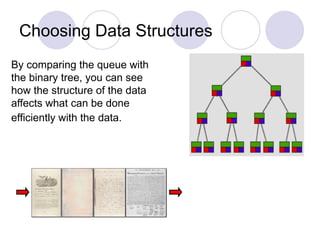
By comparing the queue with
the binary tree, you can see
how the structure of the data
affects what can be done
efficiently with the data.
Choosing Data Structures
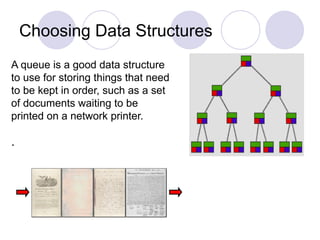
A queue is a good data structure
to use for storing things that need
to be kept in order, such as a set
of documents waiting to be
printed on a network printer.
.
Choosing Data Structures
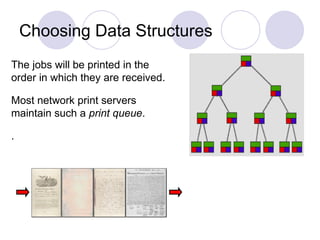
The jobs will be printed in the
order in which they are received.
Most network print servers
maintain such a print queue.
.
Choosing Data Structures
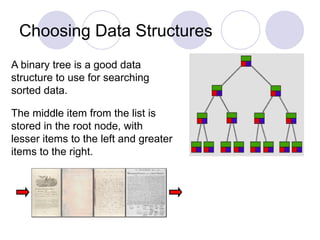
A binary tree is a good data
structure to use for searching
sorted data.
The middle item from the list is
stored in the root node, with
lesser items to the left and greater
items to the right.
Choosing Data Structures
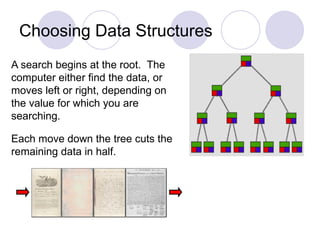
A search begins at the root. The
computer either find the data, or
moves left or right, depending on
the value for which you are
searching.
Each move down the tree cuts the
remaining data in half.
Choosing Data Structures
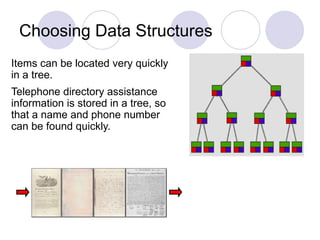
Items can be located very quickly
in a tree.
Telephone directory assistance
information is stored in a tree, so
that a name and phone number
can be found quickly.
Choosing Data Structures
For some applications, a queue is
the best data structure to use.
For others, a binary tree is better.
Programmers choose from
among many data structures
based on how the data will be
used by the program.
Data Structures in Alice
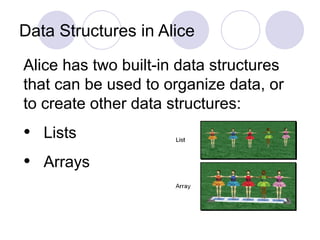
Alice has two built-in data structures
that can be used to organize data, or
to create other data structures:
• Lists
• Arrays
Lists
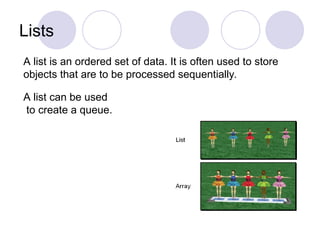
A list is an ordered set of data. It is often used to store
objects that are to be processed sequentially.
A list can be used
to create a queue.
Arrays
An array is an indexed set of variables, such as
dancer[1], dancer[2], dancer[3],… It is like a set of
boxes that hold things.
A list is a set of items.
An array is a set of
variables that each
store an item.
Arrays and Lists
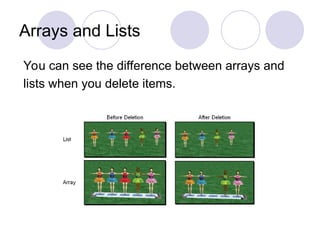
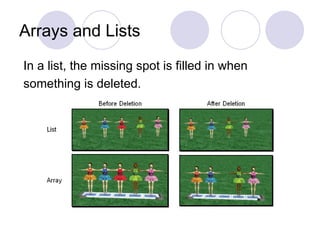
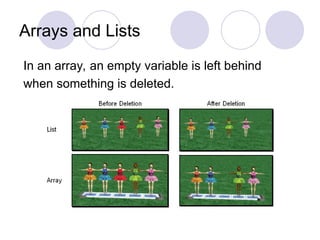
You can see the difference between arrays and
lists when you delete items.
Arrays and Lists
In a list, the missing spot is filled in when
something is deleted.
Arrays and Lists
In an array, an empty variable is left behind
when something is deleted.
Lists
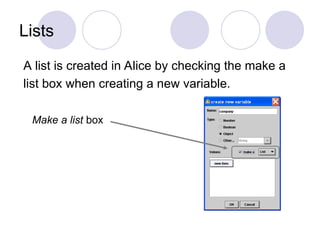
A list is created in Alice by checking the make a
list box when creating a new variable.
Make a list box
Lists
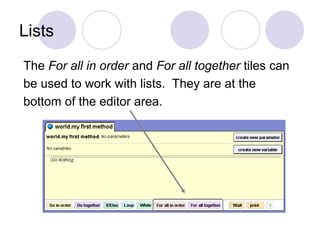
The For all in order and For all together tiles can
be used to work with lists. They are at the
bottom of the editor area.
Arrays
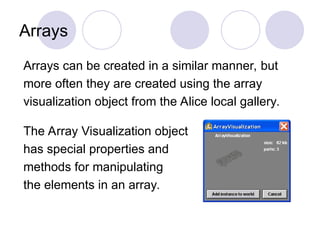
Arrays can be created in a similar manner, but
more often they are created using the array
visualization object from the Alice local gallery.
The Array Visualization object
has special properties and
methods for manipulating
the elements in an array.
Arrays
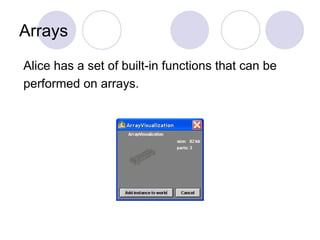
Alice has a set of built-in functions that can be
performed on arrays.
CHAPTER 4 24
LISTS
All the programs in this file are selected from
Ellis Horowitz, Sartaj Sahni, and Susan Anderson-Freed
“Fundamentals of Data Structures in C”,
Computer Science Press, 1992.
CHAPTER 4 25
Introduction
Array
successive items locate a fixed distance
disadvantage
data movements during insertion and deletion
waste space in storing n ordered lists of varying
size
possible solution
linked list
CHAPTER 4 26
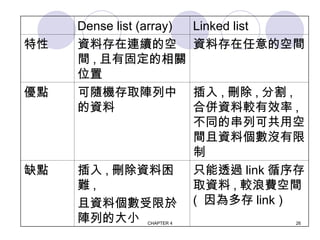
Dense list (array) Linked list
特性 資料存在連續的空
間 , 且有固定的相關
位置
資料存在任意的空間
優點 可隨機存取陣列中
的資料
插入 , 刪除 , 分割 ,
合併資料較有效率 ,
不同的串列可共用空
間且資料個數沒有限
制
缺點 插入 , 刪除資料困
難 ,
且資料個數受限於
陣列的大小
只能透過 link 循序存
取資料 , 較浪費空間
( 因為多存 link )
CHAPTER 4 27
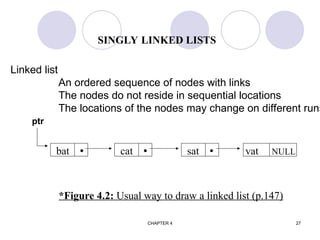
SINGLY LINKED LISTS
bat  cat  sat  vat NULL
*Figure 4.2: Usual way to draw a linked list (p.147)
Linked list
An ordered sequence of nodes with links
The nodes do not reside in sequential locations
The locations of the nodes may change on different runs
ptr
CHAPTER 4 28
typedef struct list_node *list_pointer;
typedef struct list_node {
char data [4];
list_pointer link;
}list_node;
Creation
list_pointer ptr =NULL;
Testing
#define IS_EMPTY(ptr) (!(ptr))
Allocation
ptr=(list_pointer) malloc (sizeof(list_node));
Example 4.1: create a linked list of words
Declaration
CHAPTER 4 29
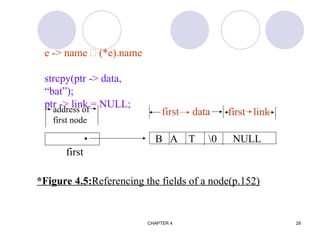
B A T 0 NULL

address of
first node
first data first link
first
*Figure 4.5:Referencing the fields of a node(p.152)
e -> name  (*e).name
strcpy(ptr -> data,
“bat”);
ptr -> link = NULL;
CHAPTER 4 30
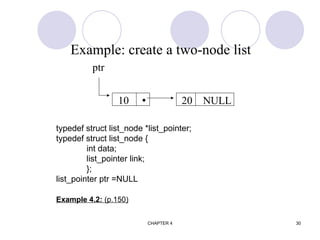
typedef struct list_node *list_pointer;
typedef struct list_node {
int data;
list_pointer link;
};
list_pointer ptr =NULL
Example 4.2: (p.150)
Example: create a two-node list
10  20 NULL
ptr
CHAPTER 4 31
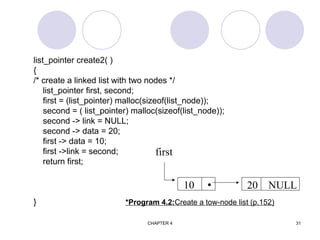
list_pointer create2( )
{
/* create a linked list with two nodes */
list_pointer first, second;
first = (list_pointer) malloc(sizeof(list_node));
second = ( list_pointer) malloc(sizeof(list_node));
second -> link = NULL;
second -> data = 20;
first -> data = 10;
first ->link = second;
return first;
} *Program 4.2:Create a tow-node list (p.152)
10  20 NULL
first
CHAPTER 4 32
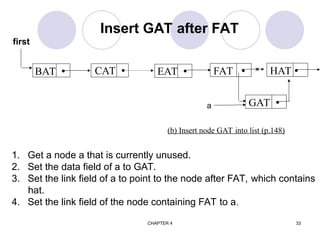
Insert GAT after FAT
(a) Insert GAT into data [5]
1 HAT
2
3 CAT
4 EAT
5 GAT
6
7 WAT
8 BAT
9 FAT
10
11 VAT
15
4
9
1
0
3
5
7
CHAPTER 4 33
BAT  CAT  EAT 
(b) Insert node GAT into list (p.148)
FAT 
Insert GAT after FAT
first
1. Get a node a that is currently unused.
2. Set the data field of a to GAT.
3. Set the link field of a to point to the node after FAT, which contains
hat.
4. Set the link field of the node containing FAT to a.
HAT 
GAT 
a
×
CHAPTER 4 34
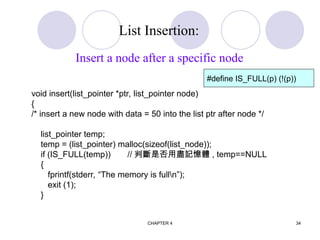
void insert(list_pointer *ptr, list_pointer node)
{
/* insert a new node with data = 50 into the list ptr after node */
list_pointer temp;
temp = (list_pointer) malloc(sizeof(list_node));
if (IS_FULL(temp)) // 判斷是否用盡記憶體 , temp==NULL
{
fprintf(stderr, “The memory is fulln”);
exit (1);
}
List Insertion:
Insert a node after a specific node
#define IS_FULL(p) (!(p))
CHAPTER 4 35
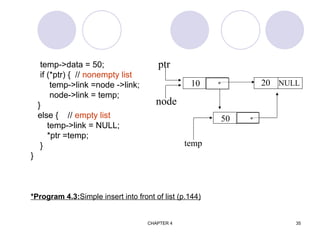
temp->data = 50;
if (*ptr) { // nonempty list
temp->link =node ->link;
node->link = temp;
}
else { // empty list
temp->link = NULL;
*ptr =temp;
}
}
*Program 4.3:Simple insert into front of list (p.144)
temp
50 
10  20 NULL
ptr
node
CHAPTER 4 36
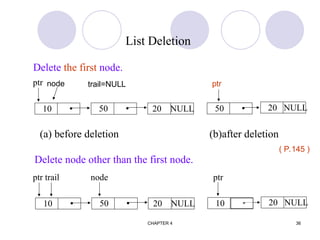
10  20 NULL
50  20 NULL
50 
(a) before deletion (b)after deletion
Delete node other than the first node.
ptr
List Deletion
Delete the first node.
10  20 NULL
50  20 NULL
10 
ptr trail node ptr
( P.145 )
ptr
trail=NULL
node
CHAPTER 4 37
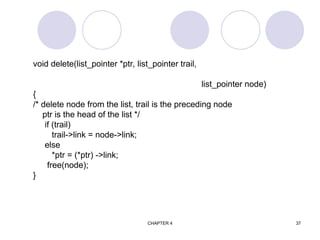
void delete(list_pointer *ptr, list_pointer trail,
list_pointer node)
{
/* delete node from the list, trail is the preceding node
ptr is the head of the list */
if (trail)
trail->link = node->link;
else
*ptr = (*ptr) ->link;
free(node);
}
CHAPTER 4 38
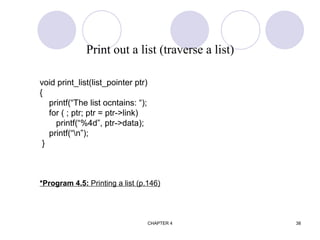
void print_list(list_pointer ptr)
{
printf(“The list ocntains: “);
for ( ; ptr; ptr = ptr->link)
printf(“%4d”, ptr->data);
printf(“n”);
}
*Program 4.5: Printing a list (p.146)
Print out a list (traverse a list)
CHAPTER 4 39
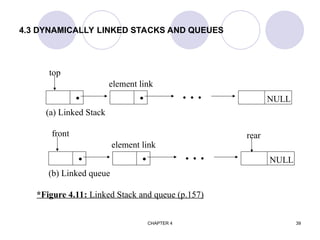
4.3 DYNAMICALLY LINKED STACKS AND QUEUES
  NULL
  
top
element link
(a) Linked Stack
  NULL
  
front
element link
(b) Linked queue
rear
*Figure 4.11: Linked Stack and queue (p.157)
CHAPTER 4 40
#define MAX_STACKS 10 /* maximum number of stacks */
typedef struct {
int key;
/* other fields */
} element;
typedef struct stack *stack_pointer;
typedef struct stack {
element item;
stack_pointer link;
};
stack_pointer top[MAX_STACKS];
Represent n stacks
CHAPTER 4 41
#define MAX_QUEUES 10 /* maximum number of queues */
typedef struct queue *queue_pointer;
typedef struct queue {
element item;
queue_pointer link;
};
queue_pointer front[MAX_QUEUE], rear[MAX_QUEUES];
Represent n queues
CHAPTER 4 42
void push( int I, element item)
{
/* add item to the ith stack */
stackPointer temp;
MALLOC (temp, sizeof(*temp));
temp  data = item;
temp  link = top[i];
top[i] = temp;
}
*Program 4.5:Add to a linked stack (p.158)
Push in the linked stack
CHAPTER 4 43
element pop(int i)
{/* remove top element from the ith stack */
stack_pointer temp = top[i];
element item;
if (!temp))
return
stackEmpty();
item = temp data;
top[i] = temp link;
free(temp);
return item;
}
*Program 4.6: Delete from a linked stack (p.158)
pop from the linked stack
CHAPTER 4 44
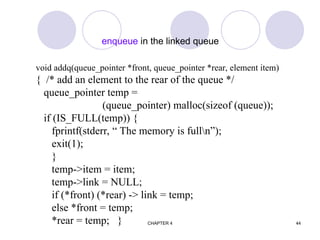
enqueue in the linked queue
void addq(queue_pointer *front, queue_pointer *rear, element item)
{ /* add an element to the rear of the queue */
queue_pointer temp =
(queue_pointer) malloc(sizeof (queue));
if (IS_FULL(temp)) {
fprintf(stderr, “ The memory is fulln”);
exit(1);
}
temp->item = item;
temp->link = NULL;
if (*front) (*rear) -> link = temp;
else *front = temp;
*rear = temp; }
CHAPTER 4 45
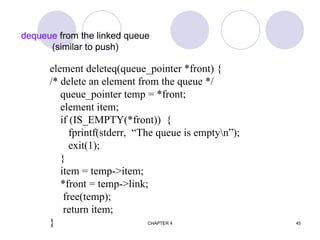
dequeue from the linked queue
(similar to push)
element deleteq(queue_pointer *front) {
/* delete an element from the queue */
queue_pointer temp = *front;
element item;
if (IS_EMPTY(*front)) {
fprintf(stderr, “The queue is emptyn”);
exit(1);
}
item = temp->item;
*front = temp->link;
free(temp);
return item;
}
CHAPTER 4 46
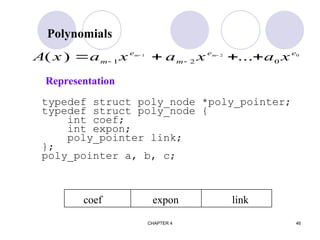
Polynomials
typedef struct poly_node *poly_pointer;
typedef struct poly_node {
int coef;
int expon;
poly_pointer link;
};
poly_pointer a, b, c;
A x a x a x a x
m
e
m
e e
m m
( ) ...
   
 
 
1 2 0
1 2 0
coef expon link
Representation
CHAPTER 4 47
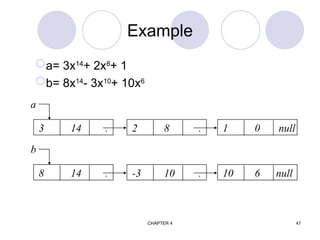
Example
a= 3x14
+ 2x8
+ 1
b= 8x14
- 3x10
+ 10x6
3 14 . 2 8 . 1 0 null
a
8 14 . -3 10 . 10 6 null
b
CHAPTER 4 48
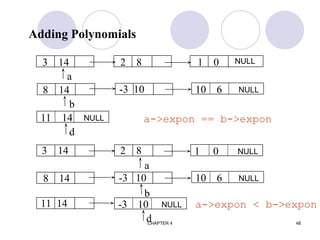
Adding Polynomials
3 14 2 8 1 0
a
8 14 -3 10
b
d
a->expon == b->expon
3 14 2 8
a
8 14 -3 10
b
11 14
d
a->expon < b->expon
NULL
10 6 NULL
11 14 NULL
1 0 NULL
10 6 NULL
-3 10 NULL
CHAPTER 4 49
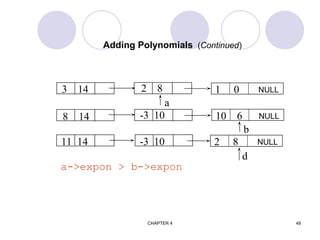
Adding Polynomials (Continued)
3 14 2 8
a
8 14 -3 10
b
11 14
a->expon > b->expon
-3 10
d
1 0 NULL
10 6 NULL
2 8 NULL
CHAPTER 4 50
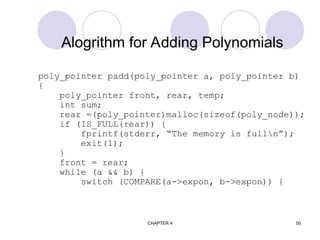
Alogrithm for Adding Polynomials
poly_pointer padd(poly_pointer a, poly_pointer b)
{
poly_pointer front, rear, temp;
int sum;
rear =(poly_pointer)malloc(sizeof(poly_node));
if (IS_FULL(rear)) {
fprintf(stderr, “The memory is fulln”);
exit(1);
}
front = rear;
while (a && b) {
switch (COMPARE(a->expon, b->expon)) {
CHAPTER 4 51
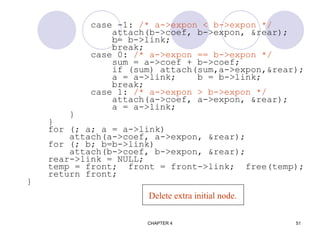
case -1: /* a->expon < b->expon */
attach(b->coef, b->expon, &rear);
b= b->link;
break;
case 0: /* a->expon == b->expon */
sum = a->coef + b->coef;
if (sum) attach(sum,a->expon,&rear);
a = a->link; b = b->link;
break;
case 1: /* a->expon > b->expon */
attach(a->coef, a->expon, &rear);
a = a->link;
}
}
for (; a; a = a->link)
attach(a->coef, a->expon, &rear);
for (; b; b=b->link)
attach(b->coef, b->expon, &rear);
rear->link = NULL;
temp = front; front = front->link; free(temp);
return front;
}
Delete extra initial node.
CHAPTER 4 52
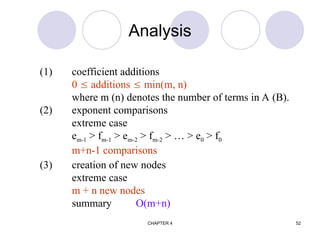
Analysis
(1) coefficient additions
0  additions  min(m, n)
where m (n) denotes the number of terms in A (B).
(2) exponent comparisons
extreme case
em-1 > fm-1 > em-2 > fm-2 > … > e0 > f0
m+n-1 comparisons
(3) creation of new nodes
extreme case
m + n new nodes
summary O(m+n)
CHAPTER 4 53
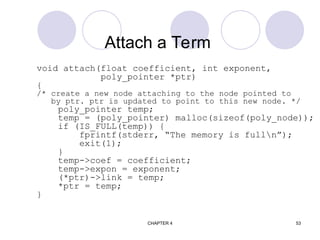
Attach a Term
void attach(float coefficient, int exponent,
poly_pointer *ptr)
{
/* create a new node attaching to the node pointed to
by ptr. ptr is updated to point to this new node. */
poly_pointer temp;
temp = (poly_pointer) malloc(sizeof(poly_node));
if (IS_FULL(temp)) {
fprintf(stderr, “The memory is fulln”);
exit(1);
}
temp->coef = coefficient;
temp->expon = exponent;
(*ptr)->link = temp;
*ptr = temp;
}
CHAPTER 4 54
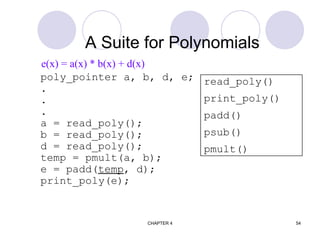
A Suite for Polynomials
poly_pointer a, b, d, e;
.
.
.
a = read_poly();
b = read_poly();
d = read_poly();
temp = pmult(a, b);
e = padd(temp, d);
print_poly(e);
read_poly()
print_poly()
padd()
psub()
pmult()
e(x) = a(x) * b(x) + d(x)
CHAPTER 4 55
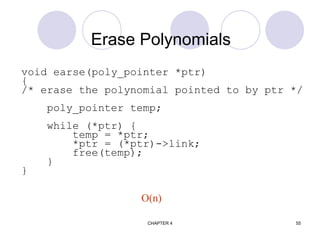
Erase Polynomials
void earse(poly_pointer *ptr)
{
/* erase the polynomial pointed to by ptr */
poly_pointer temp;
while (*ptr) {
temp = *ptr;
*ptr = (*ptr)->link;
free(temp);
}
}
O(n)
CHAPTER 4 56
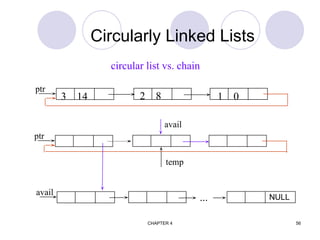
Circularly Linked Lists
3 14 2 8 1 0
ptr
ptr
avail
...
avail
temp
circular list vs. chain
NULL
CHAPTER 4 57
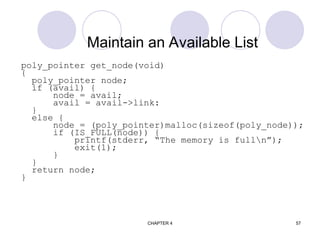
Maintain an Available List
poly_pointer get_node(void)
{
poly_pointer node;
if (avail) {
node = avail;
avail = avail->link:
}
else {
node = (poly_pointer)malloc(sizeof(poly_node));
if (IS_FULL(node)) {
printf(stderr, “The memory is fulln”);
exit(1);
}
}
return node;
}
CHAPTER 4 58
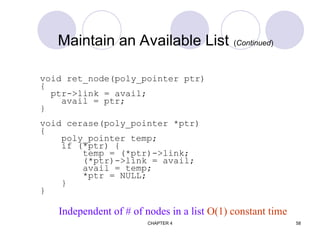
Maintain an Available List (Continued)
void ret_node(poly_pointer ptr)
{
ptr->link = avail;
avail = ptr;
}
void cerase(poly_pointer *ptr)
{
poly_pointer temp;
if (*ptr) {
temp = (*ptr)->link;
(*ptr)->link = avail;
avail = temp;
*ptr = NULL;
}
}
Independent of # of nodes in a list O(1) constant time
CHAPTER 4 59
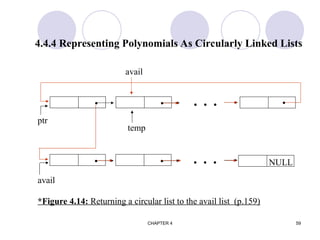
4.4.4 Representing Polynomials As Circularly Linked Lists
  
  
avail
temp
ptr
     NULL
avail
*Figure 4.14: Returning a circular list to the avail list (p.159)
CHAPTER 4 60
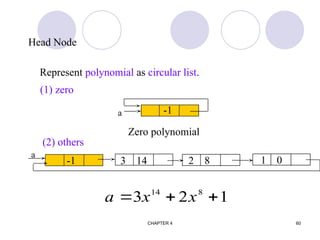
Head Node
3 14 2 8 1 0
a
-1
a
Zero polynomial
-1
a x x
  
3 2 1
14 8
Represent polynomial as circular list.
(1) zero
(2) others
CHAPTER 4 61
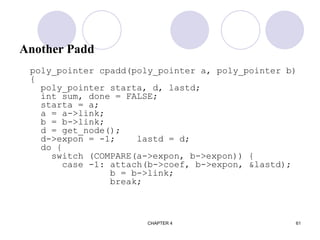
Another Padd
poly_pointer cpadd(poly_pointer a, poly_pointer b)
{
poly_pointer starta, d, lastd;
int sum, done = FALSE;
starta = a;
a = a->link;
b = b->link;
d = get_node();
d->expon = -1; lastd = d;
do {
switch (COMPARE(a->expon, b->expon)) {
case -1: attach(b->coef, b->expon, &lastd);
b = b->link;
break;
CHAPTER 4 62
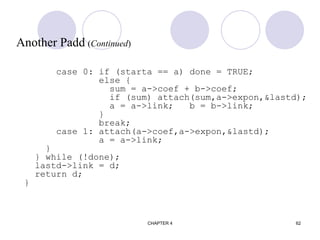
Another Padd (Continued)
case 0: if (starta == a) done = TRUE;
else {
sum = a->coef + b->coef;
if (sum) attach(sum,a->expon,&lastd);
a = a->link; b = b->link;
}
break;
case 1: attach(a->coef,a->expon,&lastd);
a = a->link;
}
} while (!done);
lastd->link = d;
return d;
}
CHAPTER 4 63
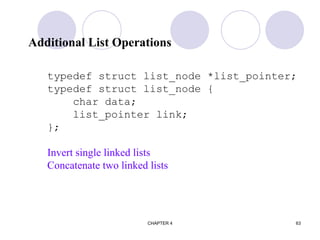
Additional List Operations
typedef struct list_node *list_pointer;
typedef struct list_node {
char data;
list_pointer link;
};
Invert single linked lists
Concatenate two linked lists
CHAPTER 4 64
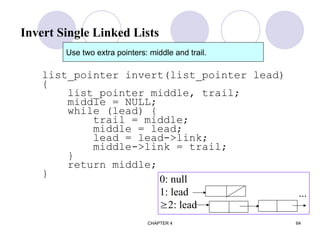
Invert Single Linked Lists
list_pointer invert(list_pointer lead)
{
list_pointer middle, trail;
middle = NULL;
while (lead) {
trail = middle;
middle = lead;
lead = lead->link;
middle->link = trail;
}
return middle;
}
0: null
1: lead
2: lead
...
Use two extra pointers: middle and trail.
CHAPTER 4 65
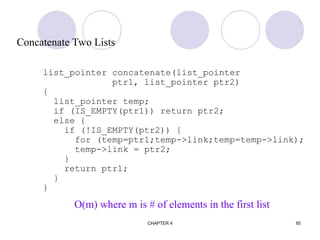
Concatenate Two Lists
list_pointer concatenate(list_pointer
ptr1, list_pointer ptr2)
{
list_pointer temp;
if (IS_EMPTY(ptr1)) return ptr2;
else {
if (!IS_EMPTY(ptr2)) {
for (temp=ptr1;temp->link;temp=temp->link);
temp->link = ptr2;
}
return ptr1;
}
}
O(m) where m is # of elements in the first list
CHAPTER 4 66
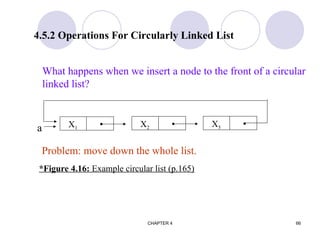
4.5.2 Operations For Circularly Linked List
X1  X2  X3 
a
*Figure 4.16: Example circular list (p.165)
What happens when we insert a node to the front of a circular
linked list?
Problem: move down the whole list.
CHAPTER 4 67
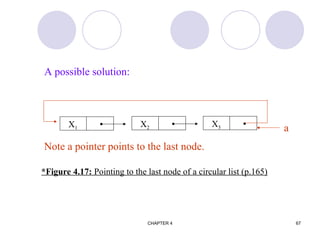
X1  X2  X3 
a
*Figure 4.17: Pointing to the last node of a circular list (p.165)
A possible solution:
Note a pointer points to the last node.
CHAPTER 4 68
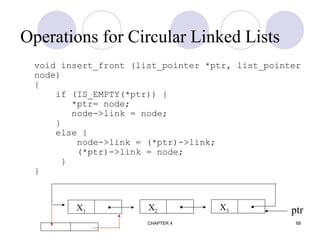
Operations for Circular Linked Lists
void insert_front (list_pointer *ptr, list_pointer
node)
{
if (IS_EMPTY(*ptr)) {
*ptr= node;
node->link = node;
}
else {
node->link = (*ptr)->link;
(*ptr)->link = node;
}
}
X1  X2  X3  ptr
CHAPTER 4 69
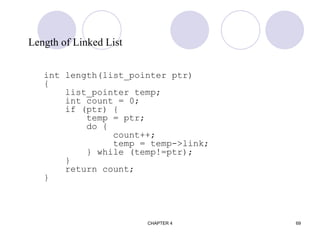
Length of Linked List
int length(list_pointer ptr)
{
list_pointer temp;
int count = 0;
if (ptr) {
temp = ptr;
do {
count++;
temp = temp->link;
} while (temp!=ptr);
}
return count;
}
CHAPTER 4 70














15
0
0
0
0
0
4
0
0
0
0
12
0
11
0
0
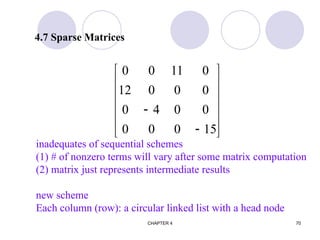
4.7 Sparse Matrices
inadequates of sequential schemes
(1) # of nonzero terms will vary after some matrix computation
(2) matrix just represents intermediate results
new scheme
Each column (row): a circular linked list with a head node
CHAPTER 4 71
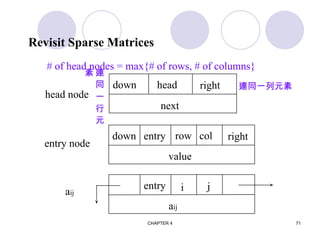
Revisit Sparse Matrices
down head right
next
head node
down entry right
value
row col
entry
aij
i j
entry node
aij
# of head nodes = max{# of rows, # of columns}
連同一列元素
連
同
一
行
元
素
CHAPTER 4 72
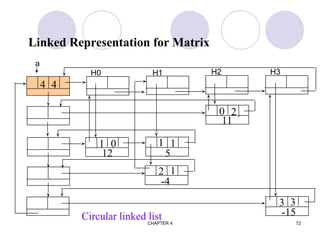
Linked Representation for Matrix
4 4
1 0
12
2 1
-4
0 2
11
3 3
-15
1 1
5
Circular linked list
a
H0 H1 H2 H3
CHAPTER 4 73
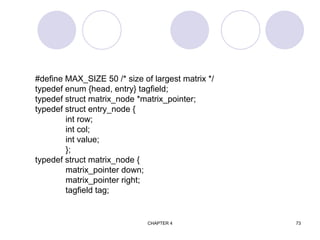
#define MAX_SIZE 50 /* size of largest matrix */
typedef enum {head, entry} tagfield;
typedef struct matrix_node *matrix_pointer;
typedef struct entry_node {
int row;
int col;
int value;
};
typedef struct matrix_node {
matrix_pointer down;
matrix_pointer right;
tagfield tag;
CHAPTER 4 74
union {
matrix_pointer next;
entry_node entry;
} u;
};
matrix_pointer hdnode[MAX_SIZE];
CHAPTER 4 75
[0] [1] [2]
[0]
[1]
[2]
[3]
[4]
4 4 4
0 2 11
1 0 12
2 1 -4
3 3 -15
*Figure 4.22: Sample input for sparse matrix (p.174)
CHAPTER 4 76
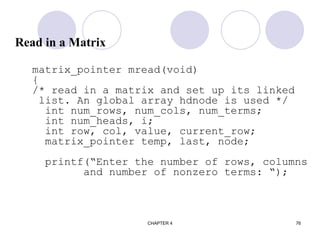
Read in a Matrix
matrix_pointer mread(void)
{
/* read in a matrix and set up its linked
list. An global array hdnode is used */
int num_rows, num_cols, num_terms;
int num_heads, i;
int row, col, value, current_row;
matrix_pointer temp, last, node;
printf(“Enter the number of rows, columns
and number of nonzero terms: “);
CHAPTER 4 77
scanf(“%d%d%d”, &num_rows, &num_cols,
&num_terms);
num_heads =
(num_cols>num_rows)? num_cols : num_rows;
/* set up head node for the list of head
nodes */
node = new_node(); node->tag = entry;
node->u.entry.row = num_rows;
node->u.entry.col = num_cols;
if (!num_heads) node->right = node;
else { /* initialize the head nodes */
for (i=0; i<num_heads; i++) {
term= new_node();
hdnode[i] = temp;
hdnode[i]->tag = head;
hdnode[i]->right = temp;
hdnode[i]->u.next = temp;
}
O(max(n,m))
CHAPTER 4 78
current_row= 0; last= hdnode[0];
for (i=0; i<num_terms; i++) {
printf(“Enter row, column and value:”);
scanf(“%d%d%d”, &row, &col, &value);
if (row>current_row) {
last->right= hdnode[current_row];
current_row= row; last=hdnode[row];
}
temp = new_node();
temp->tag=entry; temp->u.entry.row=row;
temp->u.entry.col = col;
temp->u.entry.value = value;
last->right = temp;/*link to row list */
last= temp;
/* link to column list */
hdnode[col]->u.next->down = temp;
hdnode[col]=>u.next = temp;
}
利用 next field 存放 column 的 last node
CHAPTER 4 79
/*close last row */
last->right = hdnode[current_row];
/* close all column lists */
for (i=0; i<num_cols; i++)
hdnode[i]->u.next->down = hdnode[i];
/* link all head nodes together */
for (i=0; i<num_heads-1; i++)
hdnode[i]->u.next = hdnode[i+1];
hdnode[num_heads-1]->u.next= node;
node->right = hdnode[0];
}
return node;
}
O(max{#_rows, #_cols}+#_terms)
CHAPTER 4 80
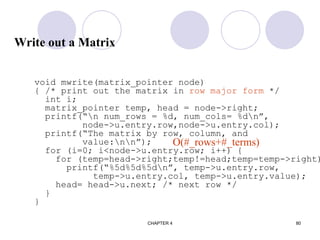
Write out a Matrix
void mwrite(matrix_pointer node)
{ /* print out the matrix in row major form */
int i;
matrix_pointer temp, head = node->right;
printf(“n num_rows = %d, num_cols= %dn”,
node->u.entry.row,node->u.entry.col);
printf(“The matrix by row, column, and
value:nn”);
for (i=0; i<node->u.entry.row; i++) {
for (temp=head->right;temp!=head;temp=temp->right)
printf(“%5d%5d%5dn”, temp->u.entry.row,
temp->u.entry.col, temp->u.entry.value);
head= head->u.next; /* next row */
}
}
O(#_rows+#_terms)
CHAPTER 4 81
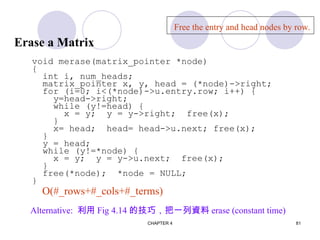
Erase a Matrix
void merase(matrix_pointer *node)
{
int i, num_heads;
matrix_pointer x, y, head = (*node)->right;
for (i=0; i<(*node)->u.entry.row; i++) {
y=head->right;
while (y!=head) {
x = y; y = y->right; free(x);
}
x= head; head= head->u.next; free(x);
}
y = head;
while (y!=*node) {
x = y; y = y->u.next; free(x);
}
free(*node); *node = NULL;
}
Free the entry and head nodes by row.
O(#_rows+#_cols+#_terms)
Alternative: 利用 Fig 4.14 的技巧,把一列資料 erase (constant time)
CHAPTER 4 82
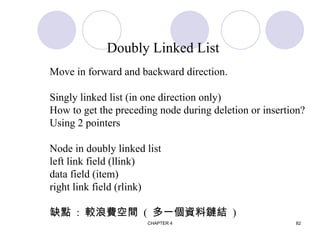
Doubly Linked List
Move in forward and backward direction.
Singly linked list (in one direction only)
How to get the preceding node during deletion or insertion?
Using 2 pointers
Node in doubly linked list
left link field (llink)
data field (item)
right link field (rlink)
缺點 : 較浪費空間 ( 多一個資料鏈結 )
CHAPTER 4 83
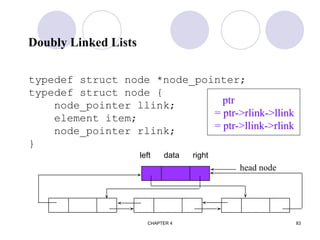
Doubly Linked Lists
typedef struct node *node_pointer;
typedef struct node {
node_pointer llink;
element item;
node_pointer rlink;
}
head node
ptr
= ptr->rlink->llink
= ptr->llink->rlink
left data right
CHAPTER 4 84
first
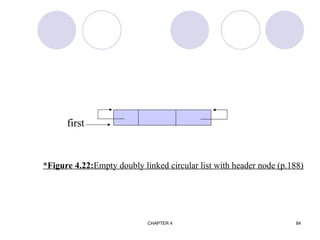
*Figure 4.22:Empty doubly linked circular list with header node (p.188)
CHAPTER 4 85
first
x
first
x
before after
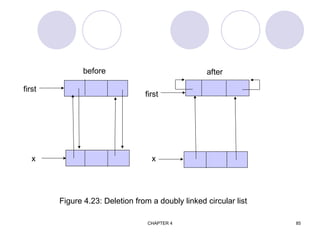
Figure 4.23: Deletion from a doubly linked circular list
CHAPTER 4 86
 
node
newnode
node
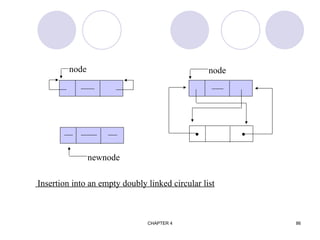
Insertion into an empty doubly linked circular list
CHAPTER 4 87
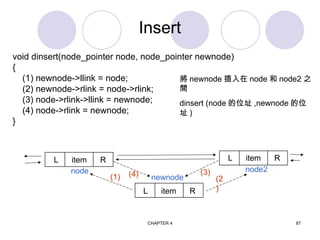
Insert
void dinsert(node_pointer node, node_pointer newnode)
{
(1) newnode->llink = node;
(2) newnode->rlink = node->rlink;
(3) node->rlink->llink = newnode;
(4) node->rlink = newnode;
}
newnode
L item R
L item R
L item R
node node2
(1) (2
)
將 newnode 插入在 node 和 node2 之
間
dinsert (node 的位址 ,newnode 的位
址 )
(3)
(4)
CHAPTER 4 88
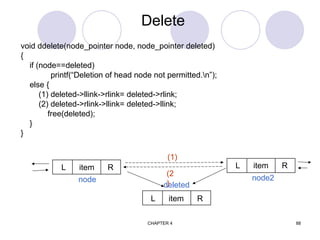
Delete
deleted
L item R
L item R
L item R
node node2
(1)
(2
)
void ddelete(node_pointer node, node_pointer deleted)
{
if (node==deleted)
printf(“Deletion of head node not permitted.n”);
else {
(1) deleted->llink->rlink= deleted->rlink;
(2) deleted->rlink->llink= deleted->llink;
free(deleted);
}
}

Introduction to Data structures and Trees.ppt

  • 1.
    UNIT -1 Introduction toData Structures
  • 2.
    Data Structures A datastructure is a scheme for organizing data in the memory of a computer. Some of the more commonly used data structures include lists, arrays, stacks, queues, heaps, trees, and graphs. Binary Tree
  • 3.
    Data Structures The wayin which the data is organized affects the performance of a program for different tasks. Computer programmers decide which data structures to use based on the nature of the data and the processes that need to be performed on that data. Binary Tree
  • 4.
    Example: A Queue Aqueue is an example of commonly used simple data structure. A queue has beginning and end, called the front and back of the queue. Data enters the queue at one end and leaves at the other. Because of this, data exits the queue in the same order in which it enters the queue, like people in a checkout line at a supermarket.
  • 5.
    Example: A BinaryTree A binary tree is another commonly used data structure. It is organized like an upside down tree. Each spot on the tree, called a node, holds an item of data along with a left pointer and a right pointer. Binary Tree
  • 6.
    Example: A BinaryTree The pointers are lined up so that the structure forms the upside down tree, with a single node at the top, called the root node, and branches increasing on the left and right as you go down the tree. Binary Tree
  • 7.
    Choosing Data Structures Bycomparing the queue with the binary tree, you can see how the structure of the data affects what can be done efficiently with the data.
  • 8.
    Choosing Data Structures Aqueue is a good data structure to use for storing things that need to be kept in order, such as a set of documents waiting to be printed on a network printer. .
  • 9.
    Choosing Data Structures Thejobs will be printed in the order in which they are received. Most network print servers maintain such a print queue. .
  • 10.
    Choosing Data Structures Abinary tree is a good data structure to use for searching sorted data. The middle item from the list is stored in the root node, with lesser items to the left and greater items to the right.
  • 11.
    Choosing Data Structures Asearch begins at the root. The computer either find the data, or moves left or right, depending on the value for which you are searching. Each move down the tree cuts the remaining data in half.
  • 12.
    Choosing Data Structures Itemscan be located very quickly in a tree. Telephone directory assistance information is stored in a tree, so that a name and phone number can be found quickly.
  • 13.
    Choosing Data Structures Forsome applications, a queue is the best data structure to use. For others, a binary tree is better. Programmers choose from among many data structures based on how the data will be used by the program.
  • 14.
    Data Structures inAlice Alice has two built-in data structures that can be used to organize data, or to create other data structures: • Lists • Arrays
  • 15.
    Lists A list isan ordered set of data. It is often used to store objects that are to be processed sequentially. A list can be used to create a queue.
  • 16.
    Arrays An array isan indexed set of variables, such as dancer[1], dancer[2], dancer[3],… It is like a set of boxes that hold things. A list is a set of items. An array is a set of variables that each store an item.
  • 17.
    Arrays and Lists Youcan see the difference between arrays and lists when you delete items.
  • 18.
    Arrays and Lists Ina list, the missing spot is filled in when something is deleted.
  • 19.
    Arrays and Lists Inan array, an empty variable is left behind when something is deleted.
  • 20.
    Lists A list iscreated in Alice by checking the make a list box when creating a new variable. Make a list box
  • 21.
    Lists The For allin order and For all together tiles can be used to work with lists. They are at the bottom of the editor area.
  • 22.
    Arrays Arrays can becreated in a similar manner, but more often they are created using the array visualization object from the Alice local gallery. The Array Visualization object has special properties and methods for manipulating the elements in an array.
  • 23.
    Arrays Alice has aset of built-in functions that can be performed on arrays.
  • 24.
    CHAPTER 4 24 LISTS Allthe programs in this file are selected from Ellis Horowitz, Sartaj Sahni, and Susan Anderson-Freed “Fundamentals of Data Structures in C”, Computer Science Press, 1992.
  • 25.
    CHAPTER 4 25 Introduction Array successiveitems locate a fixed distance disadvantage data movements during insertion and deletion waste space in storing n ordered lists of varying size possible solution linked list
  • 26.
    CHAPTER 4 26 Denselist (array) Linked list 特性 資料存在連續的空 間 , 且有固定的相關 位置 資料存在任意的空間 優點 可隨機存取陣列中 的資料 插入 , 刪除 , 分割 , 合併資料較有效率 , 不同的串列可共用空 間且資料個數沒有限 制 缺點 插入 , 刪除資料困 難 , 且資料個數受限於 陣列的大小 只能透過 link 循序存 取資料 , 較浪費空間 ( 因為多存 link )
  • 27.
    CHAPTER 4 27 SINGLYLINKED LISTS bat  cat  sat  vat NULL *Figure 4.2: Usual way to draw a linked list (p.147) Linked list An ordered sequence of nodes with links The nodes do not reside in sequential locations The locations of the nodes may change on different runs ptr
  • 28.
    CHAPTER 4 28 typedefstruct list_node *list_pointer; typedef struct list_node { char data [4]; list_pointer link; }list_node; Creation list_pointer ptr =NULL; Testing #define IS_EMPTY(ptr) (!(ptr)) Allocation ptr=(list_pointer) malloc (sizeof(list_node)); Example 4.1: create a linked list of words Declaration
  • 29.
    CHAPTER 4 29 BA T 0 NULL  address of first node first data first link first *Figure 4.5:Referencing the fields of a node(p.152) e -> name  (*e).name strcpy(ptr -> data, “bat”); ptr -> link = NULL;
  • 30.
    CHAPTER 4 30 typedefstruct list_node *list_pointer; typedef struct list_node { int data; list_pointer link; }; list_pointer ptr =NULL Example 4.2: (p.150) Example: create a two-node list 10  20 NULL ptr
  • 31.
    CHAPTER 4 31 list_pointercreate2( ) { /* create a linked list with two nodes */ list_pointer first, second; first = (list_pointer) malloc(sizeof(list_node)); second = ( list_pointer) malloc(sizeof(list_node)); second -> link = NULL; second -> data = 20; first -> data = 10; first ->link = second; return first; } *Program 4.2:Create a tow-node list (p.152) 10  20 NULL first
  • 32.
    CHAPTER 4 32 InsertGAT after FAT (a) Insert GAT into data [5] 1 HAT 2 3 CAT 4 EAT 5 GAT 6 7 WAT 8 BAT 9 FAT 10 11 VAT 15 4 9 1 0 3 5 7
  • 33.
    CHAPTER 4 33 BAT CAT  EAT  (b) Insert node GAT into list (p.148) FAT  Insert GAT after FAT first 1. Get a node a that is currently unused. 2. Set the data field of a to GAT. 3. Set the link field of a to point to the node after FAT, which contains hat. 4. Set the link field of the node containing FAT to a. HAT  GAT  a ×
  • 34.
    CHAPTER 4 34 voidinsert(list_pointer *ptr, list_pointer node) { /* insert a new node with data = 50 into the list ptr after node */ list_pointer temp; temp = (list_pointer) malloc(sizeof(list_node)); if (IS_FULL(temp)) // 判斷是否用盡記憶體 , temp==NULL { fprintf(stderr, “The memory is fulln”); exit (1); } List Insertion: Insert a node after a specific node #define IS_FULL(p) (!(p))
  • 35.
    CHAPTER 4 35 temp->data= 50; if (*ptr) { // nonempty list temp->link =node ->link; node->link = temp; } else { // empty list temp->link = NULL; *ptr =temp; } } *Program 4.3:Simple insert into front of list (p.144) temp 50  10  20 NULL ptr node
  • 36.
    CHAPTER 4 36 10 20 NULL 50  20 NULL 50  (a) before deletion (b)after deletion Delete node other than the first node. ptr List Deletion Delete the first node. 10  20 NULL 50  20 NULL 10  ptr trail node ptr ( P.145 ) ptr trail=NULL node
  • 37.
    CHAPTER 4 37 voiddelete(list_pointer *ptr, list_pointer trail, list_pointer node) { /* delete node from the list, trail is the preceding node ptr is the head of the list */ if (trail) trail->link = node->link; else *ptr = (*ptr) ->link; free(node); }
  • 38.
    CHAPTER 4 38 voidprint_list(list_pointer ptr) { printf(“The list ocntains: “); for ( ; ptr; ptr = ptr->link) printf(“%4d”, ptr->data); printf(“n”); } *Program 4.5: Printing a list (p.146) Print out a list (traverse a list)
  • 39.
    CHAPTER 4 39 4.3DYNAMICALLY LINKED STACKS AND QUEUES   NULL    top element link (a) Linked Stack   NULL    front element link (b) Linked queue rear *Figure 4.11: Linked Stack and queue (p.157)
  • 40.
    CHAPTER 4 40 #defineMAX_STACKS 10 /* maximum number of stacks */ typedef struct { int key; /* other fields */ } element; typedef struct stack *stack_pointer; typedef struct stack { element item; stack_pointer link; }; stack_pointer top[MAX_STACKS]; Represent n stacks
  • 41.
    CHAPTER 4 41 #defineMAX_QUEUES 10 /* maximum number of queues */ typedef struct queue *queue_pointer; typedef struct queue { element item; queue_pointer link; }; queue_pointer front[MAX_QUEUE], rear[MAX_QUEUES]; Represent n queues
  • 42.
    CHAPTER 4 42 voidpush( int I, element item) { /* add item to the ith stack */ stackPointer temp; MALLOC (temp, sizeof(*temp)); temp  data = item; temp  link = top[i]; top[i] = temp; } *Program 4.5:Add to a linked stack (p.158) Push in the linked stack
  • 43.
    CHAPTER 4 43 elementpop(int i) {/* remove top element from the ith stack */ stack_pointer temp = top[i]; element item; if (!temp)) return stackEmpty(); item = temp data; top[i] = temp link; free(temp); return item; } *Program 4.6: Delete from a linked stack (p.158) pop from the linked stack
  • 44.
    CHAPTER 4 44 enqueuein the linked queue void addq(queue_pointer *front, queue_pointer *rear, element item) { /* add an element to the rear of the queue */ queue_pointer temp = (queue_pointer) malloc(sizeof (queue)); if (IS_FULL(temp)) { fprintf(stderr, “ The memory is fulln”); exit(1); } temp->item = item; temp->link = NULL; if (*front) (*rear) -> link = temp; else *front = temp; *rear = temp; }
  • 45.
    CHAPTER 4 45 dequeuefrom the linked queue (similar to push) element deleteq(queue_pointer *front) { /* delete an element from the queue */ queue_pointer temp = *front; element item; if (IS_EMPTY(*front)) { fprintf(stderr, “The queue is emptyn”); exit(1); } item = temp->item; *front = temp->link; free(temp); return item; }
  • 46.
    CHAPTER 4 46 Polynomials typedefstruct poly_node *poly_pointer; typedef struct poly_node { int coef; int expon; poly_pointer link; }; poly_pointer a, b, c; A x a x a x a x m e m e e m m ( ) ...         1 2 0 1 2 0 coef expon link Representation
  • 47.
    CHAPTER 4 47 Example a=3x14 + 2x8 + 1 b= 8x14 - 3x10 + 10x6 3 14 . 2 8 . 1 0 null a 8 14 . -3 10 . 10 6 null b
  • 48.
    CHAPTER 4 48 AddingPolynomials 3 14 2 8 1 0 a 8 14 -3 10 b d a->expon == b->expon 3 14 2 8 a 8 14 -3 10 b 11 14 d a->expon < b->expon NULL 10 6 NULL 11 14 NULL 1 0 NULL 10 6 NULL -3 10 NULL
  • 49.
    CHAPTER 4 49 AddingPolynomials (Continued) 3 14 2 8 a 8 14 -3 10 b 11 14 a->expon > b->expon -3 10 d 1 0 NULL 10 6 NULL 2 8 NULL
  • 50.
    CHAPTER 4 50 Alogrithmfor Adding Polynomials poly_pointer padd(poly_pointer a, poly_pointer b) { poly_pointer front, rear, temp; int sum; rear =(poly_pointer)malloc(sizeof(poly_node)); if (IS_FULL(rear)) { fprintf(stderr, “The memory is fulln”); exit(1); } front = rear; while (a && b) { switch (COMPARE(a->expon, b->expon)) {
  • 51.
    CHAPTER 4 51 case-1: /* a->expon < b->expon */ attach(b->coef, b->expon, &rear); b= b->link; break; case 0: /* a->expon == b->expon */ sum = a->coef + b->coef; if (sum) attach(sum,a->expon,&rear); a = a->link; b = b->link; break; case 1: /* a->expon > b->expon */ attach(a->coef, a->expon, &rear); a = a->link; } } for (; a; a = a->link) attach(a->coef, a->expon, &rear); for (; b; b=b->link) attach(b->coef, b->expon, &rear); rear->link = NULL; temp = front; front = front->link; free(temp); return front; } Delete extra initial node.
  • 52.
    CHAPTER 4 52 Analysis (1)coefficient additions 0  additions  min(m, n) where m (n) denotes the number of terms in A (B). (2) exponent comparisons extreme case em-1 > fm-1 > em-2 > fm-2 > … > e0 > f0 m+n-1 comparisons (3) creation of new nodes extreme case m + n new nodes summary O(m+n)
  • 53.
    CHAPTER 4 53 Attacha Term void attach(float coefficient, int exponent, poly_pointer *ptr) { /* create a new node attaching to the node pointed to by ptr. ptr is updated to point to this new node. */ poly_pointer temp; temp = (poly_pointer) malloc(sizeof(poly_node)); if (IS_FULL(temp)) { fprintf(stderr, “The memory is fulln”); exit(1); } temp->coef = coefficient; temp->expon = exponent; (*ptr)->link = temp; *ptr = temp; }
  • 54.
    CHAPTER 4 54 ASuite for Polynomials poly_pointer a, b, d, e; . . . a = read_poly(); b = read_poly(); d = read_poly(); temp = pmult(a, b); e = padd(temp, d); print_poly(e); read_poly() print_poly() padd() psub() pmult() e(x) = a(x) * b(x) + d(x)
  • 55.
    CHAPTER 4 55 ErasePolynomials void earse(poly_pointer *ptr) { /* erase the polynomial pointed to by ptr */ poly_pointer temp; while (*ptr) { temp = *ptr; *ptr = (*ptr)->link; free(temp); } } O(n)
  • 56.
    CHAPTER 4 56 CircularlyLinked Lists 3 14 2 8 1 0 ptr ptr avail ... avail temp circular list vs. chain NULL
  • 57.
    CHAPTER 4 57 Maintainan Available List poly_pointer get_node(void) { poly_pointer node; if (avail) { node = avail; avail = avail->link: } else { node = (poly_pointer)malloc(sizeof(poly_node)); if (IS_FULL(node)) { printf(stderr, “The memory is fulln”); exit(1); } } return node; }
  • 58.
    CHAPTER 4 58 Maintainan Available List (Continued) void ret_node(poly_pointer ptr) { ptr->link = avail; avail = ptr; } void cerase(poly_pointer *ptr) { poly_pointer temp; if (*ptr) { temp = (*ptr)->link; (*ptr)->link = avail; avail = temp; *ptr = NULL; } } Independent of # of nodes in a list O(1) constant time
  • 59.
    CHAPTER 4 59 4.4.4Representing Polynomials As Circularly Linked Lists       avail temp ptr      NULL avail *Figure 4.14: Returning a circular list to the avail list (p.159)
  • 60.
    CHAPTER 4 60 HeadNode 3 14 2 8 1 0 a -1 a Zero polynomial -1 a x x    3 2 1 14 8 Represent polynomial as circular list. (1) zero (2) others
  • 61.
    CHAPTER 4 61 AnotherPadd poly_pointer cpadd(poly_pointer a, poly_pointer b) { poly_pointer starta, d, lastd; int sum, done = FALSE; starta = a; a = a->link; b = b->link; d = get_node(); d->expon = -1; lastd = d; do { switch (COMPARE(a->expon, b->expon)) { case -1: attach(b->coef, b->expon, &lastd); b = b->link; break;
  • 62.
    CHAPTER 4 62 AnotherPadd (Continued) case 0: if (starta == a) done = TRUE; else { sum = a->coef + b->coef; if (sum) attach(sum,a->expon,&lastd); a = a->link; b = b->link; } break; case 1: attach(a->coef,a->expon,&lastd); a = a->link; } } while (!done); lastd->link = d; return d; }
  • 63.
    CHAPTER 4 63 AdditionalList Operations typedef struct list_node *list_pointer; typedef struct list_node { char data; list_pointer link; }; Invert single linked lists Concatenate two linked lists
  • 64.
    CHAPTER 4 64 InvertSingle Linked Lists list_pointer invert(list_pointer lead) { list_pointer middle, trail; middle = NULL; while (lead) { trail = middle; middle = lead; lead = lead->link; middle->link = trail; } return middle; } 0: null 1: lead 2: lead ... Use two extra pointers: middle and trail.
  • 65.
    CHAPTER 4 65 ConcatenateTwo Lists list_pointer concatenate(list_pointer ptr1, list_pointer ptr2) { list_pointer temp; if (IS_EMPTY(ptr1)) return ptr2; else { if (!IS_EMPTY(ptr2)) { for (temp=ptr1;temp->link;temp=temp->link); temp->link = ptr2; } return ptr1; } } O(m) where m is # of elements in the first list
  • 66.
    CHAPTER 4 66 4.5.2Operations For Circularly Linked List X1  X2  X3  a *Figure 4.16: Example circular list (p.165) What happens when we insert a node to the front of a circular linked list? Problem: move down the whole list.
  • 67.
    CHAPTER 4 67 X1 X2  X3  a *Figure 4.17: Pointing to the last node of a circular list (p.165) A possible solution: Note a pointer points to the last node.
  • 68.
    CHAPTER 4 68 Operationsfor Circular Linked Lists void insert_front (list_pointer *ptr, list_pointer node) { if (IS_EMPTY(*ptr)) { *ptr= node; node->link = node; } else { node->link = (*ptr)->link; (*ptr)->link = node; } } X1  X2  X3  ptr
  • 69.
    CHAPTER 4 69 Lengthof Linked List int length(list_pointer ptr) { list_pointer temp; int count = 0; if (ptr) { temp = ptr; do { count++; temp = temp->link; } while (temp!=ptr); } return count; }
  • 70.
    CHAPTER 4 70               15 0 0 0 0 0 4 0 0 0 0 12 0 11 0 0 4.7Sparse Matrices inadequates of sequential schemes (1) # of nonzero terms will vary after some matrix computation (2) matrix just represents intermediate results new scheme Each column (row): a circular linked list with a head node
  • 71.
    CHAPTER 4 71 RevisitSparse Matrices down head right next head node down entry right value row col entry aij i j entry node aij # of head nodes = max{# of rows, # of columns} 連同一列元素 連 同 一 行 元 素
  • 72.
    CHAPTER 4 72 LinkedRepresentation for Matrix 4 4 1 0 12 2 1 -4 0 2 11 3 3 -15 1 1 5 Circular linked list a H0 H1 H2 H3
  • 73.
    CHAPTER 4 73 #defineMAX_SIZE 50 /* size of largest matrix */ typedef enum {head, entry} tagfield; typedef struct matrix_node *matrix_pointer; typedef struct entry_node { int row; int col; int value; }; typedef struct matrix_node { matrix_pointer down; matrix_pointer right; tagfield tag;
  • 74.
    CHAPTER 4 74 union{ matrix_pointer next; entry_node entry; } u; }; matrix_pointer hdnode[MAX_SIZE];
  • 75.
    CHAPTER 4 75 [0][1] [2] [0] [1] [2] [3] [4] 4 4 4 0 2 11 1 0 12 2 1 -4 3 3 -15 *Figure 4.22: Sample input for sparse matrix (p.174)
  • 76.
    CHAPTER 4 76 Readin a Matrix matrix_pointer mread(void) { /* read in a matrix and set up its linked list. An global array hdnode is used */ int num_rows, num_cols, num_terms; int num_heads, i; int row, col, value, current_row; matrix_pointer temp, last, node; printf(“Enter the number of rows, columns and number of nonzero terms: “);
  • 77.
    CHAPTER 4 77 scanf(“%d%d%d”,&num_rows, &num_cols, &num_terms); num_heads = (num_cols>num_rows)? num_cols : num_rows; /* set up head node for the list of head nodes */ node = new_node(); node->tag = entry; node->u.entry.row = num_rows; node->u.entry.col = num_cols; if (!num_heads) node->right = node; else { /* initialize the head nodes */ for (i=0; i<num_heads; i++) { term= new_node(); hdnode[i] = temp; hdnode[i]->tag = head; hdnode[i]->right = temp; hdnode[i]->u.next = temp; } O(max(n,m))
  • 78.
    CHAPTER 4 78 current_row=0; last= hdnode[0]; for (i=0; i<num_terms; i++) { printf(“Enter row, column and value:”); scanf(“%d%d%d”, &row, &col, &value); if (row>current_row) { last->right= hdnode[current_row]; current_row= row; last=hdnode[row]; } temp = new_node(); temp->tag=entry; temp->u.entry.row=row; temp->u.entry.col = col; temp->u.entry.value = value; last->right = temp;/*link to row list */ last= temp; /* link to column list */ hdnode[col]->u.next->down = temp; hdnode[col]=>u.next = temp; } 利用 next field 存放 column 的 last node
  • 79.
    CHAPTER 4 79 /*closelast row */ last->right = hdnode[current_row]; /* close all column lists */ for (i=0; i<num_cols; i++) hdnode[i]->u.next->down = hdnode[i]; /* link all head nodes together */ for (i=0; i<num_heads-1; i++) hdnode[i]->u.next = hdnode[i+1]; hdnode[num_heads-1]->u.next= node; node->right = hdnode[0]; } return node; } O(max{#_rows, #_cols}+#_terms)
  • 80.
    CHAPTER 4 80 Writeout a Matrix void mwrite(matrix_pointer node) { /* print out the matrix in row major form */ int i; matrix_pointer temp, head = node->right; printf(“n num_rows = %d, num_cols= %dn”, node->u.entry.row,node->u.entry.col); printf(“The matrix by row, column, and value:nn”); for (i=0; i<node->u.entry.row; i++) { for (temp=head->right;temp!=head;temp=temp->right) printf(“%5d%5d%5dn”, temp->u.entry.row, temp->u.entry.col, temp->u.entry.value); head= head->u.next; /* next row */ } } O(#_rows+#_terms)
  • 81.
    CHAPTER 4 81 Erasea Matrix void merase(matrix_pointer *node) { int i, num_heads; matrix_pointer x, y, head = (*node)->right; for (i=0; i<(*node)->u.entry.row; i++) { y=head->right; while (y!=head) { x = y; y = y->right; free(x); } x= head; head= head->u.next; free(x); } y = head; while (y!=*node) { x = y; y = y->u.next; free(x); } free(*node); *node = NULL; } Free the entry and head nodes by row. O(#_rows+#_cols+#_terms) Alternative: 利用 Fig 4.14 的技巧,把一列資料 erase (constant time)
  • 82.
    CHAPTER 4 82 DoublyLinked List Move in forward and backward direction. Singly linked list (in one direction only) How to get the preceding node during deletion or insertion? Using 2 pointers Node in doubly linked list left link field (llink) data field (item) right link field (rlink) 缺點 : 較浪費空間 ( 多一個資料鏈結 )
  • 83.
    CHAPTER 4 83 DoublyLinked Lists typedef struct node *node_pointer; typedef struct node { node_pointer llink; element item; node_pointer rlink; } head node ptr = ptr->rlink->llink = ptr->llink->rlink left data right
  • 84.
    CHAPTER 4 84 first *Figure4.22:Empty doubly linked circular list with header node (p.188)
  • 85.
    CHAPTER 4 85 first x first x beforeafter Figure 4.23: Deletion from a doubly linked circular list
  • 86.
    CHAPTER 4 86  node newnode node Insertion into an empty doubly linked circular list
  • 87.
    CHAPTER 4 87 Insert voiddinsert(node_pointer node, node_pointer newnode) { (1) newnode->llink = node; (2) newnode->rlink = node->rlink; (3) node->rlink->llink = newnode; (4) node->rlink = newnode; } newnode L item R L item R L item R node node2 (1) (2 ) 將 newnode 插入在 node 和 node2 之 間 dinsert (node 的位址 ,newnode 的位 址 ) (3) (4)
  • 88.
    CHAPTER 4 88 Delete deleted Litem R L item R L item R node node2 (1) (2 ) void ddelete(node_pointer node, node_pointer deleted) { if (node==deleted) printf(“Deletion of head node not permitted.n”); else { (1) deleted->llink->rlink= deleted->rlink; (2) deleted->rlink->llink= deleted->llink; free(deleted); } }

Editor's Notes

  • #14 The Redo button will reverse the last use of the Undo button, restoring the previous action. The Ctrl-Y keyboard shortcut also can be used in place of the Redo button.
  • #15 The Redo button will reverse the last use of the Undo button, restoring the previous action. The Ctrl-Y keyboard shortcut also can be used in place of the Redo button.
  • #16 The Redo button will reverse the last use of the Undo button, restoring the previous action. The Ctrl-Y keyboard shortcut also can be used in place of the Redo button.
  • #17 The Redo button will reverse the last use of the Undo button, restoring the previous action. The Ctrl-Y keyboard shortcut also can be used in place of the Redo button.
  • #18 The Redo button will reverse the last use of the Undo button, restoring the previous action. The Ctrl-Y keyboard shortcut also can be used in place of the Redo button.
  • #19 The Redo button will reverse the last use of the Undo button, restoring the previous action. The Ctrl-Y keyboard shortcut also can be used in place of the Redo button.
  • #20 The Redo button will reverse the last use of the Undo button, restoring the previous action. The Ctrl-Y keyboard shortcut also can be used in place of the Redo button.
  • #21 The Redo button will reverse the last use of the Undo button, restoring the previous action. The Ctrl-Y keyboard shortcut also can be used in place of the Redo button.
  • #22 The Redo button will reverse the last use of the Undo button, restoring the previous action. The Ctrl-Y keyboard shortcut also can be used in place of the Redo button.
  • #23 The Redo button will reverse the last use of the Undo button, restoring the previous action. The Ctrl-Y keyboard shortcut also can be used in place of the Redo button.