Introduction to C
Programming
By Mohamed Gamal
© Mohamed Gamal 2024
The topics of today’s lecture:
Agenda
Functions in C
– A function is a “black box” that we've locked part of our program into.
– The idea behind a function is that it groups part of the program and in
particular, that the code within the function is reusable.
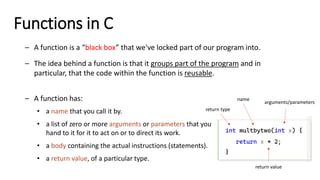
– A function has:
• a name that you call it by.
• a list of zero or more arguments or parameters that you
hand to it for it to act on or to direct its work.
• a body containing the actual instructions (statements).
• a return value, of a particular type.
int multbytwo(int x) {
return x * 2;
}
name
return type
arguments/parameters
return value
Functions in C
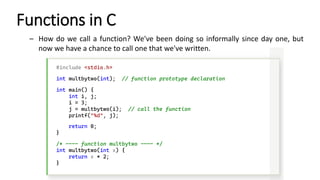
– How do we call a function? We've been doing so informally since day one, but
now we have a chance to call one that we've written.
#include <stdio.h>
int multbytwo(int); // function prototype declaration
int main() {
int i, j;
i = 3;
j = multbytwo(i); // call the function
printf("%d", j);
return 0;
}
/* ---- function multbytwo ---- */
int multbytwo(int x) {
return x * 2;
}
Functions in C
– What makes a good function? The most important aspect of a good “building
block” is that have a single, well-defined task to perform.
– Other reasons:
• When you find that a program is hard to manage
• It appeared in the main program several times.
• The main program was getting too big, so it could be made (presumably)
smaller and more manageable.
When you call a function, you only have to know what it does, not how it does it.
Functions in C
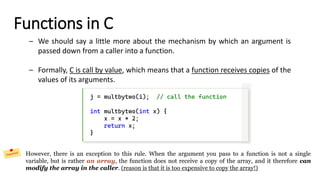
– We should say a little more about the mechanism by which an argument is
passed down from a caller into a function.
– Formally, C is call by value, which means that a function receives copies of the
values of its arguments.
j = multbytwo(i); // call the function
int multbytwo(int x) {
x = x * 2;
return x;
}
However, there is an exception to this rule. When the argument you pass to a function is not a single
variable, but is rather an array, the function does not receive a copy of the array, and it therefore can
modify the array in the caller. (reason is that it is too expensive to copy the array!)
Void Functions
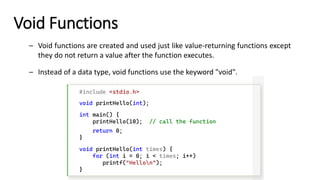
– Void functions are created and used just like value-returning functions except
they do not return a value after the function executes.
– Instead of a data type, void functions use the keyword "void".
#include <stdio.h>
void printHello(int);
int main() {
printHello(10); // call the function
return 0;
}
void printHello(int times) {
for (int i = 0; i < times; i++)
printf("Hellon");
}
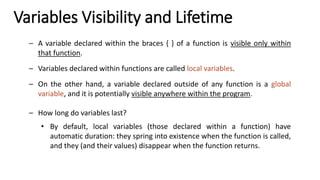
Variables Visibility and Lifetime
– A variable declared within the braces { } of a function is visible only within
that function.
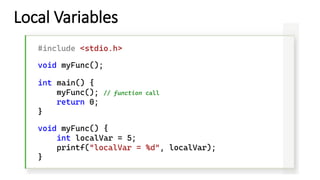
– Variables declared within functions are called local variables.
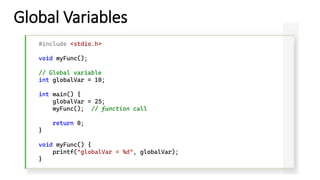
– On the other hand, a variable declared outside of any function is a global
variable, and it is potentially visible anywhere within the program.
– How long do variables last?
• By default, local variables (those declared within a function) have
automatic duration: they spring into existence when the function is called,
and they (and their values) disappear when the function returns.
Local Variables
#include <stdio.h>
void myFunc();
int main() {
myFunc(); // function call
return 0;
}
void myFunc() {
int localVar = 5;
printf("localVar = %d", localVar);
}
Global Variables
#include <stdio.h>
void myFunc();
// Global variable
int globalVar = 10;
int main() {
globalVar = 25;
myFunc(); // function call
return 0;
}
void myFunc() {
printf("globalVar = %d", globalVar);
}
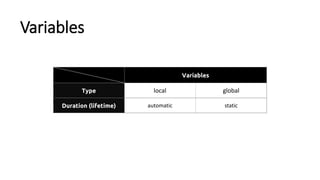
Variables
Variables
Type local global
Duration (lifetime) automatic static
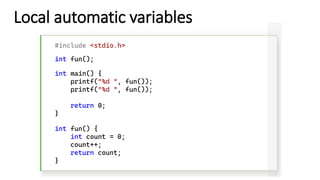
Local automatic variables
#include <stdio.h>
int fun();
int main() {
printf("%d ", fun());
return 0;
}
int fun() {
int count = 0;
count++;
return count;
}
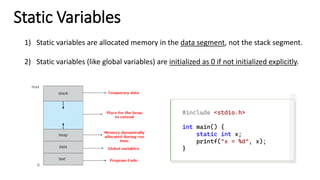
Static Variables
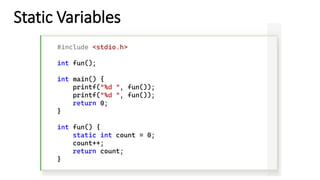
1) Static variables are allocated memory in the data segment, not the stack segment.
2) Static variables (like global variables) are initialized as 0 if not initialized explicitly.
#include <stdio.h>
int main() {
static int x;
printf("x = %d", x);
}
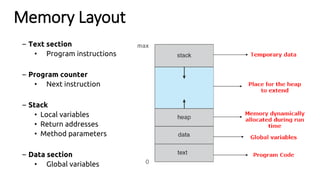
Memory Layout
– Text section
• Program instructions
– Program counter
• Next instruction
– Stack
• Local variables
• Return addresses
• Method parameters
– Data section
• Global variables
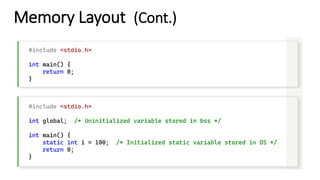
Memory Layout (Cont.)
#include <stdio.h>
int main() {
return 0;
}
#include <stdio.h>
int global; /* Uninitialized variable stored in bss */
int main() {
static int i = 100; /* Initialized static variable stored in DS */
return 0;
}
Static Variables
#include <stdio.h>
int fun();
int main() {
printf("%d ", fun());
return 0;
}
int fun() {
static int count = 0;
count++;
return count;
}
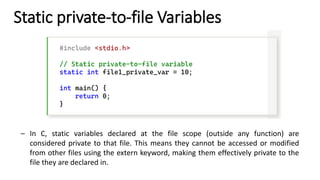
Static private-to-file Variables
#include <stdio.h>
// Static private-to-file variable
static int file1_private_var = 10;
int main() {
return 0;
}
– In C, static variables declared at the file scope (outside any function) are
considered private to that file. This means they cannot be accessed or modified
from other files using the extern keyword, making them effectively private to the
file they are declared in.
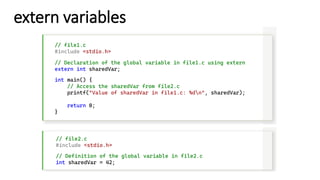
extern variables
// file1.c
#include <stdio.h>
// Declaration of the global variable in file1.c using extern
extern int sharedVar;
int main() {
// Access the sharedVar from file2.c
printf("Value of sharedVar in file1.c: %dn", sharedVar);
return 0;
}
// file2.c
#include <stdio.h>
// Definition of the global variable in file2.c
int sharedVar = 42;
Structures in C
– An array is a collection of associated values, all of the same type.
– A structure is a collection of associated values, but the values can all have
different types.
– The basic user-defined data type in C is the structure or struct.
struct User {
char name[20];
int age;
};
keyword name
members or fields
Structures in C – Example
#include <stdio.h>
#include <string.h>
struct User {
char name[20];
int age;
};
int main() {
struct User u1;
strcpy(u1.name, "Mohamed");
u1.age = 25;
printf("Name: %s, Age: %d", u1.name, u1.age);
return 0;
}
variable
Structures in C – Example
#include <stdio.h>
#include <string.h>
struct User {
char name[20];
int age;
} u1, u2, u3;
int main() {
strcpy(u1.name, "Mohamed");
u1.age = 25;
printf("Name: %s, Age: %d", u1.name, u1.age);
return 0;
}
variable
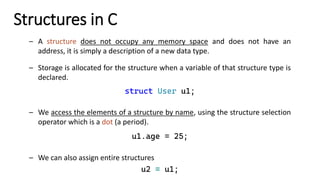
Structures in C
– A structure does not occupy any memory space and does not have an
address, it is simply a description of a new data type.
– Storage is allocated for the structure when a variable of that structure type is
declared.
struct User u1;
– We access the elements of a structure by name, using the structure selection
operator which is a dot (a period).
u1.age = 25;
– We can also assign entire structures
u2 = u1;
#include <stdio.h>
#include <string.h>
struct User {
char name[20];
int age;
} u1, u2;
struct User struct_func(struct User, struct User);
int main() {
strcpy(u1.name, "Mohamed");
u1.age = 25;
strcpy(u2.name, "Gamal");
u2.age = 40;
struct User result = struct_func(u2, u1);
printf("Age difference: %d years", result.age);
return 0;
}
struct User struct_func(struct User user1, struct User user2) {
struct User result;
// Subtract the two ages
result.age = user1.age - user2.age;
return result;
}
• We can also pass structures as
arguments to functions, and
declare and define functions
which return structures.
Struct
Functions
#include <stdio.h>
#include <string.h>
struct vital {
int age;
int height;
};
struct home {
char name[12];
char address[20];
};
struct person {
struct vital emp;
struct home place;
};
int main() {
struct person p1;
p1.emp.age = 25;
printf("Age: %dn", p1.emp.age);
strcpy(p1.place.address, "Cairo, Egypt");
printf("Address: %s", p1.place.address);
return 0;
}
• A structure variable can be a
member of another structure
template.
• In order to access a member
of one of the nested
structures, the dot operator is
used until the lowest member
is reached in the structure
hierarchy.
Nested
Structures
struct person {
struct vital emp;
struct home place;
} stats[100];
• Like any other data type in C, a variable of a structure type can be arrayed.
Array of Structures
• The above declaration would allow for the storage of 100 items of type
people. Any specific item could be referenced as:
stats[indx].place.name;
stats[indx].emp.age;
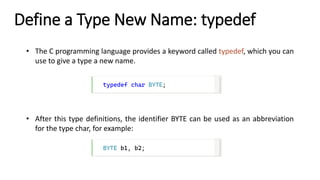
• The C programming language provides a keyword called typedef, which you can
use to give a type a new name.
Define a Type New Name: typedef
typedef char BYTE;
• After this type definitions, the identifier BYTE can be used as an abbreviation
for the type char, for example:
BYTE b1, b2;
• You can use typedef to give a name to user defined data type as well.
• For example, you can use typedef with structure to define a new data type and
then use that data type to define structure variables directly as follows:
Define a Type New Name: typedef
#include <stdio.h>
#include <string.h>
typedef struct Books {
char title[50];
char author[50];
char subject[100];
int book_id;
} Book;
int main() {
Book book;
strcpy(book.title, "Intro to C Programming");
strcpy(book.author, "Mohamed Gamal");
strcpy(book.subject, "C Programming Tutorial");
book.book_id = 6495407;
printf("Book title : %sn", book.title);
printf("Book author : %sn", book.author);
printf("Book subject : %sn", book.subject);
printf("Book book_id : %dn", book.book_id);
return 0;
}
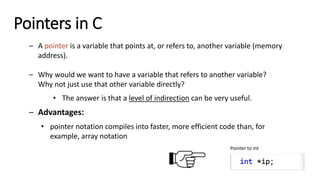
Pointers in C
– A pointer is a variable that points at, or refers to, another variable (memory
address).
– Why would we want to have a variable that refers to another variable?
Why not just use that other variable directly?
• The answer is that a level of indirection can be very useful.
– Advantages:
• pointer notation compiles into faster, more efficient code than, for
example, array notation
Pointer to int
int *ip;
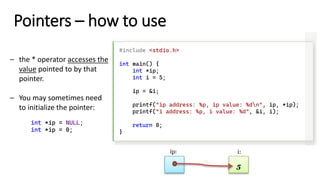
Pointers – how to use
#include <stdio.h>
int main() {
int *ip;
int i = 5;
ip = &i;
printf("ip address: %p, ip value: %dn", ip, *ip);
printf("i address: %p, i value: %d", &i, i);
return 0;
}
– the * operator accesses the
value pointed to by that
pointer.
– You may sometimes need
to initialize the pointer:
int *ip = NULL;
int *ip = 0;
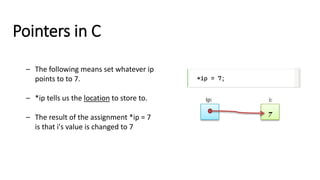
Pointers in C
*ip = 7;
– The following means set whatever ip
points to to 7.
– *ip tells us the location to store to.
– The result of the assignment *ip = 7
is that i's value is changed to 7
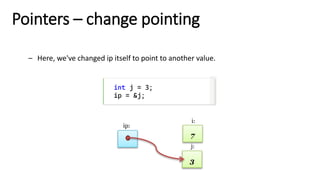
Pointers – change pointing
int j = 3;
ip = &j;
– Here, we've changed ip itself to point to another value.
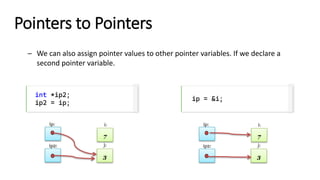
Pointers to Pointers
int *ip2;
ip2 = ip;
– We can also assign pointer values to other pointer variables. If we declare a
second pointer variable.
ip = &i;
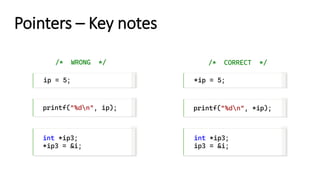
Pointers – Key notes
ip = 5;
/* WRONG */
*ip = 5;
/* CORRECT */
printf("%dn", ip); printf("%dn", *ip);
int *ip3;
*ip3 = &i;
int *ip3;
ip3 = &i;
Pointers and Arrays
– Pointers do not have to point to single variables. They can also point at
the cells of an array.
#include <stdio.h>
int main() {
int *ip;
int a[10];
ip = &a[3];
return 0;
}
0 1 2 3 4
Pointers and Arrays – Pointer Arithmetic
– Once we have a pointer pointing into an array, we can start doing
pointer arithmetic.
– Given that ip is a pointer to a[3], we can add 1 to ip:
ip2 = ip + 1 → a[4]
0 1 2 3 4
Pointers and Arrays – Pointer Arithmetic
– We are not limited to only addition but subtraction as well, since the
memory locations for arrays are contiguous.
– Given that ip is a pointer to a[3], we can add 1 to ip:
ip2 = ip - 1 → a[2]
0 1 2 3 4
#include <stdio.h>
int main() {
int *ip, *ip2;
int a[5] = { 10, 20, 30, 40, 50 };
ip = &a[3];
ip2 = ip – 1;
printf("%d", *ip2);
return 0;
}
Pointers and Arrays – Pointer Arithmetic
– We are not limited to only addition but subtraction as well, since the
memory locations for arrays are contiguous.
– Given that ip is a pointer to a[2], we can add 1 to ip:
*(ip + 1)
0 1 2 3 4
#include <stdio.h>
int main() {
int *ip;
int a[5] = { 10, 20, 30, 40, 50 };
ip = &a[3];
printf("%d", *(ip+1));
return 0;
}
Pointers and Arrays
– The shortcuts we learned previously all work for pointers, too.
#include <stdio.h>
int main() {
int a[5] = { 10, 20, 30, 40, 50 };
int *ip = &a[2];
++ip;
printf("%d", *ip);
return 0;
}
#include <stdio.h>
int compareStrings(char str1[], char str2[]);
int main() {
char str1[] = "Mohamed";
char str2[] = "Gamal";
int result = compareStrings(str1, str2);
if (result == 0) {
printf("The two strings are equal.");
}
else {
printf("The two strings are different!");
}
return 0;
}
int compareStrings(char str1[], char str2[]) {
char* p1 = &str1[0], * p2 = &str2[0];
while (1) {
if (*p1 != *p2)
return *p1 - *p2;
if (*p1 == '0' && *p2 == '0')
return 0;
p1++;
p2++;
}
}
Compare Two
Strings
#include <stdio.h>
int main() {
int array1[10] = { 10, 20, 30, 40, 50, 60, 70, 80, 90, 100 };
int array2[10];
int *ip1, *ip2 = &array2[0];
int *ep = &array1[10];
for (ip1 = &array1[0]; ip1 < ep; ip1++)
*ip2++ = *ip1;
/* Print the two arrays' values */
int size = sizeof(array1) / sizeof(array1[0]);
for (int i = 0; i < size; i++) {
printf("array1[%d] = %dn", i, array1[i]);
printf("array2[%d] = %dnn", i, array2[i]);
}
return 0;
}
Copy two
arrays
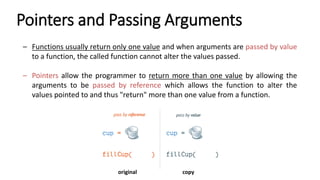
Pointers and Passing Arguments
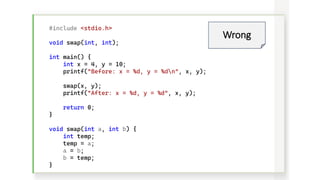
– Functions usually return only one value and when arguments are passed by value
to a function, the called function cannot alter the values passed.
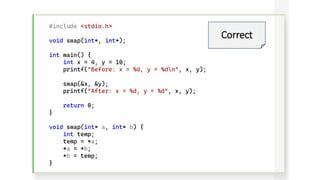
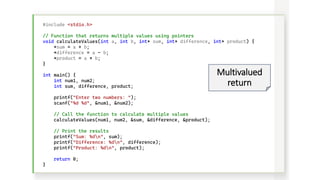
– Pointers allow the programmer to return more than one value by allowing the
arguments to be passed by reference which allows the function to alter the
values pointed to and thus "return" more than one value from a function.
copy
original
#include <stdio.h>
void swap(int, int);
int main() {
int x = 4, y = 10;
printf("Before: x = %d, y = %dn", x, y);
swap(x, y);
printf("After: x = %d, y = %d", x, y);
return 0;
}
void swap(int a, int b) {
int temp;
temp = a;
a = b;
b = temp;
}
Wrong
#include <stdio.h>
void swap(int*, int*);
int main() {
int x = 4, y = 10;
printf("Before: x = %d, y = %dn", x, y);
swap(&x, &y);
printf("After: x = %d, y = %d", x, y);
return 0;
}
void swap(int* a, int* b) {
int temp;
temp = *a;
*a = *b;
*b = temp;
}
Correct
#include <stdio.h>
// Function that returns multiple values using pointers
void calculateValues(int a, int b, int* sum, int* difference, int* product) {
*sum = a + b;
*difference = a - b;
*product = a * b;
}
int main() {
int num1, num2;
int sum, difference, product;
printf("Enter two numbers: ");
scanf("%d %d", &num1, &num2);
// Call the function to calculate multiple values
calculateValues(num1, num2, &sum, &difference, &product);
// Print the results
printf("Sum: %dn", sum);
printf("Difference: %dn", difference);
printf("Product: %dn", product);
return 0;
}
Multivalued
return
Memory Allocation
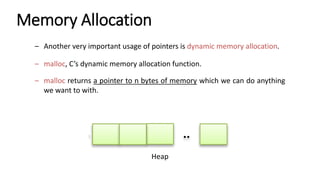
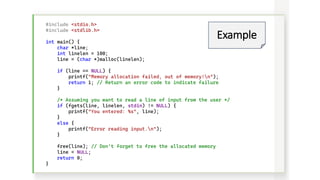
– Another very important usage of pointers is dynamic memory allocation.
– malloc, C’s dynamic memory allocation function.
– malloc returns a pointer to n bytes of memory which we can do anything
we want to with.
Heap
#include <stdio.h>
#include <stdlib.h>
int main() {
char *line;
int linelen = 100;
line = (char *)malloc(linelen);
if (line == NULL) {
printf("Memory allocation failed, out of memory!n");
return 1; // Return an error code to indicate failure
}
/* Assuming you want to read a line of input from the user */
if (fgets(line, linelen, stdin) != NULL) {
printf("You entered: %s", line);
}
else {
printf("Error reading input.n");
}
free(line); // Don't forget to free the allocated memory
line = NULL;
return 0;
}
Example
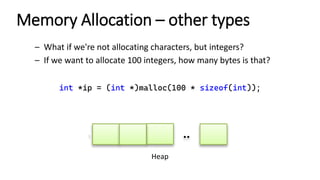
Memory Allocation – other types
– What if we're not allocating characters, but integers?
– If we want to allocate 100 integers, how many bytes is that?
Heap
int *ip = (int *)malloc(100 * sizeof(int));
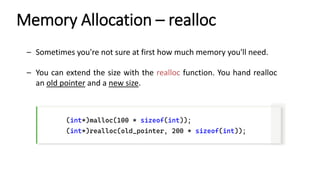
Memory Allocation – realloc
– Sometimes you're not sure at first how much memory you'll need.
– You can extend the size with the realloc function. You hand realloc
an old pointer and a new size.
(int*)malloc(100 * sizeof(int));
(int*)realloc(old_pointer, 200 * sizeof(int));
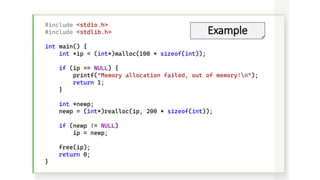
#include <stdio.h>
#include <stdlib.h>
int main() {
int *ip = (int*)malloc(100 * sizeof(int));
if (ip == NULL) {
printf("Memory allocation failed, out of memory!n");
return 1;
}
int *newp;
newp = (int*)realloc(ip, 200 * sizeof(int));
if (newp != NULL)
ip = newp;
free(ip);
return 0;
}
Example
#include <stdio.h>
#include <stdlib.h>
#define MAXLINE 100
int main() {
char line[MAXLINE];
int *ip;
int nalloc, nitems;
nalloc = 100;
ip = (int *)malloc(nalloc * sizeof(int));
if (ip == NULL) {
printf("Out of memory!n");
return 1;
}
nitems = 0;
while (fgets(line, MAXLINE, stdin) != NULL) {
/* increase allocation */
if (nitems >= nalloc) {
int* newp;
nalloc += 100;
newp = (int *)realloc(ip, nalloc * sizeof(int));
if (newp == NULL) {
printf("Out of memory!n");
return 1;
}
ip = newp;
}
ip[nitems++] = atoi(line);
}
}
Dynamic input
End of lecture 4
ThankYou!

Introduction to C Programming -Lecture 4

  • 1.
    Introduction to C Programming ByMohamed Gamal © Mohamed Gamal 2024
  • 2.
    The topics oftoday’s lecture: Agenda
  • 4.
    Functions in C –A function is a “black box” that we've locked part of our program into. – The idea behind a function is that it groups part of the program and in particular, that the code within the function is reusable. – A function has: • a name that you call it by. • a list of zero or more arguments or parameters that you hand to it for it to act on or to direct its work. • a body containing the actual instructions (statements). • a return value, of a particular type. int multbytwo(int x) { return x * 2; } name return type arguments/parameters return value
  • 5.
    Functions in C –How do we call a function? We've been doing so informally since day one, but now we have a chance to call one that we've written. #include <stdio.h> int multbytwo(int); // function prototype declaration int main() { int i, j; i = 3; j = multbytwo(i); // call the function printf("%d", j); return 0; } /* ---- function multbytwo ---- */ int multbytwo(int x) { return x * 2; }
  • 6.
    Functions in C –What makes a good function? The most important aspect of a good “building block” is that have a single, well-defined task to perform. – Other reasons: • When you find that a program is hard to manage • It appeared in the main program several times. • The main program was getting too big, so it could be made (presumably) smaller and more manageable. When you call a function, you only have to know what it does, not how it does it.
  • 7.
    Functions in C –We should say a little more about the mechanism by which an argument is passed down from a caller into a function. – Formally, C is call by value, which means that a function receives copies of the values of its arguments. j = multbytwo(i); // call the function int multbytwo(int x) { x = x * 2; return x; } However, there is an exception to this rule. When the argument you pass to a function is not a single variable, but is rather an array, the function does not receive a copy of the array, and it therefore can modify the array in the caller. (reason is that it is too expensive to copy the array!)
  • 8.
    Void Functions – Voidfunctions are created and used just like value-returning functions except they do not return a value after the function executes. – Instead of a data type, void functions use the keyword "void". #include <stdio.h> void printHello(int); int main() { printHello(10); // call the function return 0; } void printHello(int times) { for (int i = 0; i < times; i++) printf("Hellon"); }
  • 9.
    Variables Visibility andLifetime – A variable declared within the braces { } of a function is visible only within that function. – Variables declared within functions are called local variables. – On the other hand, a variable declared outside of any function is a global variable, and it is potentially visible anywhere within the program. – How long do variables last? • By default, local variables (those declared within a function) have automatic duration: they spring into existence when the function is called, and they (and their values) disappear when the function returns.
  • 10.
    Local Variables #include <stdio.h> voidmyFunc(); int main() { myFunc(); // function call return 0; } void myFunc() { int localVar = 5; printf("localVar = %d", localVar); }
  • 11.
    Global Variables #include <stdio.h> voidmyFunc(); // Global variable int globalVar = 10; int main() { globalVar = 25; myFunc(); // function call return 0; } void myFunc() { printf("globalVar = %d", globalVar); }
  • 12.
  • 13.
    Local automatic variables #include<stdio.h> int fun(); int main() { printf("%d ", fun()); printf("%d ", fun()); return 0; } int fun() { int count = 0; count++; return count; }
  • 14.
    Static Variables 1) Staticvariables are allocated memory in the data segment, not the stack segment. 2) Static variables (like global variables) are initialized as 0 if not initialized explicitly. #include <stdio.h> int main() { static int x; printf("x = %d", x); }
  • 15.
    Memory Layout – Textsection • Program instructions – Program counter • Next instruction – Stack • Local variables • Return addresses • Method parameters – Data section • Global variables
  • 16.
    Memory Layout (Cont.) #include<stdio.h> int main() { return 0; } #include <stdio.h> int global; /* Uninitialized variable stored in bss */ int main() { static int i = 100; /* Initialized static variable stored in DS */ return 0; }
  • 17.
    Static Variables #include <stdio.h> intfun(); int main() { printf("%d ", fun()); printf("%d ", fun()); return 0; } int fun() { static int count = 0; count++; return count; }
  • 18.
    Static private-to-file Variables #include<stdio.h> // Static private-to-file variable static int file1_private_var = 10; int main() { return 0; } – In C, static variables declared at the file scope (outside any function) are considered private to that file. This means they cannot be accessed or modified from other files using the extern keyword, making them effectively private to the file they are declared in.
  • 19.
    extern variables // file1.c #include<stdio.h> // Declaration of the global variable in file1.c using extern extern int sharedVar; int main() { // Access the sharedVar from file2.c printf("Value of sharedVar in file1.c: %dn", sharedVar); return 0; } // file2.c #include <stdio.h> // Definition of the global variable in file2.c int sharedVar = 42;
  • 21.
    Structures in C –An array is a collection of associated values, all of the same type. – A structure is a collection of associated values, but the values can all have different types. – The basic user-defined data type in C is the structure or struct. struct User { char name[20]; int age; }; keyword name members or fields
  • 22.
    Structures in C– Example #include <stdio.h> #include <string.h> struct User { char name[20]; int age; }; int main() { struct User u1; strcpy(u1.name, "Mohamed"); u1.age = 25; printf("Name: %s, Age: %d", u1.name, u1.age); return 0; } variable
  • 23.
    Structures in C– Example #include <stdio.h> #include <string.h> struct User { char name[20]; int age; } u1, u2, u3; int main() { strcpy(u1.name, "Mohamed"); u1.age = 25; printf("Name: %s, Age: %d", u1.name, u1.age); return 0; } variable
  • 24.
    Structures in C –A structure does not occupy any memory space and does not have an address, it is simply a description of a new data type. – Storage is allocated for the structure when a variable of that structure type is declared. struct User u1; – We access the elements of a structure by name, using the structure selection operator which is a dot (a period). u1.age = 25; – We can also assign entire structures u2 = u1;
  • 25.
    #include <stdio.h> #include <string.h> structUser { char name[20]; int age; } u1, u2; struct User struct_func(struct User, struct User); int main() { strcpy(u1.name, "Mohamed"); u1.age = 25; strcpy(u2.name, "Gamal"); u2.age = 40; struct User result = struct_func(u2, u1); printf("Age difference: %d years", result.age); return 0; } struct User struct_func(struct User user1, struct User user2) { struct User result; // Subtract the two ages result.age = user1.age - user2.age; return result; } • We can also pass structures as arguments to functions, and declare and define functions which return structures. Struct Functions
  • 26.
    #include <stdio.h> #include <string.h> structvital { int age; int height; }; struct home { char name[12]; char address[20]; }; struct person { struct vital emp; struct home place; }; int main() { struct person p1; p1.emp.age = 25; printf("Age: %dn", p1.emp.age); strcpy(p1.place.address, "Cairo, Egypt"); printf("Address: %s", p1.place.address); return 0; } • A structure variable can be a member of another structure template. • In order to access a member of one of the nested structures, the dot operator is used until the lowest member is reached in the structure hierarchy. Nested Structures
  • 27.
    struct person { structvital emp; struct home place; } stats[100]; • Like any other data type in C, a variable of a structure type can be arrayed. Array of Structures • The above declaration would allow for the storage of 100 items of type people. Any specific item could be referenced as: stats[indx].place.name; stats[indx].emp.age;
  • 28.
    • The Cprogramming language provides a keyword called typedef, which you can use to give a type a new name. Define a Type New Name: typedef typedef char BYTE; • After this type definitions, the identifier BYTE can be used as an abbreviation for the type char, for example: BYTE b1, b2;
  • 29.
    • You canuse typedef to give a name to user defined data type as well. • For example, you can use typedef with structure to define a new data type and then use that data type to define structure variables directly as follows: Define a Type New Name: typedef #include <stdio.h> #include <string.h> typedef struct Books { char title[50]; char author[50]; char subject[100]; int book_id; } Book; int main() { Book book; strcpy(book.title, "Intro to C Programming"); strcpy(book.author, "Mohamed Gamal"); strcpy(book.subject, "C Programming Tutorial"); book.book_id = 6495407; printf("Book title : %sn", book.title); printf("Book author : %sn", book.author); printf("Book subject : %sn", book.subject); printf("Book book_id : %dn", book.book_id); return 0; }
  • 31.
    Pointers in C –A pointer is a variable that points at, or refers to, another variable (memory address). – Why would we want to have a variable that refers to another variable? Why not just use that other variable directly? • The answer is that a level of indirection can be very useful. – Advantages: • pointer notation compiles into faster, more efficient code than, for example, array notation Pointer to int int *ip;
  • 32.
    Pointers – howto use #include <stdio.h> int main() { int *ip; int i = 5; ip = &i; printf("ip address: %p, ip value: %dn", ip, *ip); printf("i address: %p, i value: %d", &i, i); return 0; } – the * operator accesses the value pointed to by that pointer. – You may sometimes need to initialize the pointer: int *ip = NULL; int *ip = 0;
  • 33.
    Pointers in C *ip= 7; – The following means set whatever ip points to to 7. – *ip tells us the location to store to. – The result of the assignment *ip = 7 is that i's value is changed to 7
  • 34.
    Pointers – changepointing int j = 3; ip = &j; – Here, we've changed ip itself to point to another value.
  • 35.
    Pointers to Pointers int*ip2; ip2 = ip; – We can also assign pointer values to other pointer variables. If we declare a second pointer variable. ip = &i;
  • 36.
    Pointers – Keynotes ip = 5; /* WRONG */ *ip = 5; /* CORRECT */ printf("%dn", ip); printf("%dn", *ip); int *ip3; *ip3 = &i; int *ip3; ip3 = &i;
  • 37.
    Pointers and Arrays –Pointers do not have to point to single variables. They can also point at the cells of an array. #include <stdio.h> int main() { int *ip; int a[10]; ip = &a[3]; return 0; } 0 1 2 3 4
  • 38.
    Pointers and Arrays– Pointer Arithmetic – Once we have a pointer pointing into an array, we can start doing pointer arithmetic. – Given that ip is a pointer to a[3], we can add 1 to ip: ip2 = ip + 1 → a[4] 0 1 2 3 4
  • 39.
    Pointers and Arrays– Pointer Arithmetic – We are not limited to only addition but subtraction as well, since the memory locations for arrays are contiguous. – Given that ip is a pointer to a[3], we can add 1 to ip: ip2 = ip - 1 → a[2] 0 1 2 3 4 #include <stdio.h> int main() { int *ip, *ip2; int a[5] = { 10, 20, 30, 40, 50 }; ip = &a[3]; ip2 = ip – 1; printf("%d", *ip2); return 0; }
  • 40.
    Pointers and Arrays– Pointer Arithmetic – We are not limited to only addition but subtraction as well, since the memory locations for arrays are contiguous. – Given that ip is a pointer to a[2], we can add 1 to ip: *(ip + 1) 0 1 2 3 4 #include <stdio.h> int main() { int *ip; int a[5] = { 10, 20, 30, 40, 50 }; ip = &a[3]; printf("%d", *(ip+1)); return 0; }
  • 41.
    Pointers and Arrays –The shortcuts we learned previously all work for pointers, too. #include <stdio.h> int main() { int a[5] = { 10, 20, 30, 40, 50 }; int *ip = &a[2]; ++ip; printf("%d", *ip); return 0; }
  • 42.
    #include <stdio.h> int compareStrings(charstr1[], char str2[]); int main() { char str1[] = "Mohamed"; char str2[] = "Gamal"; int result = compareStrings(str1, str2); if (result == 0) { printf("The two strings are equal."); } else { printf("The two strings are different!"); } return 0; } int compareStrings(char str1[], char str2[]) { char* p1 = &str1[0], * p2 = &str2[0]; while (1) { if (*p1 != *p2) return *p1 - *p2; if (*p1 == '0' && *p2 == '0') return 0; p1++; p2++; } } Compare Two Strings
  • 43.
    #include <stdio.h> int main(){ int array1[10] = { 10, 20, 30, 40, 50, 60, 70, 80, 90, 100 }; int array2[10]; int *ip1, *ip2 = &array2[0]; int *ep = &array1[10]; for (ip1 = &array1[0]; ip1 < ep; ip1++) *ip2++ = *ip1; /* Print the two arrays' values */ int size = sizeof(array1) / sizeof(array1[0]); for (int i = 0; i < size; i++) { printf("array1[%d] = %dn", i, array1[i]); printf("array2[%d] = %dnn", i, array2[i]); } return 0; } Copy two arrays
  • 44.
    Pointers and PassingArguments – Functions usually return only one value and when arguments are passed by value to a function, the called function cannot alter the values passed. – Pointers allow the programmer to return more than one value by allowing the arguments to be passed by reference which allows the function to alter the values pointed to and thus "return" more than one value from a function. copy original
  • 45.
    #include <stdio.h> void swap(int,int); int main() { int x = 4, y = 10; printf("Before: x = %d, y = %dn", x, y); swap(x, y); printf("After: x = %d, y = %d", x, y); return 0; } void swap(int a, int b) { int temp; temp = a; a = b; b = temp; } Wrong
  • 46.
    #include <stdio.h> void swap(int*,int*); int main() { int x = 4, y = 10; printf("Before: x = %d, y = %dn", x, y); swap(&x, &y); printf("After: x = %d, y = %d", x, y); return 0; } void swap(int* a, int* b) { int temp; temp = *a; *a = *b; *b = temp; } Correct
  • 47.
    #include <stdio.h> // Functionthat returns multiple values using pointers void calculateValues(int a, int b, int* sum, int* difference, int* product) { *sum = a + b; *difference = a - b; *product = a * b; } int main() { int num1, num2; int sum, difference, product; printf("Enter two numbers: "); scanf("%d %d", &num1, &num2); // Call the function to calculate multiple values calculateValues(num1, num2, &sum, &difference, &product); // Print the results printf("Sum: %dn", sum); printf("Difference: %dn", difference); printf("Product: %dn", product); return 0; } Multivalued return
  • 49.
    Memory Allocation – Anothervery important usage of pointers is dynamic memory allocation. – malloc, C’s dynamic memory allocation function. – malloc returns a pointer to n bytes of memory which we can do anything we want to with. Heap
  • 50.
    #include <stdio.h> #include <stdlib.h> intmain() { char *line; int linelen = 100; line = (char *)malloc(linelen); if (line == NULL) { printf("Memory allocation failed, out of memory!n"); return 1; // Return an error code to indicate failure } /* Assuming you want to read a line of input from the user */ if (fgets(line, linelen, stdin) != NULL) { printf("You entered: %s", line); } else { printf("Error reading input.n"); } free(line); // Don't forget to free the allocated memory line = NULL; return 0; } Example
  • 51.
    Memory Allocation –other types – What if we're not allocating characters, but integers? – If we want to allocate 100 integers, how many bytes is that? Heap int *ip = (int *)malloc(100 * sizeof(int));
  • 52.
    Memory Allocation –realloc – Sometimes you're not sure at first how much memory you'll need. – You can extend the size with the realloc function. You hand realloc an old pointer and a new size. (int*)malloc(100 * sizeof(int)); (int*)realloc(old_pointer, 200 * sizeof(int));
  • 53.
    #include <stdio.h> #include <stdlib.h> intmain() { int *ip = (int*)malloc(100 * sizeof(int)); if (ip == NULL) { printf("Memory allocation failed, out of memory!n"); return 1; } int *newp; newp = (int*)realloc(ip, 200 * sizeof(int)); if (newp != NULL) ip = newp; free(ip); return 0; } Example
  • 54.
    #include <stdio.h> #include <stdlib.h> #defineMAXLINE 100 int main() { char line[MAXLINE]; int *ip; int nalloc, nitems; nalloc = 100; ip = (int *)malloc(nalloc * sizeof(int)); if (ip == NULL) { printf("Out of memory!n"); return 1; } nitems = 0; while (fgets(line, MAXLINE, stdin) != NULL) { /* increase allocation */ if (nitems >= nalloc) { int* newp; nalloc += 100; newp = (int *)realloc(ip, nalloc * sizeof(int)); if (newp == NULL) { printf("Out of memory!n"); return 1; } ip = newp; } ip[nitems++] = atoi(line); } } Dynamic input
  • 55.
    End of lecture4 ThankYou!