Chapter 1: Introduction
Purpose of Database Systems
View of Data
Database Languages
Relational Databases
Database Design
Database Management System
(DBMS)
DBMS contains information about a particular enterprise
Collection of interrelated data
Set of programs to access the data
An environment that is both convenient and efficient to use
•Database Applications:
Banking: all transactions
Airlines: reservations, schedules
Universities: registration, grades
Sales: customers, products, purchases
Online retailers: order tracking, customized recommendations
Manufacturing: production, inventory, orders, supply chain
Human resources: employee records, salaries, tax deductions
•Databases touch all aspects of our lives
Purpose of Database Systems
• In the early days, database applications were built
directly on top of file systems
• Drawbacks of using file systems to store data:
– Data redundancy and inconsistency
• Multiple file formats, duplication of information in different files
– Difficulty in accessing data
• Need to write a new program to carry out each new task
– Data isolation — multiple files and formats
– Integrity problems
• Integrity constraints (e.g. account balance > 0) become “buried” in
program code rather than being stated explicitly
• Hard to add new constraints or change existing ones
Purpose of Database Systems (Cont.)
• Drawbacks of using file systems (cont.)
– Atomicity of updates
• Failures may leave database in an inconsistent state with partial
updates carried out
• Example: Transfer of funds from one account to another should
either complete or not happen at all
– Concurrent access by multiple users
• Concurrent accessed needed for performance
• Uncontrolled concurrent accesses can lead to inconsistencies
– Example: Two people reading a balance and updating it at the same time
– Security problems
• Hard to provide user access to some, but not all, data
• Database systems offer solutions to all the above
problems
Levels of Abstraction
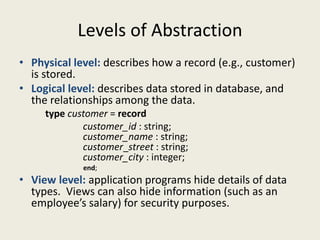
• Physical level: describes how a record (e.g., customer)
is stored.
• Logical level: describes data stored in database, and
the relationships among the data.
type customer = record
customer_id : string;
customer_name : string;
customer_street : string;
customer_city : integer;
end;
• View level: application programs hide details of data
types. Views can also hide information (such as an
employee’s salary) for security purposes.
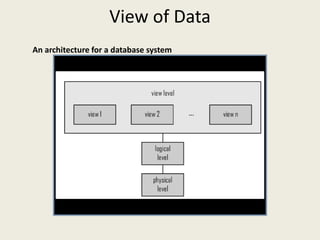
View of Data
An architecture for a database system
Instances and Schemas
• Similar to types and variables in programming languages
• Schema – the logical structure of the database
– Example: The database consists of information about a set of customers and accounts
and the relationship between them)
– Analogous to type information of a variable in a program
– Physical schema: database design at the physical level
– Logical schema: database design at the logical level
• Instance – the actual content of the database at a particular point in time
– Analogous to the value of a variable
• Physical Data Independence – the ability to modify the physical schema without changing
the logical schema
– Applications depend on the logical schema
– In general, the interfaces between the various levels and components should be well
defined so that changes in some parts do not seriously influence others.
Data Models
• A collection of tools for describing
– Data
– Data relationships
– Data semantics
– Data constraints
• Relational model
• Entity-Relationship data model (mainly for database design)
• Object-based data models (Object-oriented and Object-
relational)
• Semistructured data model (XML)
• Other older models:
– Network model
– Hierarchical model
Data Manipulation Language (DML)
• Language for accessing and manipulating the data
organized by the appropriate data model
– DML also known as query language
• Two classes of languages
– Procedural – user specifies what data is required and
how to get those data
– Declarative (nonprocedural) – user specifies what
data is required without specifying how to get those
data
• SQL is the most widely used query language
Data Definition Language (DDL)
• Specification notation for defining the database schema
Example: create table account (
account-number char(10),
balance integer)
• DDL compiler generates a set of tables stored in a data
dictionary
• Data dictionary contains metadata (i.e., data about data)
– Database schema
– Data storage and definition language
• Specifies the storage structure and access methods used
– Integrity constraints
• Domain constraints
• Referential integrity (references constraint in SQL)
• Assertions
– Authorization
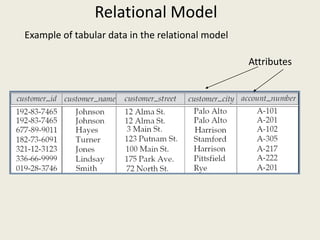
Relational Model
Example of tabular data in the relational model
Attributes
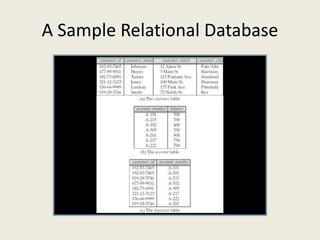
A Sample Relational Database
SQL
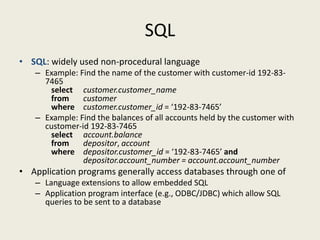
• SQL: widely used non-procedural language
– Example: Find the name of the customer with customer-id 192-83-
7465
select customer.customer_name
from customer
where customer.customer_id = ‘192-83-7465’
– Example: Find the balances of all accounts held by the customer with
customer-id 192-83-7465
select account.balance
from depositor, account
where depositor.customer_id = ‘192-83-7465’ and
depositor.account_number = account.account_number
• Application programs generally access databases through one of
– Language extensions to allow embedded SQL
– Application program interface (e.g., ODBC/JDBC) which allow SQL
queries to be sent to a database
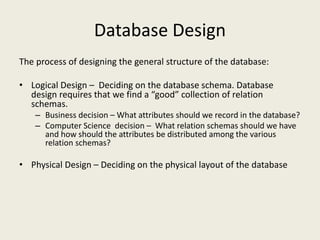
Database Design
The process of designing the general structure of the database:
• Logical Design – Deciding on the database schema. Database
design requires that we find a “good” collection of relation
schemas.
– Business decision – What attributes should we record in the database?
– Computer Science decision – What relation schemas should we have
and how should the attributes be distributed among the various
relation schemas?
• Physical Design – Deciding on the physical layout of the database
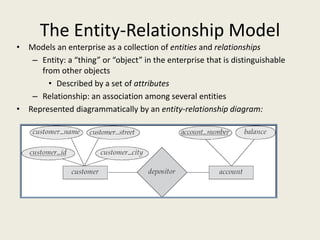
The Entity-Relationship Model
• Models an enterprise as a collection of entities and relationships
– Entity: a “thing” or “object” in the enterprise that is distinguishable
from other objects
• Described by a set of attributes
– Relationship: an association among several entities
• Represented diagrammatically by an entity-relationship diagram:

INTRODUCTION OF DATA BASE

  • 1.
  • 2.
    Chapter 1: Introduction Purposeof Database Systems View of Data Database Languages Relational Databases Database Design
  • 3.
    Database Management System (DBMS) DBMScontains information about a particular enterprise Collection of interrelated data Set of programs to access the data An environment that is both convenient and efficient to use •Database Applications: Banking: all transactions Airlines: reservations, schedules Universities: registration, grades Sales: customers, products, purchases Online retailers: order tracking, customized recommendations Manufacturing: production, inventory, orders, supply chain Human resources: employee records, salaries, tax deductions •Databases touch all aspects of our lives
  • 4.
    Purpose of DatabaseSystems • In the early days, database applications were built directly on top of file systems • Drawbacks of using file systems to store data: – Data redundancy and inconsistency • Multiple file formats, duplication of information in different files – Difficulty in accessing data • Need to write a new program to carry out each new task – Data isolation — multiple files and formats – Integrity problems • Integrity constraints (e.g. account balance > 0) become “buried” in program code rather than being stated explicitly • Hard to add new constraints or change existing ones
  • 5.
    Purpose of DatabaseSystems (Cont.) • Drawbacks of using file systems (cont.) – Atomicity of updates • Failures may leave database in an inconsistent state with partial updates carried out • Example: Transfer of funds from one account to another should either complete or not happen at all – Concurrent access by multiple users • Concurrent accessed needed for performance • Uncontrolled concurrent accesses can lead to inconsistencies – Example: Two people reading a balance and updating it at the same time – Security problems • Hard to provide user access to some, but not all, data • Database systems offer solutions to all the above problems
  • 6.
    Levels of Abstraction •Physical level: describes how a record (e.g., customer) is stored. • Logical level: describes data stored in database, and the relationships among the data. type customer = record customer_id : string; customer_name : string; customer_street : string; customer_city : integer; end; • View level: application programs hide details of data types. Views can also hide information (such as an employee’s salary) for security purposes.
  • 7.
    View of Data Anarchitecture for a database system
  • 8.
    Instances and Schemas •Similar to types and variables in programming languages • Schema – the logical structure of the database – Example: The database consists of information about a set of customers and accounts and the relationship between them) – Analogous to type information of a variable in a program – Physical schema: database design at the physical level – Logical schema: database design at the logical level • Instance – the actual content of the database at a particular point in time – Analogous to the value of a variable • Physical Data Independence – the ability to modify the physical schema without changing the logical schema – Applications depend on the logical schema – In general, the interfaces between the various levels and components should be well defined so that changes in some parts do not seriously influence others.
  • 9.
    Data Models • Acollection of tools for describing – Data – Data relationships – Data semantics – Data constraints • Relational model • Entity-Relationship data model (mainly for database design) • Object-based data models (Object-oriented and Object- relational) • Semistructured data model (XML) • Other older models: – Network model – Hierarchical model
  • 10.
    Data Manipulation Language(DML) • Language for accessing and manipulating the data organized by the appropriate data model – DML also known as query language • Two classes of languages – Procedural – user specifies what data is required and how to get those data – Declarative (nonprocedural) – user specifies what data is required without specifying how to get those data • SQL is the most widely used query language
  • 11.
    Data Definition Language(DDL) • Specification notation for defining the database schema Example: create table account ( account-number char(10), balance integer) • DDL compiler generates a set of tables stored in a data dictionary • Data dictionary contains metadata (i.e., data about data) – Database schema – Data storage and definition language • Specifies the storage structure and access methods used – Integrity constraints • Domain constraints • Referential integrity (references constraint in SQL) • Assertions – Authorization
  • 12.
    Relational Model Example oftabular data in the relational model Attributes
  • 13.
  • 14.
    SQL • SQL: widelyused non-procedural language – Example: Find the name of the customer with customer-id 192-83- 7465 select customer.customer_name from customer where customer.customer_id = ‘192-83-7465’ – Example: Find the balances of all accounts held by the customer with customer-id 192-83-7465 select account.balance from depositor, account where depositor.customer_id = ‘192-83-7465’ and depositor.account_number = account.account_number • Application programs generally access databases through one of – Language extensions to allow embedded SQL – Application program interface (e.g., ODBC/JDBC) which allow SQL queries to be sent to a database
  • 15.
    Database Design The processof designing the general structure of the database: • Logical Design – Deciding on the database schema. Database design requires that we find a “good” collection of relation schemas. – Business decision – What attributes should we record in the database? – Computer Science decision – What relation schemas should we have and how should the attributes be distributed among the various relation schemas? • Physical Design – Deciding on the physical layout of the database
  • 16.
    The Entity-Relationship Model •Models an enterprise as a collection of entities and relationships – Entity: a “thing” or “object” in the enterprise that is distinguishable from other objects • Described by a set of attributes – Relationship: an association among several entities • Represented diagrammatically by an entity-relationship diagram: