Introduction of
computer
What do you mean by computer
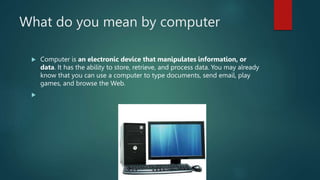
 Computer is an electronic device that manipulates information, or
data. It has the ability to store, retrieve, and process data. You may already
know that you can use a computer to type documents, send email, play
games, and browse the Web.

history
 who made first computer
 Charles Babbage
 What did Charles Babbage achieve? English mathematician and inventor
Charles Babbage is credited with having conceived the first automatic
digital computer. During the mid-1830s Babbage developed plans for
the Analytical Engine.
 How it develop
 n 1822, Charles Babbage conceptualized and began developing the
Difference Engine, which is considered the first automatic computing
machine that could approximate polynomials. The Difference Engine was
capable of computing several sets of numbers and making hard copies of
the results.
Why was the computer invented?
 The computer was invented in order to automate mathematical
calculations that were previously completed by people. Charles
Babbage is considered to be the “father” of the computer.
India first computer
 TIFRAC (Tata Institute of Fundamental Research Automatic
Calculator) was the first computer developed in India, at the Tata Institute
of Fundamental Research in Mumbai. Initially a TIFR Pilot Machine was
developed in the 1950s (operational in 1956).
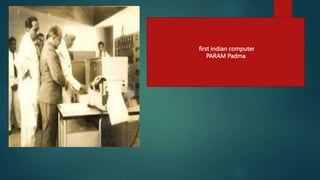
first indian computer
PARAM Padma
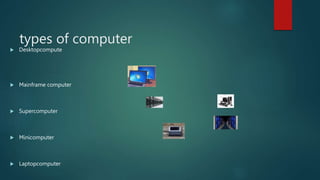
types of computer
 Desktopcompute
 Mainframe computer
 Supercomputer
 Minicomputer
 Laptopcomputer
Physical part of computer
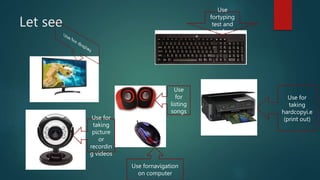
 Moniter
 Keyboard
 Mouse
 Scanner
 Webcome
 Printer
 speaker
Let see
Use
fortyping
test and
numbers
Use for
taking
hardcopyi.e
(print out)
Use
for
listing
songs
Use fornavigation
on computer
Use for
taking
picture
or
recordin
g videos
Ms office
 Microsoft Office is a suite of applications designed to help with
productivity and completing common tasks on a computer. You can
create and edit documents containing text and images, work with data in
spreadsheets and databases, and create presentations and posters. Word.
Excel. PowerPoint
 It mainly consists of Word, Excel, PowerPoint, Access, OneNote,
Outlook and Publisher applications. Microsoft Office was primarily
created to automate the manual office work with a collection of purpose-
built applications
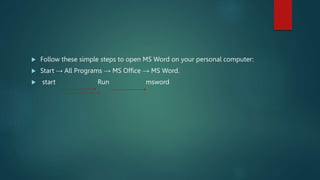
 Follow these simple steps to open MS Word on your personal computer:
 Start → All Programs → MS Office → MS Word.
 start Run msword
Ms word
 New document
 =rand()

Introduction of computer.pptx

  • 1.
  • 2.
    What do youmean by computer  Computer is an electronic device that manipulates information, or data. It has the ability to store, retrieve, and process data. You may already know that you can use a computer to type documents, send email, play games, and browse the Web. 
  • 3.
    history  who madefirst computer  Charles Babbage  What did Charles Babbage achieve? English mathematician and inventor Charles Babbage is credited with having conceived the first automatic digital computer. During the mid-1830s Babbage developed plans for the Analytical Engine.  How it develop  n 1822, Charles Babbage conceptualized and began developing the Difference Engine, which is considered the first automatic computing machine that could approximate polynomials. The Difference Engine was capable of computing several sets of numbers and making hard copies of the results.
  • 4.
    Why was thecomputer invented?  The computer was invented in order to automate mathematical calculations that were previously completed by people. Charles Babbage is considered to be the “father” of the computer.
  • 5.
    India first computer TIFRAC (Tata Institute of Fundamental Research Automatic Calculator) was the first computer developed in India, at the Tata Institute of Fundamental Research in Mumbai. Initially a TIFR Pilot Machine was developed in the 1950s (operational in 1956).
  • 6.
  • 7.
    types of computer Desktopcompute  Mainframe computer  Supercomputer  Minicomputer  Laptopcomputer
  • 8.
    Physical part ofcomputer  Moniter  Keyboard  Mouse  Scanner  Webcome  Printer  speaker
  • 9.
    Let see Use fortyping test and numbers Usefor taking hardcopyi.e (print out) Use for listing songs Use fornavigation on computer Use for taking picture or recordin g videos
  • 10.
    Ms office  MicrosoftOffice is a suite of applications designed to help with productivity and completing common tasks on a computer. You can create and edit documents containing text and images, work with data in spreadsheets and databases, and create presentations and posters. Word. Excel. PowerPoint  It mainly consists of Word, Excel, PowerPoint, Access, OneNote, Outlook and Publisher applications. Microsoft Office was primarily created to automate the manual office work with a collection of purpose- built applications
  • 11.
     Follow thesesimple steps to open MS Word on your personal computer:  Start → All Programs → MS Office → MS Word.  start Run msword
  • 12.
    Ms word  Newdocument  =rand()