Lesson 1-Introducing
Basic Network Concepts
Overview
• Introduction to networks.
• Need for networks.
• Classification of networks.
Introduction to Networks
• A network consists of two or more entities or
objects sharing resources and information.
• A computer network consists of two or more
computing devices connected to each other
to share resources and information.
• The network becomes a powerful tool when
computers communicate and share
resources with other computers on the same
network or entirely distinct networks.
Introduction to Networks
• Computers on a network can act as a
client or a server.
• A client is a computer that requests for
resources.
• A server is a computer that controls and
provides access to resources.
Introduction to Networks
• Data is a piece of information.
• The computing concept ‘hierarchy of data’ is used when planning a
network.
• It is essential to maintain a hierarchy of data to manage and
control resources among computers.
• Network access to data must be evaluated carefully to avoid
security issues.
Need for Networks
• A computer that operates independently
from other computers is called a stand-
alone computer.
• The process of printing or transferring data
from one system to another using various
storage devices is called sneakernet.
Need for Networks
• Enhance communication.
• Share resources.
• Facilitate centralized management.
Enhance Communication
• Computer networks use electronic mail (e-
mail) as the choice for most of the
communication.
• By using networks, information can be
sent to a larger audience in an extremely
fast and efficient manner.
Share Resources
• A copy of data or application stored at a single
central location is shared over a network.
• Computer peripheral devices, referred to as
additional components, can be attached to a
computer and be shared in a network.
• Peripheral devices include faxes,
modems, scanners, plotters, and any other
device that connects to the computers.
• Equipments having common requirements
can be shared in order to reduce
maintenance cost.
Share Resources
Share Resources
• Important data can also be stored centrally
to make it accessible to users, thereby
saving storage space on individual
computers.
• Computer applications, which take up a
considerable amount of storage space,
can be installed centrally on the network,
saving storage space.
Facilitate Centralized
Management
• Networks are used to assist in
management tasks associated with their
own operation and maintenance.
• Using networks results in increased
efficiency and a resultant reduction in
maintenance costs.
Facilitate Centralized
Management
Software:
– Software is a set of instructions or programs
that control the operation of a computer.
– Software can be installed at a central location
using servers, where the installation files are
made accessible over the network.
Classification of Networks
• Classification by network geography.
• Classification by component roles.
Classification by Network
Geography
• Networks are frequently classified
according to the geographical boundaries
spanned by the network itself.
• LAN, WAN, and MAN are the basic types
of classification, of which LAN and WAN
are frequently used.
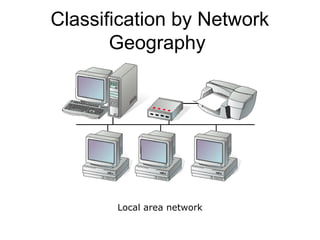
Local area network (LAN):
– A LAN covers a relatively small area such as
a classroom, school, or a single building.
– LANs are inexpensive to install and also
provide higher speeds.
Classification by Network
Geography
Local area network
Classification by Network
Geography
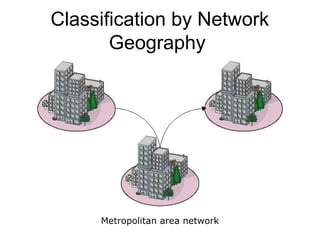
Metropolitan area network (MAN):
– A MAN spans the distance of a typical
metropolitan city.
– The cost of installation and operation is
higher.
– MANs use high-speed connections such as
fiber optics to achieve higher speeds.
Classification by Network
Geography
Metropolitan area network
Classification by Network
Geography
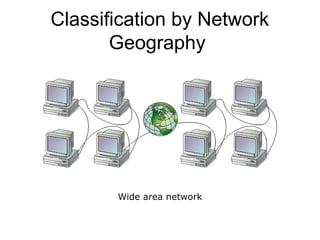
Wide area network (WAN):
– WANs span a larger area than a single city.
– These use long distance telecommunication
networks for connection, thereby increasing
the cost.
– The Internet is a good example of a WAN.
Classification by Network
Geography
Wide area network
Classification by Network
Geography
Classification by Component
Roles
• Networks can also be classified according
to the roles that the networked computers
play in the network’s operation.
• Peer-to-peer, server-based, and client-
based are the types of roles into which
networks are classified.
Classification by Component
Roles
Peer-to-peer:
– In a peer-to-peer network, all computers are considered equal.
– Each computer controls its own information and is capable of
functioning as either a client or a server depending upon the
requirement.
– Peer-to-peer networks are inexpensive and easy to install.
– They are popular as home networks and for use in small companies.
Classification by Component
Roles
Peer-to-peer (continued):
– Most operating systems come with built-in
peer-to-peer networking capability.
– The maximum number of peers that can
operate on a peer-to-peer network is ten.
– Each peer shares resources and allows
others open access to them.
Classification by Component
Roles
Peer-to-peer (continued):
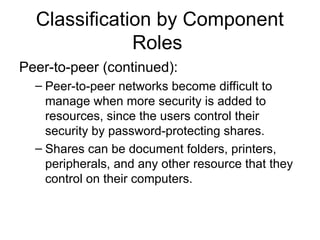
– Peer-to-peer networks become difficult to
manage when more security is added to
resources, since the users control their
security by password-protecting shares.
– Shares can be document folders, printers,
peripherals, and any other resource that they
control on their computers.
Classification by Component
Roles
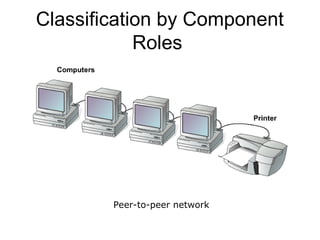
Peer-to-peer network
Classification by Component
Roles
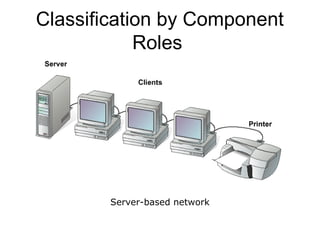
Server-based:
– A server-based network offers centralized
control and is designed for secure operations.
– In a server-based network, a dedicated server
controls the network.
Classification by Component
Roles
Server-based (continued):
– A dedicated server is one that services the
network by storing data, applications,
resources, and also provides access to
resources required by the client.
– These servers can also control the network’s
security from one centralized location or share
it with other specially configured servers.
Classification by Component
Roles
Server-based network
Classification by Component
Roles
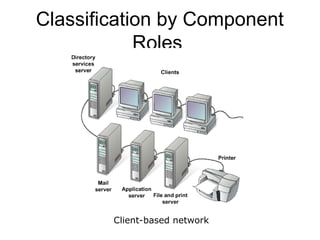
Client-based:
– Client-based network servers process requests
from clients and return just the results.
– These networks take advantage of the powerful
processing capabilities of both the client and
the server.
– Application servers and communications
servers are examples of client-based networks.
Classification by Component
Roles
Client-based network
Summary
• A network consists of two or more entities
sharing resources and information.
• A computer network consists of two or
more computers that are connected and
are able to communicate.
Summary
• The basic purpose of networks is to
enable effective communication, share
resources, and facilitate centralized
management of data.
• Networks can be classified according to
their geographical boundaries or their
component roles.

Introducing the enBasic Network Concepts

  • 1.
  • 2.
    Overview • Introduction tonetworks. • Need for networks. • Classification of networks.
  • 3.
    Introduction to Networks •A network consists of two or more entities or objects sharing resources and information. • A computer network consists of two or more computing devices connected to each other to share resources and information. • The network becomes a powerful tool when computers communicate and share resources with other computers on the same network or entirely distinct networks.
  • 4.
    Introduction to Networks •Computers on a network can act as a client or a server. • A client is a computer that requests for resources. • A server is a computer that controls and provides access to resources.
  • 5.
    Introduction to Networks •Data is a piece of information. • The computing concept ‘hierarchy of data’ is used when planning a network. • It is essential to maintain a hierarchy of data to manage and control resources among computers. • Network access to data must be evaluated carefully to avoid security issues.
  • 6.
    Need for Networks •A computer that operates independently from other computers is called a stand- alone computer. • The process of printing or transferring data from one system to another using various storage devices is called sneakernet.
  • 7.
    Need for Networks •Enhance communication. • Share resources. • Facilitate centralized management.
  • 8.
    Enhance Communication • Computernetworks use electronic mail (e- mail) as the choice for most of the communication. • By using networks, information can be sent to a larger audience in an extremely fast and efficient manner.
  • 9.
    Share Resources • Acopy of data or application stored at a single central location is shared over a network. • Computer peripheral devices, referred to as additional components, can be attached to a computer and be shared in a network.
  • 10.
    • Peripheral devicesinclude faxes, modems, scanners, plotters, and any other device that connects to the computers. • Equipments having common requirements can be shared in order to reduce maintenance cost. Share Resources
  • 11.
    Share Resources • Importantdata can also be stored centrally to make it accessible to users, thereby saving storage space on individual computers. • Computer applications, which take up a considerable amount of storage space, can be installed centrally on the network, saving storage space.
  • 12.
    Facilitate Centralized Management • Networksare used to assist in management tasks associated with their own operation and maintenance. • Using networks results in increased efficiency and a resultant reduction in maintenance costs.
  • 13.
    Facilitate Centralized Management Software: – Softwareis a set of instructions or programs that control the operation of a computer. – Software can be installed at a central location using servers, where the installation files are made accessible over the network.
  • 14.
    Classification of Networks •Classification by network geography. • Classification by component roles.
  • 15.
    Classification by Network Geography •Networks are frequently classified according to the geographical boundaries spanned by the network itself. • LAN, WAN, and MAN are the basic types of classification, of which LAN and WAN are frequently used.
  • 16.
    Local area network(LAN): – A LAN covers a relatively small area such as a classroom, school, or a single building. – LANs are inexpensive to install and also provide higher speeds. Classification by Network Geography
  • 17.
  • 18.
    Metropolitan area network(MAN): – A MAN spans the distance of a typical metropolitan city. – The cost of installation and operation is higher. – MANs use high-speed connections such as fiber optics to achieve higher speeds. Classification by Network Geography
  • 19.
  • 20.
    Wide area network(WAN): – WANs span a larger area than a single city. – These use long distance telecommunication networks for connection, thereby increasing the cost. – The Internet is a good example of a WAN. Classification by Network Geography
  • 21.
  • 22.
    Classification by Component Roles •Networks can also be classified according to the roles that the networked computers play in the network’s operation. • Peer-to-peer, server-based, and client- based are the types of roles into which networks are classified.
  • 23.
    Classification by Component Roles Peer-to-peer: –In a peer-to-peer network, all computers are considered equal. – Each computer controls its own information and is capable of functioning as either a client or a server depending upon the requirement. – Peer-to-peer networks are inexpensive and easy to install. – They are popular as home networks and for use in small companies.
  • 24.
    Classification by Component Roles Peer-to-peer(continued): – Most operating systems come with built-in peer-to-peer networking capability. – The maximum number of peers that can operate on a peer-to-peer network is ten. – Each peer shares resources and allows others open access to them.
  • 25.
    Classification by Component Roles Peer-to-peer(continued): – Peer-to-peer networks become difficult to manage when more security is added to resources, since the users control their security by password-protecting shares. – Shares can be document folders, printers, peripherals, and any other resource that they control on their computers.
  • 26.
  • 27.
    Classification by Component Roles Server-based: –A server-based network offers centralized control and is designed for secure operations. – In a server-based network, a dedicated server controls the network.
  • 28.
    Classification by Component Roles Server-based(continued): – A dedicated server is one that services the network by storing data, applications, resources, and also provides access to resources required by the client. – These servers can also control the network’s security from one centralized location or share it with other specially configured servers.
  • 29.
  • 30.
    Classification by Component Roles Client-based: –Client-based network servers process requests from clients and return just the results. – These networks take advantage of the powerful processing capabilities of both the client and the server. – Application servers and communications servers are examples of client-based networks.
  • 31.
  • 32.
    Summary • A networkconsists of two or more entities sharing resources and information. • A computer network consists of two or more computers that are connected and are able to communicate.
  • 33.
    Summary • The basicpurpose of networks is to enable effective communication, share resources, and facilitate centralized management of data. • Networks can be classified according to their geographical boundaries or their component roles.