1
Riverbed SteelHead
Integration with Cisco IWAN
Solution Guide
August 2016
Riverbed Technical Marketing
Deploying SteelHead Path Selection with Zscaler
SteelHead Path Selection to Zscaler with RiOS 9.0 Solution Guide 2
© 2016 Riverbed Technology, Inc. All rights reserved.
Riverbed®, SteelApp™, SteelCentral™, SteelFusion™, SteelHead™, SteelScript™, SteelStore™, Steelhead®,
Cloud Steelhead®, Virtual Steelhead®, Granite™, Interceptor®, Stingray™, Whitewater®, WWOS™, RiOS®,
Think Fast®, AirPcap®, BlockStream™, FlyScript™, SkipWare®, TrafficScript®, TurboCap®, WinPcap®,
Mazu®, OPNET®, and Cascade® are all trademarks or registered trademarks of Riverbed Technology, Inc.
(Riverbed) in the United States and other countries. Riverbed and any Riverbed product or service name
or logo used herein are trademarks of Riverbed. All other trademarks used herein belong to their
respective owners. The trademarks and logos displayed herein cannot be used without the prior written
consent of Riverbed or their respective owners.
This documentation is furnished “AS IS” and is subject to change without notice and should not be
construed as a commitment by Riverbed. This documentation may not be copied, modified or distributed
without the express authorization of Riverbed and may be used only in connection with Riverbed
products and services. Use, duplication, reproduction, release, modification, disclosure or transfer of this
documentation is restricted in accordance with the Federal Acquisition Regulations as applied to civilian
agencies and the Defense Federal Acquisition Regulation Supplement as applied to military agencies. This
documentation qualifies as “commercial computer software documentation” and any use by the
government shall be governed solely by these terms. All other use is prohibited. Riverbed assumes no
responsibility or liability for any errors or inaccuracies that may appear in this documentation.
Cisco® is a registered trademark of Cisco Systems, Inc. and its affiliates in the United States and in other
countries.
Microsoft® is a registered trademark of Microsoft Corporation and its affiliates in the United States and in
other countries.
VMware® is a registered trademark of VMware, Inc. and its affiliates in the United States and in other
countries.
3
Riverbed SteelHead integrated with Cisco IWAN
Introduction
Riverbed SteelHead is the industry leader for WAN optimization and a lot of customers prefer to continue
to use SteelHead for their WAN optimization needs even if the customers have chosen Cisco® IWAN in
their Enterprise environment. This document details how we have verified SteelHead intergration into
Cisco`s IWAN solution.
Cisco® IWAN environment
The Cisco Intelligent WAN (IWAN) solution provides design and implementation guidance for
organizations looking to deploy wide area network (WAN) transport with a transport-independent design
(TID), intelligent path control, and secure encrypted communications between branch locations while
reducing the operating cost of the WAN. IWAN takes full advantage of cost-effective transport services in
order to increase bandwidth capacity without compromising performance, reliability, or security of
collaboration or cloud-based applications.
Deployment:
Virtual SteelHeads are used in inline deployment mode. There should not be any configurational changes
if we switch to Physical Steelheads . Virtual SteelHead can be deployed either on ESxi or on the Cisco SRE-
UCS by following these steps https://splash.riverbed.com/docs/DOC-1276
We support parallel and serial deployments as well.
Note: WCCP may not be a Valid deployment on ISR4K.
Test Scenario:
Deploying SteelHead Path Selection with Zscaler
SteelHead Path Selection to Zscaler with RiOS 9.0 Solution Guide 4
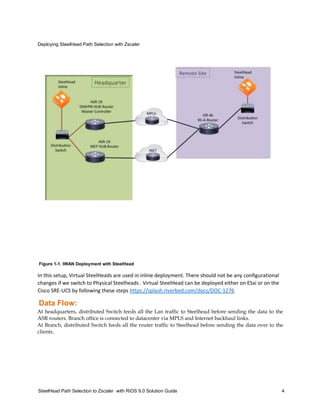
Figure 1-1. IWAN Deployment with SteelHead
In this setup, Virtual SteelHeads are used in inline deployment. There should not be any configurational
changes if we switch to Physical Steelheads . Virtual SteelHead can be deployed either on ESxi or on the
Cisco SRE-UCS by following these steps https://splash.riverbed.com/docs/DOC-1276
Data Flow:
At headquarters, distributed Switch feeds all the Lan traffic to Steelhead before sending the data to the
ASR routers. Branch office is connected to datacenter via MPLS and Internet backhaul links.
At Branch, distributed Switch feeds all the router traffic to Steelhead before sending the data over to the
clients.
5
Protocols Configured in iWAN
DMVPN:
Dynamic Multipoint VPN (DMVPN) is a Cisco IOS Software solution for building scalable IPsec Virtual
Private Networks (VPNs). Cisco DMVPN uses a centralized architecture to provide easier implementation
and management for deployments that require granular access controls for diverse user communities,
including mobile workers, telecommuters, and extranet users.
DMVPN tunnels are configured on MPLS and Internet Links.
Configuration on DMVPN Hub router:
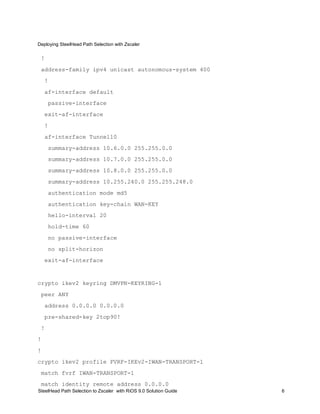
interface Tunnel10
bandwidth 1000000
ip address 10.6.34.1 255.255.254.0
no ip redirects
ip mtu 1400
ip nhrp authentication 2top90!
ip nhrp map multicast dynamic
ip nhrp network-id 101
ip nhrp holdtime 600
ip nhrp redirect
ip tcp adjust-mss 1360
delay 1000
tunnel source GigabitEthernet0/0/1
tunnel mode gre multipoint
tunnel key 101
tunnel vrf IWAN-TRANSPORT-1
tunnel protection ipsec profile DMVPN-PROFILE-TRANSPORT-1
domain iwan path MPLS
router eigrp IWAN-EIGRP
Deploying SteelHead Path Selection with Zscaler
SteelHead Path Selection to Zscaler with RiOS 9.0 Solution Guide 6
!
address-family ipv4 unicast autonomous-system 400
!
af-interface default
passive-interface
exit-af-interface
!
af-interface Tunnel10
summary-address 10.6.0.0 255.255.0.0
summary-address 10.7.0.0 255.255.0.0
summary-address 10.8.0.0 255.255.0.0
summary-address 10.255.240.0 255.255.248.0
authentication mode md5
authentication key-chain WAN-KEY
hello-interval 20
hold-time 60
no passive-interface
no split-horizon
exit-af-interface
crypto ikev2 keyring DMVPN-KEYRING-1
peer ANY
address 0.0.0.0 0.0.0.0
pre-shared-key 2top90!
!
!
!
crypto ikev2 profile FVRF-IKEv2-IWAN-TRANSPORT-1
match fvrf IWAN-TRANSPORT-1
match identity remote address 0.0.0.0
7
authentication local pre-share
authentication remote pre-share
keyring local DMVPN-KEYRING-1
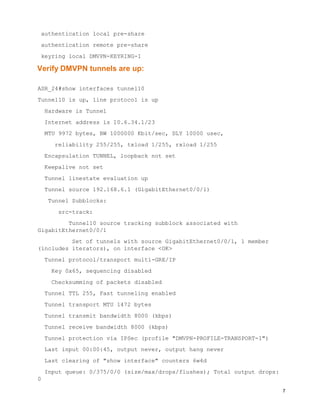
Verify DMVPN tunnels are up:
ASR_24#show interfaces tunnel10
Tunnel10 is up, line protocol is up
Hardware is Tunnel
Internet address is 10.6.34.1/23
MTU 9972 bytes, BW 1000000 Kbit/sec, DLY 10000 usec,
reliability 255/255, txload 1/255, rxload 1/255
Encapsulation TUNNEL, loopback not set
Keepalive not set
Tunnel linestate evaluation up
Tunnel source 192.168.6.1 (GigabitEthernet0/0/1)
Tunnel Subblocks:
src-track:
Tunnel10 source tracking subblock associated with
GigabitEthernet0/0/1
Set of tunnels with source GigabitEthernet0/0/1, 1 member
(includes iterators), on interface <OK>
Tunnel protocol/transport multi-GRE/IP
Key 0x65, sequencing disabled
Checksumming of packets disabled
Tunnel TTL 255, Fast tunneling enabled
Tunnel transport MTU 1472 bytes
Tunnel transmit bandwidth 8000 (kbps)
Tunnel receive bandwidth 8000 (kbps)
Tunnel protection via IPSec (profile "DMVPN-PROFILE-TRANSPORT-1")
Last input 00:00:45, output never, output hang never
Last clearing of "show interface" counters 6w4d
Input queue: 0/375/0/0 (size/max/drops/flushes); Total output drops:
0
Deploying SteelHead Path Selection with Zscaler
SteelHead Path Selection to Zscaler with RiOS 9.0 Solution Guide 8
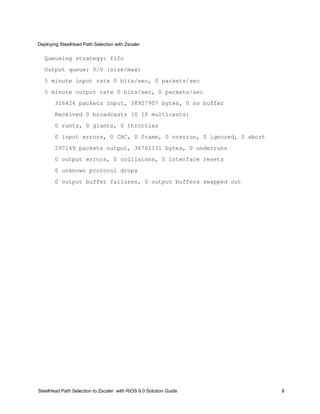
Queueing strategy: fifo
Output queue: 0/0 (size/max)
5 minute input rate 0 bits/sec, 0 packets/sec
5 minute output rate 0 bits/sec, 0 packets/sec
316424 packets input, 38927907 bytes, 0 no buffer
Received 0 broadcasts (0 IP multicasts)
0 runts, 0 giants, 0 throttles
0 input errors, 0 CRC, 0 frame, 0 overrun, 0 ignored, 0 abort
297149 packets output, 36761131 bytes, 0 underruns
0 output errors, 0 collisions, 0 interface resets
0 unknown protocol drops
0 output buffer failures, 0 output buffers swapped out
Deploying SteelHead Path Selection with Zscaler
SteelHead Path Selection to Zscaler with RiOS 9.0 Solution Guide 9
PFRv3:
PfRv3 probe reduction feature allows to reduce the probing of traffic on channels that are not carrying any
traffic. Probing is used to compute important metrics such as reachability, one-way delay (OWD), jitter,
and loss on channels that don’t have user traffic. It helps PfRv3 algorithm to choose the best channel to
use for a given traffic class.
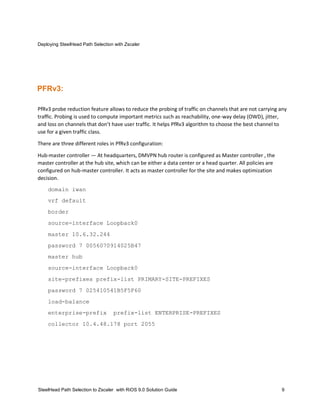
There are three different roles in PfRv3 configuration:
Hub-master controller — At headquarters, DMVPN hub router is configured as Master controller , the
master controller at the hub site, which can be either a data center or a head quarter. All policies are
configured on hub-master controller. It acts as master controller for the site and makes optimization
decision.
domain iwan
vrf default
border
source-interface Loopback0
master 10.6.32.244
password 7 0056070914025B47
master hub
source-interface Loopback0
site-prefixes prefix-list PRIMARY-SITE-PREFIXES
password 7 025410541B5F5F60
load-balance
enterprise-prefix prefix-list ENTERPRISE-PREFIXES
collector 10.4.48.178 port 2055
Deploying SteelHead Path Selection with Zscaler
SteelHead Path Selection to Zscaler with RiOS 9.0 Solution Guide 10
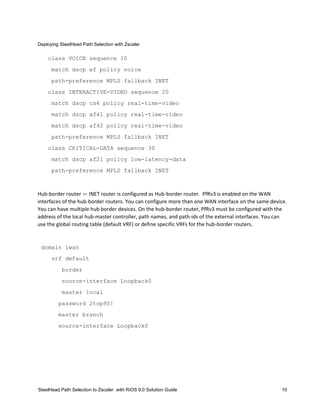
class VOICE sequence 10
match dscp ef policy voice
path-preference MPLS fallback INET
class INTERACTIVE-VIDEO sequence 20
match dscp cs4 policy real-time-video
match dscp af41 policy real-time-video
match dscp af42 policy real-time-video
path-preference MPLS fallback INET
class CRITICAL-DATA sequence 30
match dscp af21 policy low-latency-data
path-preference MPLS fallback INET
Hub-border router — INET router is configured as Hub-border router. PfRv3 is enabled on the WAN
interfaces of the hub-border routers. You can configure more than one WAN interface on the same device.
You can have multiple hub border devices. On the hub-border router, PfRv3 must be configured with the
address of the local hub-master controller, path names, and path-ids of the external interfaces. You can
use the global routing table (default VRF) or define specific VRFs for the hub-border routers.
domain iwan
vrf default
border
source-interface Loopback0
master local
password 2top90!
master branch
source-interface Loopback0
SteelHead Path Selection to Zscaler with RiOS 9.0 Solution Guide 11
hub 10.6.32.244
Branch-master controller — Remote-site Router , the branch-master controller is the master controller at
the branch site. There is no policy configuration on this device. It receives policy from the hub-master
controller. This device acts as master controller for the branch site and makes optimization decision.
domain iwan
vrf default
master branch
source-interface Loopback0
password 7 075D35435E504944
hub 10.6.32.244
Configure SteelHead Basic Interfaces
1. WAN Visibility is set to Correct addressing which is SteelHead's defaults setting.
 Connection is optimized over MPLS link which has DMVPN configured with PFRv3
Deploying SteelHead Path Selection with Zscaler
SteelHead Path Selection to Zscaler with RiOS 9.0 Solution Guide 12
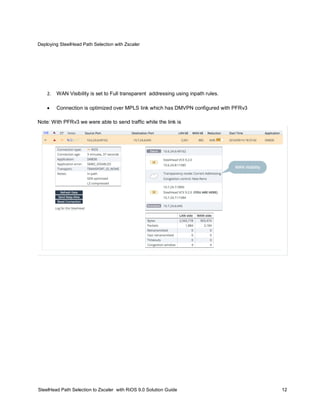
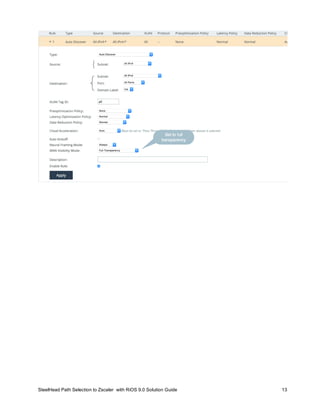
2. WAN Visibility is set to Full transparent addressing using inpath rules.
 Connection is optimized over MPLS link which has DMVPN configured with PFRv3
Note: With PFRv3 we were able to send traffic while the link is
SteelHead Path Selection to Zscaler with RiOS 9.0 Solution Guide 13

Integrate steelhead into iwan

  • 1.
    1 Riverbed SteelHead Integration withCisco IWAN Solution Guide August 2016 Riverbed Technical Marketing
  • 2.
    Deploying SteelHead PathSelection with Zscaler SteelHead Path Selection to Zscaler with RiOS 9.0 Solution Guide 2 © 2016 Riverbed Technology, Inc. All rights reserved. Riverbed®, SteelApp™, SteelCentral™, SteelFusion™, SteelHead™, SteelScript™, SteelStore™, Steelhead®, Cloud Steelhead®, Virtual Steelhead®, Granite™, Interceptor®, Stingray™, Whitewater®, WWOS™, RiOS®, Think Fast®, AirPcap®, BlockStream™, FlyScript™, SkipWare®, TrafficScript®, TurboCap®, WinPcap®, Mazu®, OPNET®, and Cascade® are all trademarks or registered trademarks of Riverbed Technology, Inc. (Riverbed) in the United States and other countries. Riverbed and any Riverbed product or service name or logo used herein are trademarks of Riverbed. All other trademarks used herein belong to their respective owners. The trademarks and logos displayed herein cannot be used without the prior written consent of Riverbed or their respective owners. This documentation is furnished “AS IS” and is subject to change without notice and should not be construed as a commitment by Riverbed. This documentation may not be copied, modified or distributed without the express authorization of Riverbed and may be used only in connection with Riverbed products and services. Use, duplication, reproduction, release, modification, disclosure or transfer of this documentation is restricted in accordance with the Federal Acquisition Regulations as applied to civilian agencies and the Defense Federal Acquisition Regulation Supplement as applied to military agencies. This documentation qualifies as “commercial computer software documentation” and any use by the government shall be governed solely by these terms. All other use is prohibited. Riverbed assumes no responsibility or liability for any errors or inaccuracies that may appear in this documentation. Cisco® is a registered trademark of Cisco Systems, Inc. and its affiliates in the United States and in other countries. Microsoft® is a registered trademark of Microsoft Corporation and its affiliates in the United States and in other countries. VMware® is a registered trademark of VMware, Inc. and its affiliates in the United States and in other countries.
  • 3.
    3 Riverbed SteelHead integratedwith Cisco IWAN Introduction Riverbed SteelHead is the industry leader for WAN optimization and a lot of customers prefer to continue to use SteelHead for their WAN optimization needs even if the customers have chosen Cisco® IWAN in their Enterprise environment. This document details how we have verified SteelHead intergration into Cisco`s IWAN solution. Cisco® IWAN environment The Cisco Intelligent WAN (IWAN) solution provides design and implementation guidance for organizations looking to deploy wide area network (WAN) transport with a transport-independent design (TID), intelligent path control, and secure encrypted communications between branch locations while reducing the operating cost of the WAN. IWAN takes full advantage of cost-effective transport services in order to increase bandwidth capacity without compromising performance, reliability, or security of collaboration or cloud-based applications. Deployment: Virtual SteelHeads are used in inline deployment mode. There should not be any configurational changes if we switch to Physical Steelheads . Virtual SteelHead can be deployed either on ESxi or on the Cisco SRE- UCS by following these steps https://splash.riverbed.com/docs/DOC-1276 We support parallel and serial deployments as well. Note: WCCP may not be a Valid deployment on ISR4K. Test Scenario:
  • 4.
    Deploying SteelHead PathSelection with Zscaler SteelHead Path Selection to Zscaler with RiOS 9.0 Solution Guide 4 Figure 1-1. IWAN Deployment with SteelHead In this setup, Virtual SteelHeads are used in inline deployment. There should not be any configurational changes if we switch to Physical Steelheads . Virtual SteelHead can be deployed either on ESxi or on the Cisco SRE-UCS by following these steps https://splash.riverbed.com/docs/DOC-1276 Data Flow: At headquarters, distributed Switch feeds all the Lan traffic to Steelhead before sending the data to the ASR routers. Branch office is connected to datacenter via MPLS and Internet backhaul links. At Branch, distributed Switch feeds all the router traffic to Steelhead before sending the data over to the clients.
  • 5.
    5 Protocols Configured iniWAN DMVPN: Dynamic Multipoint VPN (DMVPN) is a Cisco IOS Software solution for building scalable IPsec Virtual Private Networks (VPNs). Cisco DMVPN uses a centralized architecture to provide easier implementation and management for deployments that require granular access controls for diverse user communities, including mobile workers, telecommuters, and extranet users. DMVPN tunnels are configured on MPLS and Internet Links. Configuration on DMVPN Hub router: interface Tunnel10 bandwidth 1000000 ip address 10.6.34.1 255.255.254.0 no ip redirects ip mtu 1400 ip nhrp authentication 2top90! ip nhrp map multicast dynamic ip nhrp network-id 101 ip nhrp holdtime 600 ip nhrp redirect ip tcp adjust-mss 1360 delay 1000 tunnel source GigabitEthernet0/0/1 tunnel mode gre multipoint tunnel key 101 tunnel vrf IWAN-TRANSPORT-1 tunnel protection ipsec profile DMVPN-PROFILE-TRANSPORT-1 domain iwan path MPLS router eigrp IWAN-EIGRP
  • 6.
    Deploying SteelHead PathSelection with Zscaler SteelHead Path Selection to Zscaler with RiOS 9.0 Solution Guide 6 ! address-family ipv4 unicast autonomous-system 400 ! af-interface default passive-interface exit-af-interface ! af-interface Tunnel10 summary-address 10.6.0.0 255.255.0.0 summary-address 10.7.0.0 255.255.0.0 summary-address 10.8.0.0 255.255.0.0 summary-address 10.255.240.0 255.255.248.0 authentication mode md5 authentication key-chain WAN-KEY hello-interval 20 hold-time 60 no passive-interface no split-horizon exit-af-interface crypto ikev2 keyring DMVPN-KEYRING-1 peer ANY address 0.0.0.0 0.0.0.0 pre-shared-key 2top90! ! ! ! crypto ikev2 profile FVRF-IKEv2-IWAN-TRANSPORT-1 match fvrf IWAN-TRANSPORT-1 match identity remote address 0.0.0.0
  • 7.
    7 authentication local pre-share authenticationremote pre-share keyring local DMVPN-KEYRING-1 Verify DMVPN tunnels are up: ASR_24#show interfaces tunnel10 Tunnel10 is up, line protocol is up Hardware is Tunnel Internet address is 10.6.34.1/23 MTU 9972 bytes, BW 1000000 Kbit/sec, DLY 10000 usec, reliability 255/255, txload 1/255, rxload 1/255 Encapsulation TUNNEL, loopback not set Keepalive not set Tunnel linestate evaluation up Tunnel source 192.168.6.1 (GigabitEthernet0/0/1) Tunnel Subblocks: src-track: Tunnel10 source tracking subblock associated with GigabitEthernet0/0/1 Set of tunnels with source GigabitEthernet0/0/1, 1 member (includes iterators), on interface <OK> Tunnel protocol/transport multi-GRE/IP Key 0x65, sequencing disabled Checksumming of packets disabled Tunnel TTL 255, Fast tunneling enabled Tunnel transport MTU 1472 bytes Tunnel transmit bandwidth 8000 (kbps) Tunnel receive bandwidth 8000 (kbps) Tunnel protection via IPSec (profile "DMVPN-PROFILE-TRANSPORT-1") Last input 00:00:45, output never, output hang never Last clearing of "show interface" counters 6w4d Input queue: 0/375/0/0 (size/max/drops/flushes); Total output drops: 0
  • 8.
    Deploying SteelHead PathSelection with Zscaler SteelHead Path Selection to Zscaler with RiOS 9.0 Solution Guide 8 Queueing strategy: fifo Output queue: 0/0 (size/max) 5 minute input rate 0 bits/sec, 0 packets/sec 5 minute output rate 0 bits/sec, 0 packets/sec 316424 packets input, 38927907 bytes, 0 no buffer Received 0 broadcasts (0 IP multicasts) 0 runts, 0 giants, 0 throttles 0 input errors, 0 CRC, 0 frame, 0 overrun, 0 ignored, 0 abort 297149 packets output, 36761131 bytes, 0 underruns 0 output errors, 0 collisions, 0 interface resets 0 unknown protocol drops 0 output buffer failures, 0 output buffers swapped out
  • 9.
    Deploying SteelHead PathSelection with Zscaler SteelHead Path Selection to Zscaler with RiOS 9.0 Solution Guide 9 PFRv3: PfRv3 probe reduction feature allows to reduce the probing of traffic on channels that are not carrying any traffic. Probing is used to compute important metrics such as reachability, one-way delay (OWD), jitter, and loss on channels that don’t have user traffic. It helps PfRv3 algorithm to choose the best channel to use for a given traffic class. There are three different roles in PfRv3 configuration: Hub-master controller — At headquarters, DMVPN hub router is configured as Master controller , the master controller at the hub site, which can be either a data center or a head quarter. All policies are configured on hub-master controller. It acts as master controller for the site and makes optimization decision. domain iwan vrf default border source-interface Loopback0 master 10.6.32.244 password 7 0056070914025B47 master hub source-interface Loopback0 site-prefixes prefix-list PRIMARY-SITE-PREFIXES password 7 025410541B5F5F60 load-balance enterprise-prefix prefix-list ENTERPRISE-PREFIXES collector 10.4.48.178 port 2055
  • 10.
    Deploying SteelHead PathSelection with Zscaler SteelHead Path Selection to Zscaler with RiOS 9.0 Solution Guide 10 class VOICE sequence 10 match dscp ef policy voice path-preference MPLS fallback INET class INTERACTIVE-VIDEO sequence 20 match dscp cs4 policy real-time-video match dscp af41 policy real-time-video match dscp af42 policy real-time-video path-preference MPLS fallback INET class CRITICAL-DATA sequence 30 match dscp af21 policy low-latency-data path-preference MPLS fallback INET Hub-border router — INET router is configured as Hub-border router. PfRv3 is enabled on the WAN interfaces of the hub-border routers. You can configure more than one WAN interface on the same device. You can have multiple hub border devices. On the hub-border router, PfRv3 must be configured with the address of the local hub-master controller, path names, and path-ids of the external interfaces. You can use the global routing table (default VRF) or define specific VRFs for the hub-border routers. domain iwan vrf default border source-interface Loopback0 master local password 2top90! master branch source-interface Loopback0
  • 11.
    SteelHead Path Selectionto Zscaler with RiOS 9.0 Solution Guide 11 hub 10.6.32.244 Branch-master controller — Remote-site Router , the branch-master controller is the master controller at the branch site. There is no policy configuration on this device. It receives policy from the hub-master controller. This device acts as master controller for the branch site and makes optimization decision. domain iwan vrf default master branch source-interface Loopback0 password 7 075D35435E504944 hub 10.6.32.244 Configure SteelHead Basic Interfaces 1. WAN Visibility is set to Correct addressing which is SteelHead's defaults setting.  Connection is optimized over MPLS link which has DMVPN configured with PFRv3
  • 12.
    Deploying SteelHead PathSelection with Zscaler SteelHead Path Selection to Zscaler with RiOS 9.0 Solution Guide 12 2. WAN Visibility is set to Full transparent addressing using inpath rules.  Connection is optimized over MPLS link which has DMVPN configured with PFRv3 Note: With PFRv3 we were able to send traffic while the link is
  • 13.
    SteelHead Path Selectionto Zscaler with RiOS 9.0 Solution Guide 13