 CLOUD VENDOR
-INTACCT
 CLOUD APPLICATION
-FRUUX
-GDocsDrive
-GetApp.com
 CLOUD STORAGE
-MEDIA CLOUD
-MEMONIC
CLOUDVENDOR: INTACCT
 The Intacct name was derived from “internet” and “accounting.”
 Intacct offers two main products:
 Intacct - Intacct is a cloud financial management and accounting
system specifically designed for use by small and mid-sized
companies.
 Intacct Accountant Edition - Intacct Accountant Edition delivers
web based accounting and financial applications that are designed
for use by accounting firms and business process outsourcers.
 The Intacct system includes applications for accounting, contract
management, revenue recognition, inventory, purchasing, vendor
management, financial consolidation, and financial reporting.
CLOUD APPLICATION
 FRUUX
 GDocsDrive
 GetApp.com
FRUUX
 The web app also allows to manage contacts, calendars
and tasks in the browser
 Fruux is made in Germany and your data is always
securely backed up for you.
 Fruux works on Apple Mac OS X, Apple iOS (iPhone,
iPad & iPod Touch), Blackberry OS 10, Mozilla Firefox
OS, Microsoft Windows, Google Android, Linux, with
popular apps such as Microsoft Outlook, Mozilla
Thunderbird, BusyCal and with many other platforms,
devices and applications
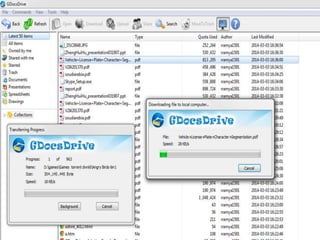
GDocsDrive
 GDocsDrive is a Google Docs client app, which allows you to
manage Google Docs files with ease, all from the comfort of your
desktop.
 With GDocsDrive, you can conveniently use your local applications
to modify online Google Docs files, and drag and drop files directly
between Google cloud and your local computer.
 Nearly all the functions of Google Docs are seamlessly available in
this one tool, which makes Google Docs like a Google Drive on
your desktop.
 Select a folder, drag and drop it in the GDocsDrive window, and you
are done! It’s just that easy.
GDocsDrive is a Google Docs Windows client which
requires little resources.
 Operating system:
Windows XP
Windows Vista
Windows 7
 CPU, Memory, Hard Drive:
No requirements. GDocsDrive is a small and portable
tool requiring minimum resources.
 Internet connection:
Required.
GetApp.com
Media Cloud
Media Cloud is an open source, open data
platform that allows researchers to
answer quantitative questions about the
content of online media.
It "tracks hundreds of newspapers and
thousands of Web sites and blogs”
 The best way to share big files
FAST: File transfer acceleration built in.
Uploads and downloads fly as fast as your
network can carry them.
SIMPLE: Share files with anyone by sending a
secure link. Nothing to download or install.
 SECURE: You're in control of who accesses
your files, for how long and whether they need
a password.
MEMONIC
 Memonic is an online notetaking application
that allows users to save and organize
information while conducting research online
and offline.
 A clip may be a full webpage or webpage
excerpt, a document or document excerpt, a
text note, or a screenshot.
 Memonic was launched early 2010.
 Product
 For Browsers
 For Mac OS X
 For Windows
 For iPhone / iPad
THANKYOU!!!

Intact

  • 1.
     CLOUD VENDOR -INTACCT CLOUD APPLICATION -FRUUX -GDocsDrive -GetApp.com  CLOUD STORAGE -MEDIA CLOUD -MEMONIC
  • 2.
    CLOUDVENDOR: INTACCT  TheIntacct name was derived from “internet” and “accounting.”  Intacct offers two main products:  Intacct - Intacct is a cloud financial management and accounting system specifically designed for use by small and mid-sized companies.  Intacct Accountant Edition - Intacct Accountant Edition delivers web based accounting and financial applications that are designed for use by accounting firms and business process outsourcers.  The Intacct system includes applications for accounting, contract management, revenue recognition, inventory, purchasing, vendor management, financial consolidation, and financial reporting.
  • 3.
    CLOUD APPLICATION  FRUUX GDocsDrive  GetApp.com
  • 4.
    FRUUX  The webapp also allows to manage contacts, calendars and tasks in the browser  Fruux is made in Germany and your data is always securely backed up for you.  Fruux works on Apple Mac OS X, Apple iOS (iPhone, iPad & iPod Touch), Blackberry OS 10, Mozilla Firefox OS, Microsoft Windows, Google Android, Linux, with popular apps such as Microsoft Outlook, Mozilla Thunderbird, BusyCal and with many other platforms, devices and applications
  • 7.
    GDocsDrive  GDocsDrive isa Google Docs client app, which allows you to manage Google Docs files with ease, all from the comfort of your desktop.  With GDocsDrive, you can conveniently use your local applications to modify online Google Docs files, and drag and drop files directly between Google cloud and your local computer.  Nearly all the functions of Google Docs are seamlessly available in this one tool, which makes Google Docs like a Google Drive on your desktop.  Select a folder, drag and drop it in the GDocsDrive window, and you are done! It’s just that easy.
  • 8.
    GDocsDrive is aGoogle Docs Windows client which requires little resources.  Operating system: Windows XP Windows Vista Windows 7  CPU, Memory, Hard Drive: No requirements. GDocsDrive is a small and portable tool requiring minimum resources.  Internet connection: Required.
  • 12.
  • 18.
    Media Cloud Media Cloudis an open source, open data platform that allows researchers to answer quantitative questions about the content of online media. It "tracks hundreds of newspapers and thousands of Web sites and blogs”
  • 19.
     The bestway to share big files FAST: File transfer acceleration built in. Uploads and downloads fly as fast as your network can carry them. SIMPLE: Share files with anyone by sending a secure link. Nothing to download or install.  SECURE: You're in control of who accesses your files, for how long and whether they need a password.
  • 20.
    MEMONIC  Memonic isan online notetaking application that allows users to save and organize information while conducting research online and offline.  A clip may be a full webpage or webpage excerpt, a document or document excerpt, a text note, or a screenshot.  Memonic was launched early 2010.  Product  For Browsers  For Mac OS X  For Windows  For iPhone / iPad
  • 22.