Install windows os
7 My name
contact information
or project description
Enable objectives
Types of operating system(window os 7)
Purpose of product key
Hardware compatibility
Versions and service pack of windows
Types of operating system(window os
7)
There are four types of Operating System(OS)
they are:
1.Real-Time Operating System(RTOS)
Real-Time Operating Systems are used to
control machinery , scientific instrument and
industrial systems. An RTOS typically, has very
little user interface capability, no-end user
utilities, since the system will be a “scaled box”
when delivered for use.
2. Single-User, Single Task
As the name implies, the Operating System is
designed to managed the computer so that one
user can effectively do one thing at a time. The
palm OS for palm handled Operating System .
3.Single-user,Multi-Task
This is type of Operating System most people use
on their desktop and laptop computer Today.
Microsoft’s windows and Apple’s MacOS
platforms are both examples of Operating System
that will let a single user have several programs
in operation at the same time. For example, it’s
entirely possible for a windows user to be writing
a note in a word processor while downloading a
file from the internet while printing the text of an
E-mail message.
4.Multi-User
A multi- user operating system allows many different
user to take a advantage of the computer’s recourses
simulteously. The operating system must make sure
that the requirements of the various user are balanced,
and that each of the programs they are using has
sufficient and separate resources so that a problem
with one user doesn’t affect the entire community of
users. UNIX, VMS and mainframe operating system,
such as MVS, are examples of multi-user operating
systems .
Purpose of product key
• A product key is a 25-character code
that's used to activate Windows. Activation
helps verify that Windows hasn't been
used on more PCs than the Microsoft
Software License Terms allow. Your
product key is on a card inside the box
that the Windows DVD came in—or in an
email that shows that you bought
Windows.
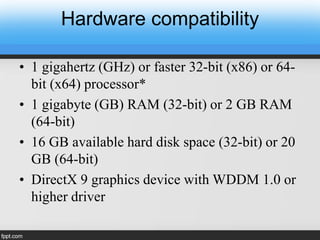
Hardware compatibility
• 1 gigahertz (GHz) or faster 32-bit (x86) or 64-
bit (x64) processor*
• 1 gigabyte (GB) RAM (32-bit) or 2 GB RAM
(64-bit)
• 16 GB available hard disk space (32-bit) or 20
GB (64-bit)
• DirectX 9 graphics device with WDDM 1.0 or
higher driver
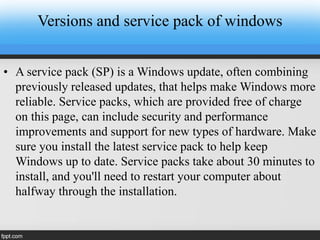
Versions and service pack of windows
• A service pack (SP) is a Windows update, often combining
previously released updates, that helps make Windows more
reliable. Service packs, which are provided free of charge
on this page, can include security and performance
improvements and support for new types of hardware. Make
sure you install the latest service pack to help keep
Windows up to date. Service packs take about 30 minutes to
install, and you'll need to restart your computer about
halfway through the installation.
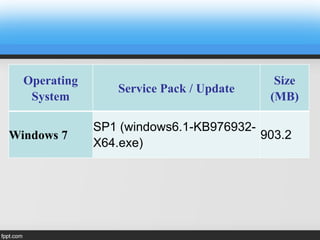
Operating
System
Service Pack / Update
Size
(MB)
Windows 7
SP1 (windows6.1-KB976932-
X64.exe)
903.2

INSTALL WINDOW OS.ppt

  • 1.
    Install windows os 7My name contact information or project description
  • 2.
    Enable objectives Types ofoperating system(window os 7) Purpose of product key Hardware compatibility Versions and service pack of windows
  • 3.
    Types of operatingsystem(window os 7) There are four types of Operating System(OS) they are: 1.Real-Time Operating System(RTOS) Real-Time Operating Systems are used to control machinery , scientific instrument and industrial systems. An RTOS typically, has very little user interface capability, no-end user utilities, since the system will be a “scaled box” when delivered for use.
  • 4.
    2. Single-User, SingleTask As the name implies, the Operating System is designed to managed the computer so that one user can effectively do one thing at a time. The palm OS for palm handled Operating System .
  • 5.
    3.Single-user,Multi-Task This is typeof Operating System most people use on their desktop and laptop computer Today. Microsoft’s windows and Apple’s MacOS platforms are both examples of Operating System that will let a single user have several programs in operation at the same time. For example, it’s entirely possible for a windows user to be writing a note in a word processor while downloading a file from the internet while printing the text of an E-mail message.
  • 6.
    4.Multi-User A multi- useroperating system allows many different user to take a advantage of the computer’s recourses simulteously. The operating system must make sure that the requirements of the various user are balanced, and that each of the programs they are using has sufficient and separate resources so that a problem with one user doesn’t affect the entire community of users. UNIX, VMS and mainframe operating system, such as MVS, are examples of multi-user operating systems .
  • 7.
    Purpose of productkey • A product key is a 25-character code that's used to activate Windows. Activation helps verify that Windows hasn't been used on more PCs than the Microsoft Software License Terms allow. Your product key is on a card inside the box that the Windows DVD came in—or in an email that shows that you bought Windows.
  • 8.
    Hardware compatibility • 1gigahertz (GHz) or faster 32-bit (x86) or 64- bit (x64) processor* • 1 gigabyte (GB) RAM (32-bit) or 2 GB RAM (64-bit) • 16 GB available hard disk space (32-bit) or 20 GB (64-bit) • DirectX 9 graphics device with WDDM 1.0 or higher driver
  • 9.
    Versions and servicepack of windows • A service pack (SP) is a Windows update, often combining previously released updates, that helps make Windows more reliable. Service packs, which are provided free of charge on this page, can include security and performance improvements and support for new types of hardware. Make sure you install the latest service pack to help keep Windows up to date. Service packs take about 30 minutes to install, and you'll need to restart your computer about halfway through the installation.
  • 10.
    Operating System Service Pack /Update Size (MB) Windows 7 SP1 (windows6.1-KB976932- X64.exe) 903.2