WELCOME
to @SAPInsideTrack 2012
in Eindhoven, NL
Infusing Design Thinking


                           ©SAP AG 2012 | 1
WHAT WE EXPECT Be open. Do it. Try it out.


                                             ©SAP AG 2012 | 2
WHY WE DO THIS   To meet the user’s needs.


                                             ©SAP AG 2012 | 3
DESIGN THINKING


Things to Remember
 USE THE WHOLE SPACE. Do not limit    TIME-BOXING – yes, you will not have
  yourself to the white board.          enough time
 Active participation by everyone     Please – minimal use of cell phones,
                                        computers, iPads
 Be VISUAL


                                                                  ©SAP AG 2012 | 4
DESIGN THINKING

 Create Innovation by combining the
right PEOPLE, the needed SPACE and
       a supporting PROCESS.


                              ©SAP AG 2012 | 5
THERE IS NO MAGIC.


                     ©SAP AG 2012 | 6
AND IT’S NOT ABOUT LUCK.


                           ©SAP AG 2012 | 7
THE RIGHT PEOPLE.


                    ©SAP AG 2012 | 8
NO LONESOME RESEARCH.


                        ©SAP AG 2012 | 9
INTERDISCIPLINARY TEAMS   of T-shaped people.


                                      ©SAP AG 2012 | 10
DIFFERENT MINDSETS & EXPERIENCES.


                               ©SAP AG 2012 | 11
THE NEEDED SPACE.


                    ©SAP AG 2012 | 12
FLEXIBLE ENVIRONMENT


                       ©SAP AG 2012 | 13
THE TEAM SPACE IS YOURS


                          ©SAP AG 2012 | 14
THE SUPPORTING PROCESS.


                    ©SAP AG 2012 | 15
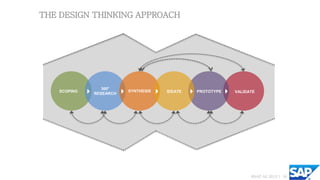
THE DESIGN THINKING APPROACH


                 360°
    SCOPING              SYNTHESIS   IDEATE   PROTOTYPE   VALIDATE
              RESEARCH


                                                                ©SAP AG 2012 | 16
CURIOSITY & WILLINGNESS TO LEARN.


                                ©SAP AG 2012 | 17
BE A CHILD.


              ©SAP AG 2012 | 18
FAILURES ARE ALLOWED and a great opportunity to learn.


                                           ©SAP AG 2012 | 19
SCOPING


What are you trying to achieve?
   focus of the solution                     plan the project, based on the phases
   quick research to validate                 of the Design Thinking approach
   shift the project focus if necessary


                                                                         ©SAP AG 2012 | 20
360° RESEARCH go out of the building.


                                        ©SAP AG 2012 | 21
360° RESEARCH


Research, discover, explore and capture
   Find key insights               Understand stakeholders
   Find the real expert            Gather market information
   Gain empathy for the users      Research analogous situations
                                    Research adjacent situations
                                    Do field research to understand users


                                                               ©SAP AG 2010 | 22
                                                                       2012
360° RESEARCH


Understand stakeholders
   Understand their expectations and
    motivations
   map out their relationships to each
    other and to the project goals.


                                          ©SAP AG 2012 | 23
360° RESEARCH


Gather market information
   Is the market big enough?             Consider analysts and thought
   What will be your unique selling       leaders
    proposition?
   Your competitive advantage?


                                                                  ©SAP AG 2010 | 24
                                                                          2012
360° RESEARCH


Do field research to understand users
   with the people for whom you are   Here are some methods and tools to choose:
    designing                             Interviews and in context observations:
                                           to get answers to specific questions
                                          Ethnographic studies: great to collect
                                           data on peoples’ culture and contexts
                                          Make tools: great for collective
                                           creativity


                                                                         ©SAP AG 2010 | 25
                                                                                 2012
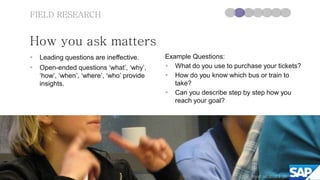
FIELD RESEARCH


How you ask matters
   Leading questions are ineffective.      Example Questions:
   Open-ended questions ‘what’, ‘why’,      What do you use to purchase your tickets?
    ‘how’, ‘when’, ‘where’, ‘who’ provide    How do you know which bus or train to
    insights.                                  take?
                                             Can you describe step by step how you
                                               reach your goal?


                                                                       ©SAP AG 2010 | 26
                                                                               2012
FIELD RESEARCH


What to do when you are with your end
users
Body language, listening, observation Collect artifacts
   Show visible signs of empathy.       What is the artifact and who uses it?
   Observe the users:                   Who creates it and who receives it?
    Do they look confused, nervous,      How is it used, reused, misused?
    delighted?                           Why do they use it this way?
   Let them finish their thought.


                                                                    ©SAP AG 2010 | 27
                                                                            2012
FIELD RESEARCH


If you return early, do not try to
connect the dots and do not
jump to conclusions, yet.


                                     ©SAP AG 2012 | 28
                                             2010
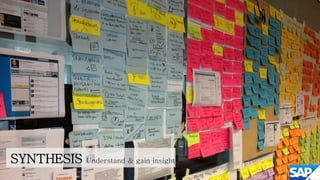
SYNTHESIS   Understand & gain insights

                                         ©SAP AG 2010 | 29
                                                 2012
SYNTHESIS


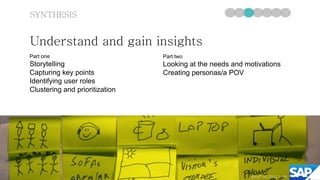
Understand and gain insights
Part one                        Part two
Storytelling                    Looking at the needs and motivations
Capturing key points            Creating personas/a POV
Identifying user roles
Clustering and prioritization


                                                          ©SAP AG 2010 | 30
                                                                  2012
SYNTHESIS

 Storytelling
   Make a list of users you saw                Be visual 
   Describe what you heard and observed        Put one statement per post-it and
   Try not to (mis)interpret or judge and       articulate the statements clearly so that
    indicate if you make an assumption           they are understandable without other
   As the audience, try to note down all        context.
    important details on post-its               Use one color per user to have a
                                                 reference.


                                                                           ©SAP AG 2010 | 31
                                                                                   2012
THE ART OF STRUCTURING YOUR INSIGHTS.


                               ©SAP AG 2012 | 32
THE ART OF STRUCTURING YOUR INSIGHTS.


                               ©SAP AG 2012 | 33
SYNTHESIS


Creating personas
   Personas are fictional characters created to    Your persona description might include:
    represent user types.                            name and picture
   They are useful in considering the goals,        demographics like age, education
    desires, and limitations of the users to help    needs and tasks
    to guide design decisions.                       goals and aspirations
   Personas put a personal human face on
    otherwise abstract data about customers


                                                                               ©SAP AG 2012 | 34
SYNTHESIS


Coming up with a POV                               Point of View
POV = User + Need + Insight                    Template:
                                               [Attributed user] needs (to) [Position]
The Point of View is one sentence that
                                               because [Insight]
creates an image in your mind. Based on
                                               Example:
an understanding of a user group and an        The Department Supervisor needs time with
insight into a specific need, it narrows the   customers, since knowing who they are
focus and makes the problem specific.          enables her to optimize her ordering plan.


                                                                              ©SAP AG 2012 | 35
IDEATION find ideas & go for quantity.


                                         ©SAP AG 2010 | 36
                                                 2012
IDEATION


Ideation is about brainstorming ideas
   The goal is to generate as many ideas as
    possible
   At this point the team starts to imagine        Creating
                                                    Choices
    possibilities
   Do not check for feasibility and viability at
    the beginning of ideation, this is done later
    during prioritization


                                                               ©SAP AG 2012 | 37
BRAINSTORMING RULES.   ©SAP AG 2012 | 38
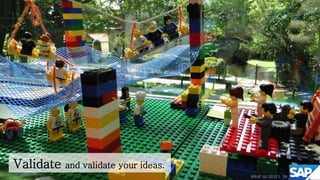
Validate and validate your ideas.
                                    ©SAP AG 2012 | 39
VALIDATION & ITERATION


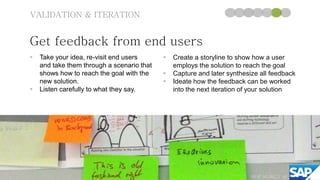
Get feedback from end users
   Take your idea, re-visit end users         Create a storyline to show how a user
    and take them through a scenario that       employs the solution to reach the goal
    shows how to reach the goal with the       Capture and later synthesize all feedback
    new solution.                              Ideate how the feedback can be worked
   Listen carefully to what they say.          into the next iteration of your solution


                                                                          ©SAP AG 2010 | 40
                                                                                  2012
PROTOTYPE make ideas tangible.
                                 ©SAP AG 2012 | 41
PROTOTYPING


Fail early, fail often
   A first or preliminary model of something.              The better it looks, the more narrow the
   Prototypes may show what something looks or              feedback.
    feels like, or how it operates.                         Failure is simply part of understanding
   Prototypes make things tangible.                         and improving.
   It is made to test other peoples’ reaction, and to      Different types of prototyping.
    help you learn and gain insights into what your
    ideas mean to the people you are designing for.


                                                                                  ©SAP AG 2010 | 42
                                                                                          2012
PROTOTYPING


Storyboards
   Visualize your solution                   Storyboards help viewers to share the
   make it tangible by sketching it out       holistic experience a user of a product
                                               or service might go through.


                                                                          ©SAP AG 2012 | 43
PROTOTYPING


Low fidelity Mockups
   Demonstrate Functionality,
                                         Don‘t try to be too perfect. “Key
    (Look)&Feel of your Solution
                                          functionality and screen flow is key,
   Compose low fidelity mockups by       rather than finalized screenshots.“
    using traditional material.


                                                                   ©SAP AG 2010 | 44
                                                                           2012
CONSTRUCTIVE FEEDBACK CULTURE.

                             ©SAP AG 2012 | 45
THANK YOU Eindhoven
       Now you are all

”Infused with Design Thinking”


                             ©SAP AG 2012 | 46

Inno jam deck_it3604sap

  • 1.
    WELCOME to @SAPInsideTrack 2012 inEindhoven, NL Infusing Design Thinking ©SAP AG 2012 | 1
  • 2.
    WHAT WE EXPECTBe open. Do it. Try it out. ©SAP AG 2012 | 2
  • 3.
    WHY WE DOTHIS To meet the user’s needs. ©SAP AG 2012 | 3
  • 4.
    DESIGN THINKING Things toRemember  USE THE WHOLE SPACE. Do not limit  TIME-BOXING – yes, you will not have yourself to the white board. enough time  Active participation by everyone  Please – minimal use of cell phones, computers, iPads  Be VISUAL ©SAP AG 2012 | 4
  • 5.
    DESIGN THINKING CreateInnovation by combining the right PEOPLE, the needed SPACE and a supporting PROCESS. ©SAP AG 2012 | 5
  • 6.
    THERE IS NOMAGIC. ©SAP AG 2012 | 6
  • 7.
    AND IT’S NOTABOUT LUCK. ©SAP AG 2012 | 7
  • 8.
    THE RIGHT PEOPLE. ©SAP AG 2012 | 8
  • 9.
    NO LONESOME RESEARCH. ©SAP AG 2012 | 9
  • 10.
    INTERDISCIPLINARY TEAMS of T-shaped people. ©SAP AG 2012 | 10
  • 11.
    DIFFERENT MINDSETS &EXPERIENCES. ©SAP AG 2012 | 11
  • 12.
    THE NEEDED SPACE. ©SAP AG 2012 | 12
  • 13.
    FLEXIBLE ENVIRONMENT ©SAP AG 2012 | 13
  • 14.
    THE TEAM SPACEIS YOURS ©SAP AG 2012 | 14
  • 15.
    THE SUPPORTING PROCESS. ©SAP AG 2012 | 15
  • 16.
    THE DESIGN THINKINGAPPROACH 360° SCOPING SYNTHESIS IDEATE PROTOTYPE VALIDATE RESEARCH ©SAP AG 2012 | 16
  • 17.
    CURIOSITY & WILLINGNESSTO LEARN. ©SAP AG 2012 | 17
  • 18.
    BE A CHILD. ©SAP AG 2012 | 18
  • 19.
    FAILURES ARE ALLOWEDand a great opportunity to learn. ©SAP AG 2012 | 19
  • 20.
    SCOPING What are youtrying to achieve?  focus of the solution  plan the project, based on the phases  quick research to validate of the Design Thinking approach  shift the project focus if necessary ©SAP AG 2012 | 20
  • 21.
    360° RESEARCH goout of the building. ©SAP AG 2012 | 21
  • 22.
    360° RESEARCH Research, discover,explore and capture  Find key insights  Understand stakeholders  Find the real expert  Gather market information  Gain empathy for the users  Research analogous situations  Research adjacent situations  Do field research to understand users ©SAP AG 2010 | 22 2012
  • 23.
    360° RESEARCH Understand stakeholders  Understand their expectations and motivations  map out their relationships to each other and to the project goals. ©SAP AG 2012 | 23
  • 24.
    360° RESEARCH Gather marketinformation  Is the market big enough?  Consider analysts and thought  What will be your unique selling leaders proposition?  Your competitive advantage? ©SAP AG 2010 | 24 2012
  • 25.
    360° RESEARCH Do fieldresearch to understand users  with the people for whom you are Here are some methods and tools to choose: designing  Interviews and in context observations: to get answers to specific questions  Ethnographic studies: great to collect data on peoples’ culture and contexts  Make tools: great for collective creativity ©SAP AG 2010 | 25 2012
  • 26.
    FIELD RESEARCH How youask matters  Leading questions are ineffective. Example Questions:  Open-ended questions ‘what’, ‘why’,  What do you use to purchase your tickets? ‘how’, ‘when’, ‘where’, ‘who’ provide  How do you know which bus or train to insights. take?  Can you describe step by step how you reach your goal? ©SAP AG 2010 | 26 2012
  • 27.
    FIELD RESEARCH What todo when you are with your end users Body language, listening, observation Collect artifacts  Show visible signs of empathy.  What is the artifact and who uses it?  Observe the users:  Who creates it and who receives it? Do they look confused, nervous,  How is it used, reused, misused? delighted?  Why do they use it this way?  Let them finish their thought. ©SAP AG 2010 | 27 2012
  • 28.
    FIELD RESEARCH If youreturn early, do not try to connect the dots and do not jump to conclusions, yet. ©SAP AG 2012 | 28 2010
  • 29.
    SYNTHESIS Understand & gain insights ©SAP AG 2010 | 29 2012
  • 30.
    SYNTHESIS Understand and gaininsights Part one Part two Storytelling Looking at the needs and motivations Capturing key points Creating personas/a POV Identifying user roles Clustering and prioritization ©SAP AG 2010 | 30 2012
  • 31.
    SYNTHESIS Storytelling  Make a list of users you saw  Be visual   Describe what you heard and observed  Put one statement per post-it and  Try not to (mis)interpret or judge and articulate the statements clearly so that indicate if you make an assumption they are understandable without other  As the audience, try to note down all context. important details on post-its  Use one color per user to have a reference. ©SAP AG 2010 | 31 2012
  • 32.
    THE ART OFSTRUCTURING YOUR INSIGHTS. ©SAP AG 2012 | 32
  • 33.
    THE ART OFSTRUCTURING YOUR INSIGHTS. ©SAP AG 2012 | 33
  • 34.
    SYNTHESIS Creating personas  Personas are fictional characters created to Your persona description might include: represent user types.  name and picture  They are useful in considering the goals,  demographics like age, education desires, and limitations of the users to help  needs and tasks to guide design decisions.  goals and aspirations  Personas put a personal human face on otherwise abstract data about customers ©SAP AG 2012 | 34
  • 35.
    SYNTHESIS Coming up witha POV Point of View POV = User + Need + Insight Template: [Attributed user] needs (to) [Position] The Point of View is one sentence that because [Insight] creates an image in your mind. Based on Example: an understanding of a user group and an The Department Supervisor needs time with insight into a specific need, it narrows the customers, since knowing who they are focus and makes the problem specific. enables her to optimize her ordering plan. ©SAP AG 2012 | 35
  • 36.
    IDEATION find ideas& go for quantity. ©SAP AG 2010 | 36 2012
  • 37.
    IDEATION Ideation is aboutbrainstorming ideas  The goal is to generate as many ideas as possible  At this point the team starts to imagine Creating Choices possibilities  Do not check for feasibility and viability at the beginning of ideation, this is done later during prioritization ©SAP AG 2012 | 37
  • 38.
    BRAINSTORMING RULES. ©SAP AG 2012 | 38
  • 39.
    Validate and validateyour ideas. ©SAP AG 2012 | 39
  • 40.
    VALIDATION & ITERATION Getfeedback from end users  Take your idea, re-visit end users  Create a storyline to show how a user and take them through a scenario that employs the solution to reach the goal shows how to reach the goal with the  Capture and later synthesize all feedback new solution.  Ideate how the feedback can be worked  Listen carefully to what they say. into the next iteration of your solution ©SAP AG 2010 | 40 2012
  • 41.
    PROTOTYPE make ideastangible. ©SAP AG 2012 | 41
  • 42.
    PROTOTYPING Fail early, failoften  A first or preliminary model of something.  The better it looks, the more narrow the  Prototypes may show what something looks or feedback. feels like, or how it operates.  Failure is simply part of understanding  Prototypes make things tangible. and improving.  It is made to test other peoples’ reaction, and to  Different types of prototyping. help you learn and gain insights into what your ideas mean to the people you are designing for. ©SAP AG 2010 | 42 2012
  • 43.
    PROTOTYPING Storyboards  Visualize your solution  Storyboards help viewers to share the  make it tangible by sketching it out holistic experience a user of a product or service might go through. ©SAP AG 2012 | 43
  • 44.
    PROTOTYPING Low fidelity Mockups  Demonstrate Functionality,  Don‘t try to be too perfect. “Key (Look)&Feel of your Solution functionality and screen flow is key,  Compose low fidelity mockups by rather than finalized screenshots.“ using traditional material. ©SAP AG 2010 | 44 2012
  • 45.
  • 46.
    THANK YOU Eindhoven Now you are all ”Infused with Design Thinking” ©SAP AG 2012 | 46