Informm Meaningful Insights from Millions of Conversations!
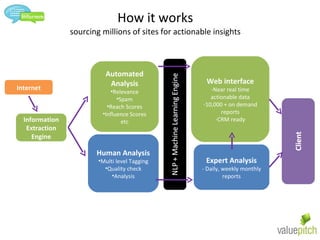
How it works sourcing millions of sites for actionable insights Internet Information Extraction Engine Automated Analysis Relevance Spam Reach Scores Influence Scores etc Human Analysis Multi level Tagging Quality check Analysis Web interface Near real time actionable data 10,000 + on demand reports CRM ready Expert Analysis - Daily, weekly monthly reports
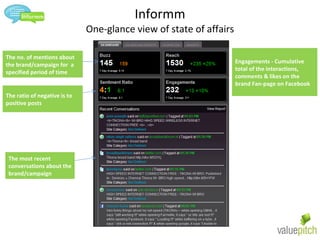
Informm One-glance view of state of affairs The no. of mentions about the brand/campaign for  a specified period of time The ratio of negative is to positive posts Engagements - Cumulative total of the interactions, comments & likes on the brand Fan-page on Facebook The most recent conversations about the brand/campaign
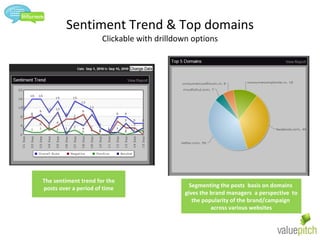
Sentiment Trend & Top domains Clickable with drilldown options The sentiment trend for the posts over a period of time Segmenting the posts  basis on domains  gives the brand managers  a perspective  to the popularity of the brand/campaign  across various websites
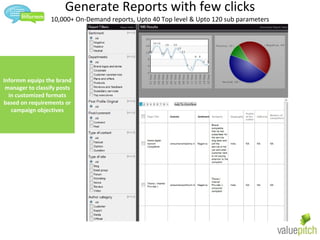
Generate Reports with few clicks 10,000+ On-Demand reports, Upto 40 Top level & Upto 120 sub parameters Informm equips the brand manager to classify posts in customized formats based on requirements or campaign objectives
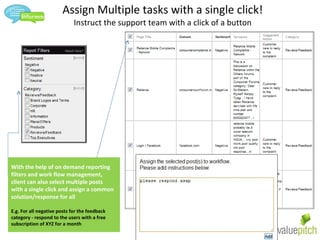
Assign Multiple tasks with a single click! Instruct the support team with a click of a button With the help of on demand reporting filters and work flow management, client can also select multiple posts  with a single click and assign a common solution/response for all E.g. For all negative posts for the feedback category - respond to the users with a free subscription of XYZ for a month
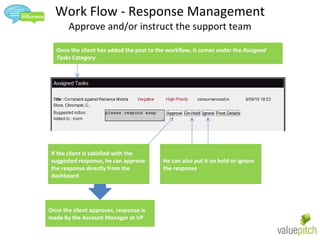
Work Flow - Response Management Approve and/or instruct the support team Once the client has added the post to the workflow, it comes under the  Assigned Tasks  Category If the client is satisfied with the suggested response, he can approve the response directly from the dashboard He can also put it on hold or ignore the response Once the client approves, response is made by the Account Manager at VP
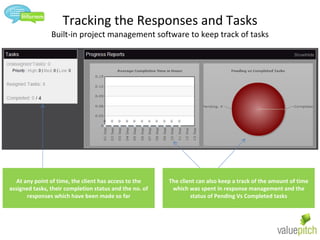
Tracking the Responses and Tasks Built-in project management software to keep track of tasks At any point of time, the client has access to the assigned tasks, their completion status and the no. of responses which have been made so far The client can also keep a track of the amount of time which was spent in response management and the status of Pending Vs Completed tasks
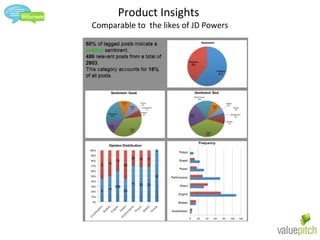
Product Insights  Comparable to  the likes of JD Powers
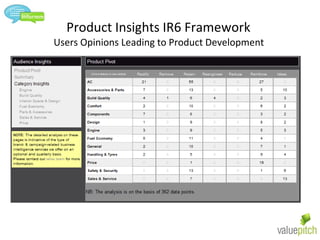
Product Insights IR6 Framework  Users Opinions Leading to Product Development
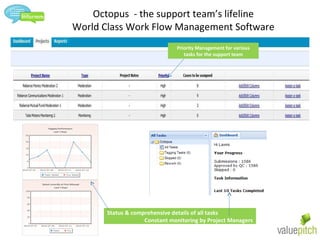
Octopus  - the support team’s lifeline World Class Work Flow Management Software Priority Management for various tasks for the support team Status & comprehensive details of all tasks Constant monitoring by Project Managers

Informm Final

  • 1.
    Informm Meaningful Insightsfrom Millions of Conversations!
  • 2.
    How it workssourcing millions of sites for actionable insights Internet Information Extraction Engine Automated Analysis Relevance Spam Reach Scores Influence Scores etc Human Analysis Multi level Tagging Quality check Analysis Web interface Near real time actionable data 10,000 + on demand reports CRM ready Expert Analysis - Daily, weekly monthly reports
  • 3.
    Informm One-glance viewof state of affairs The no. of mentions about the brand/campaign for a specified period of time The ratio of negative is to positive posts Engagements - Cumulative total of the interactions, comments & likes on the brand Fan-page on Facebook The most recent conversations about the brand/campaign
  • 4.
    Sentiment Trend &Top domains Clickable with drilldown options The sentiment trend for the posts over a period of time Segmenting the posts basis on domains gives the brand managers a perspective to the popularity of the brand/campaign across various websites
  • 5.
    Generate Reports withfew clicks 10,000+ On-Demand reports, Upto 40 Top level & Upto 120 sub parameters Informm equips the brand manager to classify posts in customized formats based on requirements or campaign objectives
  • 6.
    Assign Multiple taskswith a single click! Instruct the support team with a click of a button With the help of on demand reporting filters and work flow management, client can also select multiple posts with a single click and assign a common solution/response for all E.g. For all negative posts for the feedback category - respond to the users with a free subscription of XYZ for a month
  • 7.
    Work Flow -Response Management Approve and/or instruct the support team Once the client has added the post to the workflow, it comes under the Assigned Tasks Category If the client is satisfied with the suggested response, he can approve the response directly from the dashboard He can also put it on hold or ignore the response Once the client approves, response is made by the Account Manager at VP
  • 8.
    Tracking the Responsesand Tasks Built-in project management software to keep track of tasks At any point of time, the client has access to the assigned tasks, their completion status and the no. of responses which have been made so far The client can also keep a track of the amount of time which was spent in response management and the status of Pending Vs Completed tasks
  • 9.
    Product Insights Comparable to the likes of JD Powers
  • 10.
    Product Insights IR6Framework Users Opinions Leading to Product Development
  • 11.
    Octopus -the support team’s lifeline World Class Work Flow Management Software Priority Management for various tasks for the support team Status & comprehensive details of all tasks Constant monitoring by Project Managers