INFORMATION SYSTEM
INTERNATIONAL MANAGEMENT TRAINING CONSORTIUM
2
INFORMATION SYSTEMS
Why Do People Need Information?
• Individuals - Entertainment and enlightenment
• Businesses - Decision making, problem solving and control
3
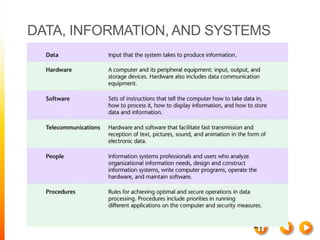
DATA, INFORMATION, AND SYSTEMS
Data vs. Information
• Data
• A “given,” or fact; a number, a statement, or a picture
• Represents something in the real world
• The raw materials in the production of information
• Information
• Data that have meaning within a context
• Data in relationships
• Data after manipulation
4
DATA, INFORMATION, AND SYSTEMS
Data Manipulation
• Example: customer survey
• Reading through data collected from a customer survey
with questions in various categories would be time-
consuming and not very helpful.
• When manipulated, the surveys may provide useful
information.
5
DATA, INFORMATION,
AND SYSTEMS
Generating Information
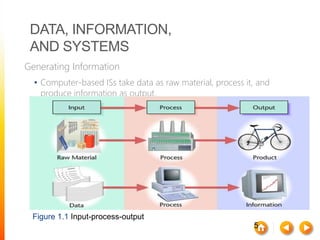
• Computer-based ISs take data as raw material, process it, and
produce information as output.
Figure 1.1 Input-process-output
6
DATA, INFORMATION,
AND SYSTEMS
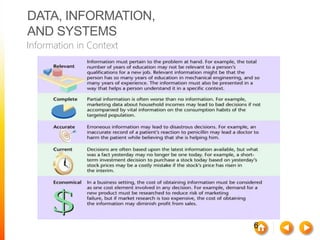
Information in Context
7
DATA, INFORMATION, AND SYSTEMS
What Is a System?
• System: A set of components that work together to achieve a
common goal
• Subsystem: One part of a system where the products of more
than one system are combined to reach an ultimate goal
• Closed system: Stand-alone system that has no contact with
other systems
• Open system: System that interfaces with other systems
8
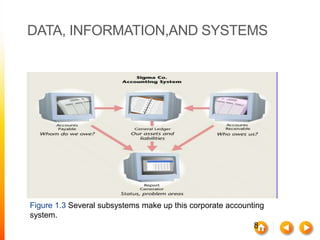
DATA, INFORMATION,AND SYSTEMS
Figure 1.3 Several subsystems make up this corporate accounting
system.
 Computer Hardware
 Computer Software
 Telecommunications and Computer
Networks
 Data Resource Management
Operational Support Systems
•Transaction Processing System
•Process Control System
Management Support Systems
•Management Information System (MIS)
•Decision Support System (DSS)
•Executive Support System (ESS)
 The tangible elements of a computer system
 The components that store and process data,
perform calculations
 Input devices like the keyboard and mouse allow
users to enter data and commands.
 Storage and processing components consist of the
hard drive and other storage components like flash
drives.
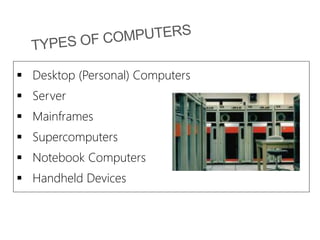
 Desktop (Personal) Computers
 Server
 Mainframes
 Supercomputers
 Notebook Computers
 Handheld Devices
Programs, routines, and computer
languages that control a computer
Operating System
• Windows Operating System
• Mac Operating System
Application Software
• Microsoft PowerPoint
• Quicken
 THE INTERNET
 Local Area Networks (LAN)
 Wide Area Networks (WAN)
 Wireless Local Networks
 Intranets
 Virtual Private Networks (VPN)
 Voice over Internet Protocol (VoIP)
E-Crime
Computer Viruses
• Worms
• Trojan Horses
• Spyware
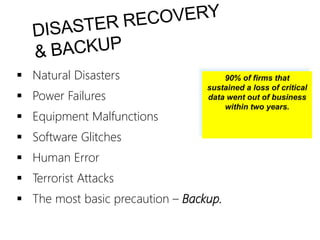
 Natural Disasters
 Power Failures
 Equipment Malfunctions
 Software Glitches
 Human Error
 Terrorist Attacks
 The most basic precaution – Backup.
90% of firms that
sustained a loss of critical
data went out of business
within two years.
The Distributed Workforce
• Employees who work in virtual offices
Application Service Providers
• A firm that provides computers and
application support
On Demand, Cloud, and Grid
Computing
• Renting software time
18
DATA, INFORMATION,AND SYSTEMS
Information and Managers
• Systems thinking
• Creates a framework for problem solving and decision
making.
• Keeps managers focused on overall goals and operations
of business.
19
DATA, INFORMATION,AND SYSTEMS
20
DATA, INFORMATION, AND SYSTEMS
The Benefits of Human-Computer Synergy
• Synergy
• When combined resources produce output that exceeds
the sum of the outputs of the same resources employed
separately
• Allows human thought to be translated into efficient
processing of large amounts of data
21
DATA, INFORMATION, AND SYSTEMS
22
DATA, INFORMATION, AND SYSTEMS
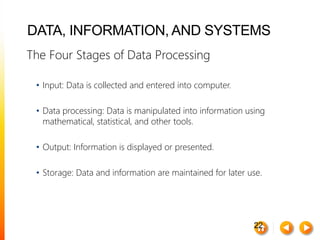
The Four Stages of Data Processing
• Input: Data is collected and entered into computer.
• Data processing: Data is manipulated into information using
mathematical, statistical, and other tools.
• Output: Information is displayed or presented.
• Storage: Data and information are maintained for later use.
23
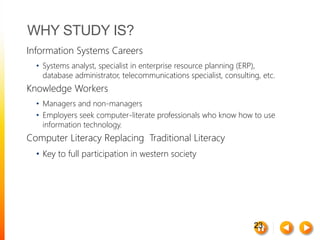
WHY STUDY IS?
Information Systems Careers
• Systems analyst, specialist in enterprise resource planning (ERP),
database administrator, telecommunications specialist, consulting, etc.
Knowledge Workers
• Managers and non-managers
• Employers seek computer-literate professionals who know how to use
information technology.
Computer Literacy Replacing Traditional Literacy
• Key to full participation in western society
24
ETHICALAND SOCIETAL ISSUES
THE NOT-SO-BRIGHT SIDE
Consumer Privacy
• Organizations collect (and sometimes sell) huge
amounts of data on individuals.
Employee Privacy
• IT supports remote monitoring of employees, violating
privacy and creating stress.
25
ETHICALAND SOCIETAL ISSUES
THE NOT-SO-BRIGHT SIDE
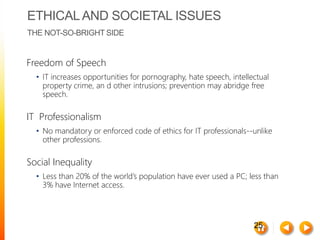
Freedom of Speech
• IT increases opportunities for pornography, hate speech, intellectual
property crime, an d other intrusions; prevention may abridge free
speech.
IT Professionalism
• No mandatory or enforced code of ethics for IT professionals--unlike
other professions.
Social Inequality
• Less than 20% of the world’s population have ever used a PC; less than
3% have Internet access.

INFORMATION SYSTEM.pptx

  • 1.
  • 2.
    2 INFORMATION SYSTEMS Why DoPeople Need Information? • Individuals - Entertainment and enlightenment • Businesses - Decision making, problem solving and control
  • 3.
    3 DATA, INFORMATION, ANDSYSTEMS Data vs. Information • Data • A “given,” or fact; a number, a statement, or a picture • Represents something in the real world • The raw materials in the production of information • Information • Data that have meaning within a context • Data in relationships • Data after manipulation
  • 4.
    4 DATA, INFORMATION, ANDSYSTEMS Data Manipulation • Example: customer survey • Reading through data collected from a customer survey with questions in various categories would be time- consuming and not very helpful. • When manipulated, the surveys may provide useful information.
  • 5.
    5 DATA, INFORMATION, AND SYSTEMS GeneratingInformation • Computer-based ISs take data as raw material, process it, and produce information as output. Figure 1.1 Input-process-output
  • 6.
  • 7.
    7 DATA, INFORMATION, ANDSYSTEMS What Is a System? • System: A set of components that work together to achieve a common goal • Subsystem: One part of a system where the products of more than one system are combined to reach an ultimate goal • Closed system: Stand-alone system that has no contact with other systems • Open system: System that interfaces with other systems
  • 8.
    8 DATA, INFORMATION,AND SYSTEMS Figure1.3 Several subsystems make up this corporate accounting system.
  • 9.
     Computer Hardware Computer Software  Telecommunications and Computer Networks  Data Resource Management
  • 10.
    Operational Support Systems •TransactionProcessing System •Process Control System Management Support Systems •Management Information System (MIS) •Decision Support System (DSS) •Executive Support System (ESS)
  • 11.
     The tangibleelements of a computer system  The components that store and process data, perform calculations  Input devices like the keyboard and mouse allow users to enter data and commands.  Storage and processing components consist of the hard drive and other storage components like flash drives.
  • 12.
     Desktop (Personal)Computers  Server  Mainframes  Supercomputers  Notebook Computers  Handheld Devices
  • 13.
    Programs, routines, andcomputer languages that control a computer Operating System • Windows Operating System • Mac Operating System Application Software • Microsoft PowerPoint • Quicken
  • 14.
     THE INTERNET Local Area Networks (LAN)  Wide Area Networks (WAN)  Wireless Local Networks  Intranets  Virtual Private Networks (VPN)  Voice over Internet Protocol (VoIP)
  • 15.
    E-Crime Computer Viruses • Worms •Trojan Horses • Spyware
  • 16.
     Natural Disasters Power Failures  Equipment Malfunctions  Software Glitches  Human Error  Terrorist Attacks  The most basic precaution – Backup. 90% of firms that sustained a loss of critical data went out of business within two years.
  • 17.
    The Distributed Workforce •Employees who work in virtual offices Application Service Providers • A firm that provides computers and application support On Demand, Cloud, and Grid Computing • Renting software time
  • 18.
    18 DATA, INFORMATION,AND SYSTEMS Informationand Managers • Systems thinking • Creates a framework for problem solving and decision making. • Keeps managers focused on overall goals and operations of business.
  • 19.
  • 20.
    20 DATA, INFORMATION, ANDSYSTEMS The Benefits of Human-Computer Synergy • Synergy • When combined resources produce output that exceeds the sum of the outputs of the same resources employed separately • Allows human thought to be translated into efficient processing of large amounts of data
  • 21.
  • 22.
    22 DATA, INFORMATION, ANDSYSTEMS The Four Stages of Data Processing • Input: Data is collected and entered into computer. • Data processing: Data is manipulated into information using mathematical, statistical, and other tools. • Output: Information is displayed or presented. • Storage: Data and information are maintained for later use.
  • 23.
    23 WHY STUDY IS? InformationSystems Careers • Systems analyst, specialist in enterprise resource planning (ERP), database administrator, telecommunications specialist, consulting, etc. Knowledge Workers • Managers and non-managers • Employers seek computer-literate professionals who know how to use information technology. Computer Literacy Replacing Traditional Literacy • Key to full participation in western society
  • 24.
    24 ETHICALAND SOCIETAL ISSUES THENOT-SO-BRIGHT SIDE Consumer Privacy • Organizations collect (and sometimes sell) huge amounts of data on individuals. Employee Privacy • IT supports remote monitoring of employees, violating privacy and creating stress.
  • 25.
    25 ETHICALAND SOCIETAL ISSUES THENOT-SO-BRIGHT SIDE Freedom of Speech • IT increases opportunities for pornography, hate speech, intellectual property crime, an d other intrusions; prevention may abridge free speech. IT Professionalism • No mandatory or enforced code of ethics for IT professionals--unlike other professions. Social Inequality • Less than 20% of the world’s population have ever used a PC; less than 3% have Internet access.