Modern Information Retrieval
Chap 02: User Interfaces for Search, Baeza-Yates & Ribeiro-Neto, Modern Information Retrieval, 2nd Edition –
p. 1
Chapter 2
User Interfaces for Search
How People Search
Search Interfaces
Today
Visualization in Search
Interfaces
Design and Evaluation
of Search Interfaces
Introduction
This chapter focuses on
the human users of search systems
the search user interface, i.e., the window through which
search systems are seen
The user interface role is to aid in the searchers’
understanding and expression of their information
need
Further, the interface should help users
formulate their queries
select among available information
sources understand search results
keep track of the progress of their search
Chap 02: User Interfaces for Search, Baeza-Yates & Ribeiro-Neto, Modern Information Retrieval, 2nd Edition –
p. 2
How People Search
Chap 02: User Interfaces for Search, Baeza-Yates & Ribeiro-Neto, Modern Information Retrieval, 2nd Edition –
p. 3
How People Search
User interaction with search interfaces
differs depending on
the type of task
the domain expertise of the information seeker
the amount of time and effort available to invest
in the process
Marchionini makes a distinction between
information lookup and exploratory search
Information lookup tasks
are akin to fact retrieval or question answering
can be satisfied by discrete pieces of information:
numbers, dates, names, or Web sites
can work well for standard Web search interactions
Chap 02: User Interfaces for Search, Baeza-Yates & Ribeiro-Neto, Modern Information Retrieval, 2nd Edition –
p. 4
How People Search
Exploratory search is divided into learning
and
investigating tasks
Learning search
requires more than single query-response
pairs requires the searcher to spend time
scanning and reading multiple information
items synthesizing content to form new
understanding
Chap 02: User Interfaces for Search, Baeza-Yates & Ribeiro-Neto, Modern Information Retrieval, 2nd Edition –
p. 5
How People Search
Investigating refers to a longer-term process which
involves multiple iterations that take place over perhaps very
long periods of time
may return results that are critically assessed before
being integrated into personal and professional
knowledge bases
may be concerned with finding a large proportion of the
relevant information available
Chap 02: User Interfaces for Search, Baeza-Yates & Ribeiro-Neto, Modern Information Retrieval, 2nd Edition –
p. 6
How People Search
Information seeking can be seen as being part
of a larger process referred to as sensemaking
Sensemaking is an iterative process of
formulating a conceptual representation from a
large collection
Russell et al. observe that most of the effort in
sensemaking goes towards the synthesis of a
good representation
Some sensemaking activities interweave search
throughout, while others consist of doing a batch
of search followed by a batch of analysis and
synthesis
Chap 02: User Interfaces for Search, Baeza-Yates & Ribeiro-Neto, Modern Information Retrieval, 2nd Edition –
p. 7
How People Search
Examples of deep analysis tasks that
require sensemaking (in addition to
search)
the legal discovery process
epidemiology (disease
tracking)
studying customer complaints to improve
service obtaining business intelligence.
Chap 02: User Interfaces for Search, Baeza-Yates & Ribeiro-Neto, Modern Information Retrieval, 2nd Edition –
p. 8
Classic × Dynamic Model
Classic notion of the information seeking process:
1. problem identification
2. articulation of information need(s)
3. query formulation
4. results evaluation
More recent models emphasize the dynamic nature
of the search process
The users learn as they search
Their information needs adjust as they see retrieval results
and other document surrogates
This dynamic process is sometimes referred to as
the
berry picking model of search
Chap 02: User Interfaces for Search, Baeza-Yates & Ribeiro-Neto, Modern Information Retrieval, 2nd Edition –
p. 9
Classic × Dynamic Model
The rapid response times of today’s Web
search engines allow searchers:
to look at the results that come back
to reformulate their query based on these results
This kind of behavior is a commonly-observed
strategy within the berry-picking approach
Sometimes it is referred to as orienteering
Jansen et al made a analysis of search logs and
found that the proportion of users who modified
queries is 52%
Chap 02: User Interfaces for Search, Baeza-Yates & Ribeiro-Neto, Modern Information Retrieval, 2nd Edition –
p. 10
Classic × Dynamic Model
Some seeking models cast the process in terms of
strategies and how choices for next steps are made
In some cases, these models are meant to reflect
conscious planning behavior by expert searchers
In others, the models are meant to capture the less planned,
potentially more reactive behavior of a typical information
seeker
Chap 02: User Interfaces for Search, Baeza-Yates & Ribeiro-Neto, Modern Information Retrieval, 2nd Edition –
p. 11
Navigation × Search
Navigation: the searcher looks at an information
structure and browses among the available
information
This browsing strategy is preferrable when the
information structure is well-matched to the
user’s information need
it is mentally less taxing to recognize a piece of information
than it is to recall it
it works well only so long as appropriate links are available
If the links are not avaliable, then the
browsing experience might be frustrating
Chap 02: User Interfaces for Search, Baeza-Yates & Ribeiro-Neto, Modern Information Retrieval, 2nd Edition –
p. 12
Navigation × Search
Spool discusses an example of a user looking
for a software driver for a particular laser
printer
Say the user first clicks on printers, then laser
printers, then the following sequence of links:
HP laser printers
HP laser printers model 9750
software for HP laser printers model 9750
software drivers for HP laser printers model 9750
for the
Win98 operating system
This kind of interaction is acceptable when
each refinement makes sense for the task at
hand
Chap 02: User Interfaces for Search, Baeza-Yates & Ribeiro-Neto, Modern Information Retrieval, 2nd Edition –
p. 13
Search Process
Numerous studies have been made of people
engaged in the search process
The results of these studies can help guide the
design of search interfaces
One common observation is that users often
reformulate their queries with slight
modifications
Another is that searchers often search for
information that they have previously accessed
The users’ search strategies differ when searching
over previously seen materials
Researchers have developed search interfaces
support both query history and revisitation
Chap 02: User Interfaces for Search, Baeza-Yates & Ribeiro-Neto, Modern Information Retrieval, 2nd Edition –
p. 14
Search Process
Studies also show that it is difficult for people to
determine whether or not a document is relevant
to a topic
The less users know about a topic, the poorer judges they
are of whether a search result is relevant to that topic
Other studies found that searchers tend to look at
only the top-ranked retrieved results
Further, they are biased towards thinking the top
one or two results are better than those beneath
them
Chap 02: User Interfaces for Search, Baeza-Yates & Ribeiro-Neto, Modern Information Retrieval, 2nd Edition –
p. 15
Search Process
Studies also show that people are poor at
estimating how much of the relevant material
they have found
Other studies have assessed the effects of
knowledge of the search process itself
These studies have observed that experts use
different strategies than novices searchers
For instance, Tabatabai et al found that
expert searchers were more patient than
novices this positive attitude led to better
search outcomes
Chap 02: User Interfaces for Search, Baeza-Yates & Ribeiro-Neto, Modern Information Retrieval, 2nd Edition –
p. 16
Search Interfaces Today
Chap 02: User Interfaces for Search, Baeza-Yates & Ribeiro-Neto, Modern Information Retrieval, 2nd Edition –
p. 17
Getting Started
How does an information seeking session
begin in online information systems?
The most common way is to use a Web search engine
Another method is to select a Web site from a
personal collection of already-visited sites
which are typically stored in a browser’s bookmark
Online bookmark systems are popular among a smaller
segment of users
Ex: Delicious.com
Web directories are also used as a common starting point,
but have been largely replaced by search engines
Chap 02: User Interfaces for Search, Baeza-Yates & Ribeiro-Neto, Modern Information Retrieval, 2nd Edition –
p. 18
Query Specification
The primary methods for a searcher to express
their information need are either
entering words into a search entry form
selecting links from a directory or other information
organization display
For Web search engines, the query is specified
in textual form
Typically, Web queries today are very short
consisting of one to three words
Chap 02: User Interfaces for Search, Baeza-Yates & Ribeiro-Neto, Modern Information Retrieval, 2nd Edition –
p. 19
Query Specification
Short queries reflect the standard usage
scenario in which the user tests the waters:
If the results do not look relevant, then the user reformulates
their query
If the results are promising, then the user navigates to the
most relevant-looking Web site
This search behavior is a demonstration of the
orienteering strategy of Web search
Chap 02: User Interfaces for Search, Baeza-Yates & Ribeiro-Neto, Modern Information Retrieval, 2nd Edition –
p. 20
Query Specification
Before the Web, search systems regularly supported
Boolean operators and command-based syntax
However, these are often difficult for most users to
understand
Jansen et al conducted a study over a Web log with
1.5M queries, and found that
2.1% of the queries contained Boolean operators
7.6% contained other query syntax, primarily double-
quotation marks for phrases
White et al examined interaction logs of nearly
600,000 users, and found that
1.1% of the queries contained one or more
operators 8.7% of the users used an operator at
any time
Chap 02: User Interfaces for Search, Baeza-Yates & Ribeiro-Neto, Modern Information Retrieval, 2nd Edition –
p. 21
Query Specification
Web ranking has gone through three major
phases In the first phase, from approximately
1994–2000:
Since the Web was much smaller then, complex queries
were less likely to yield relevant information
Further, pages retrieved not necessarily contained all
query words
Around 1997, Google moved to conjunctive
queries only
The other Web search engines followed, and conjunctive
ranking became the norm
Google also added term proximity information and
page importance scoring (PageRank)
As the Web grew, longer queries posed as phrases started
Chap 02: User Interfaces for Search, Baeza-Yates & Ribeiro-Neto, Modern Information Retrieval, 2nd Edition –
p. 22
Query Specification Interfaces
The standard interface for a textual query is a
search box entry form
Studies suggest a relationship between query
length and the width of the entry form
Results found that either small forms discourage long
queries or wide forms encourage longer queries
Chap 02: User Interfaces for Search, Baeza-Yates & Ribeiro-Neto, Modern Information Retrieval, 2nd Edition –
p. 23
Query Specification Interfaces
Some entry forms are followed by a form that filters
the query in some way
For instance, at yelp.com, the user can refine
the search by location using a second form
Notice that the yelp.com form also shows the
user’s home location, if it has been specified
previously
Chap 02: User Interfaces for Search, Baeza-Yates & Ribeiro-Neto, Modern Information Retrieval, 2nd Edition –
p. 24
Query Specification Interfaces
Some search forms show hints on what kind
of information should be entered into each
form
For instance, in zvents.com search, the first
box is labeled “what are you looking for”?
Chap 02: User Interfaces for Search, Baeza-Yates & Ribeiro-Neto, Modern Information Retrieval, 2nd Edition –
p. 25
Query Specification Interfaces
The previous example also illustrates specialized
input types that some search engines are
supporting today
The zvents.com site recognizes that words like “tomorrow”
are time-sensitive
It also allows flexibility in the syntax of dates
To illustrate, searching for “comedy on wed ”
automatically computes the date for the nearest
future Wednesday
This is an example of how the interface can be designed to
reflect how people think
Chap 02: User Interfaces for Search, Baeza-Yates & Ribeiro-Neto, Modern Information Retrieval, 2nd Edition –
p. 26
Query Specification Interfaces
Some interfaces show a list of query suggestions as
the user types the query
This is referred to as auto-complete, auto-suggest, or
dynamic query suggestions
Anick et al found that users clicked on dynamic
Yahoo suggestions one third of the time
Often the suggestions shown are those whose
prefix matches the characters typed so far
However, in some cases, suggestions are shown that only
have interior letters matching
Further, suggestions may be shown that are
synonyms of the words typed so far
Chap 02: User Interfaces for Search, Baeza-Yates & Ribeiro-Neto, Modern Information Retrieval, 2nd Edition –
p. 27
Query Specification Interfaces
Dynamic query suggestions, from
Netflix.com
Chap 02: User Interfaces for Search, Baeza-Yates & Ribeiro-Neto, Modern Information Retrieval, 2nd Edition –
p. 28
Query Specification Interfaces
The dynamic query suggestions can be derived
from several sources, including:
The user’s own query history
A set of metadata that a Web site’s designer considers
important All of the text contained within a Web site
Chap 02: User Interfaces for Search, Baeza-Yates & Ribeiro-Neto, Modern Information Retrieval, 2nd Edition –
p. 29
Query Specification Interfaces
Dynamic query suggestions, grouped by type,
from NextBio.com:
Chap 02: User Interfaces for Search, Baeza-Yates & Ribeiro-Neto, Modern Information Retrieval, 2nd Edition –
p. 30
Retrieval Results Display
When displaying search results, either
the documents must be shown in full, or else
the searcher must be presented with some kind of
representation of the content of those documents
The document surrogate refers to the information
that summarizes the document
This information is a key part of the success of the
search interface
The design of document surrogates is an active area of
research and experimentation
The quality of the surrogate can greatly effect the
perceived relevance of the search results listing
Chap 02: User Interfaces for Search, Baeza-Yates & Ribeiro-Neto, Modern Information Retrieval, 2nd Edition –
p. 31
Retrieval Results Display
In Web search, the page title is usually shown
prominently, along with the URL and other
metadata
In search over information collections, metadata
such as date published and author are often
displayed
Text summary (or snippet) containing text
extracted from the document is also critical
Currently, the standard results display is a vertical
list of textual summaries
This list is sometimes referred to as the SERP
(Search Engine Results Page)
Chap 02: User Interfaces for Search, Baeza-Yates & Ribeiro-Neto, Modern Information Retrieval, 2nd Edition –
p. 32
Retrieval Results Display
In some cases the summaries are excerpts drawn
from the full text that contain the query terms
In other cases, specialized kinds of metadata
are shown in addition to standard textual
results
This technique is known as blended results or
universal search
Chap 02: User Interfaces for Search, Baeza-Yates & Ribeiro-Neto, Modern Information Retrieval, 2nd Edition –
p. 33
Retrieval Results Display
For example, a query on a term like “rainbow” may
return sample images as one entry in the results
listing
Chap 02: User Interfaces for Search, Baeza-Yates & Ribeiro-Neto, Modern Information Retrieval, 2nd Edition –
p. 34
Retrieval Results Display
A query on the name of a sports team might retrieve
the latest game scores and a link to buy tickets
Chap 02: User Interfaces for Search, Baeza-Yates & Ribeiro-Neto, Modern Information Retrieval, 2nd Edition –
p. 35
Retrieval Results Display
Nielsen notes that in some cases the information
need is satisfied directly in the search results listing
This makes the search engine an “answer engine”
Displaying the query terms in the context in which
they appear in the document:
Improves the user’s ability to gauge the relevance of the
results It is sometimes referred to as KWIC - keywords in
context
It is also known as query-biased summaries, query-
oriented summaries, or user-directed summaries
Chap 02: User Interfaces for Search, Baeza-Yates & Ribeiro-Neto, Modern Information Retrieval, 2nd Edition –
p. 36
Retrieval Results Display
The visual effect of query term highlighting can
also improve usability of search results listings
Highlighting can be shown both in document surrogates
in the retrieval results and in the retrieved documents
Determining which text to place in the summary,
and how much text to show, is a challenging
problem
Often the summaries contain all the query
terms in close proximity to one another
However, there is a trade-off between
Showing contiguous sentences, to aid in coherence in the
result Showing sentences that contain the query terms
Chap 02: User Interfaces for Search, Baeza-Yates & Ribeiro-Neto, Modern Information Retrieval, 2nd Edition –
p. 37
Retrieval Results Display
Some results suggest that it is better to show
full sentences rather than cut them off
On the other hand, very long sentences are usually not
desirable in the results listing
Further, the kind of information to display should
vary according to the intent of the query
Longer results are deemed better than shorter ones for
certain types of information need
On the other hand, abbreviated listing is
preferable for navegational queries
Similarly, requests for factual information can be satisfied
with a concise results display
Chap 02: User Interfaces for Search, Baeza-Yates & Ribeiro-Neto, Modern Information Retrieval, 2nd Edition –
p. 38
Retrieval Results Display
Other kinds of document information can be
usefully shown in the search results page
Chap 02: User Interfaces for Search, Baeza-Yates & Ribeiro-Neto, Modern Information Retrieval, 2nd Edition –
p. 39
Retrieval Results Display
The page results below show figures extracted
from journal articles alongside the search results
Chap 02: User Interfaces for Search, Baeza-Yates & Ribeiro-Neto, Modern Information Retrieval, 2nd Edition –
p. 40
Query Reformulation
There are tools to help users reformulate their
query
One technique consists of showing terms related to the
query or to the documents retrieved in response to the
query
A special case of this is spelling corrections or
suggestions
Usually only one suggested alternative is shown: clicking on
that alternative re-executes the query
In years back, the search results were shown using
the purportedly incorrect spelling
Chap 02: User Interfaces for Search, Baeza-Yates & Ribeiro-Neto, Modern Information Retrieval, 2nd Edition –
p. 41
Query Reformulation
Microsoft Live’s search results page for the query
“IMF”
Chap 02: User Interfaces for Search, Baeza-Yates & Ribeiro-Neto, Modern Information Retrieval, 2nd Edition –
p. 42
Query Reformulation
Term expansion: search interfaces are
increasingly employing related term suggestions
Log studies suggest that term suggestions
are a somewhat heavily-used feature in Web
search
Jansen et al made a log study and found that 8%
of queries were generated from term
suggestions
Anick et al found that 6% of users who were exposed
to term suggestions chose to click on them
Chap 02: User Interfaces for Search, Baeza-Yates & Ribeiro-Neto, Modern Information Retrieval, 2nd Edition –
p. 43
Query Reformulation
Some query term suggestions are based on the
entire search session of the particular user
Others are based on behavior of other users who
have issued the same or similar queries in the past
One strategy is to show similar queries by other users
Another is to extract terms from documents that have
been
clicked on in the past by searchers who issued the
same query
Chap 02: User Interfaces for Search, Baeza-Yates & Ribeiro-Neto, Modern Information Retrieval, 2nd Edition –
p. 44
Query Reformulation
Relevance feedback is another method whose goal
is to aid in query reformulation
The main idea is to have the user indicate
which documents are relevant to their query
In some variations, users also indicate which terms
extracted from those documents are relevant
The system then computes a new query from
this information and shows a new retrieval set
Chap 02: User Interfaces for Search, Baeza-Yates & Ribeiro-Neto, Modern Information Retrieval, 2nd Edition –
p. 45
Query Reformulation
Nonetheless, this method has not been found
to be successful from a usability perspective
Because that, it does not appear in standard interfaces
today
This stems from several factors:
People are not particularly good at judging document
relevance, especially for topics with which they are
unfamiliar
The beneficial behavior of relevance feedback is inconsistent
Chap 02: User Interfaces for Search, Baeza-Yates & Ribeiro-Neto, Modern Information Retrieval, 2nd Edition –
p. 46
Organizing Search Results
Organizing results into meaningful groups can help
users understand the results and decide what to do
next
Popular methods for grouping search results:
category systems and clustering
Category system: meaningful labels organized in
such a way as to reflect the concepts relevant to a
domain
Good category systems have the characteristics of
being coherent and relatively complete
Their structure is predictable and consistent across
search results for an information collection
Chap 02: User Interfaces for Search, Baeza-Yates & Ribeiro-Neto, Modern Information Retrieval, 2nd Edition –
p. 47
Organizing Search Results
The most commonly used category structures are
flat, hierarchical, and faceted categories
Flat categories are simply lists of topics or subjects
They can be used for grouping, filtering (narrowing), and
sorting sets of documents in search interfaces
Most Web sites organize their information into
general categories
Selecting that category narrows the set of information
shown accordingly
Chap 02: User Interfaces for Search, Baeza-Yates & Ribeiro-Neto, Modern Information Retrieval, 2nd Edition –
p. 48
Organizing Search Results
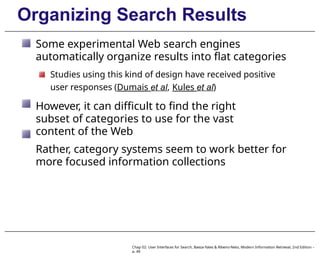
Some experimental Web search engines
automatically organize results into flat categories
Studies using this kind of design have received positive
user responses (Dumais et al, Kules et al)
However, it can difficult to find the right
subset of categories to use for the vast
content of the Web
Rather, category systems seem to work better for
more focused information collections
Chap 02: User Interfaces for Search, Baeza-Yates & Ribeiro-Neto, Modern Information Retrieval, 2nd Edition –
p. 49
Organizing Search Results
In the early days of the Web, hierarchical
directory systems such as Yahoo’s were popular
Hierarchy can also be effective in the presentation
of search results over a book or other small
collection
The Superbook system was an early search
interface based on this idea
In the Superbook system, the search results were
shown in the context of the table-of-contents
hierarchy
Chap 02: User Interfaces for Search, Baeza-Yates & Ribeiro-Neto, Modern Information Retrieval, 2nd Edition –
p. 50
Organizing Search Results
The SuperBook interface for showing retrieval
results in context
Chap 02: User Interfaces for Search, Baeza-Yates & Ribeiro-Neto, Modern Information Retrieval, 2nd Edition –
p. 51
Organizing Search Results
An alternative representation is the faceted
metadata
Unlike flat categories, faceted metadata allow
the assignment of multiple categories to a
single item
Each category corresponds to a different facet
(dimension or feature type) of the collection of
items
Chap 02: User Interfaces for Search, Baeza-Yates & Ribeiro-Neto, Modern Information Retrieval, 2nd Edition –
p. 52
Organizing Search Results
Figure below shows a example of faceted
navigation
Chap 02: User Interfaces for Search, Baeza-Yates & Ribeiro-Neto, Modern Information Retrieval, 2nd Edition –
p. 53
Organizing Search Results
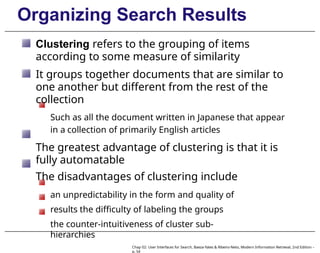
Clustering refers to the grouping of items
according to some measure of similarity
It groups together documents that are similar to
one another but different from the rest of the
collection
Such as all the document written in Japanese that appear
in a collection of primarily English articles
The greatest advantage of clustering is that it is
fully automatable
The disadvantages of clustering include
an unpredictability in the form and quality of
results the difficulty of labeling the groups
the counter-intuitiveness of cluster sub-
hierarchies
Chap 02: User Interfaces for Search, Baeza-Yates & Ribeiro-Neto, Modern Information Retrieval, 2nd Edition –
p. 54
Organizing Search Results
Output produced using Findex
clustering
Chap 02: User Interfaces for Search, Baeza-Yates & Ribeiro-Neto, Modern Information Retrieval, 2nd Edition –
p. 55
Organizing Search Results
Cluster output on the query “senate”, from
Clusty.com
Chap 02: User Interfaces for Search, Baeza-Yates & Ribeiro-Neto, Modern Information Retrieval, 2nd Edition –
p. 56
Visualization in Search Interfaces
Experimentation with visualization for search has
been primarily applied in the following ways:
Visualizing Boolean syntax
Visualizing query terms within retrieval results
Visualizing relationships among words and
documents Visualization for text mining
Chap 02: User Interfaces for Search, Baeza-Yates & Ribeiro-Neto, Modern Information Retrieval, 2nd Edition –
p. 57
Visualizing Boolean Syntax
Boolean query syntax is difficult for most users
and is rarely used in Web search
For many years, researchers have experimented
with how to visualize Boolean query specification
A common approach is to show Venn diagrams
A more flexible version of this idea was seen in
the
VQuery system, proposed by Steve Jones
Chap 02: User Interfaces for Search, Baeza-Yates & Ribeiro-Neto, Modern Information Retrieval, 2nd Edition –
p. 58
Visualizing Boolean Syntax
The VQuery interface for Boolean query
specification
Chap 02: User Interfaces for Search, Baeza-Yates & Ribeiro-Neto, Modern Information Retrieval, 2nd Edition –
p. 59
Visualizing Query Terms
Understanding the role of the query terms
within the retrieved docs can help relevance
assessment
Experimental visualizations have been designed
that make this role more explicit
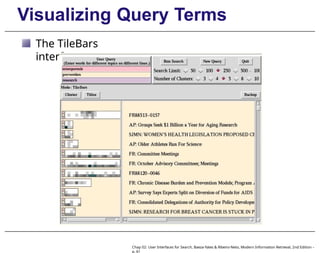
In the TileBars interface, for instance, documents
are shown as horizontal glyphs
The locations of the query term hits marked along
the glyph
The user is encouraged to break the query into
its different facets, with one concept per line
Then, the lines show the frequency of
occurrence of query terms within each topic
Chap 02: User Interfaces for Search, Baeza-Yates & Ribeiro-Neto, Modern Information Retrieval, 2nd Edition –
p. 60
Visualizing Query Terms
The TileBars
interface
Chap 02: User Interfaces for Search, Baeza-Yates & Ribeiro-Neto, Modern Information Retrieval, 2nd Edition –
p. 61
Visualizing Query Terms
Other approaches include placing the query
terms in bar charts, scatter plots, and tables
A usability study by Reiterer et al compared five
views:
a standard Web search engine-style results listing
a list view showing titles, document metadata, and a
graphic showing locations of query terms
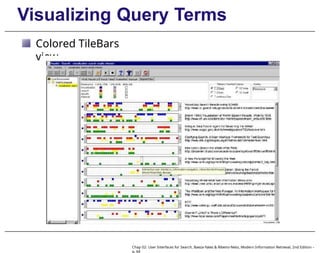
a color TileBars-like view
a color bar chart view like that of Veerasamy & Belkin
a scatter plot view plotting relevance scores against
date of publication
Chap 02: User Interfaces for Search, Baeza-Yates & Ribeiro-Neto, Modern Information Retrieval, 2nd Edition –
p. 62
Visualizing Query Terms
Field-sortable search results
view
Chap 02: User Interfaces for Search, Baeza-Yates & Ribeiro-Neto, Modern Information Retrieval, 2nd Edition –
p. 63
Visualizing Query Terms
Colored TileBars
view
Chap 02: User Interfaces for Search, Baeza-Yates & Ribeiro-Neto, Modern Information Retrieval, 2nd Edition –
p. 64
Visualizing Query Terms
When asked for subjective responses, the 40
participants of the study preferred, on average, in
this order:
Field-sortable view
first TileBars
Web-style listing
The bar chart and scatter plot received
negative responses
Chap 02: User Interfaces for Search, Baeza-Yates & Ribeiro-Neto, Modern Information Retrieval, 2nd Edition –
p. 65
Visualizing Query Terms
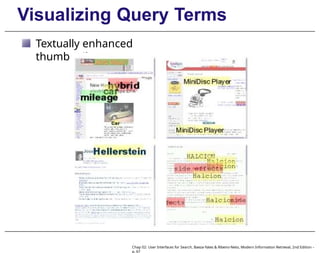
Another variation on the idea of showing query term
hits within documents is to show thumbnails
Thumbnails are miniaturized rendered versions of the
visual appearance of the document
However, Czerwinski et al found that thumbnails are
no better than blank squares for improving search
results
The negative study results may stem from a
problem with the size of the thumbnails
Woodruff et al shows that making the query terms more
visible via highlighting within the thumbnail improves its
usability
Chap 02: User Interfaces for Search, Baeza-Yates & Ribeiro-Neto, Modern Information Retrieval, 2nd Edition –
p. 66
Visualizing Query Terms
Textually enhanced
thumbnails
Chap 02: User Interfaces for Search, Baeza-Yates & Ribeiro-Neto, Modern Information Retrieval, 2nd Edition –
p. 67
Words and Docs Relationships
Numerous works proposed variations on the idea
of placing words and docs on a two-dimensional
canvas
In these works, proximity of glyphs represents
semantic relationships among the terms or
documents
An early version of this idea is the VIBE interface
Documents containing combinations of the query terms
are placed midway between the icons representing
those terms
The Aduna Autofocus and the Lyberworld
projects presented a 3D version of the ideas
behind VIBE
Chap 02: User Interfaces for Search, Baeza-Yates & Ribeiro-Neto, Modern Information Retrieval, 2nd Edition –
p. 68
Words and Docs Relationships
The VIBE display
Chap 02: User Interfaces for Search, Baeza-Yates & Ribeiro-Neto, Modern Information Retrieval, 2nd Edition –
p. 69
Words and Docs Relationships
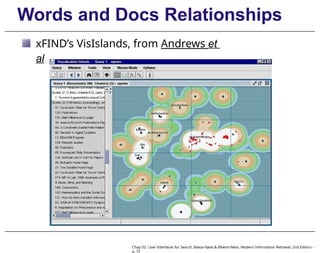
Another idea is to map docs or words from a very
high- dimensional term space down into a 2D plane
The docs or words fall within that plane, using 2D or 3D
This variation on clustering can be done to
documents retrieved as a result of a query
documents that match a query can be highlighted
within a pre-processed set of documents
InfoSky and xFIND’s VisIslands are two variations
on these starfield displays
Chap 02: User Interfaces for Search, Baeza-Yates & Ribeiro-Neto, Modern Information Retrieval, 2nd Edition –
p. 70
Words and Docs Relationships
InfoSky, from Jonker et
al
Chap 02: User Interfaces for Search, Baeza-Yates & Ribeiro-Neto, Modern Information Retrieval, 2nd Edition –
p. 71
Words and Docs Relationships
xFIND’s VisIslands, from Andrews et
al
Chap 02: User Interfaces for Search, Baeza-Yates & Ribeiro-Neto, Modern Information Retrieval, 2nd Edition –
p. 72
Words and Docs Relationships
These views are relatively easy to compute and can
be visually striking
However, evaluations that have been conducted so
far provide negative evidence as to their
usefulness
The main problems are that the contents of the documents
are not visible in such views
A more promising application of this kind of idea is
in the layout of thesaurus terms, in a small network
graph
Ex: Visual Wordnet
Chap 02: User Interfaces for Search, Baeza-Yates & Ribeiro-Neto, Modern Information Retrieval, 2nd Edition –
p. 73
Words and Docs Relationships
The Visual Wordnet view of the WordNet
lexical thesaurus
Chap 02: User Interfaces for Search, Baeza-Yates & Ribeiro-Neto, Modern Information Retrieval, 2nd Edition –
p. 74
Visualization for Text Mining
Visualization is also used for purposes of analysis
and exploration of textual data
Visualizations such as the Word Tree show a piece of
a text concordance
It allows the user to view which words and phrases
commonly precede or follow a given word
Another example is the NameVoyager, which
shows frequencies of names for U.S. children
across time
Chap 02: User Interfaces for Search, Baeza-Yates & Ribeiro-Neto, Modern Information Retrieval, 2nd Edition –
p. 75
Visualization for Text Mining
The Word Tree visualization, on Martin Luther
King’s
I have a dream speech, from Wattenberg et al
Chap 02: User Interfaces for Search, Baeza-Yates & Ribeiro-Neto, Modern Information Retrieval, 2nd Edition –
p. 76
Visualization for Text Mining
The popularity of baby names over time
(names beginning with JA), from
babynamewizard.com
Chap 02: User Interfaces for Search, Baeza-Yates & Ribeiro-Neto, Modern Information Retrieval, 2nd Edition –
p. 77
Visualization for Text Mining
Visualization is also used in search interfaces
intended for analysts
An example is the TRIST information triage
system, from Proulx et al
In this system, search results is represented
as document icons
Thousands of documents can be viewed in one
display
It supports multiple linked dimensions that allow
for finding characteristics and correlations among
the docs
Its designers won the IEEE Visual Analytics Science
and Technology (VAST) contest for two years
running
Chap 02: User Interfaces for Search, Baeza-Yates & Ribeiro-Neto, Modern Information Retrieval, 2nd Edition –
p. 78
Visualization for Text Mining
The TRIST interface with results for queries related
to Avian Flu
Chap 02: User Interfaces for Search, Baeza-Yates & Ribeiro-Neto, Modern Information Retrieval, 2nd Edition –
p. 79
Design and Evaluation
User interface design: a field of Human-
Computer Interaction (HCI)
This field studies how people think about,
respond to, and use technology
User-centered design: a set of practices developed
to facilitate the design of interfaces
The design process begins by determining what
the intended users’ goals are
Then, the interface is devised to help people
achieve those goals by completing a series of
tasks
Chap 02: User Interfaces for Search, Baeza-Yates & Ribeiro-Neto, Modern Information Retrieval, 2nd Edition –
p. 80
Design and Evaluation
Goals in the domain of information access can
range quite widely
From finding a plumber to keeping informed about a
business competitor
From writing a publishable scholarly article to
investigating an allegation of fraud
The design of interfaces is an iterative process, in
which the goals and tasks are elucidated via user
research
Chap 02: User Interfaces for Search, Baeza-Yates & Ribeiro-Neto, Modern Information Retrieval, 2nd Edition –
p. 81
Design and Evaluation
Evaluating a user interface is often different from
evaluating a ranking algorithm or a crawling
technique
A crawler can be assessed by crisp quantitative metrics such
as coverage and freshness
A ranking algorithm can be evaluated by precision, recall,
and speed
The quality of a user interface is determined by
how people respond to it
Subjective responses are as, if not more,
important than quantitative measures
If a person has a choice between two systems, they
will use the one they prefer
Chap 02: User Interfaces for Search, Baeza-Yates & Ribeiro-Neto, Modern Information Retrieval, 2nd Edition –
p. 82
Design and Evaluation
The reasons for preference may be determined
by a host of factors:
Speed, familiarity, aesthetics, preferred features, or
perceived ranking accuracy
Often the preferred choice is the familiar one
Chap 02: User Interfaces for Search, Baeza-Yates & Ribeiro-Neto, Modern Information Retrieval, 2nd Edition –
p. 83
Design and Evaluation
How best to evaluate a user interface depends on
the current stage in the development cycle
When starting with a new design or idea, discount
usability methods are typically used
Example: showing a few users different designs asking
them to indicate which parts are promising and which are
not
Another commonly used discount evaluation
method is
heuristic evaluation
Usability experts “walk through” a design and evaluate
the functionality in accordance with a set of design
guidelines
Chap 02: User Interfaces for Search, Baeza-Yates & Ribeiro-Neto, Modern Information Retrieval, 2nd Edition –
p. 84
Design and Evaluation
A formal experiment must be carefully designed to
take into account potentially confounding factors
For instance, it is important for participants to be motivated
to do well on the task
This kind of study can uncover important
subjective results
Such as whether a new design is strongly preferred
over a baseline
However, it is difficult to find accurate
quantitative differences with a small number
of participants
Chap 02: User Interfaces for Search, Baeza-Yates & Ribeiro-Neto, Modern Information Retrieval, 2nd Edition –
p. 85
Design and Evaluation
Another problem: the timing variable is not the
right measure for evaluating an interactive
search session
A tool that allows the searcher to learn about their subject
matter as they search may be more beneficial, but take more
time
Two approaches to evaluating search interfaces
have gained in popularity in recent years
One is to conduct a longitudinal study
Participants use a new interface for an extended period of
time, and their usage is monitored and logged
Evaluation is based both on log analysis and questionnaires
and interviews with the participants
Chap 02: User Interfaces for Search, Baeza-Yates & Ribeiro-Neto, Modern Information Retrieval, 2nd Edition –
p. 86
Design and Evaluation
Another evaluation technique is to perform
experiments on already heavily-used Web sites
Consider a search engine that receives millions
of queries a day
a randomly selected subset of the users is shown a
new design
their actions are logged and compared to another randomly
selected control group that continues to use the existing
interface
this approach is often referred to as bucket testing, A/B
testing
Chap 02: User Interfaces for Search, Baeza-Yates & Ribeiro-Neto, Modern Information Retrieval, 2nd Edition –
p. 87

Information Retrieval slides_chap02.pptx

  • 1.
    Modern Information Retrieval Chap02: User Interfaces for Search, Baeza-Yates & Ribeiro-Neto, Modern Information Retrieval, 2nd Edition – p. 1 Chapter 2 User Interfaces for Search How People Search Search Interfaces Today Visualization in Search Interfaces Design and Evaluation of Search Interfaces
  • 2.
    Introduction This chapter focuseson the human users of search systems the search user interface, i.e., the window through which search systems are seen The user interface role is to aid in the searchers’ understanding and expression of their information need Further, the interface should help users formulate their queries select among available information sources understand search results keep track of the progress of their search Chap 02: User Interfaces for Search, Baeza-Yates & Ribeiro-Neto, Modern Information Retrieval, 2nd Edition – p. 2
  • 3.
    How People Search Chap02: User Interfaces for Search, Baeza-Yates & Ribeiro-Neto, Modern Information Retrieval, 2nd Edition – p. 3
  • 4.
    How People Search Userinteraction with search interfaces differs depending on the type of task the domain expertise of the information seeker the amount of time and effort available to invest in the process Marchionini makes a distinction between information lookup and exploratory search Information lookup tasks are akin to fact retrieval or question answering can be satisfied by discrete pieces of information: numbers, dates, names, or Web sites can work well for standard Web search interactions Chap 02: User Interfaces for Search, Baeza-Yates & Ribeiro-Neto, Modern Information Retrieval, 2nd Edition – p. 4
  • 5.
    How People Search Exploratorysearch is divided into learning and investigating tasks Learning search requires more than single query-response pairs requires the searcher to spend time scanning and reading multiple information items synthesizing content to form new understanding Chap 02: User Interfaces for Search, Baeza-Yates & Ribeiro-Neto, Modern Information Retrieval, 2nd Edition – p. 5
  • 6.
    How People Search Investigatingrefers to a longer-term process which involves multiple iterations that take place over perhaps very long periods of time may return results that are critically assessed before being integrated into personal and professional knowledge bases may be concerned with finding a large proportion of the relevant information available Chap 02: User Interfaces for Search, Baeza-Yates & Ribeiro-Neto, Modern Information Retrieval, 2nd Edition – p. 6
  • 7.
    How People Search Informationseeking can be seen as being part of a larger process referred to as sensemaking Sensemaking is an iterative process of formulating a conceptual representation from a large collection Russell et al. observe that most of the effort in sensemaking goes towards the synthesis of a good representation Some sensemaking activities interweave search throughout, while others consist of doing a batch of search followed by a batch of analysis and synthesis Chap 02: User Interfaces for Search, Baeza-Yates & Ribeiro-Neto, Modern Information Retrieval, 2nd Edition – p. 7
  • 8.
    How People Search Examplesof deep analysis tasks that require sensemaking (in addition to search) the legal discovery process epidemiology (disease tracking) studying customer complaints to improve service obtaining business intelligence. Chap 02: User Interfaces for Search, Baeza-Yates & Ribeiro-Neto, Modern Information Retrieval, 2nd Edition – p. 8
  • 9.
    Classic × DynamicModel Classic notion of the information seeking process: 1. problem identification 2. articulation of information need(s) 3. query formulation 4. results evaluation More recent models emphasize the dynamic nature of the search process The users learn as they search Their information needs adjust as they see retrieval results and other document surrogates This dynamic process is sometimes referred to as the berry picking model of search Chap 02: User Interfaces for Search, Baeza-Yates & Ribeiro-Neto, Modern Information Retrieval, 2nd Edition – p. 9
  • 10.
    Classic × DynamicModel The rapid response times of today’s Web search engines allow searchers: to look at the results that come back to reformulate their query based on these results This kind of behavior is a commonly-observed strategy within the berry-picking approach Sometimes it is referred to as orienteering Jansen et al made a analysis of search logs and found that the proportion of users who modified queries is 52% Chap 02: User Interfaces for Search, Baeza-Yates & Ribeiro-Neto, Modern Information Retrieval, 2nd Edition – p. 10
  • 11.
    Classic × DynamicModel Some seeking models cast the process in terms of strategies and how choices for next steps are made In some cases, these models are meant to reflect conscious planning behavior by expert searchers In others, the models are meant to capture the less planned, potentially more reactive behavior of a typical information seeker Chap 02: User Interfaces for Search, Baeza-Yates & Ribeiro-Neto, Modern Information Retrieval, 2nd Edition – p. 11
  • 12.
    Navigation × Search Navigation:the searcher looks at an information structure and browses among the available information This browsing strategy is preferrable when the information structure is well-matched to the user’s information need it is mentally less taxing to recognize a piece of information than it is to recall it it works well only so long as appropriate links are available If the links are not avaliable, then the browsing experience might be frustrating Chap 02: User Interfaces for Search, Baeza-Yates & Ribeiro-Neto, Modern Information Retrieval, 2nd Edition – p. 12
  • 13.
    Navigation × Search Spooldiscusses an example of a user looking for a software driver for a particular laser printer Say the user first clicks on printers, then laser printers, then the following sequence of links: HP laser printers HP laser printers model 9750 software for HP laser printers model 9750 software drivers for HP laser printers model 9750 software drivers for HP laser printers model 9750 for the Win98 operating system This kind of interaction is acceptable when each refinement makes sense for the task at hand Chap 02: User Interfaces for Search, Baeza-Yates & Ribeiro-Neto, Modern Information Retrieval, 2nd Edition – p. 13
  • 14.
    Search Process Numerous studieshave been made of people engaged in the search process The results of these studies can help guide the design of search interfaces One common observation is that users often reformulate their queries with slight modifications Another is that searchers often search for information that they have previously accessed The users’ search strategies differ when searching over previously seen materials Researchers have developed search interfaces support both query history and revisitation Chap 02: User Interfaces for Search, Baeza-Yates & Ribeiro-Neto, Modern Information Retrieval, 2nd Edition – p. 14
  • 15.
    Search Process Studies alsoshow that it is difficult for people to determine whether or not a document is relevant to a topic The less users know about a topic, the poorer judges they are of whether a search result is relevant to that topic Other studies found that searchers tend to look at only the top-ranked retrieved results Further, they are biased towards thinking the top one or two results are better than those beneath them Chap 02: User Interfaces for Search, Baeza-Yates & Ribeiro-Neto, Modern Information Retrieval, 2nd Edition – p. 15
  • 16.
    Search Process Studies alsoshow that people are poor at estimating how much of the relevant material they have found Other studies have assessed the effects of knowledge of the search process itself These studies have observed that experts use different strategies than novices searchers For instance, Tabatabai et al found that expert searchers were more patient than novices this positive attitude led to better search outcomes Chap 02: User Interfaces for Search, Baeza-Yates & Ribeiro-Neto, Modern Information Retrieval, 2nd Edition – p. 16
  • 17.
    Search Interfaces Today Chap02: User Interfaces for Search, Baeza-Yates & Ribeiro-Neto, Modern Information Retrieval, 2nd Edition – p. 17
  • 18.
    Getting Started How doesan information seeking session begin in online information systems? The most common way is to use a Web search engine Another method is to select a Web site from a personal collection of already-visited sites which are typically stored in a browser’s bookmark Online bookmark systems are popular among a smaller segment of users Ex: Delicious.com Web directories are also used as a common starting point, but have been largely replaced by search engines Chap 02: User Interfaces for Search, Baeza-Yates & Ribeiro-Neto, Modern Information Retrieval, 2nd Edition – p. 18
  • 19.
    Query Specification The primarymethods for a searcher to express their information need are either entering words into a search entry form selecting links from a directory or other information organization display For Web search engines, the query is specified in textual form Typically, Web queries today are very short consisting of one to three words Chap 02: User Interfaces for Search, Baeza-Yates & Ribeiro-Neto, Modern Information Retrieval, 2nd Edition – p. 19
  • 20.
    Query Specification Short queriesreflect the standard usage scenario in which the user tests the waters: If the results do not look relevant, then the user reformulates their query If the results are promising, then the user navigates to the most relevant-looking Web site This search behavior is a demonstration of the orienteering strategy of Web search Chap 02: User Interfaces for Search, Baeza-Yates & Ribeiro-Neto, Modern Information Retrieval, 2nd Edition – p. 20
  • 21.
    Query Specification Before theWeb, search systems regularly supported Boolean operators and command-based syntax However, these are often difficult for most users to understand Jansen et al conducted a study over a Web log with 1.5M queries, and found that 2.1% of the queries contained Boolean operators 7.6% contained other query syntax, primarily double- quotation marks for phrases White et al examined interaction logs of nearly 600,000 users, and found that 1.1% of the queries contained one or more operators 8.7% of the users used an operator at any time Chap 02: User Interfaces for Search, Baeza-Yates & Ribeiro-Neto, Modern Information Retrieval, 2nd Edition – p. 21
  • 22.
    Query Specification Web rankinghas gone through three major phases In the first phase, from approximately 1994–2000: Since the Web was much smaller then, complex queries were less likely to yield relevant information Further, pages retrieved not necessarily contained all query words Around 1997, Google moved to conjunctive queries only The other Web search engines followed, and conjunctive ranking became the norm Google also added term proximity information and page importance scoring (PageRank) As the Web grew, longer queries posed as phrases started Chap 02: User Interfaces for Search, Baeza-Yates & Ribeiro-Neto, Modern Information Retrieval, 2nd Edition – p. 22
  • 23.
    Query Specification Interfaces Thestandard interface for a textual query is a search box entry form Studies suggest a relationship between query length and the width of the entry form Results found that either small forms discourage long queries or wide forms encourage longer queries Chap 02: User Interfaces for Search, Baeza-Yates & Ribeiro-Neto, Modern Information Retrieval, 2nd Edition – p. 23
  • 24.
    Query Specification Interfaces Someentry forms are followed by a form that filters the query in some way For instance, at yelp.com, the user can refine the search by location using a second form Notice that the yelp.com form also shows the user’s home location, if it has been specified previously Chap 02: User Interfaces for Search, Baeza-Yates & Ribeiro-Neto, Modern Information Retrieval, 2nd Edition – p. 24
  • 25.
    Query Specification Interfaces Somesearch forms show hints on what kind of information should be entered into each form For instance, in zvents.com search, the first box is labeled “what are you looking for”? Chap 02: User Interfaces for Search, Baeza-Yates & Ribeiro-Neto, Modern Information Retrieval, 2nd Edition – p. 25
  • 26.
    Query Specification Interfaces Theprevious example also illustrates specialized input types that some search engines are supporting today The zvents.com site recognizes that words like “tomorrow” are time-sensitive It also allows flexibility in the syntax of dates To illustrate, searching for “comedy on wed ” automatically computes the date for the nearest future Wednesday This is an example of how the interface can be designed to reflect how people think Chap 02: User Interfaces for Search, Baeza-Yates & Ribeiro-Neto, Modern Information Retrieval, 2nd Edition – p. 26
  • 27.
    Query Specification Interfaces Someinterfaces show a list of query suggestions as the user types the query This is referred to as auto-complete, auto-suggest, or dynamic query suggestions Anick et al found that users clicked on dynamic Yahoo suggestions one third of the time Often the suggestions shown are those whose prefix matches the characters typed so far However, in some cases, suggestions are shown that only have interior letters matching Further, suggestions may be shown that are synonyms of the words typed so far Chap 02: User Interfaces for Search, Baeza-Yates & Ribeiro-Neto, Modern Information Retrieval, 2nd Edition – p. 27
  • 28.
    Query Specification Interfaces Dynamicquery suggestions, from Netflix.com Chap 02: User Interfaces for Search, Baeza-Yates & Ribeiro-Neto, Modern Information Retrieval, 2nd Edition – p. 28
  • 29.
    Query Specification Interfaces Thedynamic query suggestions can be derived from several sources, including: The user’s own query history A set of metadata that a Web site’s designer considers important All of the text contained within a Web site Chap 02: User Interfaces for Search, Baeza-Yates & Ribeiro-Neto, Modern Information Retrieval, 2nd Edition – p. 29
  • 30.
    Query Specification Interfaces Dynamicquery suggestions, grouped by type, from NextBio.com: Chap 02: User Interfaces for Search, Baeza-Yates & Ribeiro-Neto, Modern Information Retrieval, 2nd Edition – p. 30
  • 31.
    Retrieval Results Display Whendisplaying search results, either the documents must be shown in full, or else the searcher must be presented with some kind of representation of the content of those documents The document surrogate refers to the information that summarizes the document This information is a key part of the success of the search interface The design of document surrogates is an active area of research and experimentation The quality of the surrogate can greatly effect the perceived relevance of the search results listing Chap 02: User Interfaces for Search, Baeza-Yates & Ribeiro-Neto, Modern Information Retrieval, 2nd Edition – p. 31
  • 32.
    Retrieval Results Display InWeb search, the page title is usually shown prominently, along with the URL and other metadata In search over information collections, metadata such as date published and author are often displayed Text summary (or snippet) containing text extracted from the document is also critical Currently, the standard results display is a vertical list of textual summaries This list is sometimes referred to as the SERP (Search Engine Results Page) Chap 02: User Interfaces for Search, Baeza-Yates & Ribeiro-Neto, Modern Information Retrieval, 2nd Edition – p. 32
  • 33.
    Retrieval Results Display Insome cases the summaries are excerpts drawn from the full text that contain the query terms In other cases, specialized kinds of metadata are shown in addition to standard textual results This technique is known as blended results or universal search Chap 02: User Interfaces for Search, Baeza-Yates & Ribeiro-Neto, Modern Information Retrieval, 2nd Edition – p. 33
  • 34.
    Retrieval Results Display Forexample, a query on a term like “rainbow” may return sample images as one entry in the results listing Chap 02: User Interfaces for Search, Baeza-Yates & Ribeiro-Neto, Modern Information Retrieval, 2nd Edition – p. 34
  • 35.
    Retrieval Results Display Aquery on the name of a sports team might retrieve the latest game scores and a link to buy tickets Chap 02: User Interfaces for Search, Baeza-Yates & Ribeiro-Neto, Modern Information Retrieval, 2nd Edition – p. 35
  • 36.
    Retrieval Results Display Nielsennotes that in some cases the information need is satisfied directly in the search results listing This makes the search engine an “answer engine” Displaying the query terms in the context in which they appear in the document: Improves the user’s ability to gauge the relevance of the results It is sometimes referred to as KWIC - keywords in context It is also known as query-biased summaries, query- oriented summaries, or user-directed summaries Chap 02: User Interfaces for Search, Baeza-Yates & Ribeiro-Neto, Modern Information Retrieval, 2nd Edition – p. 36
  • 37.
    Retrieval Results Display Thevisual effect of query term highlighting can also improve usability of search results listings Highlighting can be shown both in document surrogates in the retrieval results and in the retrieved documents Determining which text to place in the summary, and how much text to show, is a challenging problem Often the summaries contain all the query terms in close proximity to one another However, there is a trade-off between Showing contiguous sentences, to aid in coherence in the result Showing sentences that contain the query terms Chap 02: User Interfaces for Search, Baeza-Yates & Ribeiro-Neto, Modern Information Retrieval, 2nd Edition – p. 37
  • 38.
    Retrieval Results Display Someresults suggest that it is better to show full sentences rather than cut them off On the other hand, very long sentences are usually not desirable in the results listing Further, the kind of information to display should vary according to the intent of the query Longer results are deemed better than shorter ones for certain types of information need On the other hand, abbreviated listing is preferable for navegational queries Similarly, requests for factual information can be satisfied with a concise results display Chap 02: User Interfaces for Search, Baeza-Yates & Ribeiro-Neto, Modern Information Retrieval, 2nd Edition – p. 38
  • 39.
    Retrieval Results Display Otherkinds of document information can be usefully shown in the search results page Chap 02: User Interfaces for Search, Baeza-Yates & Ribeiro-Neto, Modern Information Retrieval, 2nd Edition – p. 39
  • 40.
    Retrieval Results Display Thepage results below show figures extracted from journal articles alongside the search results Chap 02: User Interfaces for Search, Baeza-Yates & Ribeiro-Neto, Modern Information Retrieval, 2nd Edition – p. 40
  • 41.
    Query Reformulation There aretools to help users reformulate their query One technique consists of showing terms related to the query or to the documents retrieved in response to the query A special case of this is spelling corrections or suggestions Usually only one suggested alternative is shown: clicking on that alternative re-executes the query In years back, the search results were shown using the purportedly incorrect spelling Chap 02: User Interfaces for Search, Baeza-Yates & Ribeiro-Neto, Modern Information Retrieval, 2nd Edition – p. 41
  • 42.
    Query Reformulation Microsoft Live’ssearch results page for the query “IMF” Chap 02: User Interfaces for Search, Baeza-Yates & Ribeiro-Neto, Modern Information Retrieval, 2nd Edition – p. 42
  • 43.
    Query Reformulation Term expansion:search interfaces are increasingly employing related term suggestions Log studies suggest that term suggestions are a somewhat heavily-used feature in Web search Jansen et al made a log study and found that 8% of queries were generated from term suggestions Anick et al found that 6% of users who were exposed to term suggestions chose to click on them Chap 02: User Interfaces for Search, Baeza-Yates & Ribeiro-Neto, Modern Information Retrieval, 2nd Edition – p. 43
  • 44.
    Query Reformulation Some queryterm suggestions are based on the entire search session of the particular user Others are based on behavior of other users who have issued the same or similar queries in the past One strategy is to show similar queries by other users Another is to extract terms from documents that have been clicked on in the past by searchers who issued the same query Chap 02: User Interfaces for Search, Baeza-Yates & Ribeiro-Neto, Modern Information Retrieval, 2nd Edition – p. 44
  • 45.
    Query Reformulation Relevance feedbackis another method whose goal is to aid in query reformulation The main idea is to have the user indicate which documents are relevant to their query In some variations, users also indicate which terms extracted from those documents are relevant The system then computes a new query from this information and shows a new retrieval set Chap 02: User Interfaces for Search, Baeza-Yates & Ribeiro-Neto, Modern Information Retrieval, 2nd Edition – p. 45
  • 46.
    Query Reformulation Nonetheless, thismethod has not been found to be successful from a usability perspective Because that, it does not appear in standard interfaces today This stems from several factors: People are not particularly good at judging document relevance, especially for topics with which they are unfamiliar The beneficial behavior of relevance feedback is inconsistent Chap 02: User Interfaces for Search, Baeza-Yates & Ribeiro-Neto, Modern Information Retrieval, 2nd Edition – p. 46
  • 47.
    Organizing Search Results Organizingresults into meaningful groups can help users understand the results and decide what to do next Popular methods for grouping search results: category systems and clustering Category system: meaningful labels organized in such a way as to reflect the concepts relevant to a domain Good category systems have the characteristics of being coherent and relatively complete Their structure is predictable and consistent across search results for an information collection Chap 02: User Interfaces for Search, Baeza-Yates & Ribeiro-Neto, Modern Information Retrieval, 2nd Edition – p. 47
  • 48.
    Organizing Search Results Themost commonly used category structures are flat, hierarchical, and faceted categories Flat categories are simply lists of topics or subjects They can be used for grouping, filtering (narrowing), and sorting sets of documents in search interfaces Most Web sites organize their information into general categories Selecting that category narrows the set of information shown accordingly Chap 02: User Interfaces for Search, Baeza-Yates & Ribeiro-Neto, Modern Information Retrieval, 2nd Edition – p. 48
  • 49.
    Organizing Search Results Someexperimental Web search engines automatically organize results into flat categories Studies using this kind of design have received positive user responses (Dumais et al, Kules et al) However, it can difficult to find the right subset of categories to use for the vast content of the Web Rather, category systems seem to work better for more focused information collections Chap 02: User Interfaces for Search, Baeza-Yates & Ribeiro-Neto, Modern Information Retrieval, 2nd Edition – p. 49
  • 50.
    Organizing Search Results Inthe early days of the Web, hierarchical directory systems such as Yahoo’s were popular Hierarchy can also be effective in the presentation of search results over a book or other small collection The Superbook system was an early search interface based on this idea In the Superbook system, the search results were shown in the context of the table-of-contents hierarchy Chap 02: User Interfaces for Search, Baeza-Yates & Ribeiro-Neto, Modern Information Retrieval, 2nd Edition – p. 50
  • 51.
    Organizing Search Results TheSuperBook interface for showing retrieval results in context Chap 02: User Interfaces for Search, Baeza-Yates & Ribeiro-Neto, Modern Information Retrieval, 2nd Edition – p. 51
  • 52.
    Organizing Search Results Analternative representation is the faceted metadata Unlike flat categories, faceted metadata allow the assignment of multiple categories to a single item Each category corresponds to a different facet (dimension or feature type) of the collection of items Chap 02: User Interfaces for Search, Baeza-Yates & Ribeiro-Neto, Modern Information Retrieval, 2nd Edition – p. 52
  • 53.
    Organizing Search Results Figurebelow shows a example of faceted navigation Chap 02: User Interfaces for Search, Baeza-Yates & Ribeiro-Neto, Modern Information Retrieval, 2nd Edition – p. 53
  • 54.
    Organizing Search Results Clusteringrefers to the grouping of items according to some measure of similarity It groups together documents that are similar to one another but different from the rest of the collection Such as all the document written in Japanese that appear in a collection of primarily English articles The greatest advantage of clustering is that it is fully automatable The disadvantages of clustering include an unpredictability in the form and quality of results the difficulty of labeling the groups the counter-intuitiveness of cluster sub- hierarchies Chap 02: User Interfaces for Search, Baeza-Yates & Ribeiro-Neto, Modern Information Retrieval, 2nd Edition – p. 54
  • 55.
    Organizing Search Results Outputproduced using Findex clustering Chap 02: User Interfaces for Search, Baeza-Yates & Ribeiro-Neto, Modern Information Retrieval, 2nd Edition – p. 55
  • 56.
    Organizing Search Results Clusteroutput on the query “senate”, from Clusty.com Chap 02: User Interfaces for Search, Baeza-Yates & Ribeiro-Neto, Modern Information Retrieval, 2nd Edition – p. 56
  • 57.
    Visualization in SearchInterfaces Experimentation with visualization for search has been primarily applied in the following ways: Visualizing Boolean syntax Visualizing query terms within retrieval results Visualizing relationships among words and documents Visualization for text mining Chap 02: User Interfaces for Search, Baeza-Yates & Ribeiro-Neto, Modern Information Retrieval, 2nd Edition – p. 57
  • 58.
    Visualizing Boolean Syntax Booleanquery syntax is difficult for most users and is rarely used in Web search For many years, researchers have experimented with how to visualize Boolean query specification A common approach is to show Venn diagrams A more flexible version of this idea was seen in the VQuery system, proposed by Steve Jones Chap 02: User Interfaces for Search, Baeza-Yates & Ribeiro-Neto, Modern Information Retrieval, 2nd Edition – p. 58
  • 59.
    Visualizing Boolean Syntax TheVQuery interface for Boolean query specification Chap 02: User Interfaces for Search, Baeza-Yates & Ribeiro-Neto, Modern Information Retrieval, 2nd Edition – p. 59
  • 60.
    Visualizing Query Terms Understandingthe role of the query terms within the retrieved docs can help relevance assessment Experimental visualizations have been designed that make this role more explicit In the TileBars interface, for instance, documents are shown as horizontal glyphs The locations of the query term hits marked along the glyph The user is encouraged to break the query into its different facets, with one concept per line Then, the lines show the frequency of occurrence of query terms within each topic Chap 02: User Interfaces for Search, Baeza-Yates & Ribeiro-Neto, Modern Information Retrieval, 2nd Edition – p. 60
  • 61.
    Visualizing Query Terms TheTileBars interface Chap 02: User Interfaces for Search, Baeza-Yates & Ribeiro-Neto, Modern Information Retrieval, 2nd Edition – p. 61
  • 62.
    Visualizing Query Terms Otherapproaches include placing the query terms in bar charts, scatter plots, and tables A usability study by Reiterer et al compared five views: a standard Web search engine-style results listing a list view showing titles, document metadata, and a graphic showing locations of query terms a color TileBars-like view a color bar chart view like that of Veerasamy & Belkin a scatter plot view plotting relevance scores against date of publication Chap 02: User Interfaces for Search, Baeza-Yates & Ribeiro-Neto, Modern Information Retrieval, 2nd Edition – p. 62
  • 63.
    Visualizing Query Terms Field-sortablesearch results view Chap 02: User Interfaces for Search, Baeza-Yates & Ribeiro-Neto, Modern Information Retrieval, 2nd Edition – p. 63
  • 64.
    Visualizing Query Terms ColoredTileBars view Chap 02: User Interfaces for Search, Baeza-Yates & Ribeiro-Neto, Modern Information Retrieval, 2nd Edition – p. 64
  • 65.
    Visualizing Query Terms Whenasked for subjective responses, the 40 participants of the study preferred, on average, in this order: Field-sortable view first TileBars Web-style listing The bar chart and scatter plot received negative responses Chap 02: User Interfaces for Search, Baeza-Yates & Ribeiro-Neto, Modern Information Retrieval, 2nd Edition – p. 65
  • 66.
    Visualizing Query Terms Anothervariation on the idea of showing query term hits within documents is to show thumbnails Thumbnails are miniaturized rendered versions of the visual appearance of the document However, Czerwinski et al found that thumbnails are no better than blank squares for improving search results The negative study results may stem from a problem with the size of the thumbnails Woodruff et al shows that making the query terms more visible via highlighting within the thumbnail improves its usability Chap 02: User Interfaces for Search, Baeza-Yates & Ribeiro-Neto, Modern Information Retrieval, 2nd Edition – p. 66
  • 67.
    Visualizing Query Terms Textuallyenhanced thumbnails Chap 02: User Interfaces for Search, Baeza-Yates & Ribeiro-Neto, Modern Information Retrieval, 2nd Edition – p. 67
  • 68.
    Words and DocsRelationships Numerous works proposed variations on the idea of placing words and docs on a two-dimensional canvas In these works, proximity of glyphs represents semantic relationships among the terms or documents An early version of this idea is the VIBE interface Documents containing combinations of the query terms are placed midway between the icons representing those terms The Aduna Autofocus and the Lyberworld projects presented a 3D version of the ideas behind VIBE Chap 02: User Interfaces for Search, Baeza-Yates & Ribeiro-Neto, Modern Information Retrieval, 2nd Edition – p. 68
  • 69.
    Words and DocsRelationships The VIBE display Chap 02: User Interfaces for Search, Baeza-Yates & Ribeiro-Neto, Modern Information Retrieval, 2nd Edition – p. 69
  • 70.
    Words and DocsRelationships Another idea is to map docs or words from a very high- dimensional term space down into a 2D plane The docs or words fall within that plane, using 2D or 3D This variation on clustering can be done to documents retrieved as a result of a query documents that match a query can be highlighted within a pre-processed set of documents InfoSky and xFIND’s VisIslands are two variations on these starfield displays Chap 02: User Interfaces for Search, Baeza-Yates & Ribeiro-Neto, Modern Information Retrieval, 2nd Edition – p. 70
  • 71.
    Words and DocsRelationships InfoSky, from Jonker et al Chap 02: User Interfaces for Search, Baeza-Yates & Ribeiro-Neto, Modern Information Retrieval, 2nd Edition – p. 71
  • 72.
    Words and DocsRelationships xFIND’s VisIslands, from Andrews et al Chap 02: User Interfaces for Search, Baeza-Yates & Ribeiro-Neto, Modern Information Retrieval, 2nd Edition – p. 72
  • 73.
    Words and DocsRelationships These views are relatively easy to compute and can be visually striking However, evaluations that have been conducted so far provide negative evidence as to their usefulness The main problems are that the contents of the documents are not visible in such views A more promising application of this kind of idea is in the layout of thesaurus terms, in a small network graph Ex: Visual Wordnet Chap 02: User Interfaces for Search, Baeza-Yates & Ribeiro-Neto, Modern Information Retrieval, 2nd Edition – p. 73
  • 74.
    Words and DocsRelationships The Visual Wordnet view of the WordNet lexical thesaurus Chap 02: User Interfaces for Search, Baeza-Yates & Ribeiro-Neto, Modern Information Retrieval, 2nd Edition – p. 74
  • 75.
    Visualization for TextMining Visualization is also used for purposes of analysis and exploration of textual data Visualizations such as the Word Tree show a piece of a text concordance It allows the user to view which words and phrases commonly precede or follow a given word Another example is the NameVoyager, which shows frequencies of names for U.S. children across time Chap 02: User Interfaces for Search, Baeza-Yates & Ribeiro-Neto, Modern Information Retrieval, 2nd Edition – p. 75
  • 76.
    Visualization for TextMining The Word Tree visualization, on Martin Luther King’s I have a dream speech, from Wattenberg et al Chap 02: User Interfaces for Search, Baeza-Yates & Ribeiro-Neto, Modern Information Retrieval, 2nd Edition – p. 76
  • 77.
    Visualization for TextMining The popularity of baby names over time (names beginning with JA), from babynamewizard.com Chap 02: User Interfaces for Search, Baeza-Yates & Ribeiro-Neto, Modern Information Retrieval, 2nd Edition – p. 77
  • 78.
    Visualization for TextMining Visualization is also used in search interfaces intended for analysts An example is the TRIST information triage system, from Proulx et al In this system, search results is represented as document icons Thousands of documents can be viewed in one display It supports multiple linked dimensions that allow for finding characteristics and correlations among the docs Its designers won the IEEE Visual Analytics Science and Technology (VAST) contest for two years running Chap 02: User Interfaces for Search, Baeza-Yates & Ribeiro-Neto, Modern Information Retrieval, 2nd Edition – p. 78
  • 79.
    Visualization for TextMining The TRIST interface with results for queries related to Avian Flu Chap 02: User Interfaces for Search, Baeza-Yates & Ribeiro-Neto, Modern Information Retrieval, 2nd Edition – p. 79
  • 80.
    Design and Evaluation Userinterface design: a field of Human- Computer Interaction (HCI) This field studies how people think about, respond to, and use technology User-centered design: a set of practices developed to facilitate the design of interfaces The design process begins by determining what the intended users’ goals are Then, the interface is devised to help people achieve those goals by completing a series of tasks Chap 02: User Interfaces for Search, Baeza-Yates & Ribeiro-Neto, Modern Information Retrieval, 2nd Edition – p. 80
  • 81.
    Design and Evaluation Goalsin the domain of information access can range quite widely From finding a plumber to keeping informed about a business competitor From writing a publishable scholarly article to investigating an allegation of fraud The design of interfaces is an iterative process, in which the goals and tasks are elucidated via user research Chap 02: User Interfaces for Search, Baeza-Yates & Ribeiro-Neto, Modern Information Retrieval, 2nd Edition – p. 81
  • 82.
    Design and Evaluation Evaluatinga user interface is often different from evaluating a ranking algorithm or a crawling technique A crawler can be assessed by crisp quantitative metrics such as coverage and freshness A ranking algorithm can be evaluated by precision, recall, and speed The quality of a user interface is determined by how people respond to it Subjective responses are as, if not more, important than quantitative measures If a person has a choice between two systems, they will use the one they prefer Chap 02: User Interfaces for Search, Baeza-Yates & Ribeiro-Neto, Modern Information Retrieval, 2nd Edition – p. 82
  • 83.
    Design and Evaluation Thereasons for preference may be determined by a host of factors: Speed, familiarity, aesthetics, preferred features, or perceived ranking accuracy Often the preferred choice is the familiar one Chap 02: User Interfaces for Search, Baeza-Yates & Ribeiro-Neto, Modern Information Retrieval, 2nd Edition – p. 83
  • 84.
    Design and Evaluation Howbest to evaluate a user interface depends on the current stage in the development cycle When starting with a new design or idea, discount usability methods are typically used Example: showing a few users different designs asking them to indicate which parts are promising and which are not Another commonly used discount evaluation method is heuristic evaluation Usability experts “walk through” a design and evaluate the functionality in accordance with a set of design guidelines Chap 02: User Interfaces for Search, Baeza-Yates & Ribeiro-Neto, Modern Information Retrieval, 2nd Edition – p. 84
  • 85.
    Design and Evaluation Aformal experiment must be carefully designed to take into account potentially confounding factors For instance, it is important for participants to be motivated to do well on the task This kind of study can uncover important subjective results Such as whether a new design is strongly preferred over a baseline However, it is difficult to find accurate quantitative differences with a small number of participants Chap 02: User Interfaces for Search, Baeza-Yates & Ribeiro-Neto, Modern Information Retrieval, 2nd Edition – p. 85
  • 86.
    Design and Evaluation Anotherproblem: the timing variable is not the right measure for evaluating an interactive search session A tool that allows the searcher to learn about their subject matter as they search may be more beneficial, but take more time Two approaches to evaluating search interfaces have gained in popularity in recent years One is to conduct a longitudinal study Participants use a new interface for an extended period of time, and their usage is monitored and logged Evaluation is based both on log analysis and questionnaires and interviews with the participants Chap 02: User Interfaces for Search, Baeza-Yates & Ribeiro-Neto, Modern Information Retrieval, 2nd Edition – p. 86
  • 87.
    Design and Evaluation Anotherevaluation technique is to perform experiments on already heavily-used Web sites Consider a search engine that receives millions of queries a day a randomly selected subset of the users is shown a new design their actions are logged and compared to another randomly selected control group that continues to use the existing interface this approach is often referred to as bucket testing, A/B testing Chap 02: User Interfaces for Search, Baeza-Yates & Ribeiro-Neto, Modern Information Retrieval, 2nd Edition – p. 87