


Skill information management
     Dashboard
     How To Build A Quick and efective
     Monitor For Learning - Listening Or
     Tracking Anything
what these technique help u ??
#1 Become an “Expert” on any topic by reading 3 to 5
blog posts a day for a month on your topic of interest

#2 Know when people talk about you or your company
online

#3 Keep a sharp eye on your competitors
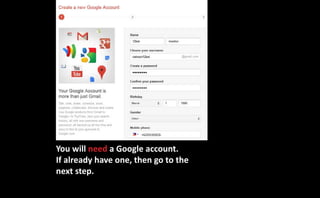
You will need a Google account.
If already have one, then go to the
next step.
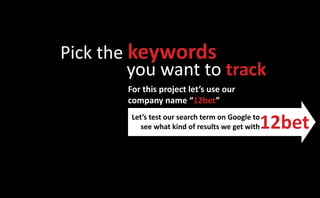
Pick the keywords
         you want to track
        For this project let’s use our
        company name “12bet”

                                               12bet
         Let’s test our search term on Google to
            see what kind of results we get with
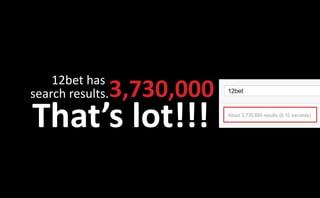
12bet has
search results.   3,730,000
That’s lot!!!
To get fewer, but targeted results
we can use Booleansearch operators
           Boolean search operators
           are symbols we can use to finetune
           our search request
How to use the most common ones
“ “ = Using quotes returans results with that extract
phrase. Example: “12bet casino”

AND = Using AND return only matches with both
terms. Example: Poker AND Games
cont...
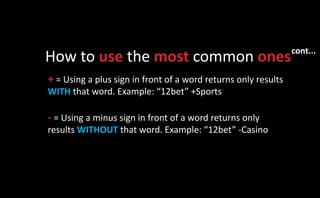
How to use the most common ones
+ = Using a plus sign in front of a word returns only results
WITH that word. Example: “12bet” +Sports

- = Using a minus sign in front of a word returns only
results WITHOUT that word. Example: “12bet” -Casino
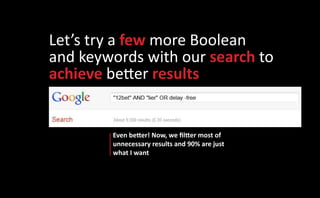
Let’s try a few more Boolean
and keywords with our search to
achieve better results


        Even better! Now, we filtter most of
        unnecessary results and 90% are just
        what I want
I’m happy with those results.
So. I’ll make a note and save the search term:

“12bet” AND “lier” OR delay -free
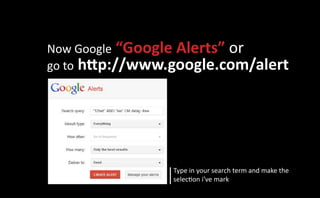
Now Google “Google Alerts” or
go to http://www.google.com/alert


                 Type in your search term and make the
                 selection i’ve mark
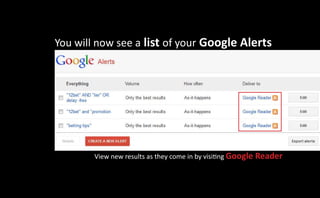
You will now see a list of your Google Alerts


        View new results as they come in by visiting Google Reader
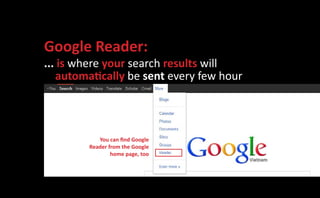
Google Reader:
... is where your search results will
   automatically be sent every few hour


           You can find Google
        Reader from the Google
                home page, too
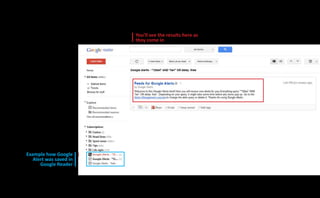
You’ll see the results here as
                        they come in


Example how Google
   Alert was saved in
      Google Reader
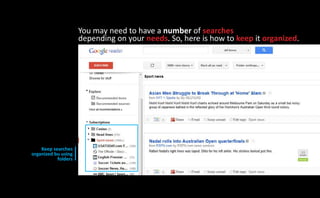
You may need to have a number of searches
                     depending on your needs. So, here is how to keep it organized.


    Keep searches
organized bu using
           folders
You can add other searches and
               subscriptions to your
               		Google Reader
   When you see this symbol on a     This servive is call RSS. Which
website it means you can subscribe   many blogs, websites, and
                to receive updates   search engines have it
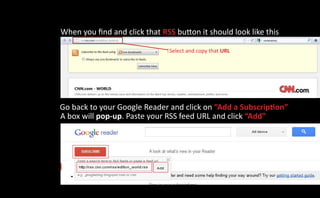
When you find and click that RSS button it should look like this

                               Select and copy that URL


Go back to your Google Reader and click on “Add a Subscription”
A box will pop-up. Paste your RSS feed URL and click “Add”
Now, new results will be delivered to
  your dashboard as they’re found
       Test different keywords to perfect
         what search queries work best....
Thank

Information management skill

  • 1.
    Skill information management Dashboard How To Build A Quick and efective Monitor For Learning - Listening Or Tracking Anything
  • 2.
    what these techniquehelp u ?? #1 Become an “Expert” on any topic by reading 3 to 5 blog posts a day for a month on your topic of interest #2 Know when people talk about you or your company online #3 Keep a sharp eye on your competitors
  • 3.
    You will needa Google account. If already have one, then go to the next step.
  • 4.
    Pick the keywords you want to track For this project let’s use our company name “12bet” 12bet Let’s test our search term on Google to see what kind of results we get with
  • 5.
    12bet has search results. 3,730,000 That’s lot!!!
  • 6.
    To get fewer,but targeted results we can use Booleansearch operators Boolean search operators are symbols we can use to finetune our search request
  • 7.
    How to usethe most common ones “ “ = Using quotes returans results with that extract phrase. Example: “12bet casino” AND = Using AND return only matches with both terms. Example: Poker AND Games
  • 8.
    cont... How to usethe most common ones + = Using a plus sign in front of a word returns only results WITH that word. Example: “12bet” +Sports - = Using a minus sign in front of a word returns only results WITHOUT that word. Example: “12bet” -Casino
  • 9.
    Let’s try afew more Boolean and keywords with our search to achieve better results Even better! Now, we filtter most of unnecessary results and 90% are just what I want
  • 10.
    I’m happy withthose results. So. I’ll make a note and save the search term: “12bet” AND “lier” OR delay -free
  • 11.
    Now Google “GoogleAlerts” or go to http://www.google.com/alert Type in your search term and make the selection i’ve mark
  • 12.
    You will nowsee a list of your Google Alerts View new results as they come in by visiting Google Reader
  • 13.
    Google Reader: ... iswhere your search results will automatically be sent every few hour You can find Google Reader from the Google home page, too
  • 14.
    You’ll see theresults here as they come in Example how Google Alert was saved in Google Reader
  • 15.
    You may needto have a number of searches depending on your needs. So, here is how to keep it organized. Keep searches organized bu using folders
  • 16.
    You can addother searches and subscriptions to your Google Reader When you see this symbol on a This servive is call RSS. Which website it means you can subscribe many blogs, websites, and to receive updates search engines have it
  • 17.
    When you findand click that RSS button it should look like this Select and copy that URL Go back to your Google Reader and click on “Add a Subscription” A box will pop-up. Paste your RSS feed URL and click “Add”
  • 18.
    Now, new resultswill be delivered to your dashboard as they’re found Test different keywords to perfect what search queries work best....
  • 19.