Increasing Productivity With
             Google Apps & Gmail Tools
                     Cooper Marcus
                         April 24, 2012

                     Use Twitter Hashtag #npweb


A Service
   Of:                               Sponsored by:
How This Webinar Works
     •      A link to the slides/materials will be sent in an email after
            the webinar

     •      If you’d like to ask a question during the webinar, you can
            type it in the question box of your control panel on the right
            side of your screen

     •      Chat with us on twitter using the hashtag - #npweb

A Service
   Of:                                       Sponsored by:
Upcoming Tech Tuesday Webinars
 May 1, 2012
    Supporting A Development Office: Have You Got What It
    Takes?
 May 8, 2012
    How to Blog your way to Increased Constituent
    Engagement and Fundraising

            Visit www.NonprofitWebinars.com for a complete list

A Service
   Of:                                  Sponsored by:
Increasing Productivity With
             Google Apps & Gmail Tools
                     Cooper Marcus
                       April 24, 2012


A Service
   Of:                           Sponsored by:
Protecting and Preserving the            www.cjwconsulting.com	

            Institutional Memories of Nonprofits
            Since 1993	

                                    (866) 598-0430	

                                                     info@cjwconsulting.com	


A Service
   Of:                                            Sponsored by:
Affordable collaborative data
             management in the cloud.

A Service
   Of:                      Sponsored by:
Today’s Speaker


                                 Cooper Marcus
                                      CEO,
                                     Wishery
Assisting with chat questions:                                                     Hosting:
April Hunt, Nonprofit Webinars                 Cheri J Weissman, CJW Consulting & Services,
                                                                                       Inc.
 A Service
    Of:                                        Sponsored by:
Increasing Productivity
 with Google Apps &
     Gmail Tools
Tools and Techniques for Nonprofits
              Presented by:
       Cooper Marcus, CEO, Wishery
          cooper@wishery.com
            @CooperMarcus
               @Wishery
           www.Wishery.com
Get More Done, Faster -
            in Gmail
•   Gmail productivity = Nonprofit success


•   Gmail Labs
•   Browser Extensions
•   Google Apps


•   Stick around for special offers!
Gmail Labs

•   “Labs is a testing ground for experimental features
    that aren't quite ready for primetime. They may
    change, break or disappear at any time.”


•   Built-in to Gmail - neither addon nor extension
•   Enabled by individual users
•   Explore and experiment!
Gmail Labs - Pros and Cons

•   Pro:
    •   Anyone can install and use (Apps admin must
        enable for domain)
    •   Specific to Gmail account - works across
        browsers and computers
    •   Rarely conflict with other addons
•   Con:
    •   Only Google makes ‘em!
    •   Mostly “small” improvements
Gmail Labs - Enable in Google
      Apps Dashboard
Gmail Labs - Access in Gmail
Gmail Labs - Favorites
Browser Extensions for Gmail

•   Available from:
    •   Chrome Web Store
    •   Firefox Add-ons Manager
    •   Safari Extensions Gallery
    •   Publisher’s websites
Chrome Web Store
Firefox Add-ons Manager
Safari Extension Gallery
Browser Extensions for Gmail
      - Pros and Cons
•   Pro:
    •   Specific to single browser on single Mac/PC
    •   Anyone can install and use
•   Con:
    •   Not centrally installed/configured/managed
    •   Unavailable for Internet Explorer
    •   Conflicts possible
Google Apps

•   Available from the Google
    Apps Marketplace
    •   Many are just Single Sign
        On (SSO)
    •   Some do more:
        •   Gmail Gadgets
        •   Calendar, Docs,
            Contacts integration
Google Apps - Pros and Cons

•   Pro:
    •   Centrally installed and administered
    •   Available to all (or some) users, all at once, on
        every browser
    •   Never conflicts with other addons
•   Con:
    •   Different technical capabilities compared to
        Browser Extensions
    •   Must by installed by Google Apps Administrator
Rapportive

•   “Get rich contact profiles, right inside Gmail”


•   Browser extension
•   Free
Rapportive
Boomerang


•   “Schedule an email to be sent later. Easy email
    reminders.”


•   Browser extension
•   Freemium - $5 or $15/month
Boomerang


•   Send Later


•   Snooze Button


•   Follow-up Reminders
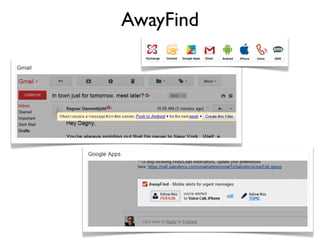
AwayFind

•   “Get AWAY from your inbox — let urgent emails
    cut through the clutter and FIND you...instantly.”


•   Browser Extension or Google Apps (functionality
    may vary)
•   Freemium - $10/user/month or less
AwayFind
Attachments.me

•   “A better way to find attachments in your email”


•   Browser extension or Google Apps (functionality
    varies)
•   Free
Attachments.me
Attachments.me
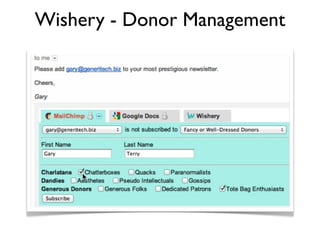
Wishery

•   “Get More Done, Stay in Gmail”


•   View and edit MailChimp email list membership
    inside Gmail
•   Automatically search Google Docs for email
    addresses


•   Browser extension (coming soon) or Google Apps
•   Freemium - up to $99/year/organization
Wishery
Wishery - Volunteer Management
MailChimp


                     Gmail + Wishery
Wishery - Donor Management
Wishery - Nonprofit Links

•   Simple & (Nearly) Free Donor and Volunteer
    Management for Nonprofits (Wishery blog)


•   Wishery Integrates MailChimp with Google Apps
    (MailChimp blog)
Tout

•   “Tout streamlines your email workflow with
    Groups, Analytics, and Templating”


•   Browser extension
•   Freemium - up to $49/month
Tout

•   Templates


•   Tracking


•   Delayed sending
Special Offers for Nonprofits

•   Rapportive.com - it’s free!
•   BoomerangGmail.com - Nonprofit pricing for 5+
    seats - email sales@baydin.com
•   AwayFind.com - Pro free for 3 months - email
    jared@awayfind.com
•   Attachments.me - it’s free!
•   Wishery.com - 50% off Wishery Pro - email
    cooper@wishery.com
•   ToutApp.com
Upcoming Tech Tuesday Webinars
  Dates                                            Topic
5/1         Supporting A Development Office: Have You Got What It Takes?


5/8         How to Blog your way to Increased Constituent Engagement and Fundraising


                  Register at NonprofitWebinars.com

A Service
   Of:                                              Sponsored by:
Thank you!

            Please complete the post event survey
            that will show up as you leave the webinar.

              You will be receiving an email with links
              to the materials shortly after the webinar.


A Service
   Of:                               Sponsored by:

Increasing Productivity With Google Apps & Gmail Tools

  • 1.
    Increasing Productivity With Google Apps & Gmail Tools Cooper Marcus April 24, 2012 Use Twitter Hashtag #npweb A Service Of: Sponsored by:
  • 2.
    How This WebinarWorks •  A link to the slides/materials will be sent in an email after the webinar •  If you’d like to ask a question during the webinar, you can type it in the question box of your control panel on the right side of your screen •  Chat with us on twitter using the hashtag - #npweb A Service Of: Sponsored by:
  • 3.
    Upcoming Tech TuesdayWebinars May 1, 2012 Supporting A Development Office: Have You Got What It Takes? May 8, 2012 How to Blog your way to Increased Constituent Engagement and Fundraising Visit www.NonprofitWebinars.com for a complete list A Service Of: Sponsored by:
  • 4.
    Increasing Productivity With Google Apps & Gmail Tools Cooper Marcus April 24, 2012 A Service Of: Sponsored by:
  • 5.
    Protecting and Preservingthe www.cjwconsulting.com Institutional Memories of Nonprofits Since 1993 (866) 598-0430 info@cjwconsulting.com A Service Of: Sponsored by:
  • 6.
    Affordable collaborative data management in the cloud. A Service Of: Sponsored by:
  • 7.
    Today’s Speaker Cooper Marcus CEO, Wishery Assisting with chat questions: Hosting: April Hunt, Nonprofit Webinars Cheri J Weissman, CJW Consulting & Services, Inc. A Service Of: Sponsored by:
  • 8.
    Increasing Productivity withGoogle Apps & Gmail Tools Tools and Techniques for Nonprofits Presented by: Cooper Marcus, CEO, Wishery cooper@wishery.com @CooperMarcus @Wishery www.Wishery.com
  • 9.
    Get More Done,Faster - in Gmail • Gmail productivity = Nonprofit success • Gmail Labs • Browser Extensions • Google Apps • Stick around for special offers!
  • 10.
    Gmail Labs • “Labs is a testing ground for experimental features that aren't quite ready for primetime. They may change, break or disappear at any time.” • Built-in to Gmail - neither addon nor extension • Enabled by individual users • Explore and experiment!
  • 11.
    Gmail Labs -Pros and Cons • Pro: • Anyone can install and use (Apps admin must enable for domain) • Specific to Gmail account - works across browsers and computers • Rarely conflict with other addons • Con: • Only Google makes ‘em! • Mostly “small” improvements
  • 12.
    Gmail Labs -Enable in Google Apps Dashboard
  • 13.
    Gmail Labs -Access in Gmail
  • 14.
    Gmail Labs -Favorites
  • 15.
    Browser Extensions forGmail • Available from: • Chrome Web Store • Firefox Add-ons Manager • Safari Extensions Gallery • Publisher’s websites
  • 16.
  • 17.
  • 18.
  • 19.
    Browser Extensions forGmail - Pros and Cons • Pro: • Specific to single browser on single Mac/PC • Anyone can install and use • Con: • Not centrally installed/configured/managed • Unavailable for Internet Explorer • Conflicts possible
  • 20.
    Google Apps • Available from the Google Apps Marketplace • Many are just Single Sign On (SSO) • Some do more: • Gmail Gadgets • Calendar, Docs, Contacts integration
  • 21.
    Google Apps -Pros and Cons • Pro: • Centrally installed and administered • Available to all (or some) users, all at once, on every browser • Never conflicts with other addons • Con: • Different technical capabilities compared to Browser Extensions • Must by installed by Google Apps Administrator
  • 22.
    Rapportive • “Get rich contact profiles, right inside Gmail” • Browser extension • Free
  • 23.
  • 24.
    Boomerang • “Schedule an email to be sent later. Easy email reminders.” • Browser extension • Freemium - $5 or $15/month
  • 25.
    Boomerang • Send Later • Snooze Button • Follow-up Reminders
  • 26.
    AwayFind • “Get AWAY from your inbox — let urgent emails cut through the clutter and FIND you...instantly.” • Browser Extension or Google Apps (functionality may vary) • Freemium - $10/user/month or less
  • 27.
  • 28.
    Attachments.me • “A better way to find attachments in your email” • Browser extension or Google Apps (functionality varies) • Free
  • 29.
  • 30.
  • 31.
    Wishery • “Get More Done, Stay in Gmail” • View and edit MailChimp email list membership inside Gmail • Automatically search Google Docs for email addresses • Browser extension (coming soon) or Google Apps • Freemium - up to $99/year/organization
  • 32.
  • 33.
    Wishery - VolunteerManagement MailChimp Gmail + Wishery
  • 34.
    Wishery - DonorManagement
  • 35.
    Wishery - DonorManagement
  • 36.
    Wishery - NonprofitLinks • Simple & (Nearly) Free Donor and Volunteer Management for Nonprofits (Wishery blog) • Wishery Integrates MailChimp with Google Apps (MailChimp blog)
  • 37.
    Tout • “Tout streamlines your email workflow with Groups, Analytics, and Templating” • Browser extension • Freemium - up to $49/month
  • 38.
    Tout • Templates • Tracking • Delayed sending
  • 39.
    Special Offers forNonprofits • Rapportive.com - it’s free! • BoomerangGmail.com - Nonprofit pricing for 5+ seats - email sales@baydin.com • AwayFind.com - Pro free for 3 months - email jared@awayfind.com • Attachments.me - it’s free! • Wishery.com - 50% off Wishery Pro - email cooper@wishery.com • ToutApp.com
  • 40.
    Upcoming Tech TuesdayWebinars Dates Topic 5/1 Supporting A Development Office: Have You Got What It Takes? 5/8 How to Blog your way to Increased Constituent Engagement and Fundraising Register at NonprofitWebinars.com A Service Of: Sponsored by:
  • 41.
    Thank you! Please complete the post event survey that will show up as you leave the webinar. You will be receiving an email with links to the materials shortly after the webinar. A Service Of: Sponsored by: