PREPARED BY RAVI KUMAR LANKE Page 1
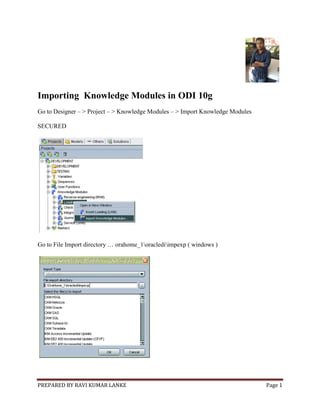
Importing Knowledge Modules in ODI 10g
Go to Designer – > Project – > Knowledge Modules – > Import Knowledge Modules
SECURED
Go to File Import directory … orahome_1oraclediimpexp ( windows )
PREPARED BY RAVI KUMAR LANKE Page 2
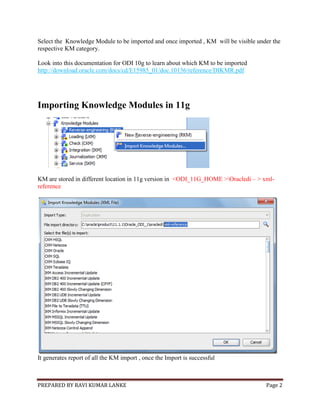
Select the Knowledge Module to be imported and once imported , KM will be visible under the
respective KM category.
Look into this documentation for ODI 10g to learn about which KM to be imported
http://download.oracle.com/docs/cd/E15985_01/doc.10136/reference/DIKMR.pdf
Importing Knowledge Modules in 11g
KM are stored in different location in 11g version in <ODI_11G_HOME >Oracledi – > xml-
reference
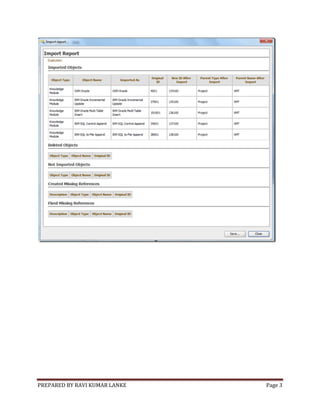
It generates report of all the KM import , once the Import is successful
PREPARED BY RAVI KUMAR LANKE Page 3

Importing knowledge modules odi 10g and 11g

  • 1.
    PREPARED BY RAVIKUMAR LANKE Page 1 Importing Knowledge Modules in ODI 10g Go to Designer – > Project – > Knowledge Modules – > Import Knowledge Modules SECURED Go to File Import directory … orahome_1oraclediimpexp ( windows )
  • 2.
    PREPARED BY RAVIKUMAR LANKE Page 2 Select the Knowledge Module to be imported and once imported , KM will be visible under the respective KM category. Look into this documentation for ODI 10g to learn about which KM to be imported http://download.oracle.com/docs/cd/E15985_01/doc.10136/reference/DIKMR.pdf Importing Knowledge Modules in 11g KM are stored in different location in 11g version in <ODI_11G_HOME >Oracledi – > xml- reference It generates report of all the KM import , once the Import is successful
  • 3.
    PREPARED BY RAVIKUMAR LANKE Page 3