-1-
<Insert Picture Here>
Oracle E-Business Suite R12.1 Accounts Receivables Essentials Partner
Boot Camp Training Courseware
-2-
For Oracle employees and authorized partners only. Do not distribute to third parties.
© 2009 Oracle Corporation – Proprietary and Confidential
The following is intended to outline our general
product direction. It is intended for information
purposes only, and may not be incorporated into any
contract. It is not a commitment to deliver any
material, code, or functionality, and should not be
relied upon in making purchasing decisions.
The development, release, and timing of any
features or functionality described for Oracle’s
products remains at the sole discretion of Oracle.
Safe Harbor Statement
-3-
For Oracle employees and authorized partners only. Do not distribute to third parties.
© 2009 Oracle Corporation – Proprietary and Confidential
Use of this Site (“Site”) or Materials constitutes agreement with the following terms and conditions:
1. Oracle Corporation (“Oracle”) is pleased to allow its business partner (“Partner”) to download and
copy the information, documents, and the online training courses (collectively, “Materials") found on this
Site. The use of the Materials is restricted to the non-commercial, internal training of the Partner’s
employees only. The Materials may not be used for training, promotion, or sales to customers or other
partners or third parties.
2. All the Materials are trademarks of Oracle and are proprietary information of Oracle. Partner or other
third party at no time has any right to resell, redistribute or create derivative works from the Materials.
3. Oracle disclaims any warranties or representations as to the accuracy or completeness of any
Materials. Materials are provided "as is" without warranty of any kind, either express or implied,
including without limitation warranties of merchantability, fitness for a particular purpose, and non-
infringement.
4. Under no circumstances shall Oracle or the Oracle Authorized Delivery Partner be liable for any loss,
damage, liability or expense incurred or suffered which is claimed to have resulted from use of this Site
of Materials. As a condition of use of the Materials, Partner agrees to indemnify Oracle from and against
any and all actions, claims, losses, damages, liabilities and expenses (including reasonable attorneys'
fees) arising out of Partner’s use of the Materials.
5. Reference materials including but not limited to those identified in the Boot Camp manifest can not be
redistributed in any format without Oracle written consent.
Oracle Training Materials – Usage
Agreement
-4-
Key Content Contributors
Contributing Companies
For Oracle employees and authorized partners only. Do not distribute to third parties.
© 2009 Oracle Corporation – Proprietary and Confidential
-5-
For Oracle employees and authorized partners only. Do not distribute to third parties.
© 2009 Oracle Corporation – Proprietary and Confidential
• Order to Cash Lifecycle overview
• Overview of Oracle Receivables Process
• Managing Parties and Customer Accounts
• Process Invoices Using Auto Invoice
• Process Invoices
• Bill Presentment Architecture
• Credit Management
• Implement Customer Invoicing
• Receipts
• Implement Receipts
• Tax Processing
• Period Closing Process
• Annexure
Bootcamp Objectives
-6-
For Oracle employees and authorized partners only. Do not distribute to third parties.
© 2009 Oracle Corporation – Proprietary and Confidential
Section Objectives
E-Business Tax Architecture Overview
Receivables Tax Process Overview
Receivables Setup Steps for Tax
Manage Tax Accounting and Tax Adjustments
-7-
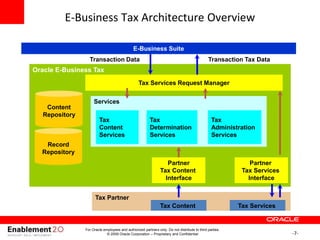
E-Business Tax Architecture Overview
Oracle E-Business Tax
Tax Services Request Manager
Services
Tax
Content
Services
Tax
Determination
Services
Tax
Administration
Services
Partner
Tax Content
Interface
Content
Repository
Record
Repository
Partner
Tax Services
Interface
Tax Partner
Tax Content Tax Services
E-Business Suite
Transaction Tax Data
Transaction Data
For Oracle employees and authorized partners only. Do not distribute to third parties.
© 2009 Oracle Corporation – Proprietary and Confidential
-8-
For Oracle employees and authorized partners only. Do not distribute to third parties.
© 2009 Oracle Corporation – Proprietary and Confidential
Section Objectives
E-Business Tax Architecture Overview
Receivables Tax Process Overview
Receivables Setup Steps for Tax
Manage Tax Accounting and Tax Adjustments
-9-
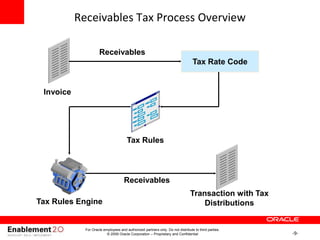
Receivables Tax Process Overview
Invoice
Tax Rate Code
Tax Rules
Transaction with Tax
Distributions
Receivables
Tax Rules Engine
Receivables
For Oracle employees and authorized partners only. Do not distribute to third parties.
© 2009 Oracle Corporation – Proprietary and Confidential
-10-
Tax Overview
• You use E-Business Tax to set up and maintain these taxes:
– Value Added Tax (VAT) - Imposed on the value added to goods or services
at each stage of their supply.
– Goods and Services Tax (GST) - Sales tax levied on many consumer
products and professional services.
For Oracle employees and authorized partners only. Do not distribute to third parties.
© 2009 Oracle Corporation – Proprietary and Confidential
-11-
Tax Overview
• E-Business Tax processes Oracle Order Management and Oracle
Receivables Output Tax, which is charged on the supply of taxable
goods and services on customer invoices or revenue items. You
should report Output Tax whenever you account for sales.
• E-Business Tax processes Oracle Payables and Oracle Purchasing
Input Tax, which is paid on supplier invoices.
• Amount Due to the Tax Authority consists of Output Tax on customer
invoices minus any Recoverable Input Tax on supplier invoices.
For Oracle employees and authorized partners only. Do not distribute to third parties.
© 2009 Oracle Corporation – Proprietary and Confidential
-12-
Value Added Tax (VAT)
• Value Added Tax (VAT) is imposed on the supply of goods and
services paid for by the consumer, but collected at each stage of the
production and distribution chain.
• The VAT charged on a customer invoice is called Output Tax.
• Any VAT paid on a vender invoice is called Input Tax.
• The amount due each period can be : Amount Due = Output Tax –
Input Tax.
For Oracle employees and authorized partners only. Do not distribute to third parties.
© 2009 Oracle Corporation – Proprietary and Confidential
-13-
For Oracle employees and authorized partners only. Do not distribute to third parties.
© 2009 Oracle Corporation – Proprietary and Confidential
Section Objectives
E-Business Tax Architecture Overview
Receivables Tax Process Overview
Receivables Setup Steps for Tax
Manage Tax Accounting and Tax Adjustments
-14-
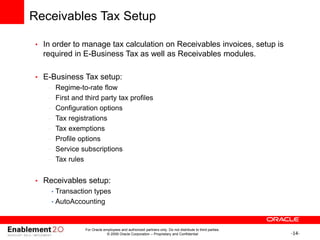
Receivables Tax Setup
• In order to manage tax calculation on Receivables invoices, setup is
required in E-Business Tax as well as Receivables modules.
• E-Business Tax setup:
– Regime-to-rate flow
– First and third party tax profiles
– Configuration options
– Tax registrations
– Tax exemptions
– Profile options
– Service subscriptions
– Tax rules
• Receivables setup:
• Transaction types
• AutoAccounting
For Oracle employees and authorized partners only. Do not distribute to third parties.
© 2009 Oracle Corporation – Proprietary and Confidential
-15-
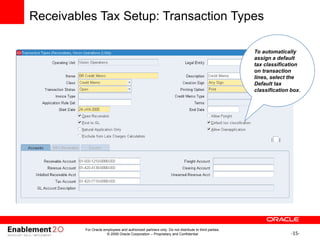
Receivables Tax Setup: Transaction Types
To automatically
assign a default
tax classification
on transaction
lines, select the
Default tax
classification box.
For Oracle employees and authorized partners only. Do not distribute to third parties.
© 2009 Oracle Corporation – Proprietary and Confidential
-16-
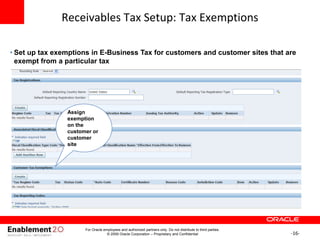
Receivables Tax Setup: Tax Exemptions
Assign
exemption
on the
customer or
customer
site
• Set up tax exemptions in E-Business Tax for customers and customer sites that are
exempt from a particular tax
For Oracle employees and authorized partners only. Do not distribute to third parties.
© 2009 Oracle Corporation – Proprietary and Confidential
-17-
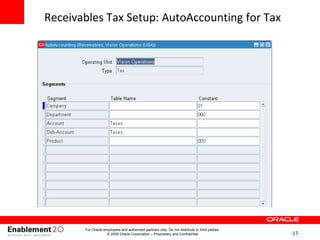
Receivables Tax Setup: AutoAccounting for Tax
For Oracle employees and authorized partners only. Do not distribute to third parties.
© 2009 Oracle Corporation – Proprietary and Confidential
-18-
Receivables Tax Setup: Profile Options
• eBTax: Allow Manual Tax Lines: Determines which users can enter manual
tax lines on the transaction for the tax setups that allow this update.
• eBTax: Allow Ad Hoc Tax Changes: Determines which users can make ad
hoc tax changes on the transaction line, such as selecting a different tax
status or tax rate.
• eBTax: Allow Override of Customer Exemptions: Controls the display of
the Tax Handling field on the transaction line. You use the Tax Handling field to
apply and update customer tax exemptions on transactions.
• eBTax: Allow Override of Tax Classification Code: Controls whether
users can update the tax classification code that is defaulted to the transaction
line. You only set this profile option if you intend to calculate taxes using tax
classification codes and the Direct Tax Rate Determination tax rule.
• eBTax: Invoice Freight as Revenue: Controls whether to consider freight
amounts as taxable line items.
• eBTax: Inventory Item for Freight: Lets Order Management use an
Inventory item defined as Freight on Receivables transaction lines.
For Oracle employees and authorized partners only. Do not distribute to third parties.
© 2009 Oracle Corporation – Proprietary and Confidential
-19-
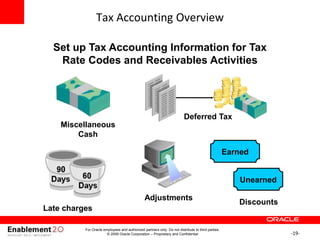
Tax Accounting Overview
Set up Tax Accounting Information for Tax
Rate Codes and Receivables Activities
Earned
Unearned
Adjustments
Discounts
Miscellaneous
Cash
Late charges
Deferred Tax
For Oracle employees and authorized partners only. Do not distribute to third parties.
© 2009 Oracle Corporation – Proprietary and Confidential
-20-
For Oracle employees and authorized partners only. Do not distribute to third parties.
© 2009 Oracle Corporation – Proprietary and Confidential
Section Objectives
E-Business Tax Architecture Overview
Receivables Tax Process Overview
Receivables Setup Steps for Tax
Manage Tax Accounting and Tax Adjustments
-21-
Tax Accounting for Deferred Tax
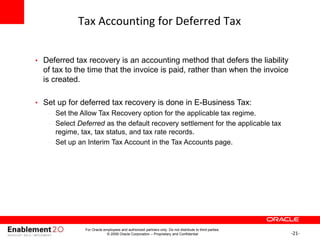
• Deferred tax recovery is an accounting method that defers the liability
of tax to the time that the invoice is paid, rather than when the invoice
is created.
• Set up for deferred tax recovery is done in E-Business Tax:
– Set the Allow Tax Recovery option for the applicable tax regime.
– Select Deferred as the default recovery settlement for the applicable tax
regime, tax, tax status, and tax rate records.
– Set up an Interim Tax Account in the Tax Accounts page.
For Oracle employees and authorized partners only. Do not distribute to third parties.
© 2009 Oracle Corporation – Proprietary and Confidential
-22-
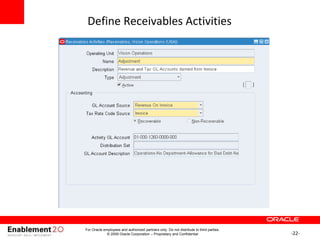
Define Receivables Activities
For Oracle employees and authorized partners only. Do not distribute to third parties.
© 2009 Oracle Corporation – Proprietary and Confidential
-23-
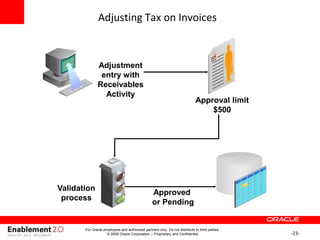
Adjusting Tax on Invoices
Adjustment
entry with
Receivables
Activity
Approval limit
$500
Validation
process
Approved
or Pending
For Oracle employees and authorized partners only. Do not distribute to third parties.
© 2009 Oracle Corporation – Proprietary and Confidential

implementing tax in EBS - receivables.ppt

  • 1.
    -1- <Insert Picture Here> OracleE-Business Suite R12.1 Accounts Receivables Essentials Partner Boot Camp Training Courseware
  • 2.
    -2- For Oracle employeesand authorized partners only. Do not distribute to third parties. © 2009 Oracle Corporation – Proprietary and Confidential The following is intended to outline our general product direction. It is intended for information purposes only, and may not be incorporated into any contract. It is not a commitment to deliver any material, code, or functionality, and should not be relied upon in making purchasing decisions. The development, release, and timing of any features or functionality described for Oracle’s products remains at the sole discretion of Oracle. Safe Harbor Statement
  • 3.
    -3- For Oracle employeesand authorized partners only. Do not distribute to third parties. © 2009 Oracle Corporation – Proprietary and Confidential Use of this Site (“Site”) or Materials constitutes agreement with the following terms and conditions: 1. Oracle Corporation (“Oracle”) is pleased to allow its business partner (“Partner”) to download and copy the information, documents, and the online training courses (collectively, “Materials") found on this Site. The use of the Materials is restricted to the non-commercial, internal training of the Partner’s employees only. The Materials may not be used for training, promotion, or sales to customers or other partners or third parties. 2. All the Materials are trademarks of Oracle and are proprietary information of Oracle. Partner or other third party at no time has any right to resell, redistribute or create derivative works from the Materials. 3. Oracle disclaims any warranties or representations as to the accuracy or completeness of any Materials. Materials are provided "as is" without warranty of any kind, either express or implied, including without limitation warranties of merchantability, fitness for a particular purpose, and non- infringement. 4. Under no circumstances shall Oracle or the Oracle Authorized Delivery Partner be liable for any loss, damage, liability or expense incurred or suffered which is claimed to have resulted from use of this Site of Materials. As a condition of use of the Materials, Partner agrees to indemnify Oracle from and against any and all actions, claims, losses, damages, liabilities and expenses (including reasonable attorneys' fees) arising out of Partner’s use of the Materials. 5. Reference materials including but not limited to those identified in the Boot Camp manifest can not be redistributed in any format without Oracle written consent. Oracle Training Materials – Usage Agreement
  • 4.
    -4- Key Content Contributors ContributingCompanies For Oracle employees and authorized partners only. Do not distribute to third parties. © 2009 Oracle Corporation – Proprietary and Confidential
  • 5.
    -5- For Oracle employeesand authorized partners only. Do not distribute to third parties. © 2009 Oracle Corporation – Proprietary and Confidential • Order to Cash Lifecycle overview • Overview of Oracle Receivables Process • Managing Parties and Customer Accounts • Process Invoices Using Auto Invoice • Process Invoices • Bill Presentment Architecture • Credit Management • Implement Customer Invoicing • Receipts • Implement Receipts • Tax Processing • Period Closing Process • Annexure Bootcamp Objectives
  • 6.
    -6- For Oracle employeesand authorized partners only. Do not distribute to third parties. © 2009 Oracle Corporation – Proprietary and Confidential Section Objectives E-Business Tax Architecture Overview Receivables Tax Process Overview Receivables Setup Steps for Tax Manage Tax Accounting and Tax Adjustments
  • 7.
    -7- E-Business Tax ArchitectureOverview Oracle E-Business Tax Tax Services Request Manager Services Tax Content Services Tax Determination Services Tax Administration Services Partner Tax Content Interface Content Repository Record Repository Partner Tax Services Interface Tax Partner Tax Content Tax Services E-Business Suite Transaction Tax Data Transaction Data For Oracle employees and authorized partners only. Do not distribute to third parties. © 2009 Oracle Corporation – Proprietary and Confidential
  • 8.
    -8- For Oracle employeesand authorized partners only. Do not distribute to third parties. © 2009 Oracle Corporation – Proprietary and Confidential Section Objectives E-Business Tax Architecture Overview Receivables Tax Process Overview Receivables Setup Steps for Tax Manage Tax Accounting and Tax Adjustments
  • 9.
    -9- Receivables Tax ProcessOverview Invoice Tax Rate Code Tax Rules Transaction with Tax Distributions Receivables Tax Rules Engine Receivables For Oracle employees and authorized partners only. Do not distribute to third parties. © 2009 Oracle Corporation – Proprietary and Confidential
  • 10.
    -10- Tax Overview • Youuse E-Business Tax to set up and maintain these taxes: – Value Added Tax (VAT) - Imposed on the value added to goods or services at each stage of their supply. – Goods and Services Tax (GST) - Sales tax levied on many consumer products and professional services. For Oracle employees and authorized partners only. Do not distribute to third parties. © 2009 Oracle Corporation – Proprietary and Confidential
  • 11.
    -11- Tax Overview • E-BusinessTax processes Oracle Order Management and Oracle Receivables Output Tax, which is charged on the supply of taxable goods and services on customer invoices or revenue items. You should report Output Tax whenever you account for sales. • E-Business Tax processes Oracle Payables and Oracle Purchasing Input Tax, which is paid on supplier invoices. • Amount Due to the Tax Authority consists of Output Tax on customer invoices minus any Recoverable Input Tax on supplier invoices. For Oracle employees and authorized partners only. Do not distribute to third parties. © 2009 Oracle Corporation – Proprietary and Confidential
  • 12.
    -12- Value Added Tax(VAT) • Value Added Tax (VAT) is imposed on the supply of goods and services paid for by the consumer, but collected at each stage of the production and distribution chain. • The VAT charged on a customer invoice is called Output Tax. • Any VAT paid on a vender invoice is called Input Tax. • The amount due each period can be : Amount Due = Output Tax – Input Tax. For Oracle employees and authorized partners only. Do not distribute to third parties. © 2009 Oracle Corporation – Proprietary and Confidential
  • 13.
    -13- For Oracle employeesand authorized partners only. Do not distribute to third parties. © 2009 Oracle Corporation – Proprietary and Confidential Section Objectives E-Business Tax Architecture Overview Receivables Tax Process Overview Receivables Setup Steps for Tax Manage Tax Accounting and Tax Adjustments
  • 14.
    -14- Receivables Tax Setup •In order to manage tax calculation on Receivables invoices, setup is required in E-Business Tax as well as Receivables modules. • E-Business Tax setup: – Regime-to-rate flow – First and third party tax profiles – Configuration options – Tax registrations – Tax exemptions – Profile options – Service subscriptions – Tax rules • Receivables setup: • Transaction types • AutoAccounting For Oracle employees and authorized partners only. Do not distribute to third parties. © 2009 Oracle Corporation – Proprietary and Confidential
  • 15.
    -15- Receivables Tax Setup:Transaction Types To automatically assign a default tax classification on transaction lines, select the Default tax classification box. For Oracle employees and authorized partners only. Do not distribute to third parties. © 2009 Oracle Corporation – Proprietary and Confidential
  • 16.
    -16- Receivables Tax Setup:Tax Exemptions Assign exemption on the customer or customer site • Set up tax exemptions in E-Business Tax for customers and customer sites that are exempt from a particular tax For Oracle employees and authorized partners only. Do not distribute to third parties. © 2009 Oracle Corporation – Proprietary and Confidential
  • 17.
    -17- Receivables Tax Setup:AutoAccounting for Tax For Oracle employees and authorized partners only. Do not distribute to third parties. © 2009 Oracle Corporation – Proprietary and Confidential
  • 18.
    -18- Receivables Tax Setup:Profile Options • eBTax: Allow Manual Tax Lines: Determines which users can enter manual tax lines on the transaction for the tax setups that allow this update. • eBTax: Allow Ad Hoc Tax Changes: Determines which users can make ad hoc tax changes on the transaction line, such as selecting a different tax status or tax rate. • eBTax: Allow Override of Customer Exemptions: Controls the display of the Tax Handling field on the transaction line. You use the Tax Handling field to apply and update customer tax exemptions on transactions. • eBTax: Allow Override of Tax Classification Code: Controls whether users can update the tax classification code that is defaulted to the transaction line. You only set this profile option if you intend to calculate taxes using tax classification codes and the Direct Tax Rate Determination tax rule. • eBTax: Invoice Freight as Revenue: Controls whether to consider freight amounts as taxable line items. • eBTax: Inventory Item for Freight: Lets Order Management use an Inventory item defined as Freight on Receivables transaction lines. For Oracle employees and authorized partners only. Do not distribute to third parties. © 2009 Oracle Corporation – Proprietary and Confidential
  • 19.
    -19- Tax Accounting Overview Setup Tax Accounting Information for Tax Rate Codes and Receivables Activities Earned Unearned Adjustments Discounts Miscellaneous Cash Late charges Deferred Tax For Oracle employees and authorized partners only. Do not distribute to third parties. © 2009 Oracle Corporation – Proprietary and Confidential
  • 20.
    -20- For Oracle employeesand authorized partners only. Do not distribute to third parties. © 2009 Oracle Corporation – Proprietary and Confidential Section Objectives E-Business Tax Architecture Overview Receivables Tax Process Overview Receivables Setup Steps for Tax Manage Tax Accounting and Tax Adjustments
  • 21.
    -21- Tax Accounting forDeferred Tax • Deferred tax recovery is an accounting method that defers the liability of tax to the time that the invoice is paid, rather than when the invoice is created. • Set up for deferred tax recovery is done in E-Business Tax: – Set the Allow Tax Recovery option for the applicable tax regime. – Select Deferred as the default recovery settlement for the applicable tax regime, tax, tax status, and tax rate records. – Set up an Interim Tax Account in the Tax Accounts page. For Oracle employees and authorized partners only. Do not distribute to third parties. © 2009 Oracle Corporation – Proprietary and Confidential
  • 22.
    -22- Define Receivables Activities ForOracle employees and authorized partners only. Do not distribute to third parties. © 2009 Oracle Corporation – Proprietary and Confidential
  • 23.
    -23- Adjusting Tax onInvoices Adjustment entry with Receivables Activity Approval limit $500 Validation process Approved or Pending For Oracle employees and authorized partners only. Do not distribute to third parties. © 2009 Oracle Corporation – Proprietary and Confidential

Editor's Notes