NIIT University
                    Exploring
                  Mobile learning


                  By: Akhlesh Agarwal


                                        1
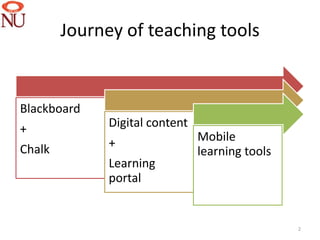
Journey of teaching tools


Blackboard
+             Digital content
              +                 Mobile
Chalk                           learning tools
              Learning
              portal


                                                 2
Mobile learning
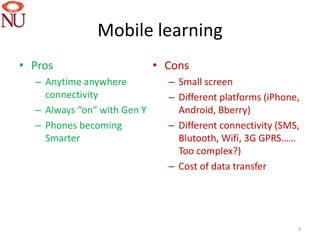
• Pros                       • Cons
  – Anytime anywhere           – Small screen
    connectivity               – Different platforms (iPhone,
  – Always “on” with Gen Y       Android, Bberry)
  – Phones becoming            – Different connectivity (SMS,
    Smarter                      Blutooth, Wifi, 3G GPRS……
                                 Too complex?)
                               – Cost of data transfer


                                                            3
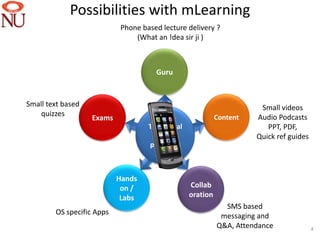
Possibilities with mLearning
                            Phone based lecture delivery ?
                                (What an !dea sir ji )


                                      Guru


Small text based                                                       Small videos
    quizzes                                                 Content   Audio Podcasts
                   Exams
                                    Traditional                          PPT, PDF,
                                     learning                         Quick ref guides
                                    processes


                           Hands
                            on /                  Collab
                            Labs                  oration
                                                              SMS based
        OS specific Apps                                     messaging and
                                                            Q&A, Attendance              4
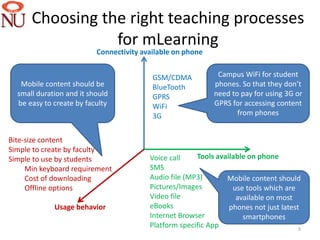
Choosing the right teaching processes
                 for mLearning
                          Connectivity available on phone


                                          GSM/CDMA           Campus WiFi for student
   Mobile content should be               BlueTooth         phones. So that they don’t
  small duration and it should            GPRS              need to pay for using 3G or
  be easy to create by faculty            WiFi              GPRS for accessing content
                                          3G                       from phones


Bite-size content
Simple to create by faculty
Simple to use by students                Voice call    Tools available on phone
     Min keyboard requirement            SMS
     Cost of downloading                 Audio file (MP3)       Mobile content should
     Offline options                     Pictures/Images          use tools which are
                                         Video file                available on most
             Usage behavior              eBooks                  phones not just latest
                                         Internet Browser            smartphones
                                         Platform specific App                         5
Results from student survey
 on technology availability
     in student phones


                              6
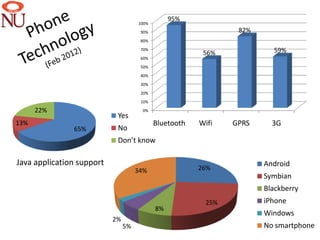
95%
                                     100%
                                      90%                       82%
                                      80%
                                      70%
                                                         56%            59%
                                      60%
                                      50%
                                      40%
                                      30%
                                      20%
                                      10%

      22%                             0%
                            Yes
13%                                         Bluetooth   Wifi   GPRS     3G
               65%          No
                            Don’t know

Java application support                                              Android
                                     34%                26%
                                                                      Symbian
                                                                      Blackberry
                                                         25%          iPhone
                                            8%
                                                                      Windows
                           2%
                                5%                                    No smartphone
                                                                               7
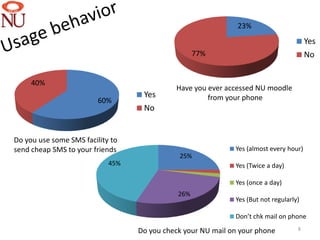
23%
                                                                                       Yes
                                                   77%                                 No


     40%
                                            Have you ever accessed NU moodle
                                   Yes               from your phone
                         60%
                                   No


Do you use some SMS facility to
send cheap SMS to your friends                               Yes (almost every hour)
                                             25%
                            45%                              Yes (Twice a day)

                                                             Yes (once a day)
                                             26%
                                                             Yes (But not regularly)

                                                             Don’t chk mail on phone

                                  Do you check your NU mail on your phone          8
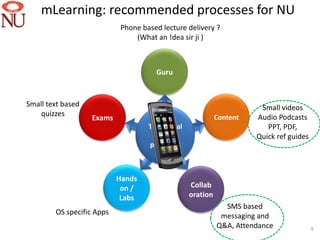
mLearning: recommended processes for NU
                            Phone based lecture delivery ?
                                (What an !dea sir ji )


                                      Guru


Small text based                                                       Small videos
    quizzes                                                 Content   Audio Podcasts
                   Exams
                                    Traditional                          PPT, PDF,
                                     learning                         Quick ref guides
                                    processes


                           Hands
                            on /                  Collab
                            Labs                  oration
                                                              SMS based
        OS specific Apps                                     messaging and
                                                            Q&A, Attendance              9
Key findings
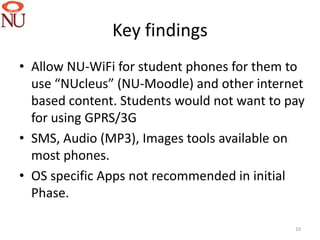
• Allow NU-WiFi for student phones for them to
  use “NUcleus” (NU-Moodle) and other internet
  based content. Students would not want to pay
  for using GPRS/3G
• SMS, Audio (MP3), Images tools available on
  most phones.
• OS specific Apps not recommended in initial
  Phase.

                                             10
Recommended processes
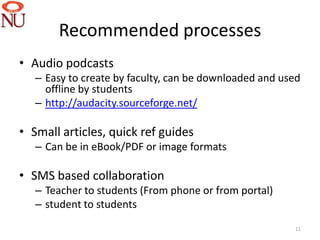
• Audio podcasts
   – Easy to create by faculty, can be downloaded and used
     offline by students
   – http://audacity.sourceforge.net/

• Small articles, quick ref guides
   – Can be in eBook/PDF or image formats

• SMS based collaboration
   – Teacher to students (From phone or from portal)
   – student to students
                                                        11
Mobile learning at NU campus


                               12
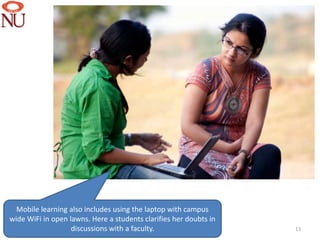
Mobile learning also includes using the laptop with campus
wide WiFi in open lawns. Here a students clarifies her doubts in
                   discussions with a faculty.                     13
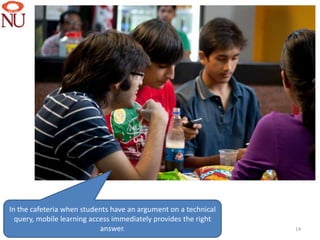
In the cafeteria when students have an argument on a technical
  query, mobile learning access immediately provides the right
                            answer.                              14
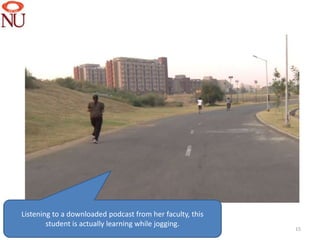
Listening to a downloaded podcast from her faculty, this
        student is actually learning while jogging.
                                                           15
akhlesh.agarwal@


           @akhlesha

                       16

Implementing mobile learning

  • 1.
    NIIT University Exploring Mobile learning By: Akhlesh Agarwal 1
  • 2.
    Journey of teachingtools Blackboard + Digital content + Mobile Chalk learning tools Learning portal 2
  • 3.
    Mobile learning • Pros • Cons – Anytime anywhere – Small screen connectivity – Different platforms (iPhone, – Always “on” with Gen Y Android, Bberry) – Phones becoming – Different connectivity (SMS, Smarter Blutooth, Wifi, 3G GPRS…… Too complex?) – Cost of data transfer 3
  • 4.
    Possibilities with mLearning Phone based lecture delivery ? (What an !dea sir ji ) Guru Small text based Small videos quizzes Content Audio Podcasts Exams Traditional PPT, PDF, learning Quick ref guides processes Hands on / Collab Labs oration SMS based OS specific Apps messaging and Q&A, Attendance 4
  • 5.
    Choosing the rightteaching processes for mLearning Connectivity available on phone GSM/CDMA Campus WiFi for student Mobile content should be BlueTooth phones. So that they don’t small duration and it should GPRS need to pay for using 3G or be easy to create by faculty WiFi GPRS for accessing content 3G from phones Bite-size content Simple to create by faculty Simple to use by students Voice call Tools available on phone Min keyboard requirement SMS Cost of downloading Audio file (MP3) Mobile content should Offline options Pictures/Images use tools which are Video file available on most Usage behavior eBooks phones not just latest Internet Browser smartphones Platform specific App 5
  • 6.
    Results from studentsurvey on technology availability in student phones 6
  • 7.
    95% 100% 90% 82% 80% 70% 56% 59% 60% 50% 40% 30% 20% 10% 22% 0% Yes 13% Bluetooth Wifi GPRS 3G 65% No Don’t know Java application support Android 34% 26% Symbian Blackberry 25% iPhone 8% Windows 2% 5% No smartphone 7
  • 8.
    23% Yes 77% No 40% Have you ever accessed NU moodle Yes from your phone 60% No Do you use some SMS facility to send cheap SMS to your friends Yes (almost every hour) 25% 45% Yes (Twice a day) Yes (once a day) 26% Yes (But not regularly) Don’t chk mail on phone Do you check your NU mail on your phone 8
  • 9.
    mLearning: recommended processesfor NU Phone based lecture delivery ? (What an !dea sir ji ) Guru Small text based Small videos quizzes Content Audio Podcasts Exams Traditional PPT, PDF, learning Quick ref guides processes Hands on / Collab Labs oration SMS based OS specific Apps messaging and Q&A, Attendance 9
  • 10.
    Key findings • AllowNU-WiFi for student phones for them to use “NUcleus” (NU-Moodle) and other internet based content. Students would not want to pay for using GPRS/3G • SMS, Audio (MP3), Images tools available on most phones. • OS specific Apps not recommended in initial Phase. 10
  • 11.
    Recommended processes • Audiopodcasts – Easy to create by faculty, can be downloaded and used offline by students – http://audacity.sourceforge.net/ • Small articles, quick ref guides – Can be in eBook/PDF or image formats • SMS based collaboration – Teacher to students (From phone or from portal) – student to students 11
  • 12.
    Mobile learning atNU campus 12
  • 13.
    Mobile learning alsoincludes using the laptop with campus wide WiFi in open lawns. Here a students clarifies her doubts in discussions with a faculty. 13
  • 14.
    In the cafeteriawhen students have an argument on a technical query, mobile learning access immediately provides the right answer. 14
  • 15.
    Listening to adownloaded podcast from her faculty, this student is actually learning while jogging. 15
  • 16.
    akhlesh.agarwal@ @akhlesha 16

Editor's Notes

  • #2 These are the speaker notes.