© Psion Confidential
psion.com | ingenuityworking.com
Implementation of Integrated Project
and Resource Management System
© Psion Confidential
psion.com | ingenuityworking.com
Agenda
» Introduction to Psion
» Why resource planning is important
» The Past
» Steps taken so far
 Setting up to do resource planning
• How projects are organized
• Who we view and see our resources
• Who controls what
• Subtitles in set up
 How do we plan?
• How
• Horizons
• Refinements
© Psion Confidential
psion.com | ingenuityworking.com
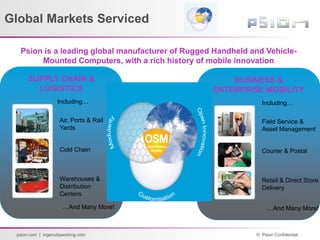
Global Markets Serviced
Psion is a leading global manufacturer of Rugged Handheld and Vehicle-
Mounted Computers, with a rich history of mobile innovation
SUPPLY CHAIN &
LOGISTICS
1980
Air, Ports & Rail
Yards
Cold Chain
Warehouses &
Distribution
Centers
Including…
…And Many More!
BUSINESS &
ENTERPRISE MOBILITY
1998
Field Service &
Asset Management
Courier & Postal
Retail & Direct Store
Delivery
Including…
…And Many More!
Psion is a leading global manufacturer of Rugged Handheld and Vehicle-
Mounted Computers, with a rich history of mobile innovation
© Psion Confidential
psion.com | ingenuityworking.com
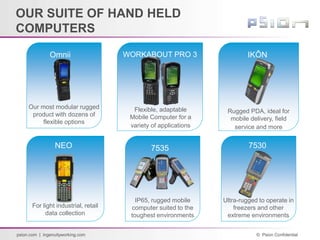
IKÔN
WORKABOUT PRO 3
NEO 7535 7530
For light industrial, retail
data collection
Flexible, adaptable
Mobile Computer for a
variety of applications
Rugged PDA, ideal for
mobile delivery, field
service and more
IP65, rugged mobile
computer suited to the
toughest environments
Ultra-rugged to operate in
freezers and other
extreme environments
OUR SUITE OF HAND HELD
COMPUTERS
Omnii
Our most modular rugged
product with dozens of
flexible options
© Psion Confidential
psion.com | ingenuityworking.com
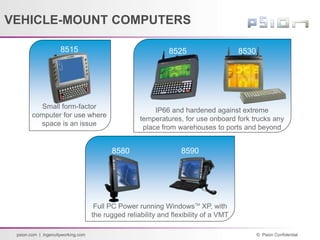
8530
8515 8525
Small form-factor
computer for use where
space is an issue
IP66 and hardened against extreme
temperatures, for use onboard fork trucks any
place from warehouses to ports and beyond
8590
8580
Full PC Power running WindowsTM
XP, with
the rugged reliability and flexibility of a VMT
VEHICLE-MOUNT COMPUTERS
© Psion Confidential
psion.com | ingenuityworking.com
Resource Planning why is it Important
» Profits and growth are driven by new products
 The key is knowing when to commit to new projects
• Standing Assumption
Psion is people constrained and not expense/capital
constrained
 Requires
• Clear, consistent, reliable identification of resource
supply and demand issues well in advance
• Single reliable and well-understood cross-functional
process for allocation of resources to projects
© Psion Confidential
psion.com | ingenuityworking.com
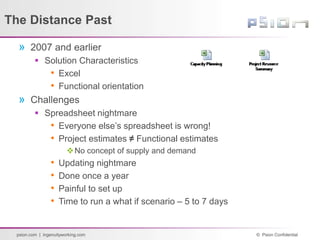
The Distance Past
» 2007 and earlier
 Solution Characteristics
• Excel
• Functional orientation
» Challenges
 Spreadsheet nightmare
• Everyone else’s spreadsheet is wrong!
• Project estimates ≠ Functional estimates
No concept of supply and demand
• Updating nightmare
• Done once a year
• Painful to set up
• Time to run a what if scenario – 5 to 7 days
© Psion Confidential
psion.com | ingenuityworking.com
The Near Past
» IT to the rescue with MS Project Server
 Common resource database and project definition!!
 Initial introduction of supply and demand
» Challenges
 Batch operation – cube build
 Updates take a long time
• Data is spread across individual projects
 Still needed Excel to run what if scenarios both for
budgeting and resources
 Stability issues
© Psion Confidential
psion.com | ingenuityworking.com
Today – Integrated Database Solution
» Along comes P6
» Major Concern
 P6 has the capability with real time results!
 The question:
• How do we use it without creating a monster!
We don’t have an army of planners!
• Company characteristics
Managers like to be in control
 Make things complex
 Stress the uniqueness of their function over other functions
© Psion Confidential
psion.com | ingenuityworking.com
Solution – How do we organize and
analyze our projects?
» Stared with the way we organize our projects and
how we want to analysis them
 EPS node primary structure
• Based on how we organize our projects which is the
opposite how we analyze the business
• Allows for easier maintenance
Structure is repeated over and over
 Project Codes – slice and dice the projects for analysis
• Limited the number – total 9
Goes against Psion belief’s
• Focused on the key ways we analyze the business
© Psion Confidential
psion.com | ingenuityworking.com
Solution – How do we view our
resources?
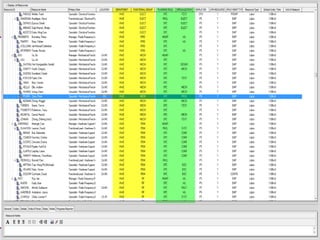
» Resource Structure – Start simple with the goal of
finding common structure between all groups
 Roles
• Reduce the number of roles from 96 to 14
191 in the Engineering Group
• Resource codes
Used in place of roles
 Reduced the number of roles to reduce and
 Increased our ability to do across group analysis
• Introduce generic role for planning
© Psion Confidential
psion.com | ingenuityworking.com
© Psion Confidential
psion.com | ingenuityworking.com
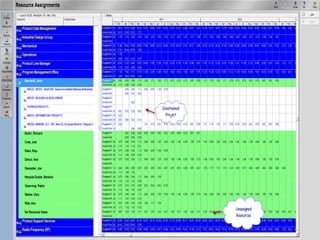
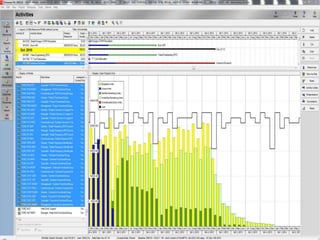
How do we see our resources
» Provide standard views and reports to promote
consistency in approach
 Overview Views
• Overload and under-load reports
 Assignment Views
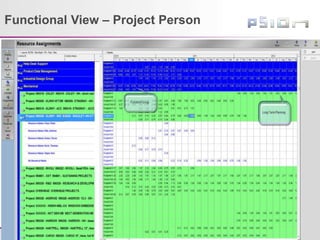
• Functional
Person, Project
Project, Person
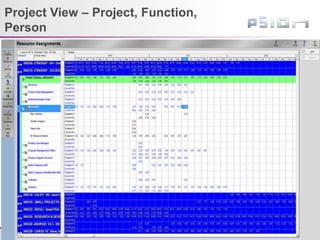
• Project
Function, Person
© Psion Confidential
psion.com | ingenuityworking.com
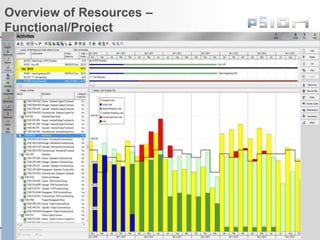
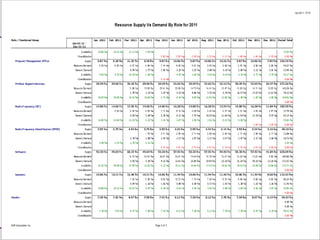
Overview of Resources –
Functional/Project
© Psion Confidential
psion.com | ingenuityworking.com
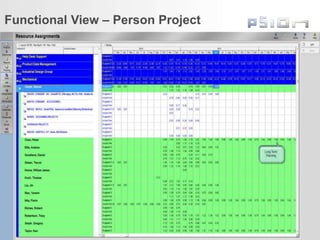
Functional View – Person Project
© Psion Confidential
psion.com | ingenuityworking.com
Functional View – Project Person
© Psion Confidential
psion.com | ingenuityworking.com
Project View – Project, Function,
Person
© Psion Confidential
psion.com | ingenuityworking.com
Determining who does what
» Who has access to which projects
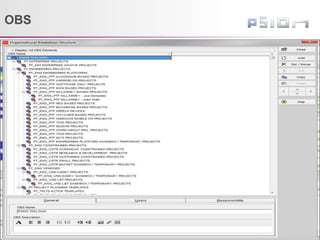
 OBS in P6 controls who can see what projects
• We kept things simple it’s the same as our EPS
Assign users project access based on the EPS levels
they work with
» Determine who controls the data in a project
 Default anyone can view
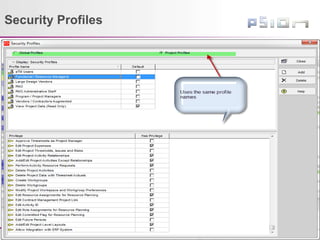
 Use security profiles to control who can change the
data in a project and to make it seamless to the
organization
• This is not a trivial task!
Too easy to make too complex when coupled with the
OBS
 Creating an administrative nightmare!!
© Psion Confidential
psion.com | ingenuityworking.com
OBS
© Psion Confidential
psion.com | ingenuityworking.com
Security Profiles
© Psion Confidential
psion.com | ingenuityworking.com
Subtleties in Setting up Resource
Planning
» Calendars
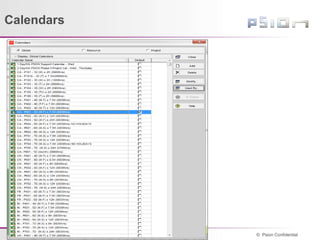
 Global vs Project vs Resource
• Provide a board suite of global calendars
Avoided project and resource specific calendars
» Time
 Need to understand the number of hours in a year,
week, month and its impact when calculating FTEs
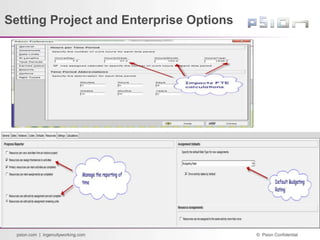
» Project Settings
 Agree as to how progress is tracked when using
resources
© Psion Confidential
psion.com | ingenuityworking.com
Calendars
© Psion Confidential
psion.com | ingenuityworking.com
Setting Project and Enterprise Options
© Psion Confidential
psion.com | ingenuityworking.com
Solution – How do we plan resources?
» Purpose:
 Define resource demand at the appropriate levels of
detail through the life-cycle of a project
 Describe resources in the supply pool to enable
matching of supply to demand most effectively
» Approach
 Develop a rolling wave planning philosophy for
resources - labour, expense and capital
 Foster collaborative planning – force the discussions
• Clear communication of demand / supply
requirements and status
© Psion Confidential
psion.com | ingenuityworking.com
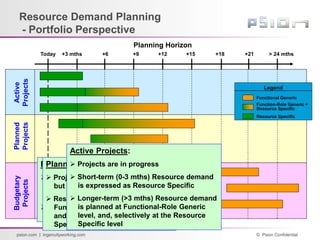
Resource Demand Planning
- Portfolio Perspective
+3 mths > 24 mths
Planning Horizon
+15
+12
+9
+6
Today
Active
Projects
Planned
Projects
Budgetary
Projects
+18 +21
Legend
Resource Specific
Functional Generic
Function-Role Generic +
Resource Specific
Budgetary Projects:
 Projects are included in PDV
budgetary plans – not yet
approved to proceed
 Resource demand estimated to
Functional Generic level
Planned Projects:
 Projects are approved to proceed
but have not yet started
 Resource demand estimated to
Functional-Role Generic level,
and, selectively to the Resource
Specific level
Active Projects:
 Projects are in progress
 Short-term (0-3 mths) Resource demand
is expressed as Resource Specific
 Longer-term (>3 mths) Resource demand
is planned at Functional-Role Generic
level, and, selectively at the Resource
Specific level
© Psion Confidential
psion.com | ingenuityworking.com
Planning Refinements
» What about non-development project work?
 Solution
• Level of Effort and/or Constrained project
Overhead
Level R&D – floating time lines
Sustaining – capped at with dedicated people
• Few people are actually allocated to the projects
• Everyone can charge in to the project for unplanned work
» How do you show long term demand??
 Generic Resource
» What about unplanned work in a project?
 Activity to capture the hours between time reports
• Adjust schedules once identified
© Psion Confidential
psion.com | ingenuityworking.com
© Psion Confidential
psion.com | ingenuityworking.com
© Psion Confidential
psion.com | ingenuityworking.com
© Psion Confidential
psion.com | ingenuityworking.com
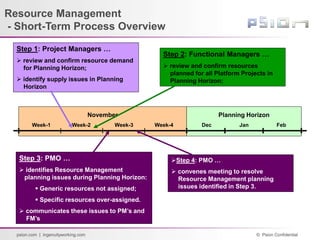
Resource Management
- Short-Term Process Overview
Planning Horizon
November
Dec Jan Feb
Week-1 Week-4
Week-3
Week-2
Step 1: Project Managers …
 review and confirm resource demand
for Planning Horizon;
 identify supply issues in Planning
Horizon
Step 2: Functional Managers …
 review and confirm resources
planned for all Platform Projects in
Planning Horizon;
Step 3: PMO …
 identifies Resource Management
planning issues during Planning Horizon:
 Generic resources not assigned;
 Specific resources over-assigned.
 communicates these issues to PM’s and
FM’s
Step 4: PMO …
 convenes meeting to resolve
Resource Management planning
issues identified in Step 3.
© Psion Confidential
psion.com | ingenuityworking.com
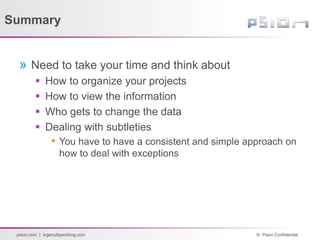
Summary
» Need to take your time and think about
 How to organize your projects
 How to view the information
 Who gets to change the data
 Dealing with subtleties
• You have to have a consistent and simple approach on
how to deal with exceptions

Implementation Of Integrated Project Management And Resource Management System

  • 1.
    © Psion Confidential psion.com| ingenuityworking.com Implementation of Integrated Project and Resource Management System
  • 2.
    © Psion Confidential psion.com| ingenuityworking.com Agenda » Introduction to Psion » Why resource planning is important » The Past » Steps taken so far  Setting up to do resource planning • How projects are organized • Who we view and see our resources • Who controls what • Subtitles in set up  How do we plan? • How • Horizons • Refinements
  • 3.
    © Psion Confidential psion.com| ingenuityworking.com Global Markets Serviced Psion is a leading global manufacturer of Rugged Handheld and Vehicle- Mounted Computers, with a rich history of mobile innovation SUPPLY CHAIN & LOGISTICS 1980 Air, Ports & Rail Yards Cold Chain Warehouses & Distribution Centers Including… …And Many More! BUSINESS & ENTERPRISE MOBILITY 1998 Field Service & Asset Management Courier & Postal Retail & Direct Store Delivery Including… …And Many More! Psion is a leading global manufacturer of Rugged Handheld and Vehicle- Mounted Computers, with a rich history of mobile innovation
  • 4.
    © Psion Confidential psion.com| ingenuityworking.com IKÔN WORKABOUT PRO 3 NEO 7535 7530 For light industrial, retail data collection Flexible, adaptable Mobile Computer for a variety of applications Rugged PDA, ideal for mobile delivery, field service and more IP65, rugged mobile computer suited to the toughest environments Ultra-rugged to operate in freezers and other extreme environments OUR SUITE OF HAND HELD COMPUTERS Omnii Our most modular rugged product with dozens of flexible options
  • 5.
    © Psion Confidential psion.com| ingenuityworking.com 8530 8515 8525 Small form-factor computer for use where space is an issue IP66 and hardened against extreme temperatures, for use onboard fork trucks any place from warehouses to ports and beyond 8590 8580 Full PC Power running WindowsTM XP, with the rugged reliability and flexibility of a VMT VEHICLE-MOUNT COMPUTERS
  • 6.
    © Psion Confidential psion.com| ingenuityworking.com Resource Planning why is it Important » Profits and growth are driven by new products  The key is knowing when to commit to new projects • Standing Assumption Psion is people constrained and not expense/capital constrained  Requires • Clear, consistent, reliable identification of resource supply and demand issues well in advance • Single reliable and well-understood cross-functional process for allocation of resources to projects
  • 7.
    © Psion Confidential psion.com| ingenuityworking.com The Distance Past » 2007 and earlier  Solution Characteristics • Excel • Functional orientation » Challenges  Spreadsheet nightmare • Everyone else’s spreadsheet is wrong! • Project estimates ≠ Functional estimates No concept of supply and demand • Updating nightmare • Done once a year • Painful to set up • Time to run a what if scenario – 5 to 7 days
  • 8.
    © Psion Confidential psion.com| ingenuityworking.com The Near Past » IT to the rescue with MS Project Server  Common resource database and project definition!!  Initial introduction of supply and demand » Challenges  Batch operation – cube build  Updates take a long time • Data is spread across individual projects  Still needed Excel to run what if scenarios both for budgeting and resources  Stability issues
  • 9.
    © Psion Confidential psion.com| ingenuityworking.com Today – Integrated Database Solution » Along comes P6 » Major Concern  P6 has the capability with real time results!  The question: • How do we use it without creating a monster! We don’t have an army of planners! • Company characteristics Managers like to be in control  Make things complex  Stress the uniqueness of their function over other functions
  • 10.
    © Psion Confidential psion.com| ingenuityworking.com Solution – How do we organize and analyze our projects? » Stared with the way we organize our projects and how we want to analysis them  EPS node primary structure • Based on how we organize our projects which is the opposite how we analyze the business • Allows for easier maintenance Structure is repeated over and over  Project Codes – slice and dice the projects for analysis • Limited the number – total 9 Goes against Psion belief’s • Focused on the key ways we analyze the business
  • 11.
    © Psion Confidential psion.com| ingenuityworking.com Solution – How do we view our resources? » Resource Structure – Start simple with the goal of finding common structure between all groups  Roles • Reduce the number of roles from 96 to 14 191 in the Engineering Group • Resource codes Used in place of roles  Reduced the number of roles to reduce and  Increased our ability to do across group analysis • Introduce generic role for planning
  • 12.
    © Psion Confidential psion.com| ingenuityworking.com
  • 13.
    © Psion Confidential psion.com| ingenuityworking.com How do we see our resources » Provide standard views and reports to promote consistency in approach  Overview Views • Overload and under-load reports  Assignment Views • Functional Person, Project Project, Person • Project Function, Person
  • 14.
    © Psion Confidential psion.com| ingenuityworking.com Overview of Resources – Functional/Project
  • 15.
    © Psion Confidential psion.com| ingenuityworking.com Functional View – Person Project
  • 16.
    © Psion Confidential psion.com| ingenuityworking.com Functional View – Project Person
  • 17.
    © Psion Confidential psion.com| ingenuityworking.com Project View – Project, Function, Person
  • 18.
    © Psion Confidential psion.com| ingenuityworking.com Determining who does what » Who has access to which projects  OBS in P6 controls who can see what projects • We kept things simple it’s the same as our EPS Assign users project access based on the EPS levels they work with » Determine who controls the data in a project  Default anyone can view  Use security profiles to control who can change the data in a project and to make it seamless to the organization • This is not a trivial task! Too easy to make too complex when coupled with the OBS  Creating an administrative nightmare!!
  • 19.
    © Psion Confidential psion.com| ingenuityworking.com OBS
  • 20.
    © Psion Confidential psion.com| ingenuityworking.com Security Profiles
  • 21.
    © Psion Confidential psion.com| ingenuityworking.com Subtleties in Setting up Resource Planning » Calendars  Global vs Project vs Resource • Provide a board suite of global calendars Avoided project and resource specific calendars » Time  Need to understand the number of hours in a year, week, month and its impact when calculating FTEs » Project Settings  Agree as to how progress is tracked when using resources
  • 22.
    © Psion Confidential psion.com| ingenuityworking.com Calendars
  • 23.
    © Psion Confidential psion.com| ingenuityworking.com Setting Project and Enterprise Options
  • 24.
    © Psion Confidential psion.com| ingenuityworking.com Solution – How do we plan resources? » Purpose:  Define resource demand at the appropriate levels of detail through the life-cycle of a project  Describe resources in the supply pool to enable matching of supply to demand most effectively » Approach  Develop a rolling wave planning philosophy for resources - labour, expense and capital  Foster collaborative planning – force the discussions • Clear communication of demand / supply requirements and status
  • 25.
    © Psion Confidential psion.com| ingenuityworking.com Resource Demand Planning - Portfolio Perspective +3 mths > 24 mths Planning Horizon +15 +12 +9 +6 Today Active Projects Planned Projects Budgetary Projects +18 +21 Legend Resource Specific Functional Generic Function-Role Generic + Resource Specific Budgetary Projects:  Projects are included in PDV budgetary plans – not yet approved to proceed  Resource demand estimated to Functional Generic level Planned Projects:  Projects are approved to proceed but have not yet started  Resource demand estimated to Functional-Role Generic level, and, selectively to the Resource Specific level Active Projects:  Projects are in progress  Short-term (0-3 mths) Resource demand is expressed as Resource Specific  Longer-term (>3 mths) Resource demand is planned at Functional-Role Generic level, and, selectively at the Resource Specific level
  • 26.
    © Psion Confidential psion.com| ingenuityworking.com Planning Refinements » What about non-development project work?  Solution • Level of Effort and/or Constrained project Overhead Level R&D – floating time lines Sustaining – capped at with dedicated people • Few people are actually allocated to the projects • Everyone can charge in to the project for unplanned work » How do you show long term demand??  Generic Resource » What about unplanned work in a project?  Activity to capture the hours between time reports • Adjust schedules once identified
  • 27.
    © Psion Confidential psion.com| ingenuityworking.com
  • 28.
    © Psion Confidential psion.com| ingenuityworking.com
  • 29.
    © Psion Confidential psion.com| ingenuityworking.com
  • 30.
    © Psion Confidential psion.com| ingenuityworking.com Resource Management - Short-Term Process Overview Planning Horizon November Dec Jan Feb Week-1 Week-4 Week-3 Week-2 Step 1: Project Managers …  review and confirm resource demand for Planning Horizon;  identify supply issues in Planning Horizon Step 2: Functional Managers …  review and confirm resources planned for all Platform Projects in Planning Horizon; Step 3: PMO …  identifies Resource Management planning issues during Planning Horizon:  Generic resources not assigned;  Specific resources over-assigned.  communicates these issues to PM’s and FM’s Step 4: PMO …  convenes meeting to resolve Resource Management planning issues identified in Step 3.
  • 31.
    © Psion Confidential psion.com| ingenuityworking.com Summary » Need to take your time and think about  How to organize your projects  How to view the information  Who gets to change the data  Dealing with subtleties • You have to have a consistent and simple approach on how to deal with exceptions

Editor's Notes

  • #6 Use This slide in place of Slide 25, in abbreviated presentation settings.