Implement a voice-controlled system using Edge Impulse’s machine
learning platform
Objective
To implement a voice-controlled system using Edge Impulse’s machine learning platform and a
microcontroller to classify audio commands and perform corresponding actions on a circuit.
Tools and Technologies
 Edge Impulse Studio (for ML model development)
 Microcontroller Board (e.g., Arduino/Nano BLE 33 Sense)
 Microphone (for capturing voice data)
 USB connection (for deployment and testing)
Step-by-Step Implementation
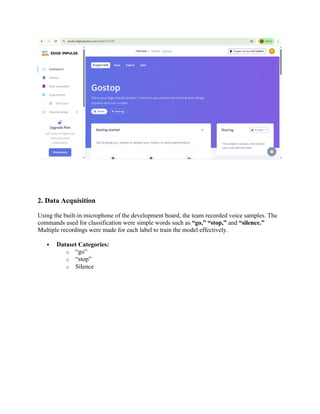
1. Project Creation on Edge Impulse
A new project was created on the Edge Impulse platform. This project serves as the workspace
for collecting data, training models, and deploying to embedded devices.
2. Data Acquisition
Using the built-in microphone of the development board, the team recorded voice samples. The
commands used for classification were simple words such as “go,” “stop,” and “silence.”
Multiple recordings were made for each label to train the model effectively.
 Dataset Categories:
o “go”
o “stop”
o Silence
3. Impulse Design
In the Impulse Design tab:
 A MFCC (Mel Frequency Cepstral Coefficients) block was added to extract features
from audio signals.
 A Classification (NN Classifier) block was used to interpret the features and classify
them into the respective labels.
4. Data Processing Configuration
Under the MFCC Block:
 Frame length, frame stride, and number of coefficients were configured.
 A preview of the MFCC transformation helped in verifying the data quality.
5. Neural Network Configuration
A simple feed-forward neural network was used:
 Input: MFCC features
 Hidden layers: Configured with standard settings
 Output: Softmax layer for classification into "go", "stop", or "silence"
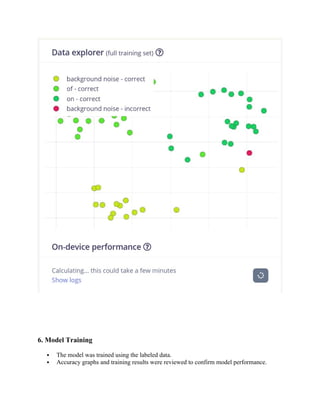
6. Model Training
 Model was trained on the collected and labeled dataset.
 The training accuracy, validation loss, and confusion matrix were reviewed.
 Model achieved reasonable classification accuracy for distinguishing commands.
7. Model Testing
The trained model was tested on new audio samples.
The prediction results showed high accuracy with correct classification of spoken commands.
The testing phase confirmed that the model could reliably differentiate between "go" and
"stop" commands.
8. Deployment to Microcontroller
 The trained model was deployed as an Arduino library.
 The library was integrated into the Arduino IDE and flashed to the microcontroller.
 Real-time voice commands were now processed directly on the edge device.
Arduino Code:
/* Edge Impulse ingestion SDK
* Copyright (c) 2022 EdgeImpulse Inc.
*
* Licensed under the Apache License, Version 2.0 (the "License");
* you may not use this file except in compliance with the License.
* You may obtain a copy of the License at
* http://www.apache.org/licenses/LICENSE-2.0
*
* Unless required by applicable law or agreed to in writing, software
* distributed under the License is distributed on an "AS IS" BASIS,
* WITHOUT WARRANTIES OR CONDITIONS OF ANY KIND, either express or
implied.
* See the License for the specific language governing permissions and
* limitations under the License.
*
*/
// If your target is limited in memory remove this macro to save 10K RAM
#define EIDSP_QUANTIZE_FILTERBANK 0
/**
* Define the number of slices per model window. E.g. a model window of
1000 ms
* with slices per model window set to 4. Results in a slice size of 250
ms.
* For more info: https://docs.edgeimpulse.com/docs/continuous-audio-
sampling
*/
#define EI_CLASSIFIER_SLICES_PER_MODEL_WINDOW 4
/*
** NOTE: If you run into TFLite arena allocation issue.
**
** This may be due to may dynamic memory fragmentation.
** Try defining "-DEI_CLASSIFIER_ALLOCATION_STATIC" in boards.local.txt
(create
** if it doesn't exist) and copy this file to
**
`<ARDUINO_CORE_INSTALL_PATH>/arduino/hardware/<mbed_core>/<core_version>/
`.
**
** See
** (https://support.arduino.cc/hc/en-us/articles/360012076960-Where-are-
the-installed-cores-located-)
** to find where Arduino installs cores on your machine.
**
** If the problem persists then there's not enough memory for this model
and application.
*/
/* Includes
---------------------------------------------------------------- */
#include <PDM.h>
#include <Gostop_inferencing.h>
/** Audio buffers, pointers and selectors */
typedef struct {
signed short *buffers[2];
unsigned char buf_select;
unsigned char buf_ready;
unsigned int buf_count;
unsigned int n_samples;
} inference_t;
static inference_t inference;
static bool record_ready = false;
static signed short *sampleBuffer;
static bool debug_nn = false; // Set this to true to see e.g. features
generated from the raw signal
static int print_results = -(EI_CLASSIFIER_SLICES_PER_MODEL_WINDOW);
/**
* @brief Arduino setup function
*/
void setup()
{
// put your setup code here, to run once:
Serial.begin(115200);
// comment out the below line to cancel the wait for USB connection
(needed for native USB)
while (!Serial);
Serial.println("Edge Impulse Inferencing Demo");
// summary of inferencing settings (from model_metadata.h)
ei_printf("Inferencing settings:n");
ei_printf("tInterval: %.2f ms.n", (float)EI_CLASSIFIER_INTERVAL_MS);
ei_printf("tFrame size: %dn", EI_CLASSIFIER_DSP_INPUT_FRAME_SIZE);
ei_printf("tSample length: %d ms.n",
EI_CLASSIFIER_RAW_SAMPLE_COUNT / 16);
ei_printf("tNo. of classes: %dn",
sizeof(ei_classifier_inferencing_categories) /
sizeof(ei_classifier_inferencing_categories[0]));
run_classifier_init();
if (microphone_inference_start(EI_CLASSIFIER_SLICE_SIZE) == false) {
ei_printf("ERR: Could not allocate audio buffer (size %d), this
could be due to the window length of your modelrn",
EI_CLASSIFIER_RAW_SAMPLE_COUNT);
return;
}
}
/**
* @brief Arduino main function. Runs the inferencing loop.
*/
void loop()
{
bool m = microphone_inference_record();
if (!m) {
ei_printf("ERR: Failed to record audio...n");
return;
}
signal_t signal;
signal.total_length = EI_CLASSIFIER_SLICE_SIZE;
signal.get_data = &microphone_audio_signal_get_data;
ei_impulse_result_t result = {0};
EI_IMPULSE_ERROR r = run_classifier_continuous(&signal, &result,
debug_nn);
if (r != EI_IMPULSE_OK) {
ei_printf("ERR: Failed to run classifier (%d)n", r);
return;
}
if (++print_results >= (EI_CLASSIFIER_SLICES_PER_MODEL_WINDOW)) {
// print the predictions
ei_printf("Predictions ");
ei_printf("(DSP: %d ms., Classification: %d ms., Anomaly: %d
ms.)",
result.timing.dsp, result.timing.classification,
result.timing.anomaly);
ei_printf(": n");
for (size_t ix = 0; ix < EI_CLASSIFIER_LABEL_COUNT; ix++) {
ei_printf(" %s: %.5fn", result.classification[ix].label,
result.classification[ix].value);
}
#if EI_CLASSIFIER_HAS_ANOMALY == 1
ei_printf(" anomaly score: %.3fn", result.anomaly);
#endif
print_results = 0;
}
}
/**
* @brief PDM buffer full callback
* Get data and call audio thread callback
*/
static void pdm_data_ready_inference_callback(void)
{
int bytesAvailable = PDM.available();
// read into the sample buffer
int bytesRead = PDM.read((char *)&sampleBuffer[0], bytesAvailable);
if (record_ready == true) {
for (int i = 0; i<bytesRead>> 1; i++) {
inference.buffers[inference.buf_select][inference.buf_count++]
= sampleBuffer[i];
if (inference.buf_count >= inference.n_samples) {
inference.buf_select ^= 1;
inference.buf_count = 0;
inference.buf_ready = 1;
}
}
}
}
/**
* @brief Init inferencing struct and setup/start PDM
*
* @param[in] n_samples The n samples
*
* @return { description_of_the_return_value }
*/
static bool microphone_inference_start(uint32_t n_samples)
{
inference.buffers[0] = (signed short *)malloc(n_samples *
sizeof(signed short));
if (inference.buffers[0] == NULL) {
return false;
}
inference.buffers[1] = (signed short *)malloc(n_samples *
sizeof(signed short));
if (inference.buffers[1] == NULL) {
free(inference.buffers[0]);
return false;
}
sampleBuffer = (signed short *)malloc((n_samples >> 1) * sizeof(signed
short));
if (sampleBuffer == NULL) {
free(inference.buffers[0]);
free(inference.buffers[1]);
return false;
}
inference.buf_select = 0;
inference.buf_count = 0;
inference.n_samples = n_samples;
inference.buf_ready = 0;
// configure the data receive callback
PDM.onReceive(&pdm_data_ready_inference_callback);
PDM.setBufferSize((n_samples >> 1) * sizeof(int16_t));
// initialize PDM with:
// - one channel (mono mode)
// - a 16 kHz sample rate
if (!PDM.begin(1, EI_CLASSIFIER_FREQUENCY)) {
ei_printf("Failed to start PDM!");
}
// set the gain, defaults to 20
PDM.setGain(127);
record_ready = true;
return true;
}
/**
* @brief Wait on new data
*
* @return True when finished
*/
static bool microphone_inference_record(void)
{
bool ret = true;
if (inference.buf_ready == 1) {
ei_printf(
"Error sample buffer overrun. Decrease the number of slices
per model window "
"(EI_CLASSIFIER_SLICES_PER_MODEL_WINDOW)n");
ret = false;
}
while (inference.buf_ready == 0) {
delay(1);
}
inference.buf_ready = 0;
return ret;
}
/**
* Get raw audio signal data
*/
static int microphone_audio_signal_get_data(size_t offset, size_t length,
float *out_ptr)
{
numpy::int16_to_float(&inference.buffers[inference.buf_select ^ 1]
[offset], out_ptr, length);
return 0;
}
/**
* @brief Stop PDM and release buffers
*/
static void microphone_inference_end(void)
{
PDM.end();
free(inference.buffers[0]);
free(inference.buffers[1]);
free(sampleBuffer);
}
#if !defined(EI_CLASSIFIER_SENSOR) || EI_CLASSIFIER_SENSOR !=
EI_CLASSIFIER_SENSOR_MICROPHONE
#error "Invalid model for current sensor."
#endif
Task 2:
Objective
To develop a voice-controlled LED system using machine learning. The system is trained to
recognize voice commands (“on,” “off”) and control an LED connected to the Arduino Nano 33
BLE Sense board accordingly.
Hardware Requirements
 Development Board: Arduino Nano 33 BLE Sense
 LED Pin: D13 (Onboard LED)
 Power Supply: 3.3V and GND
Step-by-Step Implementation
Step 1: Create Project
 Navigate to Edge Impulse Studio
 Create a new project named "Voice Control"
 Select Arduino Nano 33 BLE Sense as the target device
Step 2: Data Acquisition
 Go to the Data Acquisition tab
 Record voice samples for the following three classes:
o “on”
o “off”
o “background noise”
3. Impulse Design
In the Impulse Design section:
 Input: Audio (microphone)
 Processing Block: MFCC (Mel-Frequency Cepstral Coefficients)
 Learning Block: Classification (Neural Network)
4. Data Processing Configuration
 MFCC block parameters were configured for optimal feature extraction.
 After configuring, the “Generate Features” button was used to convert audio samples
into numerical features.
5. Neural Network Configuration
A simple feed-forward neural network was used:
 Input: MFCC features
 Hidden layers: Configured with standard settings
 Output: Softmax layer for classification into "on", "off", or "background noise"
6. Model Training
 The model was trained using the labeled data.
 Accuracy graphs and training results were reviewed to confirm model performance.
7. Model Testing
 The model was tested on new, unseen samples using the Model Testing tab.
 Prediction results were accurate and the confusion matrix showed reliable classification
for “on” and “off” commands.
8. Deployment to Microcontroller
 The model was deployed as an Arduino Library (.zip).
 It was imported into Arduino IDE using Sketch → Include Library → Add .ZIP
Library.
 The model was compiled and flashed onto the Arduino Nano 33 BLE Sense.
Arduino Code:
#include <PDM.h>
#include <Voice_control_inferencing.h> // Replace with your actual library name
#define EIDSP_QUANTIZE_FILTERBANK 0
#define EI_CLASSIFIER_SLICES_PER_MODEL_WINDOW 4
typedef struct {
signed short *buffers[2];
unsigned char buf_select;
unsigned char buf_ready;
unsigned int buf_count;
unsigned int n_samples;
} inference_t;
static inference_t inference;
static bool record_ready = false;
static signed short *sampleBuffer;
static int print_results = -(EI_CLASSIFIER_SLICES_PER_MODEL_WINDOW);
void setup() {
Serial.begin(115200);
pinMode(LED_BUILTIN, OUTPUT);
while (!Serial);
ei_printf("Edge Impulse Continuous Voice Commandn");
run_classifier_init();
if (!microphone_inference_start(EI_CLASSIFIER_SLICE_SIZE)) {
ei_printf("ERR: Audio buffer setup failed!n");
return;
}
}
void loop() {
if (!microphone_inference_record()) {
ei_printf("ERR: Recording failedn");
return;
}
signal_t signal;
signal.total_length = EI_CLASSIFIER_SLICE_SIZE;
signal.get_data = &microphone_audio_signal_get_data;
ei_impulse_result_t result = { 0 };
EI_IMPULSE_ERROR r = run_classifier_continuous(&signal, &result, false);
if (++print_results >= EI_CLASSIFIER_SLICES_PER_MODEL_WINDOW) {
for (size_t ix = 0; ix < EI_CLASSIFIER_LABEL_COUNT; ix++) {
ei_printf(" %s: %.2fn", result.classification[ix].label, result.classification[ix].value);
// Act on high-confidence predictions
if (result.classification[ix].value > 0.8) {
if (strcmp(result.classification[ix].label, "on") == 0) {
digitalWrite(LED_BUILTIN, HIGH);
} else if (strcmp(result.classification[ix].label, "off") == 0) {
digitalWrite(LED_BUILTIN, LOW);
}
}
}
print_results = 0;
}
}
// --- PDM Microphone Setup & Callbacks ---
static void pdm_data_ready_inference_callback(void) {
int bytesAvailable = PDM.available();
int bytesRead = PDM.read((char *)sampleBuffer, bytesAvailable);
if (record_ready) {
for (int i = 0; i < (bytesRead >> 1); i++) {
inference.buffers[inference.buf_select][inference.buf_count++] = sampleBuffer[i];
if (inference.buf_count >= inference.n_samples) {
inference.buf_select ^= 1;
inference.buf_count = 0;
inference.buf_ready = 1;
}
}
}
}
static bool microphone_inference_start(uint32_t n_samples) {
inference.buffers[0] = (signed short *)malloc(n_samples * sizeof(signed short));
inference.buffers[1] = (signed short *)malloc(n_samples * sizeof(signed short));
sampleBuffer = (signed short *)malloc((n_samples >> 1) * sizeof(signed short));
if (!inference.buffers[0] || !inference.buffers[1] || !sampleBuffer) return false;
inference.buf_select = 0;
inference.buf_count = 0;
inference.n_samples = n_samples;
inference.buf_ready = 0;
PDM.onReceive(&pdm_data_ready_inference_callback);
PDM.setBufferSize((n_samples >> 1) * sizeof(int16_t));
if (!PDM.begin(1, EI_CLASSIFIER_FREQUENCY)) return false;
PDM.setGain(127);
record_ready = true;
return true;
}
static bool microphone_inference_record(void) {
if (inference.buf_ready == 1) {
ei_printf("Error: buffer overrunn");
return false;
}
while (inference.buf_ready == 0) delay(1);
inference.buf_ready = 0;
return true;
}
static int microphone_audio_signal_get_data(size_t offset, size_t length, float *out_ptr) {
numpy::int16_to_float(&inference.buffers[inference.buf_select ^ 1][offset], out_ptr, length);
return 0;
}
9. Circuit Integration
 The onboard LED connected to pin D13 was used.
 Upon speaking the command “on,” the LED turned on.
 Saying “off” successfully turned the LED off.
 This confirmed the integration of voice recognition with hardware control.
Conclusion
This lab successfully demonstrated the deployment of an edge AI voice recognition system on an
embedded device. It allowed hands-free control of an LED using voice commands, showing the
power and simplicity of embedded machine learning.

Implement a voice-controlled system using Edge Impulse’s machine learning platform

  • 1.
    Implement a voice-controlledsystem using Edge Impulse’s machine learning platform Objective To implement a voice-controlled system using Edge Impulse’s machine learning platform and a microcontroller to classify audio commands and perform corresponding actions on a circuit. Tools and Technologies  Edge Impulse Studio (for ML model development)  Microcontroller Board (e.g., Arduino/Nano BLE 33 Sense)  Microphone (for capturing voice data)  USB connection (for deployment and testing) Step-by-Step Implementation 1. Project Creation on Edge Impulse A new project was created on the Edge Impulse platform. This project serves as the workspace for collecting data, training models, and deploying to embedded devices.
  • 2.
    2. Data Acquisition Usingthe built-in microphone of the development board, the team recorded voice samples. The commands used for classification were simple words such as “go,” “stop,” and “silence.” Multiple recordings were made for each label to train the model effectively.  Dataset Categories: o “go” o “stop” o Silence
  • 4.
    3. Impulse Design Inthe Impulse Design tab:  A MFCC (Mel Frequency Cepstral Coefficients) block was added to extract features from audio signals.  A Classification (NN Classifier) block was used to interpret the features and classify them into the respective labels. 4. Data Processing Configuration Under the MFCC Block:  Frame length, frame stride, and number of coefficients were configured.  A preview of the MFCC transformation helped in verifying the data quality.
  • 5.
    5. Neural NetworkConfiguration A simple feed-forward neural network was used:  Input: MFCC features  Hidden layers: Configured with standard settings  Output: Softmax layer for classification into "go", "stop", or "silence"
  • 6.
    6. Model Training Model was trained on the collected and labeled dataset.  The training accuracy, validation loss, and confusion matrix were reviewed.  Model achieved reasonable classification accuracy for distinguishing commands.
  • 7.
    7. Model Testing Thetrained model was tested on new audio samples. The prediction results showed high accuracy with correct classification of spoken commands. The testing phase confirmed that the model could reliably differentiate between "go" and "stop" commands.
  • 8.
    8. Deployment toMicrocontroller  The trained model was deployed as an Arduino library.  The library was integrated into the Arduino IDE and flashed to the microcontroller.  Real-time voice commands were now processed directly on the edge device.
  • 9.
    Arduino Code: /* EdgeImpulse ingestion SDK * Copyright (c) 2022 EdgeImpulse Inc. * * Licensed under the Apache License, Version 2.0 (the "License"); * you may not use this file except in compliance with the License. * You may obtain a copy of the License at * http://www.apache.org/licenses/LICENSE-2.0 *
  • 10.
    * Unless requiredby applicable law or agreed to in writing, software * distributed under the License is distributed on an "AS IS" BASIS, * WITHOUT WARRANTIES OR CONDITIONS OF ANY KIND, either express or implied. * See the License for the specific language governing permissions and * limitations under the License. * */ // If your target is limited in memory remove this macro to save 10K RAM #define EIDSP_QUANTIZE_FILTERBANK 0 /** * Define the number of slices per model window. E.g. a model window of 1000 ms * with slices per model window set to 4. Results in a slice size of 250 ms. * For more info: https://docs.edgeimpulse.com/docs/continuous-audio- sampling */ #define EI_CLASSIFIER_SLICES_PER_MODEL_WINDOW 4 /* ** NOTE: If you run into TFLite arena allocation issue. ** ** This may be due to may dynamic memory fragmentation. ** Try defining "-DEI_CLASSIFIER_ALLOCATION_STATIC" in boards.local.txt (create ** if it doesn't exist) and copy this file to ** `<ARDUINO_CORE_INSTALL_PATH>/arduino/hardware/<mbed_core>/<core_version>/ `. ** ** See ** (https://support.arduino.cc/hc/en-us/articles/360012076960-Where-are- the-installed-cores-located-) ** to find where Arduino installs cores on your machine. ** ** If the problem persists then there's not enough memory for this model and application. */ /* Includes ---------------------------------------------------------------- */ #include <PDM.h>
  • 11.
    #include <Gostop_inferencing.h> /** Audiobuffers, pointers and selectors */ typedef struct { signed short *buffers[2]; unsigned char buf_select; unsigned char buf_ready; unsigned int buf_count; unsigned int n_samples; } inference_t; static inference_t inference; static bool record_ready = false; static signed short *sampleBuffer; static bool debug_nn = false; // Set this to true to see e.g. features generated from the raw signal static int print_results = -(EI_CLASSIFIER_SLICES_PER_MODEL_WINDOW); /** * @brief Arduino setup function */ void setup() { // put your setup code here, to run once: Serial.begin(115200); // comment out the below line to cancel the wait for USB connection (needed for native USB) while (!Serial); Serial.println("Edge Impulse Inferencing Demo"); // summary of inferencing settings (from model_metadata.h) ei_printf("Inferencing settings:n"); ei_printf("tInterval: %.2f ms.n", (float)EI_CLASSIFIER_INTERVAL_MS); ei_printf("tFrame size: %dn", EI_CLASSIFIER_DSP_INPUT_FRAME_SIZE); ei_printf("tSample length: %d ms.n", EI_CLASSIFIER_RAW_SAMPLE_COUNT / 16); ei_printf("tNo. of classes: %dn", sizeof(ei_classifier_inferencing_categories) / sizeof(ei_classifier_inferencing_categories[0])); run_classifier_init(); if (microphone_inference_start(EI_CLASSIFIER_SLICE_SIZE) == false) { ei_printf("ERR: Could not allocate audio buffer (size %d), this could be due to the window length of your modelrn",
  • 12.
    EI_CLASSIFIER_RAW_SAMPLE_COUNT); return; } } /** * @brief Arduinomain function. Runs the inferencing loop. */ void loop() { bool m = microphone_inference_record(); if (!m) { ei_printf("ERR: Failed to record audio...n"); return; } signal_t signal; signal.total_length = EI_CLASSIFIER_SLICE_SIZE; signal.get_data = &microphone_audio_signal_get_data; ei_impulse_result_t result = {0}; EI_IMPULSE_ERROR r = run_classifier_continuous(&signal, &result, debug_nn); if (r != EI_IMPULSE_OK) { ei_printf("ERR: Failed to run classifier (%d)n", r); return; } if (++print_results >= (EI_CLASSIFIER_SLICES_PER_MODEL_WINDOW)) { // print the predictions ei_printf("Predictions "); ei_printf("(DSP: %d ms., Classification: %d ms., Anomaly: %d ms.)", result.timing.dsp, result.timing.classification, result.timing.anomaly); ei_printf(": n"); for (size_t ix = 0; ix < EI_CLASSIFIER_LABEL_COUNT; ix++) { ei_printf(" %s: %.5fn", result.classification[ix].label, result.classification[ix].value); } #if EI_CLASSIFIER_HAS_ANOMALY == 1 ei_printf(" anomaly score: %.3fn", result.anomaly); #endif print_results = 0;
  • 13.
    } } /** * @brief PDMbuffer full callback * Get data and call audio thread callback */ static void pdm_data_ready_inference_callback(void) { int bytesAvailable = PDM.available(); // read into the sample buffer int bytesRead = PDM.read((char *)&sampleBuffer[0], bytesAvailable); if (record_ready == true) { for (int i = 0; i<bytesRead>> 1; i++) { inference.buffers[inference.buf_select][inference.buf_count++] = sampleBuffer[i]; if (inference.buf_count >= inference.n_samples) { inference.buf_select ^= 1; inference.buf_count = 0; inference.buf_ready = 1; } } } } /** * @brief Init inferencing struct and setup/start PDM * * @param[in] n_samples The n samples * * @return { description_of_the_return_value } */ static bool microphone_inference_start(uint32_t n_samples) { inference.buffers[0] = (signed short *)malloc(n_samples * sizeof(signed short)); if (inference.buffers[0] == NULL) { return false; } inference.buffers[1] = (signed short *)malloc(n_samples *
  • 14.
    sizeof(signed short)); if (inference.buffers[1]== NULL) { free(inference.buffers[0]); return false; } sampleBuffer = (signed short *)malloc((n_samples >> 1) * sizeof(signed short)); if (sampleBuffer == NULL) { free(inference.buffers[0]); free(inference.buffers[1]); return false; } inference.buf_select = 0; inference.buf_count = 0; inference.n_samples = n_samples; inference.buf_ready = 0; // configure the data receive callback PDM.onReceive(&pdm_data_ready_inference_callback); PDM.setBufferSize((n_samples >> 1) * sizeof(int16_t)); // initialize PDM with: // - one channel (mono mode) // - a 16 kHz sample rate if (!PDM.begin(1, EI_CLASSIFIER_FREQUENCY)) { ei_printf("Failed to start PDM!"); } // set the gain, defaults to 20 PDM.setGain(127); record_ready = true; return true; } /** * @brief Wait on new data * * @return True when finished
  • 15.
    */ static bool microphone_inference_record(void) { boolret = true; if (inference.buf_ready == 1) { ei_printf( "Error sample buffer overrun. Decrease the number of slices per model window " "(EI_CLASSIFIER_SLICES_PER_MODEL_WINDOW)n"); ret = false; } while (inference.buf_ready == 0) { delay(1); } inference.buf_ready = 0; return ret; } /** * Get raw audio signal data */ static int microphone_audio_signal_get_data(size_t offset, size_t length, float *out_ptr) { numpy::int16_to_float(&inference.buffers[inference.buf_select ^ 1] [offset], out_ptr, length); return 0; } /** * @brief Stop PDM and release buffers */ static void microphone_inference_end(void) { PDM.end(); free(inference.buffers[0]); free(inference.buffers[1]); free(sampleBuffer); }
  • 16.
    #if !defined(EI_CLASSIFIER_SENSOR) ||EI_CLASSIFIER_SENSOR != EI_CLASSIFIER_SENSOR_MICROPHONE #error "Invalid model for current sensor." #endif Task 2: Objective To develop a voice-controlled LED system using machine learning. The system is trained to recognize voice commands (“on,” “off”) and control an LED connected to the Arduino Nano 33 BLE Sense board accordingly. Hardware Requirements  Development Board: Arduino Nano 33 BLE Sense  LED Pin: D13 (Onboard LED)  Power Supply: 3.3V and GND Step-by-Step Implementation Step 1: Create Project  Navigate to Edge Impulse Studio  Create a new project named "Voice Control"  Select Arduino Nano 33 BLE Sense as the target device
  • 17.
    Step 2: DataAcquisition  Go to the Data Acquisition tab  Record voice samples for the following three classes: o “on” o “off” o “background noise”
  • 18.
    3. Impulse Design Inthe Impulse Design section:  Input: Audio (microphone)  Processing Block: MFCC (Mel-Frequency Cepstral Coefficients)  Learning Block: Classification (Neural Network)
  • 19.
    4. Data ProcessingConfiguration  MFCC block parameters were configured for optimal feature extraction.  After configuring, the “Generate Features” button was used to convert audio samples into numerical features.
  • 20.
    5. Neural NetworkConfiguration A simple feed-forward neural network was used:  Input: MFCC features  Hidden layers: Configured with standard settings  Output: Softmax layer for classification into "on", "off", or "background noise"
  • 21.
    6. Model Training The model was trained using the labeled data.  Accuracy graphs and training results were reviewed to confirm model performance.
  • 22.
    7. Model Testing The model was tested on new, unseen samples using the Model Testing tab.  Prediction results were accurate and the confusion matrix showed reliable classification for “on” and “off” commands. 8. Deployment to Microcontroller  The model was deployed as an Arduino Library (.zip).  It was imported into Arduino IDE using Sketch → Include Library → Add .ZIP Library.  The model was compiled and flashed onto the Arduino Nano 33 BLE Sense.
  • 23.
    Arduino Code: #include <PDM.h> #include<Voice_control_inferencing.h> // Replace with your actual library name #define EIDSP_QUANTIZE_FILTERBANK 0 #define EI_CLASSIFIER_SLICES_PER_MODEL_WINDOW 4 typedef struct { signed short *buffers[2]; unsigned char buf_select; unsigned char buf_ready; unsigned int buf_count; unsigned int n_samples; } inference_t; static inference_t inference; static bool record_ready = false; static signed short *sampleBuffer; static int print_results = -(EI_CLASSIFIER_SLICES_PER_MODEL_WINDOW); void setup() {
  • 24.
    Serial.begin(115200); pinMode(LED_BUILTIN, OUTPUT); while (!Serial); ei_printf("EdgeImpulse Continuous Voice Commandn"); run_classifier_init(); if (!microphone_inference_start(EI_CLASSIFIER_SLICE_SIZE)) { ei_printf("ERR: Audio buffer setup failed!n"); return; } } void loop() { if (!microphone_inference_record()) { ei_printf("ERR: Recording failedn"); return; } signal_t signal; signal.total_length = EI_CLASSIFIER_SLICE_SIZE; signal.get_data = &microphone_audio_signal_get_data; ei_impulse_result_t result = { 0 }; EI_IMPULSE_ERROR r = run_classifier_continuous(&signal, &result, false); if (++print_results >= EI_CLASSIFIER_SLICES_PER_MODEL_WINDOW) { for (size_t ix = 0; ix < EI_CLASSIFIER_LABEL_COUNT; ix++) { ei_printf(" %s: %.2fn", result.classification[ix].label, result.classification[ix].value); // Act on high-confidence predictions if (result.classification[ix].value > 0.8) { if (strcmp(result.classification[ix].label, "on") == 0) { digitalWrite(LED_BUILTIN, HIGH); } else if (strcmp(result.classification[ix].label, "off") == 0) { digitalWrite(LED_BUILTIN, LOW); } } } print_results = 0; } } // --- PDM Microphone Setup & Callbacks --- static void pdm_data_ready_inference_callback(void) { int bytesAvailable = PDM.available(); int bytesRead = PDM.read((char *)sampleBuffer, bytesAvailable);
  • 25.
    if (record_ready) { for(int i = 0; i < (bytesRead >> 1); i++) { inference.buffers[inference.buf_select][inference.buf_count++] = sampleBuffer[i]; if (inference.buf_count >= inference.n_samples) { inference.buf_select ^= 1; inference.buf_count = 0; inference.buf_ready = 1; } } } } static bool microphone_inference_start(uint32_t n_samples) { inference.buffers[0] = (signed short *)malloc(n_samples * sizeof(signed short)); inference.buffers[1] = (signed short *)malloc(n_samples * sizeof(signed short)); sampleBuffer = (signed short *)malloc((n_samples >> 1) * sizeof(signed short)); if (!inference.buffers[0] || !inference.buffers[1] || !sampleBuffer) return false; inference.buf_select = 0; inference.buf_count = 0; inference.n_samples = n_samples; inference.buf_ready = 0; PDM.onReceive(&pdm_data_ready_inference_callback); PDM.setBufferSize((n_samples >> 1) * sizeof(int16_t)); if (!PDM.begin(1, EI_CLASSIFIER_FREQUENCY)) return false; PDM.setGain(127); record_ready = true; return true; } static bool microphone_inference_record(void) { if (inference.buf_ready == 1) { ei_printf("Error: buffer overrunn"); return false; } while (inference.buf_ready == 0) delay(1); inference.buf_ready = 0; return true; } static int microphone_audio_signal_get_data(size_t offset, size_t length, float *out_ptr) { numpy::int16_to_float(&inference.buffers[inference.buf_select ^ 1][offset], out_ptr, length); return 0; }
  • 26.
    9. Circuit Integration The onboard LED connected to pin D13 was used.  Upon speaking the command “on,” the LED turned on.  Saying “off” successfully turned the LED off.  This confirmed the integration of voice recognition with hardware control. Conclusion This lab successfully demonstrated the deployment of an edge AI voice recognition system on an embedded device. It allowed hands-free control of an LED using voice commands, showing the power and simplicity of embedded machine learning.