Elasticsearch 
Node 
It refers to a single running instance of Elasticsearch. 
 
Cluster [Database in RDBMS analogy] 
It is a collection of one or more nodes.  
 
Index [Table in RDBMS analogy] 
It is a collection of different types of documents and their properties. Index also uses 
the concept of shards to improve the performance. 
 
Document [Row in RDBMS analogy] 
It is a collection of fields in a specific manner defined in JSON format. Every document
                               
belongs to a type and resides inside an index. Every document is associated with a
                             
unique identifier called the UID. 
 
Shard 
Indexes are horizontally subdivided into shards. This means each shard contains all
                       
the properties of the document but contains less number of JSON objects than index.
                           
The horizontal separation makes shard an independent node, which can be store in
                         
any node. Primary shard is the original horizontal part of an index and then these
                             
primary shards are replicated into replica shards. 
 
Replicas 
Elasticsearch allows a user to create replicas of their indexes and shards. Replication
                         
not only helps in increasing the availability of data in case of failure, but also improves
                               
the performance of searching by carrying out a parallel search operation in these
                         
replicas. 
 
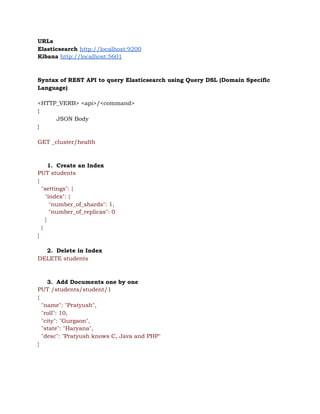
URLs 
Elasticsearch ​http://localhost:9200 
Kibana ​http://localhost:5601 
 
 
Syntax of REST API to query Elasticsearch using Query DSL (Domain Specific 
Language) 
 
<HTTP_VERB> <api>/<command> 
{ 
JSON Body 
} 
 
GET _cluster/health 
 
 
1. Create an Index 
PUT students 
{ 
"settings": { 
"index": { 
"number_of_shards": 1, 
"number_of_replicas": 0 
} 
} 
} 
 
2. Delete in Index 
DELETE students 
 
 
3. Add Documents one by one 
PUT /students/student/1 
{ 
"name": "Pratyush", 
"roll": 10, 
"city": "Gurgaon", 
"state": "Haryana", 
"desc": "Pratyush knows C, Java and PHP" 
} 


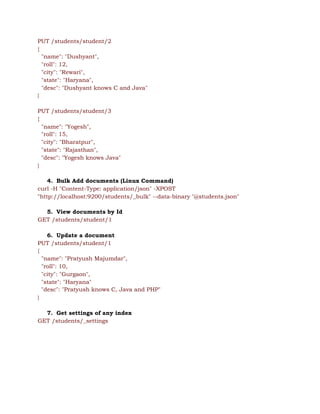
PUT /students/student/2 
{ 
"name": "Dushyant", 
"roll": 12, 
"city": "Rewari", 
"state": "Haryana", 
"desc": "Dushyant knows C and Java" 
} 
 
PUT /students/student/3 
{ 
"name": "Yogesh", 
"roll": 15, 
"city": "Bharatpur", 
"state": "Rajasthan", 
"desc": "Yogesh knows Java" 
} 
 
4. Bulk Add documents (Linux Command) 
curl -H "Content-Type: application/json" -XPOST 
"http://localhost:9200/students/_bulk" --data-binary "@students.json" 
 
5. View documents by Id 
GET /students/student/1 
 
6. Update a document 
PUT /students/student/1 
{ 
"name": "Pratyush Majumdar", 
"roll": 10, 
"city": "Gurgaon", 
"state": "Haryana" 
"desc": "Pratyush knows C, Java and PHP" 
} 
 
7. Get settings of any index 
GET /students/_settings 


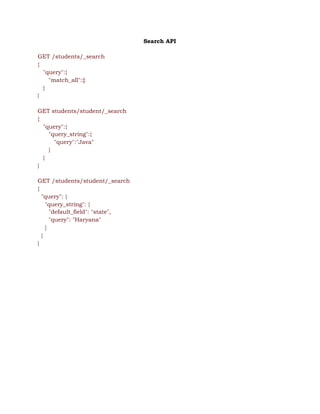
Search API 
 
GET /students/_search 
{ 
"query":{ 
"match_all":{} 
} 
} 
 
GET students/student/_search 
{ 
"query":{ 
"query_string":{ 
"query":"Java" 
} 
} 
} 
 
GET /students/student/_search 
{ 
"query": { 
"query_string": { 
"default_field": "state", 
"query": "Haryana" 
} 
} 
} 


Completion Suggester 
 
1. Mapping query 
 
PUT phones 
{ 
"mappings": { 
"phone" : { 
"properties" : { 
"suggest" : { 
"type" : "completion" 
}, 
"title" : { 
"type": "keyword" 
} 
} 
} 
} 
} 
 
 
2. Add Data with input 
PUT phones/phone/1 
{ 
"name" : "Apple iPhone 12 pro max", 
"suggest" : { 
"input": [  
"Apple",  
"iPhone",  
"Apple iPhone", 
"iPhone 12", 
"pro max", 
"Apple iPhone 12 pro max" 
], 
"weight" : 12 
} 
} 


PUT phones/phone/2 
{ 
"name" : "Apple iPhone 11 pro max", 
"suggest" : { 
"input": [  
"Apple",  
"iPhone",  
"Apple iPhone", 
"iPhone 11", 
"pro max", 
"Apple iPhone 11 pro max" 
], 
"weight" : 11 
} 
} 
 
PUT phones/phone/3 
{ 
"name" : "Apple iPhone X", 
"suggest" : { 
"input": [  
"Apple",  
"iPhone",  
"Apple iPhone", 
"iPhone X", 
"Apple iPhone X" 
], 
"weight" : 10 
} 
} 
 
PUT phones/phone/4 
{ 
"name" : "Apple iPhone 9 Plus", 
"suggest" : { 
"input": [  
"Apple",  
"iPhone",  
"Apple iPhone", 
"iPhone 9", 
"9 Plus", 
"Apple iPhone 9 Plus" 
], 
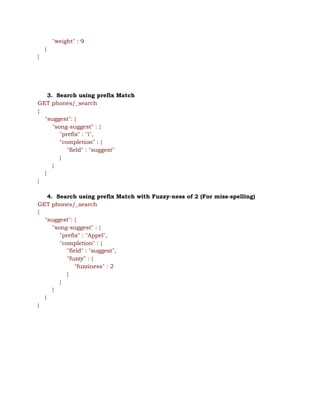
"weight" : 9 
} 
} 


3. Search using prefix Match 
GET phones/_search 
{ 
"suggest": { 
"song-suggest" : { 
"prefix" : "i",  
"completion" : {  
"field" : "suggest" 
} 
} 
} 
} 
 
4. Search using prefix Match with Fuzzy-ness of 2 (For miss-spelling) 
GET phones/_search 
{ 
"suggest": { 
"song-suggest" : { 
"prefix" : "Appel",  
"completion" : {  
"field" : "suggest", 
"fuzzy" : { 
"fuzziness" : 2 
} 
} 
} 
} 
} 


Elasticsearch

  • 1.
    Elasticsearch  Node  It refers toa single running instance of Elasticsearch.    Cluster [Database in RDBMS analogy]  It is a collection of one or more nodes.     Index [Table in RDBMS analogy]  It is a collection of different types of documents and their properties. Index also uses  the concept of shards to improve the performance.    Document [Row in RDBMS analogy]  It is a collection of fields in a specific manner defined in JSON format. Every document                                 belongs to a type and resides inside an index. Every document is associated with a                               unique identifier called the UID.    Shard  Indexes are horizontally subdivided into shards. This means each shard contains all                         the properties of the document but contains less number of JSON objects than index.                             The horizontal separation makes shard an independent node, which can be store in                           any node. Primary shard is the original horizontal part of an index and then these                               primary shards are replicated into replica shards.    Replicas  Elasticsearch allows a user to create replicas of their indexes and shards. Replication                           not only helps in increasing the availability of data in case of failure, but also improves                                 the performance of searching by carrying out a parallel search operation in these                           replicas.   
  • 2.
    URLs  Elasticsearch ​http://localhost:9200  Kibana ​http://localhost:5601      Syntaxof REST API to query Elasticsearch using Query DSL (Domain Specific  Language)    <HTTP_VERB> <api>/<command>  {  JSON Body  }    GET _cluster/health      1. Create an Index  PUT students  {  "settings": {  "index": {  "number_of_shards": 1,  "number_of_replicas": 0  }  }  }    2. Delete in Index  DELETE students      3. Add Documents one by one  PUT /students/student/1  {  "name": "Pratyush",  "roll": 10,  "city": "Gurgaon",  "state": "Haryana",  "desc": "Pratyush knows C, Java and PHP"  }       
  • 3.
    PUT /students/student/2  {  "name": "Dushyant",  "roll":12,  "city": "Rewari",  "state": "Haryana",  "desc": "Dushyant knows C and Java"  }    PUT /students/student/3  {  "name": "Yogesh",  "roll": 15,  "city": "Bharatpur",  "state": "Rajasthan",  "desc": "Yogesh knows Java"  }    4. Bulk Add documents (Linux Command)  curl -H "Content-Type: application/json" -XPOST  "http://localhost:9200/students/_bulk" --data-binary "@students.json"    5. View documents by Id  GET /students/student/1    6. Update a document  PUT /students/student/1  {  "name": "Pratyush Majumdar",  "roll": 10,  "city": "Gurgaon",  "state": "Haryana"  "desc": "Pratyush knows C, Java and PHP"  }    7. Get settings of any index  GET /students/_settings             
  • 4.
    Search API    GET /students/_search  {  "query":{  "match_all":{}  }  }    GETstudents/student/_search  {  "query":{  "query_string":{  "query":"Java"  }  }  }    GET /students/student/_search  {  "query": {  "query_string": {  "default_field": "state",  "query": "Haryana"  }  }  }                                 
  • 5.
    Completion Suggester    1. Mappingquery    PUT phones  {  "mappings": {  "phone" : {  "properties" : {  "suggest" : {  "type" : "completion"  },  "title" : {  "type": "keyword"  }  }  }  }  }      2. Add Data with input  PUT phones/phone/1  {  "name" : "Apple iPhone 12 pro max",  "suggest" : {  "input": [   "Apple",   "iPhone",   "Apple iPhone",  "iPhone 12",  "pro max",  "Apple iPhone 12 pro max"  ],  "weight" : 12  }  }             
  • 6.
    PUT phones/phone/2  {  "name" :"Apple iPhone 11 pro max",  "suggest" : {  "input": [   "Apple",   "iPhone",   "Apple iPhone",  "iPhone 11",  "pro max",  "Apple iPhone 11 pro max"  ],  "weight" : 11  }  }    PUT phones/phone/3  {  "name" : "Apple iPhone X",  "suggest" : {  "input": [   "Apple",   "iPhone",   "Apple iPhone",  "iPhone X",  "Apple iPhone X"  ],  "weight" : 10  }  }    PUT phones/phone/4  {  "name" : "Apple iPhone 9 Plus",  "suggest" : {  "input": [   "Apple",   "iPhone",   "Apple iPhone",  "iPhone 9",  "9 Plus",  "Apple iPhone 9 Plus"  ], 
  • 7.
    "weight" : 9  }  }          3.Search using prefix Match  GET phones/_search  {  "suggest": {  "song-suggest" : {  "prefix" : "i",   "completion" : {   "field" : "suggest"  }  }  }  }    4. Search using prefix Match with Fuzzy-ness of 2 (For miss-spelling)  GET phones/_search  {  "suggest": {  "song-suggest" : {  "prefix" : "Appel",   "completion" : {   "field" : "suggest",  "fuzzy" : {  "fuzziness" : 2  }  }  }  }  }