How to Make a WordPress Theme
Hardeep Asrani
Things we need to start…
➤ WordPress on your system.
➤ A good IDE.
➤ Starter files from Github:
➤ A basic/good knowledge of HTML, CSS and PHP.
What’s a theme in WordPress?
Required Files
➤ style.css
➤ index.php
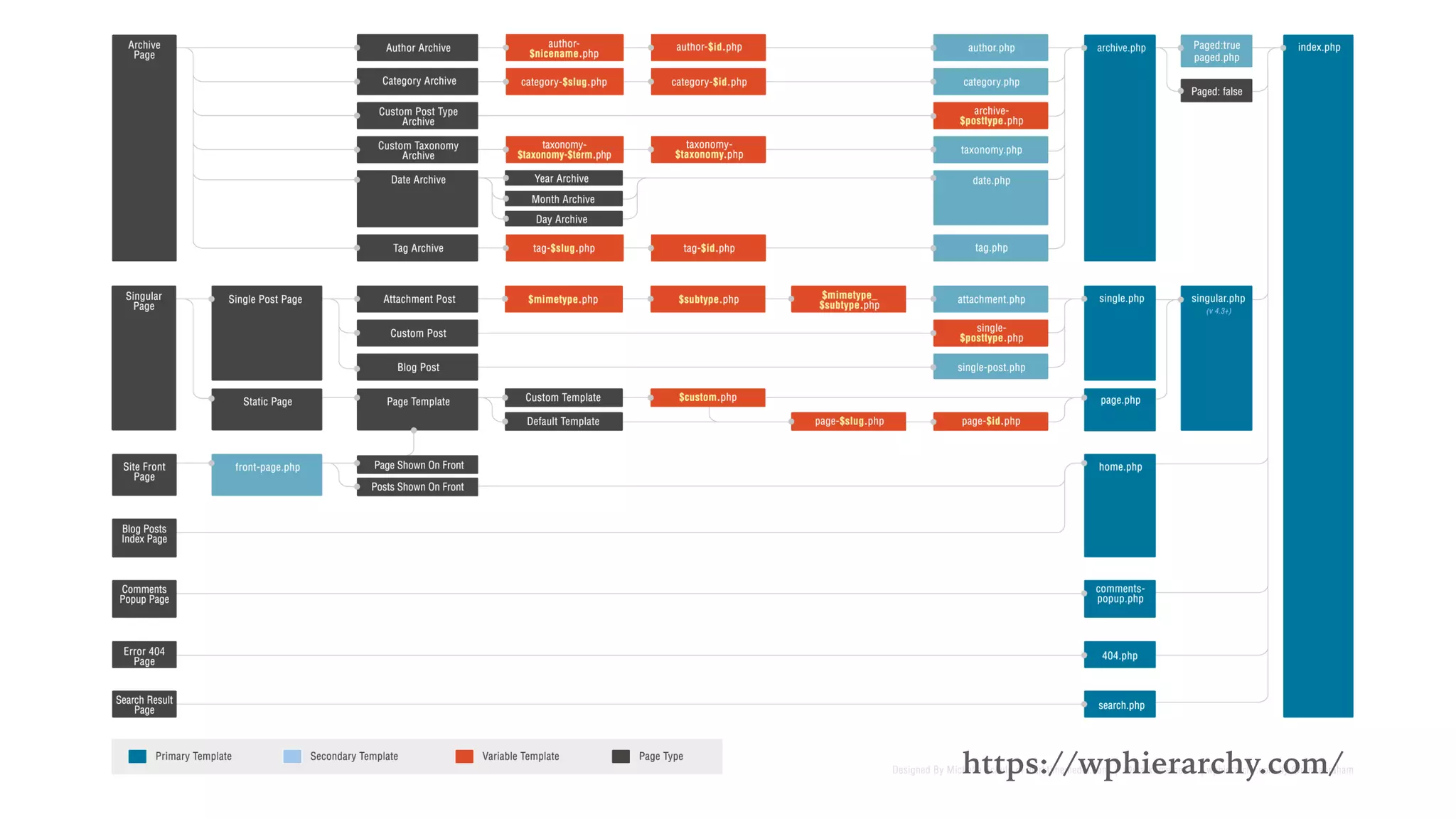
https://wphierarchy.com/
Functions of main files
➤ style.css
➤ index.php
➤ functions.php
➤ header.php
➤ footer.php
➤ single.php
➤ page.php
➤ comments.php
Enough gyaan, let’s start coding.
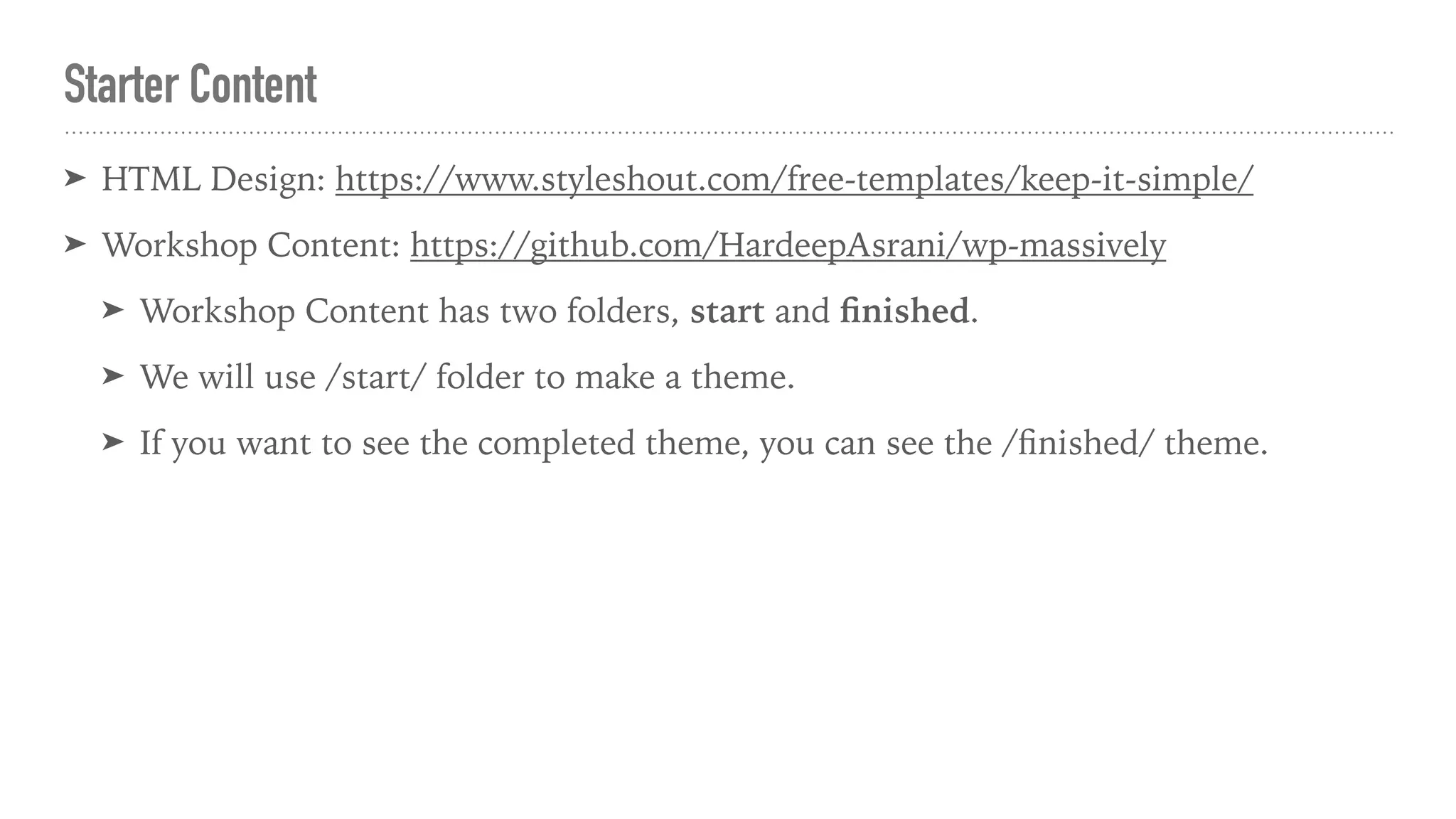
Starter Content
➤ HTML Design: https://www.styleshout.com/free-templates/keep-it-simple/
➤ Workshop Content: https://github.com/HardeepAsrani/wp-massively
➤ Workshop Content has two folders, start and finished.
➤ We will use /start/ folder to make a theme.
➤ If you want to see the completed theme, you can see the /finished/ theme.
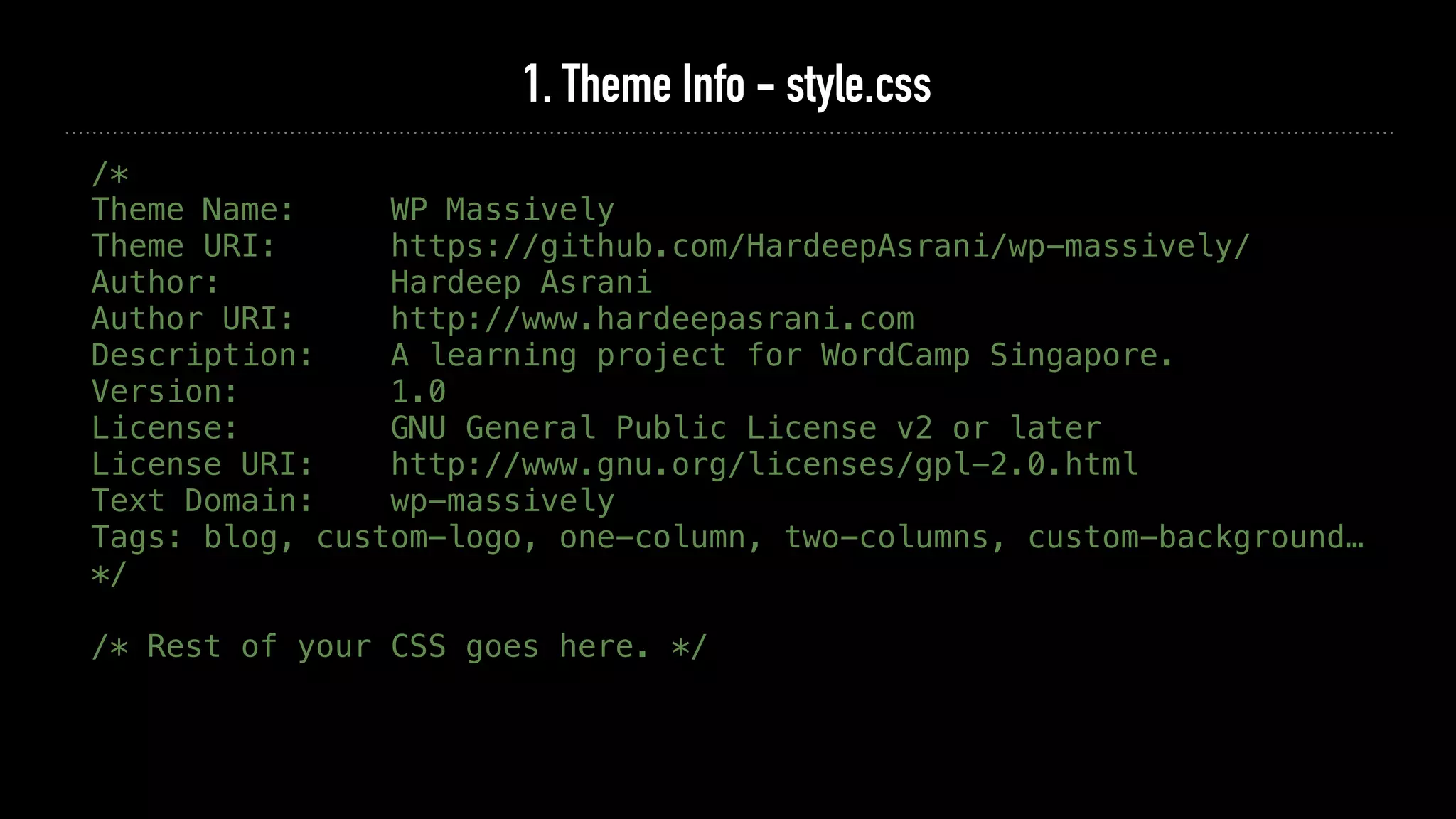
1. Theme Info - style.css
/*
Theme Name: WP Massively
Theme URI: https://github.com/HardeepAsrani/wp-massively/
Author: Hardeep Asrani
Author URI: http://www.hardeepasrani.com
Description: A learning project for WordCamp Singapore.
Version: 1.0
License: GNU General Public License v2 or later
License URI: http://www.gnu.org/licenses/gpl-2.0.html
Text Domain: wp-massively
Tags: blog, custom-logo, one-column, two-columns, custom-background…
*/
/* Rest of your CSS goes here. */
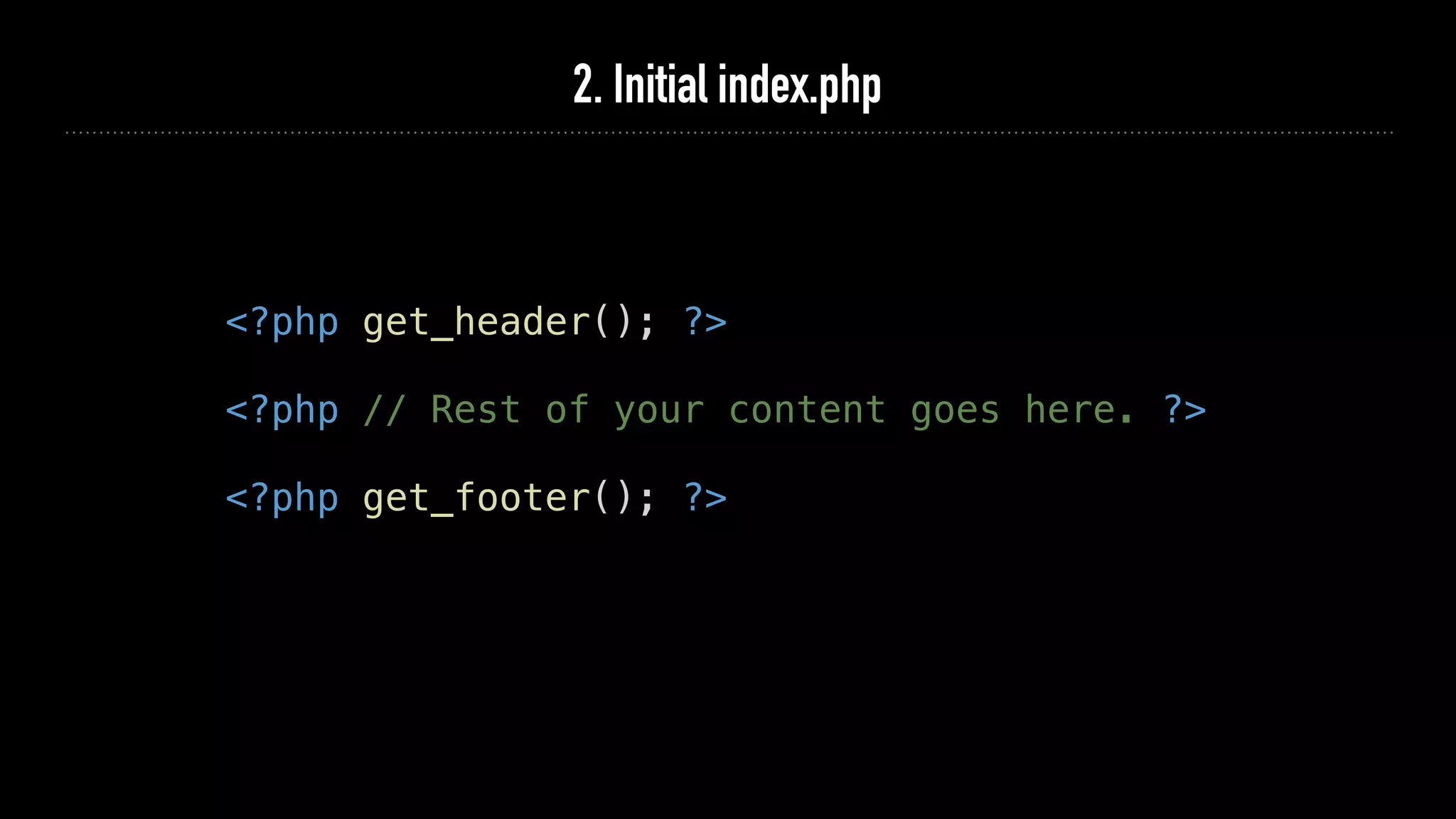
2. Initial index.php
<?php get_header(); ?>
<?php // Rest of your content goes here. ?>
<?php get_footer(); ?>
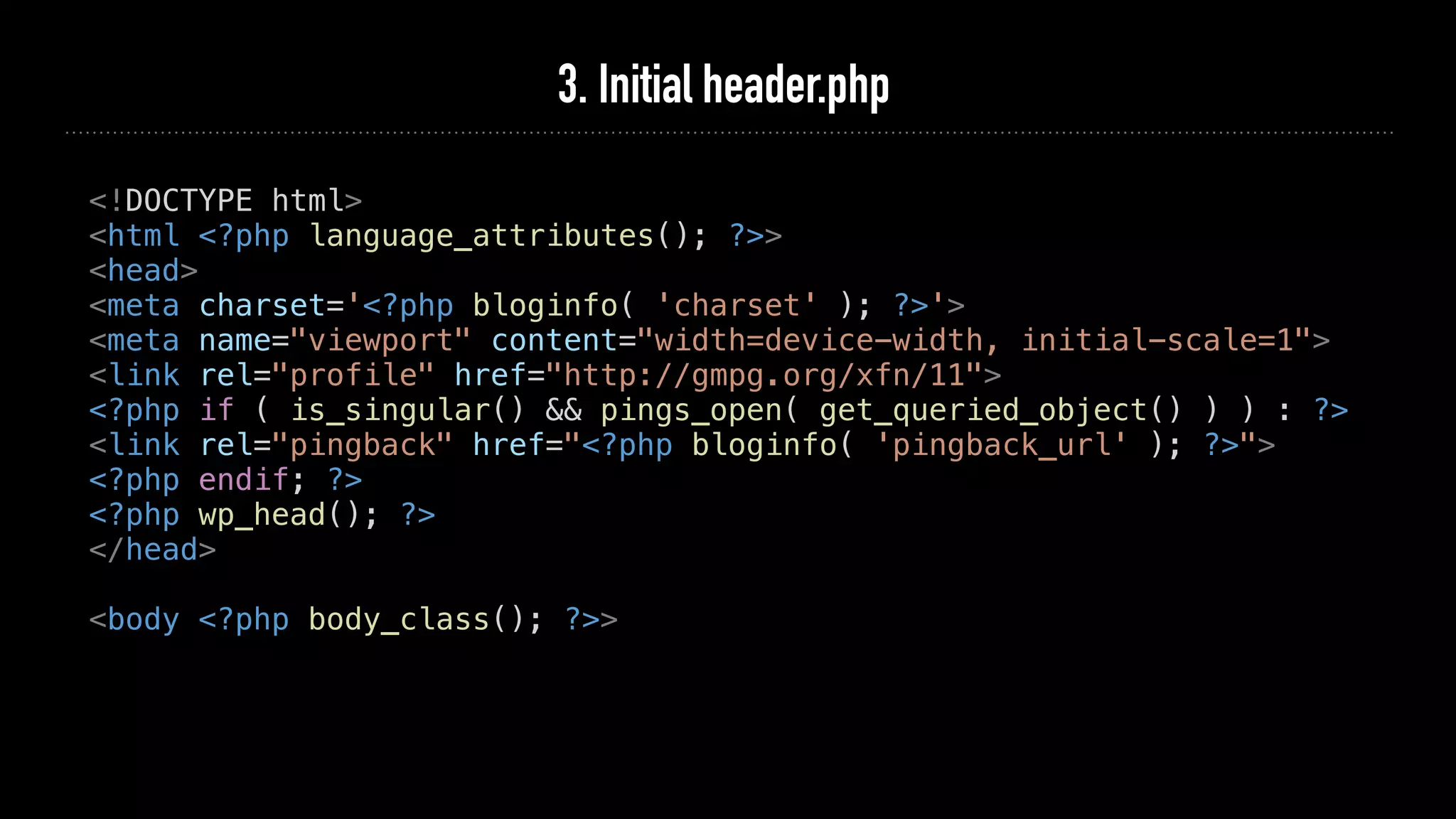
3. Initial header.php
<!DOCTYPE html>
<html <?php language_attributes(); ?>>
<head>
<meta charset='<?php bloginfo( 'charset' ); ?>'>
<meta name="viewport" content="width=device-width, initial-scale=1">
<link rel="profile" href="http://gmpg.org/xfn/11">
<?php if ( is_singular() && pings_open( get_queried_object() ) ) : ?>
<link rel="pingback" href="<?php bloginfo( 'pingback_url' ); ?>">
<?php endif; ?>
<?php wp_head(); ?>
</head>
<body <?php body_class(); ?>>
4. Initial footer.php
<?php wp_footer(); ?>
</body>
</html>
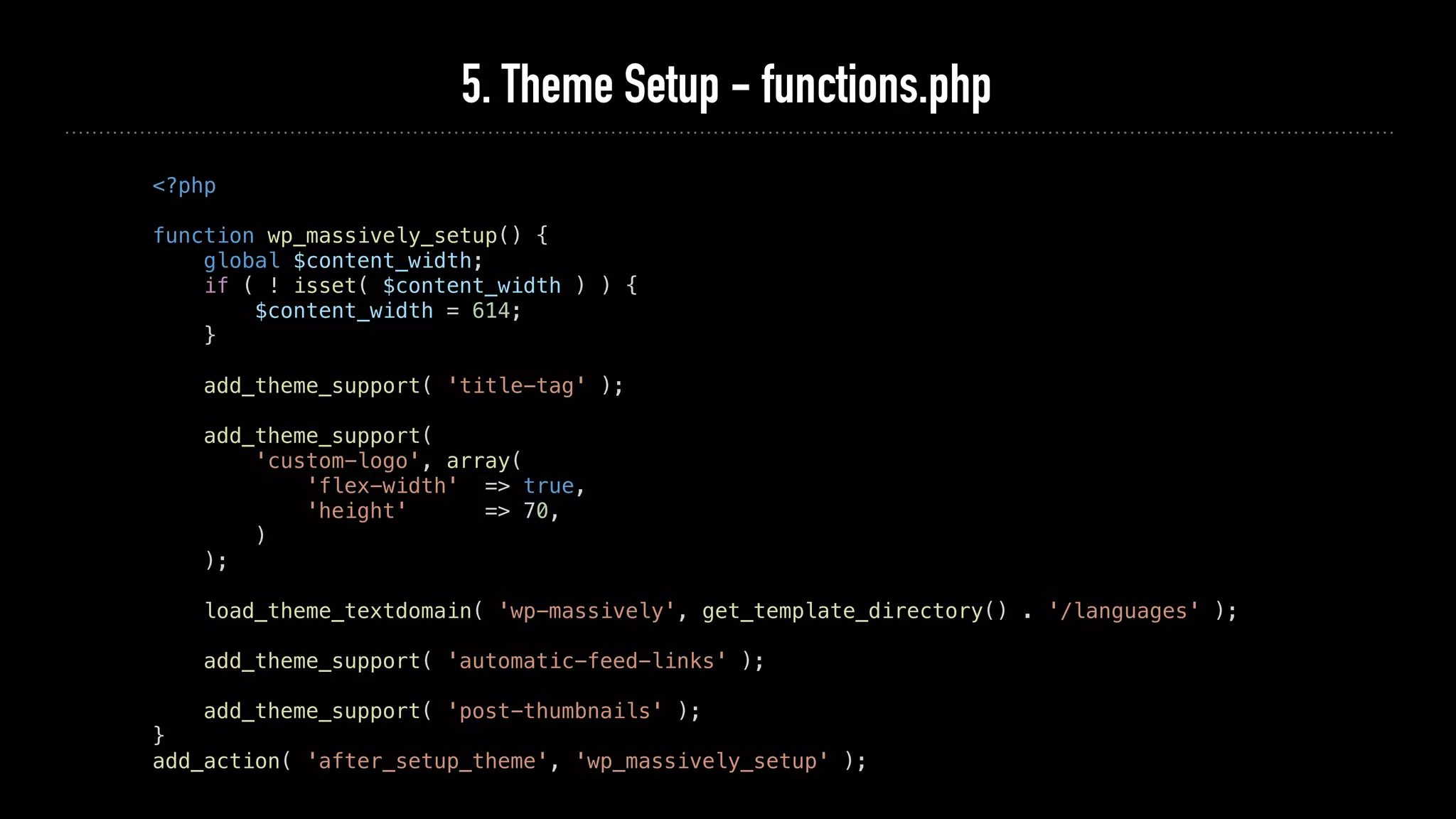
5. Theme Setup - functions.php
<?php
function wp_massively_setup() {
global $content_width;
if ( ! isset( $content_width ) ) {
$content_width = 614;
}
add_theme_support( 'title-tag' );
add_theme_support(
'custom-logo', array(
'flex-width' => true,
'height' => 70,
)
);
load_theme_textdomain( 'wp-massively', get_template_directory() . '/languages' );
add_theme_support( 'automatic-feed-links' );
add_theme_support( 'post-thumbnails' );
}
add_action( 'after_setup_theme', 'wp_massively_setup' );
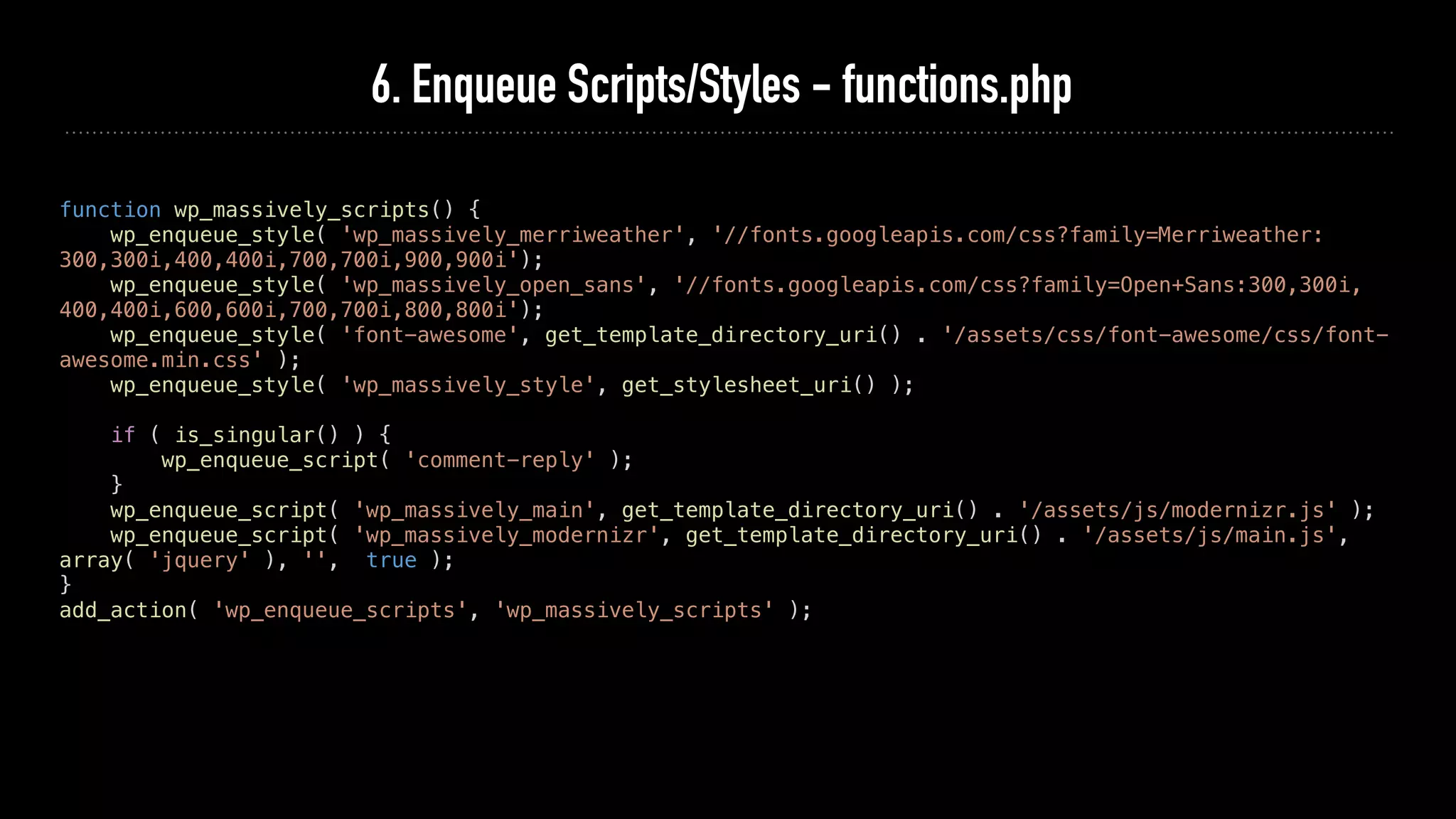
6. Enqueue Scripts/Styles - functions.php
function wp_massively_scripts() {
wp_enqueue_style( 'wp_massively_merriweather', '//fonts.googleapis.com/css?family=Merriweather:
300,300i,400,400i,700,700i,900,900i');
wp_enqueue_style( 'wp_massively_open_sans', '//fonts.googleapis.com/css?family=Open+Sans:300,300i,
400,400i,600,600i,700,700i,800,800i');
wp_enqueue_style( 'font-awesome', get_template_directory_uri() . '/assets/css/font-awesome/css/font-
awesome.min.css' );
wp_enqueue_style( 'wp_massively_style', get_stylesheet_uri() );
if ( is_singular() ) {
wp_enqueue_script( 'comment-reply' );
}
wp_enqueue_script( 'wp_massively_main', get_template_directory_uri() . '/assets/js/modernizr.js' );
wp_enqueue_script( 'wp_massively_modernizr', get_template_directory_uri() . '/assets/js/main.js',
array( 'jquery' ), '', true );
}
add_action( 'wp_enqueue_scripts', 'wp_massively_scripts' );
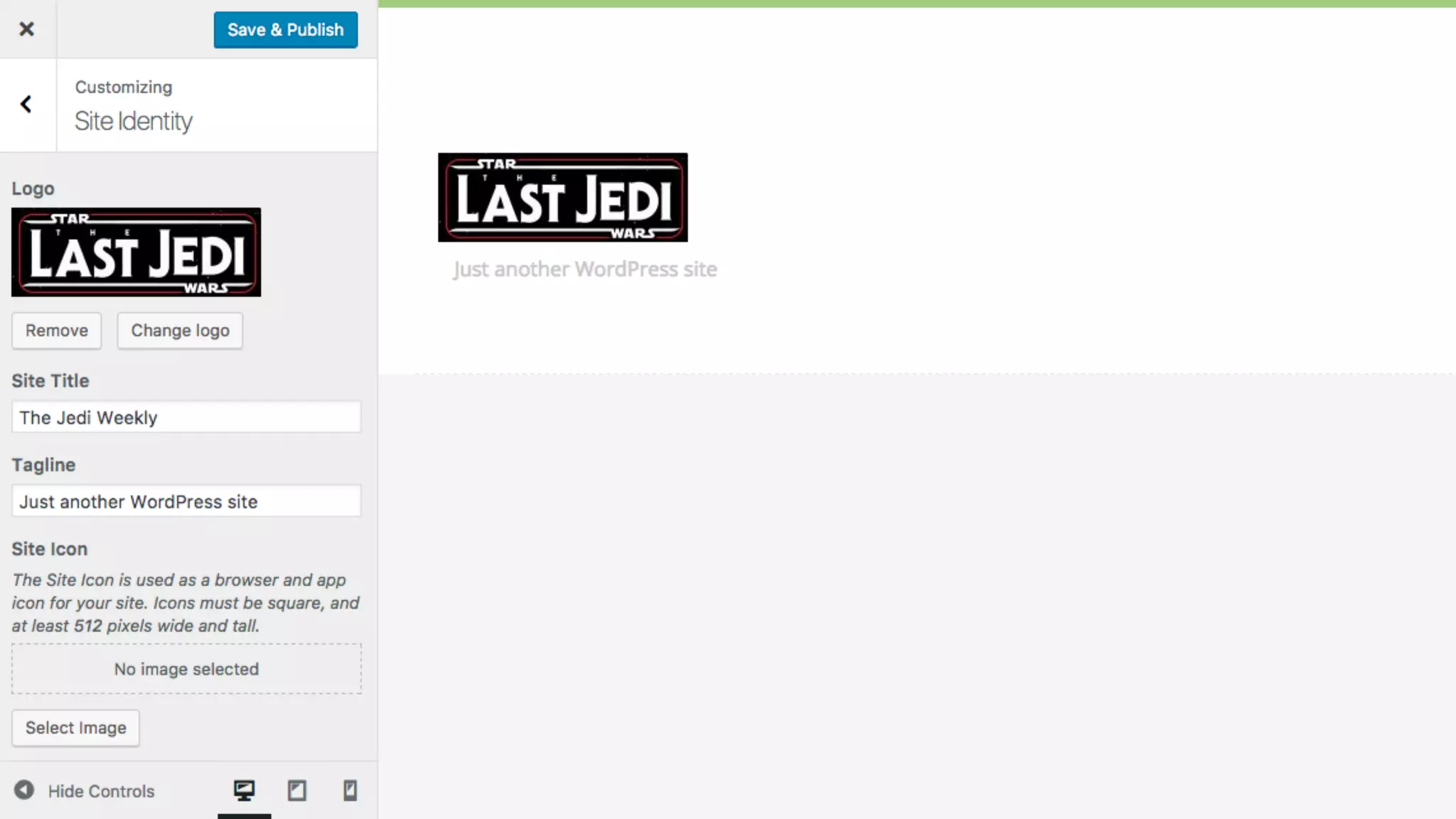
7. Adding Logo to Header - header.php
<body <?php body_class(); ?>>
<header id="top">
<div class="row">
<div class="header-content twelve columns">
<h1 id="logo-text">
<a href="<?php echo esc_url( home_url( '/' ) ); ?>" title="<?php bloginfo( 'name' ); ?>">
<?php
if ( get_theme_mod( 'custom_logo' ) ) {
$logo = wp_get_attachment_image_src( get_theme_mod( 'custom_logo' ), 'full' );
echo '<img src="' . esc_url( $logo[0] ) . '">';
} else {
bloginfo( 'name' );
}
?>
</a>
</h1>
<p id="intro"><?php bloginfo( 'description' ); ?></p>
</div>
</div>
8.1 Adding a Menu - functions.php
register_nav_menus(
array(
'primary' => esc_html__( 'Primary Menu', 'wp- massively' ),
'social' => esc_html__( 'Social Menu', 'wp- massively' ),
)
);
}
add_action( 'after_setup_theme', 'wp_ massively_setup' );
8.2 Adding a Menu - header.php
<p id="intro"><?php bloginfo( 'description' ); ?></p>
</div>          
</div>
<nav id="nav-wrap">
<a class="mobile-btn" href="#nav-wrap" title="<?php echo esc_attr( 'Show Menu', 'wp-
massively' ); ?>">
<?php _e( 'Show Menu', 'wp-massively' ); ?>
</a>
<a class="mobile-btn" href="#" title="<?php echo esc_attr( 'Hide Menu', 'wp-massively' ); ?>">
<?php _e( 'Hide Menu', 'wp-massively' ); ?>
</a>
<div class="row">        
<?php
wp_nav_menu( array(
'theme_location' => 'primary',
'menu' => esc_html__( 'Primary Menu', 'wp- massively' ),
'container' => 'ul',
'menu_class' => 'nav',
'menu_id' => 'nav',
) );
?>
</div>
</nav>
</header>
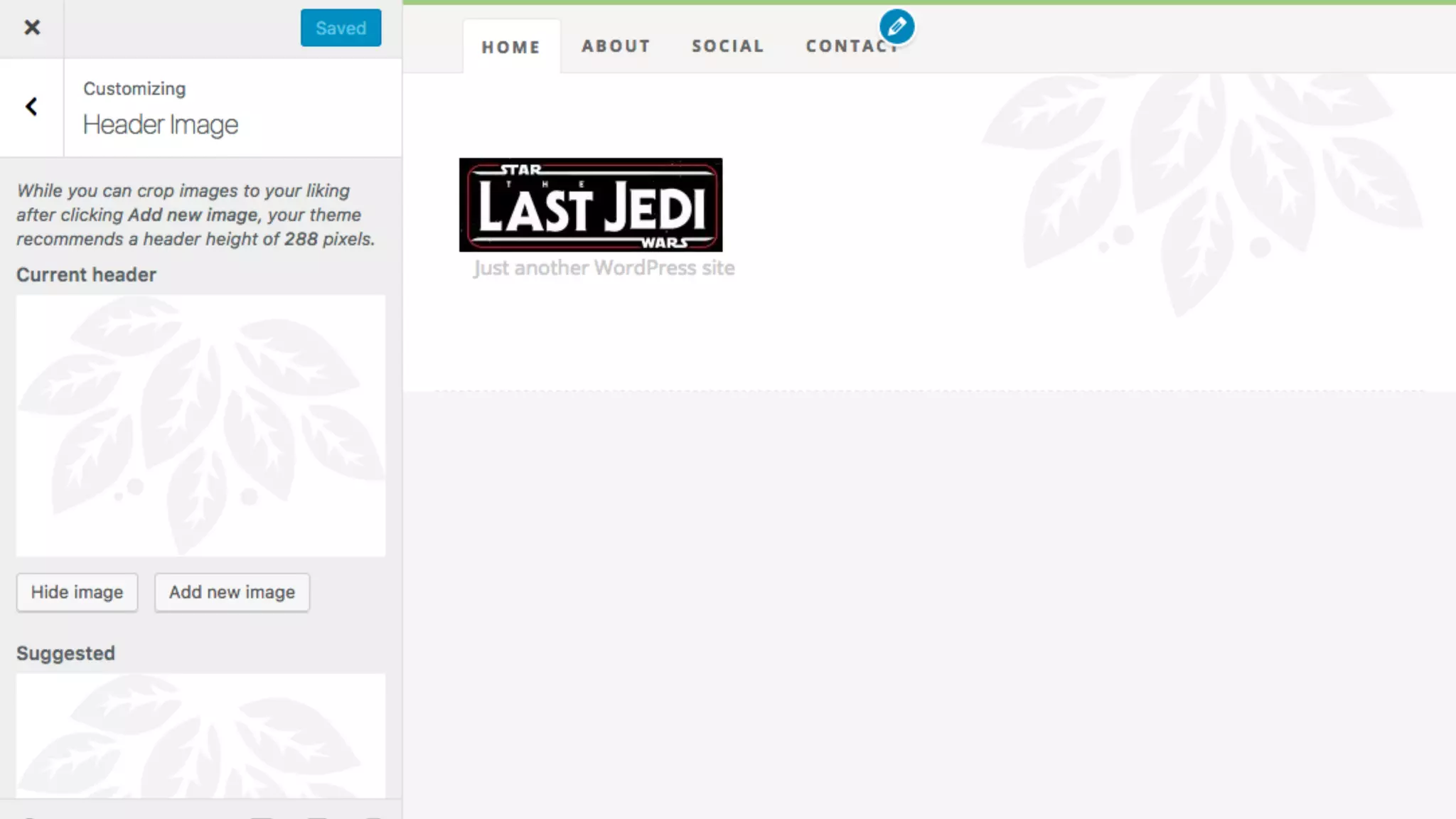
9.1 Adding Header Image/Background - functions.php
add_theme_support(
'custom-background', array(
'default-color' => '#FFFFFF',
)
);
add_theme_support(
'custom-header', array(
'default-image' => get_template_directory_uri() . '/assets/images/header.png',
'height' => 288,
'flex-height' => true,
'header-text' => false,
)
);
}
add_action( 'after_setup_theme', 'wp_ massively_setup' );
9.2 Add Background Image to header-content class - header.php
<div class="header-content twelve columns" style="background-image: url( '<?php header_image(); ?>' );">
10.1 Adding a Social Menu - footer.php
<footer>
<div class="row">
<div class="twelve columns">
<?php
wp_nav_menu( array(
'theme_location' => 'social',
'menu' => esc_html__( 'Social Menu', 'wp- massively' ),
'container' => 'ul',
'menu_class' => 'social-links',
'link_before' => '<span class="screen-reader-text">',
'link_after' => '</span>',
) );
?>
</div>
<p class="copyright"><?php _e( '&copy; Copyright 2017 WP Massively. Design by <a title="Styleshout"
href="http://www.styleshout.com/">Styleshout</a>.', 'wp-massively' ); ?></p>
</div>
<div id="go-top"><a class="smoothscroll" title="Back to Top', 'wp-massively" href="#top"><i class="fa
fa-chevron-up"></i></a></div>
</footer>
<?php wp_footer(); ?>
</body>
</html>
10.2 Adding a Social Menu - style.css
.screen-reader-text {
    clip: rect(1px, 1px, 1px, 1px);
    position: absolute !important;
    height: 1px;
    width: 1px;
    overflow: hidden;
}
footer .social-links a::before {
content: "f1e0";
font-family: 'FontAwesome';
font-size: 16px;
font-size: 1em;
display: block;
width: 20px;
height: 20px;
line-height: 20px;
}
footer .social-links a[href*="twitter.com"]::before {
content: 'f099';
}
11.1 Add Post Loop - index.php
<?php get_header(); ?>
<div id="content-wrap">
<div class="row">
<div id="main" class="eight columns">
<?php
if ( have_posts() ) :
while ( have_posts() ) : the_post();
get_template_part( 'content' );
endwhile;
the_posts_navigation();
else :
get_template_part( 'content', 'none' );
endif;
?>
</div>
</div>
</div>
<?php get_footer(); ?>
11.2 Add Post Loop Content - content.php
<article id="post-<?php the_ID(); ?>" <?php post_class( 'entry' ); ?>>
<header class="entry-header">
<h2 class="entry-title">
<a href="<?php the_permalink();?>" title="<?php the_title();?>"><?php the_title();?></a>
</h2>
<div class="entry-meta">
<ul>
<li><?php echo esc_html( get_the_date() ); ?></li>
<span class="meta-sep">&bull;</span>
<?php $category = get_the_category(); ?>
<li><a href="<?php echo esc_url( get_category_link( $category[0]->term_id ) ); ?>" title="<?php echo
esc_attr( $category[0]->cat_name ); ?>" rel="category tag"><?php echo esc_html( $category[0]->cat_name ); ?></a></li>
<span class="meta-sep">&bull;</span>
<li><?php echo esc_html( get_the_author() ); ?></li>
</ul>
</div>
</header>
<div class="entry-content-media">
<div class="post-thumb">
<?php the_post_thumbnail(); ?>
</div>
</div>
<div class="entry-content">
<?php the_content(); ?>
</div>
</article>
11.3 Add 404 Template - content-none.php
<article class="entry">
<header class="entry-header">
<h2 class="entry-title">
<?php _e( 'Well, that's a shame.', 'wp-massively' ); ?>
</h2>
</header>
<div class="entry-content">
<p><?php _e( 'We weren't able to find what you were looking for.
Perhaps searching might help?', 'wp-massively' ); ?></p>
</div>
<?php get_search_form(); ?>
</article>
12.1 Registering a Widget Area - functions.php
function wp_massively_widgets_init() {
register_sidebar(
array(
'name' => esc_html__( 'Sidebar', 'wp-massively' ),
'id' => 'sidebar-main',
'description' => esc_html__( 'Sidebar widget area.', 'wp-massively' ),
'before_widget' => '<div id="%1$s" class="widget %2$s">',
'after_widget' => '</div>',
'before_title' => '<h3 class="widget-title">',
'after_title' => '</h3>',
)
);
}
add_action( 'widgets_init', 'wp_ massively_widgets_init' );
12.2 Displaying a Sidebar - sidebar.php
<?php
if ( ! is_active_sidebar( 'sidebar-main' ) ) {
return;
}
?>
<div id="sidebar" class="four columns">
<?php dynamic_sidebar( 'sidebar-main' ); ?>
</div>
12.3 Call Sidebar - index.php
<?php get_header(); ?>
<div id="content-wrap">
<div class="row">
<div id="main" class="eight columns">
<?php
if ( have_posts() ) :
while ( have_posts() ) : the_post();
get_template_part( 'content' );
endwhile;
the_posts_navigation();
else :
get_template_part( 'content', 'none' );
endif;
?>
</div>
<?php get_sidebar(); ?>
</div>
</div>
<?php get_footer(); ?>
13.1 Make Single Post - single.php
<?php get_header(); ?>
<div id="content-wrap">
<div class="row">
<div id="main" class="eight columns">
<?php
while ( have_posts() ) : the_post();
get_template_part( 'content', 'single' );
the_post_navigation(
array(
'prev_text' => _x( '<strong>Previous Article</strong><span class="post-title">%title</span>',
'previous post', 'wp-massively' ),
'next_text' => _x( '<strong>Next Article</strong><span class="post-title">%title</span>', 'next
post', 'wp-massively' ),
)
);
if ( comments_open() || get_comments_number() ) :
echo '<div id="comments">';
comments_template();
echo '</div>';
endif;
endwhile;
?>
</div>
<?php get_sidebar(); ?>
</div>
</div>
<?php get_footer(); ?>
13.2 Make Post Content - content-single.php
<article id="post-<?php the_ID(); ?>" <?php post_class( 'entry' ); ?>>
<header class="entry-header">
<h2 class="entry-title">
<?php the_title();?>
</h2>
<div class="entry-meta">
<ul>
<li><?php echo esc_html( get_the_date() ); ?></li>
<span class="meta-sep">&bull;</span>
<?php $category = get_the_category(); ?>
<li><a href="<?php echo esc_url( get_category_link( $category[0]->term_id ) ); ?>" title="<?php echo
esc_attr( $category[0]->cat_name ); ?>" rel="category tag"><?php echo esc_html( $category[0]->cat_name ); ?></a></li>
<span class="meta-sep">&bull;</span>
<li><?php echo esc_html( get_the_author() ); ?></li>
</ul>
</div>
</header>
<div class="entry-content-media">
<div class="post-thumb">
<?php the_post_thumbnail(); ?>
</div>
</div>
<div class="entry-content">
<?php the_content(); ?>
<?php wp_link_pages(); ?>
</div>
<?php the_tags( __( '<div class="tags">Tagged in: ', 'wp-massively' ), ', ', ' </div>'); ?>
</article>
13.3.1 Comment Template - comments.php
<?php
if ( post_password_required() ) {
return;
}
?>
<div id="comments" class="comments-area">
<?php
if ( have_comments() ) : ?>
<h2 class="comments-title">
<?php
$comments_number = get_comments_number();
if ( '1' === $comments_number ) {
printf( _x( 'One Reply to &ldquo;%s&rdquo;', 'comments title', 'wp-massively' ), get_the_title() );
} else {
printf(
_nx(
'%1$s Reply to &ldquo;%2$s&rdquo;',
'%1$s Replies to &ldquo;%2$s&rdquo;',
$comments_number,
'comments title',
'wp-massively'
),
number_format_i18n( $comments_number ),
get_the_title()
);
}
?>
</h2>
13.3.2 Comment Template - comments.php
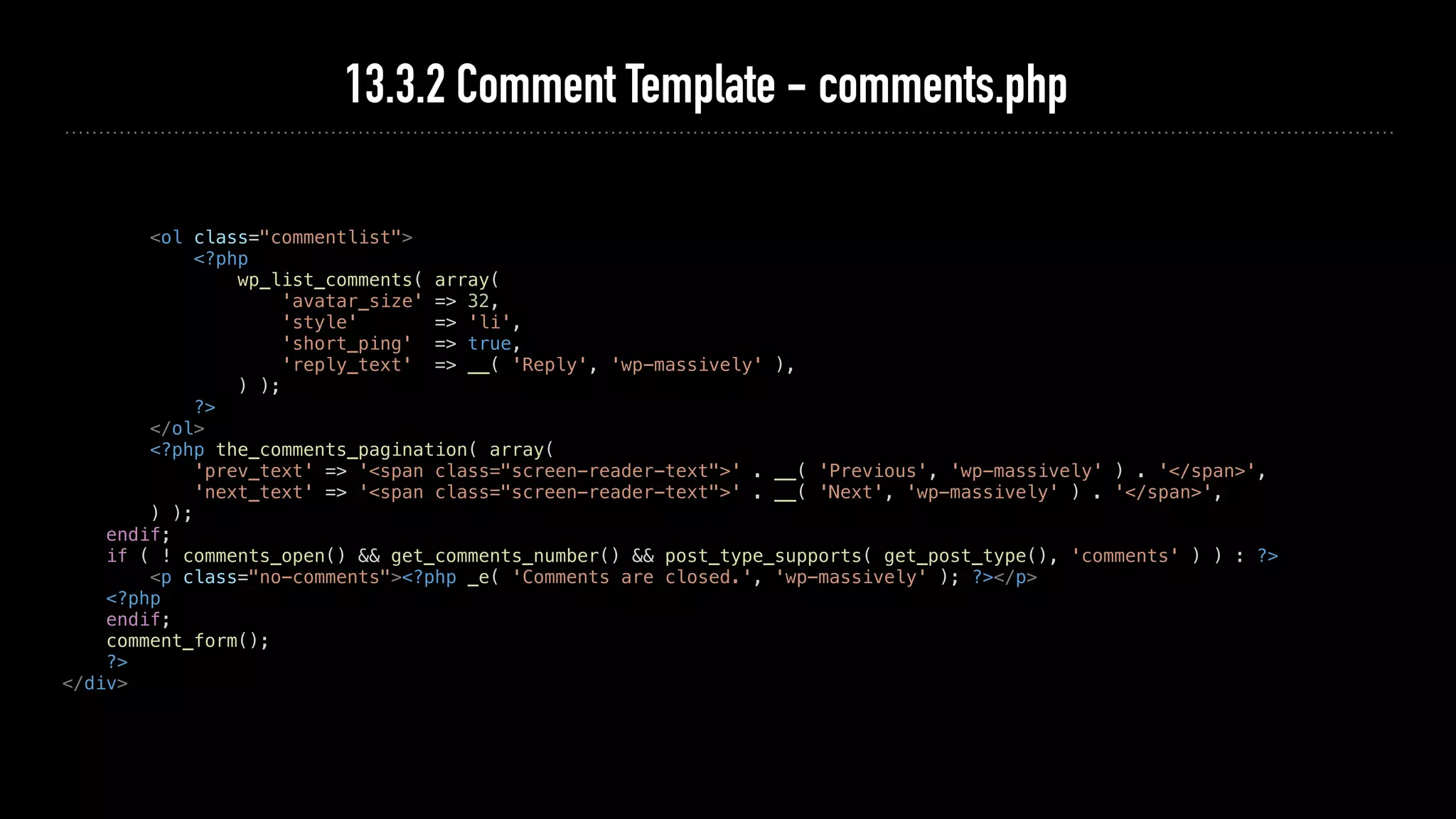
<ol class="commentlist">
<?php
wp_list_comments( array(
'avatar_size' => 32,
'style' => 'li',
'short_ping' => true,
'reply_text' => __( 'Reply', 'wp-massively' ),
) );
?>
</ol>
<?php the_comments_pagination( array(
'prev_text' => '<span class="screen-reader-text">' . __( 'Previous', 'wp-massively' ) . '</span>',
'next_text' => '<span class="screen-reader-text">' . __( 'Next', 'wp-massively' ) . '</span>',
) );
endif;
if ( ! comments_open() && get_comments_number() && post_type_supports( get_post_type(), 'comments' ) ) : ?>
<p class="no-comments"><?php _e( 'Comments are closed.', 'wp-massively' ); ?></p>
<?php
endif;
comment_form();
?>
</div>
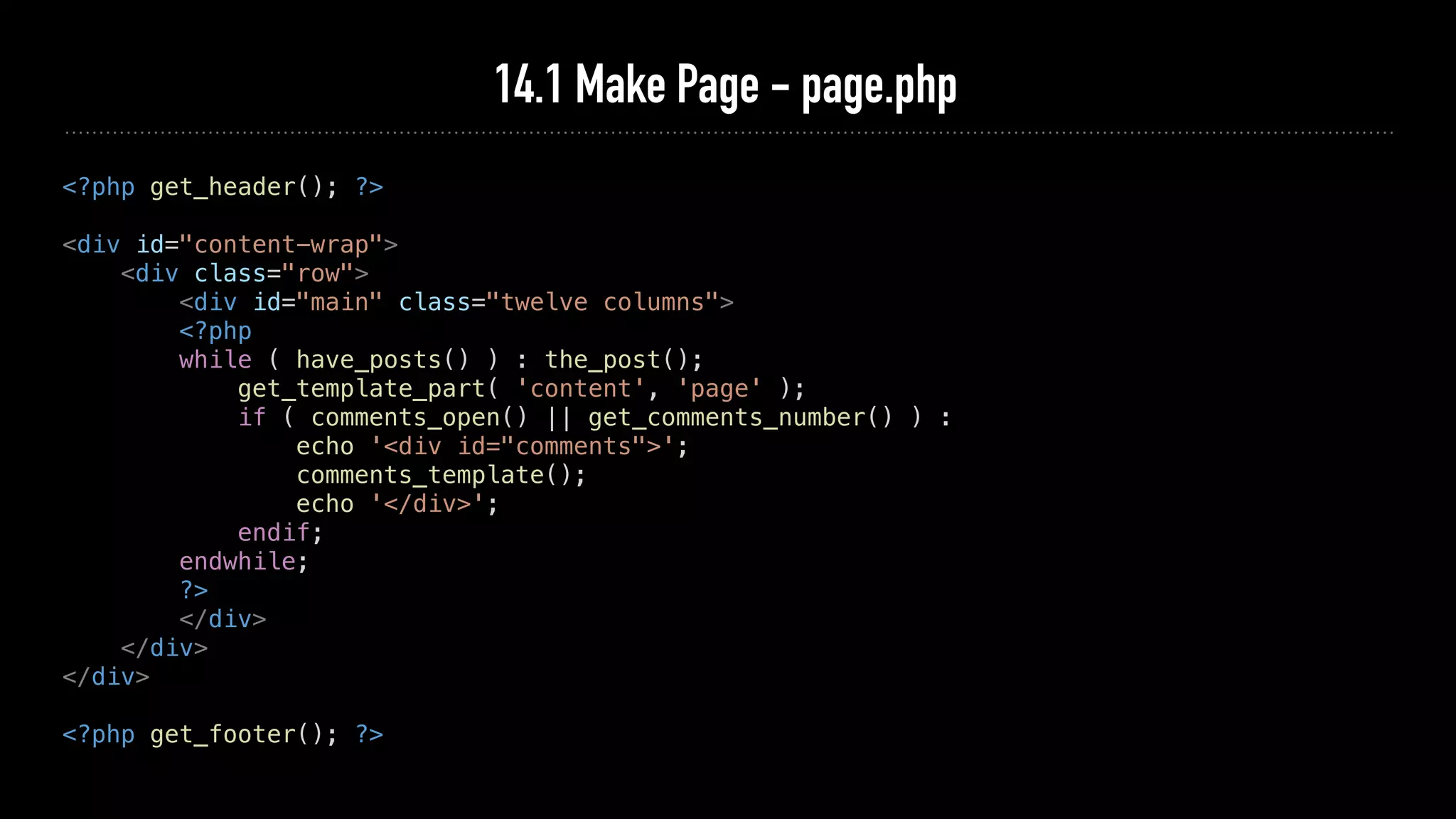
14.1 Make Page - page.php
<?php get_header(); ?>
<div id="content-wrap">
<div class="row">
<div id="main" class="twelve columns">
<?php
while ( have_posts() ) : the_post();
get_template_part( 'content', 'page' );
if ( comments_open() || get_comments_number() ) :
echo '<div id="comments">';
comments_template();
echo '</div>';
endif;
endwhile;
?>
</div>
</div>
</div>
<?php get_footer(); ?>
14.2 Make Page Content - content-page.php
<article id="post-<?php the_ID(); ?>" <?php post_class( 'entry' ); ?>>
<header class="entry-header">
<h1 class="entry-title">
<?php the_title();?>
</h1>
</header>
<div class="entry-content-media">
<div class="post-thumb">
<?php the_post_thumbnail(); ?>
</div>
</div>
<div class="entry-content">
<?php the_content(); ?>
<?php wp_link_pages(); ?>
</div>
</article>
Where to go from here?
➤ WordPress Theme Development Handbook: https://developer.wordpress.org/
themes/getting-started/
➤ WordPress Theme Review Team Guidelines: https://make.wordpress.org/themes/
handbook/review/required/
➤ If you have any questions then standing right in front of you.
➤ Tackling at home and got stuck somewhere? Have any question? Just open an issue
at: https://github.com/HardeepAsrani/wp-massively/issues
I’m Hardeep Asrani
@HardeepAsrani
hardeepasrani.com
Pirate at ThemeIsle.com

How to make a WordPress theme

  • 1.
    How to Makea WordPress Theme Hardeep Asrani
  • 2.
    Things we needto start… ➤ WordPress on your system. ➤ A good IDE. ➤ Starter files from Github: ➤ A basic/good knowledge of HTML, CSS and PHP.
  • 3.
    What’s a themein WordPress?
  • 4.
  • 5.
  • 6.
    Functions of mainfiles ➤ style.css ➤ index.php ➤ functions.php ➤ header.php ➤ footer.php ➤ single.php ➤ page.php ➤ comments.php
  • 7.
    Enough gyaan, let’sstart coding.
  • 8.
    Starter Content ➤ HTMLDesign: https://www.styleshout.com/free-templates/keep-it-simple/ ➤ Workshop Content: https://github.com/HardeepAsrani/wp-massively ➤ Workshop Content has two folders, start and finished. ➤ We will use /start/ folder to make a theme. ➤ If you want to see the completed theme, you can see the /finished/ theme.
  • 9.
    1. Theme Info- style.css /* Theme Name: WP Massively Theme URI: https://github.com/HardeepAsrani/wp-massively/ Author: Hardeep Asrani Author URI: http://www.hardeepasrani.com Description: A learning project for WordCamp Singapore. Version: 1.0 License: GNU General Public License v2 or later License URI: http://www.gnu.org/licenses/gpl-2.0.html Text Domain: wp-massively Tags: blog, custom-logo, one-column, two-columns, custom-background… */ /* Rest of your CSS goes here. */
  • 10.
    2. Initial index.php <?phpget_header(); ?> <?php // Rest of your content goes here. ?> <?php get_footer(); ?>
  • 11.
    3. Initial header.php <!DOCTYPEhtml> <html <?php language_attributes(); ?>> <head> <meta charset='<?php bloginfo( 'charset' ); ?>'> <meta name="viewport" content="width=device-width, initial-scale=1"> <link rel="profile" href="http://gmpg.org/xfn/11"> <?php if ( is_singular() && pings_open( get_queried_object() ) ) : ?> <link rel="pingback" href="<?php bloginfo( 'pingback_url' ); ?>"> <?php endif; ?> <?php wp_head(); ?> </head> <body <?php body_class(); ?>>
  • 12.
    4. Initial footer.php <?phpwp_footer(); ?> </body> </html>
  • 13.
    5. Theme Setup- functions.php <?php function wp_massively_setup() { global $content_width; if ( ! isset( $content_width ) ) { $content_width = 614; } add_theme_support( 'title-tag' ); add_theme_support( 'custom-logo', array( 'flex-width' => true, 'height' => 70, ) ); load_theme_textdomain( 'wp-massively', get_template_directory() . '/languages' ); add_theme_support( 'automatic-feed-links' ); add_theme_support( 'post-thumbnails' ); } add_action( 'after_setup_theme', 'wp_massively_setup' );
  • 14.
    6. Enqueue Scripts/Styles- functions.php function wp_massively_scripts() { wp_enqueue_style( 'wp_massively_merriweather', '//fonts.googleapis.com/css?family=Merriweather: 300,300i,400,400i,700,700i,900,900i'); wp_enqueue_style( 'wp_massively_open_sans', '//fonts.googleapis.com/css?family=Open+Sans:300,300i, 400,400i,600,600i,700,700i,800,800i'); wp_enqueue_style( 'font-awesome', get_template_directory_uri() . '/assets/css/font-awesome/css/font- awesome.min.css' ); wp_enqueue_style( 'wp_massively_style', get_stylesheet_uri() ); if ( is_singular() ) { wp_enqueue_script( 'comment-reply' ); } wp_enqueue_script( 'wp_massively_main', get_template_directory_uri() . '/assets/js/modernizr.js' ); wp_enqueue_script( 'wp_massively_modernizr', get_template_directory_uri() . '/assets/js/main.js', array( 'jquery' ), '', true ); } add_action( 'wp_enqueue_scripts', 'wp_massively_scripts' );
  • 16.
    7. Adding Logoto Header - header.php <body <?php body_class(); ?>> <header id="top"> <div class="row"> <div class="header-content twelve columns"> <h1 id="logo-text"> <a href="<?php echo esc_url( home_url( '/' ) ); ?>" title="<?php bloginfo( 'name' ); ?>"> <?php if ( get_theme_mod( 'custom_logo' ) ) { $logo = wp_get_attachment_image_src( get_theme_mod( 'custom_logo' ), 'full' ); echo '<img src="' . esc_url( $logo[0] ) . '">'; } else { bloginfo( 'name' ); } ?> </a> </h1> <p id="intro"><?php bloginfo( 'description' ); ?></p> </div> </div>
  • 19.
    8.1 Adding aMenu - functions.php register_nav_menus( array( 'primary' => esc_html__( 'Primary Menu', 'wp- massively' ), 'social' => esc_html__( 'Social Menu', 'wp- massively' ), ) ); } add_action( 'after_setup_theme', 'wp_ massively_setup' );
  • 20.
    8.2 Adding aMenu - header.php <p id="intro"><?php bloginfo( 'description' ); ?></p> </div>           </div> <nav id="nav-wrap"> <a class="mobile-btn" href="#nav-wrap" title="<?php echo esc_attr( 'Show Menu', 'wp- massively' ); ?>"> <?php _e( 'Show Menu', 'wp-massively' ); ?> </a> <a class="mobile-btn" href="#" title="<?php echo esc_attr( 'Hide Menu', 'wp-massively' ); ?>"> <?php _e( 'Hide Menu', 'wp-massively' ); ?> </a> <div class="row">         <?php wp_nav_menu( array( 'theme_location' => 'primary', 'menu' => esc_html__( 'Primary Menu', 'wp- massively' ), 'container' => 'ul', 'menu_class' => 'nav', 'menu_id' => 'nav', ) ); ?> </div> </nav> </header>
  • 22.
    9.1 Adding HeaderImage/Background - functions.php add_theme_support( 'custom-background', array( 'default-color' => '#FFFFFF', ) ); add_theme_support( 'custom-header', array( 'default-image' => get_template_directory_uri() . '/assets/images/header.png', 'height' => 288, 'flex-height' => true, 'header-text' => false, ) ); } add_action( 'after_setup_theme', 'wp_ massively_setup' );
  • 23.
    9.2 Add BackgroundImage to header-content class - header.php <div class="header-content twelve columns" style="background-image: url( '<?php header_image(); ?>' );">
  • 25.
    10.1 Adding aSocial Menu - footer.php <footer> <div class="row"> <div class="twelve columns"> <?php wp_nav_menu( array( 'theme_location' => 'social', 'menu' => esc_html__( 'Social Menu', 'wp- massively' ), 'container' => 'ul', 'menu_class' => 'social-links', 'link_before' => '<span class="screen-reader-text">', 'link_after' => '</span>', ) ); ?> </div> <p class="copyright"><?php _e( '&copy; Copyright 2017 WP Massively. Design by <a title="Styleshout" href="http://www.styleshout.com/">Styleshout</a>.', 'wp-massively' ); ?></p> </div> <div id="go-top"><a class="smoothscroll" title="Back to Top', 'wp-massively" href="#top"><i class="fa fa-chevron-up"></i></a></div> </footer> <?php wp_footer(); ?> </body> </html>
  • 26.
    10.2 Adding aSocial Menu - style.css .screen-reader-text {     clip: rect(1px, 1px, 1px, 1px);     position: absolute !important;     height: 1px;     width: 1px;     overflow: hidden; } footer .social-links a::before { content: "f1e0"; font-family: 'FontAwesome'; font-size: 16px; font-size: 1em; display: block; width: 20px; height: 20px; line-height: 20px; } footer .social-links a[href*="twitter.com"]::before { content: 'f099'; }
  • 28.
    11.1 Add PostLoop - index.php <?php get_header(); ?> <div id="content-wrap"> <div class="row"> <div id="main" class="eight columns"> <?php if ( have_posts() ) : while ( have_posts() ) : the_post(); get_template_part( 'content' ); endwhile; the_posts_navigation(); else : get_template_part( 'content', 'none' ); endif; ?> </div> </div> </div> <?php get_footer(); ?>
  • 29.
    11.2 Add PostLoop Content - content.php <article id="post-<?php the_ID(); ?>" <?php post_class( 'entry' ); ?>> <header class="entry-header"> <h2 class="entry-title"> <a href="<?php the_permalink();?>" title="<?php the_title();?>"><?php the_title();?></a> </h2> <div class="entry-meta"> <ul> <li><?php echo esc_html( get_the_date() ); ?></li> <span class="meta-sep">&bull;</span> <?php $category = get_the_category(); ?> <li><a href="<?php echo esc_url( get_category_link( $category[0]->term_id ) ); ?>" title="<?php echo esc_attr( $category[0]->cat_name ); ?>" rel="category tag"><?php echo esc_html( $category[0]->cat_name ); ?></a></li> <span class="meta-sep">&bull;</span> <li><?php echo esc_html( get_the_author() ); ?></li> </ul> </div> </header> <div class="entry-content-media"> <div class="post-thumb"> <?php the_post_thumbnail(); ?> </div> </div> <div class="entry-content"> <?php the_content(); ?> </div> </article>
  • 31.
    11.3 Add 404Template - content-none.php <article class="entry"> <header class="entry-header"> <h2 class="entry-title"> <?php _e( 'Well, that's a shame.', 'wp-massively' ); ?> </h2> </header> <div class="entry-content"> <p><?php _e( 'We weren't able to find what you were looking for. Perhaps searching might help?', 'wp-massively' ); ?></p> </div> <?php get_search_form(); ?> </article>
  • 33.
    12.1 Registering aWidget Area - functions.php function wp_massively_widgets_init() { register_sidebar( array( 'name' => esc_html__( 'Sidebar', 'wp-massively' ), 'id' => 'sidebar-main', 'description' => esc_html__( 'Sidebar widget area.', 'wp-massively' ), 'before_widget' => '<div id="%1$s" class="widget %2$s">', 'after_widget' => '</div>', 'before_title' => '<h3 class="widget-title">', 'after_title' => '</h3>', ) ); } add_action( 'widgets_init', 'wp_ massively_widgets_init' );
  • 34.
    12.2 Displaying aSidebar - sidebar.php <?php if ( ! is_active_sidebar( 'sidebar-main' ) ) { return; } ?> <div id="sidebar" class="four columns"> <?php dynamic_sidebar( 'sidebar-main' ); ?> </div>
  • 35.
    12.3 Call Sidebar- index.php <?php get_header(); ?> <div id="content-wrap"> <div class="row"> <div id="main" class="eight columns"> <?php if ( have_posts() ) : while ( have_posts() ) : the_post(); get_template_part( 'content' ); endwhile; the_posts_navigation(); else : get_template_part( 'content', 'none' ); endif; ?> </div> <?php get_sidebar(); ?> </div> </div> <?php get_footer(); ?>
  • 37.
    13.1 Make SinglePost - single.php <?php get_header(); ?> <div id="content-wrap"> <div class="row"> <div id="main" class="eight columns"> <?php while ( have_posts() ) : the_post(); get_template_part( 'content', 'single' ); the_post_navigation( array( 'prev_text' => _x( '<strong>Previous Article</strong><span class="post-title">%title</span>', 'previous post', 'wp-massively' ), 'next_text' => _x( '<strong>Next Article</strong><span class="post-title">%title</span>', 'next post', 'wp-massively' ), ) ); if ( comments_open() || get_comments_number() ) : echo '<div id="comments">'; comments_template(); echo '</div>'; endif; endwhile; ?> </div> <?php get_sidebar(); ?> </div> </div> <?php get_footer(); ?>
  • 38.
    13.2 Make PostContent - content-single.php <article id="post-<?php the_ID(); ?>" <?php post_class( 'entry' ); ?>> <header class="entry-header"> <h2 class="entry-title"> <?php the_title();?> </h2> <div class="entry-meta"> <ul> <li><?php echo esc_html( get_the_date() ); ?></li> <span class="meta-sep">&bull;</span> <?php $category = get_the_category(); ?> <li><a href="<?php echo esc_url( get_category_link( $category[0]->term_id ) ); ?>" title="<?php echo esc_attr( $category[0]->cat_name ); ?>" rel="category tag"><?php echo esc_html( $category[0]->cat_name ); ?></a></li> <span class="meta-sep">&bull;</span> <li><?php echo esc_html( get_the_author() ); ?></li> </ul> </div> </header> <div class="entry-content-media"> <div class="post-thumb"> <?php the_post_thumbnail(); ?> </div> </div> <div class="entry-content"> <?php the_content(); ?> <?php wp_link_pages(); ?> </div> <?php the_tags( __( '<div class="tags">Tagged in: ', 'wp-massively' ), ', ', ' </div>'); ?> </article>
  • 39.
    13.3.1 Comment Template- comments.php <?php if ( post_password_required() ) { return; } ?> <div id="comments" class="comments-area"> <?php if ( have_comments() ) : ?> <h2 class="comments-title"> <?php $comments_number = get_comments_number(); if ( '1' === $comments_number ) { printf( _x( 'One Reply to &ldquo;%s&rdquo;', 'comments title', 'wp-massively' ), get_the_title() ); } else { printf( _nx( '%1$s Reply to &ldquo;%2$s&rdquo;', '%1$s Replies to &ldquo;%2$s&rdquo;', $comments_number, 'comments title', 'wp-massively' ), number_format_i18n( $comments_number ), get_the_title() ); } ?> </h2>
  • 40.
    13.3.2 Comment Template- comments.php <ol class="commentlist"> <?php wp_list_comments( array( 'avatar_size' => 32, 'style' => 'li', 'short_ping' => true, 'reply_text' => __( 'Reply', 'wp-massively' ), ) ); ?> </ol> <?php the_comments_pagination( array( 'prev_text' => '<span class="screen-reader-text">' . __( 'Previous', 'wp-massively' ) . '</span>', 'next_text' => '<span class="screen-reader-text">' . __( 'Next', 'wp-massively' ) . '</span>', ) ); endif; if ( ! comments_open() && get_comments_number() && post_type_supports( get_post_type(), 'comments' ) ) : ?> <p class="no-comments"><?php _e( 'Comments are closed.', 'wp-massively' ); ?></p> <?php endif; comment_form(); ?> </div>
  • 42.
    14.1 Make Page- page.php <?php get_header(); ?> <div id="content-wrap"> <div class="row"> <div id="main" class="twelve columns"> <?php while ( have_posts() ) : the_post(); get_template_part( 'content', 'page' ); if ( comments_open() || get_comments_number() ) : echo '<div id="comments">'; comments_template(); echo '</div>'; endif; endwhile; ?> </div> </div> </div> <?php get_footer(); ?>
  • 43.
    14.2 Make PageContent - content-page.php <article id="post-<?php the_ID(); ?>" <?php post_class( 'entry' ); ?>> <header class="entry-header"> <h1 class="entry-title"> <?php the_title();?> </h1> </header> <div class="entry-content-media"> <div class="post-thumb"> <?php the_post_thumbnail(); ?> </div> </div> <div class="entry-content"> <?php the_content(); ?> <?php wp_link_pages(); ?> </div> </article>
  • 45.
    Where to gofrom here? ➤ WordPress Theme Development Handbook: https://developer.wordpress.org/ themes/getting-started/ ➤ WordPress Theme Review Team Guidelines: https://make.wordpress.org/themes/ handbook/review/required/ ➤ If you have any questions then standing right in front of you. ➤ Tackling at home and got stuck somewhere? Have any question? Just open an issue at: https://github.com/HardeepAsrani/wp-massively/issues
  • 46.