If we can defeat them sitting
at home……who needs to fight
with tanks and guns!!!!
Dr. Narinder Kumar Bhasin
Zonal Head , Indian Institute of Banking and Finance
Former Professor Amity University , Noida
Former Vice President Axis Bank Limited
BASICS OF CYBER SECURITY
 Cyber security in banking is the use of technologies and processes to
protect banks' digital systems, data, and networks from cyber threats.
 The goal is to keep customer information and financial transactions secure,
and to ensure that banking services are always accessible.
 Cyber security is important for banks because:
 Protecting customer data: Banks manage a lot of sensitive information,
including customer financial data, personal details, and transaction
records.
 Maintaining trust: Cyber security helps banks maintain the trust and
confidence of their customers.
 Meeting compliance: Cyber security helps banks comply with
regulations.
 Protecting reputation: Cyber security helps banks uphold their
reputation.
Cyber Security in Banking
 Some examples of cyber threats that banks face include:
 hacking, data theft, malware, viruses, unauthorized access,
phishing, and sniffing.
 The Reserve Bank of India (RBI) prescribes a data leak
prevention strategy for banks.
 This strategy should include data at rest, data in motion, and
data processed in endpoint devices.
Examples of Cyber Threats
 https://www.youtube.com/watch?v
=_EaXvxITwBk
WHAT IS CYBER CRIME ?
Cybercrime is nothing but where the
computer used as an object or subject of
crime!
Crime committed using a computer and
the internet to steal a person’s identity!!
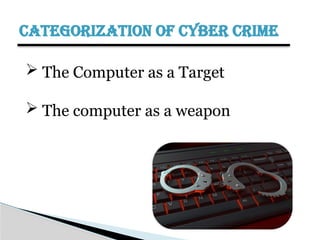
CATEGORIZATION OF CYBER CRIME
 The Computer as a Target
 The computer as a weapon
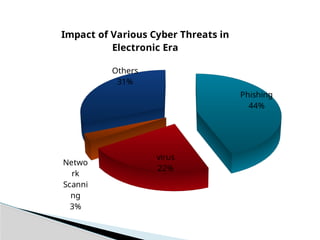
Phishing
44%
virus
22%
Netwo
rk
Scanni
ng
3%
Others
31%
Impact of Various Cyber Threats in
Electronic Era
TYPES OF CYBER CRIME
 Hacking
 Denial of service attack
 Virus Dissemination
 Computer Vandalism
 Cyber Terrorism
 Software Piracy
HACKING
 Hacking in simple terms means an illegal intrusion
into a computer system and/or network .Also called
as cracking!
Hacking means finding out weaknesses in an
established system and exploiting them. A
computer hacker is a person who finds out
weaknesses in the computer and exploits it.
WHY DO HACKERS ATTACK?
 For profit, protest, or challenge.
 A large fraction of hacker attacks have been
pranks
 Financial Gain
 Revenge
 Venting anger at a company or organization
 Terrorism
DENIAL OF SERVICE ATTACK
 Attack through which a person can render a system
unusable or significantly slow down the system for
legitimate users by overloading the system so that no
one else can use it.
 Act by the criminal, who floods the bandwidth of
the victims network.
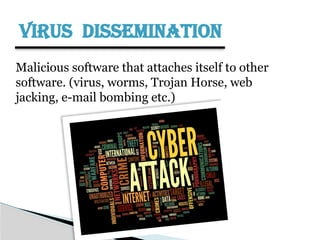
VIRUS DISSEMINATION
Malicious software that attaches itself to other
software. (virus, worms, Trojan Horse, web
jacking, e-mail bombing etc.)
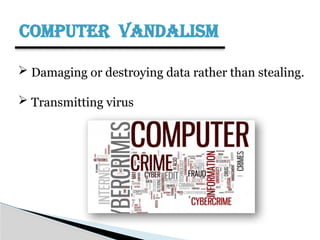
COMPUTER VANDALISM
 Damaging or destroying data rather than stealing.
 Transmitting virus
CYBER TERRORISM
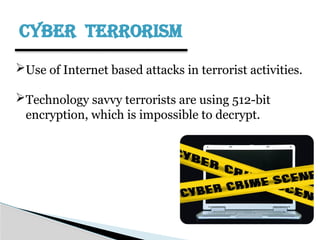
Use of Internet based attacks in terrorist activities.
Technology savvy terrorists are using 512-bit
encryption, which is impossible to decrypt.
SOFTWARE PIRACY
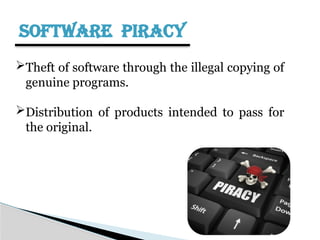
Theft of software through the illegal copying of
genuine programs.
Distribution of products intended to pass for
the original.
Cyber Security
WHAT IS CYBER SECURITY?
 Cyber security is a branch of computer security
specifically related to the Internet.
 It's objective is to establish rules and measure to
use against attacks over the Internet.
ADVANTAGES OF CYBER SECURITY
 Defend us from critical attacks.
 Browse the safe website.
 Internet security process all the incoming and
outgoing data on our computer.
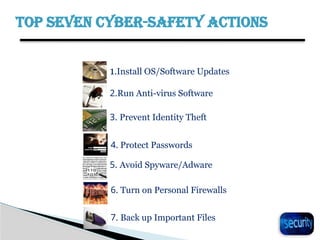
TOP SEVEN CYBER-SAFETY ACTIONS
1.Install OS/Software Updates
2.Run Anti-virus Software
3. Prevent Identity Theft
5. Avoid Spyware/Adware
7. Back up Important Files
6. Turn on Personal Firewalls
4. Protect Passwords
INSTALL OS/SOFTWARE UPDATES
21
Updates-sometimes called patches-fix problems with your
operating system (OS) (e.g., Windows XP, Windows Vista,
Mac OS X) and software programs (e.g., Microsoft Office
applications).
Most new operating systems are set to download updates
by default.
Be sure to restart your computer after updates are installed
so that the patches can be applied immediately.
RUN ANTI-VIRUS SOFTWARE
22
To avoid computer problems caused by viruses, install and
run an anti-virus program like Norton,Quick Heal,etc.
Periodically, check to see if your anti-virus is up to date by
opening your anti-virus program and checking the Last
updated date.
Anti-virus software removes viruses, quarantines and
repairs infected files, and can help prevent future viruses.
PREVENT IDENTITY THEFT
23
 Don't give out financial account numbers, Social Security numbers,
driver’s license numbers or other personal identity information unless you
know exactly who's receiving it. Protect others people’s information as you
would your own.
 Never send personal or confidential information via email or instant
messages as these can be easily intercepted.
 Beware of phishing scams - a form of fraud that uses email messages that
appear to be from a reputable business (often a financial institution) in an
attempt to gain personal or account information. Legitimate businesses
will not ask for personal information online.
PROTECT PASSWORDS
24
 Do not share your passwords, and always make new passwords difficult to guess
by avoiding dictionary words, and mixing letters, numbers and punctuation.
 Do not use one of these common passwords or any variation of them: qwerty1,
letmein,etc.
 Change your passwords periodically.
 When choosing a password:
 Mix upper and lower case letters
 Use a minimum of 8 characters
 Use mnemonics to help you remember a difficult password
 Store passwords in a safe place. Consider using KeePass Password Safe , an
encrypted USB drive to store passwords.
AVOID SPYWARE/ADWARE
25
 Spyware and adware take up memory and can slow down your
computer or cause other problems.
 Use Spybot and Ad-Aware to remove spyware/adware from your
computer
 Watch for allusions to spyware and adware in user agreements
before installing free software programs.
 Be wary of invitations to download software from unknown
internet sources.
TURN ON PERSONAL FIREWALLS
26
 Firewalls act as protective barriers between computers and the internet.
 Check your computer's security settings for a built-in personal firewall. If
you have one, turn it on. Microsoft Vista and Mac OSX have built-in
firewalls.
 Once your firewall is turned on, test your firewall for open ports that
could allow in viruses and hackers.
 Hackers search the Internet by sending out pings (calls) to random
computers and wait for responses. Firewalls prevent your computer from
responding to these calls.
BACK UP IMPORTANT FILES
27
 Reduce your risk of losing important files to a virus,
computer crash, theft or disaster by creating back-up
copies.
 Keep your critical files in one place on your computer’s
hard drive so you can easily create a back up copy.
 Save copies of your important documents and files to a
CD, online back up service, flash or USB drive, or a server.
 Store your back-up media in a secure place away from
your computer, in case of fire or theft.
CYBER SECURITY FRAMEWORK
28
 A cybersecurity framework is a set of guidelines that
help organizations manage cybersecurity risks,
vulnerabilities, and digital defense.
 Security Frameworks can also help reduce an
organization's exposure to weaknesses that hackers
and other cyber criminals can exploit.
 Some businesses must employ specific information
security frameworks to follow industry or government
regulations. For example, if your business handles
purchases by credit card, it must comply with the
Payment Card Industry Data Security Standards (PCI-
DSS) framework standards.
NIST CYBER SECURITY FRAMEWORK
29
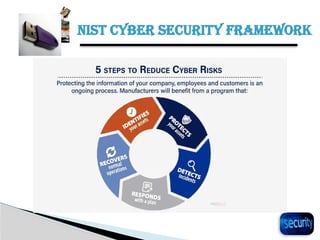
 NIST is a set of voluntary security standards that private
sector companies can use to find, identify, and respond
to cyberattacks. The framework also features guidelines
to help organizations prevent and recover from
cyberattacks. There are five functions or best practices
associated with NIST:
1. Identify
2. Protect
3. Detect
4. Respond
5. Recover
NIST CYBER SECURITY FRAMEWORK
30
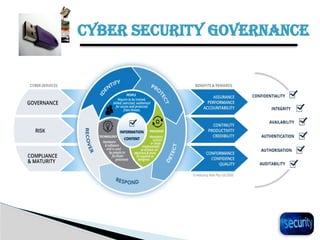
CYBER SECURITY GOVERNANCE
31
 Cybersecurity governance is a strategy that helps
organizations manage their approach to cybersecurity
and prevent cyber threats from disrupting their
operations.
 It involves defining an organization's risk appetite,
establishing accountability frameworks, and assigning
decision-making responsibilities.
 Cybersecurity governance can help organizations
coordinate their activities and ensure that their
cybersecurity efforts support their strategic goals.
CYBER SECURITY GOVERNANCE
32
 To protect an organization's information systems and
data, cybersecurity governance may also involve:
1. Drafting policies and procedures that take into
account legal, regulatory, and operational
requirements
2. Monitoring compliance with policies
3. Identifying risks posed by vulnerabilities and
threats
 Some challenges that can affect the effectiveness of
cybersecurity governance programs include:
1. Lack of resources, such as funding, talent, or poor
resource planning
2. Lack of support from senior leadership
CYBER SECURITY GOVERNANCE
33
CYBER SECURITY IT POLICIES
34
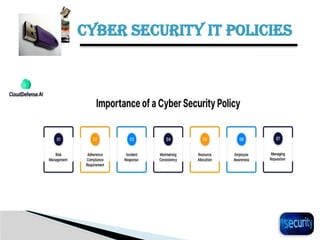
 An Information Technology (IT) security policy
involves rules and procedures that enable employees
and other stakeholders to safely use and access an
organization's IT assets and resources.
 A cyber security policy provides working guidelines for
how your online systems and software should be used
to minimize risk. It helps everyone in your business to
understand the processes you have in place to protect
your company, data and assets.
 An IT policy helps protect the organization's data and
systems from cyber threats, hacking, and other security
breaches. It outlines procedures for password
CYBER SECURITY IT POLICIES
35
 Security policy types can be divided into three types
based on the scope and purpose of the policy:
1. Organizational. These policies are a master blueprint
of the entire organization's security program.
2. System-specific. A system-specific policy covers
security procedures for an information system or
network.
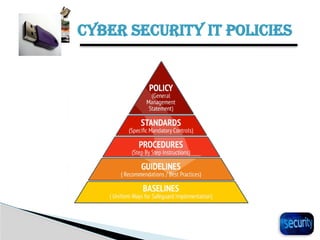
3. Issue-specific. These policies target certain aspects of
the larger organizational policy like Access Control,
Change Management, Disaster Recovery and Incident
Response.
CYBER SECURITY IT POLICIES
36
CYBER SECURITY IT POLICIES
37
38
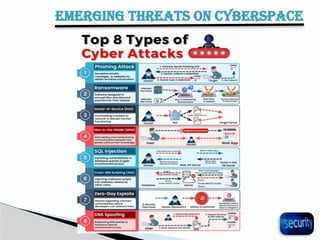
EMERGING THREATS ON CYBERSPACE
CYBER SECURITY AWARENESS
AT A GLANCE THROUGH SHORT
VIDEO CLIPS
How to Prevent Cybercrime Cybercrime Awareness
CONCLUSION
 Computer Security is a continuous battle
◦ As computer security gets tighter hackers are getting
smarter!!!
◦ Computer and information security continue to grow in
importance
◦ Nobody ever said this was going to be easy!
◦ Neglecting security is the worst thing you can do!!
iIIBF Cyber Security Presentation 2.pptx

iIIBF Cyber Security Presentation 2.pptx

  • 1.
    If we candefeat them sitting at home……who needs to fight with tanks and guns!!!! Dr. Narinder Kumar Bhasin Zonal Head , Indian Institute of Banking and Finance Former Professor Amity University , Noida Former Vice President Axis Bank Limited BASICS OF CYBER SECURITY
  • 3.
     Cyber securityin banking is the use of technologies and processes to protect banks' digital systems, data, and networks from cyber threats.  The goal is to keep customer information and financial transactions secure, and to ensure that banking services are always accessible.  Cyber security is important for banks because:  Protecting customer data: Banks manage a lot of sensitive information, including customer financial data, personal details, and transaction records.  Maintaining trust: Cyber security helps banks maintain the trust and confidence of their customers.  Meeting compliance: Cyber security helps banks comply with regulations.  Protecting reputation: Cyber security helps banks uphold their reputation. Cyber Security in Banking
  • 4.
     Some examplesof cyber threats that banks face include:  hacking, data theft, malware, viruses, unauthorized access, phishing, and sniffing.  The Reserve Bank of India (RBI) prescribes a data leak prevention strategy for banks.  This strategy should include data at rest, data in motion, and data processed in endpoint devices. Examples of Cyber Threats
  • 5.
  • 6.
    WHAT IS CYBERCRIME ? Cybercrime is nothing but where the computer used as an object or subject of crime! Crime committed using a computer and the internet to steal a person’s identity!!
  • 7.
    CATEGORIZATION OF CYBERCRIME  The Computer as a Target  The computer as a weapon
  • 8.
  • 9.
    TYPES OF CYBERCRIME  Hacking  Denial of service attack  Virus Dissemination  Computer Vandalism  Cyber Terrorism  Software Piracy
  • 10.
    HACKING  Hacking insimple terms means an illegal intrusion into a computer system and/or network .Also called as cracking! Hacking means finding out weaknesses in an established system and exploiting them. A computer hacker is a person who finds out weaknesses in the computer and exploits it.
  • 11.
    WHY DO HACKERSATTACK?  For profit, protest, or challenge.  A large fraction of hacker attacks have been pranks  Financial Gain  Revenge  Venting anger at a company or organization  Terrorism
  • 12.
    DENIAL OF SERVICEATTACK  Attack through which a person can render a system unusable or significantly slow down the system for legitimate users by overloading the system so that no one else can use it.  Act by the criminal, who floods the bandwidth of the victims network.
  • 13.
    VIRUS DISSEMINATION Malicious softwarethat attaches itself to other software. (virus, worms, Trojan Horse, web jacking, e-mail bombing etc.)
  • 14.
    COMPUTER VANDALISM  Damagingor destroying data rather than stealing.  Transmitting virus
  • 15.
    CYBER TERRORISM Use ofInternet based attacks in terrorist activities. Technology savvy terrorists are using 512-bit encryption, which is impossible to decrypt.
  • 16.
    SOFTWARE PIRACY Theft ofsoftware through the illegal copying of genuine programs. Distribution of products intended to pass for the original.
  • 17.
  • 18.
    WHAT IS CYBERSECURITY?  Cyber security is a branch of computer security specifically related to the Internet.  It's objective is to establish rules and measure to use against attacks over the Internet.
  • 19.
    ADVANTAGES OF CYBERSECURITY  Defend us from critical attacks.  Browse the safe website.  Internet security process all the incoming and outgoing data on our computer.
  • 20.
    TOP SEVEN CYBER-SAFETYACTIONS 1.Install OS/Software Updates 2.Run Anti-virus Software 3. Prevent Identity Theft 5. Avoid Spyware/Adware 7. Back up Important Files 6. Turn on Personal Firewalls 4. Protect Passwords
  • 21.
    INSTALL OS/SOFTWARE UPDATES 21 Updates-sometimescalled patches-fix problems with your operating system (OS) (e.g., Windows XP, Windows Vista, Mac OS X) and software programs (e.g., Microsoft Office applications). Most new operating systems are set to download updates by default. Be sure to restart your computer after updates are installed so that the patches can be applied immediately.
  • 22.
    RUN ANTI-VIRUS SOFTWARE 22 Toavoid computer problems caused by viruses, install and run an anti-virus program like Norton,Quick Heal,etc. Periodically, check to see if your anti-virus is up to date by opening your anti-virus program and checking the Last updated date. Anti-virus software removes viruses, quarantines and repairs infected files, and can help prevent future viruses.
  • 23.
    PREVENT IDENTITY THEFT 23 Don't give out financial account numbers, Social Security numbers, driver’s license numbers or other personal identity information unless you know exactly who's receiving it. Protect others people’s information as you would your own.  Never send personal or confidential information via email or instant messages as these can be easily intercepted.  Beware of phishing scams - a form of fraud that uses email messages that appear to be from a reputable business (often a financial institution) in an attempt to gain personal or account information. Legitimate businesses will not ask for personal information online.
  • 24.
    PROTECT PASSWORDS 24  Donot share your passwords, and always make new passwords difficult to guess by avoiding dictionary words, and mixing letters, numbers and punctuation.  Do not use one of these common passwords or any variation of them: qwerty1, letmein,etc.  Change your passwords periodically.  When choosing a password:  Mix upper and lower case letters  Use a minimum of 8 characters  Use mnemonics to help you remember a difficult password  Store passwords in a safe place. Consider using KeePass Password Safe , an encrypted USB drive to store passwords.
  • 25.
    AVOID SPYWARE/ADWARE 25  Spywareand adware take up memory and can slow down your computer or cause other problems.  Use Spybot and Ad-Aware to remove spyware/adware from your computer  Watch for allusions to spyware and adware in user agreements before installing free software programs.  Be wary of invitations to download software from unknown internet sources.
  • 26.
    TURN ON PERSONALFIREWALLS 26  Firewalls act as protective barriers between computers and the internet.  Check your computer's security settings for a built-in personal firewall. If you have one, turn it on. Microsoft Vista and Mac OSX have built-in firewalls.  Once your firewall is turned on, test your firewall for open ports that could allow in viruses and hackers.  Hackers search the Internet by sending out pings (calls) to random computers and wait for responses. Firewalls prevent your computer from responding to these calls.
  • 27.
    BACK UP IMPORTANTFILES 27  Reduce your risk of losing important files to a virus, computer crash, theft or disaster by creating back-up copies.  Keep your critical files in one place on your computer’s hard drive so you can easily create a back up copy.  Save copies of your important documents and files to a CD, online back up service, flash or USB drive, or a server.  Store your back-up media in a secure place away from your computer, in case of fire or theft.
  • 28.
    CYBER SECURITY FRAMEWORK 28 A cybersecurity framework is a set of guidelines that help organizations manage cybersecurity risks, vulnerabilities, and digital defense.  Security Frameworks can also help reduce an organization's exposure to weaknesses that hackers and other cyber criminals can exploit.  Some businesses must employ specific information security frameworks to follow industry or government regulations. For example, if your business handles purchases by credit card, it must comply with the Payment Card Industry Data Security Standards (PCI- DSS) framework standards.
  • 29.
    NIST CYBER SECURITYFRAMEWORK 29  NIST is a set of voluntary security standards that private sector companies can use to find, identify, and respond to cyberattacks. The framework also features guidelines to help organizations prevent and recover from cyberattacks. There are five functions or best practices associated with NIST: 1. Identify 2. Protect 3. Detect 4. Respond 5. Recover
  • 30.
    NIST CYBER SECURITYFRAMEWORK 30
  • 31.
    CYBER SECURITY GOVERNANCE 31 Cybersecurity governance is a strategy that helps organizations manage their approach to cybersecurity and prevent cyber threats from disrupting their operations.  It involves defining an organization's risk appetite, establishing accountability frameworks, and assigning decision-making responsibilities.  Cybersecurity governance can help organizations coordinate their activities and ensure that their cybersecurity efforts support their strategic goals.
  • 32.
    CYBER SECURITY GOVERNANCE 32 To protect an organization's information systems and data, cybersecurity governance may also involve: 1. Drafting policies and procedures that take into account legal, regulatory, and operational requirements 2. Monitoring compliance with policies 3. Identifying risks posed by vulnerabilities and threats  Some challenges that can affect the effectiveness of cybersecurity governance programs include: 1. Lack of resources, such as funding, talent, or poor resource planning 2. Lack of support from senior leadership
  • 33.
  • 34.
    CYBER SECURITY ITPOLICIES 34  An Information Technology (IT) security policy involves rules and procedures that enable employees and other stakeholders to safely use and access an organization's IT assets and resources.  A cyber security policy provides working guidelines for how your online systems and software should be used to minimize risk. It helps everyone in your business to understand the processes you have in place to protect your company, data and assets.  An IT policy helps protect the organization's data and systems from cyber threats, hacking, and other security breaches. It outlines procedures for password
  • 35.
    CYBER SECURITY ITPOLICIES 35  Security policy types can be divided into three types based on the scope and purpose of the policy: 1. Organizational. These policies are a master blueprint of the entire organization's security program. 2. System-specific. A system-specific policy covers security procedures for an information system or network. 3. Issue-specific. These policies target certain aspects of the larger organizational policy like Access Control, Change Management, Disaster Recovery and Incident Response.
  • 36.
    CYBER SECURITY ITPOLICIES 36
  • 37.
    CYBER SECURITY ITPOLICIES 37
  • 38.
  • 39.
    CYBER SECURITY AWARENESS ATA GLANCE THROUGH SHORT VIDEO CLIPS How to Prevent Cybercrime Cybercrime Awareness
  • 40.
    CONCLUSION  Computer Securityis a continuous battle ◦ As computer security gets tighter hackers are getting smarter!!! ◦ Computer and information security continue to grow in importance ◦ Nobody ever said this was going to be easy! ◦ Neglecting security is the worst thing you can do!!