BOTS
FUTURE OF APPS
GAURAV
SHARMA
MAKING BOT MAKER AT PRAMATI TECHNLOGIES
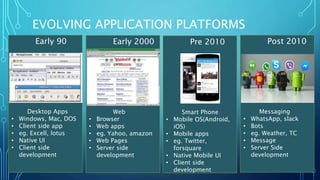
EVOLVING APPLICATION PLATFORMS
Early 90
Desktop Apps
• Windows, Mac, DOS
• Client side app
• eg. Excell, lotus
• Native UI
• Client side
development
Early 2000
Web
• Browser
• Web apps
• eg. Yahoo, amazon
• Web Pages
• Server side
development
Pre 2010
Smart Phone
• Mobile OS(Android,
iOS)
• Mobile apps
• eg. Twitter,
forsquare
• Native Mobile UI
• Client side
development
Post 2010
Messaging
• WhatsApp, slack
• Bots
• eg. Weather, TC
• Message
• Server Side
development
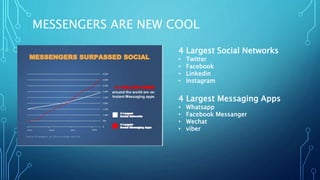
MESSENGERS ARE NEW COOL
4 Largest Social Networks
• Twitter
• Facebook
• Linkedin
• Instagram
4 Largest Messaging Apps
• Whatsapp
• Facebook Messanger
• Wechat
• viber
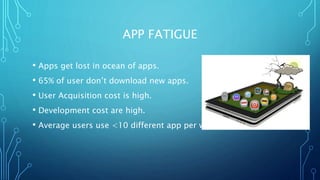
APP FATIGUE
• Apps get lost in ocean of apps.
• 65% of user don’t download new apps.
• User Acquisition cost is high.
• Development cost are high.
• Average users use <10 different app per week.
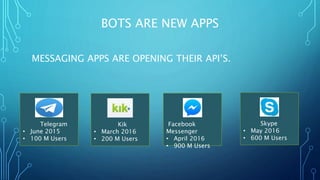
BOTS ARE NEW APPS
MESSAGING APPS ARE OPENING THEIR API’S.
Telegram
• June 2015
• 100 M Users
Kik
• March 2016
• 200 M Users
Facebook
Messenger
• April 2016
• 900 M Users
Skype
• May 2016
• 600 M Users
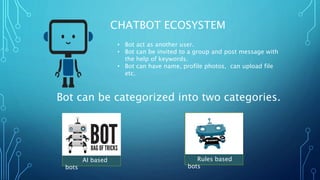
• Bot act as another user.
• Bot can be invited to a group and post message with
the help of keywords.
• Bot can have name, profile photos, can upload file
etc.
CHATBOT ECOSYSTEM
Bot can be categorized into two categories.
Rules based
bots
AI based
bots
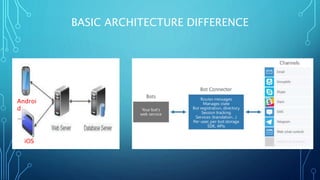
BASIC ARCHITECTURE DIFFERENCE
Androi
d
iOS
HOW TO CREATE BOT
• Register bot with bot-connector.
• Write your bot services.
• Deploy bot on channels.
REGISTERING YOUR BOT WITH THE MICROSOFT BOT
FRAMEWORK
• https://dev.botframework.com
• Register a bot
• Create Microsoft App id and password (save password
displayed only once).
• Bot configuration
CREATE BOT SERVICES
• Set up a github repository for CI.
• Switch to directory, clone repo
• npm init
• npm install --save botbuilder
• npm install --save restify
• Place given app.js in directory.
• Replace APP_ID and PASSWORD with app id and password for
your bot.
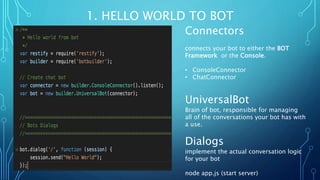
1. HELLO WORLD TO BOT
Connectors
connects your bot to either the BOT
Framework or the Console.
• ConsoleConnector
• ChatConnector
UniversalBot
Brain of bot, responsible for managing
all of the conversations your bot has with
a use.
Dialogs
implement the actual conversation logic
for your bot
node app.js (start server)
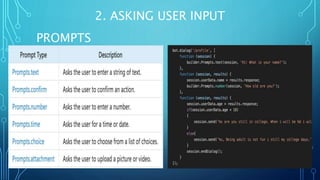
2. ASKING USER INPUT
PROMPTS
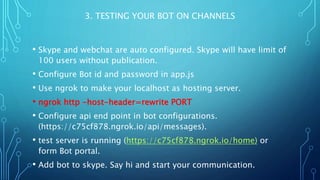
3. TESTING YOUR BOT ON CHANNELS
• Skype and webchat are auto configured. Skype will have limit of
100 users without publication.
• Configure Bot id and password in app.js
• Use ngrok to make your localhost as hosting server.
• ngrok http -host-header=rewrite PORT
• Configure api end point in bot configurations.
(https://c75cf878.ngrok.io/api/messages).
• test server is running (https://c75cf878.ngrok.io/home) or
form Bot portal.
• Add bot to skype. Say hi and start your communication.
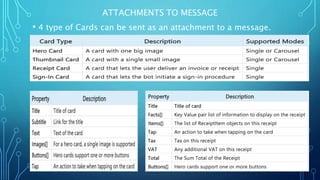
ATTACHMENTS TO MESSAGE
• 4 type of Cards can be sent as an attachment to a message.
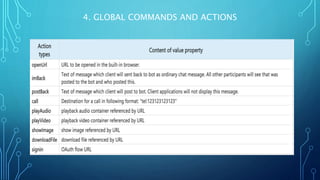
4. GLOBAL COMMANDS AND ACTIONS
• bot.beginDialogAction('actions', '/actions', { matches:
/^actions/i });
• buttons([builder.CardAction.dialogAction(session, "weather",
"Seattle, WA", "Current Weather")])
4. GLOBAL COMMANDS AND ACTIONS
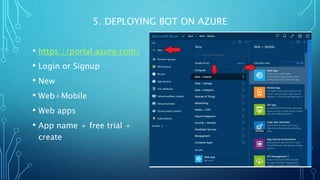
5. DEPLOYING BOT ON AZURE
• https://portal.azure.com/
• Login or Signup
• New
• Web+Mobile
• Web apps
• App name + free trial +
create
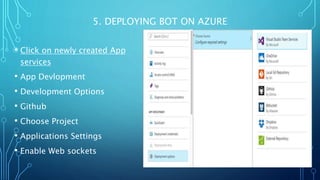
5. DEPLOYING BOT ON AZURE
• Click on newly created App
services
• App Devlopment
• Development Options
• Github
• Choose Project
• Applications Settings
• Enable Web sockets
THANKS
Resource:
Source code available : http://bit.ly/2doPsaW

Getting Started With bots

  • 1.
  • 2.
    GAURAV SHARMA MAKING BOT MAKERAT PRAMATI TECHNLOGIES
  • 3.
    EVOLVING APPLICATION PLATFORMS Early90 Desktop Apps • Windows, Mac, DOS • Client side app • eg. Excell, lotus • Native UI • Client side development Early 2000 Web • Browser • Web apps • eg. Yahoo, amazon • Web Pages • Server side development Pre 2010 Smart Phone • Mobile OS(Android, iOS) • Mobile apps • eg. Twitter, forsquare • Native Mobile UI • Client side development Post 2010 Messaging • WhatsApp, slack • Bots • eg. Weather, TC • Message • Server Side development
  • 4.
    MESSENGERS ARE NEWCOOL 4 Largest Social Networks • Twitter • Facebook • Linkedin • Instagram 4 Largest Messaging Apps • Whatsapp • Facebook Messanger • Wechat • viber
  • 5.
    APP FATIGUE • Appsget lost in ocean of apps. • 65% of user don’t download new apps. • User Acquisition cost is high. • Development cost are high. • Average users use <10 different app per week.
  • 6.
    BOTS ARE NEWAPPS MESSAGING APPS ARE OPENING THEIR API’S. Telegram • June 2015 • 100 M Users Kik • March 2016 • 200 M Users Facebook Messenger • April 2016 • 900 M Users Skype • May 2016 • 600 M Users
  • 7.
    • Bot actas another user. • Bot can be invited to a group and post message with the help of keywords. • Bot can have name, profile photos, can upload file etc. CHATBOT ECOSYSTEM Bot can be categorized into two categories. Rules based bots AI based bots
  • 8.
  • 9.
    HOW TO CREATEBOT • Register bot with bot-connector. • Write your bot services. • Deploy bot on channels.
  • 10.
    REGISTERING YOUR BOTWITH THE MICROSOFT BOT FRAMEWORK • https://dev.botframework.com • Register a bot • Create Microsoft App id and password (save password displayed only once). • Bot configuration
  • 11.
    CREATE BOT SERVICES •Set up a github repository for CI. • Switch to directory, clone repo • npm init • npm install --save botbuilder • npm install --save restify • Place given app.js in directory. • Replace APP_ID and PASSWORD with app id and password for your bot.
  • 12.
    1. HELLO WORLDTO BOT Connectors connects your bot to either the BOT Framework or the Console. • ConsoleConnector • ChatConnector UniversalBot Brain of bot, responsible for managing all of the conversations your bot has with a use. Dialogs implement the actual conversation logic for your bot node app.js (start server)
  • 13.
    2. ASKING USERINPUT PROMPTS
  • 14.
    3. TESTING YOURBOT ON CHANNELS • Skype and webchat are auto configured. Skype will have limit of 100 users without publication. • Configure Bot id and password in app.js • Use ngrok to make your localhost as hosting server. • ngrok http -host-header=rewrite PORT • Configure api end point in bot configurations. (https://c75cf878.ngrok.io/api/messages). • test server is running (https://c75cf878.ngrok.io/home) or form Bot portal. • Add bot to skype. Say hi and start your communication.
  • 15.
    ATTACHMENTS TO MESSAGE •4 type of Cards can be sent as an attachment to a message.
  • 16.
    4. GLOBAL COMMANDSAND ACTIONS • bot.beginDialogAction('actions', '/actions', { matches: /^actions/i }); • buttons([builder.CardAction.dialogAction(session, "weather", "Seattle, WA", "Current Weather")])
  • 17.
    4. GLOBAL COMMANDSAND ACTIONS
  • 18.
    5. DEPLOYING BOTON AZURE • https://portal.azure.com/ • Login or Signup • New • Web+Mobile • Web apps • App name + free trial + create
  • 19.
    5. DEPLOYING BOTON AZURE • Click on newly created App services • App Devlopment • Development Options • Github • Choose Project • Applications Settings • Enable Web sockets
  • 20.