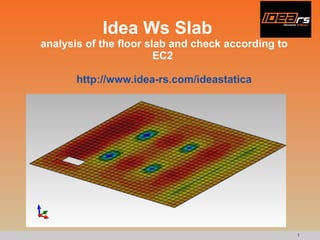
Idea Ws Slab analysis of the floor slab and check according to EC2  http://www.idea-rs.com/ideastatica
Creating of the new project and definition of the project data 1. Create a new new project 2. Specify material and thickness of the slab
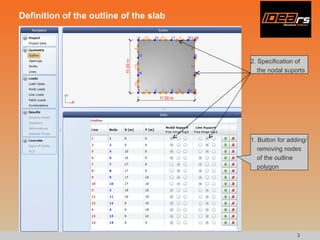
Definition of the outline of the slab 1. Button for adding/removing nodes of the outline polygon 2. Specification of the nodal suports
Definition of opening 1. Create/delete an opening 2. Adding/removing nodes of the polygon which defines the shape of the opening 3. Specification of the support in nodes or on lines
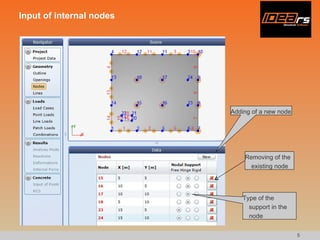
Input of internal nodes Adding of a new node Removing of the existing node Type of the support in the node
Input of internal lines Create a new line Delete the existing line Type of the support on the line
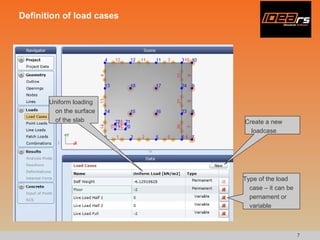
Definition of load cases Create a new loadcase Type of the load case – it can be pernament or variable Uniform loading on the surface of the slab
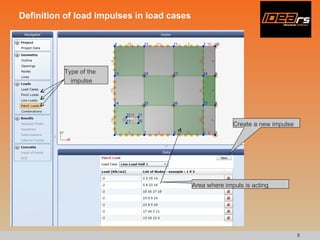
Definition of load impulses in load cases Create a new impulse Type of the impulse Area where impuls is acting
Definition of load combinations Set load coefficients for load cases in the load combination Typo of the combination Create a new combination
Running of the analysis and showing of results Run analyisis Choose load combination Choose type of the internal force
Division of the slab into areas which have the same type of the reinforcement There are defined two types of the reinforcement in this example. A type 1 in green areas and a type 2 in orange areas.
Definition of check positions Create a new position The type of the definition of the check position (node, node of the mesh, mesh element) Specify the required type of the reinforcement in the position
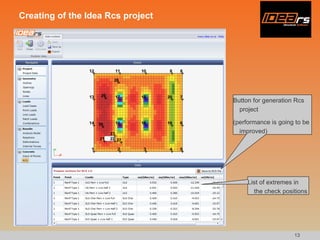
Creating of the Idea Rcs project Button for generation Rcs project (performance is going to be improved) List of extremes in the check positions
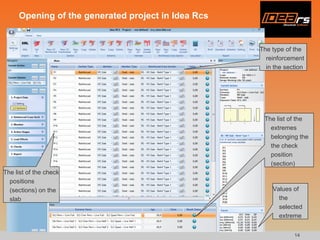
Opening of the generated project in Idea Rcs The list of the check positions (sections) on the slab The type of the reinforcement in the section The list of the extremes belonging the the check position (section) Values of the selected extreme
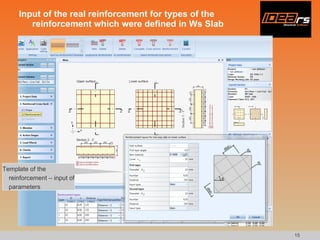
Input of the real reinforcement for types of the reinforcement which were defined in Ws Slab Template of the reinforcement – input of parameters
Table of check results for all sections Limiting check values in the check postions (sections) Check values for extremes
Preview of the calculation protocol
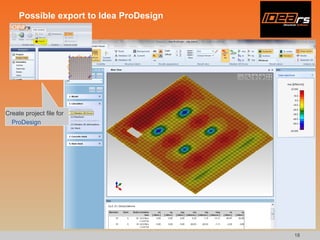
Possible export to Idea ProDesign Create project file for  ProDesign

Idea WsSlab - Tutorial 1 - creating, analysis and design of concrete slab

  • 1.
    Idea Ws Slabanalysis of the floor slab and check according to EC2 http://www.idea-rs.com/ideastatica
  • 2.
    Creating of thenew project and definition of the project data 1. Create a new new project 2. Specify material and thickness of the slab
  • 3.
    Definition of theoutline of the slab 1. Button for adding/removing nodes of the outline polygon 2. Specification of the nodal suports
  • 4.
    Definition of opening1. Create/delete an opening 2. Adding/removing nodes of the polygon which defines the shape of the opening 3. Specification of the support in nodes or on lines
  • 5.
    Input of internalnodes Adding of a new node Removing of the existing node Type of the support in the node
  • 6.
    Input of internallines Create a new line Delete the existing line Type of the support on the line
  • 7.
    Definition of loadcases Create a new loadcase Type of the load case – it can be pernament or variable Uniform loading on the surface of the slab
  • 8.
    Definition of loadimpulses in load cases Create a new impulse Type of the impulse Area where impuls is acting
  • 9.
    Definition of loadcombinations Set load coefficients for load cases in the load combination Typo of the combination Create a new combination
  • 10.
    Running of theanalysis and showing of results Run analyisis Choose load combination Choose type of the internal force
  • 11.
    Division of theslab into areas which have the same type of the reinforcement There are defined two types of the reinforcement in this example. A type 1 in green areas and a type 2 in orange areas.
  • 12.
    Definition of checkpositions Create a new position The type of the definition of the check position (node, node of the mesh, mesh element) Specify the required type of the reinforcement in the position
  • 13.
    Creating of theIdea Rcs project Button for generation Rcs project (performance is going to be improved) List of extremes in the check positions
  • 14.
    Opening of thegenerated project in Idea Rcs The list of the check positions (sections) on the slab The type of the reinforcement in the section The list of the extremes belonging the the check position (section) Values of the selected extreme
  • 15.
    Input of thereal reinforcement for types of the reinforcement which were defined in Ws Slab Template of the reinforcement – input of parameters
  • 16.
    Table of checkresults for all sections Limiting check values in the check postions (sections) Check values for extremes
  • 17.
    Preview of thecalculation protocol
  • 18.
    Possible export toIdea ProDesign Create project file for ProDesign