ICT
Concepts & Characteristics
What is Computer ?
 Computer is an electronic device.
 Can store large amounts of data.
 Can performing operations on data.
 Performing given function on the data & displays the result
as output.
 Process data whenever needed.
 Known from ‘to compute’
What is Process?
 Computer works on data as per programme is called process.
 Processing means operations like…..
 Calculations,
 Logical decision making,
 Outputting data,
 Communicating with others computer etc.
Characteristics
 Speed
 Arithmetical and Logical
Operations
 Accuracy
 Reliability
 Storage
 Retrieving Data and
Programme
 Automation
 Versatility (Flexible)
 Consistency
 Communications
Applications of Computer
• Science research
• Education
• Business applications
• Banking
• Office Automation
• Desktop publishing
• Management aids
• Engineering designing
• Road traffic control
• Railway
• Medicine
• Information services
What is Internet
 Inter connection of many computers via network.
 Global connected through network (through LAN or WAN)
 To provide the various application services i.e. E-Mail, Usenet (News),
WWW, Telnet, FTP, etc
Uses of Internet
 Searching
 E-mail service
 Commercial Services
 Electronic books & Publication
 Video Conferencing
 Sharing data and results quickly
 Retrieving files & Program of all types
 Find information databases and tutorials
 News paper columns
 Banking
 Downloading / Uploading any information
 News, sports, stocks, music etc.
 Use of internet in various fields like education, Business, governance, etc.
 And many more ………………..
Internet as a ICT tools
What is ICT?
 During last decade of twentieth century there was extraordinary development in
information and communication technology (ICT) which led to a transmutation of
processes and practices in almost all aspects of human activities.
 Information and communication technologies (ICTs) are the technologies used in
the conveying, manipulation and storage of data by electronic means.
9
Information and Communication Technologies
 Information is data that has been sorted and arranged.
 It consists of organized facts and opinions people receive during daily life.
 Changing data into information is called data processing or information processing.
 It involves gathering, organizing, and reporting data so it is useful to people.
 It is often done using information technology.
ICT Tools
 Radio, television, video, DVD, telephone (fixed line & mobile), satellite systems,
computer and network hardware and software; (equipment and services associated
with these technologies, such as videoconferencing and electronic mail.) , blogs
11
Information and Communication Technologies
 People often use the terms information and communication together.
 These terms are related, but each means something different.
 Two words we need to know to understand communication technology are data and
information.
 Data includes individual facts, statistics (numerical data), and ideas.
 These facts and ideas are not sorted or arranged in any manner.
What is Communication?
 Communication is simply the act of transferring
information from one place to another.
 Exchanging Information from computer to another
computer
 The classic communication system is made up
of an information source, an encoder, a transmitter, a
receiver, a decoder, storage, retrieval, and an
information destination.

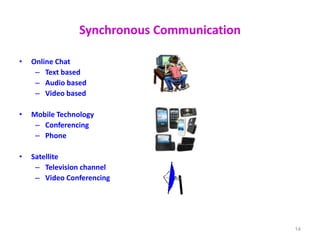
Synchronous Communication
• Online Chat
– Text based
– Audio based
– Video based
• Mobile Technology
– Conferencing
– Phone
• Satellite
– Television channel
– Video Conferencing
14
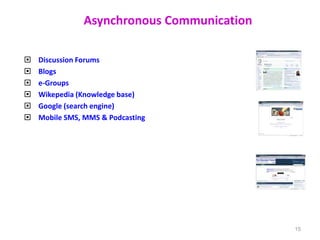
Asynchronous Communication
 Discussion Forums
 Blogs
 e-Groups
 Wikepedia (Knowledge base)
 Google (search engine)
 Mobile SMS, MMS & Podcasting
15
Scope of Internet as a ICT
• Education
• Research
• Communication
• Leisure and Entertainment
• Exploring the world
• Finance
• Shopping
• And many more ….
16
Scope of Internet as a ICT in Education
 ICT as a tool to innovate teaching-learning practice via Internet
(i.e. digital content, multimedia, teaching-learning methods,
learning environment)
 ICT as an administrative tool (i.e. education management
information systems (EMIS)
 ICT as an expanding learning opportunity (i.e. distance learning, e-
Learning)
 ICT as a facilitator of higher-order thinking skills (i.e. learner-
centered, self-directed learning, tailored learning)
17
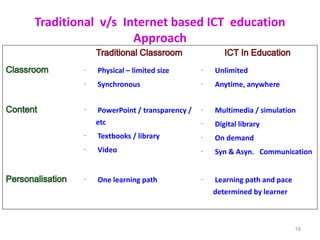
Traditional v/s Internet based ICT education
Approach
18
 Physical – limited size
 Synchronous
 Unlimited
 Anytime, anywhere
 PowerPoint / transparency /
etc
 Textbooks / library
 Video
 Multimedia / simulation
 Digital library
 On demand
 Syn & Asyn. Communication
 One learning path  Learning path and pace
determined by learner
Psychology of using Teaching Aids which include
ICTs
 Hear is an effective saying
 I hear, I forget : Verbal description only are not enough for learners
to remember and understand. Visualization of objects especially in
science and technology is important
 I see, I remember: Knowledge that is gained through the site is more
colorful, accurate and permanent. It is said that 80% of our
knowledge is gained through our eyes.
ICT can help learning
 Develop understanding
 Speed and automatic functions of ICT can enable teachers to demonstrate,
explore or explain aspects of their teaching, and students learning, more
effectively e.g. use of a spread sheet to perform calculations in order that
patterns can be concentrated on rather than the calculating.
ICT can help learning
 Extend access to sources
 the capacity and range of ICT can enable teachers and students to gain access
to historical, recent or immediate information, through, for example,
accessing information on CD-ROM or the Internet
 Enhance enquiry skills
 search for and compare information from different sources
ICT can help learning
 Enhance the communication of ideas
 communicate with other people, locally and over distances, easily and
effectively
 present information in ways which are accessible in different forms for
different audiences.
Does ICT increase access to learning opportunity?
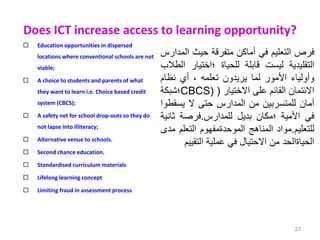
 Education opportunities in dispersed
locations where conventional schools are not
viable;
 A choice to students and parents of what
they want to learn i.e. Choice based credit
system (CBCS);
 A safety net for school drop-outs so they do
not lapse into illiteracy;
 Alternative venue to schools.
 Second chance education.
 Standardised curriculum materials
 Lifelong learning concept
 Limiting fraud in assessment process
23
‫فرص‬
‫التعليم‬
‫في‬
‫أماكن‬
‫متفرقة‬
‫حيث‬
‫ال‬
‫مدارس‬
‫التقليدية‬
‫ليست‬
‫قابلة‬
‫للحياة‬
‫؛اختيار‬
‫الطالب‬
‫وأولياء‬
‫األمور‬
‫لما‬
‫يريدون‬
‫تعلمه‬
،
‫أي‬
‫نظام‬
‫االئتمان‬
‫القائم‬
‫على‬
‫االختيار‬
(
CBCS)
‫؛‬
‫شبكة‬
‫أمان‬
‫للمتسربين‬
‫من‬
‫المدارس‬
‫حتى‬
‫ال‬
‫يسق‬
‫طوا‬
‫في‬
‫األمية‬
‫؛مكان‬
‫بديل‬
‫للمدارس‬
.
‫فرصة‬
‫ثا‬
‫نية‬
‫للتعليم‬
.
‫مواد‬
‫المناهج‬
‫الموحدةمفهوم‬
‫التعلم‬
‫مدى‬
‫الحياةالحد‬
‫من‬
‫االحتيال‬
‫في‬
‫عملية‬
‫التقي‬
‫يم‬
Useful Keys Internet
• Network: Connecting computers with each other For exchanging
information
• Client : It is a programme or computer for getting special
information from another compute.
• Server: It is a programme or computer, which gives information
to the client computer.
• Protocol: It’s a rules for connecting to the internet. (TCP/IP)
• Portal: It is a website. Known as a gateway of internet.
(Search engine)
16/03/2023 24
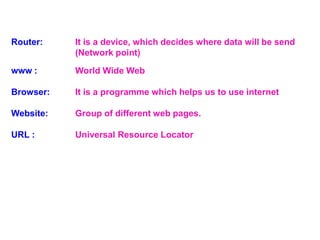
Router: It is a device, which decides where data will be send
(Network point)
www : World Wide Web
Browser: It is a programme which helps us to use internet
Website: Group of different web pages.
URL : Universal Resource Locator
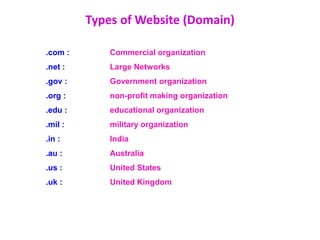
.com : Commercial organization
.net : Large Networks
.gov : Government organization
.org : non-profit making organization
.edu : educational organization
.mil : military organization
.in : India
.au : Australia
.us : United States
.uk : United Kingdom
Types of Website (Domain)
Thank You

ICTConcepts.ppt

  • 1.
  • 2.
    What is Computer?  Computer is an electronic device.  Can store large amounts of data.  Can performing operations on data.  Performing given function on the data & displays the result as output.  Process data whenever needed.  Known from ‘to compute’
  • 3.
    What is Process? Computer works on data as per programme is called process.  Processing means operations like…..  Calculations,  Logical decision making,  Outputting data,  Communicating with others computer etc.
  • 4.
    Characteristics  Speed  Arithmeticaland Logical Operations  Accuracy  Reliability  Storage  Retrieving Data and Programme  Automation  Versatility (Flexible)  Consistency  Communications
  • 5.
    Applications of Computer •Science research • Education • Business applications • Banking • Office Automation • Desktop publishing • Management aids • Engineering designing • Road traffic control • Railway • Medicine • Information services
  • 6.
    What is Internet Inter connection of many computers via network.  Global connected through network (through LAN or WAN)  To provide the various application services i.e. E-Mail, Usenet (News), WWW, Telnet, FTP, etc
  • 7.
    Uses of Internet Searching  E-mail service  Commercial Services  Electronic books & Publication  Video Conferencing  Sharing data and results quickly  Retrieving files & Program of all types  Find information databases and tutorials  News paper columns  Banking  Downloading / Uploading any information  News, sports, stocks, music etc.  Use of internet in various fields like education, Business, governance, etc.  And many more ………………..
  • 8.
    Internet as aICT tools
  • 9.
    What is ICT? During last decade of twentieth century there was extraordinary development in information and communication technology (ICT) which led to a transmutation of processes and practices in almost all aspects of human activities.  Information and communication technologies (ICTs) are the technologies used in the conveying, manipulation and storage of data by electronic means. 9
  • 10.
    Information and CommunicationTechnologies  Information is data that has been sorted and arranged.  It consists of organized facts and opinions people receive during daily life.  Changing data into information is called data processing or information processing.  It involves gathering, organizing, and reporting data so it is useful to people.  It is often done using information technology.
  • 11.
    ICT Tools  Radio,television, video, DVD, telephone (fixed line & mobile), satellite systems, computer and network hardware and software; (equipment and services associated with these technologies, such as videoconferencing and electronic mail.) , blogs 11
  • 12.
    Information and CommunicationTechnologies  People often use the terms information and communication together.  These terms are related, but each means something different.  Two words we need to know to understand communication technology are data and information.  Data includes individual facts, statistics (numerical data), and ideas.  These facts and ideas are not sorted or arranged in any manner.
  • 13.
    What is Communication? Communication is simply the act of transferring information from one place to another.  Exchanging Information from computer to another computer  The classic communication system is made up of an information source, an encoder, a transmitter, a receiver, a decoder, storage, retrieval, and an information destination. 
  • 14.
    Synchronous Communication • OnlineChat – Text based – Audio based – Video based • Mobile Technology – Conferencing – Phone • Satellite – Television channel – Video Conferencing 14
  • 15.
    Asynchronous Communication  DiscussionForums  Blogs  e-Groups  Wikepedia (Knowledge base)  Google (search engine)  Mobile SMS, MMS & Podcasting 15
  • 16.
    Scope of Internetas a ICT • Education • Research • Communication • Leisure and Entertainment • Exploring the world • Finance • Shopping • And many more …. 16
  • 17.
    Scope of Internetas a ICT in Education  ICT as a tool to innovate teaching-learning practice via Internet (i.e. digital content, multimedia, teaching-learning methods, learning environment)  ICT as an administrative tool (i.e. education management information systems (EMIS)  ICT as an expanding learning opportunity (i.e. distance learning, e- Learning)  ICT as a facilitator of higher-order thinking skills (i.e. learner- centered, self-directed learning, tailored learning) 17
  • 18.
    Traditional v/s Internetbased ICT education Approach 18  Physical – limited size  Synchronous  Unlimited  Anytime, anywhere  PowerPoint / transparency / etc  Textbooks / library  Video  Multimedia / simulation  Digital library  On demand  Syn & Asyn. Communication  One learning path  Learning path and pace determined by learner
  • 19.
    Psychology of usingTeaching Aids which include ICTs  Hear is an effective saying  I hear, I forget : Verbal description only are not enough for learners to remember and understand. Visualization of objects especially in science and technology is important  I see, I remember: Knowledge that is gained through the site is more colorful, accurate and permanent. It is said that 80% of our knowledge is gained through our eyes.
  • 20.
    ICT can helplearning  Develop understanding  Speed and automatic functions of ICT can enable teachers to demonstrate, explore or explain aspects of their teaching, and students learning, more effectively e.g. use of a spread sheet to perform calculations in order that patterns can be concentrated on rather than the calculating.
  • 21.
    ICT can helplearning  Extend access to sources  the capacity and range of ICT can enable teachers and students to gain access to historical, recent or immediate information, through, for example, accessing information on CD-ROM or the Internet  Enhance enquiry skills  search for and compare information from different sources
  • 22.
    ICT can helplearning  Enhance the communication of ideas  communicate with other people, locally and over distances, easily and effectively  present information in ways which are accessible in different forms for different audiences.
  • 23.
    Does ICT increaseaccess to learning opportunity?  Education opportunities in dispersed locations where conventional schools are not viable;  A choice to students and parents of what they want to learn i.e. Choice based credit system (CBCS);  A safety net for school drop-outs so they do not lapse into illiteracy;  Alternative venue to schools.  Second chance education.  Standardised curriculum materials  Lifelong learning concept  Limiting fraud in assessment process 23 ‫فرص‬ ‫التعليم‬ ‫في‬ ‫أماكن‬ ‫متفرقة‬ ‫حيث‬ ‫ال‬ ‫مدارس‬ ‫التقليدية‬ ‫ليست‬ ‫قابلة‬ ‫للحياة‬ ‫؛اختيار‬ ‫الطالب‬ ‫وأولياء‬ ‫األمور‬ ‫لما‬ ‫يريدون‬ ‫تعلمه‬ ، ‫أي‬ ‫نظام‬ ‫االئتمان‬ ‫القائم‬ ‫على‬ ‫االختيار‬ ( CBCS) ‫؛‬ ‫شبكة‬ ‫أمان‬ ‫للمتسربين‬ ‫من‬ ‫المدارس‬ ‫حتى‬ ‫ال‬ ‫يسق‬ ‫طوا‬ ‫في‬ ‫األمية‬ ‫؛مكان‬ ‫بديل‬ ‫للمدارس‬ . ‫فرصة‬ ‫ثا‬ ‫نية‬ ‫للتعليم‬ . ‫مواد‬ ‫المناهج‬ ‫الموحدةمفهوم‬ ‫التعلم‬ ‫مدى‬ ‫الحياةالحد‬ ‫من‬ ‫االحتيال‬ ‫في‬ ‫عملية‬ ‫التقي‬ ‫يم‬
  • 24.
    Useful Keys Internet •Network: Connecting computers with each other For exchanging information • Client : It is a programme or computer for getting special information from another compute. • Server: It is a programme or computer, which gives information to the client computer. • Protocol: It’s a rules for connecting to the internet. (TCP/IP) • Portal: It is a website. Known as a gateway of internet. (Search engine) 16/03/2023 24
  • 25.
    Router: It isa device, which decides where data will be send (Network point) www : World Wide Web Browser: It is a programme which helps us to use internet Website: Group of different web pages. URL : Universal Resource Locator
  • 26.
    .com : Commercialorganization .net : Large Networks .gov : Government organization .org : non-profit making organization .edu : educational organization .mil : military organization .in : India .au : Australia .us : United States .uk : United Kingdom Types of Website (Domain)
  • 28.