I.C.T: COMPUTER & IT’S PARTS
• A computer is an electronic device that enables to accomplish task by producing
organised information in required format of theuser. It has the capability to take in
huge quantity of data and perform numerous type of task on the basis of give an
instructions.
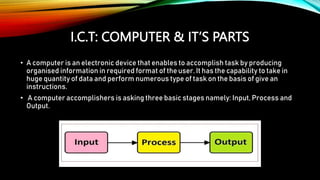
• A computer accomplishers is asking three basic stages namely: Input, Process and
Output.
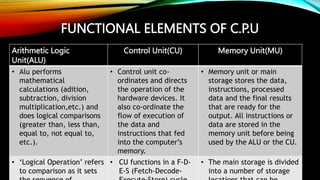
FUNCTIONAL ELEMENTS OF C.P.U
Arithmetic Logic
Unit(ALU)
Control Unit(CU) Memory Unit(MU)
• Alu performs
mathematical
calculations (adition,
subtraction, division
multiplication,etc.) and
does logical comparisons
(greater than, less than,
equal to, not equal to,
etc.).
• Control unit co-
ordinates and directs
the operation of the
hardware devices. It
also co-ordinate the
flow of execution of
the data and
instructions that fed
into the computer’s
memory.
• Memory unit or main
storage stores the data,
instructions, processed
data and the final results
that are ready for the
output. All instructions or
data are stored in the
memory unit before being
used by the ALU or the CU.
• ‘Logical Operation’ refers
to comparison as it sets
• CU functions in a F-D-
E-S (Fetch-Decode-
• The main storage is divided
into a number of storage
COMPONENTS OF A COMPUTER SYSTEM
• A computer system functions with the help of ‘Hardware’ and ‘Software’. The physical
components of a computer system are known as‘Hardware’. The virtual component is
known as ‘Software’. It is abstract, i.e. it has no physical identity.
• Hardware is the electro-mechanical part of a computer that is capable of computing
and manipulating information, wereas software is a collection of instructions or
programs which direct and co-ordinate the functions of computing and manipulating.
• The different components of a computer system are:-
1. Keyboard- Keyboard is a standard input device. It is mainly used to type text and send
instruction to a computer with the help of keys. Keyboard keys are the buttons that
represent alphabets, numericals, alphanumericals and special characters.
COMPONENTS OF A COMPUTER SYSTEM
2. Mouse- Mouse is a hand-held pointing device which is used on a flat surface and is
represented as a pointer on the screen. The pointer on the screen moves as the mouse
is moved by the user. A mouse generally consists of two buttons and a scroll will on its
top.
3. Joystick- Joystick is a pointing device whose function is similar to a mouse, except
that mouse pointer stops moving on the screen as soon as the user stops moving it,
while in joystick the pointer continues to move in the direction towards which the
joystick has been pointed.
4. Scanner- A scanner is a device that scans of physical document by sensing the
reflection that is received when the scanner emits rays on the contents. It takes the
image of the contents and converts it into a digital file.
5. Optical Mark Reader (OMR)- OMR is an input device which can detect the marks on a
paper. It is mainly used to evaluate answer sheets in which selected answers are
marked in dark circles.
COMPONENTS OF A COMPUTER SYSTEM
6. Magnetic Ink Character Reader (MICR)- MICR is a device which is used by banks for
processing of cheques by interpreting information stored in MICR code.
7. Light pen- A ‘Light Pen’ is a pen like device which uses a light sensitive detector to
select a draw objects on the display screen.
8. Barcode reader- A Barcode Reader is a scanning device which reads the barcodes.
Each course represents numeric or alphanumeric text to that are generated by
software as per the input number or code.
9. Microphone- Microphone is a voice based input device that recognizes or records the
voice in a computer. It further the converts it into a digital form and makes it audible to
the receiver.
10. Digital Camera- Digital Camera facilitates in taking pictures and images, and
converting them in digital form.

ict computer and its parts pppppppppppppppppppppppppppp;;;;;;;;;;

  • 1.
    I.C.T: COMPUTER &IT’S PARTS • A computer is an electronic device that enables to accomplish task by producing organised information in required format of theuser. It has the capability to take in huge quantity of data and perform numerous type of task on the basis of give an instructions. • A computer accomplishers is asking three basic stages namely: Input, Process and Output.
  • 2.
    FUNCTIONAL ELEMENTS OFC.P.U Arithmetic Logic Unit(ALU) Control Unit(CU) Memory Unit(MU) • Alu performs mathematical calculations (adition, subtraction, division multiplication,etc.) and does logical comparisons (greater than, less than, equal to, not equal to, etc.). • Control unit co- ordinates and directs the operation of the hardware devices. It also co-ordinate the flow of execution of the data and instructions that fed into the computer’s memory. • Memory unit or main storage stores the data, instructions, processed data and the final results that are ready for the output. All instructions or data are stored in the memory unit before being used by the ALU or the CU. • ‘Logical Operation’ refers to comparison as it sets • CU functions in a F-D- E-S (Fetch-Decode- • The main storage is divided into a number of storage
  • 3.
    COMPONENTS OF ACOMPUTER SYSTEM • A computer system functions with the help of ‘Hardware’ and ‘Software’. The physical components of a computer system are known as‘Hardware’. The virtual component is known as ‘Software’. It is abstract, i.e. it has no physical identity. • Hardware is the electro-mechanical part of a computer that is capable of computing and manipulating information, wereas software is a collection of instructions or programs which direct and co-ordinate the functions of computing and manipulating. • The different components of a computer system are:- 1. Keyboard- Keyboard is a standard input device. It is mainly used to type text and send instruction to a computer with the help of keys. Keyboard keys are the buttons that represent alphabets, numericals, alphanumericals and special characters.
  • 4.
    COMPONENTS OF ACOMPUTER SYSTEM 2. Mouse- Mouse is a hand-held pointing device which is used on a flat surface and is represented as a pointer on the screen. The pointer on the screen moves as the mouse is moved by the user. A mouse generally consists of two buttons and a scroll will on its top. 3. Joystick- Joystick is a pointing device whose function is similar to a mouse, except that mouse pointer stops moving on the screen as soon as the user stops moving it, while in joystick the pointer continues to move in the direction towards which the joystick has been pointed. 4. Scanner- A scanner is a device that scans of physical document by sensing the reflection that is received when the scanner emits rays on the contents. It takes the image of the contents and converts it into a digital file. 5. Optical Mark Reader (OMR)- OMR is an input device which can detect the marks on a paper. It is mainly used to evaluate answer sheets in which selected answers are marked in dark circles.
  • 5.
    COMPONENTS OF ACOMPUTER SYSTEM 6. Magnetic Ink Character Reader (MICR)- MICR is a device which is used by banks for processing of cheques by interpreting information stored in MICR code. 7. Light pen- A ‘Light Pen’ is a pen like device which uses a light sensitive detector to select a draw objects on the display screen. 8. Barcode reader- A Barcode Reader is a scanning device which reads the barcodes. Each course represents numeric or alphanumeric text to that are generated by software as per the input number or code. 9. Microphone- Microphone is a voice based input device that recognizes or records the voice in a computer. It further the converts it into a digital form and makes it audible to the receiver. 10. Digital Camera- Digital Camera facilitates in taking pictures and images, and converting them in digital form.