What’s In It for Me?
Hyperion Planning
11.1.2.4
Shannon Burket
Lead Consultant
MINDSTREAM
Agenda
•  Introduction
•  Audience Poll
•  What’s In It for Me?
•  Hyperion Planning
•  Smart View
•  EPM Product Development Focus
•  Questions
MINDSTREAM
About MindStream Analytics
•  Headquartered in Boston, Massachusetts
•  Specialize in the implementation, optimization and support of best in
breed Performance Management, BI and Data Analytic solutions
•  Oracle Platinum Partner with focused practices in Planning,
Consolidations, Analytics / BI, Infrastructure , EPM Strategy and
Training and Hyperion Managed Services
•  Our people average over 9 years of BI or EPM experience
•  Visit us at www.mindstreamanalytics.com
MINDSTREAM
Shannon Burket
•  17+ years of EPM experience
•  Extensive experience in all phases of system development
•  Lead Consultant – MindStream Analytics
Contact Information
Email: sburket@mindstreamanalytics.com
Phone: 859-443-9873
MINDSTREAM
Audience Poll
•  How many of you are evaluating an upgrade to 11.1.2.4?
•  What version of Planning are you currently using?
•  11.1.2.x
•  11.1.1.4.x
•  11.1.1.0 to 11.1.1.3.x
•  An earlier release
MINDSTREAM
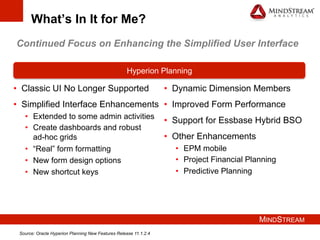
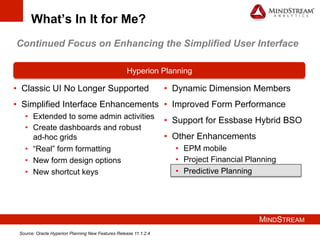
What’s In It for Me?
•  Classic UI No Longer Supported
•  Simplified Interface Enhancements
•  Extended to some admin activities
•  Create dashboards and robust
ad-hoc grids
•  “Real” form formatting
•  New form design options
•  New shortcut keys
Hyperion Planning
•  Dynamic Dimension Members
•  Improved Form Performance
•  Support for Essbase Hybrid BSO
•  Other Enhancements
•  EPM mobile
•  Project Financial Planning
•  Predictive Planning
Continued Focus on Enhancing the Simplified User Interface
Source: Oracle Hyperion Planning New Features Release 11.1.2.4
MINDSTREAM
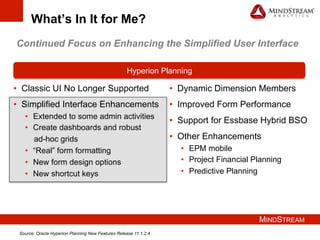
What’s In It for Me?
•  Classic UI No Longer Supported
•  Simplified Interface Enhancements
•  Extended to some admin activities
•  Create dashboards and robust
ad-hoc grids
•  “Real” form formatting
•  New form design options
•  New shortcut keys
Hyperion Planning
•  Dynamic Dimension Members
•  Improved Form Performance
•  Support for Essbase Hybrid BSO
•  Other Enhancements
•  EPM mobile
•  Project Financial Planning
•  Predictive Planning
Continued Focus on Enhancing the Simplified User Interface
Source: Oracle Hyperion Planning New Features Release 11.1.2.4
MINDSTREAM
Simplified Interface Enhancements
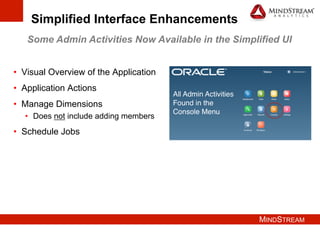
Some Admin Activities Now Available in the Simplified UI
•  Visual Overview of the Application
•  Application Actions
•  Manage Dimensions
•  Does not include adding members
•  Schedule Jobs
MINDSTREAM
Simplified Interface Enhancements
Some Admin Activities Now Available in the Simplified UI
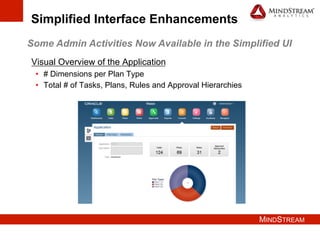
Visual Overview of the Application
•  # Dimensions per Plan Type
•  Total # of Tasks, Plans, Rules and Approval Hierarchies
MINDSTREAM
Simplified Interface Enhancements
Some Admin Activities Now Available in the Simplified UI
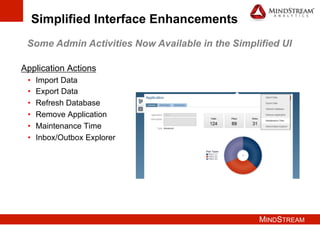
Application Actions
•  Import Data
•  Export Data
•  Refresh Database
•  Remove Application
•  Maintenance Time
•  Inbox/Outbox Explorer
MINDSTREAM
Simplified Interface Enhancements
Some Admin Activities Now Available in the Simplified UI
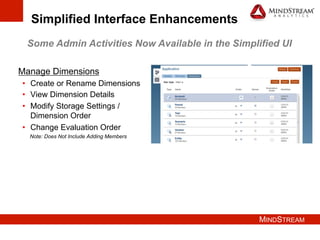
Manage Dimensions
•  Create or Rename Dimensions
•  View Dimension Details
•  Modify Storage Settings /
Dimension Order
•  Change Evaluation Order
Note: Does Not Include Adding Members
MINDSTREAM
Simplified Interface Enhancements
Some Admin Activities Now Available in the Simplified UI
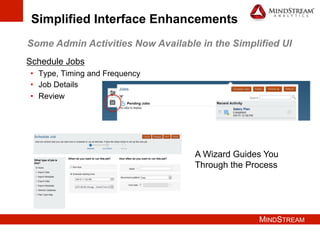
Schedule Jobs
•  Type, Timing and Frequency
•  Job Details
•  Review
A Wizard Guides You
Through the Process
MINDSTREAM
Simplified Interface Enhancements
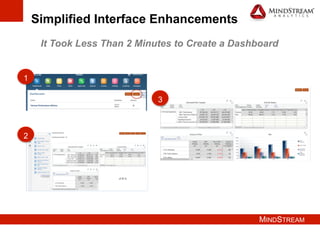
It Took Less Than 2 Minutes to Create a Dashboard
1
2
3
MINDSTREAM
Simplified Interface Enhancements
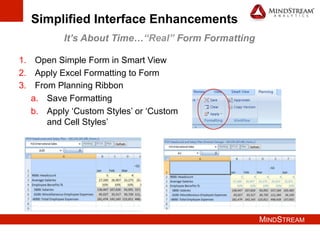
It’s About Time…“Real” Form Formatting
1.  Open Simple Form in Smart View
2.  Apply Excel Formatting to Form
3.  From Planning Ribbon
a.  Save Formatting
b.  Apply ‘Custom Styles’ or ‘Custom
and Cell Styles’
MINDSTREAM
Simplified Interface Enhancements
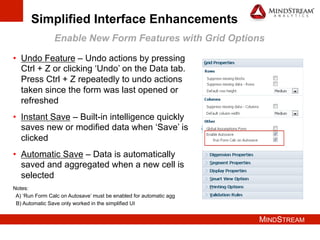
Enable New Form Features with Grid Options
•  Undo Feature – Undo actions by pressing
Ctrl + Z or clicking ‘Undo’ on the Data tab.
Press Ctrl + Z repeatedly to undo actions
taken since the form was last opened or
refreshed
•  Instant Save – Built-in intelligence quickly
saves new or modified data when ‘Save’ is
clicked
•  Automatic Save – Data is automatically
saved and aggregated when a new cell is
selected
Notes:
A) ‘Run Form Calc on Autosave’ must be enabled for automatic agg
B) Automatic Save only worked in the simplified UI
MINDSTREAM
Simplified Interface Enhancements
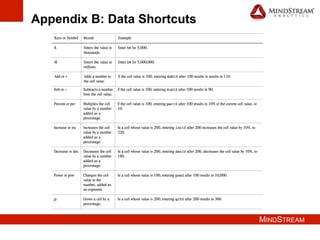
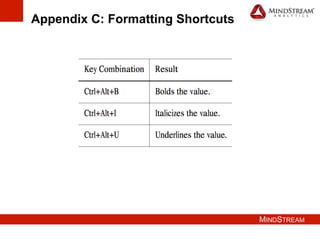
New Shortcut Keys Available in Simple Forms
•  The New Shortcuts are Divided into 3 Groups
•  Navigation
•  Data Entry
•  Formatting
•  Examples Include
•  Ctrl + Home –navigate to the first cell in the form
•  # + K – use to enter the value in thousands
•  Ctrl + Alt + B – bold a value
•  See Appendices A-C for a full list of shortcuts
MINDSTREAM
What’s In It for Me?
•  Classic UI No Longer Supported
•  Simplified Interface Enhancements
•  Extended to some admin activities
•  Create dashboards and robust
ad-hoc grids
•  “Real” form formatting
•  New form design options
•  New shortcut keys
Hyperion Planning
•  Dynamic Dimension Members
•  Improved Form Performance
•  Support for Essbase Hybrid BSO
•  Other Enhancements
•  EPM mobile
•  Project Financial Planning
•  Predictive Planning
Continued Focus on Enhancing the Simplified User Interface
Source: Oracle Hyperion Planning New Features Release 11.1.2.4
MINDSTREAM
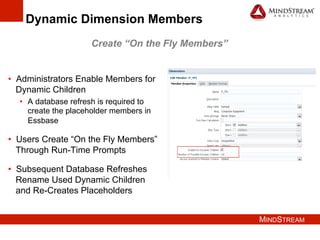
Dynamic Dimension Members
•  Administrators Enable Members for
Dynamic Children
•  A database refresh is required to
create the placeholder members in
Essbase
•  Users Create “On the Fly Members”
Through Run-Time Prompts
•  Subsequent Database Refreshes
Rename Used Dynamic Children
and Re-Creates Placeholders
Create “On the Fly Members”
MINDSTREAM
What’s In It for Me?
•  Classic UI No Longer Supported
•  Simplified Interface Enhancements
•  Extended to some admin activities
•  Create dashboards and robust
ad-hoc grids
•  “Real” form formatting
•  New form design options
•  New shortcut keys
Hyperion Planning
•  Dynamic Dimension Members
•  Improved Form Performance
•  Support for Essbase Hybrid BSO
•  Other Enhancements
•  EPM mobile
•  Project Financial Planning
•  Predictive Planning
Continued Focus on Enhancing the Simplified User Interface
Source: Oracle Hyperion Planning New Features Release 11.1.2.4
MINDSTREAM
Other Planning Enhancements
•  Improved Form Performance
•  New client-scripting technologies
•  Faster scrolling, data entry and tabbing
•  33% more load with the same response times
•  Enable compression in the web server or load balancer configuration
•  EPM Mobile
•  Supports critical Close Manager and Oracle Data Relationship
Governance functionality
•  Project Financial Planning
•  Integration with Oracle Primavera P6
•  Incremental deployment of features
•  Support for vendor dimension
MINDSTREAM
What’s In It for Me?
•  Classic UI No Longer Supported
•  Simplified Interface Enhancements
•  Extended to some admin activities
•  Create dashboards and robust
ad-hoc grids
•  “Real” form formatting
•  New form design options
•  New shortcut keys
Hyperion Planning
•  Dynamic Dimension Members
•  Improved Form Performance
•  Support for Essbase Hybrid BSO
•  Other Enhancements
•  EPM mobile
•  Project Financial Planning
•  Predictive Planning
Continued Focus on Enhancing the Simplified User Interface
Source: Oracle Hyperion Planning New Features Release 11.1.2.4
MINDSTREAM
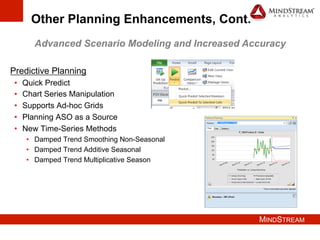
Other Planning Enhancements, Cont.
Predictive Planning
•  Quick Predict
•  Chart Series Manipulation
•  Supports Ad-hoc Grids
•  Planning ASO as a Source
•  New Time-Series Methods
•  Damped Trend Smoothing Non-Seasonal
•  Damped Trend Additive Seasonal
•  Damped Trend Multiplicative Season
Advanced Scenario Modeling and Increased Accuracy
MINDSTREAM
What’s In It for Me?
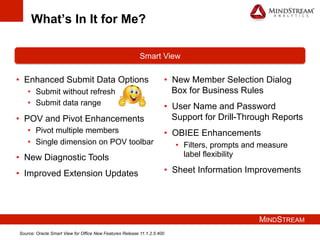
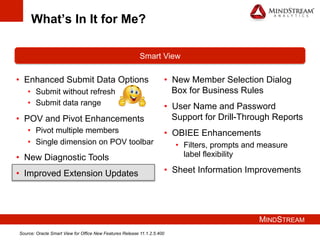
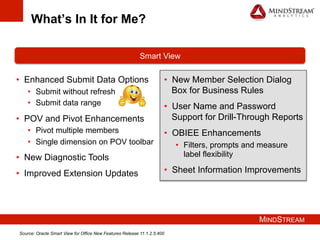
•  Enhanced Submit Data Options
•  Submit without refresh
•  Submit data range
•  POV and Pivot Enhancements
•  Pivot multiple members
•  Single dimension on POV toolbar
•  New Diagnostic Tools
•  Improved Extension Updates
Smart View
•  New Member Selection Dialog
Box for Business Rules
•  User Name and Password
Support for Drill-Through Reports
•  OBIEE Enhancements
•  Filters, prompts and measure
label flexibility
•  Sheet Information Improvements
Source: Oracle Smart View for Office New Features Release 11.1.2.5.400
MINDSTREAM
What’s In It for Me?
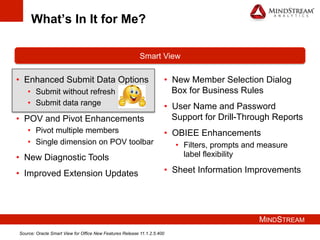
•  Enhanced Submit Data Options
•  Submit without refresh
•  Submit data range
•  POV and Pivot Enhancements
•  Pivot multiple members
•  Single dimension on POV toolbar
•  New Diagnostic Tools
•  Improved Extension Updates
Smart View
•  New Member Selection Dialog
Box for Business Rules
•  User Name and Password
Support for Drill-Through Reports
•  OBIEE Enhancements
•  Filters, prompts and measure
label flexibility
•  Sheet Information Improvements
Source: Oracle Smart View for Office New Features Release 11.1.2.5.400
MINDSTREAM
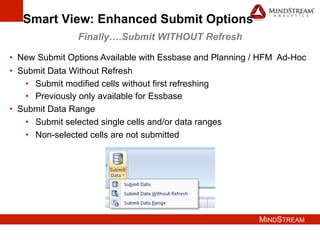
Smart View: Enhanced Submit Options
Finally….Submit WITHOUT Refresh
•  New Submit Options Available with Essbase and Planning / HFM Ad-Hoc
•  Submit Data Without Refresh
•  Submit modified cells without first refreshing
•  Previously only available for Essbase
•  Submit Data Range
•  Submit selected single cells and/or data ranges
•  Non-selected cells are not submitted
MINDSTREAM
What’s In It for Me?
•  Enhanced Submit Data Options
•  Submit without refresh
•  Submit data range
•  POV and Pivot Enhancements
•  Pivot multiple members
•  Single dimension on POV toolbar
•  New Diagnostic Tools
•  Improved Extension Updates
Smart View
•  New Member Selection Dialog
Box for Business Rules
•  User Name and Password
Support for Drill-Through Reports
•  OBIEE Enhancements
•  Filters, prompts and measure
label flexibility
•  Sheet Information Improvements
Source: Oracle Smart View for Office New Features Release 11.1.2.5.400
MINDSTREAM
POV and Pivot Enhancements
•  POV and Pivot Enhancements Available with 11.1.2.4 or Later
•  Pivot Multiple Members from Grid to POV
•  Pivot Multiple Members from POV to Grid
•  Supports A Single Dimension on the POV
MINDSTREAM
What’s In It for Me?
•  Enhanced Submit Data Options
•  Submit without refresh
•  Submit data range
•  POV and Pivot Enhancements
•  Pivot multiple members
•  Single dimension on POV toolbar
•  New Diagnostic Tools
•  Improved Extension Updates
Smart View
•  New Member Selection Dialog
Box for Business Rules
•  User Name and Password
Support for Drill-Through Reports
•  OBIEE Enhancements
•  Filters, prompts and measure
label flexibility
•  Sheet Information Improvements
Source: Oracle Smart View for Office New Features Release 11.1.2.5.400
MINDSTREAM
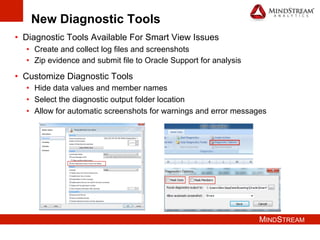
New Diagnostic Tools
•  Diagnostic Tools Available For Smart View Issues
•  Create and collect log files and screenshots
•  Zip evidence and submit file to Oracle Support for analysis
•  Customize Diagnostic Tools
•  Hide data values and member names
•  Select the diagnostic output folder location
•  Allow for automatic screenshots for warnings and error messages
MINDSTREAM
What’s In It for Me?
•  Enhanced Submit Data Options
•  Submit without refresh
•  Submit data range
•  POV and Pivot Enhancements
•  Pivot multiple members
•  Single dimension on POV toolbar
•  New Diagnostic Tools
•  Improved Extension Updates
Smart View
•  New Member Selection Dialog
Box for Business Rules
•  User Name and Password
Support for Drill-Through Reports
•  OBIEE Enhancements
•  Filters, prompts and measure
label flexibility
•  Sheet Information Improvements
Source: Oracle Smart View for Office New Features Release 11.1.2.5.400
MINDSTREAM
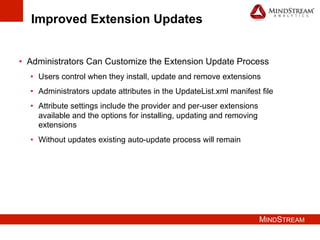
Improved Extension Updates
•  Administrators Can Customize the Extension Update Process
•  Users control when they install, update and remove extensions
•  Administrators update attributes in the UpdateList.xml manifest file
•  Attribute settings include the provider and per-user extensions
available and the options for installing, updating and removing
extensions
•  Without updates existing auto-update process will remain
MINDSTREAM
What’s In It for Me?
•  Enhanced Submit Data Options
•  Submit without refresh
•  Submit data range
•  POV and Pivot Enhancements
•  Pivot multiple members
•  Single dimension on POV toolbar
•  New Diagnostic Tools
•  Improved Extension Updates
Smart View
•  New Member Selection Dialog
Box for Business Rules
•  User Name and Password
Support for Drill-Through Reports
•  OBIEE Enhancements
•  Filters, prompts and measure
label flexibility
•  Sheet Information Improvements
Source: Oracle Smart View for Office New Features Release 11.1.2.5.400
MINDSTREAM
Other Smart View Enhancements
•  New Member Selection Dialog Box for Business Rules
•  The member selection dialog box for business rules and user variables
are the same as the standard member selection dialog box in Smart View
•  Requires Planning 11.1.2.4 or later
•  User Name and Password Support for Drill-Through Reports
•  User name and password prompts are now displayed if required to
access the data source
•  OBIEE Enhancements
•  Value selector presented in groups
•  Measure label elements can be re-ordered for pivot data display style
•  Sheet Information Improvements
•  The sheet information dialog box in Excel now contains consistent
information for Essbase, Planning and HFM
MINDSTREAM
EPM Product Development Focus
•  Deliver the Full Range of EPM Applications in the Cloud
•  Innovate with New EPM Applications
•  Continue to Extend the Lead in Existing Applications
•  Exploit Mobile and Social Capabilities to Attract New EPM Users
Source: Oracle EPM PS4 Updates
MINDSTREAM
35
Questions
For More Information Contact:
Shannon Burket
Lead Consultant
sburket@mindstreamanalytics.com
Del Rogers
VP of Sales
drogers@mindstreamanalytics.com
www.mindstreamanalytics.com
MINDSTREAM
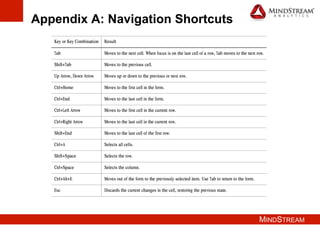
Appendix A: Navigation Shortcuts
MINDSTREAM
Appendix B: Data Shortcuts
MINDSTREAM
Appendix C: Formatting Shortcuts

Hyperion Planning 11.1.2.4 | MindStream Analytics

  • 1.
    What’s In Itfor Me? Hyperion Planning 11.1.2.4 Shannon Burket Lead Consultant
  • 2.
    MINDSTREAM Agenda •  Introduction •  AudiencePoll •  What’s In It for Me? •  Hyperion Planning •  Smart View •  EPM Product Development Focus •  Questions
  • 3.
    MINDSTREAM About MindStream Analytics • Headquartered in Boston, Massachusetts •  Specialize in the implementation, optimization and support of best in breed Performance Management, BI and Data Analytic solutions •  Oracle Platinum Partner with focused practices in Planning, Consolidations, Analytics / BI, Infrastructure , EPM Strategy and Training and Hyperion Managed Services •  Our people average over 9 years of BI or EPM experience •  Visit us at www.mindstreamanalytics.com
  • 4.
    MINDSTREAM Shannon Burket •  17+years of EPM experience •  Extensive experience in all phases of system development •  Lead Consultant – MindStream Analytics Contact Information Email: sburket@mindstreamanalytics.com Phone: 859-443-9873
  • 5.
    MINDSTREAM Audience Poll •  Howmany of you are evaluating an upgrade to 11.1.2.4? •  What version of Planning are you currently using? •  11.1.2.x •  11.1.1.4.x •  11.1.1.0 to 11.1.1.3.x •  An earlier release
  • 6.
    MINDSTREAM What’s In Itfor Me? •  Classic UI No Longer Supported •  Simplified Interface Enhancements •  Extended to some admin activities •  Create dashboards and robust ad-hoc grids •  “Real” form formatting •  New form design options •  New shortcut keys Hyperion Planning •  Dynamic Dimension Members •  Improved Form Performance •  Support for Essbase Hybrid BSO •  Other Enhancements •  EPM mobile •  Project Financial Planning •  Predictive Planning Continued Focus on Enhancing the Simplified User Interface Source: Oracle Hyperion Planning New Features Release 11.1.2.4
  • 7.
    MINDSTREAM What’s In Itfor Me? •  Classic UI No Longer Supported •  Simplified Interface Enhancements •  Extended to some admin activities •  Create dashboards and robust ad-hoc grids •  “Real” form formatting •  New form design options •  New shortcut keys Hyperion Planning •  Dynamic Dimension Members •  Improved Form Performance •  Support for Essbase Hybrid BSO •  Other Enhancements •  EPM mobile •  Project Financial Planning •  Predictive Planning Continued Focus on Enhancing the Simplified User Interface Source: Oracle Hyperion Planning New Features Release 11.1.2.4
  • 8.
    MINDSTREAM Simplified Interface Enhancements SomeAdmin Activities Now Available in the Simplified UI •  Visual Overview of the Application •  Application Actions •  Manage Dimensions •  Does not include adding members •  Schedule Jobs
  • 9.
    MINDSTREAM Simplified Interface Enhancements SomeAdmin Activities Now Available in the Simplified UI Visual Overview of the Application •  # Dimensions per Plan Type •  Total # of Tasks, Plans, Rules and Approval Hierarchies
  • 10.
    MINDSTREAM Simplified Interface Enhancements SomeAdmin Activities Now Available in the Simplified UI Application Actions •  Import Data •  Export Data •  Refresh Database •  Remove Application •  Maintenance Time •  Inbox/Outbox Explorer
  • 11.
    MINDSTREAM Simplified Interface Enhancements SomeAdmin Activities Now Available in the Simplified UI Manage Dimensions •  Create or Rename Dimensions •  View Dimension Details •  Modify Storage Settings / Dimension Order •  Change Evaluation Order Note: Does Not Include Adding Members
  • 12.
    MINDSTREAM Simplified Interface Enhancements SomeAdmin Activities Now Available in the Simplified UI Schedule Jobs •  Type, Timing and Frequency •  Job Details •  Review A Wizard Guides You Through the Process
  • 13.
    MINDSTREAM Simplified Interface Enhancements ItTook Less Than 2 Minutes to Create a Dashboard 1 2 3
  • 14.
    MINDSTREAM Simplified Interface Enhancements It’sAbout Time…“Real” Form Formatting 1.  Open Simple Form in Smart View 2.  Apply Excel Formatting to Form 3.  From Planning Ribbon a.  Save Formatting b.  Apply ‘Custom Styles’ or ‘Custom and Cell Styles’
  • 15.
    MINDSTREAM Simplified Interface Enhancements EnableNew Form Features with Grid Options •  Undo Feature – Undo actions by pressing Ctrl + Z or clicking ‘Undo’ on the Data tab. Press Ctrl + Z repeatedly to undo actions taken since the form was last opened or refreshed •  Instant Save – Built-in intelligence quickly saves new or modified data when ‘Save’ is clicked •  Automatic Save – Data is automatically saved and aggregated when a new cell is selected Notes: A) ‘Run Form Calc on Autosave’ must be enabled for automatic agg B) Automatic Save only worked in the simplified UI
  • 16.
    MINDSTREAM Simplified Interface Enhancements NewShortcut Keys Available in Simple Forms •  The New Shortcuts are Divided into 3 Groups •  Navigation •  Data Entry •  Formatting •  Examples Include •  Ctrl + Home –navigate to the first cell in the form •  # + K – use to enter the value in thousands •  Ctrl + Alt + B – bold a value •  See Appendices A-C for a full list of shortcuts
  • 17.
    MINDSTREAM What’s In Itfor Me? •  Classic UI No Longer Supported •  Simplified Interface Enhancements •  Extended to some admin activities •  Create dashboards and robust ad-hoc grids •  “Real” form formatting •  New form design options •  New shortcut keys Hyperion Planning •  Dynamic Dimension Members •  Improved Form Performance •  Support for Essbase Hybrid BSO •  Other Enhancements •  EPM mobile •  Project Financial Planning •  Predictive Planning Continued Focus on Enhancing the Simplified User Interface Source: Oracle Hyperion Planning New Features Release 11.1.2.4
  • 18.
    MINDSTREAM Dynamic Dimension Members • Administrators Enable Members for Dynamic Children •  A database refresh is required to create the placeholder members in Essbase •  Users Create “On the Fly Members” Through Run-Time Prompts •  Subsequent Database Refreshes Rename Used Dynamic Children and Re-Creates Placeholders Create “On the Fly Members”
  • 19.
    MINDSTREAM What’s In Itfor Me? •  Classic UI No Longer Supported •  Simplified Interface Enhancements •  Extended to some admin activities •  Create dashboards and robust ad-hoc grids •  “Real” form formatting •  New form design options •  New shortcut keys Hyperion Planning •  Dynamic Dimension Members •  Improved Form Performance •  Support for Essbase Hybrid BSO •  Other Enhancements •  EPM mobile •  Project Financial Planning •  Predictive Planning Continued Focus on Enhancing the Simplified User Interface Source: Oracle Hyperion Planning New Features Release 11.1.2.4
  • 20.
    MINDSTREAM Other Planning Enhancements • Improved Form Performance •  New client-scripting technologies •  Faster scrolling, data entry and tabbing •  33% more load with the same response times •  Enable compression in the web server or load balancer configuration •  EPM Mobile •  Supports critical Close Manager and Oracle Data Relationship Governance functionality •  Project Financial Planning •  Integration with Oracle Primavera P6 •  Incremental deployment of features •  Support for vendor dimension
  • 21.
    MINDSTREAM What’s In Itfor Me? •  Classic UI No Longer Supported •  Simplified Interface Enhancements •  Extended to some admin activities •  Create dashboards and robust ad-hoc grids •  “Real” form formatting •  New form design options •  New shortcut keys Hyperion Planning •  Dynamic Dimension Members •  Improved Form Performance •  Support for Essbase Hybrid BSO •  Other Enhancements •  EPM mobile •  Project Financial Planning •  Predictive Planning Continued Focus on Enhancing the Simplified User Interface Source: Oracle Hyperion Planning New Features Release 11.1.2.4
  • 22.
    MINDSTREAM Other Planning Enhancements,Cont. Predictive Planning •  Quick Predict •  Chart Series Manipulation •  Supports Ad-hoc Grids •  Planning ASO as a Source •  New Time-Series Methods •  Damped Trend Smoothing Non-Seasonal •  Damped Trend Additive Seasonal •  Damped Trend Multiplicative Season Advanced Scenario Modeling and Increased Accuracy
  • 23.
    MINDSTREAM What’s In Itfor Me? •  Enhanced Submit Data Options •  Submit without refresh •  Submit data range •  POV and Pivot Enhancements •  Pivot multiple members •  Single dimension on POV toolbar •  New Diagnostic Tools •  Improved Extension Updates Smart View •  New Member Selection Dialog Box for Business Rules •  User Name and Password Support for Drill-Through Reports •  OBIEE Enhancements •  Filters, prompts and measure label flexibility •  Sheet Information Improvements Source: Oracle Smart View for Office New Features Release 11.1.2.5.400
  • 24.
    MINDSTREAM What’s In Itfor Me? •  Enhanced Submit Data Options •  Submit without refresh •  Submit data range •  POV and Pivot Enhancements •  Pivot multiple members •  Single dimension on POV toolbar •  New Diagnostic Tools •  Improved Extension Updates Smart View •  New Member Selection Dialog Box for Business Rules •  User Name and Password Support for Drill-Through Reports •  OBIEE Enhancements •  Filters, prompts and measure label flexibility •  Sheet Information Improvements Source: Oracle Smart View for Office New Features Release 11.1.2.5.400
  • 25.
    MINDSTREAM Smart View: EnhancedSubmit Options Finally….Submit WITHOUT Refresh •  New Submit Options Available with Essbase and Planning / HFM Ad-Hoc •  Submit Data Without Refresh •  Submit modified cells without first refreshing •  Previously only available for Essbase •  Submit Data Range •  Submit selected single cells and/or data ranges •  Non-selected cells are not submitted
  • 26.
    MINDSTREAM What’s In Itfor Me? •  Enhanced Submit Data Options •  Submit without refresh •  Submit data range •  POV and Pivot Enhancements •  Pivot multiple members •  Single dimension on POV toolbar •  New Diagnostic Tools •  Improved Extension Updates Smart View •  New Member Selection Dialog Box for Business Rules •  User Name and Password Support for Drill-Through Reports •  OBIEE Enhancements •  Filters, prompts and measure label flexibility •  Sheet Information Improvements Source: Oracle Smart View for Office New Features Release 11.1.2.5.400
  • 27.
    MINDSTREAM POV and PivotEnhancements •  POV and Pivot Enhancements Available with 11.1.2.4 or Later •  Pivot Multiple Members from Grid to POV •  Pivot Multiple Members from POV to Grid •  Supports A Single Dimension on the POV
  • 28.
    MINDSTREAM What’s In Itfor Me? •  Enhanced Submit Data Options •  Submit without refresh •  Submit data range •  POV and Pivot Enhancements •  Pivot multiple members •  Single dimension on POV toolbar •  New Diagnostic Tools •  Improved Extension Updates Smart View •  New Member Selection Dialog Box for Business Rules •  User Name and Password Support for Drill-Through Reports •  OBIEE Enhancements •  Filters, prompts and measure label flexibility •  Sheet Information Improvements Source: Oracle Smart View for Office New Features Release 11.1.2.5.400
  • 29.
    MINDSTREAM New Diagnostic Tools • Diagnostic Tools Available For Smart View Issues •  Create and collect log files and screenshots •  Zip evidence and submit file to Oracle Support for analysis •  Customize Diagnostic Tools •  Hide data values and member names •  Select the diagnostic output folder location •  Allow for automatic screenshots for warnings and error messages
  • 30.
    MINDSTREAM What’s In Itfor Me? •  Enhanced Submit Data Options •  Submit without refresh •  Submit data range •  POV and Pivot Enhancements •  Pivot multiple members •  Single dimension on POV toolbar •  New Diagnostic Tools •  Improved Extension Updates Smart View •  New Member Selection Dialog Box for Business Rules •  User Name and Password Support for Drill-Through Reports •  OBIEE Enhancements •  Filters, prompts and measure label flexibility •  Sheet Information Improvements Source: Oracle Smart View for Office New Features Release 11.1.2.5.400
  • 31.
    MINDSTREAM Improved Extension Updates • Administrators Can Customize the Extension Update Process •  Users control when they install, update and remove extensions •  Administrators update attributes in the UpdateList.xml manifest file •  Attribute settings include the provider and per-user extensions available and the options for installing, updating and removing extensions •  Without updates existing auto-update process will remain
  • 32.
    MINDSTREAM What’s In Itfor Me? •  Enhanced Submit Data Options •  Submit without refresh •  Submit data range •  POV and Pivot Enhancements •  Pivot multiple members •  Single dimension on POV toolbar •  New Diagnostic Tools •  Improved Extension Updates Smart View •  New Member Selection Dialog Box for Business Rules •  User Name and Password Support for Drill-Through Reports •  OBIEE Enhancements •  Filters, prompts and measure label flexibility •  Sheet Information Improvements Source: Oracle Smart View for Office New Features Release 11.1.2.5.400
  • 33.
    MINDSTREAM Other Smart ViewEnhancements •  New Member Selection Dialog Box for Business Rules •  The member selection dialog box for business rules and user variables are the same as the standard member selection dialog box in Smart View •  Requires Planning 11.1.2.4 or later •  User Name and Password Support for Drill-Through Reports •  User name and password prompts are now displayed if required to access the data source •  OBIEE Enhancements •  Value selector presented in groups •  Measure label elements can be re-ordered for pivot data display style •  Sheet Information Improvements •  The sheet information dialog box in Excel now contains consistent information for Essbase, Planning and HFM
  • 34.
    MINDSTREAM EPM Product DevelopmentFocus •  Deliver the Full Range of EPM Applications in the Cloud •  Innovate with New EPM Applications •  Continue to Extend the Lead in Existing Applications •  Exploit Mobile and Social Capabilities to Attract New EPM Users Source: Oracle EPM PS4 Updates
  • 35.
    MINDSTREAM 35 Questions For More InformationContact: Shannon Burket Lead Consultant sburket@mindstreamanalytics.com Del Rogers VP of Sales drogers@mindstreamanalytics.com www.mindstreamanalytics.com
  • 36.
  • 37.
  • 38.