Hyper-V and Failover Clustering
Storage Failure Detection for Virtual Machines

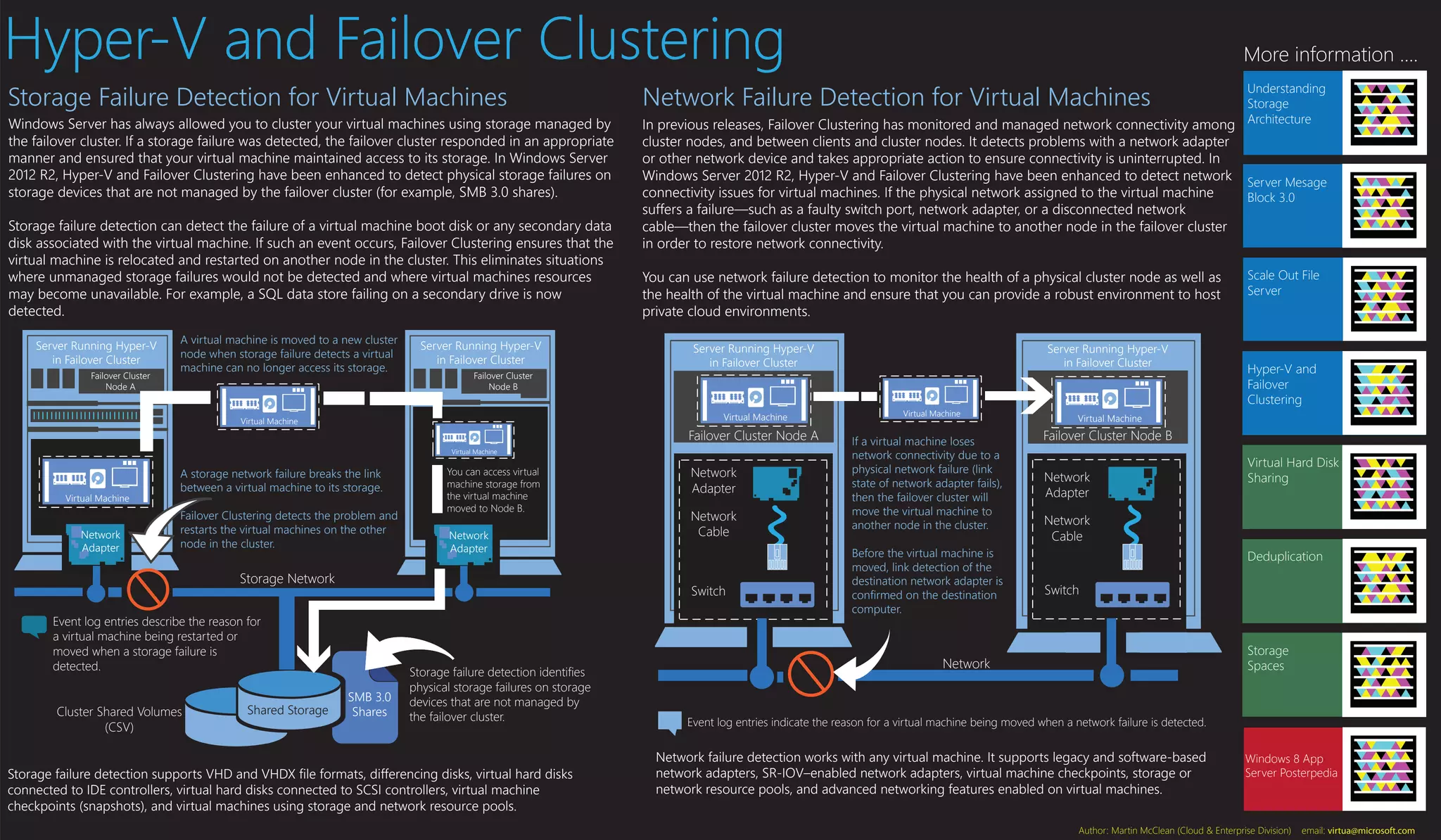
Windows Server has always allowed you to cluster your virtual machines using storage managed by
the failover cluster. If a storage failure was detected, the failover cluster responded in an appropriate
manner and ensured that your virtual machine maintained access to its storage. In Windows Server
2012 R2, Hyper-V and Failover Clustering have been enhanced to detect physical storage failures on
storage devices that are not managed by the failover cluster (for example, SMB 3.0 shares).
Storage failure detection can detect the failure of a virtual machine boot disk or any secondary data
disk associated with the virtual machine. If such an event occurs, Failover Clustering ensures that the
virtual machine is relocated and restarted on another node in the cluster. This eliminates situations
where unmanaged storage failures would not be detected and where virtual machines resources
may become unavailable. For example, a SQL data store failing on a secondary drive is now
detected.
Server Running Hyper-V
in Failover Cluster
Failover Cluster
Node A

A virtual machine is moved to a new cluster
node when storage failure detects a virtual
machine can no longer access its storage.

Server Running Hyper-V
in Failover Cluster
Failover Cluster
Node B

Network Failure Detection for Virtual Machines

Understanding
Storage
In previous releases, Failover Clustering has monitored and managed network connectivity among Architecture

cluster nodes, and between clients and cluster nodes. It detects problems with a network adapter
or other network device and takes appropriate action to ensure connectivity is uninterrupted. In
Windows Server 2012 R2, Hyper-V and Failover Clustering have been enhanced to detect network
connectivity issues for virtual machines. If the physical network assigned to the virtual machine
suffers a failure—such as a faulty switch port, network adapter, or a disconnected network
cable—then the failover cluster moves the virtual machine to another node in the failover cluster
in order to restore network connectivity.
You can use network failure detection to monitor the health of a physical cluster node as well as
the health of the virtual machine and ensure that you can provide a robust environment to host
private cloud environments.
Server Running Hyper-V
in Failover Cluster

Virtual Machine

Virtual Machine

Failover Cluster Node A
Virtual Machine

Virtual Machine

Network
Adapter

A storage network failure breaks the link
between a virtual machine to its storage.
Failover Clustering detects the problem and
restarts the virtual machines on the other
node in the cluster.

You can access virtual
machine storage from
the virtual machine
moved to Node B.

Network
Adapter

Storage Network

Cluster Shared Volumes
(CSV)

Shared Storage

Network
Adapter
Network
Cable

Switch

Event log entries describe the reason for
a virtual machine being restarted or
moved when a storage failure is
detected.

SMB 3.0
Shares

Storage failure detection identifies
physical storage failures on storage
devices that are not managed by
the failover cluster.

Storage failure detection supports VHD and VHDX file formats, differencing disks, virtual hard disks
connected to IDE controllers, virtual hard disks connected to SCSI controllers, virtual machine
checkpoints (snapshots), and virtual machines using storage and network resource pools.

More information ....

Server Running Hyper-V
in Failover Cluster

Virtual Machine

If a virtual machine loses
network connectivity due to a
physical network failure (link
state of network adapter fails),
then the failover cluster will
move the virtual machine to
another node in the cluster.
Before the virtual machine is
moved, link detection of the
destination network adapter is
confirmed on the destination
computer.

Server Mesage
Block 3.0

Scale Out File
Server

Hyper-V and
Failover
Clustering

Virtual Machine

Failover Cluster Node B
Network
Adapter

Virtual Hard Disk
Sharing

Network
Cable
Deduplication

Switch

Storage
Spaces

Network

Event log entries indicate the reason for a virtual machine being moved when a network failure is detected.

Network failure detection works with any virtual machine. It supports legacy and software-based
network adapters, SR-IOV–enabled network adapters, virtual machine checkpoints, storage or
network resource pools, and advanced networking features enabled on virtual machines.

Windows 8 App
Server Posterpedia

Author: Martin McClean (Cloud & Enterprise Division)

email: virtua@microsoft.com

Hyper v and failover clustering mini poster

  • 1.
    Hyper-V and FailoverClustering Storage Failure Detection for Virtual Machines Windows Server has always allowed you to cluster your virtual machines using storage managed by the failover cluster. If a storage failure was detected, the failover cluster responded in an appropriate manner and ensured that your virtual machine maintained access to its storage. In Windows Server 2012 R2, Hyper-V and Failover Clustering have been enhanced to detect physical storage failures on storage devices that are not managed by the failover cluster (for example, SMB 3.0 shares). Storage failure detection can detect the failure of a virtual machine boot disk or any secondary data disk associated with the virtual machine. If such an event occurs, Failover Clustering ensures that the virtual machine is relocated and restarted on another node in the cluster. This eliminates situations where unmanaged storage failures would not be detected and where virtual machines resources may become unavailable. For example, a SQL data store failing on a secondary drive is now detected. Server Running Hyper-V in Failover Cluster Failover Cluster Node A A virtual machine is moved to a new cluster node when storage failure detects a virtual machine can no longer access its storage. Server Running Hyper-V in Failover Cluster Failover Cluster Node B Network Failure Detection for Virtual Machines Understanding Storage In previous releases, Failover Clustering has monitored and managed network connectivity among Architecture cluster nodes, and between clients and cluster nodes. It detects problems with a network adapter or other network device and takes appropriate action to ensure connectivity is uninterrupted. In Windows Server 2012 R2, Hyper-V and Failover Clustering have been enhanced to detect network connectivity issues for virtual machines. If the physical network assigned to the virtual machine suffers a failure—such as a faulty switch port, network adapter, or a disconnected network cable—then the failover cluster moves the virtual machine to another node in the failover cluster in order to restore network connectivity. You can use network failure detection to monitor the health of a physical cluster node as well as the health of the virtual machine and ensure that you can provide a robust environment to host private cloud environments. Server Running Hyper-V in Failover Cluster Virtual Machine Virtual Machine Failover Cluster Node A Virtual Machine Virtual Machine Network Adapter A storage network failure breaks the link between a virtual machine to its storage. Failover Clustering detects the problem and restarts the virtual machines on the other node in the cluster. You can access virtual machine storage from the virtual machine moved to Node B. Network Adapter Storage Network Cluster Shared Volumes (CSV) Shared Storage Network Adapter Network Cable Switch Event log entries describe the reason for a virtual machine being restarted or moved when a storage failure is detected. SMB 3.0 Shares Storage failure detection identifies physical storage failures on storage devices that are not managed by the failover cluster. Storage failure detection supports VHD and VHDX file formats, differencing disks, virtual hard disks connected to IDE controllers, virtual hard disks connected to SCSI controllers, virtual machine checkpoints (snapshots), and virtual machines using storage and network resource pools. More information .... Server Running Hyper-V in Failover Cluster Virtual Machine If a virtual machine loses network connectivity due to a physical network failure (link state of network adapter fails), then the failover cluster will move the virtual machine to another node in the cluster. Before the virtual machine is moved, link detection of the destination network adapter is confirmed on the destination computer. Server Mesage Block 3.0 Scale Out File Server Hyper-V and Failover Clustering Virtual Machine Failover Cluster Node B Network Adapter Virtual Hard Disk Sharing Network Cable Deduplication Switch Storage Spaces Network Event log entries indicate the reason for a virtual machine being moved when a network failure is detected. Network failure detection works with any virtual machine. It supports legacy and software-based network adapters, SR-IOV–enabled network adapters, virtual machine checkpoints, storage or network resource pools, and advanced networking features enabled on virtual machines. Windows 8 App Server Posterpedia Author: Martin McClean (Cloud & Enterprise Division) email: virtua@microsoft.com