Hybrid Identify for M365
Simon Angling
Lead Cloud Solutions Architect, Liquid Intelligent Technologies
Simon Angling
Lead Cloud Solutions Architect,
Liquid Intelligent Technologies
simon@simonangling.com
http://simonangling.com
25+ years IT experience
MCT since 2007
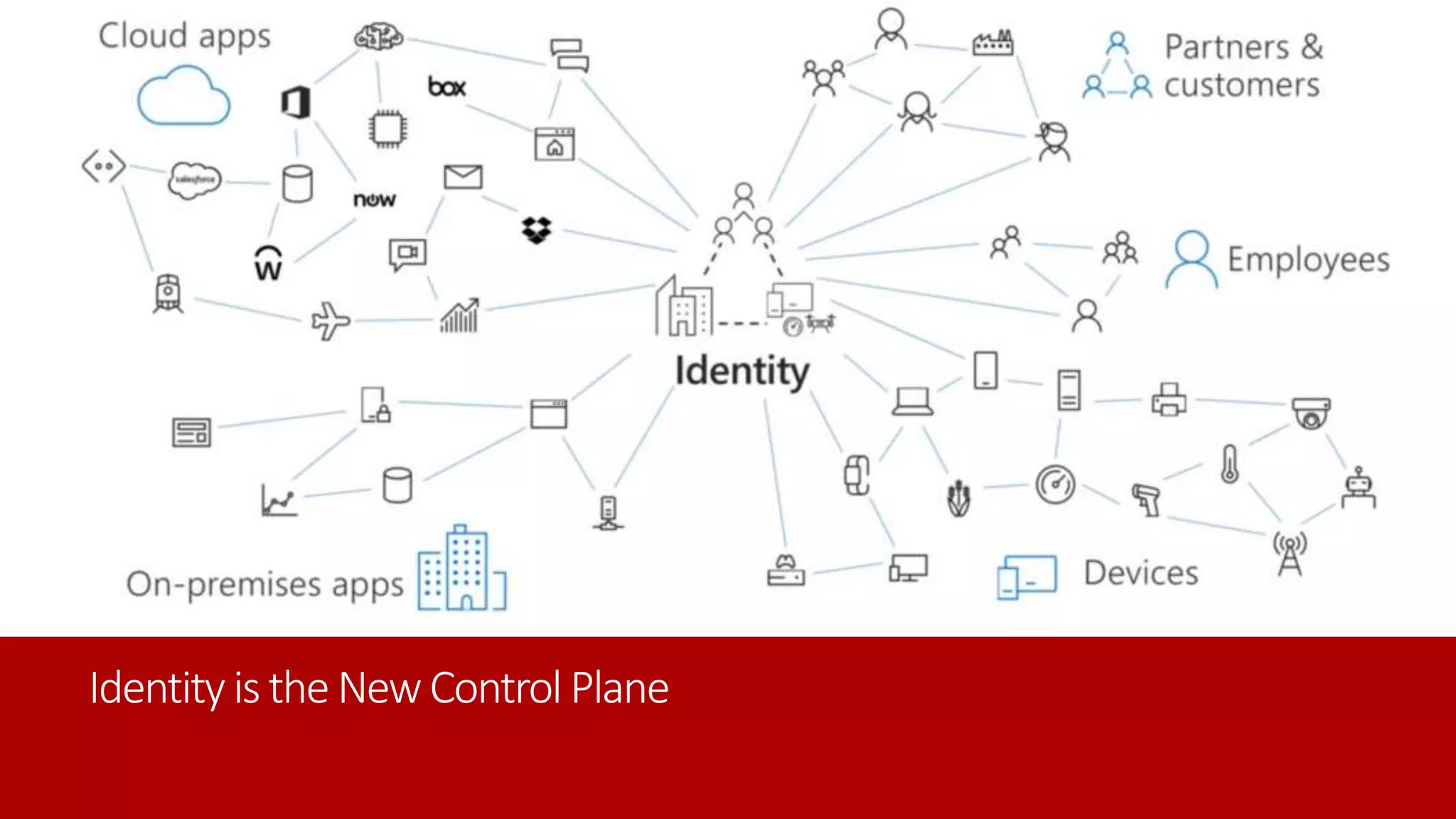
Identityis theNewControl Plane
What is Hybrid Identity?
Single sign-on
Self-service
Simple connection
On-premises
Other
directories
Windows Server
Active Directory
SaaS
Azure
Public
cloud
Cloud
Microsoft Azure Active Directory
Planning for Hybrid
Decisions, Decisions
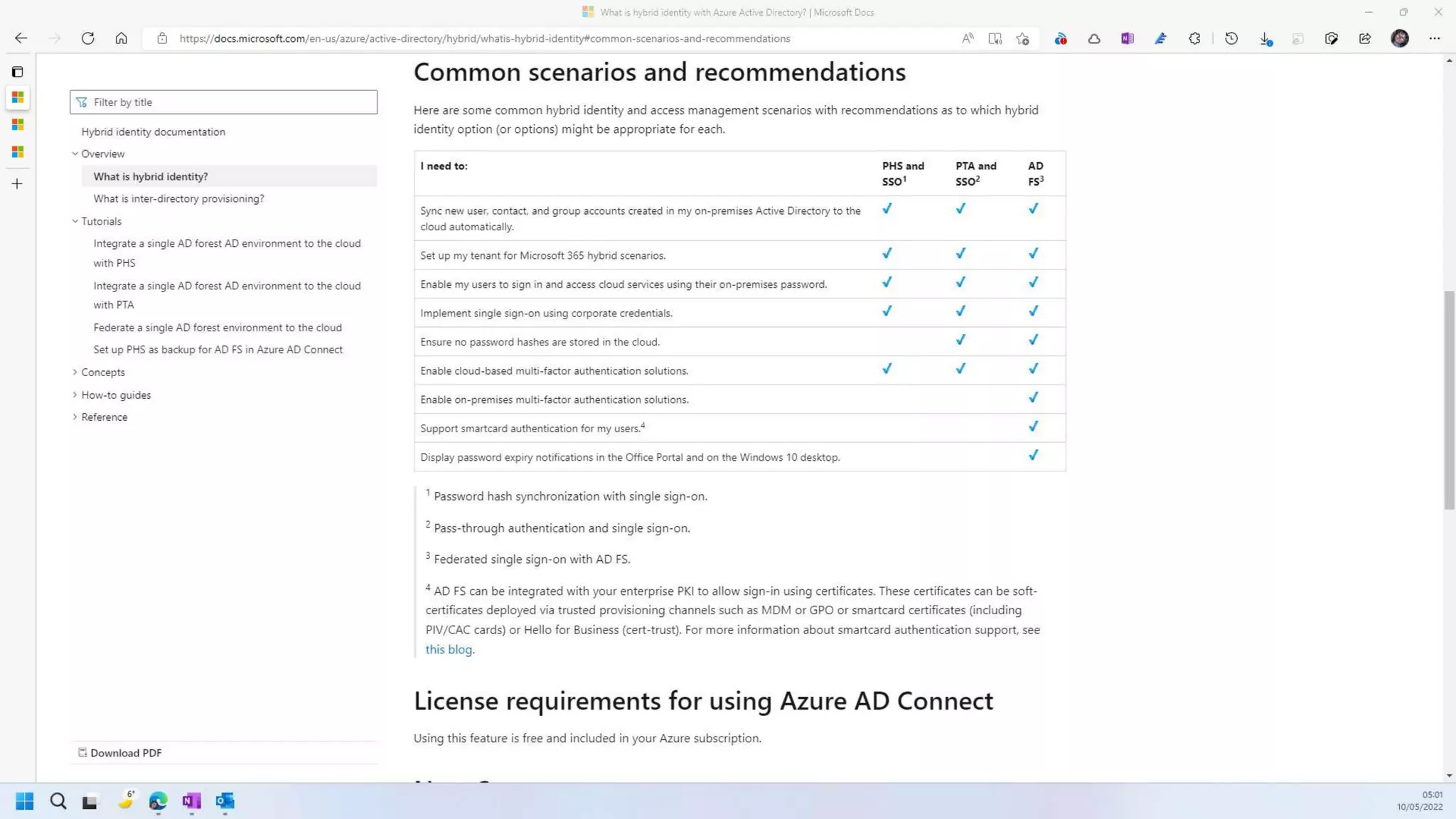
Chose Authentication Method
• Password hash synchronization (PHS)
• Pass-through authentication (PTA)
• Federation (AD FS)
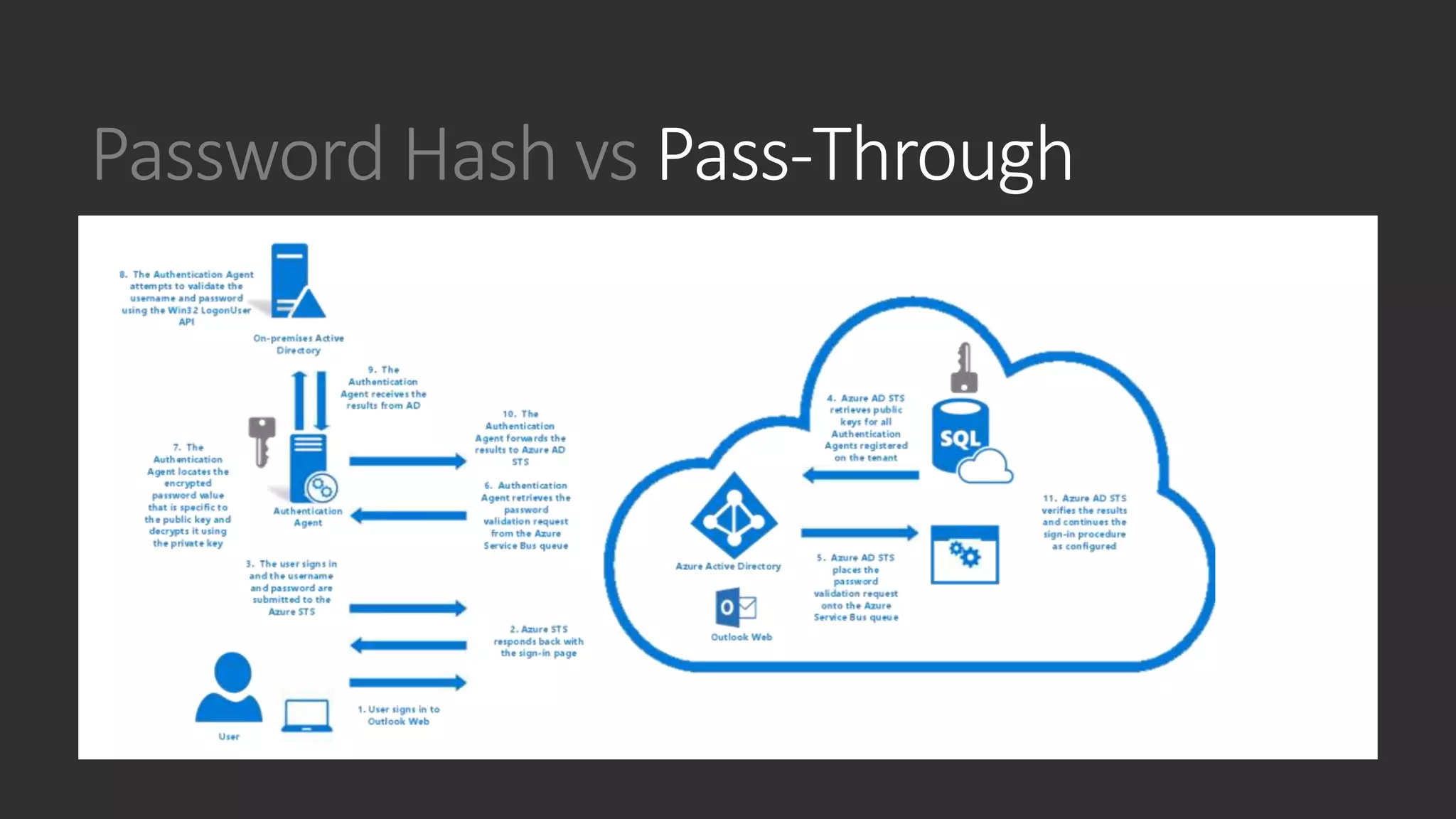
Password Hash vs Pass-Through
AZURE AD PASSWORD HASH
SYNCHRONIZATION (PHS)
AZURE AD PASS-THROUGH
AUTHENTICATION (PTA)
Password Hash vs Pass-Through
AZURE AD PASSWORD HASH
SYNCHRONIZATION (PHS)
AZURE AD PASS-THROUGH
AUTHENTICATION (PTA)
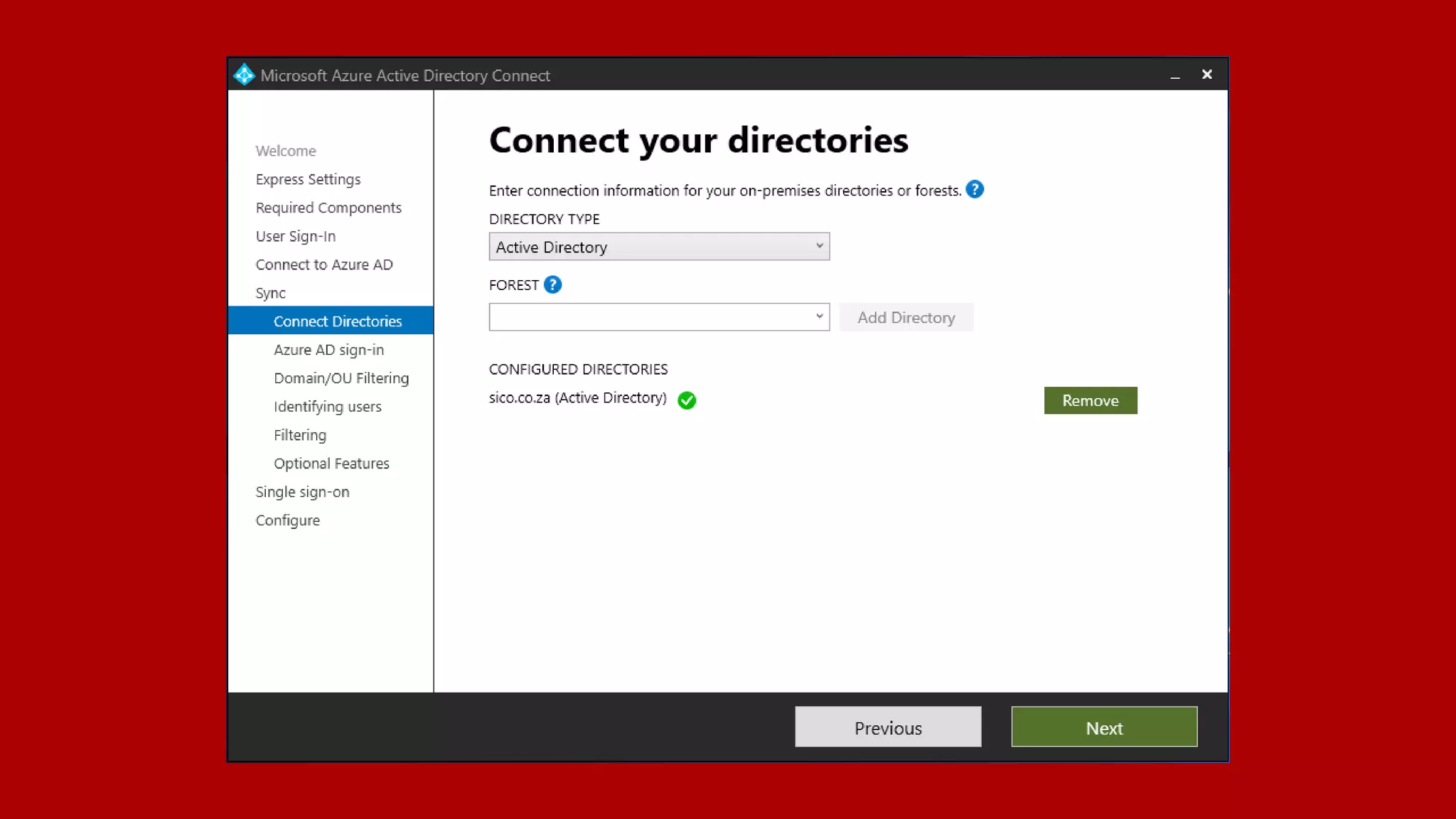
Azure AD Connect vs AAD Connect Sync

AZURE AD CONNECT
• Connect to LDAP directories
• Support for device objects
• Synchronize customer defined AD
attributes (directory extensions)
• Support for Pass-Through
Authentication
• Device and Group Writeback
• Azure AD Domain Services Support
AZURE AD CONNECT CLOUD SYNC
• Connect to multiple disconnected
on-premises AD forests
• Lightweight agent installation
mode
• Multiple active agents for high
availability
• Max 150,000 object per domain
Topology and Setup
Azure AD Connect Rules
• AAD Connect instance can sync with a single
AAD Instance and vis versa
• An AD object can be replicated either by
AADCS or one AAD Connect instance
Sample Topologies
Demo
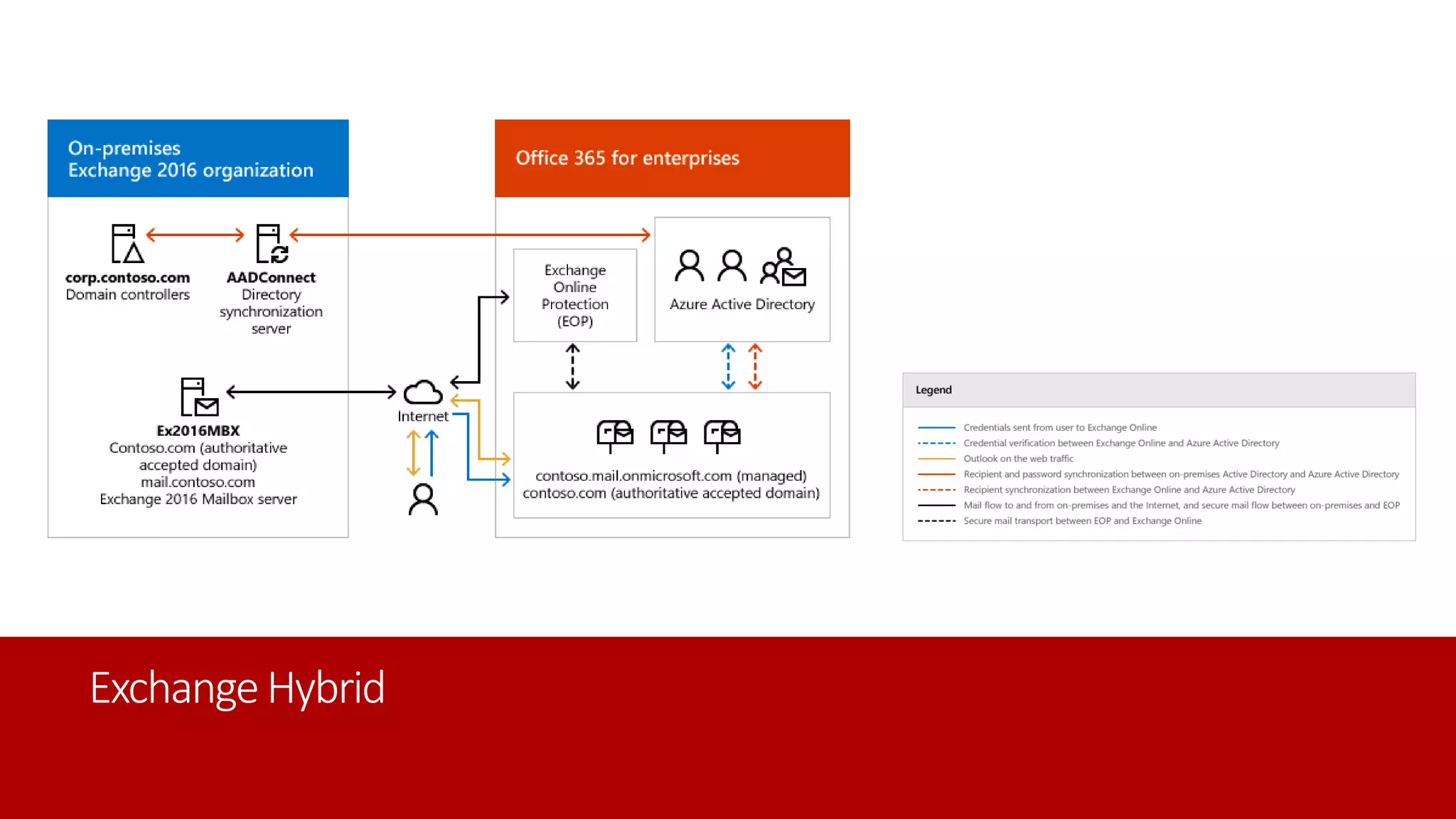
Exchange Hybrid
ExchangeHybrid
Turn of your last Exchange Server?
• You have migrated all mailboxes and public folders to Exchange Online
• Use AD for recipient management and Azure AD Connect for synchronization
• You don't use/require the on-premises Exchange admin center or Exchange Role-
Based Access Control (RBAC)
• Are comfortable with using only Windows PowerShell for recipient management
• You don't require auditing or logging of recipient management activity
• You are running only one Exchange server and only for recipient management
purposes
• Want to manage recipients without running any Exchange servers.
and Discusss…

Hybrid Identity for M365

  • 1.
    Hybrid Identify forM365 Simon Angling Lead Cloud Solutions Architect, Liquid Intelligent Technologies
  • 2.
    Simon Angling Lead CloudSolutions Architect, Liquid Intelligent Technologies simon@simonangling.com http://simonangling.com 25+ years IT experience MCT since 2007
  • 3.
  • 4.
    What is HybridIdentity? Single sign-on Self-service Simple connection On-premises Other directories Windows Server Active Directory SaaS Azure Public cloud Cloud Microsoft Azure Active Directory
  • 5.
  • 6.
    Chose Authentication Method •Password hash synchronization (PHS) • Pass-through authentication (PTA) • Federation (AD FS)
  • 7.
    Password Hash vsPass-Through AZURE AD PASSWORD HASH SYNCHRONIZATION (PHS) AZURE AD PASS-THROUGH AUTHENTICATION (PTA)
  • 8.
    Password Hash vsPass-Through AZURE AD PASSWORD HASH SYNCHRONIZATION (PHS) AZURE AD PASS-THROUGH AUTHENTICATION (PTA)
  • 10.
    Azure AD Connectvs AAD Connect Sync AZURE AD CONNECT • Connect to LDAP directories • Support for device objects • Synchronize customer defined AD attributes (directory extensions) • Support for Pass-Through Authentication • Device and Group Writeback • Azure AD Domain Services Support AZURE AD CONNECT CLOUD SYNC • Connect to multiple disconnected on-premises AD forests • Lightweight agent installation mode • Multiple active agents for high availability • Max 150,000 object per domain
  • 12.
  • 13.
    Azure AD ConnectRules • AAD Connect instance can sync with a single AAD Instance and vis versa • An AD object can be replicated either by AADCS or one AAD Connect instance
  • 14.
  • 27.
  • 28.
  • 29.
  • 30.
    Turn of yourlast Exchange Server? • You have migrated all mailboxes and public folders to Exchange Online • Use AD for recipient management and Azure AD Connect for synchronization • You don't use/require the on-premises Exchange admin center or Exchange Role- Based Access Control (RBAC) • Are comfortable with using only Windows PowerShell for recipient management • You don't require auditing or logging of recipient management activity • You are running only one Exchange server and only for recipient management purposes • Want to manage recipients without running any Exchange servers.
  • 31.

Editor's Notes

  • #12 https://docs.microsoft.com/en-us/azure/active-directory/cloud-sync/what-is-cloud-sync#comparison-between-azure-ad-connect-and-cloud-sync