@PeterHilton
http://hilton.org.uk/
HTTP demystified
for web developers
Peeling back the top layer of the 

web application stack
Web technology is like
an onion:
there’s always another
layer.
@PeterHilton • 2
A long time ago…
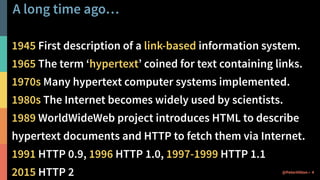
A long time ago…
1945 First description of a link-based information system.
1965 The term ‘hypertext’ coined for text containing links.
1970s Many hypertext computer systems implemented.
1980s The Internet becomes widely used by scientists.
1989 WorldWideWeb project introduces HTML to describe
hypertext documents and HTTP to fetch them via Internet.
1991 HTTP 0.9, 1996 HTTP 1.0, 1997-1999 HTTP 1.1
2015 HTTP 2 4@PeterHilton •
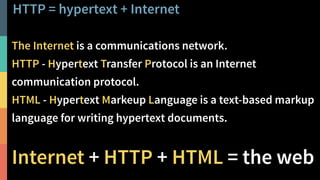
HTTP = hypertext + Internet
5@PeterHilton •
The Internet is a communications network.
HTTP - Hypertext Transfer Protocol is an Internet
communication protocol.
HTML - Hypertext Markeup Language is a text-based markup
language for writing hypertext documents.
Internet + HTTP + HTML = the web
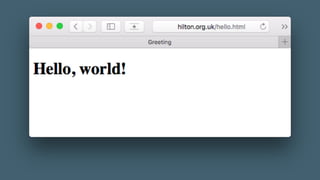
HTTP in action
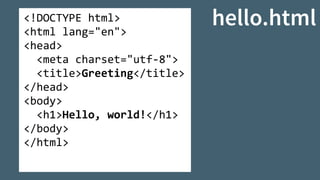
<!DOCTYPE	html>	
<html	lang="en">	
<head>	
		<meta	charset="utf-8">	
		<title>Greeting</title>	
</head>	
<body>	
		<h1>Hello,	world!</h1>	
</body>	
</html>
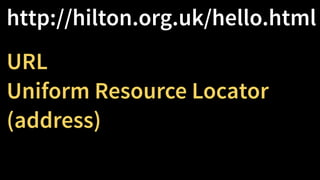
http://hilton.org.uk/hello.html
URL
Uniform Resource Locator
(address)
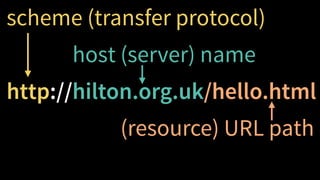
http://hilton.org.uk/hello.htmlhttp
scheme (transfer protocol)
http://hilton.org.uk/hello.html
(resource) URL path
host (server) name
http://hilton.org.uk
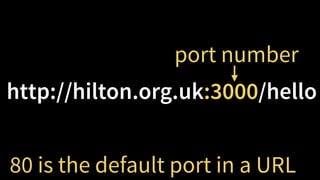
http://hilton.org.uk:3000/hello
80 is the default port in a URL
port number
$	telnet	hilton.org.uk	80	
Trying	192.30.252.153...

Connected	to	hilton.org.uk.

Escape	character	is	'^]'.	
GET	/hello.html	HTTP/1.1

Host:	hilton.org.uk	


HTTP/1.1	200	OK

Server:	GitHub.com

Date:	Sat,	16	Jul	2016	09:20:27	GMT

Content-Type:	text/html;	charset=utf-8

Content-Length:	147

Last-Modified:	Sat,	16	Jul	2016	08:27:20	GMT


<!DOCTYPE	html>

<html	lang="en">

<head>

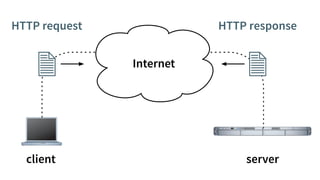
Internet
HTTP request HTTP response
client server
HTTP request in detail
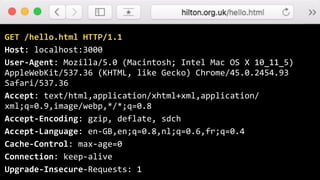
GET	/hello.html	HTTP/1.1	
Host:	localhost:3000	
User-Agent:	Mozilla/5.0	(Macintosh;	Intel	Mac	OS	X	10_11_5)	
AppleWebKit/537.36	(KHTML,	like	Gecko)	Chrome/45.0.2454.93	
Safari/537.36	
Accept:	text/html,application/xhtml+xml,application/
xml;q=0.9,image/webp,*/*;q=0.8	
Accept-Encoding:	gzip,	deflate,	sdch	
Accept-Language:	en-GB,en;q=0.8,nl;q=0.6,fr;q=0.4	
Cache-Control:	max-age=0	
Connection:	keep-alive	
Upgrade-Insecure-Requests:	1
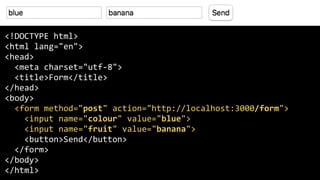
<!DOCTYPE	html>	
<html	lang="en">	
<head>	
		<meta	charset="utf-8">	
		<title>Form</title>	
</head>	
<body>	
		<form	method="post"	action="http://localhost:3000/form">	
				<input	name="colour"	value="blue">	
				<input	name="fruit"	value="banana">	
				<button>Send</button>	
		</form>	
</body>	
</html>
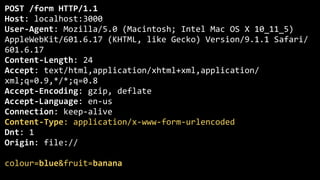
POST	/form	HTTP/1.1	
Host:	localhost:3000	
User-Agent:	Mozilla/5.0	(Macintosh;	Intel	Mac	OS	X	10_11_5)	
AppleWebKit/601.6.17	(KHTML,	like	Gecko)	Version/9.1.1	Safari/
601.6.17	
Content-Length:	24	
Accept:	text/html,application/xhtml+xml,application/
xml;q=0.9,*/*;q=0.8	
Accept-Encoding:	gzip,	deflate	
Accept-Language:	en-us	
Connection:	keep-alive	
Content-Type:	application/x-www-form-urlencoded	
Dnt:	1	
Origin:	file://	
colour=blue&fruit=banana
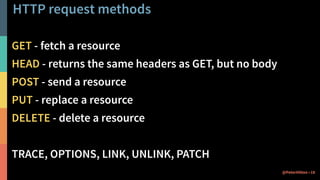
HTTP request methods
GET - fetch a resource
HEAD - returns the same headers as GET, but no body
POST - send a resource
PUT - replace a resource
DELETE - delete a resource
TRACE, OPTIONS, LINK, UNLINK, PATCH
18@PeterHilton •
HTTP response in detail
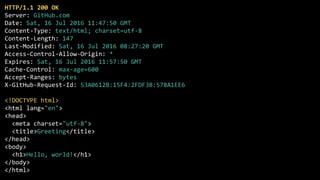
HTTP/1.1	200	OK	
Server:	GitHub.com	
Date:	Sat,	16	Jul	2016	11:47:50	GMT	
Content-Type:	text/html;	charset=utf-8	
Content-Length:	147	
Last-Modified:	Sat,	16	Jul	2016	08:27:20	GMT	
Access-Control-Allow-Origin:	*	
Expires:	Sat,	16	Jul	2016	11:57:50	GMT	
Cache-Control:	max-age=600	
Accept-Ranges:	bytes	
X-GitHub-Request-Id:	53A0612B:15F4:2FDF3B:578A1EE6	
<!DOCTYPE	html>	
<html	lang="en">	
<head>	
		<meta	charset="utf-8">	
		<title>Greeting</title>	
</head>	
<body>	
		<h1>Hello,	world!</h1>	
</body>	
</html>
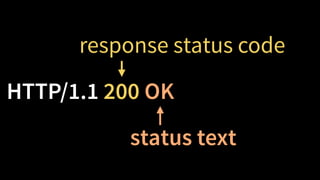
HTTP/1.1 200 OK
response status code
status text
The tricky details
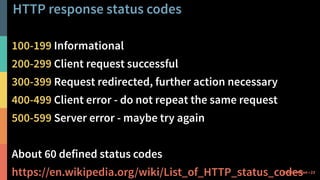
HTTP response status codes
100-199 Informational
200-299 Client request successful
300-399 Request redirected, further action necessary
400-499 Client error - do not repeat the same request
500-599 Server error - maybe try again
About 60 defined status codes
https://en.wikipedia.org/wiki/List_of_HTTP_status_codes 23@PeterHilton •
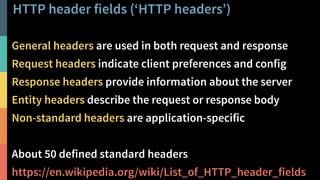
HTTP header fields (‘HTTP headers’)
24@PeterHilton •
General headers are used in both request and response
Request headers indicate client preferences and config
Response headers provide information about the server
Entity headers describe the request or response body
Non-standard headers are application-specific
About 50 defined standard headers
https://en.wikipedia.org/wiki/List_of_HTTP_header_fields
Things that everyone gets wrong
Character encodings
URL encoding/decoding
Caches and proxies
Cookies, and using them to introduce session state
25@PeterHilton •
Further reading
26@PeterHilton •
Web Client Programming with Perl (O’Reilly, 1997), 

now available free online via O’Reilly Open Books,
starts with three well-written chapters that teach
everything web developers need to know about HTTP:
Chapter 1: Introduction
Chapter 2: Demystifying the Browser
Chapter 3: Learning HTTP
http://www.oreilly.com/openbook/webclient/
@PeterHilton
http://hilton.org.uk/

HTTP demystified for web developers