
API Documentation Workshop:
Deep Dive into REST APIs
By Tom Johnson
www.idratherbewriting.com
January 24, 2015
REST
• Client-server architecture: You send a request
and get a response back. REST is the model of
the web. REST APIs also called “web APIs.”
• REST = “representational state transfer” – data
transfer modeled after the web.
• Protocol transfer is HTTP. Requests are made
through URLs.
• Can see the response in the browser.
• Responses are stateless -- not remembered.
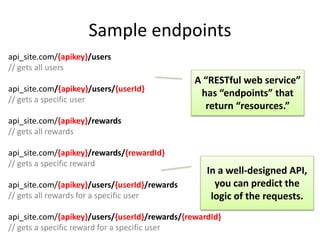
Sample endpoints
api_site.com/{apikey}/users
// gets all users
api_site.com/{apikey}/users/{userId}
// gets a specific user
api_site.com/{apikey}/rewards
// gets all rewards
api_site.com/{apikey}/rewards/{rewardId}
// gets a specific reward
api_site.com/{apikey}/users/{userId}/rewards
// gets all rewards for a specific user
api_site.com/{apikey}/users/{userId}/rewards/{rewardId}
// gets a specific reward for a specific user
In a well-designed API,
you can predict the
logic of the requests.
A “RESTful web service”
has “endpoints” that
return “resources.”
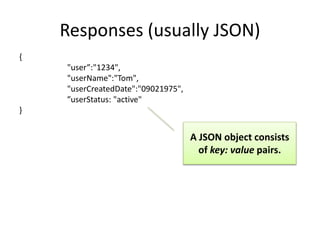
Responses (usually JSON)
{
"user”:"1234",
"userName":"Tom",
"userCreatedDate":"09021975",
”userStatus: "active"
}
A JSON object consists
of key: value pairs.
Some objects contain
lists of items in brackets [
]. Here the photo object
contains an array.
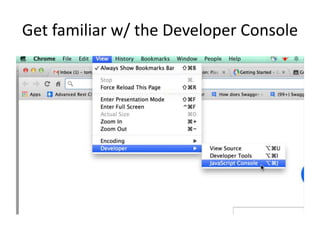
Get familiar w/ the Developer Console
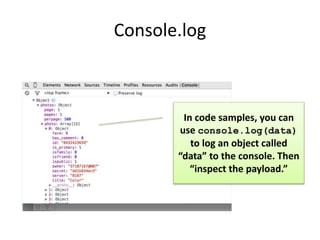
Console.log
In code samples, you can
use console.log(data)
to log an object called
“data” to the console. Then
“inspect the payload.”
HTTP requests have methods
GET
POST
DELETE
PUT
The methods available
for each resource differ.
DELETE methods aren’t
usually passed in regular
web page code for
security reasons. Usually
only submitted using
cURL.
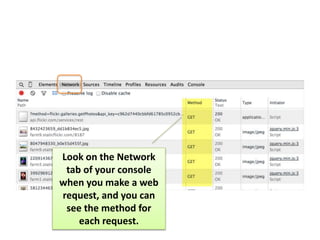
Look on the Network
tab of your console
when you make a web
request, and you can
see the method for
each request.
Activity
1. Open the JavaScript Console and go to the
Network Tab.
2. Browse to your favorite website (e.g.,
tccamp.org).
3. Look at the requests and responses logged in
the Network tab.
EXAMPLES OF REST API CALLS
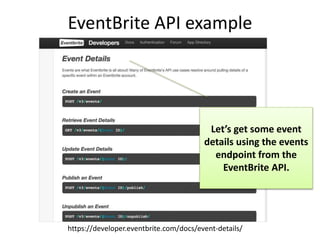
EventBrite API example
Let’s get some event
details using the events
endpoint from the
EventBrite API.
https://developer.eventbrite.com/docs/event-details/
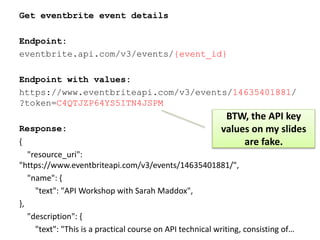
Get eventbrite event details
Endpoint:
eventbrite.api.com/v3/events/{event_id}
Endpoint with values:
https://www.eventbriteapi.com/v3/events/14635401881/
?token=C4QTJZP64YS5ITN4JSPM
Response:
{
"resource_uri":
"https://www.eventbriteapi.com/v3/events/14635401881/",
"name": {
"text": "API Workshop with Sarah Maddox",
},
"description": {
"text": "This is a practical course on API technical writing, consisting of…
BTW, the API key
values on my slides
are fake.
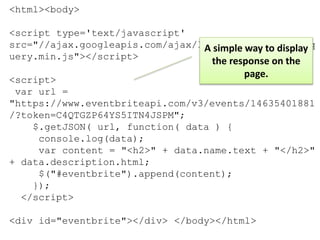
<html><body>
<script type='text/javascript'
src="//ajax.googleapis.com/ajax/libs/jquery/1.7.2/jq
uery.min.js"></script>
<script>
var url =
"https://www.eventbriteapi.com/v3/events/14635401881
/?token=C4QTGZP64YS5ITN4JSPM";
$.getJSON( url, function( data ) {
console.log(data);
var content = "<h2>" + data.name.text + "</h2>"
+ data.description.html;
$("#eventbrite").append(content);
});
</script>
<div id="eventbrite"></div> </body></html>
A simple way to display
the response on the
page.
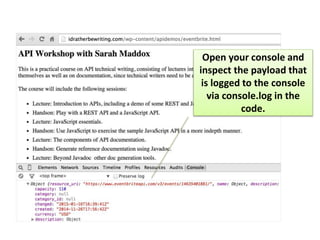
Open your console and
inspect the payload that
is logged to the console
via console.log in the
code.
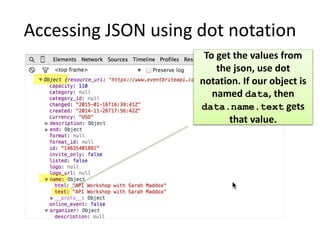
Accessing JSON using dot notation
To get the values from
the json, use dot
notation. If our object is
named data, then
data.name.text gets
that value.
Activity
1. Open the JavaScript Console and go to the
Console tab.
2. Open the eventbrite.html file in your
browser.
3. Inspect the payload.
Code samples should be simple
- Focus on call and response. What’s important
is the endpoint, its parameters, and the
resource it returns.
- No styling. In code samples, don’t get
complicated with styling unless you’re
providing a copy-and-paste widget. The more
you strip away, the better. Analogy with
graphics.
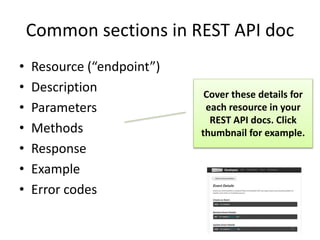
Common sections in REST API doc
• Resource (“endpoint”)
• Description
• Parameters
• Methods
• Response
• Example
• Error codes
Cover these details for
each resource in your
REST API docs. Click
thumbnail for example.
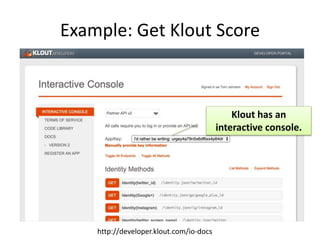
Example: Get Klout Score
Klout has an
interactive console.
http://developer.klout.com/io-docs
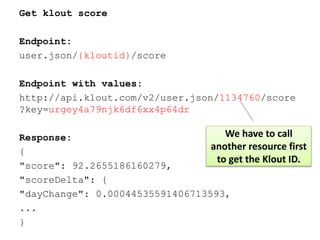
Get klout score
Endpoint:
user.json/{kloutid}/score
Endpoint with values:
http://api.klout.com/v2/user.json/1134760/score
?key=urgey4a79njk6df6xx4p64dr
Response:
{
"score": 92.2655186160279,
"scoreDelta": {
"dayChange": 0.00044535591406713593,
...
}
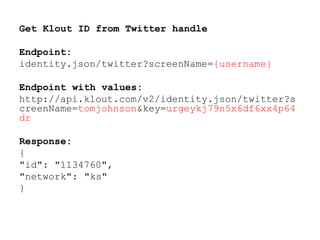
We have to call
another resource first
to get the Klout ID.
Get Klout ID from Twitter handle
Endpoint:
identity.json/twitter?screenName={username}
Endpoint with values:
http://api.klout.com/v2/identity.json/twitter?s
creenName=tomjohnson&key=urgeykj79n5x6df6xx4p64
dr
Response:
{
"id": "1134760",
"network": "ks"
}
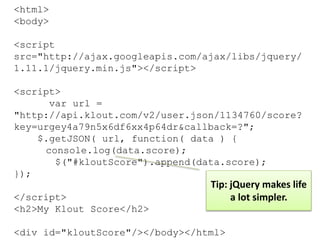
<html>
<body>
<script
src="http://ajax.googleapis.com/ajax/libs/jquery/
1.11.1/jquery.min.js"></script>
<script>
var url =
"http://api.klout.com/v2/user.json/1134760/score?
key=urgey4a79n5x6df6xx4p64dr&callback=?";
$.getJSON( url, function( data ) {
console.log(data.score);
$("#kloutScore").append(data.score);
});
</script>
<h2>My Klout Score</h2>
<div id="kloutScore"/></body></html>
Tip: jQuery makes life
a lot simpler.
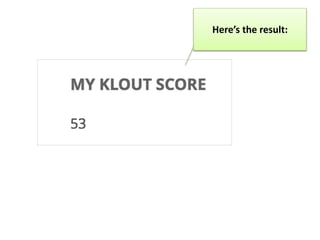
Here’s the result:
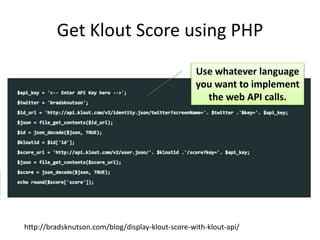
Get Klout Score using PHP
http://bradsknutson.com/blog/display-klout-score-with-klout-api/
Use whatever language
you want to implement
the web API calls.
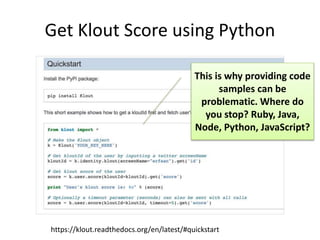
Get Klout Score using Python
https://klout.readthedocs.org/en/latest/#quickstart
This is why providing code
samples can be
problematic. Where do
you stop? Ruby, Java,
Node, Python, JavaScript?
Activity: Get your Klout score
1. Go to http://developer.klout.com/io-docs.
2. Use the identity endpoint to get your Klout ID
based on your Twitter name.
3. Use the score endpoint to get your score.
For API key, you can use the key in the
apicalls.txt file or sign up for your own.
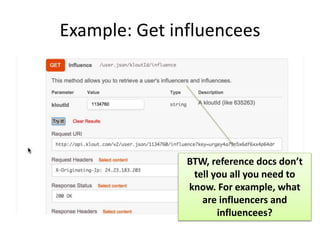
Example: Get influencees
BTW, reference docs don’t
tell you all you need to
know. For example, what
are influencers and
influencees?
Get klout influencees
Endpoint: user.json/{kloutid}/influence
Endpoint with values:
http://api.klout.com/v2/user.json/1134760/influ
ence?key=urgerjy4a79n5x6df6xx4p64dr
Response:
{
"score": 92.2655186160279,
"scoreDelta": {
"dayChange": 0.00044535591406713593,
...
}
API keys regulate
usage and prevent
servers from abuse by
too many calls.
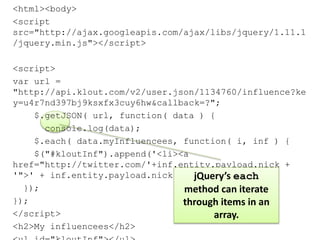
<html><body>
<script
src="http://ajax.googleapis.com/ajax/libs/jquery/1.11.1
/jquery.min.js"></script>
<script>
var url =
"http://api.klout.com/v2/user.json/1134760/influence?ke
y=u4r7nd397bj9ksxfx3cuy6hw&callback=?";
$.getJSON( url, function( data ) {
console.log(data);
$.each( data.myInfluencees, function( i, inf ) {
$("#kloutInf").append('<li><a
href="http://twitter.com/'+inf.entity.payload.nick +
'">' + inf.entity.payload.nick + '</a></li>');
});
});
</script>
<h2>My influencees</h2>
jQuery’s each
method can iterate
through items in an
array.
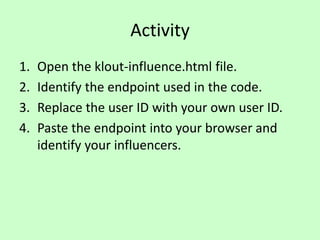
Activity
1. Open the klout-influence.html file.
2. Identify the endpoint used in the code.
3. Replace the user ID with your own user ID.
4. Paste the endpoint into your browser and
identify your influencers.
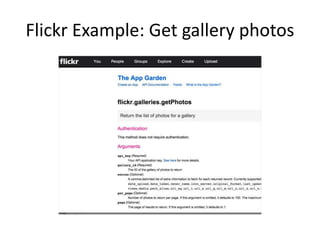
Flickr Example: Get gallery photos
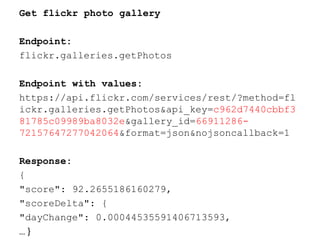
Get flickr photo gallery
Endpoint:
flickr.galleries.getPhotos
Endpoint with values:
https://api.flickr.com/services/rest/?method=fl
ickr.galleries.getPhotos&api_key=c962d7440cbbf3
81785c09989ba8032e&gallery_id=66911286-
72157647277042064&format=json&nojsoncallback=1
Response:
{
"score": 92.2655186160279,
"scoreDelta": {
"dayChange": 0.00044535591406713593,
… }
Activity
1. Open the flickr.html file in a text editor.
2. Copy the endpoint (url) and paste it into your
browser.
3. Try to find the image source URLs in the
payload.
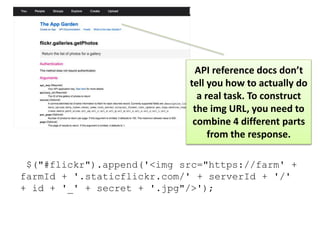
$("#flickr").append('<img src="https://farm' +
farmId + '.staticflickr.com/' + serverId + '/'
+ id + '_' + secret + '.jpg"/>');
API reference docs don’t
tell you how to actually do
a real task. To construct
the img URL, you need to
combine 4 different parts
from the response.
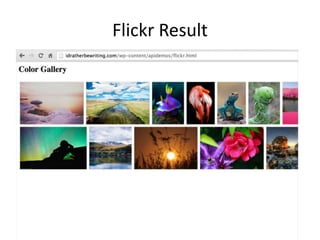
Flickr Result
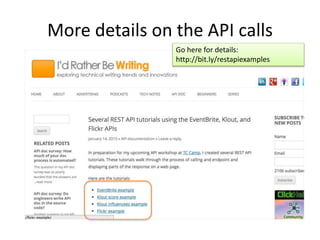
More details on the API calls
Go here for details:
http://bit.ly/restapiexamples
DESIGNING A SITE FOR API DOCS
Sample REST API doc sites
Many API doc sites
are modern looking
and awesome.
Remember, the API
Doc is the product
interface, so it has
to look good.
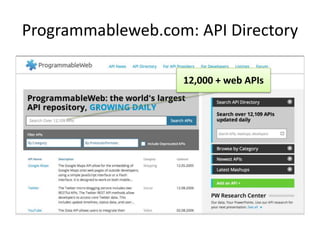
Programmableweb.com: API Directory
12,000 + web APIs
What design
trends or patterns
do we see among
popular API doc
sites?
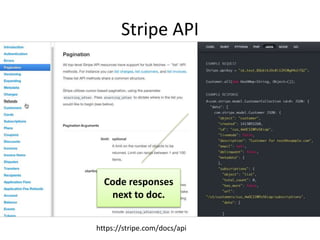
Stripe API
Code responses
next to doc.
https://stripe.com/docs/api
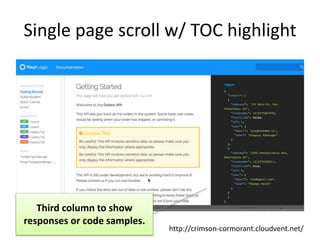
Single page scroll w/ TOC highlight
Third column to show
responses or code samples.
http://crimson-cormorant.cloudvent.net/
Jekyll API doc theme from
CloudCannon
Bootstrap scollspy demo
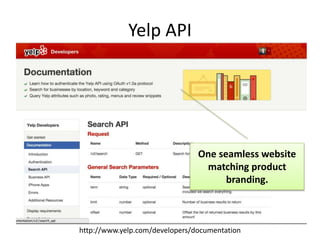
Yelp API
One seamless website
matching product
branding.
http://www.yelp.com/developers/documentation
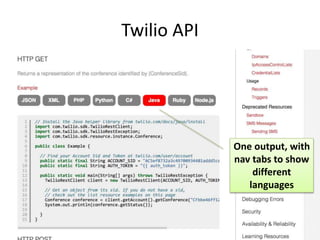
Twilio API
One output, with
nav tabs to show
different
languages
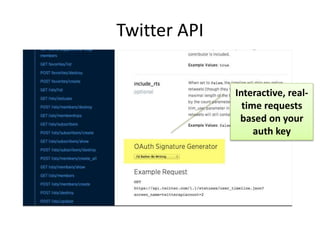
Twitter API
Interactive, real-
time requests
based on your
auth key
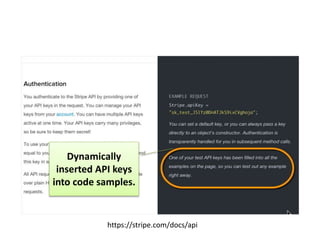
Dynamically
inserted API keys
into code samples.
https://stripe.com/docs/api
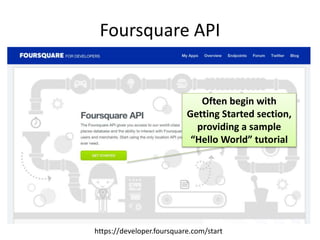
Foursquare API
Often begin with
Getting Started section,
providing a sample
“Hello World” tutorial
https://developer.foursquare.com/start
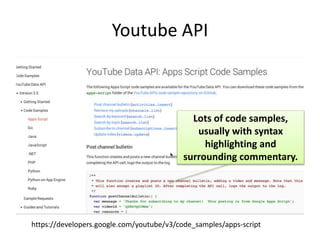
Youtube API
Lots of code samples,
usually with syntax
highlighting and
surrounding commentary.
https://developers.google.com/youtube/v3/code_samples/apps-script
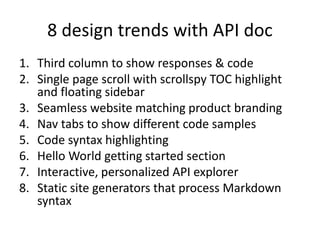
8 design trends with API doc
1. Third column to show responses & code
2. Single page scroll with scrollspy TOC highlight
and floating sidebar
3. Seamless website matching product branding
4. Nav tabs to show different code samples
5. Code syntax highlighting
6. Hello World getting started section
7. Interactive, personalized API explorer
8. Static site generators that process Markdown
syntax
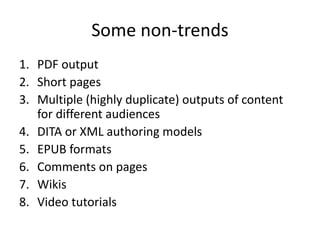
Some non-trends
1. PDF output
2. Short pages
3. Multiple (highly duplicate) outputs of content
for different audiences
4. DITA or XML authoring models
5. EPUB formats
6. Comments on pages
7. Wikis
8. Video tutorials
Question: How do
tech writers make
beautiful API doc
websites?
How do you merge worlds?
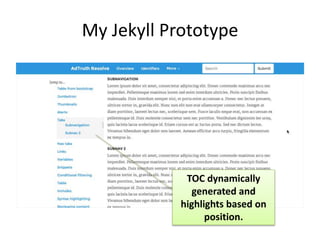
TOC dynamically
generated and
highlights based on
position.
My Jekyll Prototype
AUTO-GENERATED DOC SOLUTIONS
Auto-generated reference doc
solutions
• Swagger
• RAML
• Enunciate
• API Blueprint
• Mashery I/O
• Miredot (Java only)
• APIdocjs.com
Most common automated options
“Github stats (with caveat: these are repos, do not
necessarily all represent implementations):
Swagger: 600+ repos (270+ JS, 80+ Java, 31 Python)
RAML: 180+ repos (54 JS, 21 Java, nothing listed for
Python)
I/O Docs: 30-40 repos (mostly JS, some Java)
API Blueprint: 120+ repos (again, mostly JS, some
Java, some Python)”
– slide notes from Jennifer Rondeau presentation on
REST API Doc
What is Swagger?
A spec for describing an API so that humans and computers and read and explore it.
Different tools can parse the Swagger spec and render different outputs.
“The goal of Swagger™ is to define a standard, language-agnostic interface to REST
APIs which allows both humans and computers to discover and understand the
capabilities of the service without access to source code, documentation, or through
network traffic inspection. When properly defined via Swagger, a consumer can
understand and interact with the remote service with a minimal amount of
implementation logic.” – Swagger UI project
See Swagger spec here: https://github.com/swagger-api/swagger-spec
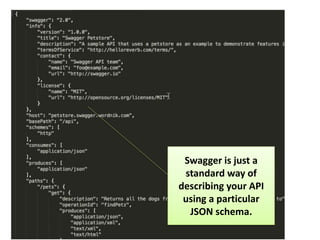
Swagger is just a
standard way of
describing your API
using a particular
JSON schema.
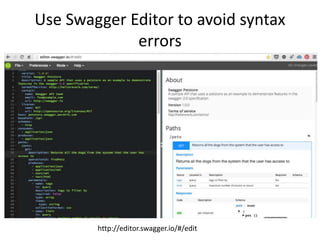
Use Swagger Editor to avoid syntax
errors
http://editor.swagger.io/#/edit
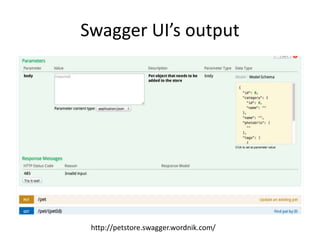
Swagger UI’s output
http://petstore.swagger.wordnik.com/
Swagger basics
• Swagger is a spec, a JSON schema for
describing your API in a standard way that
tools can process. (Kind of like DITA.)
• “Swagger UI” is one tool that parses the
Swagger spec from a JSON file. With this
approach, the JSON file is separate from the
source.
• There are also many Swagger libraries that
integrate directly into API source code.
Activity
1. Go to http://editor.swagger.io/.
2. File > Open Example > Pet Store Simple.
3. Mode > Editor. Make some simple changes, including
host value.
4. File > Download JSON.
5. Download Swagger-UI. https://github.com/swagger-
api/swagger-ui
6. In dist folder, open index.html, change url value.
7. Upload to web server and try it out. Try
http://idratherbewriting.com/wp-
content/apidemos/swagger/dist.
RAML basics
• Stands for REST API Modeling Language.
• Similar to Swagger, RAML is a competing spec
for describing APIs in a way that tools can
parse.
• Arrived later on the scene after Swagger, but
seems smarter and more efficient.
• RAML parsers built into comprehensive API
platform tooling from Mulesoft.
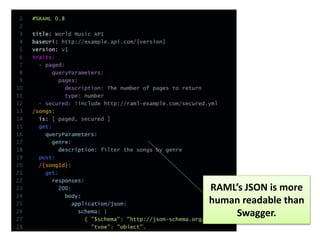
Sample RAML code
RAML’s JSON is more
human readable than
Swagger.
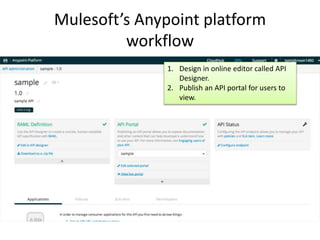
Mulesoft’s Anypoint platform
workflow
1. Design in online editor called API
Designer.
2. Publish an API portal for users to
view.
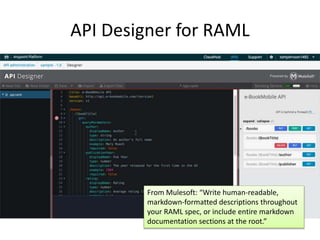
API Designer for RAML
From Mulesoft: “Write human-readable,
markdown-formatted descriptions throughout
your RAML spec, or include entire markdown
documentation sections at the root.”
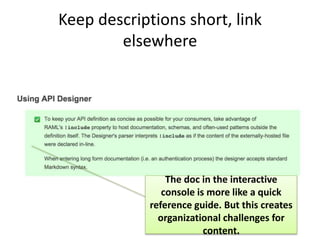
Keep descriptions short, link
elsewhere
The doc in the interactive
console is more like a quick
reference guide. But this creates
organizational challenges for
content.
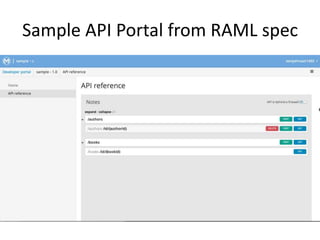
Sample API Portal from RAML spec
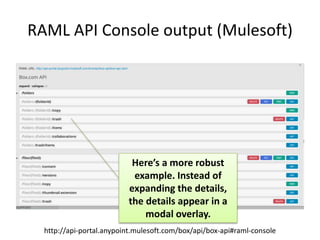
RAML API Console output (Mulesoft)
Here’s a more robust
example. Instead of
expanding the details,
the details appear in a
modal overlay.
http://api-portal.anypoint.mulesoft.com/box/api/box-api#raml-console
Swagger vs. RAML
• Swagger was first on the block, has more
community, street recognition.
• Swagger’s spec is more complicated, learning
curve higher.
• Swagger uses JSON. RAML uses YML.
• RAML is more recent, has smaller user base.
• RAML has thorough documentation &
tutorials, but tooling seems less open.
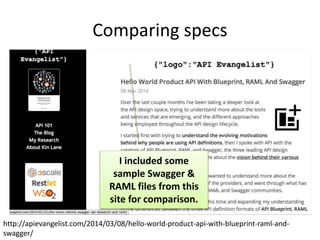
Comparing specs
http://apievangelist.com/2014/03/08/hello-world-product-api-with-blueprint-raml-and-
swagger/
I included some
sample Swagger &
RAML files from this
site for comparison.
Activity: Compare the specs
1. In the apiworkshop files, open the raml.yml and
swagger.json files and compare the specs.
2. Go to http://petstore.swagger.wordnik.com/
and explore Swagger’s demo.
3. Go to http://api-
portal.anypoint.mulesoft.com/raml-tools and
explore several API Consoles (e.g. Box).
4. Which experience do you like better?
Pros of automated doc
• No doc drift. Documentation more in sync with doc.
• More real. Data responses more meaningful & real
to user because they’re based on actual user data.
• Interactive. Gives interactive playground to
documentation, encouraging user not just to read
but to do, try, experiment, and play with API.
• Sexy. Makes API doc snazzy and sexy. Your doc is the
cool kid on the block.
• Convenient. In-source location of doc provides
convenience for engineers working with code.
Cons of automated output
• Data anemic responses. Will users new to your API have rich
enough data to populate the responses well?
• Glorified API explorer. Not much different from an API Explorer.
Not sure if all the fuss is worthwhile.
• Poor integration. Automated outputs don’t often integrate well
with non-reference documentation. Separate outputs.
• Data damage risk. Potential risk of having user apply DELETE or
UPDATE method and ruin actual content.
• Engineers can’t write. Doc is often better when under the control
of tech writers anyway. Engineers troubled by curse of knowledge.
• Ref docs are an illusion. Reference doc gives you the “illusion” of
having real doc. Makes you think other doc not needed.
• Fail in complicated scenarios. Not useful for more complicated API
scenarios, where you pass one endpoint’s result into another.
Recommended Resource
http://bit.ly/docrestapis
Tom Johnson
http://idratherbewriting.com
@tomjohnson
Image credits
• Slide 39: Catwoman. http://bit.ly/11qDsNU
• Slide 41, 54: Finger face with question. By Tsahi Levent-Levi. http://bit.ly/1sWdnln
• Slide 55: Nasa, new eyes: Butterfly. http://bit.ly/1u7ANzE

API Workshop: Deep dive into REST APIs

  • 1.
    API Documentation Workshop: DeepDive into REST APIs By Tom Johnson www.idratherbewriting.com January 24, 2015
  • 2.
    REST • Client-server architecture:You send a request and get a response back. REST is the model of the web. REST APIs also called “web APIs.” • REST = “representational state transfer” – data transfer modeled after the web. • Protocol transfer is HTTP. Requests are made through URLs. • Can see the response in the browser. • Responses are stateless -- not remembered.
  • 3.
    Sample endpoints api_site.com/{apikey}/users // getsall users api_site.com/{apikey}/users/{userId} // gets a specific user api_site.com/{apikey}/rewards // gets all rewards api_site.com/{apikey}/rewards/{rewardId} // gets a specific reward api_site.com/{apikey}/users/{userId}/rewards // gets all rewards for a specific user api_site.com/{apikey}/users/{userId}/rewards/{rewardId} // gets a specific reward for a specific user In a well-designed API, you can predict the logic of the requests. A “RESTful web service” has “endpoints” that return “resources.”
  • 4.
  • 5.
    Some objects contain listsof items in brackets [ ]. Here the photo object contains an array.
  • 6.
    Get familiar w/the Developer Console
  • 7.
    Console.log In code samples,you can use console.log(data) to log an object called “data” to the console. Then “inspect the payload.”
  • 8.
    HTTP requests havemethods GET POST DELETE PUT The methods available for each resource differ. DELETE methods aren’t usually passed in regular web page code for security reasons. Usually only submitted using cURL.
  • 9.
    Look on theNetwork tab of your console when you make a web request, and you can see the method for each request.
  • 10.
    Activity 1. Open theJavaScript Console and go to the Network Tab. 2. Browse to your favorite website (e.g., tccamp.org). 3. Look at the requests and responses logged in the Network tab.
  • 11.
  • 12.
    EventBrite API example Let’sget some event details using the events endpoint from the EventBrite API. https://developer.eventbrite.com/docs/event-details/
  • 13.
    Get eventbrite eventdetails Endpoint: eventbrite.api.com/v3/events/{event_id} Endpoint with values: https://www.eventbriteapi.com/v3/events/14635401881/ ?token=C4QTJZP64YS5ITN4JSPM Response: { "resource_uri": "https://www.eventbriteapi.com/v3/events/14635401881/", "name": { "text": "API Workshop with Sarah Maddox", }, "description": { "text": "This is a practical course on API technical writing, consisting of… BTW, the API key values on my slides are fake.
  • 14.
    <html><body> <script type='text/javascript' src="//ajax.googleapis.com/ajax/libs/jquery/1.7.2/jq uery.min.js"></script> <script> var url= "https://www.eventbriteapi.com/v3/events/14635401881 /?token=C4QTGZP64YS5ITN4JSPM"; $.getJSON( url, function( data ) { console.log(data); var content = "<h2>" + data.name.text + "</h2>" + data.description.html; $("#eventbrite").append(content); }); </script> <div id="eventbrite"></div> </body></html> A simple way to display the response on the page.
  • 15.
    Open your consoleand inspect the payload that is logged to the console via console.log in the code.
  • 16.
    Accessing JSON usingdot notation To get the values from the json, use dot notation. If our object is named data, then data.name.text gets that value.
  • 17.
    Activity 1. Open theJavaScript Console and go to the Console tab. 2. Open the eventbrite.html file in your browser. 3. Inspect the payload.
  • 18.
    Code samples shouldbe simple - Focus on call and response. What’s important is the endpoint, its parameters, and the resource it returns. - No styling. In code samples, don’t get complicated with styling unless you’re providing a copy-and-paste widget. The more you strip away, the better. Analogy with graphics.
  • 19.
    Common sections inREST API doc • Resource (“endpoint”) • Description • Parameters • Methods • Response • Example • Error codes Cover these details for each resource in your REST API docs. Click thumbnail for example.
  • 20.
    Example: Get KloutScore Klout has an interactive console. http://developer.klout.com/io-docs
  • 21.
    Get klout score Endpoint: user.json/{kloutid}/score Endpointwith values: http://api.klout.com/v2/user.json/1134760/score ?key=urgey4a79njk6df6xx4p64dr Response: { "score": 92.2655186160279, "scoreDelta": { "dayChange": 0.00044535591406713593, ... } We have to call another resource first to get the Klout ID.
  • 22.
    Get Klout IDfrom Twitter handle Endpoint: identity.json/twitter?screenName={username} Endpoint with values: http://api.klout.com/v2/identity.json/twitter?s creenName=tomjohnson&key=urgeykj79n5x6df6xx4p64 dr Response: { "id": "1134760", "network": "ks" }
  • 23.
    <html> <body> <script src="http://ajax.googleapis.com/ajax/libs/jquery/ 1.11.1/jquery.min.js"></script> <script> var url = "http://api.klout.com/v2/user.json/1134760/score? key=urgey4a79n5x6df6xx4p64dr&callback=?"; $.getJSON(url, function( data ) { console.log(data.score); $("#kloutScore").append(data.score); }); </script> <h2>My Klout Score</h2> <div id="kloutScore"/></body></html> Tip: jQuery makes life a lot simpler.
  • 24.
  • 25.
    Get Klout Scoreusing PHP http://bradsknutson.com/blog/display-klout-score-with-klout-api/ Use whatever language you want to implement the web API calls.
  • 26.
    Get Klout Scoreusing Python https://klout.readthedocs.org/en/latest/#quickstart This is why providing code samples can be problematic. Where do you stop? Ruby, Java, Node, Python, JavaScript?
  • 27.
    Activity: Get yourKlout score 1. Go to http://developer.klout.com/io-docs. 2. Use the identity endpoint to get your Klout ID based on your Twitter name. 3. Use the score endpoint to get your score. For API key, you can use the key in the apicalls.txt file or sign up for your own.
  • 28.
    Example: Get influencees BTW,reference docs don’t tell you all you need to know. For example, what are influencers and influencees?
  • 29.
    Get klout influencees Endpoint:user.json/{kloutid}/influence Endpoint with values: http://api.klout.com/v2/user.json/1134760/influ ence?key=urgerjy4a79n5x6df6xx4p64dr Response: { "score": 92.2655186160279, "scoreDelta": { "dayChange": 0.00044535591406713593, ... } API keys regulate usage and prevent servers from abuse by too many calls.
  • 30.
    <html><body> <script src="http://ajax.googleapis.com/ajax/libs/jquery/1.11.1 /jquery.min.js"></script> <script> var url = "http://api.klout.com/v2/user.json/1134760/influence?ke y=u4r7nd397bj9ksxfx3cuy6hw&callback=?"; $.getJSON(url, function( data ) { console.log(data); $.each( data.myInfluencees, function( i, inf ) { $("#kloutInf").append('<li><a href="http://twitter.com/'+inf.entity.payload.nick + '">' + inf.entity.payload.nick + '</a></li>'); }); }); </script> <h2>My influencees</h2> jQuery’s each method can iterate through items in an array.
  • 31.
    Activity 1. Open theklout-influence.html file. 2. Identify the endpoint used in the code. 3. Replace the user ID with your own user ID. 4. Paste the endpoint into your browser and identify your influencers.
  • 32.
    Flickr Example: Getgallery photos
  • 33.
    Get flickr photogallery Endpoint: flickr.galleries.getPhotos Endpoint with values: https://api.flickr.com/services/rest/?method=fl ickr.galleries.getPhotos&api_key=c962d7440cbbf3 81785c09989ba8032e&gallery_id=66911286- 72157647277042064&format=json&nojsoncallback=1 Response: { "score": 92.2655186160279, "scoreDelta": { "dayChange": 0.00044535591406713593, … }
  • 34.
    Activity 1. Open theflickr.html file in a text editor. 2. Copy the endpoint (url) and paste it into your browser. 3. Try to find the image source URLs in the payload.
  • 35.
    $("#flickr").append('<img src="https://farm' + farmId+ '.staticflickr.com/' + serverId + '/' + id + '_' + secret + '.jpg"/>'); API reference docs don’t tell you how to actually do a real task. To construct the img URL, you need to combine 4 different parts from the response.
  • 36.
  • 37.
    More details onthe API calls Go here for details: http://bit.ly/restapiexamples
  • 38.
    DESIGNING A SITEFOR API DOCS
  • 39.
    Sample REST APIdoc sites Many API doc sites are modern looking and awesome. Remember, the API Doc is the product interface, so it has to look good.
  • 40.
  • 41.
    What design trends orpatterns do we see among popular API doc sites?
  • 42.
    Stripe API Code responses nextto doc. https://stripe.com/docs/api
  • 43.
    Single page scrollw/ TOC highlight Third column to show responses or code samples. http://crimson-cormorant.cloudvent.net/
  • 44.
    Jekyll API doctheme from CloudCannon
  • 45.
  • 46.
    Yelp API One seamlesswebsite matching product branding. http://www.yelp.com/developers/documentation
  • 47.
    Twilio API One output,with nav tabs to show different languages
  • 48.
    Twitter API Interactive, real- timerequests based on your auth key
  • 49.
    Dynamically inserted API keys intocode samples. https://stripe.com/docs/api
  • 50.
    Foursquare API Often beginwith Getting Started section, providing a sample “Hello World” tutorial https://developer.foursquare.com/start
  • 51.
    Youtube API Lots ofcode samples, usually with syntax highlighting and surrounding commentary. https://developers.google.com/youtube/v3/code_samples/apps-script
  • 52.
    8 design trendswith API doc 1. Third column to show responses & code 2. Single page scroll with scrollspy TOC highlight and floating sidebar 3. Seamless website matching product branding 4. Nav tabs to show different code samples 5. Code syntax highlighting 6. Hello World getting started section 7. Interactive, personalized API explorer 8. Static site generators that process Markdown syntax
  • 53.
    Some non-trends 1. PDFoutput 2. Short pages 3. Multiple (highly duplicate) outputs of content for different audiences 4. DITA or XML authoring models 5. EPUB formats 6. Comments on pages 7. Wikis 8. Video tutorials
  • 54.
    Question: How do techwriters make beautiful API doc websites?
  • 55.
    How do youmerge worlds?
  • 56.
    TOC dynamically generated and highlightsbased on position. My Jekyll Prototype
  • 57.
  • 58.
    Auto-generated reference doc solutions •Swagger • RAML • Enunciate • API Blueprint • Mashery I/O • Miredot (Java only) • APIdocjs.com
  • 59.
    Most common automatedoptions “Github stats (with caveat: these are repos, do not necessarily all represent implementations): Swagger: 600+ repos (270+ JS, 80+ Java, 31 Python) RAML: 180+ repos (54 JS, 21 Java, nothing listed for Python) I/O Docs: 30-40 repos (mostly JS, some Java) API Blueprint: 120+ repos (again, mostly JS, some Java, some Python)” – slide notes from Jennifer Rondeau presentation on REST API Doc
  • 60.
    What is Swagger? Aspec for describing an API so that humans and computers and read and explore it. Different tools can parse the Swagger spec and render different outputs. “The goal of Swagger™ is to define a standard, language-agnostic interface to REST APIs which allows both humans and computers to discover and understand the capabilities of the service without access to source code, documentation, or through network traffic inspection. When properly defined via Swagger, a consumer can understand and interact with the remote service with a minimal amount of implementation logic.” – Swagger UI project See Swagger spec here: https://github.com/swagger-api/swagger-spec
  • 61.
    Swagger is justa standard way of describing your API using a particular JSON schema.
  • 62.
    Use Swagger Editorto avoid syntax errors http://editor.swagger.io/#/edit
  • 63.
  • 64.
    Swagger basics • Swaggeris a spec, a JSON schema for describing your API in a standard way that tools can process. (Kind of like DITA.) • “Swagger UI” is one tool that parses the Swagger spec from a JSON file. With this approach, the JSON file is separate from the source. • There are also many Swagger libraries that integrate directly into API source code.
  • 65.
    Activity 1. Go tohttp://editor.swagger.io/. 2. File > Open Example > Pet Store Simple. 3. Mode > Editor. Make some simple changes, including host value. 4. File > Download JSON. 5. Download Swagger-UI. https://github.com/swagger- api/swagger-ui 6. In dist folder, open index.html, change url value. 7. Upload to web server and try it out. Try http://idratherbewriting.com/wp- content/apidemos/swagger/dist.
  • 66.
    RAML basics • Standsfor REST API Modeling Language. • Similar to Swagger, RAML is a competing spec for describing APIs in a way that tools can parse. • Arrived later on the scene after Swagger, but seems smarter and more efficient. • RAML parsers built into comprehensive API platform tooling from Mulesoft.
  • 67.
    Sample RAML code RAML’sJSON is more human readable than Swagger.
  • 68.
    Mulesoft’s Anypoint platform workflow 1.Design in online editor called API Designer. 2. Publish an API portal for users to view.
  • 69.
    API Designer forRAML From Mulesoft: “Write human-readable, markdown-formatted descriptions throughout your RAML spec, or include entire markdown documentation sections at the root.”
  • 70.
    Keep descriptions short,link elsewhere The doc in the interactive console is more like a quick reference guide. But this creates organizational challenges for content.
  • 71.
    Sample API Portalfrom RAML spec
  • 72.
    RAML API Consoleoutput (Mulesoft) Here’s a more robust example. Instead of expanding the details, the details appear in a modal overlay. http://api-portal.anypoint.mulesoft.com/box/api/box-api#raml-console
  • 73.
    Swagger vs. RAML •Swagger was first on the block, has more community, street recognition. • Swagger’s spec is more complicated, learning curve higher. • Swagger uses JSON. RAML uses YML. • RAML is more recent, has smaller user base. • RAML has thorough documentation & tutorials, but tooling seems less open.
  • 74.
  • 75.
    Activity: Compare thespecs 1. In the apiworkshop files, open the raml.yml and swagger.json files and compare the specs. 2. Go to http://petstore.swagger.wordnik.com/ and explore Swagger’s demo. 3. Go to http://api- portal.anypoint.mulesoft.com/raml-tools and explore several API Consoles (e.g. Box). 4. Which experience do you like better?
  • 76.
    Pros of automateddoc • No doc drift. Documentation more in sync with doc. • More real. Data responses more meaningful & real to user because they’re based on actual user data. • Interactive. Gives interactive playground to documentation, encouraging user not just to read but to do, try, experiment, and play with API. • Sexy. Makes API doc snazzy and sexy. Your doc is the cool kid on the block. • Convenient. In-source location of doc provides convenience for engineers working with code.
  • 77.
    Cons of automatedoutput • Data anemic responses. Will users new to your API have rich enough data to populate the responses well? • Glorified API explorer. Not much different from an API Explorer. Not sure if all the fuss is worthwhile. • Poor integration. Automated outputs don’t often integrate well with non-reference documentation. Separate outputs. • Data damage risk. Potential risk of having user apply DELETE or UPDATE method and ruin actual content. • Engineers can’t write. Doc is often better when under the control of tech writers anyway. Engineers troubled by curse of knowledge. • Ref docs are an illusion. Reference doc gives you the “illusion” of having real doc. Makes you think other doc not needed. • Fail in complicated scenarios. Not useful for more complicated API scenarios, where you pass one endpoint’s result into another.
  • 78.
  • 79.
  • 80.
    Image credits • Slide39: Catwoman. http://bit.ly/11qDsNU • Slide 41, 54: Finger face with question. By Tsahi Levent-Levi. http://bit.ly/1sWdnln • Slide 55: Nasa, new eyes: Butterfly. http://bit.ly/1u7ANzE

Editor's Notes

  • #13 https://developer.eventbrite.com/docs/event-details/
  • #14 https://www.eventbriteapi.com/v3/events/14635401881/?token=C4QTJZP64YS5ITN4JSPM
  • #20 Take a look at an example: https://developer.eventbrite.com/docs/event-details/
  • #25 Tutorial from Brad Knutsen: http://bradsknutson.com/blog/display-klout-score-with-klout-api/
  • #26 http://bradsknutson.com/blog/display-klout-score-with-klout-api/
  • #27 https://klout.readthedocs.org/en/latest/#quickstart
  • #29 http://developer.klout.com/io-docs To get answers to my questions, I go here: http://blog.klout.com/2011/06/a-beginners-guide-to-klout/
  • #43 Also http://ricostacruz.com/jquery.transit/source/ for docco sidebar style Slate patterned after it, and docco
  • #48 http://www.twilio.com/docs/api/rest/conference
  • #49 https://dev.twitter.com/rest/reference/get/statuses/user_timeline
  • #51 https://developer.foursquare.com/start
  • #52 https://developers.google.com/youtube/v3/code_samples/apps-script
  • #54 Splunk’s documentation is an exception to the non-wiki trend.
  • #60 From slide 15 here: https://docs.google.com/presentation/d/1jejYiTagK7CnJ-ajiRO1-kbD6kzeA0R04o3W5_yKTvk/edit?pli=1#slide=id.g436148b7d_00
  • #63 http://editor.swagger.io/#/edit
  • #73 http://api-portal.anypoint.mulesoft.com/box/api/box-api#raml-console
  • #74 See http://raml.org/docs-100.html and http://raml.org/docs-200.html For getting started tutorials with RAML. http://www.mikestowe.com/2014/07/raml-vs-swagger-vs-api-blueprint.php