새로운 타입을 지원하지않을때..
이해하지 못하는 브라우저는 단순 텍스트 필드로...
jQuery UI나 YUI(야후UI) 사용해서 텍스트 필드와 연
결
나중에.. 브라우저가 지원하면 자바스크립트를 제거하
는 꿈을... 꾸어본다...
14.
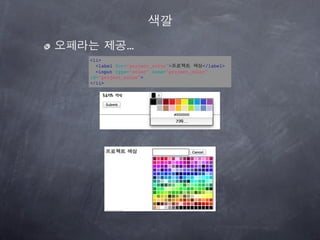
색상 선택기 교체(1)
jQuery와CSS3속성 선택자를 이용 색상 필드
를 찾아서 교체
color 타입의 input요소를 찾아, jQuery플러그
인 simpleColor를 적용
if (!hasColorSupport()){
$('input[type=color]').simpleColor();
}
15.
색상 선택기 교체(2)
브라우저자체에서 color타입을 지원한다면..
function hasColorSupport(){
input = document.createElement("input");
input.setAttribute("type", "color"); 브라우저 지원 체크
var hasColorType = (input.type !== "text");
if(hasColorType){
var testString = "foo";
input.value=testString; 브라우저 완벽지원 체크
hasColorType = (input.value != testString);
}
return(hasColorType);
}
if (!hasColorSupport()){
$('input[type=color]').simpleColor();
}
16.
jQuery
$ == jQuery
$('input[type=color]').simpleColor();
||
jQuery('input[type=color]').simpleColor();
jQuery와 CSS3속성 선택자를 이용 색상 필드를 찾아서 교체
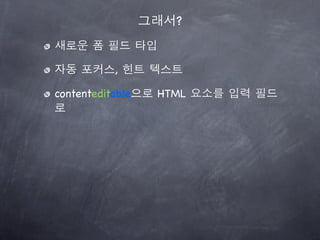
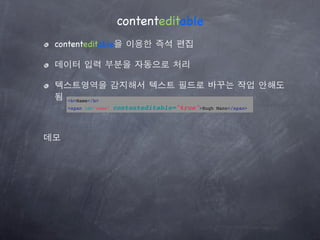
contenteditable
contenteditable을 이용한즉석 편집
데이터 입력 부분을 자동으로 처리
텍스트영역을 감지해서 텍스트 필드로 바꾸는 작업 안해도
됨 <b>Name</b>
<span id="name" contenteditable="true">Hugh Mann</span>
데모
23.
데이터 유지
새로고침하면 내역이사라짐
바꾼 내용을 서버로 전송
<b>Name</b>
<span id="name" contenteditable="true">Hugh Mann</span>
$(function(){
var status = $("#status");
$("span[contenteditable=true]").blur(function(){
var field = $(this).attr("id");
var value = $(this).text();
$.post("http://localhost:4567/users/1",
field + "=" + value,
function(data){
status.text(data); 서버에서 받은 데이터
}
);
});
});
contenteditable 속성이 true로 설정된
모든 span 요소에 이벤트 핸들러를 연결(jQuery.blur)
24.
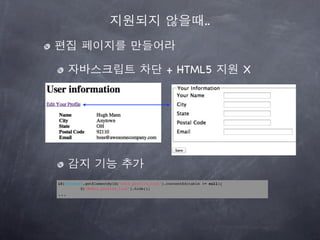
지원되지 않을때..
편집 페이지를만들어라
자바스크립트 차단 + HTML5 지원 X
감지 기능 추가
if(document.getElementById("edit_profile_link").contentEditable != null){
$("#edit_profile_link").hide();
...




![색상 선택기 교체(1)
jQuery와 CSS3속성 선택자를 이용 색상 필드
를 찾아서 교체
color 타입의 input요소를 찾아, jQuery플러그
인 simpleColor를 적용
if (!hasColorSupport()){
$('input[type=color]').simpleColor();
}](https://image.slidesharecdn.com/html5css3-111021225857-phpapp02/85/Html5-css-3-14-320.jpg)
![색상 선택기 교체(2)
브라우저 자체에서 color타입을 지원한다면..
function hasColorSupport(){
input = document.createElement("input");
input.setAttribute("type", "color"); 브라우저 지원 체크
var hasColorType = (input.type !== "text");
if(hasColorType){
var testString = "foo";
input.value=testString; 브라우저 완벽지원 체크
hasColorType = (input.value != testString);
}
return(hasColorType);
}
if (!hasColorSupport()){
$('input[type=color]').simpleColor();
}](https://image.slidesharecdn.com/html5css3-111021225857-phpapp02/85/Html5-css-3-15-320.jpg)
![jQuery
$ == jQuery
$('input[type=color]').simpleColor();
||
jQuery('input[type=color]').simpleColor();
jQuery와 CSS3속성 선택자를 이용 색상 필드를 찾아서 교체](https://image.slidesharecdn.com/html5css3-111021225857-phpapp02/85/Html5-css-3-16-320.jpg)
![autofocus 자동 포커스 이동
페이지 하나에 autofocus 속성 하나만 가능
<label for="name">이름</label>
<input type="text" name="name" autofocus="autofocus" id="name">
지원되지 않을때(jQurey)
if(!hasAutofocus()){
$('input[autofocus=autofocus]').focus();
}](https://image.slidesharecdn.com/html5css3-111021225857-phpapp02/85/Html5-css-3-18-320.jpg)

![데이터 유지
새로고침하면 내역이 사라짐
바꾼 내용을 서버로 전송
<b>Name</b>
<span id="name" contenteditable="true">Hugh Mann</span>
$(function(){
var status = $("#status");
$("span[contenteditable=true]").blur(function(){
var field = $(this).attr("id");
var value = $(this).text();
$.post("http://localhost:4567/users/1",
field + "=" + value,
function(data){
status.text(data); 서버에서 받은 데이터
}
);
});
});
contenteditable 속성이 true로 설정된
모든 span 요소에 이벤트 핸들러를 연결(jQuery.blur)](https://image.slidesharecdn.com/html5css3-111021225857-phpapp02/85/Html5-css-3-23-320.jpg)


![[커빙 아키텍쳐] 커빙은 어떻게 소셜 컨텐츠를 모아올까요?](https://cdn.slidesharecdn.com/ss_thumbnails/cubbyingtechstackfinal-130825210422-phpapp01-thumbnail.jpg?width=640&height=640&fit=bounds)


![[하코사세미나] 한 시간 만에 배우는 Jquery](https://cdn.slidesharecdn.com/ss_thumbnails/jquery-151208015421-lva1-app6891-thumbnail.jpg?width=640&height=640&fit=bounds)


![[XECon+PHPFest 2014] jQuery 개발자에서 AngularJS 개발자 되기](https://cdn.slidesharecdn.com/ss_thumbnails/xeconphpfest2014-angularjs-141110181025-conversion-gate01-thumbnail.jpg?width=640&height=640&fit=bounds)


![[JavaScript Library] - Simple jQuery](https://cdn.slidesharecdn.com/ss_thumbnails/random-130218085016-phpapp02-thumbnail.jpg?width=640&height=640&fit=bounds)


![[2012널리세미나] 모바일 크로스 브라우징, 그 끝은 어디인가?](https://cdn.slidesharecdn.com/ss_thumbnails/11-140828041107-phpapp02-thumbnail.jpg?width=640&height=640&fit=bounds)


![2011웹표준[05] 실전예제(대체택스트,폼,필드셋)](https://cdn.slidesharecdn.com/ss_thumbnails/201105-111215014524-phpapp01-thumbnail.jpg?width=640&height=640&fit=bounds)


