TAG 선택
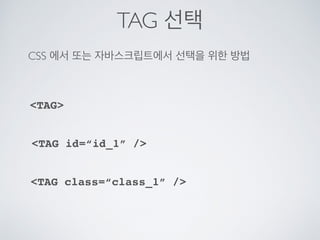
CSS 에서또는 자바스크립트에서 선택을 위한 방법
TAG class=“class_1” /
TAG id=“id_1” /
TAG
16.
TAG 선택
TAG
!DOCTYPE html
html
head
style
p{
text-align: center;
color: red;
}
/style
/head
body
pEvery paragraph will be affected by the style./p
p id=para1Me too!/p
pAnd me!/p
/body
/html
17.
#ID 선택
!DOCTYPE html
html
head
style
#para1{
text-align: center;
color: red;
}
/style
/head
body
p id=para1Hello World!/p
pThis paragraph is not affected by the style./p
/body
/html
TAG id=“id_1” /
18.
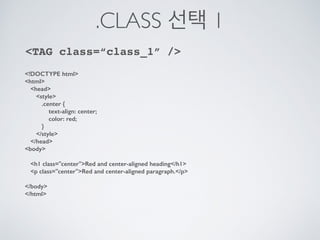
.CLASS 선택 1
!DOCTYPEhtml
html
head
style
.center {
text-align: center;
color: red;
}
/style
/head
body
h1 class=centerRed and center-aligned heading/h1
p class=centerRed and center-aligned paragraph./p
/body
/html
TAG class=“class_1” /
19.
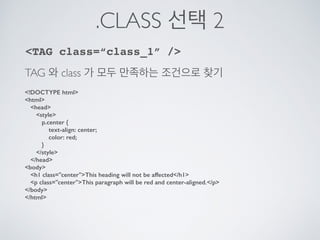
.CLASS 선택 2
!DOCTYPEhtml
html
head
style
p.center {
text-align: center;
color: red;
}
/style
/head
body
h1 class=centerThis heading will not be affected/h1
p class=centerThis paragraph will be red and center-aligned./p
/body
/html
TAG class=“class_1” /
TAG 와 class 가 모두 만족하는 조건으로 찾기
20.
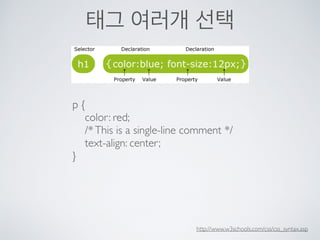
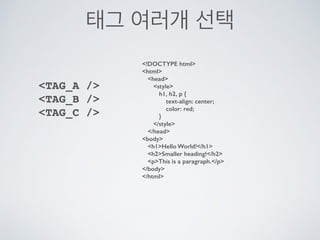
태그 여러개 선택
!DOCTYPEhtml
html
head
style
h1, h2, p {
text-align: center;
color: red;
}
/style
/head
body
h1Hello World!/h1
h2Smaller heading!/h2
pThis is a paragraph./p
/body
/html
TAG_A /
TAG_B /
TAG_C /




















![[하코사세미나] 한 시간 만에 배우는 Jquery](https://cdn.slidesharecdn.com/ss_thumbnails/jquery-151208015421-lva1-app6891-thumbnail.jpg?width=640&height=640&fit=bounds)

![[WEB UI BASIC] JavaScript 3탄](https://cdn.slidesharecdn.com/ss_thumbnails/javascript3-150515062808-lva1-app6892-thumbnail.jpg?width=640&height=640&fit=bounds)


![[커빙 아키텍쳐] 커빙은 어떻게 소셜 컨텐츠를 모아올까요?](https://cdn.slidesharecdn.com/ss_thumbnails/cubbyingtechstackfinal-130825210422-phpapp01-thumbnail.jpg?width=640&height=640&fit=bounds)


![[WEB UI BASIC] WEB과 HTML](https://cdn.slidesharecdn.com/ss_thumbnails/webuibasicweek1webhtml-150419044114-conversion-gate02-thumbnail.jpg?width=640&height=640&fit=bounds)


![[D2CAMPUS]JavaScript 다시 시작하기](https://cdn.slidesharecdn.com/ss_thumbnails/d2campusjavascript-150822065956-lva1-app6891-thumbnail.jpg?width=640&height=640&fit=bounds)


![[WEB UI BASIC] CSS_1](https://cdn.slidesharecdn.com/ss_thumbnails/webuibasicweek2css-150419055801-conversion-gate02-thumbnail.jpg?width=640&height=640&fit=bounds)


