TCT – 492: Seminar<HTML>by:TanayMathpalFinal YearComputer Engineeringtanaymathpal@gmail.comhttp://tanamania.wordpress.comhttp://twitter.com/tanamania
What is
HTML 5 is……the next major revision of HTML (Hypertext Markup Language), the core markup language of the World Wide Web.
So What???What the whole fuss is about???
Why
W3C vs WHATWG
W3CThe World Wide Web Consortium is the main international standards organization for the World Wide Web.
WHATWGWeb Hypertext Application Technology Working Group is a growing community of people interested in evolving the Web. It focuses primarily on the development of HTML and APIs needed for Web applications.
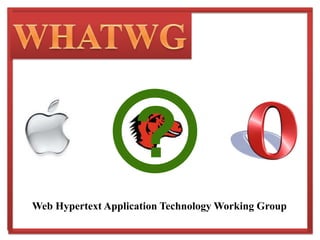
WHATWGThe WHATWG was founded by individuals of Apple, the Mozilla Foundation, and Opera Software in 2004, after a W3C workshop.
It was formed in response to the slow development of web standards monitored by the W3C, and its decision to abandon HTML in favour of XML-based technologies.?WHATWGWeb Hypertext Application Technology Working Group
HTML5The WHATWG pioneered the development of Web Applications 1.0 which was later renamed HTML5.
On 10 April 2007, the Mozilla Foundation, Apple and Opera Software proposed that the new HTML working group of the W3C adopt the WHATWG’s HTML5 as the starting point of its work.
On 9 May 2007, the new HTML working group of the W3C resolved to   do that.HTML5HTML5 is the proposed next standard for HTML 4.01, XHTML 1.0 and DOM Level 2 HTML.
HTML5 is a revolution in Web application development, making plug-in-based RIA (Rich Internet Application) technologies as Adobe Flash, Microsoft Silverlight, and Sun JavaFX obsolete.HTML5Key Features:Semantic Web
 Form Controls
Embedded Content and MultimediaSemantic Web
Semantic WebHTML 5 has replaced generic block (<div>) and inline (<span>) elements with new tags which make web application designing a whole new; semantic experience.Some of these tags will be discussed by me in the following slides.
Semantic Web tagIt is intended for semantically specifying the content section of the web page.Prior to HTML 5, we had to use <div class=“article”> or <div class=“content”>
Semantic Web and  tagsThese semantic tags can be used for placing headers and footers on the web page.Prior to HTML 5, we had to use <div id=“header”> and     <div id=“footer”>
Semantic Web tagThis tag is specifically used for dialog contents. For instance, it can be used to include a dialog conversation between two people.
Semantic Web tagUsing the <aside> tag, content other than the primary content stream is specified. This can be a flyover or a sidebar.
Semantic Web tagThis tag is for the semantic representation of section of the content. For instance, an <article> can contain a <header> and can be divided into several <section>s.
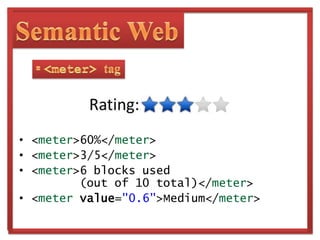
Semantic Web tagIt can be used in places where users are required to rate the web content or web application performance.Usage of <meter> tag is shown in the following slide.
Semantic Web tag
60%
3/5
6 blocks used       (out of 10 total)
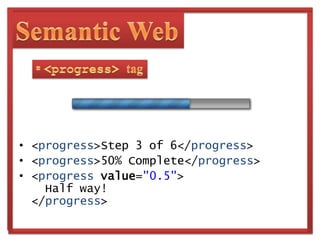
MediumSemantic Web tagThis tag is useful in cases where the progress of a loading AJAX application, web form, et cetera needs to be shown.
Semantic Web tag
Step 3 of 6
50% Complete
  Half way!Semantic Web tagThe <m> stands for marked or highlighted text. This tag is used to indicate point of relevance in a page.eg: error notifications or search results within a page
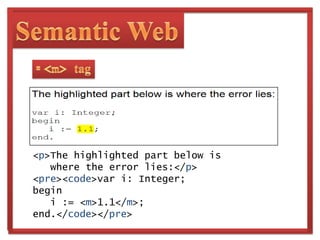
Semantic Web tag	<p>The highlighted part below is   where the error lies:</p><pre><code>vari: Integer;begini := <m>1.1</m>;end.</code></pre>
Form Controls
Form ControlsForms controls in HTML 4 are too limited and difficult to implement. The developers at W3C and WHATWG identified these limitations and introduced several new features in HTML 5.
Form ControlsHTML 5 has superseded Web Forms 2.0, the other document of WHATWG. All features of Web Forms 2.0 have now been included in the HTML 5 document.
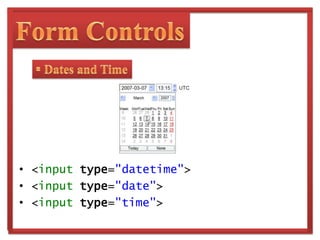
Form Controls Dates and Time
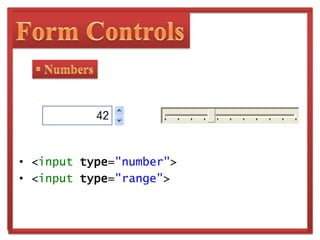
Form Controls Numbers
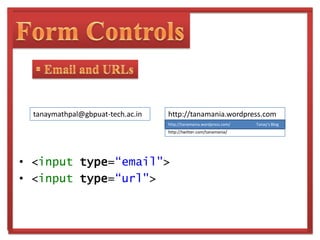
Form Controls Email and URLstanaymathpal@gbpuat-tech.ac.inhttp://tanamania.wordpress.comhttp://tanamania.wordpress.com/                          Tanay’s Bloghttp://twitter.com/tanamania/
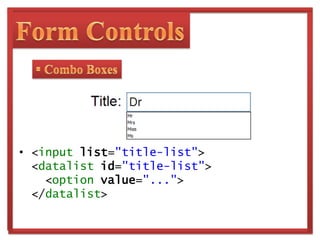
Form Controls Combo Boxes
  Form Controls Form Validation
New attributes like required, pattern, min, max, etc. have been introduced to describe validity constraints for the expected input.
New DOM APIs allow scripts to detect and deal with user input errors more easily.Embedded Content and Multimedia
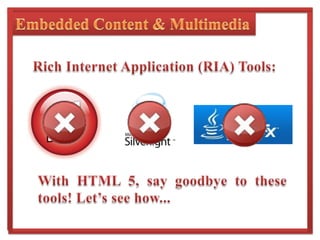
Embedded Content & MultimediaRich Internet Application (RIA) Tools:With HTML 5, say goodbye to these tools! Let’s see how...
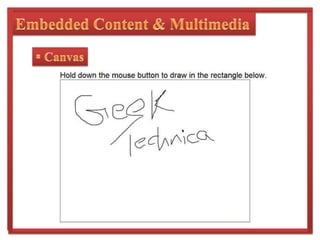
Embedded Content & Multimedia CanvasHTML 5 has introduced the <canvas> tag for adding dynamic and interactive graphics to our web page.It is proving to be extremely useful for graphs, applications, games and puzzles and many more.
Embedded Content & Multimedia CanvasA practical example of the use of <canvas> is the Mozilla lab project – Bespinwhich is an Extensible Web Code Editor built using canvas.The following image shows another small example of canvas.
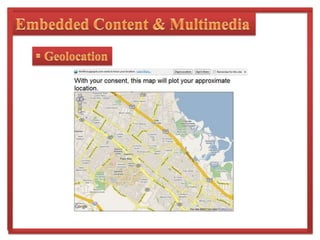
Embedded Content & Multimedia CanvasEmbedded Content & MultimediaGeolocationThis HTML 5 API defines location information of the device hosting the API.Sources of location information include Global Positioning System (GPS) and network elements such as IP address, RFID, WiFi and Bluetooth MAC addresses  and GSM/CDMA cell IDs.
Embedded Content & MultimediaGeolocationEmbedded Content & Multimedia Application CachesThis HTML 5 feature enables the user to store web applications locally and access them without any external client.Google Gears, which enables the users to access Gmail offline, is an implementation of this specification of HTML 5.
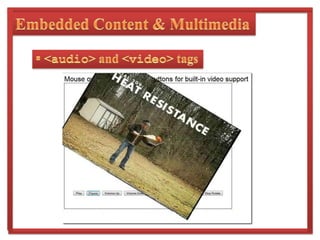
Embedded Content & Multimedia  and  tags
These are the most amazing feature of  HTML 5.
At present Flash has become the de facto standard for adding video content to web sites.

HTML5

  • 1.
    TCT – 492:Seminar<HTML>by:TanayMathpalFinal YearComputer Engineeringtanaymathpal@gmail.comhttp://tanamania.wordpress.comhttp://twitter.com/tanamania
  • 2.
  • 3.
    HTML 5 is……thenext major revision of HTML (Hypertext Markup Language), the core markup language of the World Wide Web.
  • 4.
    So What???What thewhole fuss is about???
  • 5.
  • 6.
  • 7.
    W3CThe World WideWeb Consortium is the main international standards organization for the World Wide Web.
  • 8.
    WHATWGWeb Hypertext ApplicationTechnology Working Group is a growing community of people interested in evolving the Web. It focuses primarily on the development of HTML and APIs needed for Web applications.
  • 9.
    WHATWGThe WHATWG wasfounded by individuals of Apple, the Mozilla Foundation, and Opera Software in 2004, after a W3C workshop.
  • 10.
    It was formedin response to the slow development of web standards monitored by the W3C, and its decision to abandon HTML in favour of XML-based technologies.?WHATWGWeb Hypertext Application Technology Working Group
  • 11.
    HTML5The WHATWG pioneeredthe development of Web Applications 1.0 which was later renamed HTML5.
  • 12.
    On 10 April2007, the Mozilla Foundation, Apple and Opera Software proposed that the new HTML working group of the W3C adopt the WHATWG’s HTML5 as the starting point of its work.
  • 13.
    On 9 May2007, the new HTML working group of the W3C resolved to do that.HTML5HTML5 is the proposed next standard for HTML 4.01, XHTML 1.0 and DOM Level 2 HTML.
  • 14.
    HTML5 is arevolution in Web application development, making plug-in-based RIA (Rich Internet Application) technologies as Adobe Flash, Microsoft Silverlight, and Sun JavaFX obsolete.HTML5Key Features:Semantic Web
  • 15.
  • 16.
    Embedded Content andMultimediaSemantic Web
  • 17.
    Semantic WebHTML 5has replaced generic block (<div>) and inline (<span>) elements with new tags which make web application designing a whole new; semantic experience.Some of these tags will be discussed by me in the following slides.
  • 18.
    Semantic Web tagItis intended for semantically specifying the content section of the web page.Prior to HTML 5, we had to use <div class=“article”> or <div class=“content”>
  • 19.
    Semantic Web and tagsThese semantic tags can be used for placing headers and footers on the web page.Prior to HTML 5, we had to use <div id=“header”> and <div id=“footer”>
  • 20.
    Semantic Web tagThistag is specifically used for dialog contents. For instance, it can be used to include a dialog conversation between two people.
  • 21.
    Semantic Web tagUsingthe <aside> tag, content other than the primary content stream is specified. This can be a flyover or a sidebar.
  • 22.
    Semantic Web tagThistag is for the semantic representation of section of the content. For instance, an <article> can contain a <header> and can be divided into several <section>s.
  • 23.
    Semantic Web tagItcan be used in places where users are required to rate the web content or web application performance.Usage of <meter> tag is shown in the following slide.
  • 24.
  • 25.
  • 26.
  • 27.
    6 blocks used (out of 10 total)
  • 28.
    MediumSemantic Web tagThistag is useful in cases where the progress of a loading AJAX application, web form, et cetera needs to be shown.
  • 29.
  • 30.
  • 31.
  • 32.
    Halfway!Semantic Web tagThe <m> stands for marked or highlighted text. This tag is used to indicate point of relevance in a page.eg: error notifications or search results within a page
  • 33.
    Semantic Web tag <p>Thehighlighted part below is where the error lies:</p><pre><code>vari: Integer;begini := <m>1.1</m>;end.</code></pre>
  • 34.
  • 35.
    Form ControlsForms controlsin HTML 4 are too limited and difficult to implement. The developers at W3C and WHATWG identified these limitations and introduced several new features in HTML 5.
  • 36.
    Form ControlsHTML 5has superseded Web Forms 2.0, the other document of WHATWG. All features of Web Forms 2.0 have now been included in the HTML 5 document.
  • 37.
  • 40.
  • 42.
    Form Controls Emailand URLstanaymathpal@gbpuat-tech.ac.inhttp://tanamania.wordpress.comhttp://tanamania.wordpress.com/ Tanay’s Bloghttp://twitter.com/tanamania/
  • 43.
  • 44.
    FormControls Form Validation
  • 45.
    New attributes likerequired, pattern, min, max, etc. have been introduced to describe validity constraints for the expected input.
  • 46.
    New DOM APIsallow scripts to detect and deal with user input errors more easily.Embedded Content and Multimedia
  • 47.
    Embedded Content &MultimediaRich Internet Application (RIA) Tools:With HTML 5, say goodbye to these tools! Let’s see how...
  • 48.
    Embedded Content &Multimedia CanvasHTML 5 has introduced the <canvas> tag for adding dynamic and interactive graphics to our web page.It is proving to be extremely useful for graphs, applications, games and puzzles and many more.
  • 49.
    Embedded Content &Multimedia CanvasA practical example of the use of <canvas> is the Mozilla lab project – Bespinwhich is an Extensible Web Code Editor built using canvas.The following image shows another small example of canvas.
  • 50.
    Embedded Content &Multimedia CanvasEmbedded Content & MultimediaGeolocationThis HTML 5 API defines location information of the device hosting the API.Sources of location information include Global Positioning System (GPS) and network elements such as IP address, RFID, WiFi and Bluetooth MAC addresses and GSM/CDMA cell IDs.
  • 51.
    Embedded Content &MultimediaGeolocationEmbedded Content & Multimedia Application CachesThis HTML 5 feature enables the user to store web applications locally and access them without any external client.Google Gears, which enables the users to access Gmail offline, is an implementation of this specification of HTML 5.
  • 52.
    Embedded Content &Multimedia and tags
  • 53.
    These are themost amazing feature of HTML 5.
  • 54.
    At present Flashhas become the de facto standard for adding video content to web sites.