2
+ Introduction toTOAD
• Toad Layout
• Connecting to a Database
• Searching Through a Schema
+ Basic Database Use Concepts
• Spreadsheets vs Databases
• Key Data Types in Oracle
• Data Types in a Table
Table of Contents
+ Basics of SQL
• Introduction to SQL
• Designing a Query
• SQL Syntax
• Retrieving Data From a Table
• Operators
• WHERE Commands – Basics
• WHERE Commands –”AND” Condition
• Logical Operators: “AND” Operator
• WHERE Commands –”OR” Condition
• Logical Operators: “OR” Operator
• WHERE Commands –”NOT” Condition
• Logical Operators: “NOT” Operator
• Parentheses “()” – Operator Precedence
3.
3
+ Basics ofSQL (contd.)
• IS NULL / IS NOT NULL Operator
• WHERE Command: BETWEEN Operator
• WHERE Command: Wildcard “%”
Operator
• WHERE Command: Wildcard “_” Operator
• WHERE Command: Combination of
Operators
+ SQL Aggregate Functions
• Aggregation Functions – GROUP BY
• Key List of Aggregation Functions
+ Union Vs Union ALL Operator
+ Create Table Command
+ Drop Table Command
+ Export Data
+ Appendix
Table of Contents (contd.)
5
The contents ofthis training session is to provide basic foundations for programming in Oracle SQL to get you started on
analyzing data in a productive way. You will learn about the most common functions and tools to perform a wide variety of
analyses.
All examples are based on the current primary tool – Toad 13.1.1, and the Oracle SQL language.
Introduction to TOAD
6.
6
Toad Layout
Shortcut Buttons
•Connect to a Schema
o Connect to the project schema of
your choosing
• View the Schema Browser
o Open a browser for more information
on tables found on the schema
• Execute as Statement (Ctrl + Enter)
o Run a single selected query
• Execute as Script (F5)
o Run a series of selected queries and
stored procedures (executables)
7.
7
Connecting to aDatabase
Logging into a schema:
• Enter the schema name
• Enter the password provided
• Enter the Database (example: PNDW)
• Enter an optional Alias or nickname for the
connection
• Test if the connection is successful
• Save the connection
A database is also known as a server. Multiple project schemas exist on a database/server to
separate working spaces. Each schema contains tables that were created on that specific
database and schema, almost like how a document folder contains your files.
Tip:
Once a new connection is saved, it can be
easily accessed from the main connection
window.
8.
8
Searching Through aSchema on Toad
The Schema Browser is a powerful tool that can be used to locate tables or find additional
information on one or multiple objects
You can view a list of your tables (1) and
use the filter (2) to look for specific objects
3
2
1
Tip:
You can use the “*” to filter for “all”. By using it before and/or
after, you can filter for complicated collections of object names:
The object selection list (3) allows
you to select specific objects, like
Tables, Views, Procedures, etc.
10
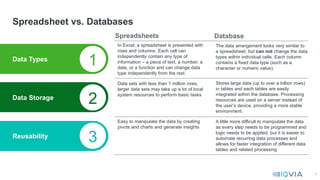
Spreadsheet vs. Databases
DataTypes
Data Storage
Reusability
In Excel, a spreadsheet is presented with
rows and columns. Each cell can
independently contain any type of
information – a piece of text, a number, a
date, or a function and can change data
type independently from the rest.
1
2
3
The data arrangement looks very similar to
a spreadsheet; but can not change the data
types within individual cells. Each column
contains a fixed data type (such as a
character or numeric value).
Data sets with less than 1 million rows,
larger data sets may take up a lot of local
system resources to perform basic tasks
Stores large data (up to over a billion rows)
in tables and each tables are easily
integrated within the database. Processing
resources are used on a server instead of
the user’s device, providing a more stable
environment.
Easy to manipulate the data by creating
pivots and charts and generate insights
A little more difficult to manipulate the data
as every step needs to be programmed and
logic needs to be applied, but it is easier to
automate recurring data processes and
allows for faster integration of different data
tables and related processing
Spreadsheets Database
11.
11
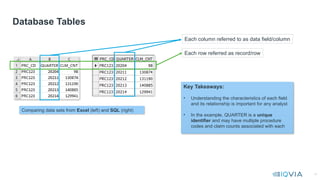
Database Tables
Each columnreferred to as data field/column
Each row referred as record/row
Comparing data sets from Excel (left) and SQL (right)
Key Takeaways:
• Understanding the characteristics of each field
and its relationship is important for any analyst
• In the example, QUARTER is a unique
identifier and may have multiple procedure
codes and claim counts associated with each
12.
12
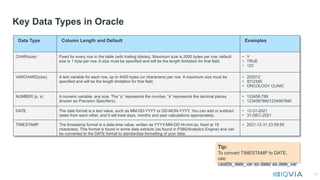
Key Data Typesin Oracle
Data Type Column Length and Default Examples
CHAR(size) Fixed for every row in the table (with trailing blanks). Maximum size is 2000 bytes per row, default
size is 1 byte per row. A size must be specified and will be the length limitation for that field.
• Y
• TRUE
• 123
VARCHAR2(size) A text variable for each row, up to 4000 bytes (or characters) per row. A maximum size must be
specified and will be the length limitation for that field.
• 202012
• ID12345
• ONCOLOGY CLINIC
NUMBER (p, s) A numeric variable, any size. The “p” represents the number, “s” represents the decimal places
(known as Precision Specifiers).
• 123456.789
• 12345678901234567890
DATE The date format is a text value, such as MM-DD-YYYY or DD-MON-YYYY. You can add or subtract
dates from each other, and it will treat days, months and year calculations appropriately.
• 12-31-2021
• 31-DEC-2021
TIMESTAMP The timestamp format is a date-time value, written as YYYY-MM-DD hh:mm:ss, fixed at 19
characters. This format is found in some data extracts (as found in P360/Analytics Engine) and can
be converted to the DATE format to standardize formatting of your data.
• 2021-12-31 23:59:59
Tip:
To convert TIMESTAMP to DATE,
use:
cast(ts_date_var as date) as date_var
13.
13
Data Types ina Table
Within the Columns tab of the Toad Schema Browser, the columns and their data types can be determined
15
Structured Query Language(SQL) is a programming
language that is used to perform various data operations
like retrieve, insert, update, delete records, create and
store tables in a database
Introduction to SQL
16.
16
Designing a Query
SQLLanguage Elements
-- Retrieve codegroup, month ID, payer type and
claim count from table
SELECT
codegroup, month_id, pay_typ_desc, clm_cnt
FROM
summary_table
WHERE
pay_typ_desc in ('MEDICARE','MEDICAID')
ORDER BY
order by codegroup, month_id;
SELECT statement
Keywords
Identifiers
Comment
Terminating Semicolon
Keywords of a Query:
SELECT | Choose the fields you want to see in your output
FROM | Indicate the table name from where you need to capture the data in your output
WHERE | (Optional) Used to set parameters for filtering the selected data
ORDER BY | (Optional) Setting sorting tiers
17.
17
SQL syntax toretrieve data from a table:
SELECT
<COLUMN NAME-1>, <COLUMN NAME-2>, … <COLUMN NAME-n>
FROM
<TABLE NAME>
WHERE
<CONDITION-1> AND/OR <CONDITION-2> AND/OR <…> <CONDITION-n>
ORDER BY
<COLUMN NAME-1>, <COLUMN NAME-2>, … <COLUMN NAME-n>
SQL Syntax
Example Script:
SELECT codegroup, month_id, pay_typ_desc, clm_cnt
FROM summary_table
WHERE pay_typ_desc in ('MEDICARE','MEDICAID’)
ORDER BY codegroup, month_id
;
18.
18
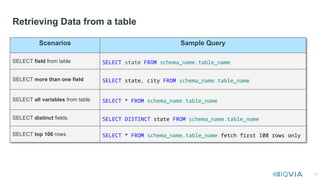
Retrieving Data froma table
Scenarios Sample Query
SELECT field from table SELECT state FROM schema_name.table_name
SELECT more than one field SELECT state, city FROM schema_name.table_name
SELECT all variables from table SELECT * FROM schema_name.table_name
SELECT distinct fields SELECT DISTINCT state FROM schema_name.table_name
SELECT top 100 rows SELECT * FROM schema_name.table_name fetch first 100 rows only
19.
19
Operators
Logical Operators DescriptionExample
AND Combines multiple where clauses WHERE SOS = ‘IP’ AND PatientAge > 65
OR Combines multiple where clauses WHERE PatientAge > 65 or PatientAge < 18
BETWEEN AND Search within the max and the min value WHERE PatientAge BETWEEN 18 AND 65
IN Search a value within a list of values WHERE Claim_status IN (‘F’, ‘S’)
NOT Reverse the logical operator used WHERE PatientAge NOT BETWEEN 18 AND 65
IS NULL Test if a value is null WHERE ProductName IS NULL
Comparison Operators Description
= Equals
> Greater than
< Less than
>= Greater than or equal to
<= Less than or equal to
!= / <> Not equal
Operator Meaning
+ Addition
- Subtraction
* Multiplication
/ Division
Operators allow you to add
logic to your query, here are
most of the commonly used
operators you may need while
navigating your analysis.
20.
20
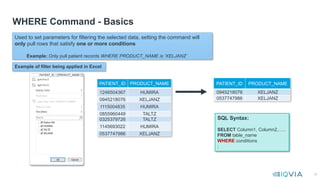
WHERE Command -Basics
PATIENT_ID PRODUCT_NAME
1246504367 HUMIRA
0945218076 XELJANZ
1115004835 HUMIRA
0855960449 TALTZ
0325379726 TALTZ
1145693022 HUMIRA
0537747986 XELJANZ
PATIENT_ID PRODUCT_NAME
0945218076 XELJANZ
0537747986 XELJANZ
SQL Syntax:
SELECT Column1, Column2,…..
FROM table_name
WHERE conditions
;
Used to set parameters for filtering the selected data, setting the command will
only pull rows that satisfy one or more conditions
Example: Only pull patient records WHERE PRODUCT_NAME is ‘XELJANZ’
Example of filter being applied in Excel
21.
21
SQL Example
Logical Operators:‘AND’ Operator AND, OR, NOT Operator Execise.txt
Excel Example
SQL Syntax:
select * from <table_name>
WHERE
<column_name> condition1
AND
<column_name> condition2;
select * from phys_details
where grad_yr > 2000 AND specialty in ('FAMILY
MEDICINE');
The table below includes list of physicians with their graduation date, state and specialty. In the example,
we filter physicians who graduated after the year 1998 AND has a specialty in Family Medicine.
select * from phys_details
where grad_yr > 1998 AND specialty in ('FAMILY
MEDICINE');
22.
22
WHERE Command: ‘AND’Condition
Sample Query
select
provider_id, spec_desc, claim_id, patient_id
from
database.table_name
where
spec_desc in (‘MEDICAL ONCOLOGY’) AND prod_nm in (‘LIBTAYO’)
;
select
provider_id, spec_desc, claim_id, patient_id
from
database.table_name
where
spec_desc in (‘MEDICAL ONCOLOGY’) AND prod_nm in (‘LIBTAYO’)
AND
month_id between 202001 and 202012
;
23.
23
Logical Operators: ‘OR’Operator
SQL Syntax:
select * from <table_name>
WHERE
<column_name> condition1
OR
<column_name> condition2;
SQL Example
Excel Spreadsheet
select * from phys_details
where grad_yr > 1998 OR specialty in ('FAMILY
MEDICINE');
The table below includes list of physicians with their graduation date, state and specialty. In the example,
we filter physicians who graduated after the year 1998 OR has a specialty in Family Medicine.
24.
24
WHERE Command: ‘OR’Command
Sample Query
select
provider_id, spec_desc, claim_id, patient_id
from
database.table_name
where
spec_prim_desc in (‘MEDICAL ONCOLOGY’)
OR spec_scnd_desc in (‘HEMATOLOGY’)
;
select
provider_id, spec_desc, claim_id, patient_id
from
database.table_name
where
(spec_prim_desc in (‘MEDICAL ONCOLOGY’)
OR spec_scnd_desc in (‘HEMATOLOGY’))
and product in (‘LIBTAYO’)
;
Tip:
While using mix of ‘AND’ and ‘OR’ in a query
advisable to apply ‘OR’ condition within parenthesis
‘()’ In the example below, we are picking providers
who are either one specialty or the other, plus they
have prescribed a product.
Changing the parentheses like the following would
pick a prescriber with one specialty OR, another
specialty plus the product (as one condition):
where spec_prim_desc in (‘MEDICAL ONCOLOGY’)
OR (spec_scnd_desc in (‘HEMATOLOGIST’)
and product in (‘LIBTAYO’))
25.
25
Logical Operators: ‘NOT’Operator
SQL Example
Excel Spreadsheet
SQL Syntax:
select * from <table_name>
WHERE <column_name>
NOT condition1;
select * from phys_details
where grad_yr > 1998 AND specialty NOT in ('FAMILY
MEDICINE');
The table below includes list of physicians with their graduation date, state and specialty. In the example,
we filter physicians who graduated after the year 1998 and does NOT have a specialty in Family
Medicine.
26.
26
WHERE Command: ‘NOT’condition
Sample Query
select
provider_id, spec_desc, claim_id, patient_id
from
database.table_name
where
spec_prim_desc NOT in (‘DERMITOLOGIST’) and claim_type NOT in (‘I’)
;
select
provider_id, spec_desc, claim_id, patient_id
from
database.table_name
where
NOT (spec_prim_desc in (‘MEDICAL ONCOLOGY’) or spec_scnd_desc in (‘HEMATOLOGY’))
and claim_type NOT in (‘I’)
;
27.
27
Parenthesis “()” –Operator Precedence
Operator Precedence With “()”
Function Output Function Output
4+5*8 44 (4+5)*8 72
Arithmetic Example: Logical Example:
Select fruit “Apple” with a color of either Red or Green
Fruit List Output
Tip:
In a simple term, () will have a control
over the order of execution in complex
operation
SQL queries have multiple operators, operator precedence determines the
sequence in which the operations are performed.
The order of execution can significantly affect the query result.
Parentheses are used to override the defined precedence of the operators in a
query.
WHERE Color = 'Red' OR Color =
'Green’ AND Fruit = 'Apple'
WHERE Fruit = 'Apple’ AND
(Color = 'Red’ OR Color = 'Green’)
28.
28
IS NULL /IS NOT NULL Operator
Defining Null:
• Represents the absence of a value/string
• Not zero
• A field value cannot “equal” a null
• Cannot be used as part of a join
• Classified as either a null or not a null
• You cannot divide by a null or use nulls in
arithmetic expressions (adding, subtracting, etc.)
as they will return a null value
NULL Value Example:
Nulls as observed
in the table
Identifying nulls
in the table
SQL Syntax:
SELECT Column1, Column2,…..
FROM table_name
WHERE Column1 is not null
;
SELECT Column1, Column2,…..
FROM table_name
WHERE Column1 is null
;
This example database table
shows HCPCS codes along
with related NDCs, where the
blank fields are NULL
Tip:
The NVL function can replace a
null field variable with a value
of your choosing, either a set
value or another variable.
SQL Syntax:
NVL(null_field, variable) as
field_name
29.
29
WHERE Command: BETWEENOperator
ID NAME PHYSICS CHEMISTRY
1 Aman 86.1 95.0
2 Sushant 95.0 91.0
3 Saumya 98.4 98.0
4 Kausiki 75.2 75.5
5 Aditya 67.7 67.0
WHERE Physics
BETWEEN 75 AND 95
WHERE Physics >= 75
AND Physics <= 95
X
X
Table below to explain the BETWEEN operator which includes students score data by subjects
Tip:
BETWEEN Operator and
“>=“ and “<=“ provide similar
results - operator check for
values in a range
It may act differently on
other platforms
SQL Syntax:
SELECT Column1, Column2,…..
FROM table_name
WHERE Column1 between
number_1 and number_2
;
How to find values within a given range in a SQL query?
BETWEEN Operator:
• The BETWEEN is a logical operator which is used to filter a range of values from a table
• The BETWEEN operator validates the range by including the numbers used in specifying
the range
X
X
30.
30
WHERE Command: BETWEENOperator
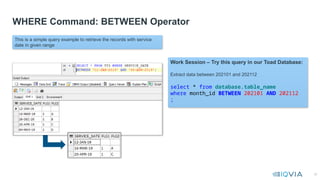
This is a simple query example to retrieve the records with service
date in given range
Work Session – Try this query in our Toad Database:
Extract data between 202101 and 202112
select * from database.table_name
where month_id BETWEEN 202101 AND 202112
;
31.
31
WHERE Command: WILDCARD‘%’ Operator
ID NAME PHYSICS CHEMISTRY
1 Aman 86.1 95.0
2 Sushant 95.0 91.0
3 Saumya 98.4 98.0
4 AMutha 75.2 75.5
5 Aditya 67.7 67.0
WHERE NAME LIKE
‘Am%’
Aman
X
X
X
X
Example: Pick NAME values starting “AM” with sequence of one or more characters, note the case of the name
Tip:
Toad is case sensitive i.e.,
“AM” is not equal to “am”.
Therefore, make sure to use
the appropriate conversion
of upper or lower case
before applying WILDCARD
operator
WHERE UPPER(NAME)
LIKE ‘AM%’
AMAN
X
X
AMUTHA
X
SQL Syntax:
select * from <table_name>
WHERE column_name
LIKE ‘TEXT%’
;
WILDCARD ‘%’
The percent sign character (%) represents a sequence of 0 (zero) or more
characters. It helps the user pull fields that are similar in spelling but not
exact matches.
32.
32
WHERE Command: WILDCARD“%” Operator
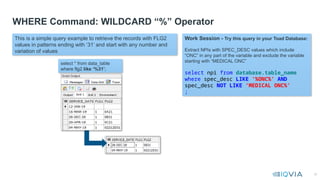
This is a simple query example to retrieve the records with FLG2
values in patterns ending with ‘31’ and start with any number and
variation of values
Work Session - Try this query in your Toad Database:
Extract NPIs with SPEC_DESC values which include
“ONC” in any part of the variable and exclude the variable
starting with “MEDICAL ONC”
select npi from database.table_name
where spec_desc LIKE ‘%ONC%’ AND
spec_desc NOT LIKE ‘MEDICAL ONC%’
;
select * from data_table
where flg2 like ‘%31’;
33.
33
WHERE Command: WILDCARD‘_’ Operator
ID NAME PHYSICS CHEMISTRY
0M11 Aman 86.1 95.0
0A21 Sushant 95.0 91.0
0121 Saumya 98.4 98.0
0D21 AMutha 75.2 75.5
0M51 Aditya 67.7 67.0
WHERE ID LIKE
‘0_21’
X
0A21
0121
0D21
X
Table below to explain the “%” operator which includes students score data by subjects
WILDCARD ‘_’
The underscore represents a single character to match a pattern from a word or string; More than
one ( _ ) underscore characters can be used to match a pattern of multiple characters.
Pick ID values with patter “0_21” and “_” can have any character
Tip:
WILDCARD operators (‘%’ or ‘_’)
will work along with LIKE
operator
SQL Syntax:
select * from <table_name>
WHERE column_name
LIKE ‘STRING_’
;
34.
34
WHERE Command: WILDCARD“_” Operator
This is a simple query example to retrieve the records with FLG2
values in patterns like ‘0_21’
Work Session - Try this query in our Toad Database:
Extract the data with Diagnosis code from “C791” to “C799”
select * from database.table_name
where diag_cd LIKE ‘C79_’
;
select * from data_table
where flg2 like ‘0_21’;
35.
35
WHERE Command: Combinationof Operators
Scenarios Sample Query
IN
or
NOT IN
select * from database.table_name
where spec_desc IN (‘MEDICAL ONCOLOGY’,‘HEMATOLOGY’)
LIKE
or
NOT LIKE
select * from database.table_name
where spec_desc LIKE ‘%ONC%’
AND spec_desc NOT LIKE ‘HEMA%’
37
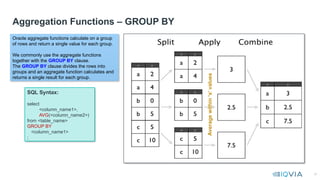
Aggregation Functions –GROUP BY
Average
within
‘x’
values
SQL Syntax:
select
<column_name1>,
AVG(<column_name2>)
from <table_name>
GROUP BY
<column_name1>
;
Oracle aggregate functions calculate on a group
of rows and return a single value for each group.
We commonly use the aggregate functions
together with the GROUP BY clause.
The GROUP BY clause divides the rows into
groups and an aggregate function calculates and
returns a single result for each group.
38.
38
Aggregation Functions –GROUP BY
GROUP BY Execise.txt
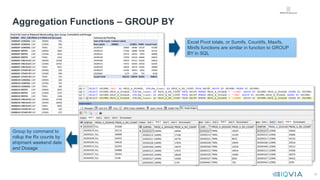
Excel Pivot totals, or Sumifs, Countifs, Maxifs,
Minifs functions are similar in function to GROUP
BY in SQL
Group by command to
rollup the Rx counts by
shipment weekend date
and Dosage
39.
39
Key List ofAggregation Functions
Function Sample Query
SUM(Variable)
select month_id, SUM(charge_amt) as total_charge_amt
from schema_name.table_name
where month_id between 202101 and 202112
group by month_id
AVG(Variable)
select month_id, AVG(charge_amt) as ave_charge_amt
from schema_name.table_name
where month_id between 202101 and 202112
group by month_id
MIN(Variable)
select month_id, MIN(charge_amt) as min_charge_amt
from schema_name.table_name
where month_id between 202101 and 202112
group by month_id
MAX(Variable)
select month_id, MAX(charge_amt) as max_charge_amt
from schema_name.table_name
where month_id between 202101 and 202112
group by month_id
COUNT(Variable)
or
COUNT(DISTINCT Variable)
select month_id, clm_typ, COUNT(npi) as row_count, COUNT(DISTINCT npi) as unique_npi
from schema_name.table_name
where month_id between 202101 and 202112
group by month_id, clm_typ
40.
40
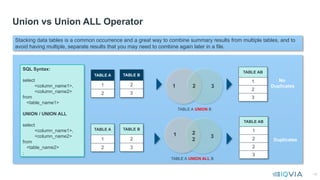
Union vs UnionALL Operator
TABLE A
1
2
1 2 3
TABLE AB
1
2
3
No
Duplicates
TABLE A UNION B
1 2
2
3
TABLE AB
1
2
2
3
Duplicates
TABLE A UNION ALL B
SQL Syntax:
select
<column_name1>,
<column_name2>
from
<table_name1>
UNION / UNION ALL
select
<column_name1>,
<column_name2>
from
<table_name2>
;
Stacking data tables is a common occurrence and a great way to combine summary results from multiple tables, and to
avoid having multiple, separate results that you may need to combine again later in a file.
TABLE B
2
3
TABLE A
1
2
TABLE B
2
3
41.
41
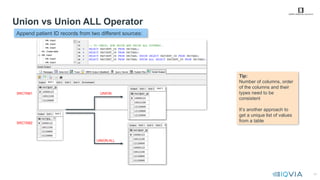
Union vs UnionALL Operator
SRCTAB1
SRCTAB2
UNION
UNION ALL
Tip:
Number of columns, order
of the columns and their
types need to be
consistent
It’s another approach to
get a unique list of values
from a table
UNION-UNION ALL Execise.txt
Append patient ID records from two different sources:
42.
42
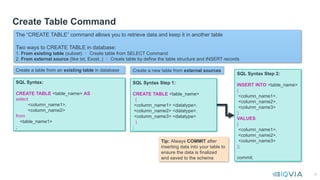
Create Table Command
The“CREATE TABLE” command allows you to retrieve data and keep it in another table
Two ways to CREATE TABLE in database:
1. From existing table (subset) Create table from SELECT Command
2. From external source (like txt, Excel..) Create table by define the table structure and INSERT records
Create a table from an existing table in database Create a new table from external sources
SQL Syntax:
CREATE TABLE <table_name> AS
select
<column_name1>,
<column_name2>
from
<table_name1>
;
SQL Syntax Step 1:
CREATE TABLE <table_name>
(
<column_name1> <datatype>,
<column_name2> <datatype>,
<column_name3> <datatype>
)
;
SQL Syntax Step 2:
INSERT INTO <table_name>
(
<column_name1>,
<column_name2>,
<column_name3>
)
VALUES
(
<column_name1>,
<column_name2>,
<column_name3>
);
commit;
Tip: Always COMMIT after
inserting data into your table to
ensure the data is finalized
and saved to the schema
43.
43
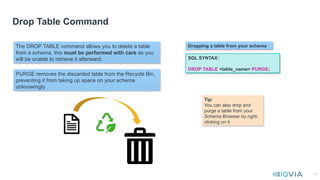
Drop Table Command
TheDROP TABLE command allows you to delete a table
from a schema, this must be performed with care as you
will be unable to retrieve it afterward.
Dropping a table from your schema
SQL SYNTAX:
DROP TABLE <table_name> PURGE;
Tip:
You can also drop and
purge a table from your
Schema Browser by right-
clicking on it
PURGE removes the discarded table from the Recycle Bin,
preventing it from taking up space on your schema
unknowingly
45
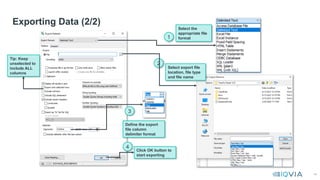
Exporting Data (2/2)
1
3
4
Selectthe
appropriate file
format
Select export file
location, file type
and file name
Define the export
file column
delimiter format
Click OK button to
start exporting
2
Tip: Keep
unselected to
include ALL
columns
#27 The ~ bitwise operator performs a bitwise logical NOT for the expression, taking each bit in turn. If expression has a value of 0, the bits in the result set are set to 1; otherwise, the bit in the result is cleared to a value of 0. In other words, ones are changed to zeros and zeros are changed to ones.

















![[PHPUGPH] PHP Roadshow - MySQL](https://cdn.slidesharecdn.com/ss_thumbnails/phpugphmysqlv3-110121124746-phpapp01-thumbnail.jpg?width=640&height=640&fit=bounds)


