HP TRIM vs. ObjectiveAn overview of EDRM software similar in function and intentionECM304Tracie Pollin
HP TRIM vs ObjectiveIntroduction of the software and its vendorBasic functionsFlexibilityLevel of integration of various functions/modulesEase of useLimitationsImplications for the workplaceObservations/Comments
HP TRIMA Document and Records Management System (DRMS) created by TowerCapture, manage, access and secure your organisations informationManages electronic and physical records from creation to disposalHP TRIM Web site www.hp.com/go/hptrim
HP TRIM BackgroundTower was founded in 1985 in Canberra by Brand HoffTower’s software products include electronic document and records management, business process automation, web content management, document capture and assembly, collaboration and information management solutions.In 2008, Tower comprised of 240 employees with offices around Australia, North America and Europe; 22 years of paper and electronic records management experience and served approximately 1,000 customers with more than 78,000 users in 32 countries.
HP TRIM Background ....On 31st March 2008 Tower signed a pre-paid agreement with HP for a takeover.Today, HP TRIM - Asia Pacific/Japan Hewlett-Packard(Public Company; 10,001 or more employees)
HP TRIM Basic FunctionsSearch – Simple & AdvancedCreate new itemsDocumentFolderSeriesBoxMaintain Records – “Powerful tool”Notes
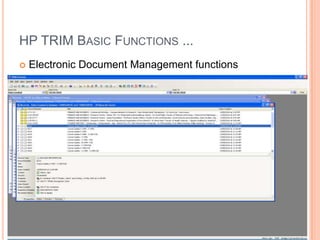
HP TRIM Basic Functions ...Electronic Document Management functions
HP TRIM Basic Functions ...Archive retention schedules (Lifecycle)TRIM email (Outlook)Action tracking (Traces the workflow)Classifications (Store by subject or function)Security (3 Levels)Holds (‘Locks’ the record)
HP TRIM Basic functions ...Web publisherHP TRIM for SharePoint manages all SharePoint content, including Web 2.0 content with HP TRIM software.
Flexibility of ApplicationAdditional fieldsCustomising the interfaceTRIM AdministrationSystem Options – configure HP TRIM system optionsDocument stores – set up and use ofImport/Export – you can import & export data to and from HP TRIM (not a standard function)Data Clean upSave Global settings – you can set & use global user settingsExternal links – you can set up links to send data to external applicationsE-Mail Templates – you can set up templates for e-mail notifications
Level of IntegrationSupports drag-and-drop from many programs, including:ASCII text 7 & 8 bitHTML Versions through 3.0, with some limitationsMicrosoft Rich Text Format (RTF) – All versionsUnicode text – All versionsLotus ManuscriptMASS11Microsoft Word – PC & MacMicrosoft Excel – PC & MacMac Word processors
Ease of UseClear iconsEasy to follow help screensLogical order and sequenceCapacity for multiple searches and screens to be open at the same timeNo previous records experience necessary
LimitationsMid level data import and export onlyInstallationUpgrading will remove all third-party filesDate and timeDowngrading a User’s Security ProfileCopying – data published, date due for destruction & date inactive are not copied
Limitations ...No user can change the Date RegisteredEnd users cannot change the following:LocationContainerNotesAccess ControlSimultaneous multiple user accessReports and Exporting XMLArchiving – 99 years or 990 MonthsBarcodes – foreign barcodes may not be supportedCurrency fields – one currency only
Implications for workplaceWorkflow solely based around TRIM capabilities and modulesStrong relationship required between records management area and ITAny upgrade will lead to a massive workloadOrganisational politics – The implementation of an updated or new EDMS will require significant investment and planning by the University and a shift in records practice and culture throughout the University.
In conclusion ....HP TRIM is an excellent product which has proven itself to be:Easy to useFlexibleExtensive functionalityConsistent and stable market share
Objective“Our brand values guide our success:Trusted - Innovative - Focused - Passionate - Committed – Integrity”Delivering a platform for compliance and accountability of business records and effective lifecycle managementhttp://www.objective.com/about-objective
Objective - backgroundSince 1987, Objective Corporation (ASX:OCL)has been an established leader and specialist provider of proven content, collaboration and process management solutions for the public sectorWith over 400 public sector customers and over two decades of experienceObjective Offices	Asia Pacific	United Kingdom	United States
Objective – Basic FunctionsRecord CaptureCreate physical locations within a repositoryGroup management of RepositoriesRequest processing for administratorsRequest, Return, Resubmit and Cancel itemsSecurity inheritanceConflict resolution for multiple requests and for archiving/moving of requested/borrowed itemsBar-code scanner supportBar-code File, Document and Box LabelsReceive notifications of overdue itemsTrack requested/moved/borrowed and overdue itemsSentencing and DisposalDisposal Schedule groupingsSentence files, file parts and electronic documentsXML export prior to destructionView all activity on a selected physical objectTransfer to secondary storageTransfer to agencyMark files for future sentencingArchive BoxesFile Label Report
Objective - FlexibilityReports - allowing greater manipulation of all object types for output, the appropriate fields and the search criteria for the determination of results.The Objective Xlink - Mail Gateway  - enables notifications to be sent via e-mail for Approvals, Publication, Requests, and Workflow functions. A complete audit trail of which documents were accessed, who accessed them and when.
Objective - Application IntegrationSharePoint Integration - SharePoint interacts well with Microsoft Office centric documentsMulti Function Device (MFD) IntegrationIntegrations currently exist with:Kofax CaptureEzeScan from Outback Imaging Thesaurus Management Currently, integrations exist with:a.k.a. from Synerconone2one from ACS
Objective – Application Integration... Email CaptureDrag and drop single or multiple emails and attachments directly into Objective NavigatorDrag and drop single or multiple emails and attachments directly into Objective folders in the email client itselfEmails stored such that they can be opened in the native client or within a browser where the native client is not presentBrowse, search, consume and contribute Objective content*Subscribe to often used Objective folders in the email client navigation pane for ease of accessAutomatically redirect incoming emails into Objective folders using email client rules 
Objective - Infrastructure IntegrationObjective's Xlink modules provide integration between Objective and your organisation's infrastructure applications.AuthenticationLDAP Authentication LDAP SynchroniserSingle Sign-On Windows AuthenticationEmail gateway 
Objective – Ease of UseEase of use and whether use of functionality is intuitive will influence staff-use of the system and assist with change management issues.  In this regards Objective could have appeal for the end-user because of its similarity with Internet Explorer and because common tasks such as creating, saving and searching are easy.
Objective - LimitationsObjective is usually seen as being costly once it is implemented.  This is, in part, due to the arrangements that Objective have regarding how changes/tailoring to the system to meet an organisation’s particular needs must be done. Whereas HPTRIM allow a fair amount of freedom with any tailoring, it is a different set-up with Objective in that they require their consultants to be involved with most of the changes and tweaking of the system and this understandably comes with a cost.
Objective – Workplace implicationsObjective Records Management provides organisations with the ability to manage both physical and electronic records within a single solution.All objects are contained and controlled within the same contextual folder hierarchy.Users are able to define custom fields for classes of records and set common Keyword terms to enable others to quickly classify their paper documents.Objective delivers the flexibility to practice centralised or decentralised records management.
Objective – “The Future”Objective's recent acquisition of Limehouse Software expands their public sector market share and capability. Objective's future solutions will be characterised by their hybrid nature. By bringing the power and flexibility of "cloud" based process management solutionsObjective for iPhone
In conclusion .....Personally I think either HPTRIM or Objective would be very suitable for any medium-large sized organization.  Both products are impressive but there are some important differences.  Nevertheless, according to one source in a government agency (DAFWA) there is the impression of a move in State Government agencies away from HPTRIM to Objective, particularly when EDRMS enters the picture.  
ReferencesAustralian National Audit Office (2003). Recordkeeping in Large Commonwealth Organisations. Audit Report No. 7 2003-2004. Canberra ACT: Commonwealth of Australia.Brown, Kris. (2010). HP TRIM WW Product Manager at Hewlett-Packard website. Accessed 7th October 2010 from, http://au.linkedin.com/in/kristopherbrownHP TRIM Software. (2010). Accessed 7th October 2010 from, http://h71028.www7.hp.com/enterprise/w1/en/software/information-management-trim.html  Joseph, P. (2008). EDRMS 101: the basics. Perth: Records Management Association of Australasia.

Hp trim vs objective

  • 1.
    HP TRIM vs.ObjectiveAn overview of EDRM software similar in function and intentionECM304Tracie Pollin
  • 2.
    HP TRIM vsObjectiveIntroduction of the software and its vendorBasic functionsFlexibilityLevel of integration of various functions/modulesEase of useLimitationsImplications for the workplaceObservations/Comments
  • 3.
    HP TRIMA Documentand Records Management System (DRMS) created by TowerCapture, manage, access and secure your organisations informationManages electronic and physical records from creation to disposalHP TRIM Web site www.hp.com/go/hptrim
  • 4.
    HP TRIM BackgroundTowerwas founded in 1985 in Canberra by Brand HoffTower’s software products include electronic document and records management, business process automation, web content management, document capture and assembly, collaboration and information management solutions.In 2008, Tower comprised of 240 employees with offices around Australia, North America and Europe; 22 years of paper and electronic records management experience and served approximately 1,000 customers with more than 78,000 users in 32 countries.
  • 5.
    HP TRIM Background....On 31st March 2008 Tower signed a pre-paid agreement with HP for a takeover.Today, HP TRIM - Asia Pacific/Japan Hewlett-Packard(Public Company; 10,001 or more employees)
  • 6.
    HP TRIM BasicFunctionsSearch – Simple & AdvancedCreate new itemsDocumentFolderSeriesBoxMaintain Records – “Powerful tool”Notes
  • 7.
    HP TRIM BasicFunctions ...Electronic Document Management functions
  • 8.
    HP TRIM BasicFunctions ...Archive retention schedules (Lifecycle)TRIM email (Outlook)Action tracking (Traces the workflow)Classifications (Store by subject or function)Security (3 Levels)Holds (‘Locks’ the record)
  • 9.
    HP TRIM Basicfunctions ...Web publisherHP TRIM for SharePoint manages all SharePoint content, including Web 2.0 content with HP TRIM software.
  • 10.
    Flexibility of ApplicationAdditionalfieldsCustomising the interfaceTRIM AdministrationSystem Options – configure HP TRIM system optionsDocument stores – set up and use ofImport/Export – you can import & export data to and from HP TRIM (not a standard function)Data Clean upSave Global settings – you can set & use global user settingsExternal links – you can set up links to send data to external applicationsE-Mail Templates – you can set up templates for e-mail notifications
  • 11.
    Level of IntegrationSupportsdrag-and-drop from many programs, including:ASCII text 7 & 8 bitHTML Versions through 3.0, with some limitationsMicrosoft Rich Text Format (RTF) – All versionsUnicode text – All versionsLotus ManuscriptMASS11Microsoft Word – PC & MacMicrosoft Excel – PC & MacMac Word processors
  • 12.
    Ease of UseCleariconsEasy to follow help screensLogical order and sequenceCapacity for multiple searches and screens to be open at the same timeNo previous records experience necessary
  • 13.
    LimitationsMid level dataimport and export onlyInstallationUpgrading will remove all third-party filesDate and timeDowngrading a User’s Security ProfileCopying – data published, date due for destruction & date inactive are not copied
  • 14.
    Limitations ...No usercan change the Date RegisteredEnd users cannot change the following:LocationContainerNotesAccess ControlSimultaneous multiple user accessReports and Exporting XMLArchiving – 99 years or 990 MonthsBarcodes – foreign barcodes may not be supportedCurrency fields – one currency only
  • 15.
    Implications for workplaceWorkflowsolely based around TRIM capabilities and modulesStrong relationship required between records management area and ITAny upgrade will lead to a massive workloadOrganisational politics – The implementation of an updated or new EDMS will require significant investment and planning by the University and a shift in records practice and culture throughout the University.
  • 16.
    In conclusion ....HPTRIM is an excellent product which has proven itself to be:Easy to useFlexibleExtensive functionalityConsistent and stable market share
  • 17.
    Objective“Our brand valuesguide our success:Trusted - Innovative - Focused - Passionate - Committed – Integrity”Delivering a platform for compliance and accountability of business records and effective lifecycle managementhttp://www.objective.com/about-objective
  • 18.
    Objective - backgroundSince1987, Objective Corporation (ASX:OCL)has been an established leader and specialist provider of proven content, collaboration and process management solutions for the public sectorWith over 400 public sector customers and over two decades of experienceObjective Offices Asia Pacific United Kingdom United States
  • 19.
    Objective – BasicFunctionsRecord CaptureCreate physical locations within a repositoryGroup management of RepositoriesRequest processing for administratorsRequest, Return, Resubmit and Cancel itemsSecurity inheritanceConflict resolution for multiple requests and for archiving/moving of requested/borrowed itemsBar-code scanner supportBar-code File, Document and Box LabelsReceive notifications of overdue itemsTrack requested/moved/borrowed and overdue itemsSentencing and DisposalDisposal Schedule groupingsSentence files, file parts and electronic documentsXML export prior to destructionView all activity on a selected physical objectTransfer to secondary storageTransfer to agencyMark files for future sentencingArchive BoxesFile Label Report
  • 20.
    Objective - FlexibilityReports- allowing greater manipulation of all object types for output, the appropriate fields and the search criteria for the determination of results.The Objective Xlink - Mail Gateway - enables notifications to be sent via e-mail for Approvals, Publication, Requests, and Workflow functions. A complete audit trail of which documents were accessed, who accessed them and when.
  • 21.
    Objective - ApplicationIntegrationSharePoint Integration - SharePoint interacts well with Microsoft Office centric documentsMulti Function Device (MFD) IntegrationIntegrations currently exist with:Kofax CaptureEzeScan from Outback Imaging Thesaurus Management Currently, integrations exist with:a.k.a. from Synerconone2one from ACS
  • 22.
    Objective – ApplicationIntegration... Email CaptureDrag and drop single or multiple emails and attachments directly into Objective NavigatorDrag and drop single or multiple emails and attachments directly into Objective folders in the email client itselfEmails stored such that they can be opened in the native client or within a browser where the native client is not presentBrowse, search, consume and contribute Objective content*Subscribe to often used Objective folders in the email client navigation pane for ease of accessAutomatically redirect incoming emails into Objective folders using email client rules 
  • 23.
    Objective - InfrastructureIntegrationObjective's Xlink modules provide integration between Objective and your organisation's infrastructure applications.AuthenticationLDAP Authentication LDAP SynchroniserSingle Sign-On Windows AuthenticationEmail gateway 
  • 24.
    Objective – Easeof UseEase of use and whether use of functionality is intuitive will influence staff-use of the system and assist with change management issues. In this regards Objective could have appeal for the end-user because of its similarity with Internet Explorer and because common tasks such as creating, saving and searching are easy.
  • 25.
    Objective - LimitationsObjectiveis usually seen as being costly once it is implemented. This is, in part, due to the arrangements that Objective have regarding how changes/tailoring to the system to meet an organisation’s particular needs must be done. Whereas HPTRIM allow a fair amount of freedom with any tailoring, it is a different set-up with Objective in that they require their consultants to be involved with most of the changes and tweaking of the system and this understandably comes with a cost.
  • 26.
    Objective – WorkplaceimplicationsObjective Records Management provides organisations with the ability to manage both physical and electronic records within a single solution.All objects are contained and controlled within the same contextual folder hierarchy.Users are able to define custom fields for classes of records and set common Keyword terms to enable others to quickly classify their paper documents.Objective delivers the flexibility to practice centralised or decentralised records management.
  • 27.
    Objective – “TheFuture”Objective's recent acquisition of Limehouse Software expands their public sector market share and capability. Objective's future solutions will be characterised by their hybrid nature. By bringing the power and flexibility of "cloud" based process management solutionsObjective for iPhone
  • 28.
    In conclusion .....PersonallyI think either HPTRIM or Objective would be very suitable for any medium-large sized organization. Both products are impressive but there are some important differences. Nevertheless, according to one source in a government agency (DAFWA) there is the impression of a move in State Government agencies away from HPTRIM to Objective, particularly when EDRMS enters the picture.  
  • 29.
    ReferencesAustralian National AuditOffice (2003). Recordkeeping in Large Commonwealth Organisations. Audit Report No. 7 2003-2004. Canberra ACT: Commonwealth of Australia.Brown, Kris. (2010). HP TRIM WW Product Manager at Hewlett-Packard website. Accessed 7th October 2010 from, http://au.linkedin.com/in/kristopherbrownHP TRIM Software. (2010). Accessed 7th October 2010 from, http://h71028.www7.hp.com/enterprise/w1/en/software/information-management-trim.html  Joseph, P. (2008). EDRMS 101: the basics. Perth: Records Management Association of Australasia.

Editor's Notes

  • #2 Hello, my name is Tracie Pollin and today I would like to present this power point to you with the aim of reporting my evaluation of two records management/document management software packages.
  • #3 The outline I will take today focuses firstly on a brief introduction of each software package, its vendor details or background, Basic functionality and flexibility. I will them focus upon the ease of use and the limitations associated with each package, and finally talk about the implications for the workplace adding some general observations.
  • #4 HP TRIM, from the website, describes itself as “ ... A document and records management system (DRMS) software. With tight desktop integration and the ability to scale across large, distributed environments, HP TRIM lets you capture, manage, access and make more secure your enterprise information, from electronic to physical records and from creation to ultimate disposal.”
  • #5 Tower was founded by Brand Hoff in Canberra in 1985 – who is quoted as saying “When I founded Tower more than 20 years ago, we set out to develop the world’s best records and document management software.”Tower develops and markets enterprise content management software and solutions, primarily for regulated and government industries. Tower’s software products include electronic document and records management, business process automation, web content management, document capture and assembly, collaboration and information management solutions.
  • #6 On 31st March 2008 Tower signed a pre-bid agreement with Hewlett Packard for a takeover with the anticipation that the acquisition of Tower would add electronic records management to HP Software’s existing e-discovery and compliance capabilities in information collection and retention , with HP Asia Pacific/Japan employing some 10,001+ employees alone.
  • #7 TRIM is a complex system with many functions and it is at this point that I would like to outline the main functions:Search – 2 types – Simple search where you search with one parameter at a time, e.g. Title word & Advanced Search – where you search with two or more sets of parameters, making use of the Boolean operators AND, OR and NOT, e.g. Title word and date created as a combination.Create new items – users can create 4 different types of records – Document – Folder – Series – BoxMaintain Records is a powerful function that allows the user to: Modify Record Titles; Relate Records; Modify Record Locations; Modify Additional fields; Change the class of a record; Make requests; Apply security Levels, Caveats and Access Controls to Records; Create a New part; and/or Change Dates on a RecordNotes – The notes function allows you to enter additional information to that which is already entered in the fixed fields.
  • #8 EDM – Electronic documents can be registered or catalogued in HP TRIM. HP TRIM will assign a unique record number to an electronic record. When an electronic document has been registered, a copy of the document is taken and placed in an electronic document store. From that point on, TRIM controls or owns the document. The document can then be viewed within HP TRIM or extracted and opened in the application it was created in.
  • #9 Archiving – The archiving function allows you to manage the lifecycle of your documents, including setting retention schedules and destruction alerts.TRIM email – some email systems can be integrated to enable cataloguing of emails and their attachments.Action tracking – action tracking allows you to trace the flow and movement of records, and the tasks they are used for within the workflow of the organisation, which also includes recording who has accessed electronic document and when!! Classifications a classification plan is used for storing records by subject or function. Classifications offer an alternative system to Thesaurus or free text titling.Security – 3 levels – 1. Security/Access – allows for modification of the Security Level, Caveat & Access control settings of a record. 2. View Rights – displays the security and Access Controls set for the selected item, generic permissions for the current user and allowed tasks for the selected item. 3. Active Audit Events – you can view where a record has been )movement history), as well as modifications made to the record and security violations for that record.Holds – creating a hold ‘locks’ the record, deactivating many of the functions for modifying the record, for example, Retention Scedules, location or title changes etc.
  • #10 And last but not least - Web publisher – allows you to create Web pages & The HP TRIM for SharePoint, Records Management module enables you to manage, finalize,relocate, and archive SharePoint content such as blogs, wikis, discussions, documents, forms, andpublished pages for the end user according to established business rules.
  • #11 Additional fields – The notes fields allows users to easily add additional information not included in the fixed fields. However, if an organisation needs to add a fixed field TRIM also allows you to do this very easily.Customising the interface – Users can customise a number of difference parts of their interface – including colour changes and dialogue box presentation. This is quick and easy to do and does not affect the display for other users.TRIM Admin – as per outlined on screen
  • #12 HP TRIM rich client supports drag-and-drop and can support documents created in numerous applications, such as : Read off screen
  • #13 Ease of use – very user friendly interface – the interface is windows based and extremely easy to navigate. At point five – reiterate that the Records Officer at my site visit to Murdoch University started with no records experience and was able to learn and felt comfortable using TRIM within 2 weeks of his starting on the job!
  • #14 After some discussion with the records manager at Murdoch University, he identified the following limitations with their current version (TRIM Context 6 R2).TRIMPort is designed for entry to mid level data import and export only – larger data requirements should opt for a custom designed package.Installation – all applications should be closed prior to starting installation as TRIM cannot close files from the TRIM software directory.Upgrade Limitation – Upgrading to a new version of TRIM will remove all third-party non-TRIM files from the TRIM software directory.Date Support – Date Support is from 01/01/0100 onwards. If the system has not been set correctly (for example, not AM, PM or 24 hr), then the following problems will occur:If you have a system clock setting of ‘hh:mm:ss’ for your regional settings (that is no AM, PM or 24 hr set), the time will default for example as 2:34, regardless of whether it is morning or afternoon. When you assign a workflow to a records, the date/Time will be completed with the current date and time. When you go to select ‘Next’ to open the next window an error message displays saying “that the parameter is incorrect”. This is caused by the fact that you have just created the Workflow but because there is no AM or PM set and the clock not being 24 hr, the system thinks it is 2:34 in the morning, before the Workflow or Tem[plate was created. Si in all the Workflow entry must have a time value entered. TOWER Software recommends the use of a 24 hour clock with the AM/PM indicator set.Downgrading a User’s security Profile – If you downgrade the Security Profile of a user and they have records marked to them that are of a higher security level than the users, then no Security Violation warning will display.Copy record – Date Published, Date Due for destruction and date Inactive are not copied from the original record when a new part, new version or record copy are performed.
  • #15 All users, including the Administrator, cannot change the Date Registered field of any record & End users cannot change – Location, Container field, noted or access control fields. Can cause huge problems if for example you number records by container and then change the number of the container – the contained records will not have their corresponding records numbers updated to reflect the new container number.Multiple user access – Users in different TRIM sessions (for example on different PCs) can open and modify the same report BUT only the last one saved is retained and the Administrator will receive a mail notification informing them that the Document store could be corrupted.Reports and Export XML – Accented Characters – a known limitation – Existing exported reports that contain accented characters cannot be imported. To resolve this you need to export the reports again, or remove the accented characters using a text editor before importing.Archiving – Retention Review – set to Review in – This field is limited to 99 years or 990 months.Barcodes – foreign barcodes that contain non-printable characters are not supported.Currency fields – Currency tab will only allow one system wide default to be setup.
  • #16 Organisational politics – Murdoch is currently undergoing a revision of the University’s EDRMS project but it has been temporarily postponed. The University has short-listed TRIM, Objective and FileNet and will select one of these when a decision is made next year. Murdoch has no immediate plans to upgrade to TRIM Version 7 as yet but apparently version 7 allows TRIM to operate on a Macintosh platform as well as a PC platform, which is of particular interest to the University given the very large number of mac users.
  • #17 TRIM enjoys a strong market position in Australia and overseas and has an excellent reputation as a reliable and user-friendly product that is valued for its commitment to on-going improvements.
  • #18 “Brand values” say it all....... To the point where they have been awarded the RMAA Jim Shepherd Award in 2006 & 2008Objective has played an active role in the records management industry with continuous sponsorship and support of the RMAA at both a Branch and National level. In 2008, for the second time, Objective was awarded the Jim Shepherd award in recognition of their support of the Records Management Association of Australasia (RMAA) and for services to the records management industry.
  • #19 Objective is an established solution provider. Since 1987, they have been trusted by Government and Top 1000 corporations to deliver long-term valued business outcomes.
  • #20 Objective Records Management meets international standards and delivers functionality that extends the traditional and current boundaries of Records Management to literally include any object of any type. 
  • #21 In addition to the standard report generator built into Objective, the Objective Reports module provides a wizard driven interface to Crystal (Crystal Reports licenses purchased separately). Reports may be saved as special objects within Objective for use by all or nominated users. The user running the report is automatically restricted to their security level; ensuring security protocols are never compromised.Output may be displayed on screen, printed, or converted to standard formats (Excel, HTML etc) Mail gateway - Where a user has a defined e-mail address, the server will send notification (via email) that: they have a Task to perform; an alarm has fired; they have Documents that need approval, a new version of a document has been published, or a File has been requested. Audit trail - The organisation has control over all documentation, complete records of all transactions, accountability is assured and the organisation has the ability to capture knowledge as it's created.
  • #22 Objective’s SharePoint integration, ObjectPoint, allows SharePoint users to actively participate in the comprehensive document lifecycle prescribed by the Objective ECM platform.  SharePoint users become full members of the ECM lifecycle. Their documents are managed from creation through to archiving so organisations can implement a true “single source of the truth” strategy within a compliant and managed environment. SharePoint interacts well with Microsoft Office centric documents.Multi Function Device (MFD) Integration - Objective integrates with a number of Multi Function Device (MFD) products. These products typically provide a range of features, such as batch scanning, OCR capability, barcode recognition, dual layer PDF storage, image correction, zonal recognition and metadata validation and completion. Integration enables automated loading of scanned documents directly into Objective. It is possible to set up rules to direct the scanned items to certain Objective folders, and to trigger workflows.  Thesaurus Management Integration - Objective integrates with a number of thesaurus management tools allowing thesauri built in these tools to be imported into Objective or allowing thesauri from Objective to be exported to these tools.
  • #24 Objective provides a number of mechanisms to enable user authentication to fit in with your organisations infrastructure requirements. LDAP Authentication enables Objective to use an LDAP compliant directory service (such as Microsoft Active Directory Service or Novell Directory Service) to check user names and passwords. LDAP Synchroniser performs the task of duplicating information about existing users, groups and user/group memberships from an LDAP compatible Directory into Objective and to synchronise upon repeated runs. This enables these existing users to be recognised by Objective, including their properties as were stored in the Directory. The Directory Synchroniser allows additions, removals and changes in the directory to be reflected within ObjectiveSingle Sign-On eliminates the need for Windows users to have a separate login/password for Objective in addition to their Windows domain login/password.Finally, Windows Authentication allows User passwords to be authenticated against a Windows NT primary or backup domain controller (PDC, BDC). This eliminates the need for Users to maintain multiple passwords for Objective and NT systems. 
  • #27 Centralised or decentralised records management - For organisations practicing centralised records management, Objective provides the ability for Records Managers to register, sentence and dispose of multi-part files, produce and make use of bar-code labels, create archive schedules with triggers, transfer to storage agencies, move to inactive storage and use Objective to track moved, requested, borrowed and overdue items from anywhere in the system.Alternatively, Objective provides the management controls to adopt a decentralised, enterprise-wide approach to Records Management. Staff across the organisation, in the course of their daily work, use Objective to access, revise, approve and publish documents as set by the business rules. Through using Objective, the requirements for compliant records management are inherent in these rules. The end result is that users are not burdened with an additional task of managing records but compliant records management occurs without the users even knowing it. 
  • #28 Limehouse has a proven software-as-a-service model. This is the first of many solutions Objective will deliver via this model.iPhone - Objective for iPhone is one of objective’s targeted solutions designed to make it easy for mobile workers to stay connected and collaborate through objective.
  • #29 And Thank you!!