HOW TO DRAW A HISTOGRAM
Steps for constructing a frequency distribution bar graph
are as follows:
1. Count number of data points[n] from data sheet.
2. Compute the range of data[R].
3. Determine the number of classes/interval or class size[K].
4. Compute class/interval width[H] using formula [ H = R/K ]
5. Determine the starting points of intervals.
6. Prepare Tally/Check sheet by summarize data on it.
7. Count number of parts in each intervals i.e. Number of
frequencies within a particular class.
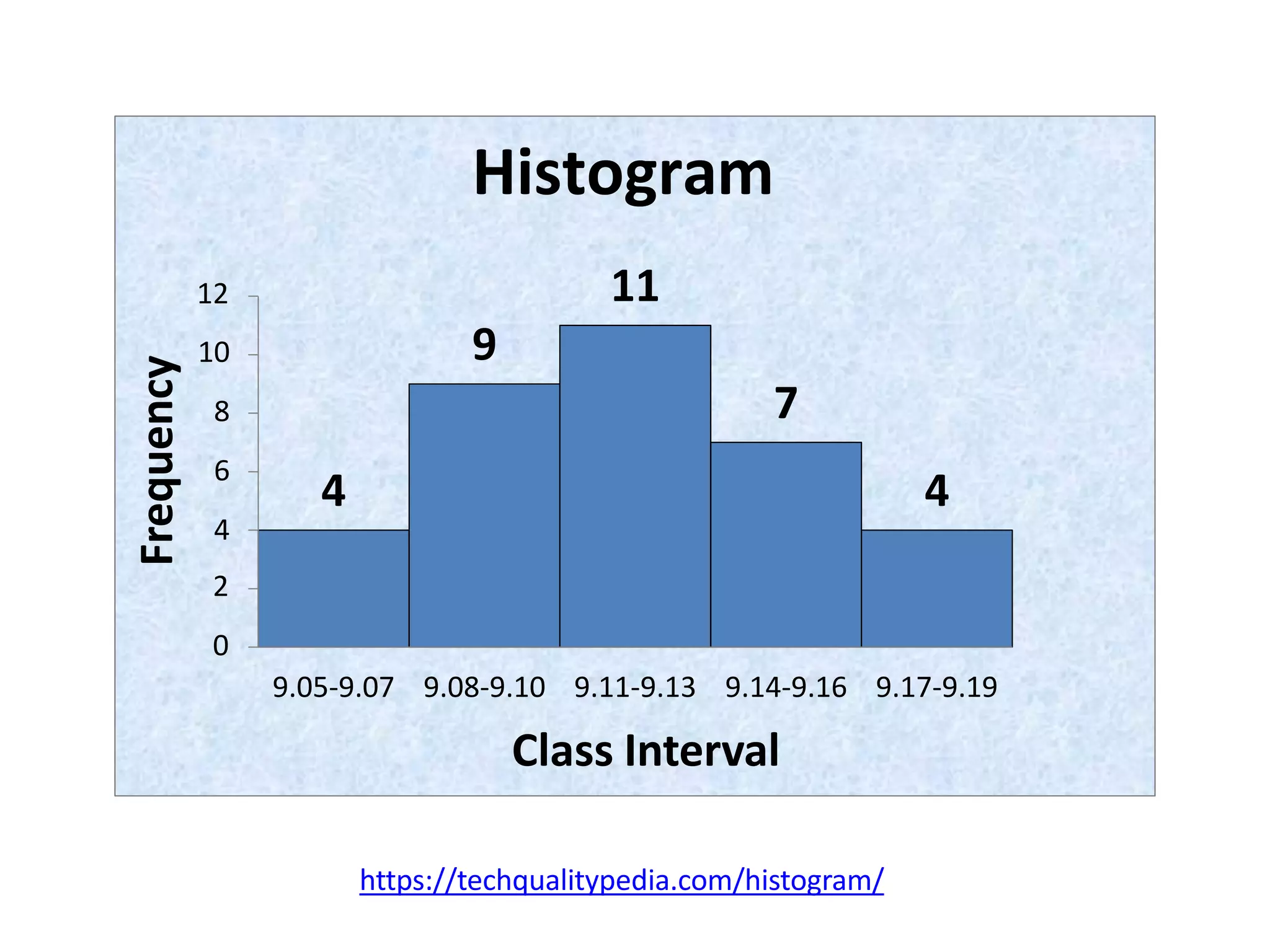
8. Now plot the graph. Place frequencies on vertical axis, and
class intervals on horizontal axis.
9. Interpret the histogram by seeing the shape distribution.
https://techqualitypedia.com/histogram/
Data sheet
Shaft dia measurements against Specification : 9.0 +0.2
9.13 9.1 9.16 9.05 9.15 9.13 9.08
9.15 9.07 9.09 9.1 9.12 9.06 9.11
9.07 9.15 9.12 9.12 9.17 9.08 9.15
9.09 9.11 9.15 9.17 9.12 9.11 9.17
9.12 9.08 9.17 9.13 9.08 9.09 9.14
Number of measurements or data points ‘n’ = 35
Range ‘R’ = [Max. value - Min. value]
= 9.17 – 9.05 = 0.12
https://techqualitypedia.com/histogram/
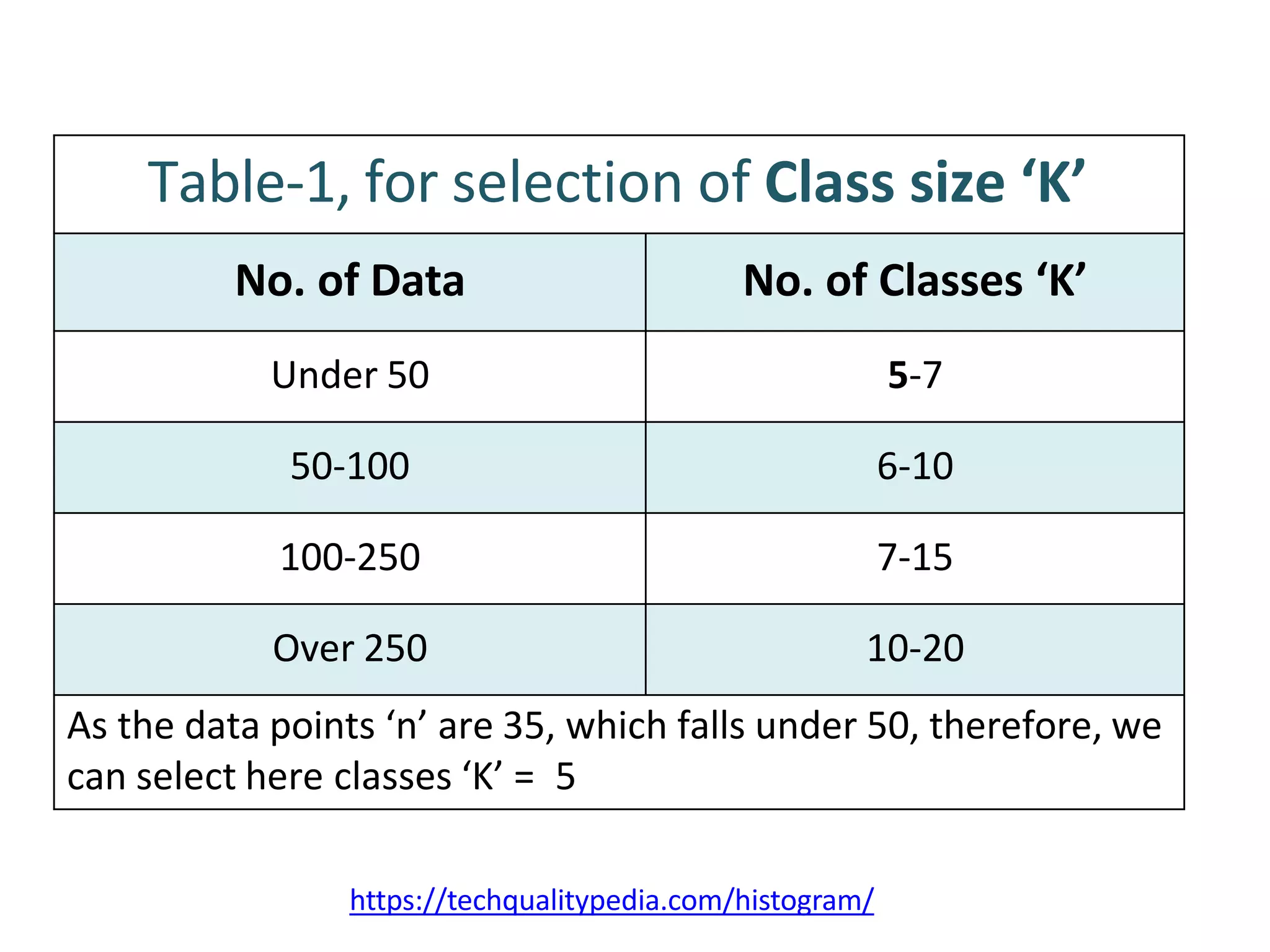
Table-1, for selection of Class size ‘K’
No. of Data No. of Classes ‘K’
Under 50 5-7
50-100 6-10
100-250 7-15
Over 250 10-20
As the data points ‘n’ are 35, which falls under 50, therefore, we
can select here classes ‘K’ = 5
https://techqualitypedia.com/histogram/
Determine the Class width ‘H’
Here we want to make number of classes ‘K’ = 5
Now, calculate the class width by dividing the Range-R, by
number of classes-K
H = R/K
H = 0.12/5
H =0.024
Note: Select ‘H’ such that ‘K’ should lie in between above
class table-1.
Tally/Check Sheet
Class
No.
Class Intervals Frequency tally Frequency
1 9.05 – 9.07 4
2 9.08 – 9.10 9
3 9.11 – 9.13 11
4 9.14 – 9.16 7
5 9.17 – 9.19 4
https://techqualitypedia.com/histogram/
4
9
11
7
4
10
8
6
4
12
Frequency
2
0
9.05-9.07 9.08-9.10 9.11-9.13 9.14-9.16 9.17-9.19
Class Interval
Histogram
https://techqualitypedia.com/histogram/

How-to-make-a-Histogram.pptx

  • 1.
    HOW TO DRAWA HISTOGRAM Steps for constructing a frequency distribution bar graph are as follows: 1. Count number of data points[n] from data sheet. 2. Compute the range of data[R]. 3. Determine the number of classes/interval or class size[K]. 4. Compute class/interval width[H] using formula [ H = R/K ] 5. Determine the starting points of intervals. 6. Prepare Tally/Check sheet by summarize data on it. 7. Count number of parts in each intervals i.e. Number of frequencies within a particular class. 8. Now plot the graph. Place frequencies on vertical axis, and class intervals on horizontal axis. 9. Interpret the histogram by seeing the shape distribution. https://techqualitypedia.com/histogram/
  • 2.
    Data sheet Shaft diameasurements against Specification : 9.0 +0.2 9.13 9.1 9.16 9.05 9.15 9.13 9.08 9.15 9.07 9.09 9.1 9.12 9.06 9.11 9.07 9.15 9.12 9.12 9.17 9.08 9.15 9.09 9.11 9.15 9.17 9.12 9.11 9.17 9.12 9.08 9.17 9.13 9.08 9.09 9.14 Number of measurements or data points ‘n’ = 35 Range ‘R’ = [Max. value - Min. value] = 9.17 – 9.05 = 0.12 https://techqualitypedia.com/histogram/
  • 3.
    https://techqualitypedia.com/histogram/ Table-1, for selectionof Class size ‘K’ No. of Data No. of Classes ‘K’ Under 50 5-7 50-100 6-10 100-250 7-15 Over 250 10-20 As the data points ‘n’ are 35, which falls under 50, therefore, we can select here classes ‘K’ = 5
  • 4.
    https://techqualitypedia.com/histogram/ Determine the Classwidth ‘H’ Here we want to make number of classes ‘K’ = 5 Now, calculate the class width by dividing the Range-R, by number of classes-K H = R/K H = 0.12/5 H =0.024 Note: Select ‘H’ such that ‘K’ should lie in between above class table-1.
  • 5.
    Tally/Check Sheet Class No. Class IntervalsFrequency tally Frequency 1 9.05 – 9.07 4 2 9.08 – 9.10 9 3 9.11 – 9.13 11 4 9.14 – 9.16 7 5 9.17 – 9.19 4 https://techqualitypedia.com/histogram/
  • 6.
  • 7.
    4 9 11 7 4 10 8 6 4 12 Frequency 2 0 9.05-9.07 9.08-9.10 9.11-9.139.14-9.16 9.17-9.19 Class Interval Histogram https://techqualitypedia.com/histogram/