How to Set
Up and Send
Mails Using
SendGrid in
NodeJs App?
www.bacancytechnology.com
Introduction
If you have landed on this blog, you know
the purpose of SendGrid and the
importance of sending mail! You might
want to answer questions like What is
SendGrid, and Why use SendGrid? Don’t
worry! We have this covered!


In this tutorial: How to Set Up and Send
Mails using SendGrid in NodeJs App, we will
answer your questions and discuss them
thoroughly! Trust me and read the blog till
the end to know SendGrid inside out!


Also, many developers use a package named
NodeMailer to send emails. You can also
visit the blog: How to Send Email using
NodeMailer with Gmail & Mailtrap, to learn
more about NodeMailer.


Let’s move on then!
Tutorial Goal:
Set Up and
Send Mails
Using
SendGrid in
NodeJs App
I’m new to SendGrid: What is SendGrid?
People appreciating SendGrid: Why use
only SendGrid when you have different
providers?
I’m a technical person. I want to set up
and start using SendGrid with my Node
App: Steps to set up and send emails
using SendGrid in NodeJs app.


Here are your questions and queries! Let’s
have an overview of what our blog has for
you, so you will continue reading till the
end!


Voila! Let’s go!
Our clients say Bacancy
provides the best and
highly-skilled developers!


Want the best? Get the best! Contact
Bacancy and hire Node.js developer for your
dream projects!
What is
SendGrid?
SendGrid is a provider that allows SMTP
(Simple Mail Transfer Protocol) service. I
hope you’re aware of SMTP. It reduces your
time and efforts and provides flexibility
when sending large volumes of emails.
Why use
SendGrid in
NodeJS to
Send Emails?
Powerful email solution for sending
bulk emails with high deliverability
rates
Provides interactive and eye-catching
built-in email templates and freedom to
edit them as well
With the help of SendGrid, you can
track the real-time performance of
emails using various metrics like
bounce rates, unsubscribers, delivered
emails rate, unique reads/opens/clicks,
and many more.
Exceptional customer support
Sendgrid has been integrated with so
many tools that it lets you centralize the
marketing efforts. The API integration
with the various tools is very powerful.
Coming back to our next question, Why
SendGrid with NodeJS? No beating around
the bush, and here are the reasons why you
should use SendGrid for sending emails.
Initial Project
Setup
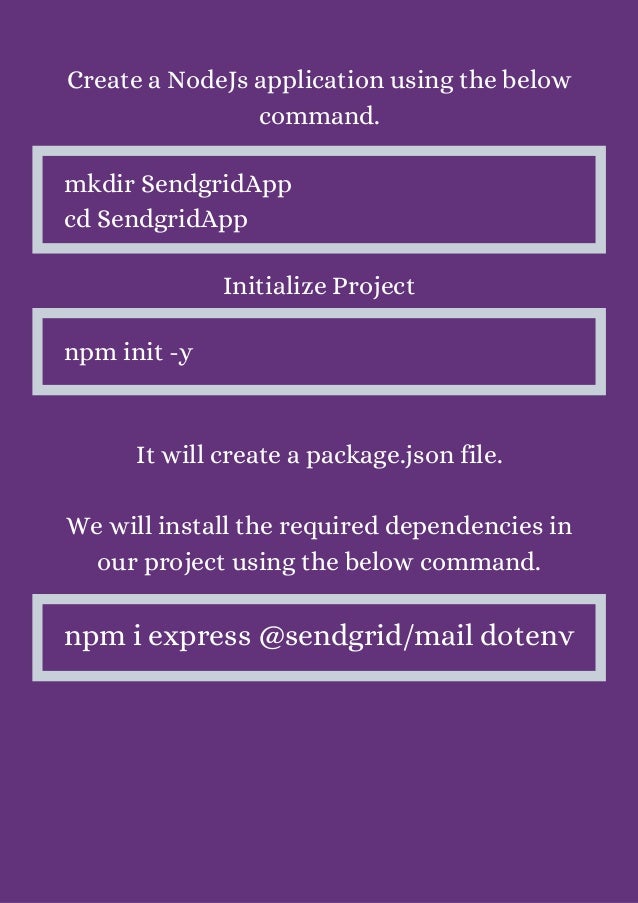
Create a NodeJs application using the below
command.


mkdir SendgridApp
cd SendgridApp
Initialize Project


npm init -y
It will create a package.json file.


We will install the required dependencies in
our project using the below command.


npm i express @sendgrid/mail dotenv
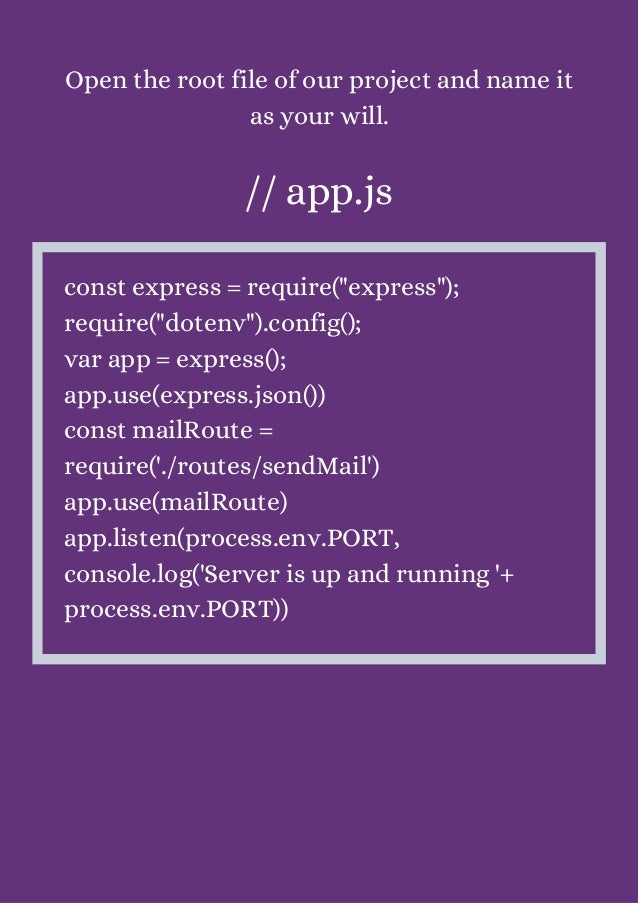
Open the root file of our project and name it
as your will.


// app.js


const express = require("express");
require("dotenv").config();
var app = express();
app.use(express.json())
const mailRoute =
require('./routes/sendMail')
app.use(mailRoute)
app.listen(process.env.PORT,
console.log('Server is up and running '+
process.env.PORT))
Set Up
SendGrid
Account
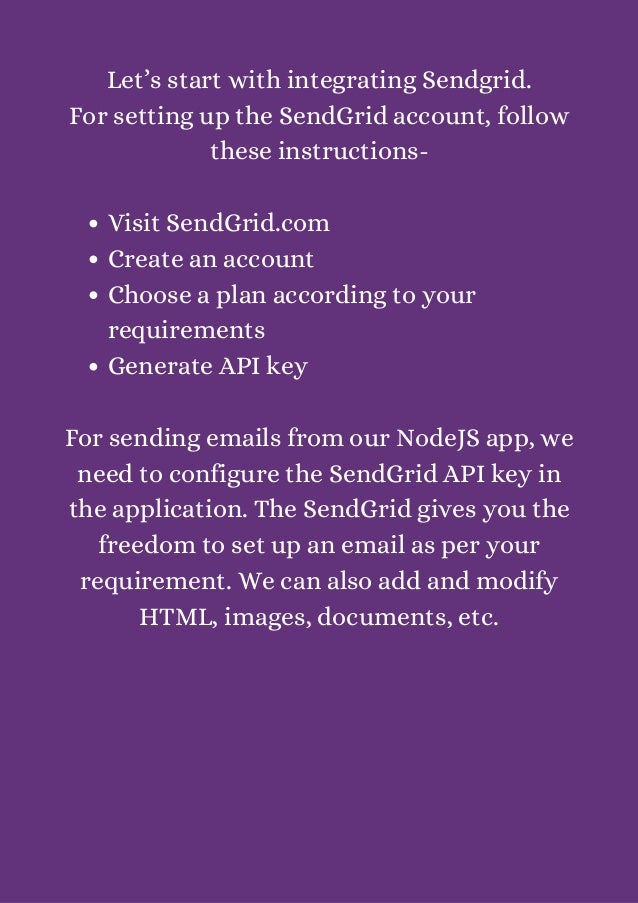
Visit SendGrid.com
Create an account
Choose a plan according to your
requirements
Generate API key
Let’s start with integrating Sendgrid.
For setting up the SendGrid account, follow
these instructions-


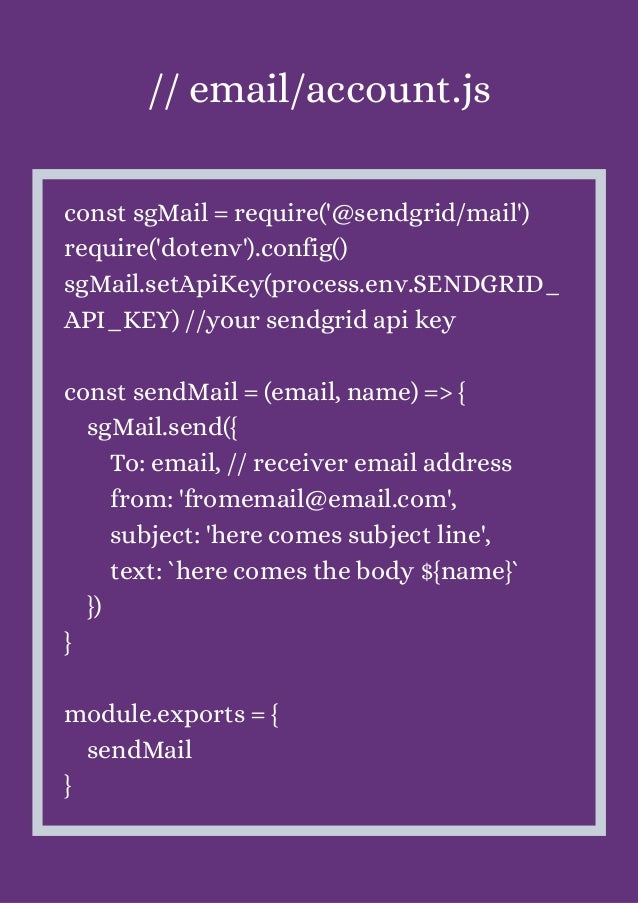
For sending emails from our NodeJS app, we
need to configure the SendGrid API key in
the application. The SendGrid gives you the
freedom to set up an email as per your
requirement. We can also add and modify
HTML, images, documents, etc.
// email/account.js


const sgMail = require('@sendgrid/mail')
require('dotenv').config()
sgMail.setApiKey(process.env.SENDGRID_
API_KEY) //your sendgrid api key
const sendMail = (email, name) => {
sgMail.send({
To: email, // receiver email address
from: 'fromemail@email.com',
subject: 'here comes subject line',
text: `here comes the body ${name}`
})
}
module.exports = {
sendMail
}
Send Mails
using
SendGrid in
NodeJs App
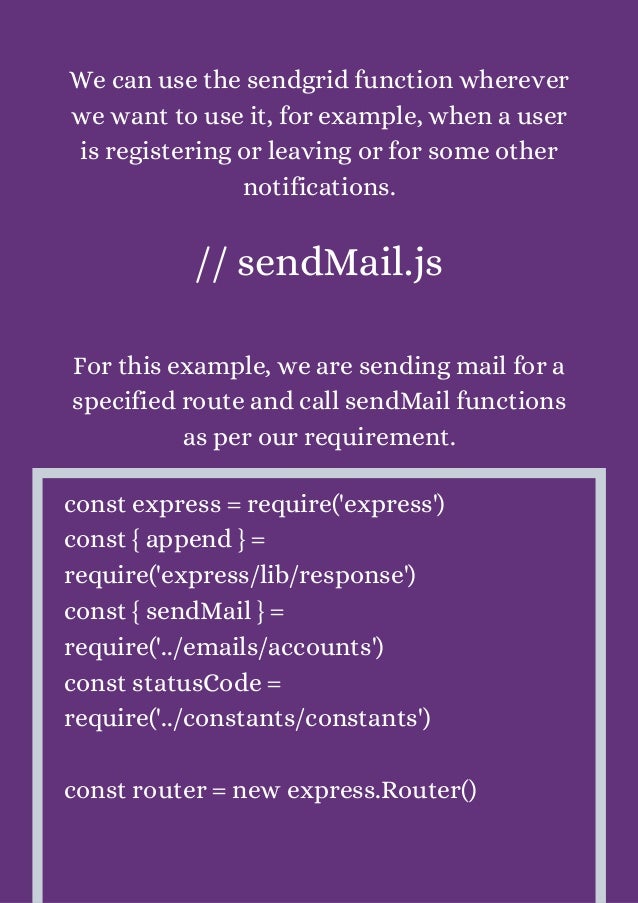
We can use the sendgrid function wherever
we want to use it, for example, when a user
is registering or leaving or for some other
notifications.


// sendMail.js


For this example, we are sending mail for a
specified route and call sendMail functions
as per our requirement.


const express = require('express')
const { append } =
require('express/lib/response')
const { sendMail } =
require('../emails/accounts')
const statusCode =
require('../constants/constants')
const router = new express.Router()
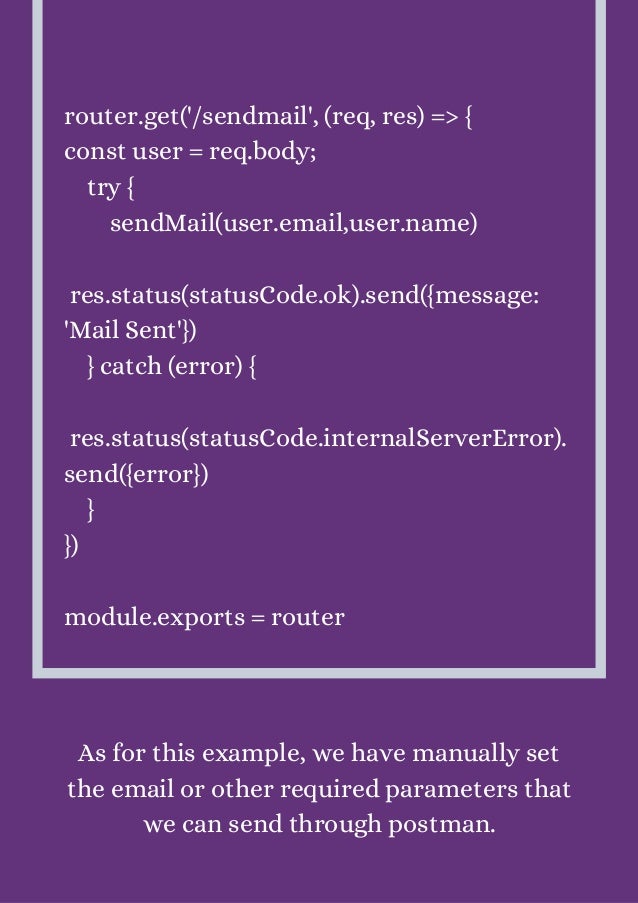
router.get('/sendmail', (req, res) => {
const user = req.body;
try {
sendMail(user.email,user.name)
res.status(statusCode.ok).send({message:
'Mail Sent'})
} catch (error) {
res.status(statusCode.internalServerError).
send({error})
}
})
module.exports = router
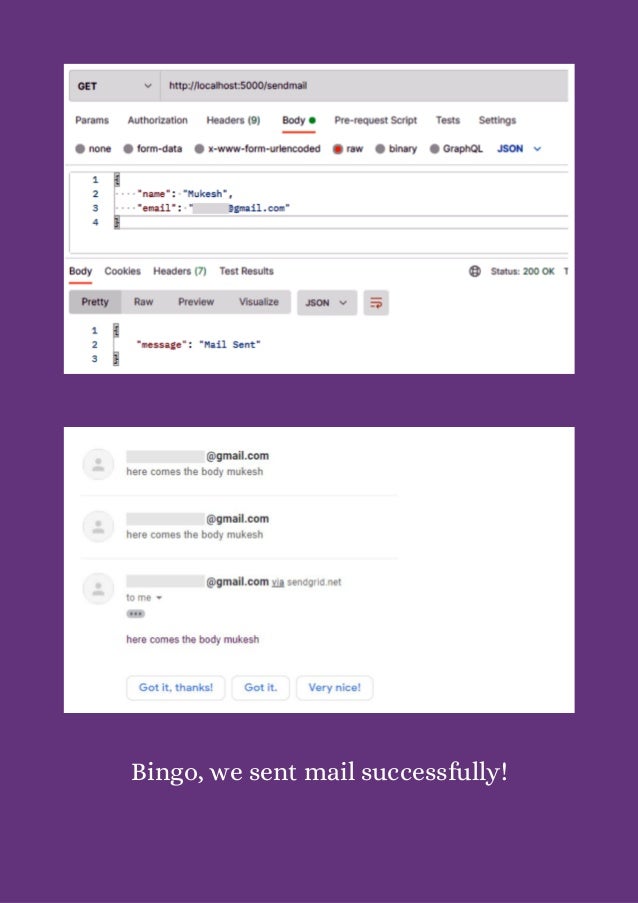
As for this example, we have manually set
the email or other required parameters that
we can send through postman.
Bingo, we sent mail successfully!
Conclusion
I hope the purpose of this tutorial: How to
Set Up and Send Mails using SendGrid in
NodeJS app, was useful to you. If you have
any questions or suggestions, please contact
us and share your thoughts! If you are a
NodeJs enthusiast and willing to polish your
knowledge, then the NodeJS tutorials page
is for you! Don’t waste your time and start
learning more about NodeJS technology!
Are you looking for reliable company to
build your application? Contact Bacancy-
the best Node.js development company and
start working with us!
www.bacancytechnology.com
Thank You

How to Set Up and Send Mails Using SendGrid in NodeJs App.pdf

  • 1.
    How to Set Upand Send Mails Using SendGrid in NodeJs App? www.bacancytechnology.com
  • 2.
  • 3.
    If you havelanded on this blog, you know the purpose of SendGrid and the importance of sending mail! You might want to answer questions like What is SendGrid, and Why use SendGrid? Don’t worry! We have this covered! In this tutorial: How to Set Up and Send Mails using SendGrid in NodeJs App, we will answer your questions and discuss them thoroughly! Trust me and read the blog till the end to know SendGrid inside out! Also, many developers use a package named NodeMailer to send emails. You can also visit the blog: How to Send Email using NodeMailer with Gmail & Mailtrap, to learn more about NodeMailer. Let’s move on then!
  • 4.
    Tutorial Goal: Set Upand Send Mails Using SendGrid in NodeJs App
  • 5.
    I’m new toSendGrid: What is SendGrid? People appreciating SendGrid: Why use only SendGrid when you have different providers? I’m a technical person. I want to set up and start using SendGrid with my Node App: Steps to set up and send emails using SendGrid in NodeJs app. Here are your questions and queries! Let’s have an overview of what our blog has for you, so you will continue reading till the end! Voila! Let’s go!
  • 6.
    Our clients sayBacancy provides the best and highly-skilled developers! Want the best? Get the best! Contact Bacancy and hire Node.js developer for your dream projects!
  • 7.
  • 8.
    SendGrid is aprovider that allows SMTP (Simple Mail Transfer Protocol) service. I hope you’re aware of SMTP. It reduces your time and efforts and provides flexibility when sending large volumes of emails.
  • 9.
  • 10.
    Powerful email solutionfor sending bulk emails with high deliverability rates Provides interactive and eye-catching built-in email templates and freedom to edit them as well With the help of SendGrid, you can track the real-time performance of emails using various metrics like bounce rates, unsubscribers, delivered emails rate, unique reads/opens/clicks, and many more. Exceptional customer support Sendgrid has been integrated with so many tools that it lets you centralize the marketing efforts. The API integration with the various tools is very powerful. Coming back to our next question, Why SendGrid with NodeJS? No beating around the bush, and here are the reasons why you should use SendGrid for sending emails.
  • 11.
  • 12.
    Create a NodeJsapplication using the below command. mkdir SendgridApp cd SendgridApp Initialize Project npm init -y It will create a package.json file. We will install the required dependencies in our project using the below command. npm i express @sendgrid/mail dotenv
  • 13.
    Open the rootfile of our project and name it as your will. // app.js const express = require("express"); require("dotenv").config(); var app = express(); app.use(express.json()) const mailRoute = require('./routes/sendMail') app.use(mailRoute) app.listen(process.env.PORT, console.log('Server is up and running '+ process.env.PORT))
  • 14.
  • 15.
    Visit SendGrid.com Create anaccount Choose a plan according to your requirements Generate API key Let’s start with integrating Sendgrid. For setting up the SendGrid account, follow these instructions- For sending emails from our NodeJS app, we need to configure the SendGrid API key in the application. The SendGrid gives you the freedom to set up an email as per your requirement. We can also add and modify HTML, images, documents, etc.
  • 16.
    // email/account.js const sgMail= require('@sendgrid/mail') require('dotenv').config() sgMail.setApiKey(process.env.SENDGRID_ API_KEY) //your sendgrid api key const sendMail = (email, name) => { sgMail.send({ To: email, // receiver email address from: 'fromemail@email.com', subject: 'here comes subject line', text: `here comes the body ${name}` }) } module.exports = { sendMail }
  • 17.
  • 18.
    We can usethe sendgrid function wherever we want to use it, for example, when a user is registering or leaving or for some other notifications. // sendMail.js For this example, we are sending mail for a specified route and call sendMail functions as per our requirement. const express = require('express') const { append } = require('express/lib/response') const { sendMail } = require('../emails/accounts') const statusCode = require('../constants/constants') const router = new express.Router()
  • 19.
    router.get('/sendmail', (req, res)=> { const user = req.body; try { sendMail(user.email,user.name) res.status(statusCode.ok).send({message: 'Mail Sent'}) } catch (error) { res.status(statusCode.internalServerError). send({error}) } }) module.exports = router As for this example, we have manually set the email or other required parameters that we can send through postman.
  • 20.
    Bingo, we sentmail successfully!
  • 21.
  • 22.
    I hope thepurpose of this tutorial: How to Set Up and Send Mails using SendGrid in NodeJS app, was useful to you. If you have any questions or suggestions, please contact us and share your thoughts! If you are a NodeJs enthusiast and willing to polish your knowledge, then the NodeJS tutorials page is for you! Don’t waste your time and start learning more about NodeJS technology! Are you looking for reliable company to build your application? Contact Bacancy- the best Node.js development company and start working with us!
  • 23.